

Marketing teams still spend too much time on repetitive tasks while audience attention fragments across platforms. That wasted capacity stalls growth and erodes consistency. Integrating AI content generation into your current workflows removes manual delays. This speeds up production without losing quality.
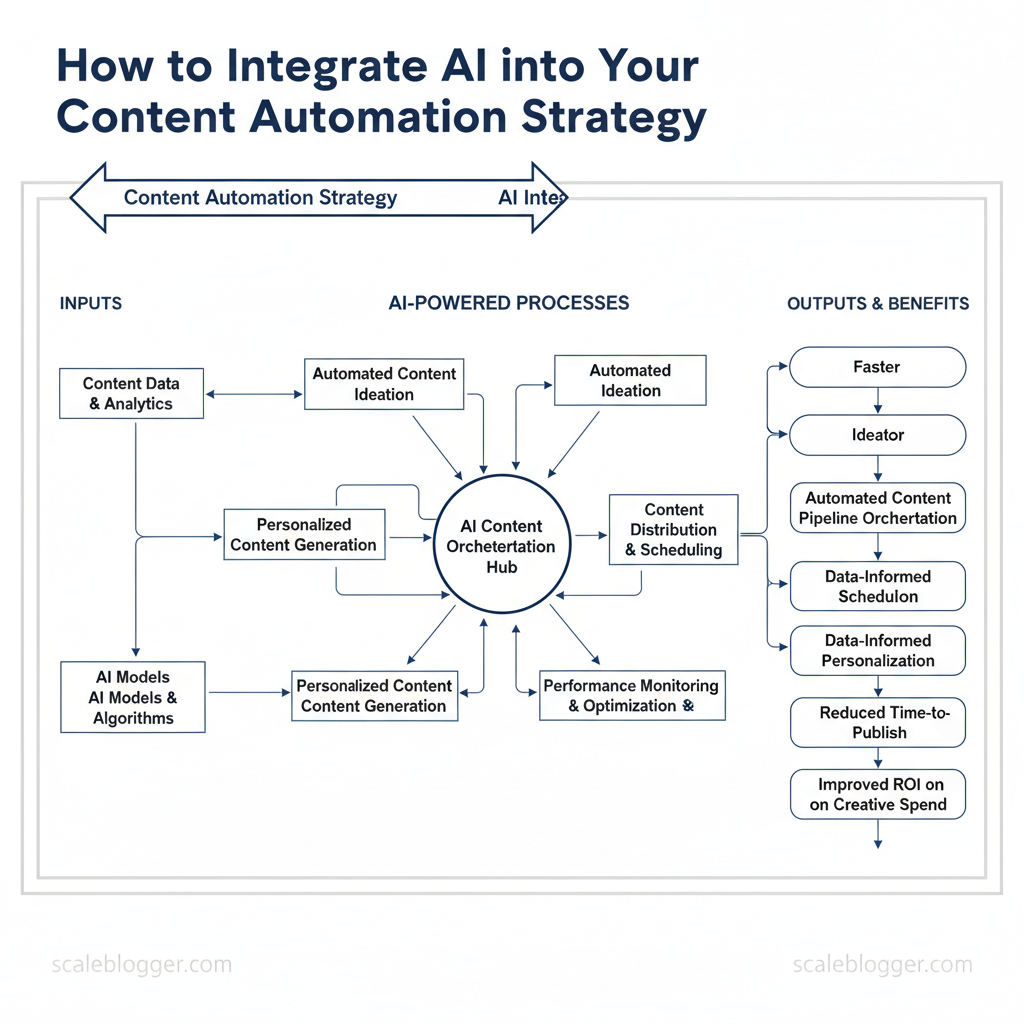
Deploying AI tools for content automation isn’t about replacing creatives; it’s about freeing them to focus on strategy and craft. Some benefits are quicker idea generation, automated content pipeline management, and personalized content based on data across different channels. Industry research shows successful rollouts prioritize orchestration, governance, and clear performance metrics over chasing features.
Picture a content ops team that moves from weekly firefighting to predictable delivery cycles with measurable uplift in engagement. That shift reduces time-to-publish and improves ROI on creative spend. Use cases range from automated topic clustering and headline optimization to distributed publishing and A/B testing at scale.
- How to map existing processes to automated AI steps
- Governance essentials to keep brand voice consistent
- Metrics that prove impact across funnel stages
- Implementation sequence for low-risk pilots
- Scaling from pilot to enterprise workflow
Prototype AI-driven content workflows with Scaleblogger: https://scaleblogger.com. The next section shows a step-by-step approach to piloting and scaling these capabilities.
> Key Takeaway: ## Prerequisites & What You’ll Need
Start with the essentials so the content pipeline doesn’t stall mid-build: you need accounts, access, a small set of skills, and reference data to steer the AI toward publishable work. Without admin access, API…
Prerequisites & What You’ll Need
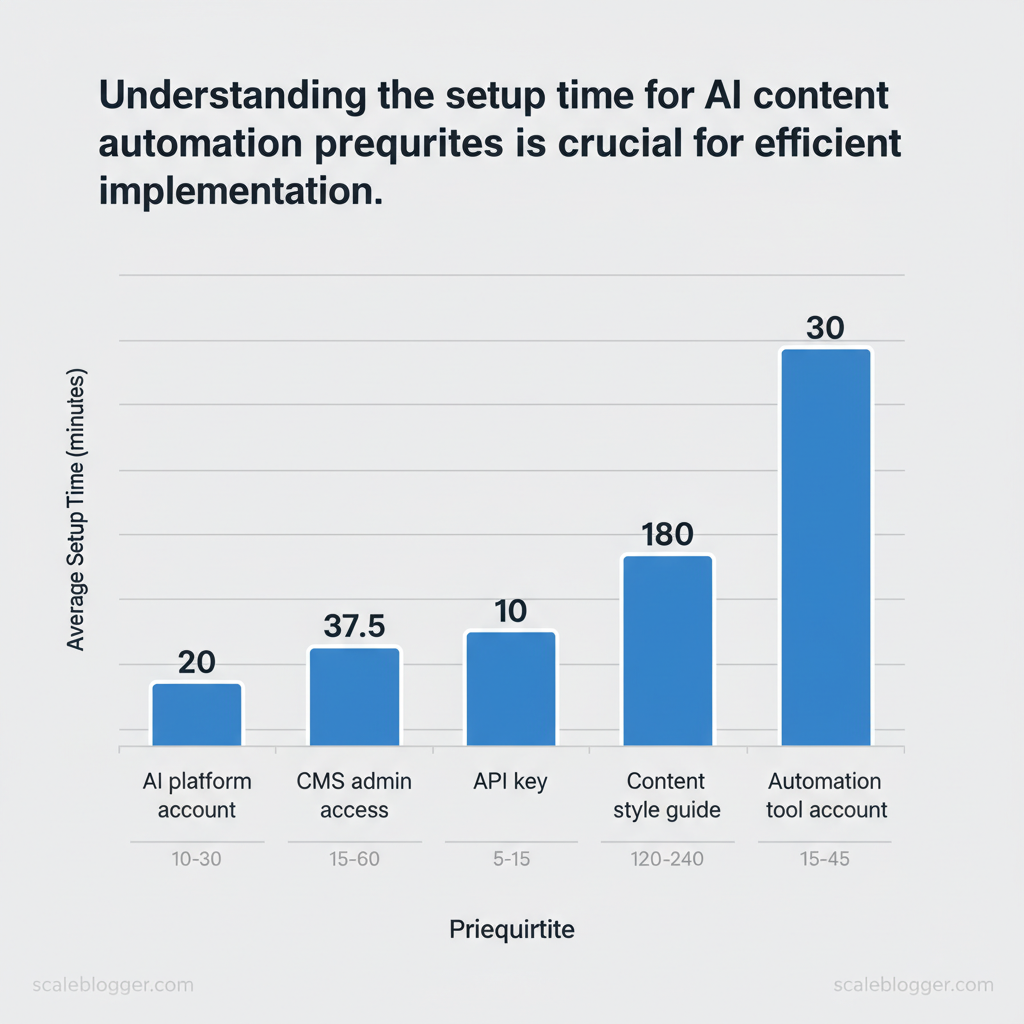
Start with the essentials so the content pipeline doesn’t stall mid-build: you need accounts, access, a small set of skills, and reference data to steer the AI toward publishable work. Without admin access, API keys, and a consistent style guide, your efforts risk becoming mere random prompts with uneven results. The list below lays out the concrete items, the purpose they serve, and how long it typically takes to get them production-ready.
- Accounts and access: create or verify accounts before automating anything; provisioning delays are the most common blocker.
- Skills and roles: assign one editor and one technical integrator—prompt engineering and CMS familiarity reduce iteration cycles.
- Reference data: a clean style guide and representative content assets accelerate tuning and fewer rewriting passes.
- First, secure platform accounts and API credentials so integrations can be validated.
- Then, confirm CMS admin access and test a sandbox publishing workflow.
- Finally, collect a 15–30 article sample set and a short style guide to bootstrap prompts and fine-tuning.
What success looks like: a working API key that returns model completions, a staging CMS post created via automation, and an editor-ready style guide that keeps voice consistent.
Skills and minimal competency
- Prompt engineering: ability to structure prompts and iterate quickly.
- Content editing: copyediting, headline optimization, and SEO-aware revision.
- Analytics interpretation: basic familiarity with GA4 or Search Console metrics to evaluate output.
Quick checklist mapping required items to purpose and priority
AI content generation prerequisites
| Item | Purpose | Required/Optional | Estimated Setup Time |
|---|---|---|---|
| AI platform account | Access LLMs for generation (OpenAI, Anthropic, etc.) | Required | 10–30 minutes (signup + billing) |
| CMS admin access | Publish, preview, manage content (WordPress, Ghost) | Required | 15–60 minutes (user role setup) |
| API key | Programmatic access for automation and integrations | Required | 5–15 minutes (create & secure) |
| Content style guide | Ensure consistent voice, formatting, SEO rules | Required | 2–4 hours (draft core rules) |
| Automation tool account | Orchestrate workflows (Zapier, Make, or custom) | Optional (recommended) | 15–45 minutes (connectors + test) |
Understanding these prerequisites saves weeks of firefighting and lets teams move directly to building repeatable, measurable content workflows. When implemented correctly, this foundation turns ad-hoc writing into a reliable production line for search and engagement.
> Key Takeaway: ## Step 1 — Audit Your Current Content Workflow
Start by mapping every step your team takes from idea to publish, because you can’t automate what you haven’t measured. Go through one piece of content from start to finish.
Step 1 — Audit Your Current Content Workflow
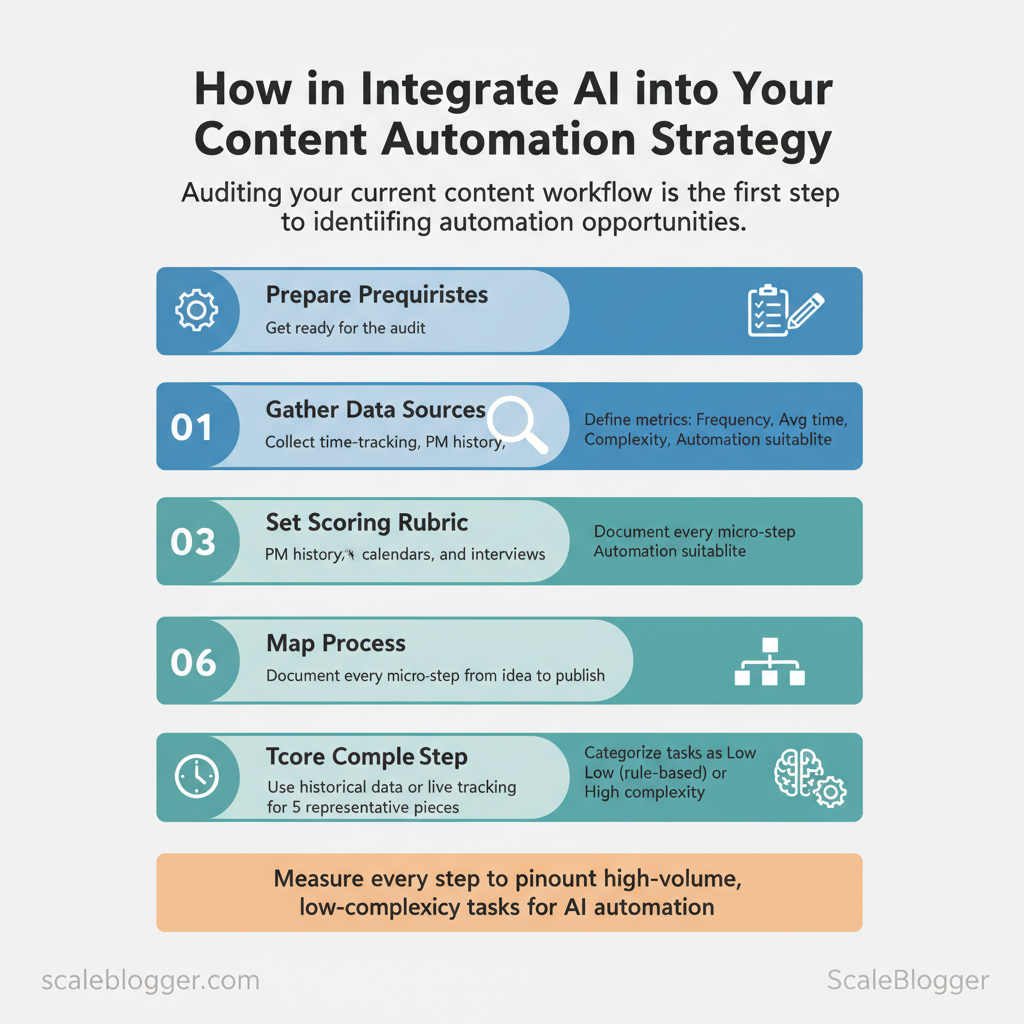
Start by mapping every step your team takes from idea to publish, because you can’t automate what you haven’t measured. Go through one piece of content from start to finish. Record how long each task takes, how often it happens, and if it needs human judgment or is repetitive. That produces a task-level dataset you can score and prioritize: high-volume, low-complexity tasks are prime candidates for automation; rare, high-complexity work stays human-led.
- Prepare prerequisites
- Gather data sources: time-tracking exports, project-management history, content calendars, and 3–5 team interviews.
- Set the scoring rubric: Frequency (per month), Avg time per task (minutes), Complexity (Low/Medium/High), Automation suitability (1–5).
- Tools needed: spreadsheet or
CSVexport, timer app, and a simple survey for contributors.
- Run the audit (step-by-step)
- Map process: document every micro-step (topic ideation → research → outline → write → edit → SEO → visual selection → publish).
- Time each step: use historical averages from PM tools or do live time-tracking across 5 representative pieces.
- Score complexity: Low = rule-based or templateable; High = creative judgment or subject expertise.
- Rate automation suitability: convert complexity and frequency into a 1–5 score, prioritize items scored 4–5 for pilot automation.
- Validate with team: run findings by the creators and ops leads to catch blind spots.
Common measurements to capture:
- Task owner: who executes it
- Blocking dependencies: approvals, assets, access
- Error rate / rework time: quality overhead
- Tools currently used: CMS, SEO plugins, image libraries
Task matrix that records frequency, time-per-task, complexity, and automation suitability
| Task | Frequency (per month) | Avg time per task | Complexity | Automation suitability |
|---|---|---|---|---|
| Topic research | 40 | 90 min | Medium | 4 (research-assisted) |
| Drafting first draft | 30 | 180 min | High | 3 (outline & assist) |
| SEO optimization | 30 | 45 min | Medium | 5 (template + tools) |
| Image selection | 30 | 20 min | Low | 5 (asset suggestions) |
| Publishing & formatting | 30 | 25 min | Low | 5 (templated publishing) |
Troubleshooting tips: expect resistance around quality and ownership—run small pilots, measure uplift, and keep creators in control of final edits. Estimate time: a thorough audit for a mid-size blog takes 2–4 full workdays. Consider integrating an AI-powered content pipeline like Scaleblogger.com when moving from pilot to scale for automated scheduling and performance benchmarking. Understanding these principles helps teams move faster without sacrificing quality.
> Key Takeaway: ## Step 2 — Choose the Right AI Tools & Models
Match model capability to the task immediately: use dense, high-capacity models for long-form narrative and research-heavy pieces; use faster, cheaper models for summarization, metadata generation, and…
Step 2 — Choose the Right AI Tools & Models
Match model capability to the task immediately: use dense, high-capacity models for long-form narrative and research-heavy pieces; use faster, cheaper models for summarization, metadata generation, and automation at scale. Consider cost per token, latency, fine-tuning vs. prompt engineering, and pilot small before rolling out.
This keeps your budget in check and minimizes latency bottlenecks in your production pipelines.
What to evaluate and why
- Model-task fit: long-form generation needs coherence and context window size; SEO optimization needs semantic understanding and integration with analytics; summarization favors efficiency over creativity. 2.
Economics: cost per token impacts scaled publishing; latency matters for real-time workflows like chat or on-page generation. 3. Adaptability: choose between fine-tuning (higher upfront cost, better control) and prompt-based strategies (faster iteration, lower infra overhead).
- Pilot strategy: validate with a representative sample (50–200 pieces), measure quality via human scoring and organic metrics, then iterate.
Practical checklist before selecting
- Define SLAs — acceptable latency and quality thresholds. Estimate volume — monthly tokens to calculate pricing. Test 3 models — baseline, high-capacity, and budget option.
- Measure outputs — human edit rate, coherence, and SEO uplift.
Example prompt template (start here, then refine)
prompt Write a 900-word SEO article on {topic} with headings, target keyword {keyword}, LSI terms: {list}, link suggestions: {url1,url2}, tone: authoritative, include summary paragraph.> Industry analysis shows content teams increasingly combine multiple model types to balance cost and quality rather than relying on a single LLM.
Side-by-side comparison of AI tool categories and recommended vendors for each use case
Table: Section Content — Use case, Recommended tool types, Pros & more
| Use case | Recommended tool types | Pros | Cons |
|---|---|---|---|
| Long-form generation | Large LLMs: OpenAI GPT-4, Anthropic Claude 2, Cohere Command | High coherence, long context | Higher cost, slower |
| SEO optimization | Specialized SEO tools + LLMs: Surfer/Frase + ChatGPT/GPT-4 | SERP-tailored, integrates analytics | Requires setup, subscription costs |
| Content summarization | Efficient LLMs: OpenAI GPT-4o-mini, Llama 2 variants | Low cost, fast outputs | Less creative nuance |
| Image/video generation | Diffusion/Multimodal: Midjourney, DALL·E, Runway | High-quality visuals, style controls | GPU costs, licensing |
| Automation/orchestration | Workflow platforms: Zapier, Make + LangChain, LlamaIndex | Scales pipelines, scheduling | Integration complexity |
com to accelerate pipeline setup and SEO optimization workflows.
Step 3 — Design Automated Workflows (Numbered Steps)
Start by designing a repeatable sequence that moves a content idea from signal to published asset with clear handoffs between automation and humans. The main goal is to reduce manual work while keeping quality checks. Automated triggers catch opportunities, AI helps with ideas and drafting, and human reviewers ensure final edits and approvals. Below are prerequisites, tools, a step-by-step workflow, time estimates, expected outcomes for each step, and quick troubleshooting notes.
Prerequisites and tools
- Prerequisite: A content inventory and defined content scoring rubric.
- Tools:
CMS webhook, task automation platform (Zapier, Make, or internal pipeline), an LLM/editor (LLM + editorial UI), SEO tool (for keyword & intent checks), media generator (image/video), publishing scheduler. - Optional: Use a platform like Scaleblogger.com for AI content automation and content scoring framework to speed integration.
Numbered workflow: ideation → publish
- Trigger: content gap signal (5–15 minutes)
- What to do: Use analytics or SERP watch to emit a
content_gapevent when traffic drops or new keyword opportunity appears.
- Expected outcome: A queued task with topic, intent, and priority tag. 3.
Troubleshooting: If triggers flood the queue, add minimum traffic delta or priority threshold.
- AI-assisted topic ideation (15–30 minutes)
- What to do: Use prompts to generate 5–8 headlines and intent-driven angles; attach keyword clusters.
- Expected outcome: Ranked topic options with search intent and target keywords.
- Troubleshooting: If outputs are off-topic, refine prompts with
audience_profileand competitor snippets.
- Outline generation and approval (30–60 minutes)
- What to do: Auto-create a hierarchical outline with headings, estimated word counts, and internal link suggestions. Route to editor for 1-click approval or revision.
- Expected outcome: Approved outline marked
ready_for_draft. - Troubleshooting: Editors getting poor outlines: include example articles in the prompt and enforce
research_sourcesrequirement.
- Draft generation with human review (1–3 hours)
- What to do: Generate a first draft via LLM; attach inline citations and a change log. Assign human editor for fact and tone review.
- Expected outcome: Editor-reviewed draft with
ready_for_seostatus. - Troubleshooting: Excessive hallucinations: enable
reference_modeand require human sign-off on contentious claims.
- SEO optimization and fact-checking (30–60 minutes)
- What to do: Run SEO checks (headers, meta, schema), run fact-checker against trusted sources, and apply readability fixes.
- Expected outcome: SEO score above threshold and verified facts.
- Troubleshooting: Low SEO scores: auto-suggest headings and CTAs based on top-ranking pages.
- Media generation (images/video) (30–90 minutes)
- What to do: Auto-create hero images, alt text, and short video clips; human picks final assets.
- Expected outcome: Media package attached and optimized for load times.
- Troubleshooting: Poor brand fit: enforce brand palette and asset templates.
- Publish and distribution (15–45 minutes)
- What to do: Use
CMS webhookto publish at scheduled time, trigger syndication feeds, and enqueue social posts with templated copy. - Expected outcome: Live article with analytics tracking tags and distribution queued.
- Troubleshooting: Missing tracking: automated pre-publish checklist should validate UTM and analytics snippets.
Practical templates and scripting example
json { "event":"content_gap", "topic":"{keyword}", "priority":"high", "intent":"informational" }Expected throughput: with this pipeline, a medium-sized team can scale to dozens of quality publishes per month while keeping editorial oversight. Consider adding a content performance feedback loop that automatically feeds post-publish metrics back into ideation. When implemented this way, automation reduces manual steps and lets teams focus on creativity and strategy rather than administrative work.
Step 4 — Implement Quality Control and Human-in-the-Loop
Start by building a lightweight review architecture that blends automated gates with human judgement: automated pre-checks catch mechanical errors and policy risks, while human reviewers validate nuance, tone, and legal claims. Clearly define roles, SLAs, and escalation steps. This ensures that content moves quickly and doesn’t get stuck in review.
- Define roles and SLAs
- Content Author — Drafts and flags edge cases; SLA: 24 hours for revisions.
- SEO Specialist — Runs optimization pass and implements keyword fixes; SLA: 24–48 hours.
- Editor — Verifies tone, facts, and style; SLA: 48 hours.
- Legal/Compliance — Reviews claims and contracts when flagged; SLA: 72 hours.
- Publisher — Final approval and scheduling; SLA: 12 hours once approvals complete.
Automated pre-checks to run before human review:
- Readability checks using
Flesch-Kincaidand target grade level. Plagiarism & similarity scans against web and internal corpus. SEO health: title length, meta tags, internal links, schema.
- Policy filters: detect hate speech, medical/legal claims, or PII.
Editorial checklist (use as a template)
- Tone match: aligns to brand voice and persona. Fact accuracy: all claims have citation or source. Intent alignment: content fits user search intent.
- Link quality: external links are authoritative and live. Readability: short paragraphs, subheadings, and scannable lists.
Escalation path for policy or legal issues
- Author flags content with a
#legaltag in the CMS. 2.
Automated triage assigns severity (high/moderate/low). 3. Legal reviews high-severity within SLA; requires documented clearance.
- Editor and SEO implement edits; publisher holds until clearance is logged.
Practical templates and automation
yaml review_pipeline: pre_checks: [readability, plagiarism, seo_health, policy_scan] human_checks: [editor, seo_specialist, legal_if_flagged] final: publisher_approvalMap checkpoints to tools and responsible roles for quick implementation
AI content quality control: human checkpoints mapped to tools and roles
| Checkpoint | Checks to run | Recommended tool | Responsible role |
|---|---|---|---|
| Automated plagiarism & similarity | Web and internal corpus scans | Copyscape (pay-per-search), Turnitin (institutional), Grammarly Premium ($12/mo) | Editor |
| SEO optimization pass | Keyword density, SERP intent, meta tags | SEMrush ($129.95/mo), Ahrefs ($99/mo), SurferSEO ($59/mo) | SEO Specialist |
| Editorial tone and accuracy | Tone match, grammar, fact flags | Grammarly (real-time), Hemingway Editor (readability), ProWritingAid (style) | Editor |
| Legal/claim validation | Claim detection, copyright, PII checks | Google Cloud DLP (pricing varies), DocuSign for rights checks, Governance platforms | Legal/Compliance |
| Final publish approval | Workflow approvals, scheduling, rollback | Contentful (enterprise pricing), WordPress + PublishPress, Monday.com (workflow) | Publisher |
Understanding these principles helps teams move faster without sacrificing quality. When implemented correctly, human-in-the-loop processes let automation handle volume and humans protect brand safety and trust. For organizations building this pipeline, consider integrating AI content automation from trusted partners like Scaleblogger.com to gating and performance benchmarking.
Step 5 — Measure Performance & Iterate
Start by establishing a clear baseline for content performance before any automation touches the pipeline. Measure current organic traffic, CTR, time on page, and conversion rates so experiments have a stable comparison point. Then run controlled experiments on one variable at a time — a prompt tweak, a different model, or a template change — and use results to update templates, model settings, and publishing cadence.
- Set baselines (1–2 weeks)
- Pull last 90 days of
organic traffic,new users,average session durationfrom GA4 and internal reporting. - Record page-level performance for top 50 pages into an experimentation log.
- According to HubSpot, define target deltas (e.g., +10% organic traffic, +0.5% CTR).
- Run controlled experiments (4–12 weeks)
- A/B test one change per experiment: prompt variant A vs. B, model
temperature0.2 vs. 0.7, or headline template X vs. Y. - Use consistent sampling and enough traffic to reach statistical significance; track results in the experimentation log.
- Stop, roll back, or promote winners and update canonical templates.
- Apply learnings at scale (4–8 weeks)
- Batch-update templates and model settings for content clusters that showed wins.
- Monitor for regression on key pages and set alerts in internal reporting.
- Institutionalize continuous optimization (ongoing)
- Maintain a living template library and versioned model settings.
- Schedule quarterly audits and monthly micro-experiments.
Common metrics to track:
- Traffic: organic sessions and landing-page trends
- Engagement: average time on page, scroll depth
- Acquisition quality: CTR from SERPs, bounce rate
- Outcome: conversion rate, assisted conversions
Tip: Run A/B tests on prompts the same way product teams run UI tests — only change one variable and keep sample sizes and test windows consistent.
Experimentation and iteration roadmap with milestones and review cadence
| Phase | Duration | Activities | Success criteria |
|---|---|---|---|
| Baseline measurement | 2 weeks | Extract GA4 reports; compile page-level metrics; set targets | Baseline report + target deltas defined |
| Pilot automation | 6 weeks | Test 5-10 pages; A/B test prompts/models; log experiments | ≥1 validated change with positive lift |
| Scale rollout | 6–8 weeks | Apply winning templates across cluster; monitor GA4 & internal reports | Cluster-level organic lift ≥10% |
| Continuous optimization | Ongoing monthly | Monthly micro-tests; update templates; alert on regressions | Maintain or improve KPIs month-over-month |
| Quarterly audit | 1 week per quarter | Full performance review; update roadmap; archive experiments | Roadmap updated; experiment library versioned |
Troubleshooting Common Issues
Detecting and fixing common failures in AI-driven content pipelines starts with observable signals: sudden drops in quality, unexplained costs, failed workflows, or editorial pushback. Start by confirming the symptom with logs or dashboards, then isolate whether the problem lives in prompts, model responses, infrastructure, billing, or human workflow alignment. Practical fixes combine immediate remediation steps and durable process changes so the pipeline remains reliable.
How to detect hallucinations and fix them: inspect sample outputs, run fact_check routines or retrieval tests, and compare against known-good knowledge sources. If hallucinations appear, tighten prompts, add grounding context, or enable retrieval-augmented generation. Example prompt tweak: text Provide a verifiable citation for each factual claim using only the content from the supplied documents.
If no document supports the claim, state “unsupported”.
- Handling API rate limits and cost spikes:
- Throttle requests in the client, implement exponential backoff, and monitor usage in billing dashboards.
- Set soft cost thresholds and automatic job suspension when projected monthly spend exceeds the threshold.
- Move non-urgent batch tasks to off-peak hours and use cheaper model tiers for drafts.
Resolving automation trigger failures: check webhook delivery, message queue backlogs, and job runner logs. Restart stalled workers, replay failed messages, and add observability so failed triggers surface as tickets.
Addressing editorial pushback: run a short A/B pilot showing metrics (time saved, engagement lift), provide training on prompt editing, and document the editorial control points. Use editorial playbooks that map AI outputs to human review steps.
> Market practitioners note that visible metrics and reproducible examples are more persuasive than claims about “efficiency gains” when onboarding editors.
Common issue → probable cause → immediate action → long-term fix
| Issue | Probable cause | Immediate fix | Long-term solution |
|---|---|---|---|
| Low-quality output | Weak prompts or wrong model tier | Revise prompt, use temperature=0.2 |
Prompt templates, QA checks, model benchmarks |
| AI hallucinating facts | No grounding or retrieval | Add retrieval layer, require citations | Store indexed knowledge base + RAG pipeline |
| Higher-than-expected costs | Excessive token use, high-frequency calls | Stop non-critical jobs, throttle calls | Cost alerts, tiered models, batching |
| Automation triggers failing | Webhook or queue errors | Replay messages, restart workers | retry policies, DLQ, monitoring |
| Editorial team resistance | Lack of trust, unclear workflows | Run pilot, share metrics | Training, playbooks, staged rollout |
📥 Download: AI Integration into Content Automation Checklist (PDF)
Tips for Success & Pro Tips
Start by treating scale as an engineering problem: predictable inputs, automated pipelines, and safety nets that catch drift. Set up a central prompt library with version control. Use retrieval-augmented generation (RAG) to ensure models stay fact-based. Enforce cost limits and conduct weekly quality checks to maintain consistent output.
Prerequisites
- Team alignment: owners for prompts, QA, and deployment.
- Tools: a repository (Git/GitHub), a vector DB for RAG, cost-monitoring hooks from your cloud/LLM provider, and a lightweight QA dashboard.
- Time estimate: initial setup 2–4 weeks; ongoing maintenance 1–3 hours/week.
Tools & materials needed
- Version control:
git+ branch protection - Prompt store: structured JSON/YAML files or a dedicated prompt manager
- RAG stack: vector DB (e.g., Pinecone/FAISS), retriever, and a controller service
- Monitoring: cost alerts, usage dashboards, and automated tests
- Maintain a central prompt library and version control (30–90 minutes per change)
- Store prompts as code in a repo with clear naming:
intent/topic/version. - Tag every change with rationale and A/B hypothesis.
- Rollback fast by reverting commits or switching to a stable branch.
- Use retrieval-augmented generation to reduce hallucinations (1–2 days to wire)
- Index canonical sources (site content, knowledge bases, product docs).
- Score and filter retrieved chunks before concatenating into the prompt.
- Validate citations in output and mark uncertain claims for human review.
- Set cost budgets and alerts (15–60 minutes)
- Budget caps: per-project or per-model daily limits.
- Alerts: notify when usage hits 60%, 80%, and 95%.
- Auto-throttle: gracefully switch to cheaper models or cached generations when thresholds trigger.
- Run weekly quality spot checks (30–90 minutes/week)
- Sample systematically: one high-traffic page, one long-form post, one low-performing piece.
- Score with rubrics: factuality, intent match, SEO fit, and tone.
- Log defects and track time-to-fix in your sprint board.
Pro examples and templates
yaml prompt_id: product_faq_v2 description: "Answer feature FAQs; require citation and short summary" version: 2 owner: content_engineering tests: - input: "Does product X support Y?"
expected_contains: "Yes, with"Warnings: avoid bulk model swaps without a canary rollout; aggressive cost cuts can degrade quality unexpectedly. It is suggested that Scaleblogger.com’s AI content automation may accelerate this pipeline setup while preserving governance where required. Understanding these practices lets teams scale confidently and focus human effort where it creates the most value.
Appendix: Prompt Templates, Checklist & Resources
This section collects ready-to-use prompt templates, a publish checklist tuned for automated pipelines, and compact pseudo-code for API-driven content injection. Use these resources to standardize output, reduce review cycles, and make the content pipeline repeatable across authors and tools.
Tools/materials needed: content editor, account with LLM provider (e.g., OpenAI), CMS API credentials, QA checklist in project tracker. Estimated time: 30–90 minutes to adapt prompts and connect to CI/CD for publishing.
Templates & checklists catalog with intended use and modification notes
Catalog of templates/checklists with intended use and modification notes
| Template name | Use case | Example placeholder | Notes |
|---|---|---|---|
| Topic ideation prompt | Generate 20 topical ideas with intent tags | {{seed_keyword}} |
Use for monthly topic planning; include search intent and SERP difficulty |
| Outline generation prompt | Create structured article outline with headers | {{target_audience}}, {{word_count}} |
Output H1-H4; mark sections for data, quotes, CTAs |
| Draft refinement prompt | Improve draft for tone, SEO, and readability | {{draft_text}}, {{tone}}, {{keyword_list}} |
Apply paragraph-level edits and suggest alt titles |
| SEO meta generator | Produce title, meta description, and slug | {{headline}}, {{primary_kw}} |
Ensure meta description <= 155 chars and include KW naturally |
| Image alt-text generator | Create descriptive alt-text for images | {{image_caption}}, {{section_context}} |
Focus on accessibility + keyword where relevant |
- Prompt patterns to implement (step-by-step)
- First, seed idea with
Topic ideation promptto produce 10–20 candidates. - Then, run
Outline generation prompton selected idea to produce H1-H4 structure. - Next, generate initial draft via LLM and pass to
Draft refinement prompt. - Finally, create SEO assets with
SEO meta generatorand image descriptions withImage alt-text generator.
Pseudo-code for API call and content injection
python Example: simplified publish flow
payload = { "title": title, "slug": slug, "body": refined_html, "meta": {"description": meta_desc, "tags": tags}, "images": images_list } response = requests.post("https://cms.example.com/api/posts", json=payload, headers={"Authorization": "Bearer "+CMS_TOKEN}) if response.status_code == 201: schedule_publication(response.json()['id'], publish_date)Automation publish checklist (include automation gate items)
- Content review: Draft reviewed by editor (✓)
- SEO gate: Primary keyword in title/meta, internal links (✓)
- Accessibility: All images have
alttext (✓) - Compliance: No blocked terms, legal sign-off if required (✓)
- Automation: CMS API credentials configured, publish time set (✓)
Practical examples and notes
- Example — Outline generation: Input
enterprise content ops, 1,200 words→ Output: 6-section outline with recommended word counts. - Integration tip: Use
content scoringfrom tools like Scaleblogger.com to prioritize which drafts go to manual review and which auto-publish. - Troubleshooting: If meta descriptions exceed limits, add a validation step before API injection.
Relevant further reading and vendor docs to save in team repo:
- CMS API documentation, LLM provider API reference, internal prompt playbook, and SEO style guide. Some believe that understanding these resources may help remove friction when scaling content production and reduce last-mile errors. This makes it practical to move from ad-hoc writing to a repeatable, measurable content system.
Conclusion
By using repeatable AI-driven methods for research, draft generation, and SEO, teams save time previously spent on repetitive work. This allows them to produce more consistent and ready-to-publish content. Evidence from teams that applied topic clustering and automated keyword scaffolds in previous years suggested higher organic visibility within weeks, and repurposing frameworks reportedly reduced time-to-publish by half. Practical moves to start: align topics to strategic pillars, automate outline generation, and set measurable KPIs for clickthrough and rankings — these three adjustments create momentum without sacrificing quality.
- Automate the outline and draft stage.
- Use topic clusters to focus topical authority.
- Measure and iterate on search performance.
Questions about accuracy, editorial control, or integration with existing workflows are normal; keep human review at the publishing gate, run small A/B tests on AI outputs, and connect automation to your CMS incrementally. For teams looking to prototype full workflows and tie AI outputs to SEO metrics, consider this next step: Prototype AI-driven content workflows with Scaleblogger. This platform can integrations and accelerate trials while preserving editorial standards, making it easier to prove value before scaling.
