

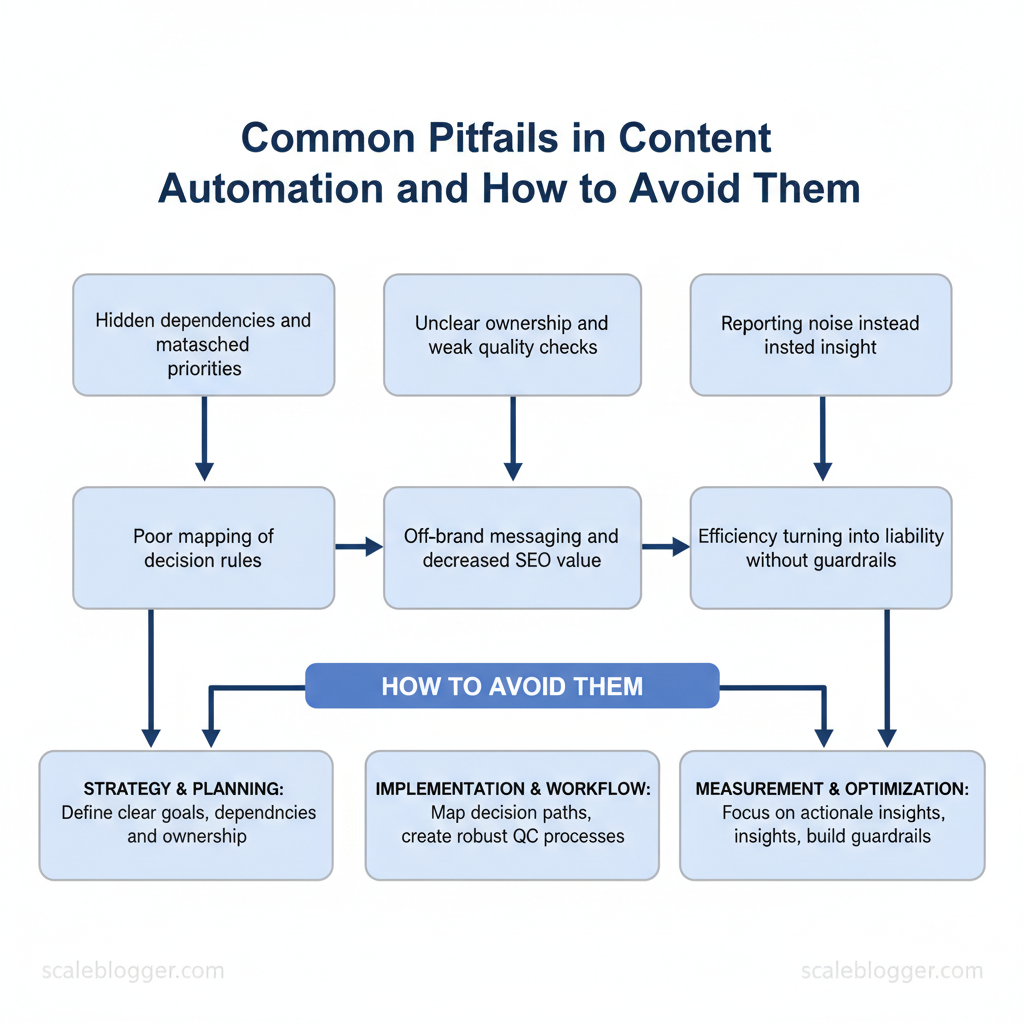
Marketing teams routinely lose momentum when automation introduces more friction than speed. Too often the shift from manual processes to automated pipelines uncovers hidden dependencies, mismatched priorities, and content automation mistakes that inflate costs and erode audience trust. Experts say automation problems are often about operations, not technology. Poorly defined decision rules, unclear ownership, and weak quality checks cause the most harm.
When those issues compound, campaigns publish off-brand messaging, SEO value drops, and reporting becomes noise instead of insight. Picture a marketing team that automates scheduling but skips editorial gating: traffic spikes for irrelevant posts while conversions fall. This situation shows that automation without proper controls can make efficiency a risk.
- What structural gaps produce the most common automation failures
- How to design decision rules that preserve brand voice and SEO value
- Practical checks to prevent duplicate or stale content from publishing
- Ways to measure automation impact without misleading KPIs
- Implementation steps that scale without adding governance overhead
This introduction leads into actionable guidance on identifying and fixing the most frequent content marketing pitfalls. Get an automation audit and implementation plan: https://scaleblogger.com — a pragmatic next step to stop repeating common errors and reclaim predictable content performance.
> Key Takeaway: ## Prerequisites and What You’ll Need
com/blog/the-ultimate-guide-to-seo-optimization-for-automated-content-in-2025/” class=”internal-link”>so the first automated content runs reliably. Teams need a mix of technical access, clear editorial…
Prerequisites and What You’ll Need
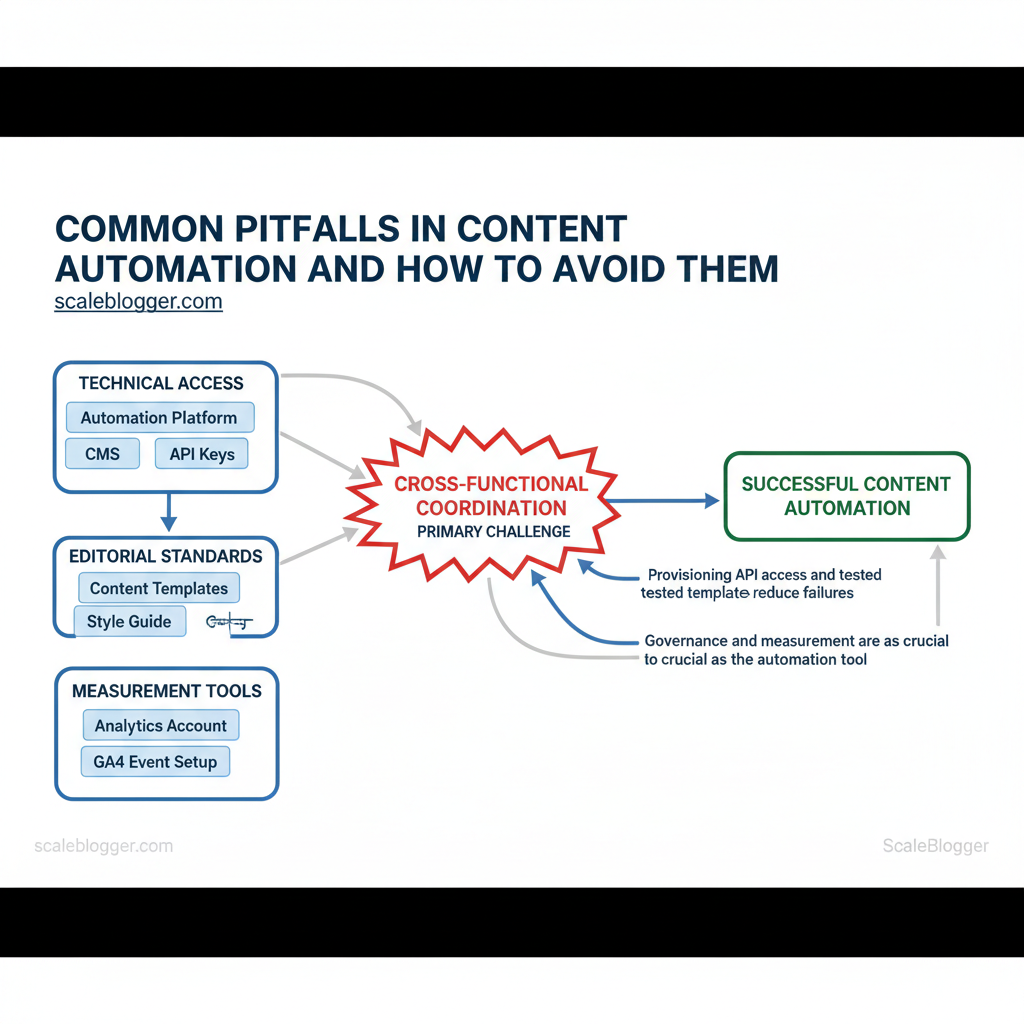
com/blog/the-ultimate-guide-to-seo-optimization-for-automated-content-in-2025/” class=”internal-link”>so the first automated content runs reliably. Teams need a mix of technical access, clear editorial standards, and measurement tools before integrating automation into a CMS. Without clear permissions, templates, and an analytics baseline, automation creates noise instead of predictable output.
Below are the concrete skills, tools, and access to have ready, plus realistic setup time and difficulty estimates.
- Skills and knowledge (who to include)
- Automation lead: Workflow automation basics (1–2 years of experience with Zapier/Make/MS Power Automate or equivalent).
- Content editor: CMS editing and content structuring (familiar with templates, taxonomies).
- SEO owner: SEO fundamentals (keyword mapping, metadata, internal linking).
- Engineer/Integrations: API familiarity (
REST, authentication headers, API keys). - Analytics analyst: GA4 event setup and conversion tracking.
- Tools and templates to provision
- Automation platform: Zapier, Make (Integromat), or Microsoft Power Automate.
- CMS: WordPress, Contentful, or a headless CMS with API write access.
- Analytics: Google Analytics / GA4 and a simple dashboard (Looker Studio or equivalent).
- Editorial calendar: Shared calendar or a content ops tool (Trello, Asana, Notion).
- Content templates: Title, meta, hero, author, canonical, and content block patterns.
- Credentials: Editor/contributor permissions, API key for CMS, API keys for NLP or AI if used.
- Time and difficulty (practical estimate)
- Small pilot: 1–2 weeks to configure one workflow and test publish rules.
- Production-ready pipeline: 3–6 weeks for QA, permissions, and analytics tagging.
- Difficulty level: Moderate — cross-functional coordination is the primary challenge, not technical complexity.
Quick reference mapping of prerequisites to why they matter and minimum level required
| Prerequisite | Why it matters | Minimum required level | Time to set up |
|---|---|---|---|
| Automation Platform | Orchestrates triggers/actions and retries | Intermediate (Zapier/Make experience) | 1–3 days for pilot |
| CMS Access | Needed to create, edit, and publish programmatically | Basic editor + API write | <1 hour to grant access |
| Editorial Calendar | Coordinates publishing cadence and approvals | Basic workflow (Trello/Notion) | 2–4 hours to configure |
| Analytics Account | Measures traffic, conversions, and content ROI | GA4 with events | 1–2 hours to connect; 1 week for data |
| Style Guide / Brand Guidelines | Ensures consistent tone, legal, and SEO rules | Documented guide (HTML/markdown) | 4–8 hours to assemble |
Understanding these prerequisites helps teams move faster without sacrificing quality. When those pieces are in place, automation becomes a lift rather than a liability, and operators can scale output with predictable performance.
> Key Takeaway: ## Step-by-Step: Audit Your Current Automation Setup
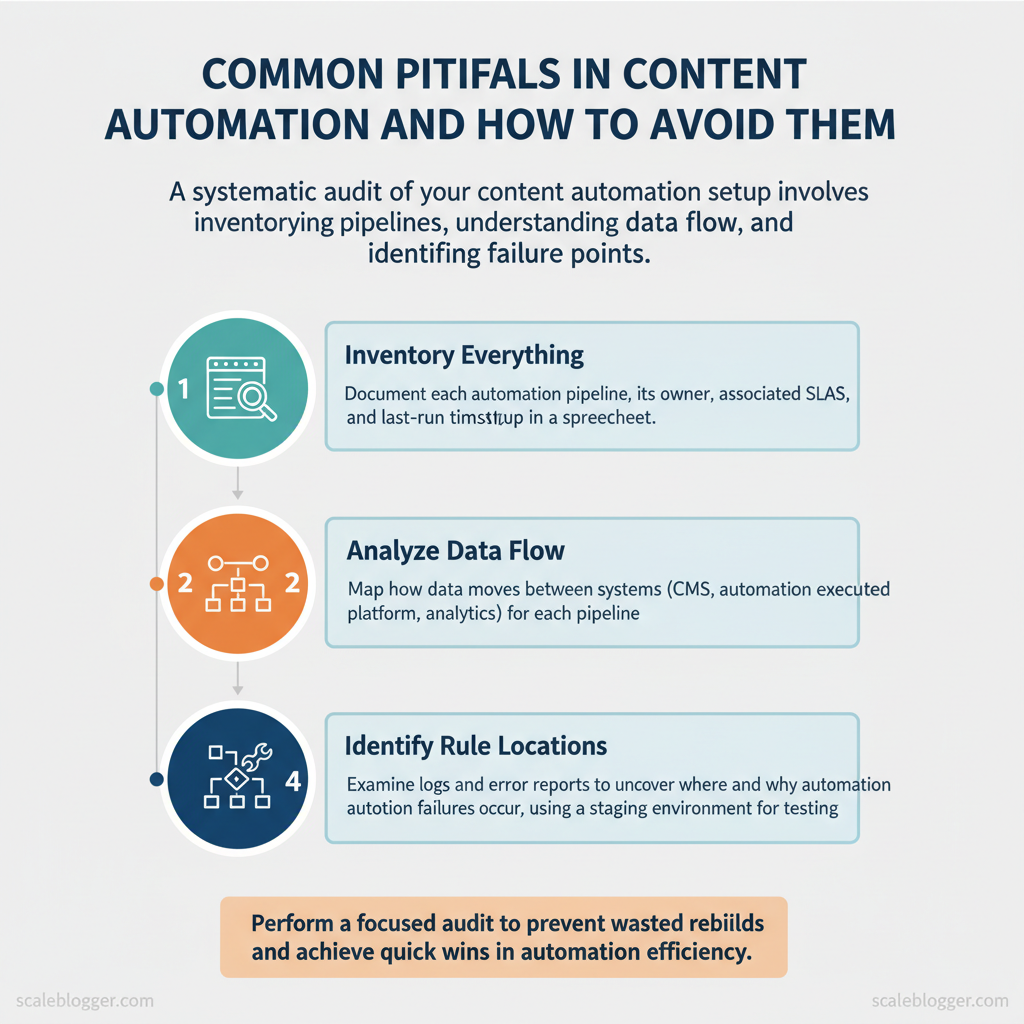
Begin the audit by diagnosing the system: identify what exists, how data flows, where rules are, and where failures occur. A focused audit prevents wasted rebuilds and surfaces quick wins that…
Step-by-Step: Audit Your Current Automation Setup
Begin the audit by diagnosing the system: identify what exists, how data flows, where rules are, and where failures occur. A focused audit prevents wasted rebuilds and surfaces quick wins that reduce manual work immediately.
Prerequisites
- Access: Admin credentials for CMS, automation platform, analytics, and cloud logs
- Stakeholders: One content owner, one engineer, one analytics owner
- Tools: Spreadsheet or schema tool, log viewer (
CloudWatch,Stackdriver), and a staging environment - Time estimate: 3–8 hours for a small stack, 1–3 days for complex setups
- Inventory everything (30–90 minutes)
- List pipelines: Document each automation pipeline (content ingest, enrichment, publishing).
- Record owners: Note who owns each pipeline and any associated SLAs.
- Expected outcome: A single spreadsheet with pipeline name, trigger, owner, and last-run timestamp.
- Map data flows (60–180 minutes)
- Draw flow diagrams: From source (CMS form, API) to final destination (published post, analytics event).
- Identify transformations: Note where data is enriched, normalized, or filtered.
- Expected outcome: Visual map showing every hop and transformation rule.
slugify() or auto-tag rules that can silently drop or rewrite content.
- Verify templates and content contracts (30–120 minutes)
- Check templates: Confirm templates in CMS, email, or JSON schemas match expected fields.
- Validate constraints: Ensure required fields, character limits, and sanitization are enforced (
strip_tags,escape). - Expected outcome: List of templates with mismatches and a prioritized fix list.
- Check logs and alerting (45–150 minutes)
- Scan logs: Search for warnings and errors, and sample successful vs failed runs.
- Validate alerts: Confirm alerts fire on failures and aren’t silenced by noisy thresholds.
- Expected outcome: Root-cause list for silent failures and a plan to add meaningful alerts.
last_success timestamps.
What to deliver
- Spreadsheet inventory, flow diagrams, and a priority fix list with owners and deadlines
- Consider using an AI-assisted pipeline like
AI content automationfrom Scaleblogger.com to standardize enrichment rules and speed remediation.
Understanding this audit process helps teams move faster while reducing the risk of hidden errors and formatting surprises. When implemented, audits convert guesswork into a reliable roadmap for incremental automation improvements.
> Key Takeaway: ## Common Pitfall 1: Over-Automation — Losing Human Oversight
When you over-automate content workflows, you lose the critical human judgment needed for tone, factual checks, and brand consistency. When teams fully rely on automation for publishing…
Common Pitfall 1: Over-Automation — Losing Human Oversight
When you over-automate content workflows, you lose the critical human judgment needed for tone, factual checks, and brand consistency. When teams fully rely on automation for publishing without check-points, mistakes spread quickly and damage trust. Avoid this by designing human-review checkpoints that preserve velocity while catching edge cases and strategic errors.
Start with clear guardrails
- Define boundaries: Specify what can be fully automated (meta tags, scheduling) and what requires review (claims, sensitive topics).
- Set SLAs: Use
24-48 hoursfor editorial review and4-8 hoursfor critical corrections. - Assign accountability: Tie approvals to named roles (author, editor, legal) with explicit sign-off obligations.
Practical processes to prevent drift
- Implement sampled rollouts: publish 1 in N pieces automatically and route the rest for review to detect model drift. 2.
Use staged automation: generate drafts with AI, require editor pass, then trigger SEO optimizations and scheduling. 3. Create escalation paths: flag content mentioning competitors, regulated topics, or ~financial~/health claims for mandatory human sign-off.
Real examples and templates
- Editorial checklist: tone, accuracy, citation, CTAs, image licensing — each item checked before publish.
- Sampling rule: Start with
1 in 5automated publishes for three weeks, then adjust to1 in 10once error rates fall below the SLA. - Rollback plan: Automated publish must include a one-click unpublish and version restore option.
Human-review checkpoint options (manual approval, sampled approvals, role-based approvals) and trade-offs
Table: Section Content — Approval Type, Pros, Cons & more
| Approval Type | Pros | Cons | Best Use Case |
|---|---|---|---|
| Manual Full Approval | Highest quality; catch nuance | Slows throughput; resource-heavy | High-risk content, legal/PR |
| Sampled Approval (1 in N) | Scalable monitoring; detects drift | Misses rare errors; sampling bias | Large-volume evergreen posts |
| Role-Based Approval (editor only) | Clear responsibility; faster than full | Single point of failure | Routine editorial content |
| Automated Guardrails + Spot Check | Fast; cost-efficient; enforces rules | Relies on rule coverage; false negatives | Social posts, metadata updates |
| Post-Publish Human Review | Maintains speed; fixes live issues | Brand exposure risk; potential user impact | Low-impact content, A/B tests |
Understanding these practices keeps teams fast and accountable; automation should amplify human judgment, not replace it. When implemented correctly, this approach reduces downstream rework and preserves the brand voice.
Common Pitfall 2: Poor Data Quality and Broken Integrations
Poor data quality and flaky integrations stall automation pipelines faster than any other single issue. Poor data can cause problems downstream. Issues like broken slugs, bad JSON, duplicated rows, and missing UTM parameters lead to publishing failures, skew analytics, and waste writers’ time. Treat data hygiene and integration resilience as first-class features of the content stack: validate at the source, normalize before processing, and build circuit breakers so one failing feed doesn’t take the whole pipeline offline.
- Validate inputs at source (5–15 minutes per source to add checks)
- Implement schema validation: apply
JSON Schemaor similar at the ingest point to reject malformed payloads. - Enforce required fields: block submissions missing
title,slug, orpublish_date. - Sanity-check lengths and character sets: avoid emoji or control characters in slugs.
- Sanitize and normalize data (15–45 minutes per transformation rule)
- Normalize slugs and titles: convert to lowercase, replace spaces, strip punctuation.
- Canonicalize author IDs: map external author handles to internal IDs.
- Standardize dates to
ISO 8601before scheduling.
- Use retries, backoff and circuit breakers
- Retry transient errors with exponential backoff (3 attempts typical).
- Open circuit after repeated failures to stop cascading retries.
- Escalate automated retries to a human queue after N failures.
- Monitor integration health and alert wisely (ongoing)
- Heartbeat checks to detect service downtime.
- Payload validation metrics (reject rate per source).
- Synthetic transactions that publish and verify a test post end-to-end.
Practical code example for a lightweight payload validation using ajv:
javascript const Ajv = require('ajv'); const ajv = new Ajv(); const schema = { type: 'object', required: ['title','slug','publish_date'], properties: { title:{type:'string'}, slug:{type:'string'}, publish_date:{type:'string', format:'date-time'} } }; const validate = ajv.compile(schema); if (!validate(payload)) throw new Error('Invalid payload');Integration health checks: monitoring option vs. setup complexity vs. maintenance cost vs. alert noise
| Monitoring Option | Setup Complexity | Maintenance Cost | Alert Noise Level |
|---|---|---|---|
| Basic Heartbeat | Low — simple ping endpoints | Low — minimal infra | Low–Medium — only downtime alerts |
| Payload Validation | Medium — schema per source | Low–Medium — update schemas | Low — rejects only malformed payloads |
| Synthetic Transactions | Medium — scripted end-to-end tests | Medium — schedule and verify | Medium — can surface transient failures |
| Full End-to-End Integration Tests | High — integrates multiple systems | High — test environments + data | High — many flaky alerts if not tuned |
| Third-Party Monitoring Service | Low–Medium — plug-in setup | Medium–High — SaaS fees ($20–$200+/mo) | Low — managed alerting and deduping |
Common Pitfall 3: Scaling Without Template Governance
Scaling content production without governance turns repeatable templates into a source of inconsistency and technical debt. Templates that begin simply can quickly become inconsistent when teams copy and modify them without guidelines. This results in broken metadata, mismatched headings, and content that performs poorly due to validation or reporting issues. Implementing template governance makes templates a controlled, testable part of the content stack so teams move fast while preserving quality.
Why governance matters
- Consistency: Enforces structure across authors and formats so downstream systems (SEO tools, analytics, CMS) can rely on predictable fields.
- Reliability: Automated checks catch missing metadata, invalid date formats, and broken internal links before publishing.
- Scalability: Teams can add templates safely because versioning and access controls prevent ad-hoc edits from propagating errors.
Step-by-step implementation plan
- md` that explains usage. 2.
Define a template schema: use a small, strict schema for required fields (author, publish_date, canonical_url, topic_cluster). Express schemas as JSON Schema or YAML frontmatter rules. 3.
Add linting and tests: include lint rules that run on push and on CI to validate frontmatter, heading depth, and internal link formats. 4. Implement access control and branching: protect main branches, require pull requests for template changes, and assign reviewers from editorial and engineering.
- 0-article-template`) and keep a changelog so teams can pin to versions or opt into upgrades.
Practical examples and snippets
- Central repo file example: keep
templates/article.mdwithYAMLfrontmatter and clear placeholders.
yaml --- title: "{TITLE}" author: "{AUTHOR_SLUG}" publish_date: "{YYYY-MM-DD}" topic_cluster: "{TOPIC_ID}" seo_meta: description: "{META_DESC}" ---- Simple lint rule (pseudocode):
python if not frontmatter.get('publish_date'): fail("missing publish_date") if len(headings) > 6: warn("too many top-level headings")- Access control pattern: protect
main, require2approvers, include at least one SEO reviewer.
Operational tips and pitfalls to avoid
- Avoid letting authors fork templates in personal drives; always submit PRs to the central repo.
- Watch for permissive lint rules — too soft and they don’t prevent issues; too strict and they block legitimate variations.
- Measure template usage and error rates; prioritize fixes where errors cluster.
Suggest assets to build now
- Template registry spreadsheet with fields and owners
- Lint rule catalog and a CI pipeline example
- Migration plan to roll template updates incrementally
Understanding these controls helps teams move faster without sacrificing quality. When implemented correctly, governance reduces firefighting and lets creators focus on high-value content.
Common Pitfall 4: Ignoring SEO and Analytics in Automated Content
Embedding SEO and analytics checks into an automated content pipeline prevents high-volume publishing from producing low-impact pages. Start by gating content before publish, enforce structural signals (canonical, schema, H1/title alignment), and run post-publish sanity checks against real traffic and indexing signals. Automation should make SEO signals a required step, not an optional annotation.
Prerequisites
- Access to publishing platform (CMS API or CI/CD)
- Analytics account (GA4 or equivalent) and Search Console access
- Automation platform (Zapier, Make, or CI runners) and an SEO tool (Lighthouse, Screaming Frog, or an API-based linter)
Tools / Materials
- SEO linter (Lighthouse CLI, PageSpeed Insights API)
- Crawler (Screaming Frog CLI or Sitebulb)
Schema validator (Rich Results Test API or inlined JSON-LD checks)
- Analytics baseline (GA4 events and Search Console API)
Step-by-step enforcement plan
- Define gating rules as code: require
meta description,canonical,schema, andH1 == SEO titlebefore merge or publish. 2.
Add a pre-publish CI job that runs a lightweight crawl and Lighthouse audit; fail the job on critical issues. 3. Auto-inject or validate canonical and JSON-LD where missing; log exceptions for human review.
- After publish, schedule a 24–72 hour analytics sanity check that confirms indexing requests and baseline traffic signals. 5.
If post-publish metrics fall below warning thresholds, trigger an automated rollback or content review ticket.
Practical examples
- Pre-publish rule (code):
yaml - run: lighthouse-ci --only-categories=seo --threshold=90
- run: python validate_schema.py content.json
> Market practitioners repeatedly see that pages missing canonical tags or schema get lost in discovery and underperform even with strong content.
Checklist of SEO checks, automation enforcement method, and recommended tool
| SEO Check | Automation Enforcement | Recommended Tool | Block/Warning Threshold |
|---|---|---|---|
| Meta Description Present | Pre-publish CI validation, block publish if missing | Screaming Frog CLI / GitHub Actions | Block if missing; Warning if >160 chars |
| H1 Matches SEO Title | Title/H1 parser rule in linter | Lighthouse CI / Custom script | Block if mismatch >30% token diff |
| Schema Valid | JSON-LD validator in CI, auto-insert templates | Rich Results Test API / Schema.org templates | Block if invalid JSON-LD; Warning if missing |
| Canonical Tag Present | Auto-inject canonical from CMS path; validate on publish | CMS API (WordPress REST) + Screaming Frog | Block if missing; Warning if points to external domain |
| UTM Parameters in Links | Link scanner for external links; add UTM templates | Custom crawler / Google Tag Manager checks | Warning if >10 external links without utm_ |
Common Pitfall 5: No Rollback or Recovery Plan
Not having a rollback or recovery plan turns any publishing error into a crisis. Create a practical playbook that treats content publishing like software deployments: snapshot before release, automate safe rollbacks, and standardize communication and post-mortems. The goal is to reduce mean time to recovery (MTTR) from hours to minutes, preserve SEO signals, and keep stakeholder confidence intact.
Prerequisites
- Versioning system: Use a CMS or repo that supports versions or snapshots. Deployment automation: A pipeline that can execute scripted rollbacks. Communication channels: Dedicated Slack channel and incident doc template.
- Access controls: Defined people who can trigger rollbacks.
Tools / materials needed
- Backup snapshots: CMS export or static HTML archive. Automation runner: CI/CD runner, webhook listener, or task scheduler. Incident log template: Timestamped actions and decisions.
- Monitoring hooks: Uptime/SEO alerts and content-change alerts.
- Document the playbook (15–30 minutes to draft; ongoing updates)
- Step 1 — Take pre-publish snapshots. Before any major change, capture a full content snapshot: HTML, metadata, images, and canonical tags. Store snapshots with timestamps and content hashes.
- Step 2 — Define rollback triggers. Create automated triggers for clear failure signals: large traffic drop, SERP disappearance, 4xx/5xx errors, or manual report from editors.
- Step 3 — Automate rollback actions. Script rollback steps in your CI/CD or CMS API:
bash
Example rollback script (concept)
curl -X POST https://cms.example.com/api/v1/content/restore \ -H "Authorization: Bearer $TOKEN" \ -d '{"content_id":"1234","snapshot_id":"2025-11-30T10:00:00Z"}'- Step 4 — Run fast verification. After rollback, run smoke checks: HTTP status, canonical tag, schema presence, and a sample render. Automate these checks.
- Step 5 — Communicate and document. Immediately post status in the incident channel, assign an owner for the post-mortem, and update stakeholders with timelines and impact.
- Step 6 — Conduct a post-mortem (30–60 minutes + follow-up). Record root cause, corrective actions, and changes to the playbook.
Practical examples
- Minor formatting regression: Auto-rollback to snapshot, rerun rendering tests, then republish a fixed version.
- SEO-impacting change: Rollback and schedule a controlled A/B test after confirming ranking behavior.
Common additions for robustness
- Canary deployments for high-traffic pages.
- Feature flags to toggle new modules without redeploying content.
- Scheduled snapshot retention policy to limit storage cost.
This approach keeps publication fast but reversible, preventing small mistakes from becoming lasting damage. When implemented, teams maintain momentum while protecting traffic and trust.
Step-by-Step: Implement Continuous Monitoring and Alerts
Start by defining what matters: monitor both technical and content KPIs so alerts trigger on meaningful anomalies, not noise. Implement a lightweight governance cadence that assigns owners, sets thresholds, and routes notifications to the team member who can act immediately.
Prerequisites
- Tools: analytics platform (GA4/Matomo), uptime/monitoring (Datadog/Prometheus/Sentry), link checker, schema validator. Data access: read access to analytics and publishing logs. Team roles: Content owner, Tech owner, SEO owner, Incident responder.
- Baseline period: at least 14 days of historical data to set thresholds.
- Establish KPIs and owners
- Define technical KPIs (
Average Load Time,Schema Validation Failures) and content KPIs (Pageviews per day,Publish Failures,Broken Links Detected). - Assign an Owner for each KPI who is responsible for triage and remediation within the governance cadence.
- Set alert rules that detect anomalies, not just hard failures
- Use relative thresholds where appropriate (e.g.,
pageviews drop >30% vs 7-day avg) and absolute thresholds for reliability (e.g.,publish failures >1/24h). - Prefer multi-condition alerts: alert only when
publish_failures >1 AND error_rate >5%.
- Configure notification channels and escalation
- Route low-priority alerts to Slack channels; route high-priority alerts to email and PagerDuty.
- Include context:
page URL,last successful publish,error logs, and a suggested first-step action.
- Schedule governance cadence
- Weekly review of non-critical alerts, monthly KPI threshold tuning, and quarterly post-incident reviews.
- Maintain a short runbook per KPI with steps for resolution, rollback, and communication.
Sample alert rule (YAML)
yaml alert: PageviewsDrop expr: pageviews_now < 0.7 avg_over_7d(pageviews) for: 30m labels: severity: warning annotations: summary: "Pageviews dropped >30% for 30m" runbook: "/runbooks/pageviews-drop"KPIs, alert thresholds, and recommended notification channels
| KPI | Alert Threshold | Notification Channel | Owner |
|---|---|---|---|
| Pageviews per day | drop >30% vs 7-day avg | Slack #analytics + Email | Content Lead |
| Publish Failures per 24h | >1 failure | PagerDuty + Email | Platform Engineer |
| Broken Links Detected | >5 new/week | Slack #seo | SEO Lead |
| Schema Validation Failures | any critical error | Email + Dashboard | Tech SEO |
| Average Load Time | >3.0s or +50% vs baseline | PagerDuty + Slack | Performance Engineer |
Continuous monitoring and a lightweight governance rhythm let teams detect the right problems early and fix them before they cascade. For AI-driven pipelines, pairing this with an AI content automation system reduces manual checks and accelerates remediation. Understanding these practices speeds up response without creating alert fatigue.
Troubleshooting Common Issues
Begin by quickly identifying the symptom: noisy metrics, sudden traffic drops, content duplication, or automation failures all require their own response approach. Rapid containment prevents damage, immediate mitigations stop bleeding, and permanent fixes plus monitoring restore long-term stability. The following catalog gives practical, repeatable steps your team can run in 5–45 minutes, depending on severity.
Prerequisites and tools
- Access: production analytics, CMS admin, server logs, task runner credentials.
- Tools: Google Analytics or equivalent, search console, server log viewer,
curl, a simple incident tracker (Slack or ticketing). - Time estimate: quick triage 5–15 minutes; full remediation 1–3 days; monitoring rollout 1–2 weeks.
Rapid triage (do this first)
- Check recent changes: review the last 48–72 hours of deploys, content pushes, and automation rule edits. 2.
Validate metrics: confirm whether the drop is real by comparing pageviews, sessions, and search impressions across multiple tools. 3. Reproduce the symptom: attempt to access affected pages, use curl -I https://site/page to confirm HTTP status codes and response headers.
Immediate mitigations to stop damage
- Rollback: if a recent deploy likely caused the issue, revert to the last known-good release within 15–30 minutes.
- Disable automation rules: temporarily pause content publishing or scraping jobs to prevent repeated bad content.
- Set safelists: limit external indexing by adding
noindexvia the CMS for affected content until fixed.
Permanent fixes and monitoring additions
- Patch the root cause: fix broken templates, correct canonical tags, or repair API integrations. 2.
Add automated tests: include a smoke test in CI that checks critical pages return 200 and correct canonical headers. 3. Instrument alerts: create threshold alerts for sudden >20% traffic drops, spike in 5xx errors, or crawl anomalies.
Example triage log template
yaml incident_id: INC-2025-001 started_at: 2025-11-30T09:12Z symptom: Organic traffic -32% last 24h initial_action: Rolled back deploy v1.4.2 next_steps: Rebuild canonical logic, add smoke test, enable alertingTroubleshooting tips
- Check canonical sources first: wrong canonicals are a common silent traffic killer.
- Use a staging-to-prod diff: visual diffing of templates reveals accidental tag removals.
- Document everything: fast handoffs depend on clean incident logs.
Understanding these steps reduces mean time to recovery and makes future incidents far less disruptive. When automation is part of the stack, build containment knobs—pauses, safelists, and quick rollbacks—so the team can move fast without risking large-scale regressions.
📥 Download: Content Automation Audit Checklist (PDF)
Tips for Success and Pro Tips
Start by treating reliability and gradual rollout as first-class parts of the content delivery pipeline. When content, templates, or automation rules change, reduce blast radius with controlled releases, validate contracts between components, and make QA a recurring operational rhythm rather than an occasional checklist. These practices keep SEO performance predictable while enabling faster iteration.
- Implement canary releases and feature flags
- Roll out gradually: Deploy a change to a small, representative subset of pages or users first.
- Measure before full release: Compare engagement and crawl metrics for the canary group versus baseline.
- Automate rollback: Keep a single command rollback for any feature flag flip.
Example feature-flag snippet for a Next.js page:
javascript if (featureFlags['new_content_layout']) { render(NewLayout(props)); } else { render(StableLayout(props)); }- Canary group selection: choose pages with equivalent traffic bands, not top-traffic only.
- Metric set: track CTR, time-on-page, crawl frequency, and index coverage.
- Use schema registries and contract testing
- Centralize contracts: Store JSON schema for content payloads in a registry accessible to authors and engineers.
- Validate at build and runtime: Run schema checks in the CI pipeline and defensive checks in production.
- Version schemas: Increment major versions for breaking changes and keep backwards-compatible transforms.
Practical contract test (CI step):
bash ajv validate -s schemas/article.v2.json -d sample_payload.json- Schema enforcement: prevents accidental field renames that break templates or A/B tests.
- Contract alerts: fail the release if downstream consumers depend on fields removed in this build.
- Run regular QA sprints and post-deployment reviews
- Schedule short, frequent QA sprints: dedicate 2–4 hours after each release window for sampling critical pages.
- Use automated smoke tests: check HTML structure, meta tags, structured data presence, and sitemap updates.
- Post-deploy review ritual: within 48–72 hours, review real-world metrics and decide whether to promote, iterate, or rollback.
- Regression checklist: canonical tags, hreflang, structured data validity, and sitemap freshness.
- Ownership: assign a rotating reviewer to avoid knowledge silos.
Advanced pro tips
- Automate content scoring: wire performance signals back into editorial workflow—score drafts by predicted traffic lift.
- Test transforms locally: use
docker-composefixtures to validate rendering across template versions. - Document escape hatches: clear runbooks for emergency rollbacks or schema hotfixes.
For teams that want to accelerate this end-to-end, consider integrating an AI-driven content pipeline like Scale your content workflow from Scaleblogger.com to automate staging, scoring, and deployment steps while preserving contract safety. Understanding these principles helps teams move faster without sacrificing quality. When implemented correctly, this approach reduces overhead by making decisions at the team level.
Appendix: Templates, Checklists, and Playbooks
This appendix delivers copy-ready templates and compact playbooks that accelerate content operations without guesswork. Use the templates verbatim, change the bracketed values, and store them in your central template library so teams can reuse them consistently. Below are practical examples, minimal customization notes, and where to keep each file for rapid access.
Templates with purpose, short usage note, and where to store them
Table: Section Content — Template Name, Purpose, Usage Note & more
| Template Name | Purpose | Usage Note | Storage Location |
|---|---|---|---|
| Audit Inventory CSV | Track content assets, URLs, status, traffic | Customize: add site, owner, last_audit_date columns; example value homepage_blog, /how-to, live, @jane, 2025-11-01 |
Google Drive > Ops/Templates/content-audit.csv |
| Rollback Script | Revert published content to previous version (CLI) | Customize: replace SITE_ID and BACKUP_PATH; example command ./rollback.sh SITE_ID /backups/2025-11-01 |
GitHub repo > ops/scripts/rollback.sh |
| Approval Email Template | Notify stakeholders for content approval | Customize: replace [TITLE], [REVIEW_LINK]; example subject Review request: [TITLE] — due 48h |
Google Docs > Templates/approval-email.md |
| SEO Pre-Publish Checklist | Ensure SEO, metadata, and tracking before publish | Customize: check GA4 ID, canonical, schema; example items meta description 120-155 chars |
Notion > Content Templates/SEO Checklists |
| Integration Alert Rule JSON | Monitor CMS-to-CDN failures, notify Slack | Customize: set webhook_url, threshold; example {"event":"deploy_failure","threshold":3,"webhook":"https://hooks.slack.com/..."} |
GitHub repo > ops/alerts/integration-rule.json |
- First, copy the CSV and checklist into your shared drive and grant edit access to content owners.
- Then, commit the
rollback.shand alert JSON to your ops repo and add automated tests. - Finally, paste the approval email into your mail client templates and link it from the CMS review workflow.
Practical example values: use GA4: G-XXXX, owner: @alice, priority: high for immediate clarity. Common pitfalls include leaving webhook placeholders unchanged and not versioning rollback scripts; always tag scripts with a release number.
Key insight: Consolidating these templates in one discoverable place reduces review cycles and prevents repeated firefighting, while minimal, consistent customization keeps teams aligned. Understanding these principles helps teams move faster without sacrificing quality.
Conclusion
Across the workflows examined, practical automation succeeds when teams map dependencies, assign a single owner, and run small staged rollouts — that pattern reduces rework and preserves momentum. Teams that piloted a single high-volume workflow and instrumented rollback metrics cut cycle time without disrupting stakeholders; others who skipped dependency mapping hit hidden breakpoints and stalled. Unsure which workflow to automate first, or worried about hidden integrations?
Start with the process that has clear inputs, a single downstream owner, and observable metrics so you can iterate fast.
- Start small with an owned pilot.
- Map dependencies before you automate.
- Measure impact and plan rollbacks.
For teams ready to move from experiments to repeatable automation, define the pilot, document integration points, and schedule a two-week instrumentation sprint. To that transition and get a prioritized plan tailored to existing systems, consider this next step: Get an automation audit and implementation plan. That engagement produces an action-ready roadmap and implementation checklist so teams can reduce friction, avoid common traps, and scale automation with confidence.
