

AI blog automation tools can help content teams turn overloaded editorial calendars into faster, more consistent publishing workflows.
Instead of manually handling research, drafting, SEO, formatting, scheduling, and distribution, modern blog automation tools can connect many of these tasks into one streamlined process.
But faster production doesn’t automatically mean better content. The right AI blogging tools still need strong editorial standards, human review, and quality controls to avoid generic or poorly optimized output.
This guide compares leading AI blog automation platforms for 2026, explains how they work, and shows how to choose the right tool for your content workflow.
Table of Contents
Common challenge: a day in the life of a time-strapped content creator
How AI blog automation works — core components and architecture
Measuring performance and benchmarking content with AI tooling
Common challenge: a day in the life of a time-strapped content creator
Imagine waking to a calendar filled with three-channel deadlines and a weekly traffic target that won’t budge.
The day begins with triaging topics, then jumps to drafting, then to formatting for different platforms—all before lunch. By mid-afternoon the drafts sit in review, publishing windows are missed, and the analytics team asks why this week’s numbers dipped.
That tug-of-war between quality and speed is where most teams lose momentum.
Forty percent of marketers now use AI writing tools (2026), and teams report a 50% decrease in content creation time and a 30% rise in audience engagement after adopting automation workflows (2026).
Those gains sound attractive, but they also reveal the scale of the operational gaps automation must solve.
A concrete example: managing an editorial calendar across three channels while hitting weekly traffic targets
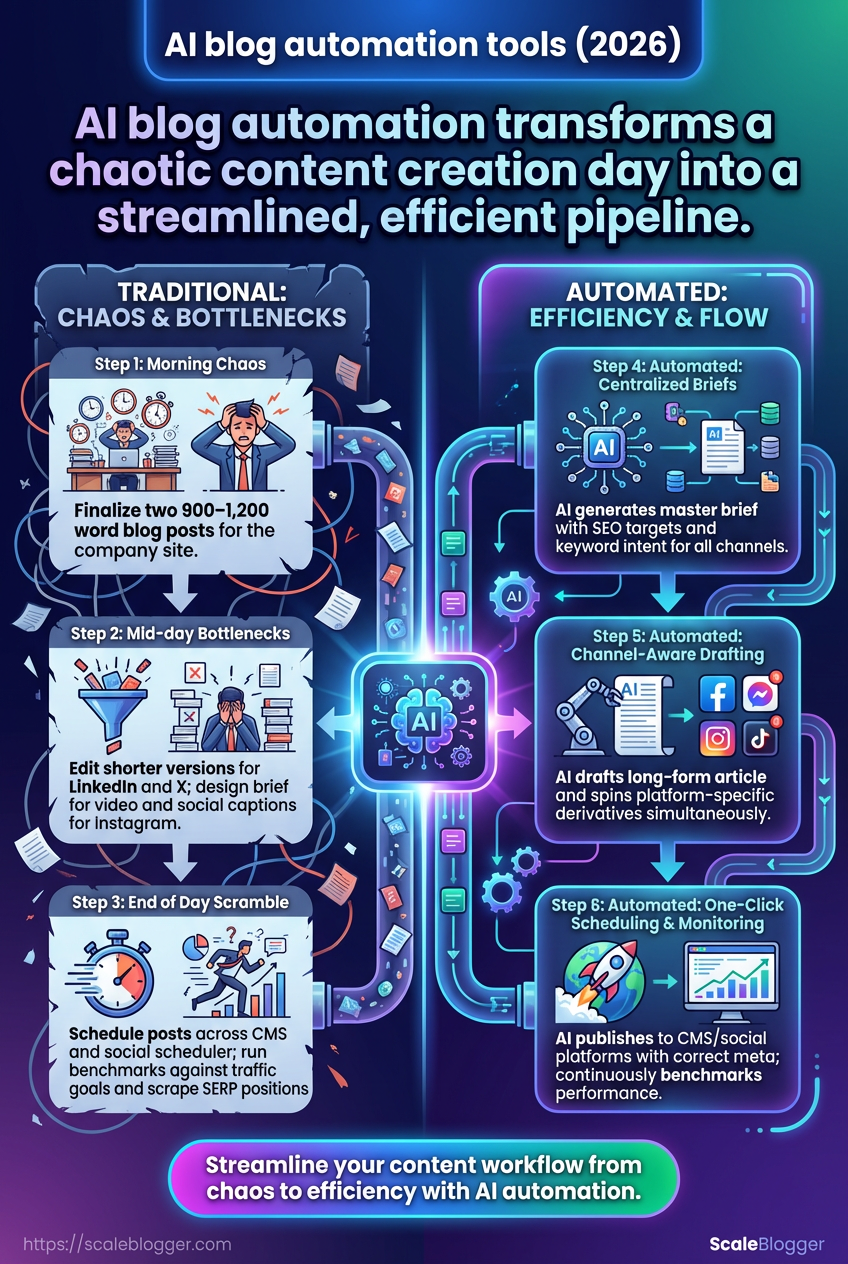
Morning: finalize two 900–1,200 word blog posts for the company site.
Late morning: edit shorter, platform-specific versions for LinkedIn and X.
Early afternoon: design brief for a short video and create social captions for Instagram.
Mid-afternoon: schedule posts across CMS and social scheduler, adjust publishing times.
End of day: run benchmarks against last week’s traffic goals and scrape SERP positions for one target keyword.
Why traditional processes break down Manual handoffs and spreadsheets create friction.
Assignments live in different tools, version control fails, and small formatting changes multiply when repurposing for each channel.
Content creators switch contexts constantly, which kills flow and increases time-to-publish.
SEO and originality add another layer.
AI drafts can speed writing, but many teams still struggle to polish for search intent and avoid duplication.
That forces extra rounds of editing and delays scheduling.
How AI blog automation addresses each bottleneck Automation centralizes the pipeline and removes repetitive work.
Topic clustering and brief generation take a handful of inputs and output consistent outlines for each channel.
Drafts can be produced by tools like Jasper, Copy.ai, or ChatGPT and then routed into a review queue.
Automated briefs: enforce SEO targets and keyword intent before drafting.
Channel-aware drafting: create a core long-form article plus short derivatives for social platforms.
One-click scheduling: publish to CMS and social platforms with correct meta and formats.
Continuous benchmarking: auto-reporting against weekly traffic goals and SERP positions.
Platforms like https://scaleblogger.com can orchestrate that pipeline so you spend more time on strategy and less on busywork.
How AI blog automation works — core components and architecture
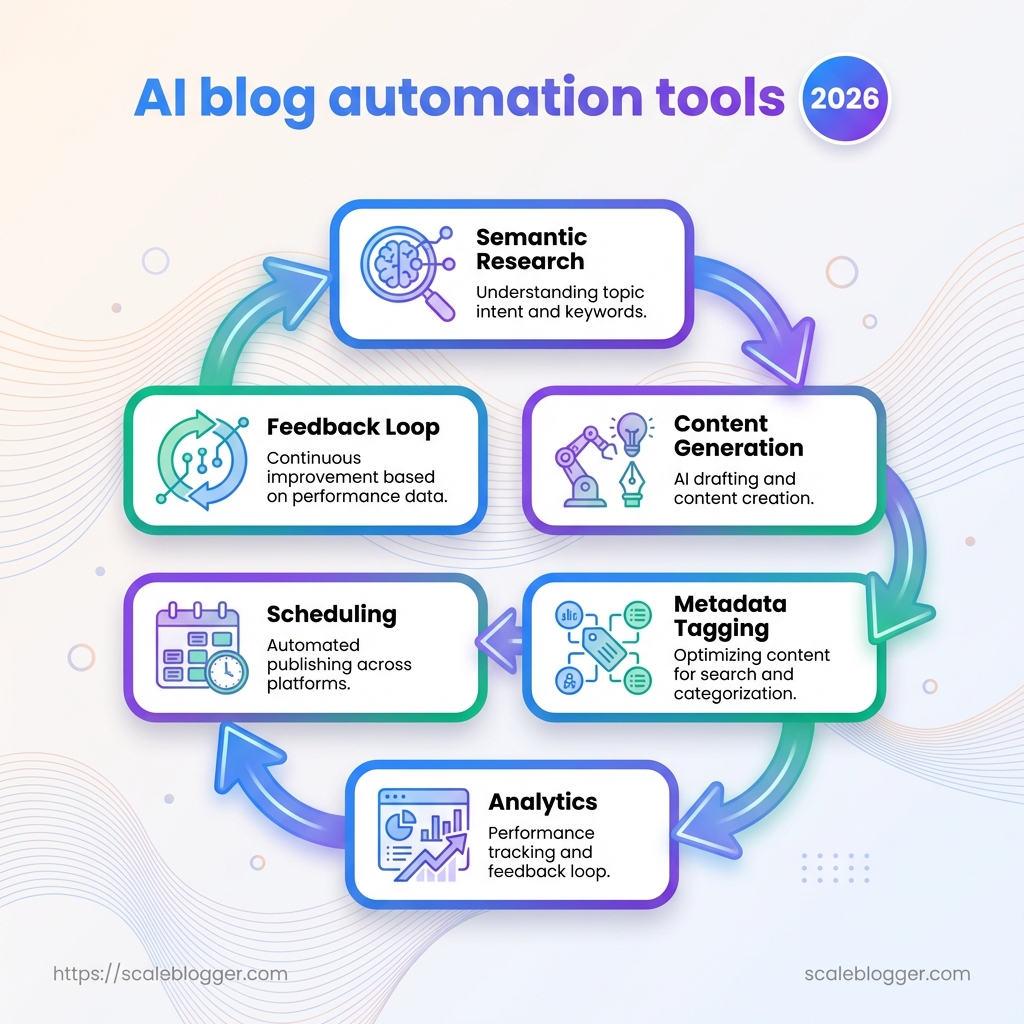
What if you could compress the editorial workflow of idea-to-publish into a repeatable, measurable pipeline? Modern AI blog automation stitches together semantic research, content generation, metadata tagging, scheduling, and analytics into a single feedback loop that scales.
At its core this is a modular architecture: discrete services talk to each other through APIs, a central orchestration layer controls flow, and human review gates ensure quality and compliance.
That setup lets teams cut content creation time substantially while keeping strategic control.
Expect automation to handle routine tasks, while people focus on high-value decisions like angle selection and final editing.
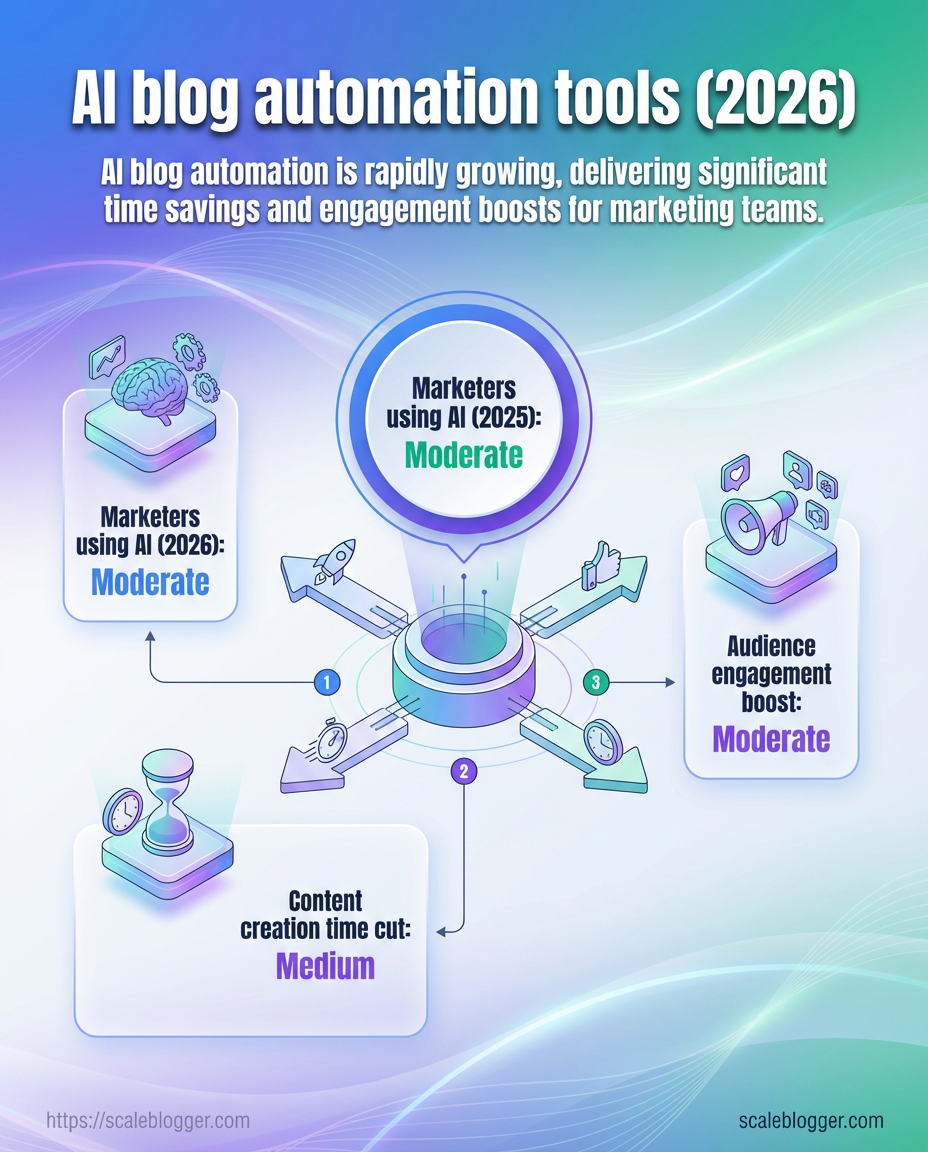
Practical gains are real: as of 2026, 40% of marketers use AI writing tools, and companies report roughly a 50% drop in content production time and a 30% lift in engagement metrics.
Integration patterns: CMS, attribution, and publishing pipelines
This diagram maps the end-to-end flow from idea to published post and downstream channels.
The visual shows the orchestration layer connecting research engines, drafting models, the CMS (WordPress/Ghost via API), and analytics sinks.
Attribution hooks record campaign and conversion metadata for accurate ROI.
Data governance and model control
Good governance starts with prompt standards, versioned fine-tuning, and explicit review gates.
Set rules for what models may generate and what requires human sign-off.
Establish
prompttemplates and allowed model versions.Implement automated checks (SEO, duplicate content, policy filters).
Route flagged drafts into a human review queue with audit logs.
As of 2026 the market for AI content generation tools is about $2.7 billion, driving rapid iteration in governance practices.
A disciplined architecture makes scaling safe and predictable.
Follow the pipeline, enforce review gates, and the system keeps improving with each publish.
Comparing leading AI blog automation tools (2026)
What if the tool you pick could cut your writing time in half and still improve engagement? In 2026 many teams expect that from AI tooling, and the market now offers distinct approaches: integrated end-to-end platforms, single-purpose assistants, and fully composable stacks you assemble yourself.
This section compares the most-used options so you can match platform capabilities to real needs: whether you want automated briefs and publishing, tight SEO guidance, or raw LLM power to stitch into your stack.
Below you’ll find a side-by-side look at features, integrations, and common pricing tiers to help decide quickly.
Practical trade-offs matter more than feature lists.
Pick a tool for how it fits your workflow, not just for its latest model name.
Tool comparison: feature and pricing overview
Platform | Primary focus (generation, scheduling, analytics) | Key AI features (NLP model type, content brief builder, SEO assist) | Integrations (CMS, analytics, calendar) | Pricing tiers | Best for |
|---|---|---|---|---|---|
Jasper | Generation & marketing copy | Proprietary marketing-tuned LLM; templates; brief builder; tone controls | WordPress, SurferSEO, Google Docs, Zapier | Free trial / Starter / Business / Enterprise | Small-to-mid marketing teams needing templates |
Copy.ai | Generation for startups | Fine-tuned LLM for short- and long-form; brief templates; idea generation | Zapier, HubSpot, WordPress | Free tier / Pro / Team | Startups and solopreneurs on a budget |
ChatGPT (OpenAI) | Flexible generation & API | GPT-family conversational models; plugins and prompt chaining; custom instructions | API integrations, Zapier, WordPress via API | Free / Plus / Enterprise (API pricing) | Teams that want programmable LLM access |
Writesonic | Conversion-focused generation | LLM templates for landing pages, blogs, ads; SEO tools | WordPress, Google Analytics, Zapier | Free / Creator / Professional / Business | Growth teams focused on conversions |
Frase | SEO research & briefs | SEO brief generation; SERP analysis; content scoring (LLM-assisted) | WordPress, Google Analytics, SEM tools | Trial / Solo / Team / Enterprise | SEO-led content teams needing briefs |
Budget long-form assistant | Lightweight LLM; templates; basic brief tools | Zapier, WordPress | Free / Saver / Unlimited | Freelancers and very small teams | |
End-to-end automation (generation→publish→repurpose) | Automated site crawl; topic clustering; SEO + LLM optimization; social repurposing | WordPress, Ghost, YouTube, LinkedIn, Instagram, GA | Starter / Pro / Enterprise | Teams wanting fully automated pipeline and repurposing | |
Open-source stack | Composable generation & control | LLM choices (e.g., Llama/Mistral), LangChain orchestration, custom briefers | Any via API: WordPress, GA4, CMS | Self-hosting costs + tooling | R&D teams and privacy-sensitive orgs |
Custom internal pipeline | Tailored enterprise workflows | Any LLM; custom scoring, editorial UI, SIEM/analytics integration | Full internal systems integration | Engineering + hosting + licensing | Enterprises with unique workflows and compliance needs |
The table highlights where platforms cluster: marketing templates, SEO briefers, end-to-end automation, or raw LLM APIs.
Choosing a full-platform solution versus a composable stack comes down to control, speed, and resources.
When to pick a full-platform solution versus a composable stack
Full platforms are best when you want fast wins and fewer integrations to manage.
They bundle SEO, briefs, scheduling, and social repurposing so non-engineering teams can ship content quickly.
Platforms also reduce operational overhead.
That matters if content velocity and consistent publishing are priorities.
Opt for a composable stack when you need strict data control, custom workflows, or unique models.
A stack gives flexibility but requires engineering time to maintain.
Speed: pick a full platform for immediate production gains.
Control: pick a composable stack for custom models, privacy, or compliance.
Cost predictability: platforms offer subscription pricing; stacks have variable engineering and hosting costs.
Scalability: platforms scale quickly for content ops; custom pipelines scale to specialized enterprise needs.
For most mid-market teams, an integrated platform that includes scheduling and SEO brief generation will be the fastest path to higher output and engagement.
Typical automated workflows and templates for blog programs
Imagine your editorial calendar as a factory line where each station hands off a near-finished part.
Automating those stations turns unpredictable sprints into repeatable cycles that scale.
The workflows below show how teams move common blog projects from brief to publish while keeping voice, SEO, and review gates intact.
Most modern teams use a mix of scheduled clusters and targeted refreshes.
The goal is to cover topics deeply, keep evergreen content live, and run a small number of high-intent conversion plays each month.
The examples that follow are ready to drop into most CMS-driven stacks or automation platforms.
Pre-built workflow examples
Weekly topical clusters: schedule a cluster that bolsters authority around one pillar topic per week.
Draft a cluster brief with the pillar title and 4–6 supporting posts.
Auto-generate SEO outlines for each supporting post.
Assign writers and set a two-stage review (editor → SEO reviewer).
Auto-schedule publish + syndication to social snippets.
Why it works: short cycles keep momentum and improve internal linking.
This screencast walks through setting up a weekly topical cluster workflow from brief creation to auto-publish.
Watch to see the brief template, automated outlines, and the two-step review gate in action.
Evergreen refresh workflow: run periodic audits and push updates to high-potential pages.
Quarterly content audit identifies pages with falling traffic but high conversions.
Auto-create a change request (new H2s, updated stats, fresh examples).
Assign a single author for rewrite and a fact-checker for sources.
Auto-deploy with a versioned publish note for tracking.
Why it works: targeted updates lift rankings faster than new posts.
Conversion-driven posts: design single-topic posts with measurable CTAs.
Create a one-page brief that includes target keyword, persona, conversion goal, and CTA.
Generate a conversion-first outline and hero copy variants.
Run A/B copy tests on headlines and CTA copy before publish.
Route final draft to legal/brand gate if required, then publish.
Why it works: focused briefs produce predictable pipeline outcomes.
Custom templates: briefs, SEO outlines, editorial checklists
Brief: A one-paragraph working title, target persona, conversion objective, and top 3 subtopics. SEO outline: Target keyword, 5 LSI keywords, suggested H2s with intent labels, internal link suggestions. Editorial checklist: Word count range, tone-of-voice bullets, image credits, fact-check steps, publish checklist.
Role assignments and review gates
Content owner: approves topic cluster and KPIs.
Writer: delivers draft and revisions.
Editor: quality, tone, and structural edits.
SEO reviewer: keyword fit, schema, meta tags.
Legal/brand: gate for regulated claims or sensitive brands.
Set SLAs: writers submit in 72 hours; editor returns in 48 hours; SEO check within 24 hours.
Use automated reminders and a final pre-publish check that validates metadata and internal links.
A repeatable set of workflows, paired with clear templates and SLAs, turns sporadic content effort into a steady, measurable program.
Measuring performance and benchmarking content with AI tooling
What if your analytics stopped being a fog of numbers and started acting like a performance coach? Good measurement turns automation from a black box into a predictable machine.
With the right metrics and comparisons, you can tell whether AI is saving time, improving relevance, or just producing more work.
Start by tracking both efficiency and audience impact.
Adoption data shows 40% of marketers use AI writing tools as of 2026, and many teams report a 50% drop in content creation time plus a 30% lift in engagement metrics (2026).
Those gains matter only if you measure the right things and compare them to sensible baselines.
This section lays out the metrics to watch, a practical benchmarking table to compare pre/post automation, and concrete A/B testing practices for AI-generated variants.
Key metrics to track for automated blog programs
Organic sessions: Monthly visits from organic search, measured in GA4 and Search Console.
Click-through rate (SERP): Percentage of impressions that become clicks; use Search Console for page-level CTR.
Average time on page: Median session length on the article; flags content relevance and depth.
Scroll depth: % of users who reach 50% / 75% / 100% of the page; indicates content consumption.
Assisted conversions: Number of conversions where the blog played a supporting role in the customer journey.
Bounce rate: Single-page sessions percentage; watch alongside scroll depth for nuance.
New vs returning users: Mix of discovery vs retention; useful for topical authority signals.
On-page conversion rate: Newsletter signups or trial starts attributable to the article.
Pages per session: Measures broader site engagement after the article visit.
Keyword rankings (top 3): Share of targeted keywords in SERP positions 1–3.
Benchmarking frameworks: comparative traffic, engagement, and conversion baselines
Benchmark template (compare pre-automation vs post-automation)
Metric | Definition | Baseline target | Measurement interval | Notes |
|---|---|---|---|---|
Organic sessions | Visits from organic search | 1,200 sessions / month | Monthly | GA4; compare rolling 90-day windows |
Click-through rate (SERP) | Clicks / impressions for page | 4.5% CTR | Weekly | Search Console; monitor SERP feature impact |
Average time on page | Median time spent per session | 2:20 (mm:ss) | Weekly | GA4; segment by device |
Scroll depth | % reaching 50% / 75% / 100% | 60% / 40% / 15% | Weekly | Use analytics or page scripts |
Assisted conversions | Conversions where page was an assist | 18 assists / month | Monthly | Attribution in GA4; compare paths |
Bounce rate | % single-page sessions | <45% | Weekly | Interpret with scroll depth |
New vs returning users | % new users of total | 65% new / 35% returning | Monthly | Useful for topical reach |
On-page conversion rate | Goal completions per visit | 1.8% | Monthly | Newsletter signups, trials |
Pages per session | Avg pages after landing | 2.6 pages | Monthly | Site-wide engagement signal |
Keyword rankings (top 3) | Count of target keywords in positions 1–3 | 12 keywords | Monthly | Use Search Console or rank tracker |
This table is a working template: plug your own historical baselines and monitor relative change over consistent intervals.
Data sources should include GA4, Search Console, and internal conversion logs.
A/B testing AI-generated variants and statistical significance best practices
Define a clear primary metric (conversion, CTR, or time on page).
Calculate required sample size using your baseline conversion and a minimum detectable effect (aim for 10–20% uplift).
Run tests across full weekly cycles (minimum two weeks; longer for low-traffic pages).
Avoid peeking and early stopping; use pre-registered endpoints or sequential methods with corrections.
Use multiple variants sparingly; prefer A vs B then iterate on winners.
Compare AI tools by generating equivalent variants with Jasper, Copy.ai, or ChatGPT, and hold tone/structure constant.
Statistical rigor matters: low sample sizes and seasonal swings create false positives.
Track lift, confidence intervals, and business impact before rolling a variant site-wide.
Platforms like https://scaleblogger.com can automate many benchmarking steps and report cross-industry baselines if you need scalable comparisons.
Measure both creation efficiency and audience outcomes, then let the data tell you which AI moves deserve scale.
Implementation roadmap: from pilot to program scale
Imagine running a small, tightly scoped pilot that proves you can cut cycle time in half while keeping quality high.
That’s the practical aim: validate the model, learn fast, then scale with controls that prevent drift.
Start with measurable objectives, a realistic sample, and clear pass/fail criteria.
Then layer governance and human-in-the-loop checks so automation raises output without creating new risks.
40% of marketers now use AI writing tools (2026), and organizations that pilot thoughtfully capture most of the upside while avoiding common mistakes.
Pilot design: objectives, sample size, and evaluation criteria
Design the pilot to answer three questions: does automation save time, does it maintain or improve engagement, and can editorial controls stop misinformation?
Objective: Validate 50% reduction in creation time and a net neutral or positive change in engagement.
Sample size: Run 10–20 articles over 4–6 weeks for a single vertical or audience segment.
That size balances signal with speed.
Evaluation criteria: Use time-to-publish, editorial score (human reviewer rubric), traffic uplift, and a misinformation/fact-check failure rate threshold (e.g., <2% flagged items).
Track results weekly and make decisions after the pilot window.
Set baseline metrics from existing articles.
Launch pilot with controlled templates and a fixed CMS integration.
Compare pilot outputs against baseline using the agreed rubric.
Change management: team roles, training, and governance
Step | Owner | Estimated time | Success criteria |
|---|---|---|---|
Define pilot goals and KPIs | Pilot owner | 3 days | KPI doc approved; baseline metrics captured |
Select tools and connect CMS | AI ops engineer | 1–2 weeks | Two-way CMS publishing; roll-back tested |
Create templates and workflows | Content lead | 1 week | Reusable templates and handoff checklist ready |
Train writers and reviewers | Training lead | 2 weeks | 80% of staff complete training; quiz pass rate ≥85% |
Establish governance policies | Legal + Editorial | 1 week | Draft policy signed; escalation paths mapped |
Run pilot and collect data | Pilot owner | 4–6 weeks | All pilot articles published and logged |
Evaluate against criteria | Analytics lead | 1 week | Metrics compared; decision recorded |
Iterate templates and tooling | Content lead + AI ops | 2 weeks | Versioned templates with change log |
Expand to new verticals | Product manager | 4 weeks per vertical | Measured repeatability with stable KPIs |
Document playbook and SOPs | Documentation owner | 1 week | Playbook published; onboarding materials ready |
This checklist maps owners to timing so scaling doesn’t rely on tribal knowledge.
Use it as the bones of your SOPs.
Risk controls: misinformation, human-in-the-loop, and copyright
Automation needs tripwires.
Implement automated fact checks, source-trace metadata, and a mandatory human sign-off for any claim flagged by the model.
Automated fact-checking: Integrate
fact-checkAPIs and set confidence thresholds.Human sign-off: Any article with flagged claims requires editor approval before publish.
Copyright guardrails: Maintain an originality score and require source attribution for quoted material.
Model versioning: Lock model versions per campaign to avoid unpredictable behavior.
Audit logs: Keep change histories and reviewer notes for post-publish review.
Final decisions should flow from data, not faith.
A tight pilot with clear roles and strong risk controls is the fastest path from curiosity to a reliable content program.
