

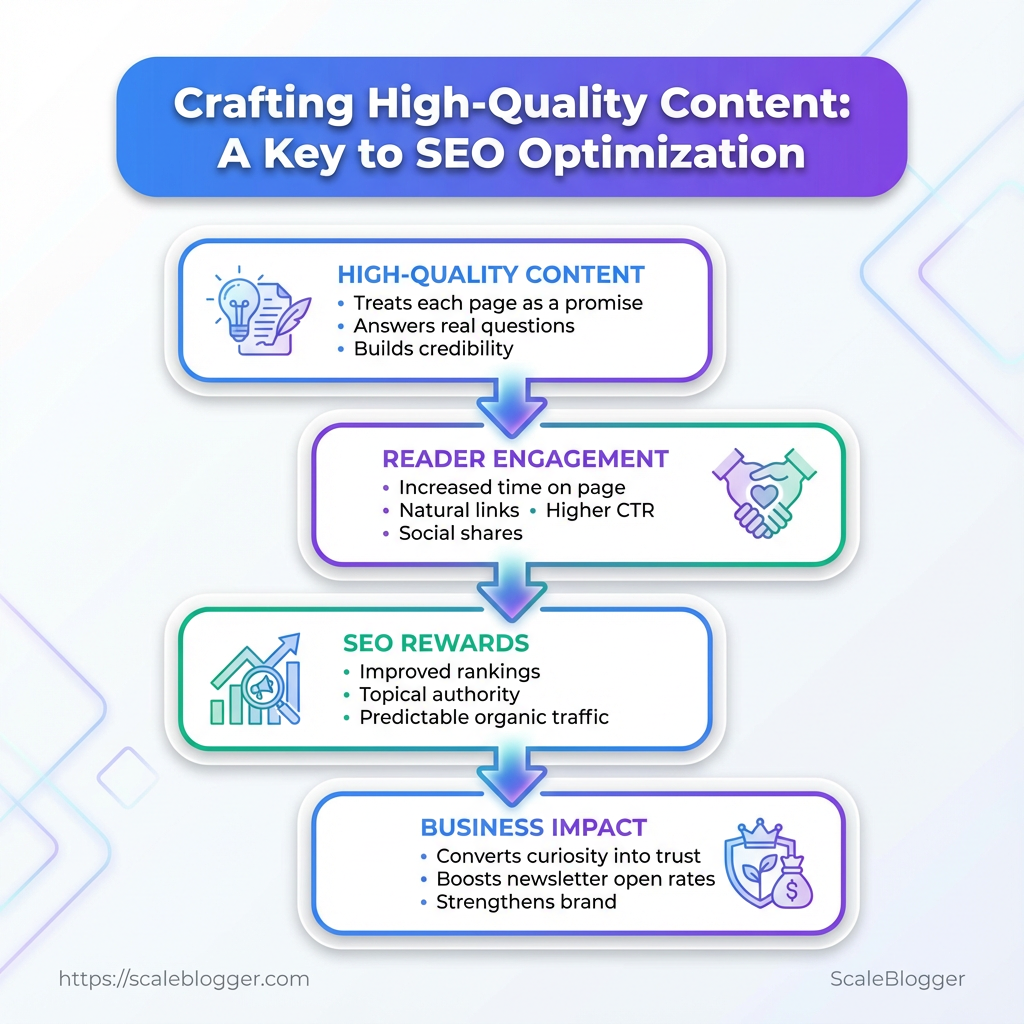
Crafting high-quality content starts with understanding what readers are actually searching for and delivering an answer that is useful, clear, and trustworthy.
Search results are crowded with shallow, keyword-heavy pages, making genuine value more important than ever. Strong content combines search intent, credible information, clear structure, and practical insights.
Effective SEO content optimization isn’t about stuffing keywords or simply writing longer articles. It’s about creating content that satisfies readers while following SEO best practices.
When quality and SEO work together, content has a better chance of earning rankings, engagement, and long-term organic traffic.
Key Takeaway: Start by focusing on three critical areas: the right tools, permissions to use them, and the skills… Start by focusing on three critical areas: the right tools, permissions to use them, and the skills necessary for data-driven decisions. Without…
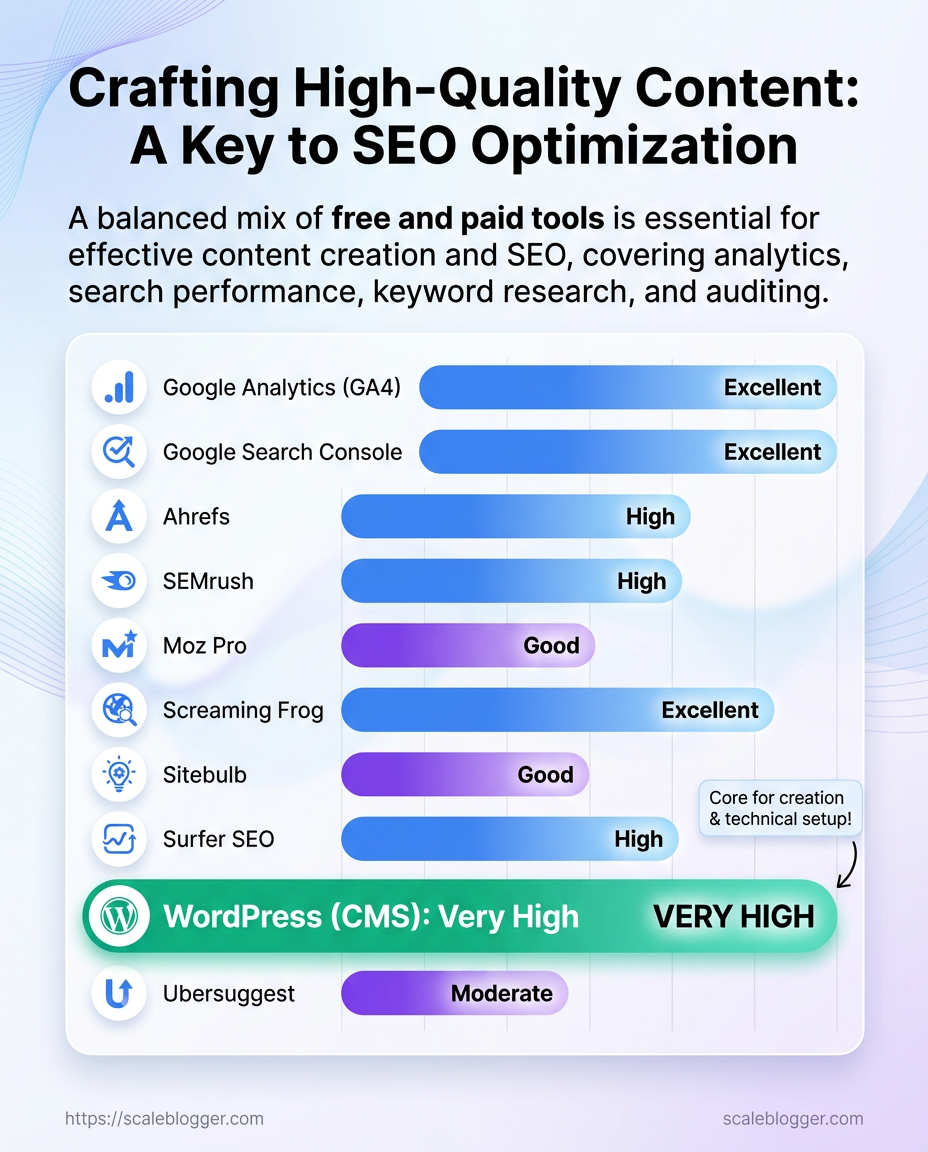
Recommended tools by purpose (keyword research, analytics, content editor, SEO auditing)
Table: What You’ll Need (Prerequisites) — Tool, Purpose, Cost (typical) & more
| Tool | Purpose | Cost (typical) | Why it’s useful |
|---|---|---|---|
| Google Analytics (GA4) | Analytics | Free | Traffic & conversion tracking, event measurement (GA4) |
| Google Search Console | Search performance | Free | Index coverage, search queries, sitemap insights |
| Ahrefs | Keyword research / backlinks | $99+/mo | Comprehensive backlink index, keyword explorer |
| SEMrush | Keyword research / competitive intel | $119.95+/mo | Competitive gap analysis, site audits |
| Moz Pro | SEO toolkit | $99+/mo | Keyword tracking, on-page grader |
| Screaming Frog | Site crawling | Free / £249/yr | Technical crawl, duplicate content & redirect checks |
| Sitebulb | SEO auditing | $13+/mo | Actionable audit reports with priorities |
| Surfer SEO | Content editor / optimization | $59+/mo | Content scoring against SERP competitors |
| WordPress (CMS) | Content editor / publishing | Free / hosting varies | Flexible publishing, plugins for SEO |
| Ubersuggest | Budget keyword tool | $12+/mo | Affordable keyword ideas and content suggestions |
Key insight: This mix balances no-cost essentials (GA4, Search Console, WordPress) with paid tools that speed discovery and prioritize work. Aim for one strong keyword tool, one auditing crawler, and a CMS you control; everything else accelerates scaling.*
A quick verification step now saves weeks of friction later: confirm access levels, install basic tracking (events, conversion goals, sitemap), and run one audit so the team has a clean baseline. Getting these prerequisites right turns strategy into repeatable execution.
Key Takeaway: Start by matching audience intent to topic ideas before you touch keywords. This… Start by matching audience intent to topic ideas before you touch keywords.
Step-by-step: Research & Topic Validation
Start by matching audience intent to topic ideas before you touch keywords. This alignment helps avoid wasting time on popular searches that do not lead to conversions. Once intent is clear, expand from a few seed topics into a prioritized keyword set, document what the SERP actually shows, and flag content gaps you can own.
Buyer/reader personas: Define at least one clear persona that includes their goals, challenges, and decision-making stage. Analytics access: Google Search Console and Google Analytics or equivalent. Basic keyword tool: Any keyword explorer that shows volume and difficulty.
Step 1: Identify Audience Intent and Seed Topics
- Map each persona to intent categories: informational, navigational, transactional, or commercial investigation.
- Pick 3–5 seed topics rooted in your product/industry or audience problems (for example: high-quality content, SEO best practices, content marketing).
- For each seed topic, run 5 SERP checks: title tags, meta descriptions, featured snippets, People Also Ask, and top-format types (listicle, how-to, long-form guide).
- Document content gaps where existing pages either miss depth, original data, or modern formats (video, interactive, templates).
What to capture per seed topic:
- Search intent pattern: dominant intent among top 10 results.
- SERP features present: quick wins for featured snippets or video carousel.
- Gap note: what competitors didn’t answer or executed poorly.
Step 2: Keyword Expansion and Prioritization
- Expand each seed with related keywords and long-tail variants using your tool. Aim for 15–40 phrases per seed.
- Assign intent to each keyword: primary intent should align with the persona mapped earlier.
- Score and prioritize using a simple, repeatable formula.
Scoring formula example
Primary Keyword: Choose one focus term that matches commercial intent and has reasonable volume (e.g., high-quality content). Supporting keywords: Select 3–6 modifiers across intent (how-to, benefits, tools, best practices). score = (intent_weight 50) + (relative_volume 30) - (difficulty 20)
Interpretation: Higher score = higher priority. Weight intent_weight by 1–3 (3 for transactional/commercial), normalize relative_volume 0–1, and use difficulty 0–1.
Practical prioritization tips:*
- Low-difficulty, informational targets: use for quick traffic and internal linking.
- Medium difficulty, commercial targets: build pillar content and chase conversions.
- High-difficulty terms: target only if you can add unique data, tooling, or distribution.
For automating parts of this pipeline or predicting content performance, consider AI-assisted systems that scale tagging, topic clusters, and publishing—Scale your content workflow can help accelerate that work.
Getting intent right up front and using a simple scoring system saves weeks of misguided content. When those seeds and scores line up, editorial work becomes a focused growth engine rather than guesswork.
Step-by-step: Outline & Structure
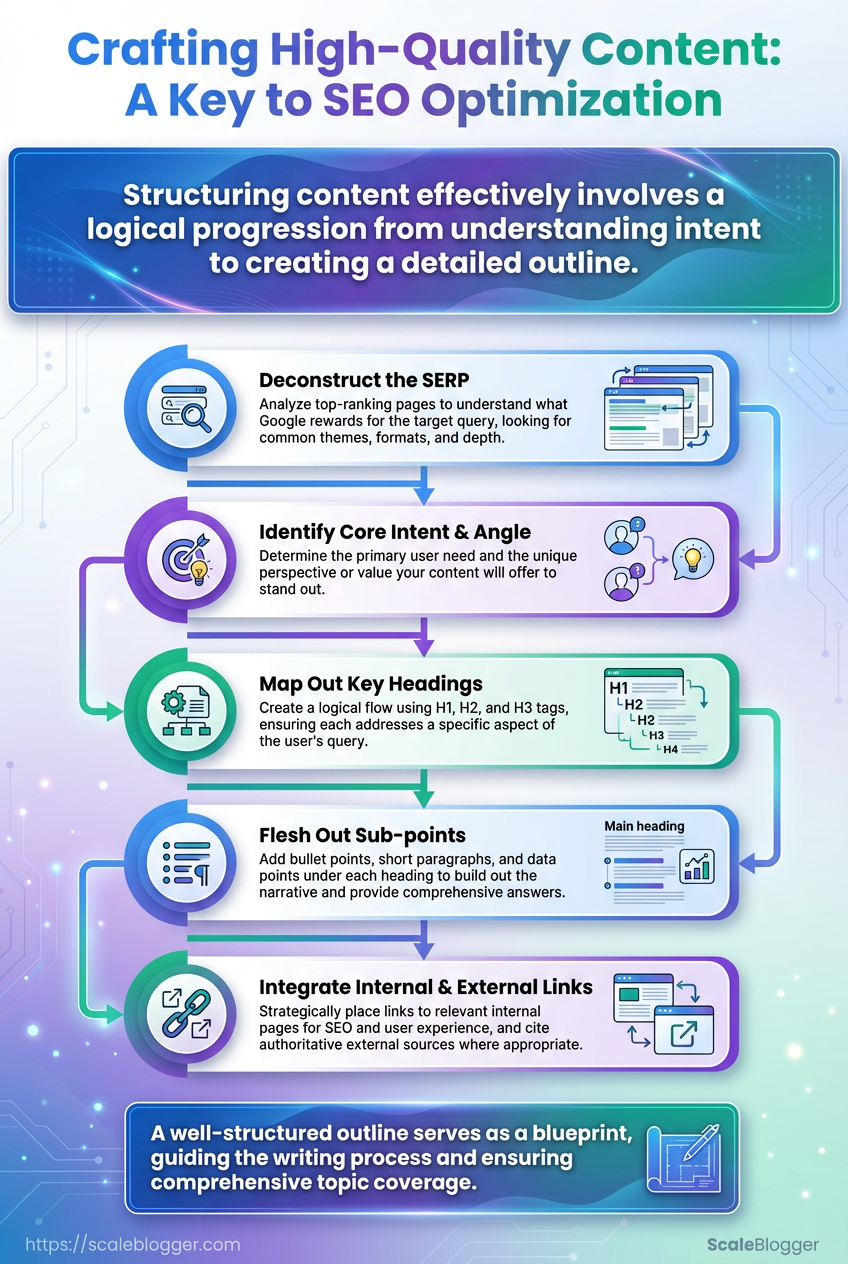
Start by building an outline that prioritizes search intent and user experience. Use keyword clusters to map H2 sections, place the primary keyword in the title and the first H2 or its opening paragraph, and design each section to satisfy a distinct sub-intent. That approach produces an SEO-first outline that guides writers and signals topical depth to search engines while keeping content useful for readers.
Audience profile: Defined personas and top questions the content must answer.
Keyword research: A list of primary keyword and 4–8 semantic keyword clusters.
Competitive sample: 3 top-ranking pages for your target keyword to audit structure and intent.
Content brief template: Word count target, desired CTAs, internal links, and examples.
Tools & materials
- Keyword clustering tool: Groups related queries into section-level topics.
- SERP analyzer: Identifies features (People Also Ask, snippets) to target.
- Content editor or CMS: Where the outline will be implemented.
- Optional: AI content automation to scale drafts and surface semantic recommendations.
Step-by-step process
- Identify the primary search intent and note the
primary keywordto anchor your page.
- Run keyword clustering and map 4–6 clusters that become H2s (each cluster = one user need).
- Draft H2 headings using descriptive language and include a cluster keyword naturally.
- For each H2, list 3–5 microtopics (H3s) that answer sub-questions or provide examples.
- Assign word-count ranges and content type (how-to, list, case study) to each H2 for balance.
- Add internal link targets and suggest 1–2 external resources per major section.
- Define meta elements: recommended meta title, meta description, and sample slug.
- (cluster: content marketing tactics): How to build a content calendar that drives traffic
- (cluster: SEO best practices): On-page SEO checklist for high-quality content
Problem: H2s feel redundant → Consolidate overlapping clusters and retest search intent.
Problem: Primary keyword feels forced → Move the keyword into the intro or H2 subtext; use semantic variants instead.
Problem: Sections lack depth → Add specific examples, data, or a short case study for each H2.
Tips woven into process: use natural language variations of target phrases, prioritize user questions over exact-match stuffing, and balance evergreen guidance with timely examples. Drafting an SEO-first outline this way makes the writing phase faster and increases chances of ranking while keeping the reader engaged and satisfied.
Key Takeaway: Start writing as soon as the outline is stable. Treat the draft like a lab: test ideas, make quick edits, and keep up the pace.
Troubleshooting Common Issues
When a post isn’t gaining traction, begin with simple checks before changing the entire strategy. Run a basic triage: confirm indexation, assess page speed, and verify on-page signals like canonical tags and structured data. Those three checks catch the majority of visibility problems and guide whether to dig into content, technical SEO, or distribution.
Immediate triage steps
- Check indexation and coverage in Google Search Console.
- Run the page through
PageSpeed Insights(mobile and desktop) to spot slow resources.
- Do a site-restricted search:
site:yourdomain.com "page title"to confirm the exact URL shows.
- Review the page’s
canonicaltag and any redirect chains.
- Inspect schema markup in the page source for syntax errors or missing properties.
Common problems and fixes
Slow page load: Reduce third-party scripts, compress images, and enable text-compression (gzip or brotli). Implement critical CSS and lazy-load below-the-fold images. A jump from 4s to 2s often increases crawl efficiency and user engagement.
Not indexed or dropped: If Search Console shows “Excluded” or “Crawled — currently not indexed”, submit the URL for reindexing after fixing thin content or duplicate issues. Ensure no noindex header or meta tag is present.
Canonicalization errors: Multiple canonicals or self-referencing mismatches confuse crawlers. Ensure the preferred URL is canonical and that server-level redirects (301) point cleanly to it.
Broken structured data: Use Rich Results Test to validate JSON-LD. Missing required fields often prevent enhanced listings; fix by adding minimal valid properties rather than overcomplicating markup.
Low internal visibility: Check internal linking — a poor internal link structure prevents authority flow. Add contextual links from higher-traffic pages and surface the article in category pages or topic clusters.
Traffic drop after deployment: Roll back recent changes in staging, test page speed differences, and compare Search Console performance dates to isolate the trigger.
Tools & quick checklist
- Search Console: verify coverage and discovery issues
- PageSpeed Insights: measure Core Web Vitals and resource bottlenecks
- Site search (
site:): confirm unique URL visibility - Rich Results Test: validate schema correctness
If recurring technical problems persist, consider automating checks and alerts; automated pipelines that flag indexation or CWV regressions save time and keep content performing. A short diagnostic run often reveals whether the fix is technical, editorial, or distributional — and points to the fastest path back to growth.
Tips for Success & Pro Tips
Treat content as a product that ships, measures, and improves. Begin with a measurable goal, such as traffic, leads, or conversions. Use analytics for every item and make changes weekly based on what works. That discipline helps ensure your posts contribute to a reliable content strategy.
Quick-win pro tips
- Audit before you build: Run a mini content audit to find pages with organic traction and conversion signals.
- Instrument everything: Add analytics events for clicks, scroll depth, and form interactions so you can prioritize changes that affect behavior.
- Use structured data: Implement
schema.orgwhere relevant to increase chance of rich results and SERP real estate. - Repurpose smartly: Turn top-performing subsections into short social threads, email snippets, or a one-page PDF lead magnet.
- Automate repetitive work: Use templates and automation for meta tags, internal linking, and scheduling to reduce friction.
Iterative optimization process (quick steps)
- Define a single metric to improve for the page (e.g., CTR, time on page, lead rate).
- Review analytics and identify the strongest and weakest elements on that page.
- Create one hypothesis (example: improve H1 clarity to boost CTR).
- Run a small test — change the headline, CTA placement, or feature snippet — track for 2–4 weeks.
- Keep winning changes and document learnings in a content playbook.
Tactical examples you can steal
- Update a 12-month-old how-to with current stats, a new example, and a consolidated FAQ; often raises rankings within a month.
- Add
FAQPagestructured data to a listicle and test for increased impressions from rich snippets. - Extract a high-engagement paragraph and publish it as a LinkedIn post linking back to the original for traffic and links.
Tools and checks worth adopting
- Content scoring: Rank drafts by topical depth and user intent alignment.
- SERP feature tracking: Monitor whether your pages win rich snippets, People Also Ask, or knowledge panels.
- Republishing cadence: Refresh cornerstone posts every 3–6 months instead of always creating new pages.
For teams building scale, consider linking editorial work to an automated pipeline so experiments and wins are repeatable; platforms that provide predictive SEO and automated publishing make that step much easier. Keep the loop tight — build, measure, iterate — and the compounding wins follow naturally.
Measure Results & Iterate
Begin by monitoring a few key metrics and reviewing them regularly. Focus on whether content moves business outcomes, not just vanity numbers. That means measuring engagement, discovery, and conversion with clear, repeatable methods so each iteration is driven by evidence rather than gut.
What to measure and why
Primary KPIs
Organic traffic: Measures discovery; use sessions and users from your analytics platform. Search visibility: Track impressions and average position in Search Console to spot keyword trends. Engagement: Look at `avg.
session duration and pages per session` to judge interest. Lead conversion: Track form fills, email signups, or MQLs attributed to content. Content ROI: Revenue or pipeline influenced per content piece (where possible).
Common features of a solid measurement setup:
- Data centralization: One dashboard pulls analytics, Search Console, and CRM.
- Attribution clarity: UTM conventions and consistent tagging.
- Baseline and targets: Historical benchmarks plus realistic improvement goals.
Review cadence and iteration process
- Set a weekly pulse check for traffic spikes and errant technical issues.
- Conduct a monthly content performance review to compare pieces against KPIs and identify winners and losers.
- Run a quarterly strategic audit to shift focus across topics, formats, and distribution channels.
Each cadence has a purpose: weekly protects site health, monthly drives tactical fixes, quarterly informs strategy shifts.
Making data-driven content decisions
Scoring rubric: Score each post 0–10 on Visibility, Engagement, and Conversion. Sum the scores and prioritize anything above 18 for replication and anything below 8 for rework or archive.
Action templates:
- If Visibility low, boost internal links, update metadata, and expand target keywords. 2.
If Engagement low, test new hooks, add richer media, or revise structure for scannability. 3. If Conversion low, A/B test CTAs, adjust offer relevance, and check page speed.
Practical tools to consider include centralized dashboards and automated alerts; for teams scaling content workflows, AI content automation can speed reporting and surface optimization opportunities.
Measure consistently, iterate with small experiments, and let metrics guide priorities. Over time, those disciplined cycles turn content from a cost center into a predictable growth engine.
Every piece in this guide points to the same practical habit: prioritize readers, then tune for search. Tight topic validation, clear outlines, and a disciplined edit pass produce higher-quality content that actually ranks because it satisfies intent, not because it stuffs keywords. Teams that ran iterative tests on headlines and section structure saw measurable uplifts in time on page and organic clicks; fixing thin sections and adding data-driven examples moved pages from invisible to competitive.
If you’re wondering how long this takes, plan a week for research and outline, a few days for drafting, and another round for optimization — and measure lift with traffic, SERP position, and engagement metrics. If the question is whether you need extra tools: they speed scale, but the process still rests on strong ideas and careful editing.
For a practical next step, pick one priority topic, build the outline from this workflow, and run one sprint to publish and measure. To that process, Automate your content workflow with Scaleblogger offers templates and publishing automation that plug into editorial sprints and SEO best practices. After one sprint you’ll know which headlines and sections deserve more investment — then double down.
