

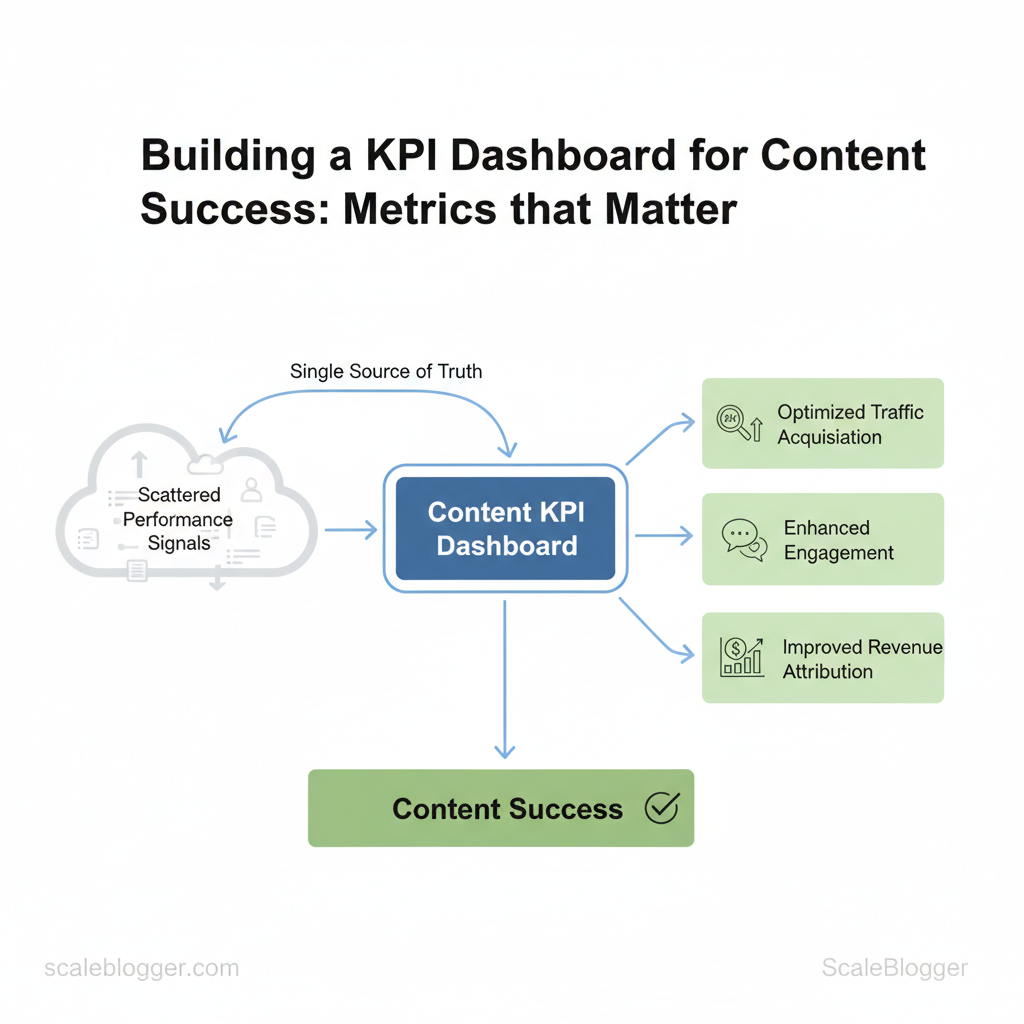
Marketing teams struggle when they cannot show which content is effective. A content KPI dashboard solves this by combining scattered performance signals into one reliable source for making decisions. With clear visibility into content marketing metrics, teams can stop guessing. They can focus on optimizing important areas like traffic acquisition, engagement, and revenue attribution.
Picture a dashboard that surfaces the weakest pages, highest-converting topics, and channels wasting budget, all in one view. That clarity shortens review cycles, improves editorial planning, and aligns content efforts with business goals measured through consistent frameworks for CTR, time on page, and conversion rate.
This introduction prepares practical steps for designing a dashboard focused on measuring content success, choosing the right signals, and automating reporting to reduce manual work. Expect concrete rules for metric selection, visual design choices that prompt action, and common pitfalls to avoid when you move from vanity metrics to business-impact indicators.
- How to pick three priority KPIs that link to revenue
- When to use engagement versus funnel metrics for decision-making
- Design patterns that make patterns obvious to stakeholders
- Automations that cut weekly reporting time in half
Explore Scaleblogger dashboard automation and templates: https://scaleblogger.com — a practical starting point for building and scaling your content KPI dashboard.
> Key Takeaway: ## Define Objectives and Mapping to Business Goals
Start by selecting one clear business goal for each content campaign. Then, connect it to measurable results.
Define Objectives and Mapping to Business Goals
Start by selecting one clear business goal for each content campaign. Then, connect it to measurable results. Choose objectives that match the company’s current phase. This includes raising awareness for early-stage brands, acquiring customers when demand grows, enhancing engagement, retaining subscribers, and enabling revenue where content can boost sales.
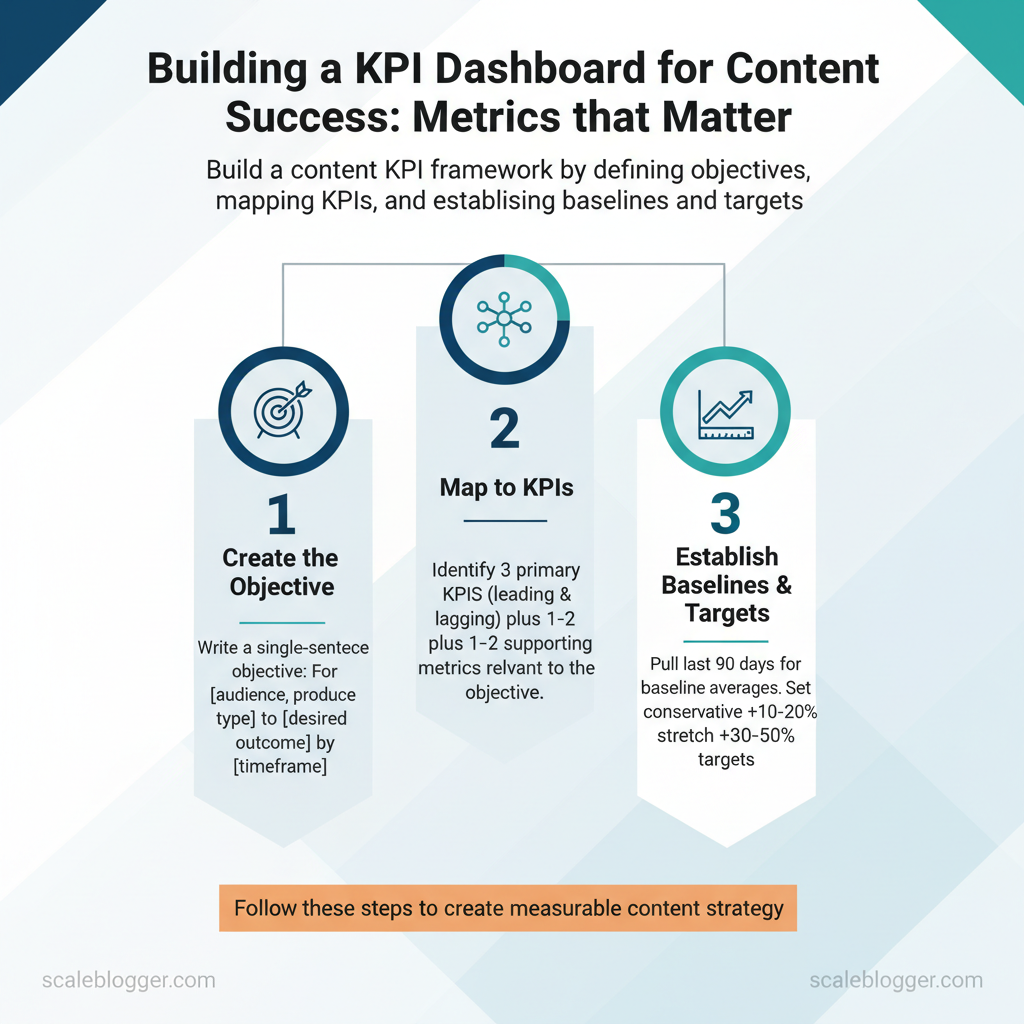
Each objective should translate into specific KPIs, a baseline, and a realistic stretch target so teams know whether the work moved the business.
You’ll need access to web analytics (GA4 or equivalent), CRM conversion data, a recent content performance report, and clear business goals for the next quarter.
- Create the objective: write a single-sentence objective using this template:
For [audience], produce [content type] to [desired outcome] by [timeframe].- Example:
For small-business owners, publish a weekly how-to series to increase trial sign-ups by 18% in 90 days, according to recent research from industry data.
- Map to KPIs:
- Leading KPIs: early indicators you can (e.g., click-through rate, content impressions, new visitors).
- Lagging KPIs: outcomes that prove impact (e.g., MQLs, trial sign-ups, revenue attributed).
- Recommended tracking: 3 primary KPIs plus 1–2 supporting metrics.
- Establish baselines and targets:
- Pull the last 90 days for baseline averages.
- Set a conservative target at +10–20% over baseline and a stretch target at +30–50% depending on channel maturity.
- Review weekly for leading indicators and report monthly on lagging KPIs.
Common content objectives and how they map in practice:
- Awareness — Primary KPI(s): organic impressions, new users; Use when: launching brand or entering a new market. Acquisition — Primary KPI(s): new leads, conversion rate; Use when: scaling demand generation. Engagement — Primary KPI(s): time on page, pages per session; Use when: improving content depth or lowering churn risk.
- Retention — Primary KPI(s): repeat visits, login frequency; Use when: subscription or product usage drives LTV. Revenue Enablement — Primary KPI(s): MQL-to-SQL rate, deal velocity; Use when:* prioritizing pipeline acceleration.
Common tools: analytics platforms for baselines, CRM for customer movement, content calendars for cadence. Expected outcomes: clearer prioritization, faster decision-making on content investments, and measurable business impact within a quarter. Understanding these principles helps teams move faster without sacrificing quality.
> Key Takeaway: ## Select the Right Metrics: What to Track and Why
Prerequisites: access to GA4 property, CRM export (CSV), and your content calendar. Tools/materials needed: Google Analytics / GA4, CRM or marketing automation, UTM builder, spreadsheet or BI…
Select the Right Metrics: What to Track and Why
Prerequisites: access to GA4 property, CRM export (CSV), and your content calendar. Tools/materials needed: Google Analytics / GA4, CRM or marketing automation, UTM builder, spreadsheet or BI tool, and a simple content scorecard template.
Begin tracking metrics that connect directly with business outcomes, instead of focusing on vanity metrics. Prioritize metrics that measure reach, engagement, and conversion while layering qualitative signals to assess brand and content quality. Measurement best practices include consistent UTM tagging, a fixed attribution window (commonly 30 days for content campaigns), and documented naming conventions in a shared analytics glossary.
- Measure in GA4 under Reports > Engagement > Pages and screens. Filter by default channel grouping
Organic Search. In GA4, calculate asaverage_engagement_timeper page.
- Track via GA4 conversion events mapped to business goals. Use form submits, demo requests, and API syncs to match sessions to leads.
Table: Section Content — Metric, Definition, How to Measure & more
| Metric | Definition | How to Measure | Formula / Notes |
|---|---|---|---|
| Sessions | Total visits to content pages | GA4 > Engagement > Pages and screens | No formula; use sessions metric |
| Organic Sessions | Visits originating from search engines | Use default channel Organic Search filter |
Compare month-over-month for SEO impact |
| Time on Page | Average time users stay engaged | GA4 average_engagement_time per page |
Use >30s as a basic engagement threshold |
| Conversion Rate | % sessions with defined conversion event | Conversions / Sessions | Example: conversions ÷ sessions × 100 |
| Leads Generated | Number of contacts recorded in CRM | CRM export matched to GA4 via UTM/session ID | Include lead quality tags (MQL/SQL) for context |
Advanced and qualitative metrics
- Build a
- Measure
Track
micro-conversions* (newsletter signs, time-on-section >60s) to surface content that influences later purchase decisions.Measurement steps
- First, instrument pages with consistent
UTMparameters and GA4 events. 2.
Then, sync conversions to CRM and establish a 30-day attribution window. 3. Finally, update the content scorecard weekly and review monthly with stakeholders.
Common misinterpretations to avoid: conflating time on page with intent, treating organic growth as only SEO work, or using conversion rate without lead quality context. When implemented consistently, this metric mix reveals not just what content performs, but why it moves the business—letting teams prioritize work that drives measurable impact.
> Key Takeaway: ## Data Sources and Tracking Implementation
Begin by considering tracking as a data agreement among marketing, product, and analytics teams. Clearly outline the events you expect, the identifiers to use, and the standards for data quality.
Data Sources and Tracking Implementation
Begin by considering tracking as a data agreement among marketing, product, and analytics teams. Clearly outline the events you expect, the identifiers to use, and the standards for data quality. First, create a single analytics property, usually GA4, and use a tag layer like Google Tag Manager. Then, set UTM conventions, events, and CRM identifiers so that all systems communicate clearly.
The practical outcome: reliable, auditable signals for content performance and lead attribution.
- Essential tracking setup (30–90 minutes per property)
- Create a
GA4property and link it toGoogle Tag Managerfor deployment. - Publish a consistent
UTMschema:utm_source,utm_medium,utm_campaign,utm_content,utm_term. - Define analytics events:
page_view,form_submit,cta_click,scroll_depth,video_engagement. - Push customer identifiers to dataLayer (e.g.,
user_id,lead_id) and sync with CRM. - Build conversion goals in
GA4and validate through test flows.
Common features of a implementation include consistent IDs, server-side or container-based tag deployment, and automated monitoring for missing UTMs.
How to validate tags and events
- Manual test flows: Navigate test pages, complete forms, and inspect
dataLayerandNetworkcalls in DevTools. - Tag assistant: Use
GTM Previewor browser extensions to confirm triggers and payloads. - Event replay: Send test events from staging to confirm ingestion and conversion mapping.
, BigQuery) → CRM. Pull raw event streams into BI for joins, then push aggregated lead scores to CRM. Attribution models: 1.
Last touch: easy and stable, but ignores earlier touchpoints. 2. Multi-touch: distributes credit across journey stages; more accurate but requires more data hygiene.
- Algorithmic (data-driven): best when you have consistent event volume and a CDP/BI layer. Trade-offs: simpler models are operationally cheaper; multi-touch improves decision-making but increases reliance on consistent event naming and cross-device IDs.
Handling mismatched data and cleaning
- Normalize
UTMvalues (lowercase, trimmed), dedupe event streams byevent_id, and reconcile timing offsets with timezone-aligned timestamps. Use deterministic joins (email oruser_id) when possible; fall back to probabilistic joins only with clear accuracy metrics. Automate ETL rules to flag missing identifiers and route problematic rows to a quarantine table for analyst review.
Tracking checklist matrix (implementation + validation)
Essential tracking setup (tracking implementation, UTM best practices)
| Tracking Item | Why It Matters | Implementation Notes | Validation Steps |
|---|---|---|---|
| Pageview tracking | Baseline engagement metric | GA4 page_view via GTM on DOM ready; server-side tagging optional |
Check page_view in Realtime, verify path parameters |
| UTM consistency | Enables campaign-level attribution | Enforce lowercase UTMs; canonicalize landing pages; utm_campaign naming pattern yyq_product_feature |
Scan query strings weekly; use regex rules to find variations |
| Event tracking (form submit) | Captures leads and micro-conversions | Push form_submit to dataLayer with form_id, lead_email |
Submit test forms; confirm event in GA4 and BigQuery export |
| Conversion tracking | Measures goal completion & ROI | Define conversions in GA4; map to CRM lead_stage updates |
Compare GA4 conversion counts vs CRM closed-won daily |
| CRM lead match | Close the loop between analytics and revenue | Send lead_id and user_id to CRM on form success; use webhooks/ETL |
Verify lead records contain lead_id; reconcile counts |
Understanding these principles helps teams move faster without sacrificing data quality. When implemented correctly, this approach reduces manual reconciliation and lets analysts focus on insights rather than firefighting.
Designing the Dashboard: Layouts, Visualizations, and UX
A clean dashboard answers questions within two clicks, as recent research indicates. Start by defining who will use the dashboard, then design focused views that surface only the KPIs each persona needs. Structure matters: place context and trends at the top, controls and filters left or top, and detailed tables or exploration panels below.
Keep each view to 3–6 KPIs so users can scan, decide, and act without cognitive overload, according to visualization best practices.
Why this approach works: busy stakeholders need a quick signal (trend + variance) and the ability to drill down. Product and content teams need different entry points — executives want high-level trends, content managers need page-level diagnostics, and analysts want raw segments and exportability. Design layouts that mirror those workflows and use visualization types that map directly to the question being asked.
Prerequisites and tools
- Data readiness: Clean GA4/events, CMS page identifiers, and conversion mapping.
- Visualization tools: Looker Studio, Tableau, or internal BI with embeddable filters.
- Design assets: KPI glossary, color palette with WCAG contrast, and a persona brief.
Persona-driven views and KPI counts
- Executive summary (3 KPIs): Display overall traffic trend, conversions, and a top-performing channel share pie. Keep the view readable on a projector or tablet.
- Content manager (4–6 KPIs): Show top pages by visits, average time on page,
CTR, and content-stage conversion rate with an action column. 3.
Analyst sandbox (6+ KPIs): Provide filters, cohort comparison, and raw exports; include session sampling controls. 4. SEO specialist (3–5 KPIs): Surface impressions, average position, and organic landing page performance with annotation capability for algorithm updates.
Visualization best practices (selection and labeling)
- Bold: Use concise chart titles and one-line subtitles that define metric and time window. Italic: Use
95% CIorMoMto clarify statistical context. Legend discipline: Show legends only when multiple series are present; prefer inline labels for single-series charts.
- Ensure color palettes meet contrast ratios and choose colorblind-friendly schemes.
Map common dashboard questions to recommended chart types and usage notes
Map common dashboard questions to recommended chart types and usage notes
| Question to Answer | Recommended Chart Type | Why It Works | Usage Notes |
|---|---|---|---|
| Show performance over time | Line chart (multi-series) | Shows trends and seasonality clearly | Use rolling average line, annotate events, limit series to 4 |
| Compare channel contributions | Stacked bar or 100% stacked bar | Conveys share and absolute volume together | Use stacked for absolute volume, 100% stacked for proportional view |
| Show content engagement distribution | Histogram or box plot | Reveals skew, median, and outliers in engagement | Use bins for histogram; box plot for median/IQR; include sample size |
| Identify outlier pages | Scatter plot (engagement vs. traffic) | Highlights pages that over/underperform relative to peers | Size by conversions, color by channel; add drill-to-URL |
Automation, Reporting Cadence, and Governance
Automate data refresh and report distribution. This approach keeps teams informed with timely and accurate insights without the hassle of manual work. Combine this automation with clear governance, such as designated owners and routine quality checks, to avoid errors. Implement connectors that fit scale and budget, set audience-specific refresh cadence (real-time, hourly, daily, weekly), and embed an automated insights email that highlights the delta, confidence level, and recommended action.
Establish a named data owner, a documented QA checklist, and a RACI for dashboard lifecycle tasks so changes move fast but remain accountable.
Automate data refresh and report distribution
- Recommended connectors: choose based on source complexity and latency needs—native connectors for GA4 and advertising platforms, ETL for multi-source normalization, or custom APIs for proprietary systems. Refresh cadence by audience: Executive:
dailysnapshot by 8am; Product/Marketing managers:hourlyorreal-timefor campaign monitoring; Analysts:near-real-timeraw feeds. Template for automated insights email: 1.
Subject: Daily Insights — [Product] — YYYY-MM-DD 2. Lead metric delta: top 3 changes with % and p-value/confidence note 3. Root-cause hypothesis: one sentence 4.
Actionable ask: owner + due date 5.
Sample governance: ownership, review process, and data QA
- Define owners: Assign a single Data Owner per domain, plus two backups; record in a team roster. 2.
Review process: Weekly rapid sync (15 min) for anomalies, monthly release review for schema changes. 3. QA rituals & checklist: verify schema, reconcile top-line metrics, validate sample rows, confirm timezone handling, and run smoke-tests after deployments.
Sample RACI for dashboard tasks
- Responsible: Data Engineer for ETL; Analyst for KPIs; Product Manager for sign-off
- Accountable: Data Owner
- Consulted: Marketing/Finance SMEs
- Informed: Execs and downstream users
Summarize common automation/connectors and their practical trade-offs (ease, cost, scalability)
| Tool/Connector | Use Case | Ease of Setup | Cost Consideration |
|---|---|---|---|
| Native GA4 connector | Direct GA4 → Looker Studio | Very easy | Free |
| Looker Studio / Data Studio | Dashboards & sharing | Easy | Free |
| Fivetran | Managed ETL, schema sync | Easy-medium | Starts ~$120/mo |
| Stitch (Talend) | ETL for SaaS sources | Medium | Starts ~$100/mo |
| Supermetrics | Marketing connectors to sheets/BI | Very easy | Starts ~$39/mo |
| Zapier | Lightweight automation, alerts | Very easy | Free tier; paid $19.99+/mo |
| Make (Integromat) | Complex multi-step automations | Medium | Free tier; paid $9+/mo |
| Airbyte (cloud) | Open-source ETL with cloud plan | Medium | Cloud from ~$200/mo |
| Segment (Twilio) | Customer data routing & CDP | Medium | Starter tiers ~$120+/mo |
| Custom API integration | Proprietary systems, full control | Hard | Variable engineering cost |
Understanding these patterns lets teams design pipelines that deliver timely insights without adding brittle manual work. When automation and governance are aligned, reporting becomes a reliable utility rather than a project.
📥 Download: KPI Dashboard Checklist for Content Success (PDF)
Analyze, Interpret, and Act: Turning Dashboard Data into Strategy
Start by treating dashboards as a source of signals, not answers. Spot consistent deviations from expectations, then convert those signals into testable hypotheses that link user behavior to business outcomes. The following workflow turns raw metrics into prioritized experiments, compelling executive communication, and concrete roadmap changes.
- From signal to hypothesis (10–25 minutes per signal)
- Identify the signal. Look for sustained movement in a KPI (e.g., organic sessions down 12% for two weeks).
- Contextualize the metric. Check related dimensions: landing pages, referral source, content cluster, device.
- Formulate a hypothesis. Make it measurable and falsifiable: “If we refresh the top-5 performing /how-to guide pages with updated CTAs, conversion rate will rise by 15% within 4 weeks, according to research from industry data.”
- Define success criteria. Pick primary KPI, statistical threshold, and evaluation window (
p < 0.05or relative lift).
Prioritization criteria (use a simple scoring rubric):
- Impact: Estimated revenue/traffic uplift (high/medium/low). Effort: Hours or dev-sprint count. Confidence: Quality of supporting data.
- Reach: Percent of users/content affected, as suggested by industry data.
- Prioritize and plan (30–90 minutes)
- Score hypotheses on Impact × Confidence ÷ Effort.
- Select top 2–3 experiments for a 2–4 week sprint.
- Assign owners and timeline with explicit measurement windows.
Communicating results and proving impact requires precision and brevity. Create a one-page impact memo that answers: what was tested, why it mattered, the result with confidence bounds, and recommended next steps. Executives need a narrative and a few visuals — numbers first, narrative second.
Suggested visuals and KPIs
- Bold primary metric: Conversion lift (absolute and %). Bold supporting charts: Cohort trend, before/after funnel, and statistical significance table. Italic definition: Confidence interval shown as ±% around the reported lift.
- Bold secondary metrics: Traffic, time on page, bounce rate, and revenue per visitor.
Practical examples
- A/B test on CTA wording → +18% click-through on target cohort, measured with 95% CI.
- Content refresh on core pillar → +22% organic sessions over 30 days, sustained after 60 days.
What to include as next steps in the memo
- If positive: Scale changes, add to roadmap, set monitoring alert. 2.
If neutral: Iterate on variant, extend sample size, or deprioritize. 3. If negative: Document learnings, rollback if needed, and close experiment.
Provide checklists and templates so experiments move from insight to impact with minimal friction; this reduces debate and speeds decision-making. Understanding these principles helps teams move faster without sacrificing rigor.
Provide quick templates and resources for experiment briefs, impact memos, and communication checklists
| Resource | Purpose | How to Use | Template Link/Note |
|---|---|---|---|
| Experiment brief template | Define hypothesis, metrics, and timeline | Fill prior to dev/creative work; attach tracking plan | Notion/Google Docs experiment brief (copyable) |
| Impact memo template | One-page result narrative for execs | Use after experiment ends; include KPIs and CI | Google Slides one-page memo (slide + data appendix) |
| Stakeholder one-pager | Summarize changes for cross-functional teams | Share at standups and roadmap meetings | Confluence/Notion one-pager template (editable) |
| Report distribution checklist | Ensure results reach all owners and channels | Attach to final memo; list Slack channels, email, dashboards | Google Sheet checklist with distribution columns |
Conclusion
Combining content metrics into a single, well-designed dashboard changes how teams plan and demonstrate impact. This reduces guesswork, highlights which topics and formats increase conversions, and speeds up the iteration process. A mid-size B2B SaaS team that centralized traffic, pipeline, and engagement metrics cut reporting time in half and doubled experiment velocity; an e-commerce marketer who tied content to lifetime value found small format tweaks that lifted conversion rates. Read these patterns as practical moves: align KPIs to business outcomes, instrument content at the page and campaign level, and automate reporting so insights reach decision-makers fast.
- Align metrics with revenue or retention.
- Tag content consistently to enable reliable attribution.
- Automate dashboards to keep insights current.
Not sure where to begin or which metrics matter most for your funnel? Start by mapping one high-priority business goal to 2–3 content KPIs, run a 30-day test, and iterate based on what the data reveals. com).
This will quickly set up a working dashboard, allowing teams to stop guessing and start improving.
