

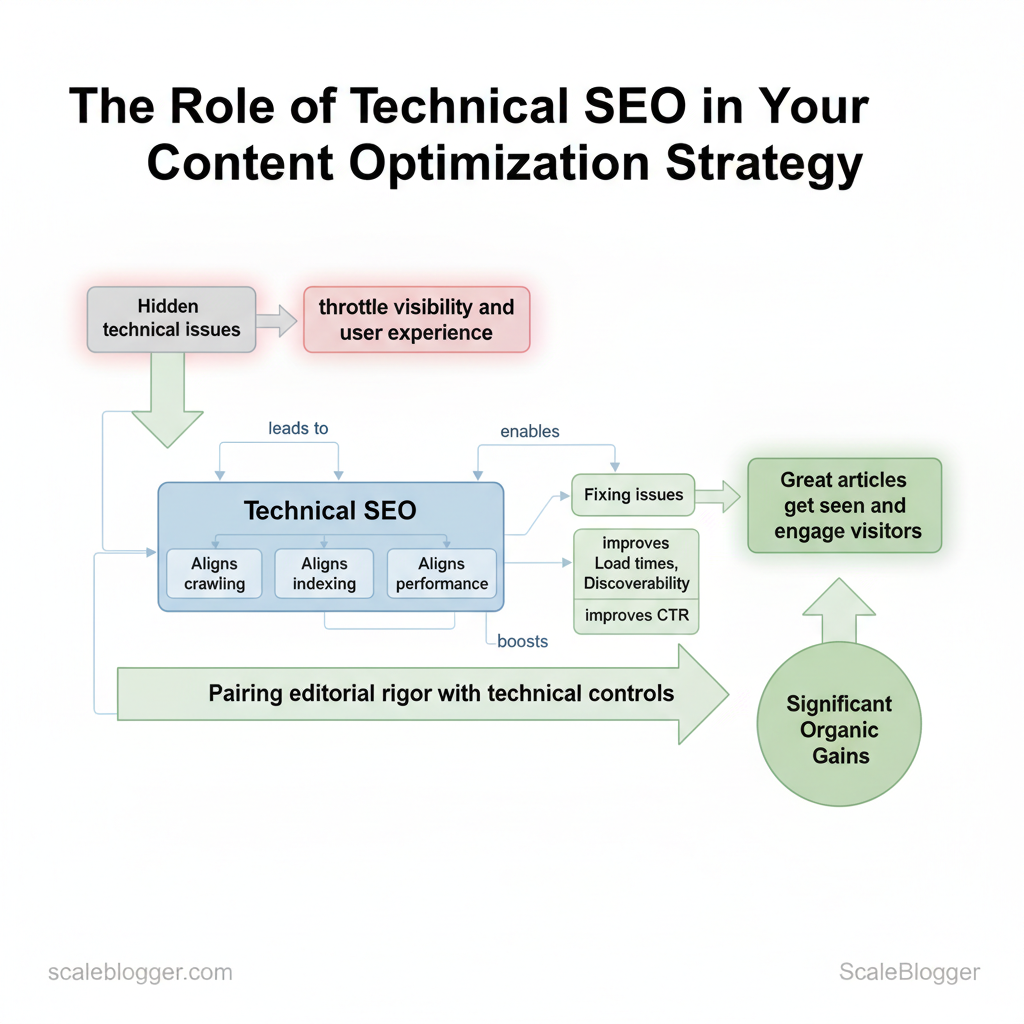
Websites lose organic momentum due to hidden technical issues. These problems limit visibility and harm user experience. Technical SEO aligns crawling, indexing, and performance with your content strategy, ensuring your great articles get seen and engage visitors. When page speed spikes, duplicate content confuses search engines, or structured data is missing, content optimization efforts deliver far less ROI.
Fixing these issues improves important metrics. Faster load times boost conversions, better indexing increases discoverability, and accurate metadata raises click-through rates. Picture a content team that doubles organic traffic simply by fixing crawl budget waste and implementing canonical tags across a sprawling blog network. That sort of gain comes from pairing editorial rigor with the right technical controls.
You’ll learn how to prioritize technical fixes alongside your editorial work, measure their impact on website performance, and scale the process without slowing down content production. Practical steps follow that fit into weekly workflows and enterprise roadmaps, with time estimates and troubleshooting cues for common pitfalls.
- How to audit crawlability and prioritize fixes for maximum traffic impact
- Performance improvements that directly raise engagement and conversions
- Practical
robots.txtand indexation rules that protect content authority - Integrating structured data into editorial processes for better SERP presence
Automate your content & technical SEO workflows with Scaleblogger — https://scaleblogger.com
> Key Takeaway: ## What is Technical SEO and Why It Matters for Content
Technical SEO is the foundation that helps search engines and users find, understand, and use content effectively. At its core it ensures search engines can crawl and index pages, that…
What is Technical SEO and Why It Matters for Content
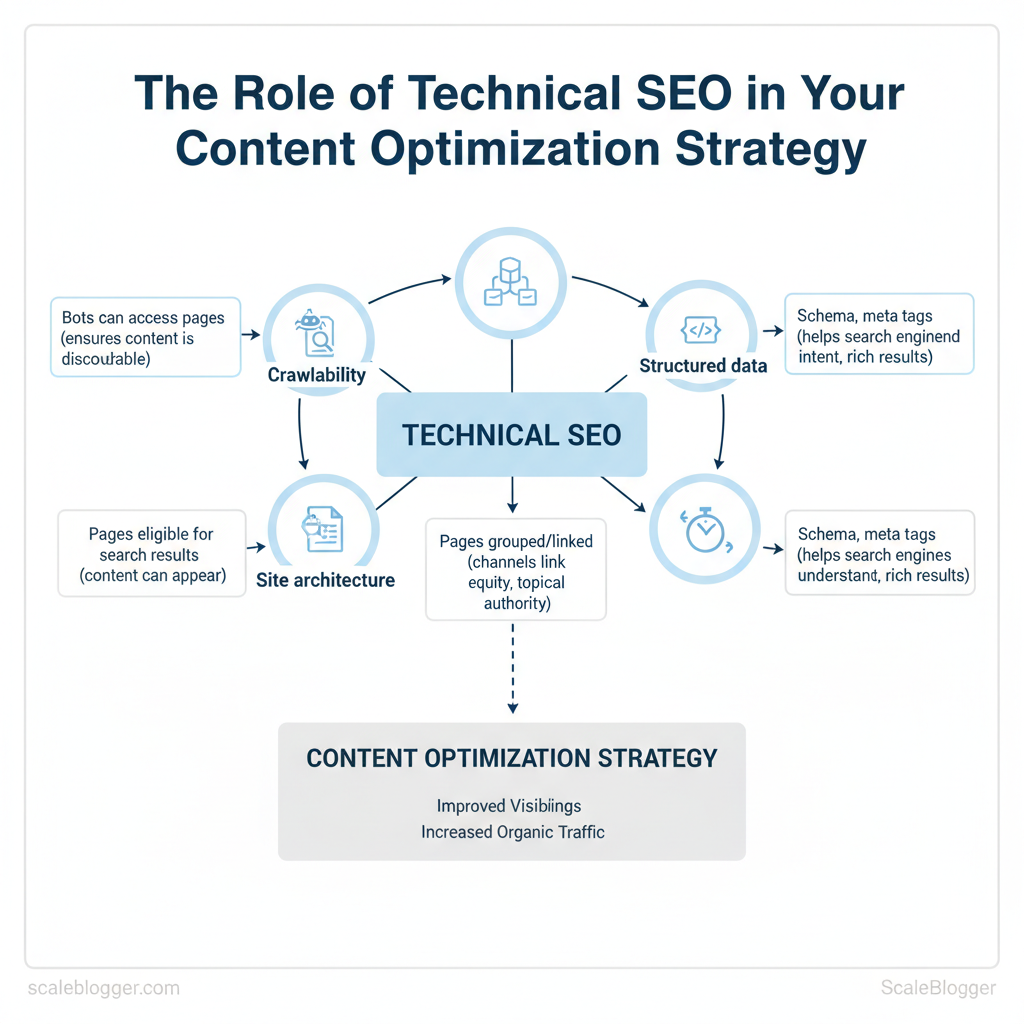
Technical SEO is the foundation that helps search engines and users find, understand, and use content effectively. At its core it ensures search engines can crawl and index pages, that site architecture funnels link equity to priority content, and that pages load fast and render correctly across devices. Without these foundations, even excellent content won’t rank because bots can’t reach it, or users leave before it renders.
Technical SEO breaks down into a few predictable domains that directly affect content performance:
- Crawlability — whether crawlers can access pages and follow links; blocked or orphaned pages never surface in search. Indexability — whether crawled pages are eligible to appear in search results; mistakes in
noindexrules or canonical tags hide content. Site architecture and internal linking — how pages are grouped and linked affects topical authority and how crawl budget is spent.
- Performance and Core Web Vitals — perceived speed, interactivity, and layout stability influence engagement metrics that correlate with rankings. * Structured data and meta directives — schema and meta tags help search engines understand content intent and enable rich results.
Examples that clarify why this matters:
- A blog post with excellent on-page optimization will not rank if it’s
noindexor lives behind a JavaScript-only link that search engines don’t follow. 2.
A content hub with poor internal linking wastes crawl budget so that new articles are discovered weeks later. 3. Slow pages raise bounce rates; when that happens across a topic cluster, topical relevance signals weaken.
When to prioritize technical fixes versus content edits:
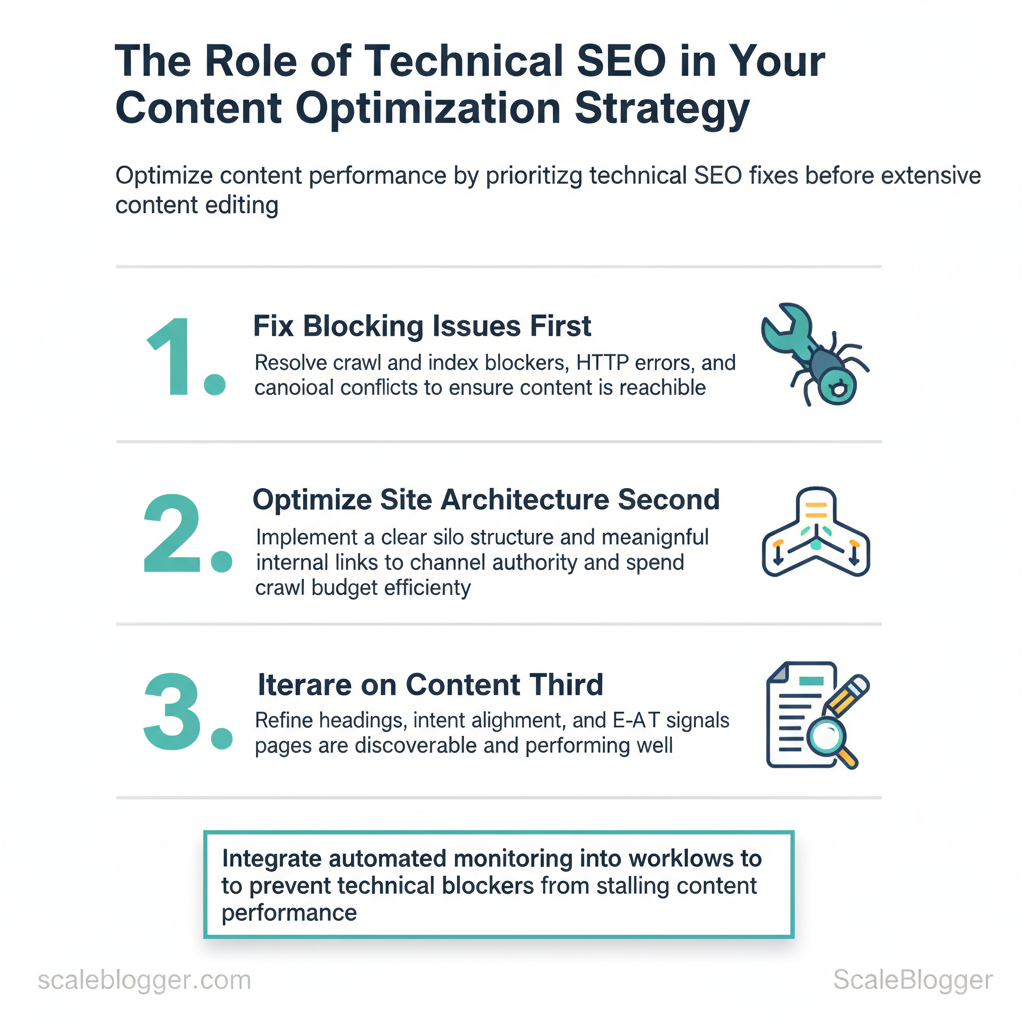
- Fix blocking issues first — resolve
crawlandindexblockers, HTTP errors, and canonical conflicts. 2.
site architecture second — implement a clear silo structure and meaningful internal links. 3. Then iterate on content — refine headings, intent alignment, and E-A-T signals once pages are reachable and fast.
Practical automation fits here: use automated crawls and monitoring to alert on regressions, and connect content pipelines to diagnostic outputs so writers see indexing or speed problems before publishing. Scaleblogger.com’s AI content automation can integrate diagnostic signals into publishing workflows to prevent technical blockers from stalling content performance.
Understanding these principles helps teams move faster without sacrificing quality. When technical SEO is baked into the publishing process, creators spend time improving substance rather than chasing visibility problems.
The core technical SEO components side-by-side with their impact on content, quick fixes, and typical tools to diagnose issues
| Technical Component | Why it matters for content | Quick fixes | Diagnostic tools |
|---|---|---|---|
| Crawlability | Ensures bots can reach pages so content is discoverable | Fix robots.txt, resolve 4xx/5xx, expose sitemap | Google Search Console, Screaming Frog, Bing Webmaster |
| Indexability | Determines whether content can appear in results | Remove stray noindex, correct rel=canonical, fix meta robots |
Google Search Console (Coverage), Ahrefs, Moz |
| Site architecture | Directs link equity and topic signals to priority pages | Implement silos, add contextual internal links, canonicalize duplicates | Screaming Frog, DeepCrawl, Sitebulb |
| Page speed | Affects engagement and Core Web Vitals metrics for ranking | Compress images, enable caching, defer JS, use CDN | Lighthouse, PageSpeed Insights, WebPageTest |
| Structured data | Enables rich results and clearer intent signals | Add JSON-LD schema for articles, FAQ, breadcrumbs | Rich Results Test, Schema.org validators, Search Console |
> Key Takeaway: ## Site Architecture, Crawlability & Indexing
A well-structured, crawlable site is essential for content to rank. Therefore, fix the site’s architecture before focusing on keywords.
Site Architecture, Crawlability & Indexing
A well-structured, crawlable site is essential for content to rank. Therefore, fix the site’s architecture before focusing on keywords. Start by ensuring search engines can discover and prioritize the pages that matter, then remove or de-prioritize low-value paths that waste crawl budget. Practical work splits into three parallel tracks: surface-level access (sitemaps + robots), URL hygiene (consistent, descriptive patterns), and in-page directives (redirects + canonicals) to avoid duplicate-content traps.
Prerequisites
- Access needed: Google Search Console and Bing Webmaster Tools verified properties.
- Tools: Screaming Frog or Sitebulb for crawls, a plain-text editor, and your CMS redirect manager.
- Time estimate: 3–8 hours for audit and fixes on a medium site (100–1,000 pages).
txt and crawl budget — actions to take
- , blog, product, landing). 2.
xml`. 3. Identify low-value pages (tag archives, filtered product pages) and block or noindex them to avoid wasting crawl budget.
- Validate with Google Search Console’s sitemap tester and run full crawls with Screaming Frog to confirm discovery and HTTP status.
id=12345. 301 vs 302: Use 301 for permanent moves and source-of-truth URL consolidation; use 302 only for temporary redirects where the original will return. com/canonical-path/" /> on duplicates; ensure canonical points to accessible, indexable pages and avoid circular canonical chains.
- Common misconfigurations: Canonical pointing to 302, canonical to non-indexable page, or self-referencing canonicals with incorrect trailing slash variations.
Practical examples
- Robots.txt snippet:
User-agent: Disallow: /wp-admin/ Allow: /wp-admin/admin-ajax.php Sitemap: https://example.com/sitemap.xml- XML sitemap entry:
xml <url> <loc>https://example.com/blog/how-to-audit-sitemaps</loc> <changefreq>weekly</changefreq> <priority>0.7</priority> </url>Provide a quick reference matrix: sitemap/robots/crawl budget — what to do, what to avoid, and how to validate
| Element | Recommended configuration | Common mistakes | Validation tool |
|---|---|---|---|
| XML sitemap | Include canonical URLs, split large sitemaps, submit to GSC | Listing non-canonical/404 URLs | Google Search Console, Screaming Frog |
| Robots.txt | Root-level file, minimal rules, reference sitemap | Overly broad Disallow, syntax errors | Google Search Console robots tester |
| Noindex/nofollow use | Noindex low-value pages, use noindex,follow for discoverability |
Noindex canonical pages or entire sections | Crawlers + GSC Coverage report |
| Pagination and canonicalization | Use rel="prev/next" where useful, canonical to main listing |
Canonicalizing paginated pages to page 1 incorrectly | Sitebulb, Screaming Frog |
| Large faceted navigation | Block or parameterize heavy filters, use canonical to clean URLs | Indexing every filter combination | Bing Webmaster Tools, Screaming Frog |
> Key Takeaway: ## Performance Optimization & Core Web Vitals
Quickly identify page speed problems. Prioritize fixes based on their impact, and select hosting that improves delivery speed.
Performance Optimization & Core Web Vitals
Quickly identify page speed problems. Prioritize fixes based on their impact, and select hosting that improves delivery speed. First, run a quick diagnostic, then focus on a few high-impact optimizations like image delivery, critical CSS, caching, and CDN. Only then should you address server-level improvements like TTFB tuning and adopting HTTP/2/3.
Prerequisites and tools
- Prerequisite: Access to site code, hosting control panel, and analytics (GA4 or server logs). ,
sharpor Squoosh), and a CDN account. Time estimate: 2–8 hours for quick wins; 1–4 weeks for full server/architecture changes.
- Expected outcome: LCP and FID improvements visible in Lighthouse and Page Experience reports within days.
Diagnosing Page Speed Issues and Quick Wins
- Run diagnostics: Use Lighthouse and WebPageTest to capture LCP, CLS, and FID metrics and a filmstrip view of loading stages. Record baseline scores.
- Interpret results: Prioritize fixes that move the largest elements earlier (LCP) and reduce main-thread work (FID/INP). 3.
Apply quick wins in priority order:
- Images: Convert to
WebP/AVIF, serve responsivesrcset, and lazy-load offscreen images. Critical CSS: Inline critical above-the-fold CSS and defer the rest. Caching: Implement longCache-Controlfor static assets; usestale-while-revalidate.
- Third-party scripts: Defer or load via
async, replace heavy tags with lightweight alternatives. Font loading: Usefont-display: swapand preload critical fonts.
Example Cache-Control header for static assets:
http Cache-Control: public, max-age=31536000, immutablePlatform-specific tips
- WordPress: Use managed cache plugins, object cache (Redis), and an image CDN plugin.
- Headless/Static: Pre-render pages, push critical assets, and edge functions.
- Large CMS: Implement fragment caching and monitor cache hit ratios.
Server, Hosting, and Delivery Considerations
Hosting options and CDN features to help readers choose based on site size, traffic, and budget
| Hosting type | Best for | Average cost range | Performance considerations |
|---|---|---|---|
| Shared hosting | Small blogs, low traffic | $3–$15/month | Limited CPU, variable TTFB, basic caching |
| Managed WordPress | SMBs, editors | $20–$100/month | Built-in caching, PHP tuning, good support |
| VPS / Cloud | Growing sites, dev control | $10–$200+/month | Tunable TTFB, scalable, needs ops knowledge |
| Headless/Static hosting with CDN | High-performance blogs, scale | $0–$50+/month (plus CDN) | Ultra-fast edge delivery, low origin load |
| Enterprise / Dedicated | High traffic, compliance | $500–$5000+/month | Dedicated resources, advanced tuning, SLAs |
Understanding these principles helps teams move faster without sacrificing quality. When implemented correctly, the changes reduce operational overhead and let content teams focus on growth.
Indexing Controls, Metadata & Structured Data
Think of indexing controls, meta tags, and structured data as a unified system. This system helps search engines discover, assess, and display content. title tags and meta descriptions for click-through rate, use canonicals to prevent duplicate-content dilution, and add structured data to unlock rich results that improve visibility and perceived relevance.
Meta tags, canonicals and pagination
Meta tags influence CTR and should be optimized for user intent and clarity.- Title tag: Keep ≤60 characters, include primary keyword and a compelling modifier.
- Meta description: 120–155 characters, highlight value or outcome to boost CTR.
- Canonical tag: Point canonical to the preferred URL when similar or syndicated pages exist;
rel="canonical"prevents indexing and ranking conflicts. - Pagination: Use
rel="prev"/rel="next"sparingly; prefer self-contained indexable pages or use canonicalization to the main view for content that’s split across pages.
- Identify duplicate or near-duplicate content with a crawl tool.
- If content is syndicated, set canonicals to the original source or use meta noindex if necessary.
- For paginated series, decide between a single canonical (preferred for consolidated authority) or indexable paginated pages with clear prev/next links.
Expected outcome: clearer index signals, fewer duplicate penalties, improved CTR from search results.
Implementing Structured Data (Schema)
Structured data communicates context to search engines; JSON-LD is the recommended format.- Choose the right schema: Article, FAQ, HowTo, Breadcrumb, and VideoObject address common content types.
- Use JSON-LD: Place script in the
or immediately before. - Test and monitor: Use automated tests and periodic crawls to catch errors and missing fields.
Example JSON-LD for an article:
json { "@context": "https://schema.org", "@type": "Article", "headline": "Indexing Controls, Metadata & Structured Data", "author": {"@type":"Person","name":"Author Name"}, "datePublished": "2025-01-15", "image": "https://example.com/thumbnail.jpg", "publisher": {"@type":"Organization","name":"Site","logo":{"@type":"ImageObject","url":"https://example.com/logo.png"}} }Practical implementation steps:
- Map content types to schema types. 2.
Generate JSON-LD via templates or CMS plugins. 3. Validate with structured data testing and monitor Search Console for enhancements.
Common pitfalls: missing required fields, placing markup in non-rendered areas, or forgetting to update schema on page changes. Automate generation where possible — tools and platforms that support AI-powered content automation can maintain consistency across hundreds of pages.
Common schema types for content with expected SERP benefits and implementation complexity
| Schema Type | Best use case | SERP benefit | Implementation complexity |
|---|---|---|---|
| Article | News, long-form posts | Rich result headline & sitelink potential | Moderate — requires author, date, image |
| FAQ | Q&A sections on pages | Expandable results with quick answers | Low — simple Q/A pairs |
| HowTo | Process or tutorial content | Step-by-step rich results with visuals | Moderate — structured steps and images |
| Breadcrumb | Multi-level site navigation | Enhanced sitelinks, clearer hierarchy | Low — URL path mapping |
| VideoObject | Pages with embedded video | Video thumbnails, rich SERP features | High — needs duration, thumbnail, uploadDate |
Understanding these principles helps teams move faster without sacrificing quality. When implemented correctly, metadata and schema reduce ambiguity for search engines and let creative teams focus on stronger content.
Monitoring, Auditing and Ongoing Maintenance
Make monitoring and auditing ongoing processes, not one-time tasks. Start by instrumenting the right telemetry, run automated audits on a predictable cadence, and convert findings into a prioritized backlog that feeds regular sprint cycles. This keeps technical debt visible, reduces organic traffic risk, and lets teams treat SEO health like an engineering KPI.
Use the right mix of tools
- Google Search Console — indexing, coverage, AMP, performance; best for: search visibility & error alerts; cost: Free. Lighthouse / PageSpeed Insights — page performance, accessibility, best practices; best for: front-end speed diagnostics; cost: Free. Screaming Frog SEO Spider — site crawl, broken links, meta issues, redirects; best for: deep on-site crawling; cost: Free limited / £209/year (paid).
, Screaming Frog Log File Analyser / Botify)** — bot behaviour, crawl frequency, status codes; best for: crawl budget and bot debugging; cost: Free limited / provider pricing varies. Sitebulb — visual crawl analysis, structured data testing, action lists; best for: audit reports for teams; cost: Starts around $13/month (plans vary). 95/month.
- Ahrefs (Site Audit) — crawl, health score, internal link analysis; best for: backlinks + technical combo; cost: Paid tiers from ~$99/month. New Relic / Datadog — performance monitoring, server errors, response times; best for: infrastructure visibility; cost: Free tiers / usage-based pricing. Sentry — application errors and stack traces; best for: catching runtime failures that affect UX; cost: Free tier / paid plans.
- Cloudflare (Analytics & Firewall) — edge errors, rate limits, bot mitigation; best for: CDN-level diagnostics and protection; cost: Free tier / paid upgrades.
Key insight: Combine crawl tools (Screaming Frog, Sitebulb), performance tools (Lighthouse, New Relic), and search telemetry (Google Search Console). Free tools cover most basics; paid suites add automation and historical trend analysis.
Automated audit cadence and checklist
- Run lightweight audits daily:
Google Search Consoleand uptime/404 alerts. 2.
Weekly checks: Lighthouse scores for priority landing pages, server response times. 3. Monthly deep crawl: Screaming Frog or Sitebulb for redirects, duplicate content, and schema errors.
- Quarterly log analysis: identify crawl budget waste and bot patterns.
txt, sitemap, canonical tags. Index coverage: unexpected noindex, soft-404s. Performance: LCP, CLS, TTFB thresholds.
- Schema & structured data: presence and errors. Redirects & status codes: 3xx chains, 4xx/5xx spikes. * Content quality signals: thin pages, duplicate titles.
Interpreting results and prioritizing fixes
- Score issues by Impact × Effort: give Impact a 1–5 (traffic, conversions affected) and Effort a 1–5 (dev time). Multiply to rank.
- , fix duplicate meta titles, correct an incorrect canonical, repair a broken critical internal link. 3.
Plan Mid-term: medium-impact fixes that require coordination — schema implementation, image optimization. 4. Schedule Long-term: architectural changes — site replatform, major URL restructuring.
Map fixes into sprints
- Triage board: add audit tickets with Impact/Effort score and reproduction steps. 2.
Sprint planning: reserve 20–30% capacity for technical debt and SEO tickets. 3. Acceptance criteria: include measurable checks (Lighthouse score >= 90, no new 5xx in logs).
- Post-deploy monitoring: track GSC impressions/clicks and performance metrics for two weeks.
Understanding these practices allows teams to keep content performant and discoverable without constant firefighting. When monitoring, auditing and maintenance are part of the workflow, teams move faster and make more confident decisions.
📥 Download: Technical SEO Optimization Checklist (PDF)
Integrating Technical SEO into Your Content Optimization Workflow
Integrate technical SEO as a built-in step rather than an afterthought: treat page health checks, performance tuning, and crawlability validation as mandatory gates from brief to publication and into steady-state monitoring. This reduces rework, speeds indexation, and protects ranking velocity when content scales.
Preconditions
- Prerequisite: Site runs a staging environment and exposes logs or a staging sitemap.
- Tools needed:
Google Search Console,Lighthouse(orPageSpeed Insights),Screaming Frog,Google Analytics/GA4, issue tracker (Jira/Trello), and an automation layer or script runner. - Time estimate: 30–90 minutes per article for integrated checks, less with automation.
Workflow: From brief to post-publication
- Prepare the brief: include target keywords, desired canonical, schema type, and redirect expectations. 2.
Pre-publish technical checklist:
- Canonical & meta: confirm
link rel="canonical"and meta robots are set. Structured data: add and validateArticleorFAQschema. Performance baseline: runLighthouseand record LCP/CLS/INP.
- Indexing controls: ensure noindex tags are absent and staging IPs blocked. 3. Handoff and ticketing:
- Create a dev ticket: include failing Lighthouse metrics, screenshot of network waterfall, and a reproducible test URL.
- Assign ownership: editorial owns content HTML; platform owns template-level fixes and CDN rules. 4. Publish and immediate checks:
- Smoke test: fetch as Google, validate sitemap entry, verify structured data passes.
25 or LCP > 4s): trigger rollback or hotfix action within SLA. 5. Post-publish monitoring (first 72 hours then weekly): Practical example: include a short pre-publish checklist template Measuring Impact: KPIs, ROI and Reporting
Automated: check for indexing status, crawl errors, and mobile usability.
Manual: review GA4 engagement and organic clicks against expected baselines.
| KPI | Baseline | Target | Measurement source |
|---|---|---|---|
| Organic impressions | 150,000 monthly | 180,000 monthly (+20%) | Google Search Console |
| Organic clicks | 9,000 monthly | 11,000 monthly (+22%) | Google Search Console |
| Average position | 28 | 20 | Google Search Console |
| Average session duration | 1m 45s | 2m 15s | Google Analytics (GA4) |
| Core Web Vitals (LCP/CLS/INP) | 3.2s / 0.18 / 310ms | 2.4s / 0.10 / 200ms | Lighthouse / PageSpeed Insights |
Understanding these principles helps teams move faster without sacrificing quality.
Conclusion
After working through crawlability, indexation, and on-page signals, the path to regaining organic momentum becomes concrete: find the hidden technical blockers, fix the highest-impact issues first, and monitor the results. Teams that couple a focused audit with prioritized remediation often see restored visibility within weeks; others that treat technical SEO as a recurring discipline protect gains over time. Practical next steps include running a full crawl, validating canonical and hreflang usage, and stabilizing site performance under real-user conditions.
- Run a technical SEO audit and flag critical errors for immediate fixes.
- Prioritize crawlability and canonical signals before content refreshes.
- Measure impact weekly and iterate on automation to prevent regressions.
If time or bandwidth is the constraint, automation changes the calculus: for teams looking to scale these workflows efficiently, platforms that automate repetitive checks and remediation workflows cut manual effort and surface regressions faster. Common questions—How quickly will rankings respond?—depend on issue severity and indexation cadence, but tracking the metrics above clarifies progress within a few weeks. To execution and move from diagnosis to sustained improvement, consider this next step: Automate your content & technical SEO workflows with Scaleblogger.
