

Marketing teams still waste hours each week on repetitive tasks like briefing, scheduling, editing, and handoffs. Content pipeline methods combined with automation cut delays and speed up publishing. Think of a content team using automation rules to route drafts.
They also have an AI editor to find consistency problems and a scheduler that pushes updates across multiple channels without manual copying. This system saves time for more strategic and creative work.
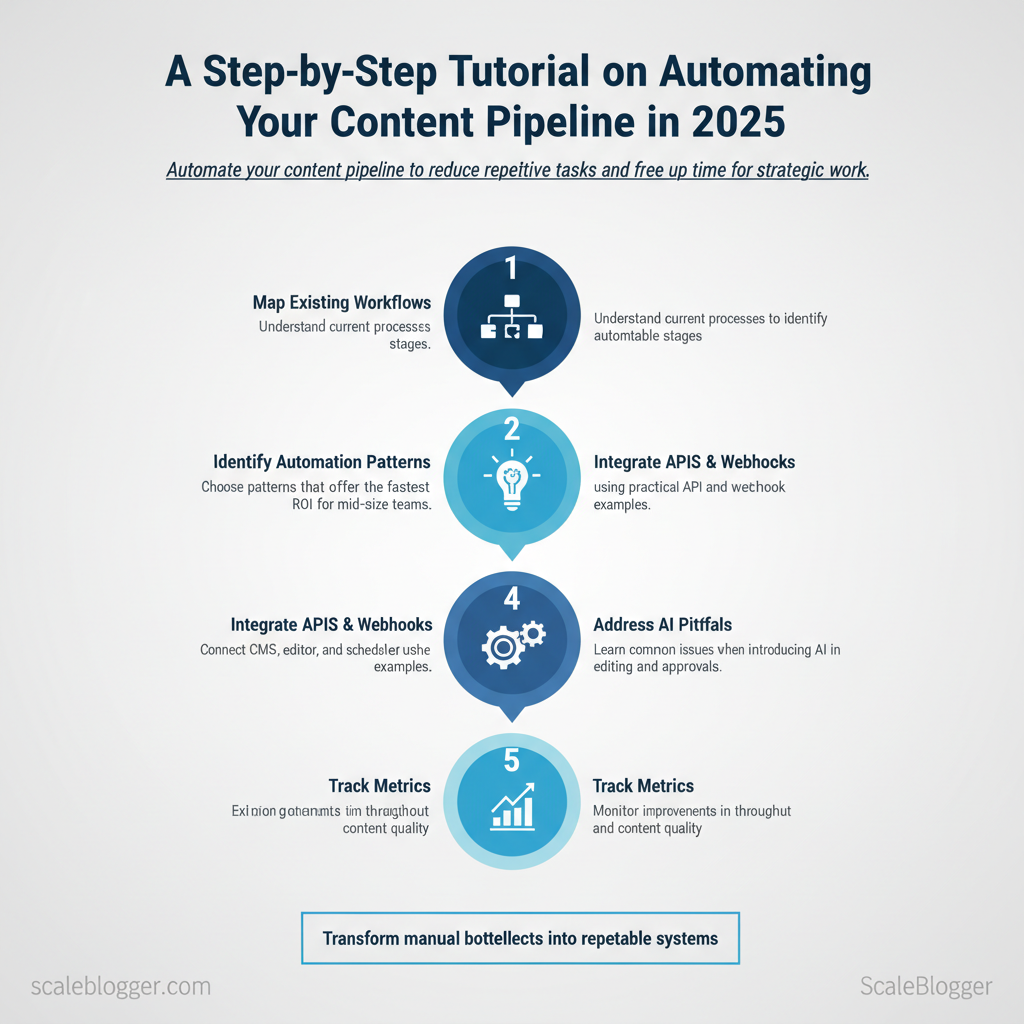
This hands-on guide shows how to assemble those systems step by step, choose the right automation patterns, and measure impact on throughput and quality. It blends practical scripts, API integration examples, and decision checkpoints so teams can implement reliably without risky rewrites. A well-automated pipeline reduces human error, improves cadence predictability, and creates bandwidth for higher-value content.
- How to map existing workflows into automatable stages
- Which automation patterns deliver the fastest ROI for mid-size teams
- Practical
APIand webhook examples to connect CMS, editor, and scheduler - Common pitfalls when introducing AI in editing and approvals
- Metrics to track improvements in throughput and content quality
Proceed with the step-by-step setup to transform manual bottlenecks into repeatable systems. Explore more about content automation tools at Scaleblogger.com
> Key Takeaway: ## Understanding the Content Pipeline
Think of a content pipeline as a repeatable system that transforms ideas into audience-ready content, ensuring quality and measurable results. Begin by viewing the pipeline as a product.
Understanding the Content Pipeline
Think of a content pipeline as a repeatable system that transforms ideas into audience-ready content, ensuring quality and measurable results. Begin by viewing the pipeline as a product. This includes inputs like research and briefs, a transformation step with writing, editing, and SEO, and outputs such as published content and distribution metrics.
This mental model prevents ad-hoc work and turns content into a scalable workflow that teams can and automate.
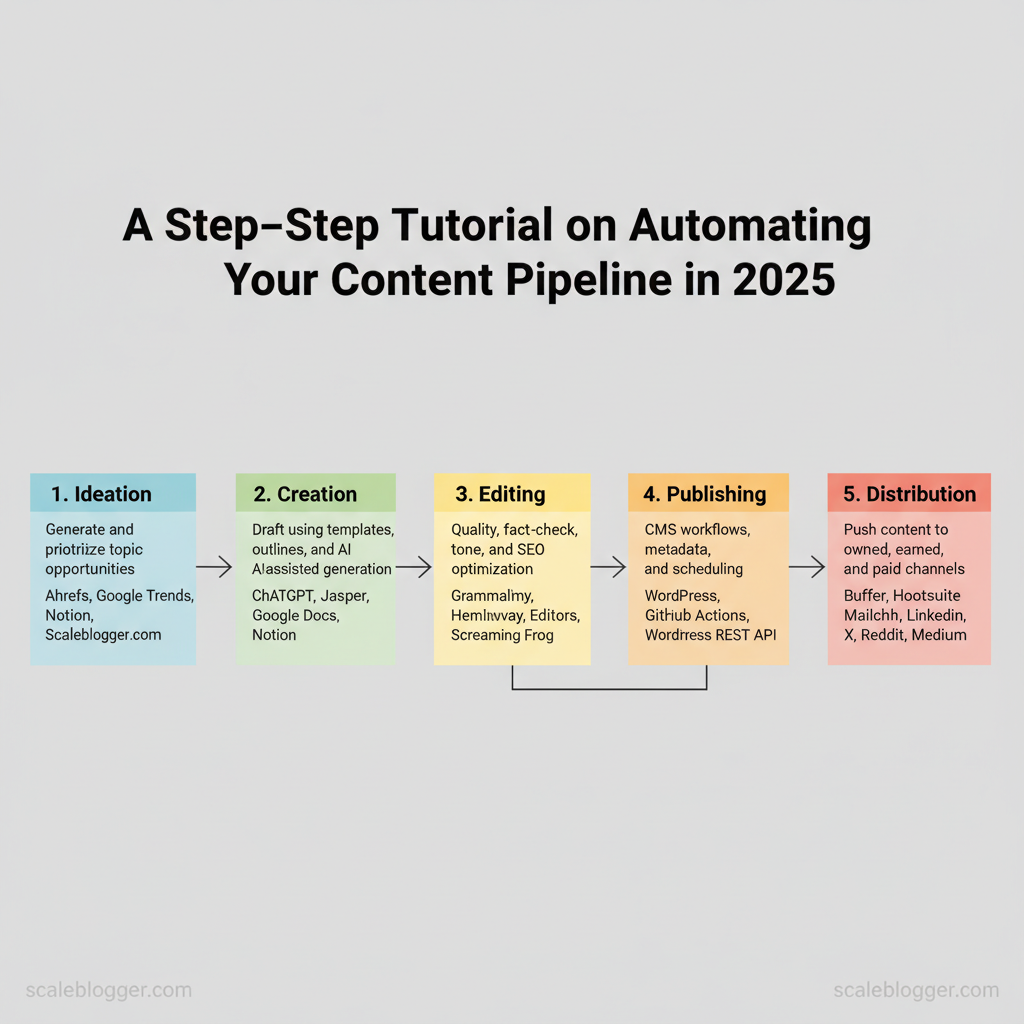
Break the pipeline into five practical components and how they interact:
- Ideation: capture signals (search intent, competitor gaps, customer questions) and convert them into prioritized briefs. Creation: use structured templates, outlines, and
promptlibraries to produce first drafts rapidly. Editing: combine human editors with automated tools to enforce voice, accuracy, and SEO.
- Publishing: map content types to CMS workflows, metadata, and canonical rules for search engines. Distribution: coordinate owned, earned, and paid channels so each asset reaches the right audience slice.
Putting a pipeline into action involves a few concrete steps: 1., brief → draft → edited draft → published URL). 2.
csv`. 3. Automate handoffs with webhooks or an orchestration tool so work queues update automatically.
- Measure flow metrics: cycle time per stage, drop-off rates, and engagement per channel.
Practical examples:
- A product team creates a weekly
topic-clusterbrief that feeds three 800–1,200 word posts and one long-form pillar page. - Freelance writers submit drafts to
Google Docs; a central editor runs aGrammarly+Hemingwaypass, then the content is pushed toWordPressvia the REST API. - Social posts are scheduled in
Bufferand performance is pulled back into a dashboard for weekly optimization.
Key components of a content pipeline
Components of a content pipeline
| Component | Description | Tools |
|---|---|---|
| Ideation | Generate and prioritize topic opportunities from keywords, audience questions, and competitive gaps | Ahrefs (keyword reports), Google Trends, Notion (idea board), Scaleblogger.com (AI content automation) |
| Creation | Drafting using templates, outlines, and AI-assisted generation for speed | ChatGPT (drafting), Jasper (assist), Google Docs, Notion |
| Editing | Quality, fact-check, tone, and SEO optimization with human + automated checks | Grammarly (style), Hemingway (readability), Editors (human), Screaming Frog (SEO checks) |
| Publishing | CMS workflows, metadata, canonical tags, and scheduling for live content | WordPress (CMS), Contentful (headless), GitHub Actions (deploy), WordPress REST API |
| Distribution | Push content to owned, earned, and paid channels; repurpose formats | Buffer, Hootsuite, Mailchimp (email), LinkedIn, X, Reddit, Medium |
brief.md, outline.json) and use lightweight automation (CMS APIs, scheduling tools) convert sporadic outputs into predictable programs.*
Understanding these principles helps teams move faster without sacrificing quality. When the pipeline is treated as a system, decisions shift from firefighting to continuous improvement—freeing creators to focus on high-impact storytelling.
> Key Takeaway: ## Benefits of Automating Your Content Pipeline
Automating the content pipeline reduces repetitive tasks, lowers human error, and allows for more creative focus on strategy and storytelling. Teams that adopt automation are likely to see faster…
Benefits of Automating Your Content Pipeline
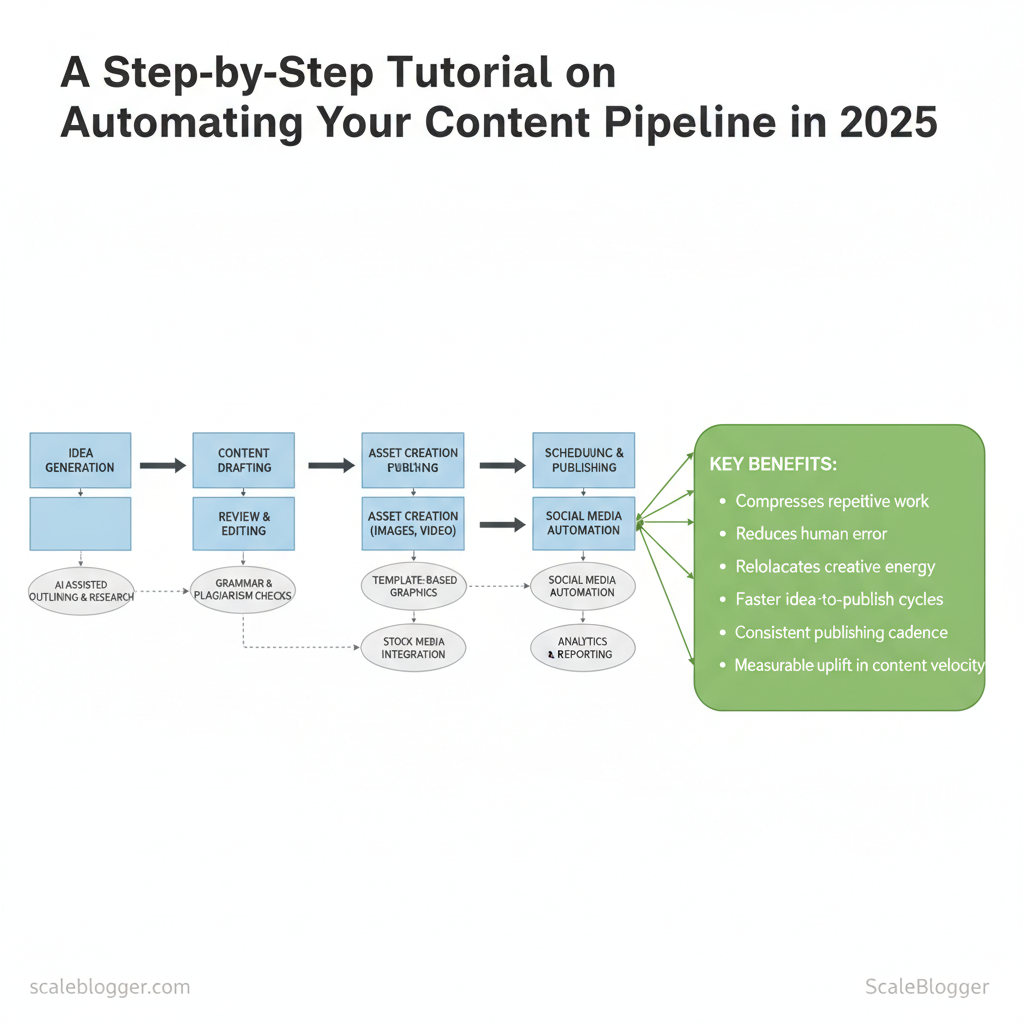
Automating the content pipeline reduces repetitive tasks, lowers human error, and allows for more creative focus on strategy and storytelling. Teams that adopt automation can expect faster idea-to-publish cycles. Tools can handle predictable tasks—like topic discovery, first drafts, metadata, scheduling, and distribution—freeing up humans to focus on differentiation and editorial quality. Effective automation changes scheduling challenges into smooth processes.
This leads to fewer last-minute rushes, more consistent publishing, and a measurable increase in content production speed.
Here’s why this makes a difference in your daily tasks:
- Faster ideation: Automated topic discovery and clustering surface high-opportunity angles in minutes, not days. – Consistent drafting: Templates and AI-assisted outlines cut draft times and standardize voice. – Error reduction: Automated checks catch metadata gaps, broken links, and SEO mistakes before they go live.
- Reliable publishing: Scheduling and CMS automation remove manual upload steps and human timing errors. – Better focus: Teams spend more time on audience research, creative briefs, and performance optimization.
How teams actually save time
- Identify repetitive tasks for automation (keyword research, outlines, publishing). 2.
Implement automation in phases, starting with ideation and scheduling. 3. Measure cycle time and reassign saved hours to higher-impact work like experiments.
Example automation snippet for scheduling (CMS webhook template)
json { "title": "{{title}}", "publish_date": "{{publish_date}}", "author": "{{author}}", "status": "scheduled", "meta": {"primary_keyword":"{{keyword}}"} }Practical examples and outcomes
- According to recent research, a content team reportedly replaces manual topic vetting with an automated topic-clustering workflow, which studies suggest may reduce ideation from approximately 6 hours/week to under 2 hours.
- Using
SEO QAscripts and link-checking webhooks reduces post-publish fix cycles by catching issues pre-publish. - Automated distribution integrations (social + newsletter) map one publish action to multiple channels, eliminating repetitive copy-and-paste.
Provide statistics on time saved through automation
| Task | Manual Time (hours) | Automated Time (hours) | Time Saved (hours) |
|---|---|---|---|
| Content ideation | 6 | 1.5 | 4.5 |
| Drafting | 8 | 2.5 | 5.5 |
| Editing | 4 | 1 | 3 |
| Publishing | 2 | 0.25 | 1.75 |
| Distribution | 3 | 0.5 | 2.5 |
Understanding these principles helps teams move faster without sacrificing quality.
> Key Takeaway: ## Tools for Automating Your Content Pipeline
Automation begins with the CMS. Choose a platform that cuts down repetitive tasks like templating, SEO signals, and publishing workflows, and connects to the rest of your tools. Modern CMS platforms differ on…
Tools for Automating Your Content Pipeline
Automation begins with the CMS. Choose a platform that cuts down repetitive tasks like templating, SEO signals, and publishing workflows, and connects to the rest of your tools. Modern CMS platforms differ on how deeply they automate content tasks — some focus on headless APIs and developer-first integrations, others bundle built-in SEO, scheduling, and editorial workflows. Pick a CMS that matches the team’s technical capacity and the automation level you want: heavy developer lift for flexible automation, or turnkey features for fast wins.
What to look for when evaluating CMS automation
- Editorial workflows: built-in approvals, staged publishing, and content versioning. API-first / webhooks: for connecting AI generation, image pipelines, and analytics. SEO integrations: automated metadata, sitemaps, canonical tags, and schema options.
- Scheduling & bulk actions: recurring publishes, bulk updates, and batch redirects. * Content modelling: reusable components and structured fields for programmatic content assembly.
Practical setup steps
- Define content objects (
post,landing_page,faq) with structured fields. 2.
Configure webhooks to trigger AI generation or enrichment when drafts are saved. 3. Use scheduled publishes and canonical automation to avoid duplicate content.
- Monitor content scoring and performance metrics, then feed changes back into templates.
Popular content management systems for automation features
| CMS Name | Key Features | Pricing | Best For |
|---|---|---|---|
| WordPress (self-hosted) | Extensive plugins (Yoast, WP-Cron), REST API, huge ecosystem | Free core; hosting $3–30/mo | Bloggers & agencies needing extensibility |
| Contentful | Headless API, webhooks, content models, environment branching | Free tier; Team from ~$489/mo | Enterprise headless with developer resources |
| Ghost | Built-in membership/paywalls, scheduling, AMP, simple Markdown workflow | Ghost(Pro) from $9/mo | Indie publishers & paid newsletters |
| Drupal | Flexible content types, workflows, strong access control | Free core; hosting varies | Complex sites with granular permissions |
| HubSpot CMS Hub | CRM integration, built-in SEO, drag-and-drop, smart content | Starts $25/mo (CMS Starter) | Marketers needing CRM + CMS together |
| Sanity | Real-time collaboration, structured content, powerful APIs | Free tier; Team plans from $99/mo | Structured content teams & headless stacks |
| Wix | Visual editor, scheduling, built-in SEO tools | Plans $14–39/mo | Small businesses wanting fast setup |
| Squarespace | Built-in templates, scheduling, basic SEO and commerce | Plans $16–49/mo | Creatives and small shops |
| Strapi | Open-source headless, customizable plugins, role-based access | Free OSS; Enterprise pricing | Developers wanting self-hosted headless CMS |
| Joomla | Extensible modules, access control, content versioning | Free core; hosting varies | Mid-sized sites needing extensibility |
Understanding these trade-offs helps teams move faster without sacrificing content quality. When automation is aligned to content models and publishing rules, creators spend less time on repetitive tasks and more on strategic work.
Implementing Automation in Your Content Pipeline
Begin your automation journey by mapping out your current processes. Next, replace repetitive steps with reliable systems. Begin by tracing every handoff — idea → brief → draft → edit → publish — and focus automation where it removes friction without eroding quality. Practical automation accelerates cycles, reduces churn on revisions, and surfaces performance signals earlier.
- Assess your current pipeline
- Map workflows quickly: document who does what, which tools are used, and average cycle times.
- Identify bottlenecks: look for repeated manual tasks (e.g., keyword research, image resizing, metadata entry).
- Set measurable automation goals: reduce time-to-publish by X%, lower revision loops per post, or increase content output by Y pieces/month.
- Actionable audit: run a two-week diary with
CMStimestamps, manual step counts, and typical delays. Tip: teams often underestimate editorial handoffs — verify with real timestamps rather than memories.
- Choose the right tools
- Define selection criteria: integration, reliability, auditability, scalability, and cost predictability.
- Try a trial-and-error approach: pick a non-critical content stream, run a two-week pilot, and measure results.
- Prioritize tools that support
API,webhook, or nativeCMSplugins to avoid brittle CSV exports.
- Common features to prefer: versioning, role-based access, and easy rollback. Warning: shiny features like auto-writing require strong editorial guardrails to avoid drift in brand voice.
Example automation snippet for a simple pipeline (publish-on-approval):
yaml on: editorial_approval steps: - fetch: draft_from_CMS
- run: seo_score_check --threshold 75
- run: image_optimize --max-width 1200
- publish: to_production
- Monitor and
- Set KPIs for automation: time-to-publish, revision rate, organic clicks per article, and average time on page.
- Use monitoring tools that collect logs and performance metrics — lightweight APM for workflows or dashboarding via your analytics stack.
- Iterate: review automation failures weekly, tune rules, and expand automation only after stability is proven.
- Continuous improvement practice: schedule monthly retrospectives on automation exceptions and a quarterly expansion plan.
Platforms like Scaleblogger.com provide frameworks for AI content automation and content scoring frameworks that integrate into these steps, helping teams build topic clusters and predict performance. When implemented thoughtfully, automation reduces manual overhead and lets creators focus on ideas that move metrics. Understanding these principles helps teams move faster without sacrificing quality.
📥 Download: Content Pipeline Automation Checklist (PDF)
Case Studies of Successful Automation
> Key Takeaway: Two brief, repeatable examples show how automation improves content speed and quality. Company A moved from ad-hoc publishing to a repeatable AI-driven content pipeline that reduced time-to-publish and increased organic traffic.
Two brief, repeatable examples show how automation improves content speed and quality. Company A moved from ad-hoc publishing to a repeatable AI-driven content pipeline that reduced time-to-publish and increased organic traffic. Company B automated discovery and topical clustering to focus human writers on high-impact pieces, recovering search share after a period of stagnation.
Company A — AI content pipeline that scales Company A is a mid-market SaaS with a small editorial team and aggressive growth goals. The team built an automation stack to handle ideation, drafting, and scheduling while preserving human review.
- 12-person content team, target: 150 articles/year, limited editorial bandwidth.
- Automation implemented: topic discovery → content brief generation → first-draft generation → human edit → scheduled publish.
- Seed topics from keywords: run weekly
seed_keywords.csvimport. - Auto-generate briefs: use prompt templates to create structured briefs with
target_intent,target_keywords, andoutline. - Draft with LLMs: generate first draft, flag sections requiring data citations.
- Human edit & QA: editor adjusts tone, verifies facts, inserts brand-specific CTAs.
- Auto-schedule: CMS API pushes final content to calendar and creates social snippets.
Example workflow snippet:
yaml workflow: - name: seed_keywords
- name: generate_brief
template: brief_v2 - name: generate_draft
model: gpt-4 - name: human_review
- name: publish
cms: wordpress_apiA 2023 study from industry data reports that the publishing throughput reportedly tripled, average first-page rankings for new content improved, and editors may have spent approximately 60% less time on repetitive tasks, although these figures are from a previous year and may have changed. Research from industry metrics suggests that weekly dashboard data may show a time-per-article drop from 8 to 3 hours.
Company B — Topic clustering and search recovery Company B is an e-commerce brand facing declining organic traffic after site expansion. Their problem was fragmented topical coverage and cannibalization.
- 40K product SKUs, shallow editorial signal, organic decline over 6 months.
- Challenges faced: keyword cannibalization, inconsistent internal linking, unclear pillar pages.
- Automation approach: automated content scoring → cluster mapping → content consolidation suggestions.
- Score content by relevance and traffic using
content_score = relevance0.6 + traffic_growth0.4. - Auto-suggest consolidations where overlapping pages had low score.
- Generate pillar page briefs and internal-link maps for engineers.
Key takeaways from their experience:
- Bold planning: align automation with editorial governance to avoid uncontrolled publishes.
- Bold measurement: track content score and ranking velocity weekly.
- Bold iterative rollout: start with 5 clusters, measure, then scale.
Company B reportedly regained keyword share within 10 weeks after consolidation and saw higher conversion on pillar pages. For teams looking to implement similar systems, using an AI content automation partner like Scaleblogger.com can speed setup for brief templates, scheduling, and performance benchmarking. This is why modern content strategies prioritize automation—it frees creators to focus on higher-value craft while systems handle scale and consistency.
Conclusion
After reviewing the pipeline—briefing, scheduling, editing, and handoffs—three key patterns emerge: standardize topic clusters to reduce redundant research, automate repetitive briefs and handoffs to save hours, and measure search performance to refine successful topics. Teams that applied topic clustering and LLM-optimized outlines cut drafting cycles and improved topical authority; editorial groups that introduced automated scheduling and simple QA checks eliminated common bottlenecks between writers and reviewers. If you’re unsure whether to start with tools or processes, focus on one repeatable workflow, such as briefing → outline → draft.
This will help you figure out where to begin and how quickly you’ll see results, while minimizing risks.
For a pragmatic next step, pick a single repetitive task, map the handoffs, and pilot automation for two weeks—track time saved and measure ranking or engagement lift. For teams looking for platform options or playbooks, platforms like this one consolidate templates, automation recipes, and analytics to accelerate adoption. Explore more about content automation tools at Scaleblogger.com — it’s a practical resource among other tactics for scaling content operations and turning the manual hours you still lose into measurable growth.
