

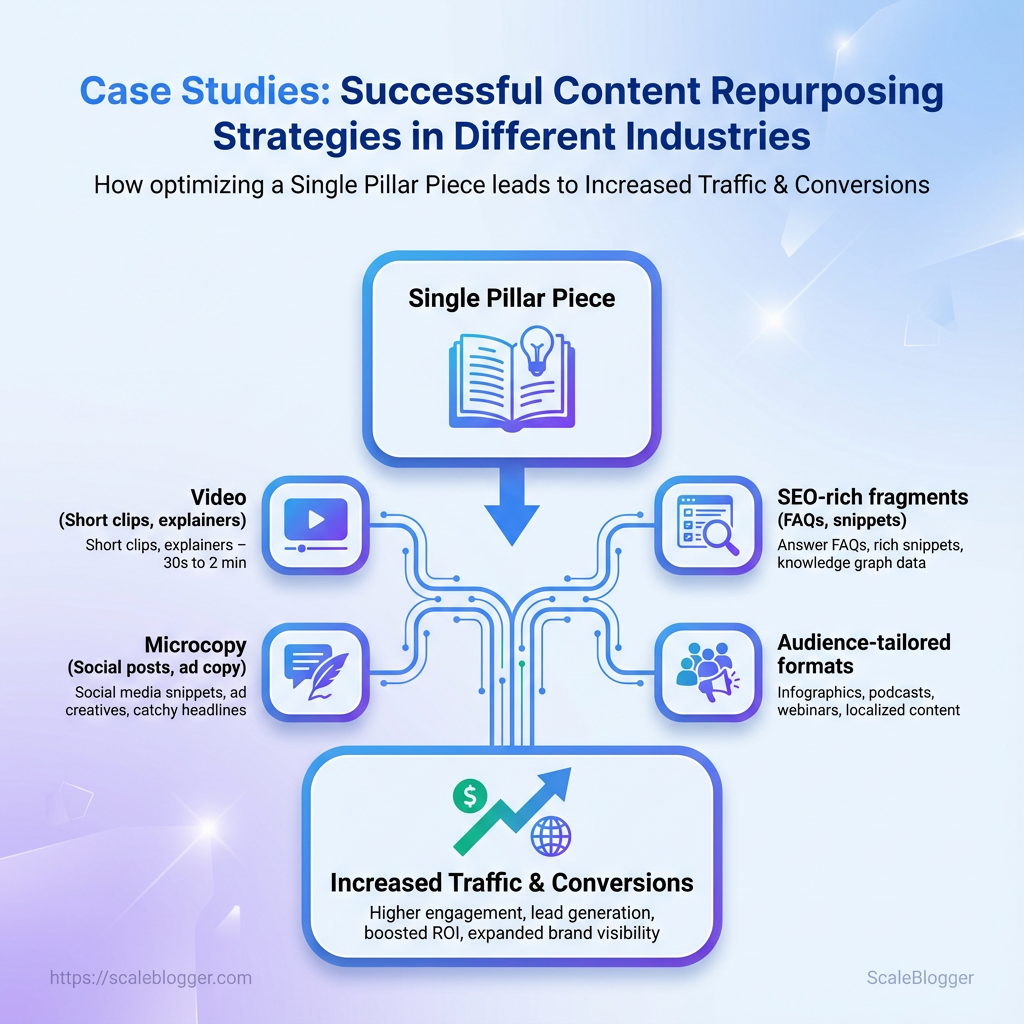
Most content teams treat long-form posts as the finish line, then wonder why reach and ROI plateau six months later. Smart teams flip that script by turning one strong asset into a dozen audience-tailored formats, and those conversions reveal patterns worth copying across niches. This collection of case studies focuses on those repeatable moves.
Each write-up shows a brand converting a single pillar piece into video, microcopy, and SEO-rich fragments that actually drive traffic back to the original idea. Expect concrete sequences that highlight distribution choices, workflow shortcuts, and measurement tactics that mattered most.
Read these real-world examples for practical clues about what scales and what flops, and use the industry insights to judge which tactics map to your audience and resources.
Prerequisites & What You’ll Need
Start with the basics: before automating repurposing or standing up an AI-powered pipeline, gather the raw assets, grant the right access, and pick tooling that actually fits the team. Without clean source content, reliable analytics, and basic distribution tools, automation creates noise instead of reach.
Must-have content assets
- Source article(s): Finalized blog posts or long-form drafts in Google Docs or Markdown.
- Raw media files: High-quality video (1080p+), audio stems, and original images or brand assets.
- Canonical metadata: Titles, preferred slugs, authors, publish dates, and target keywords.
- Content briefs or style guide: Tone, brand vocabulary, and SEO targets for consistent repurposing.
Minimum analytics and access levels
- Grant read access to
GA4and Search Console for content performance signals. - Provide editor-level access to the CMS (e.g., WordPress) so automation can schedule and publish.
- Create an API key or service account for any automation platform that needs to push updates or pull content.
Tools for repurposing and distribution
- Transcription tool: Fast transcripts for video-to-text conversion.
- Video/audio editor: Trim long-form recordings into short clips.
- Graphic tool: Create thumbnails, quote cards, and social assets.
- Analytics dashboard: Track distribution performance and iterate.
Operational notes and examples
- Use a single shared folder structure (e.g.,
Content/2026/Q1/Topic) to avoid asset-loss and make automation deterministic. - Tag each asset with a small JSON/plain-text manifest that includes
source_id,rights_holder, andpublish_windowsso scripts can make publishing decisions. - If starting small, automate one channel first (email or LinkedIn) and expand once templates are stable.
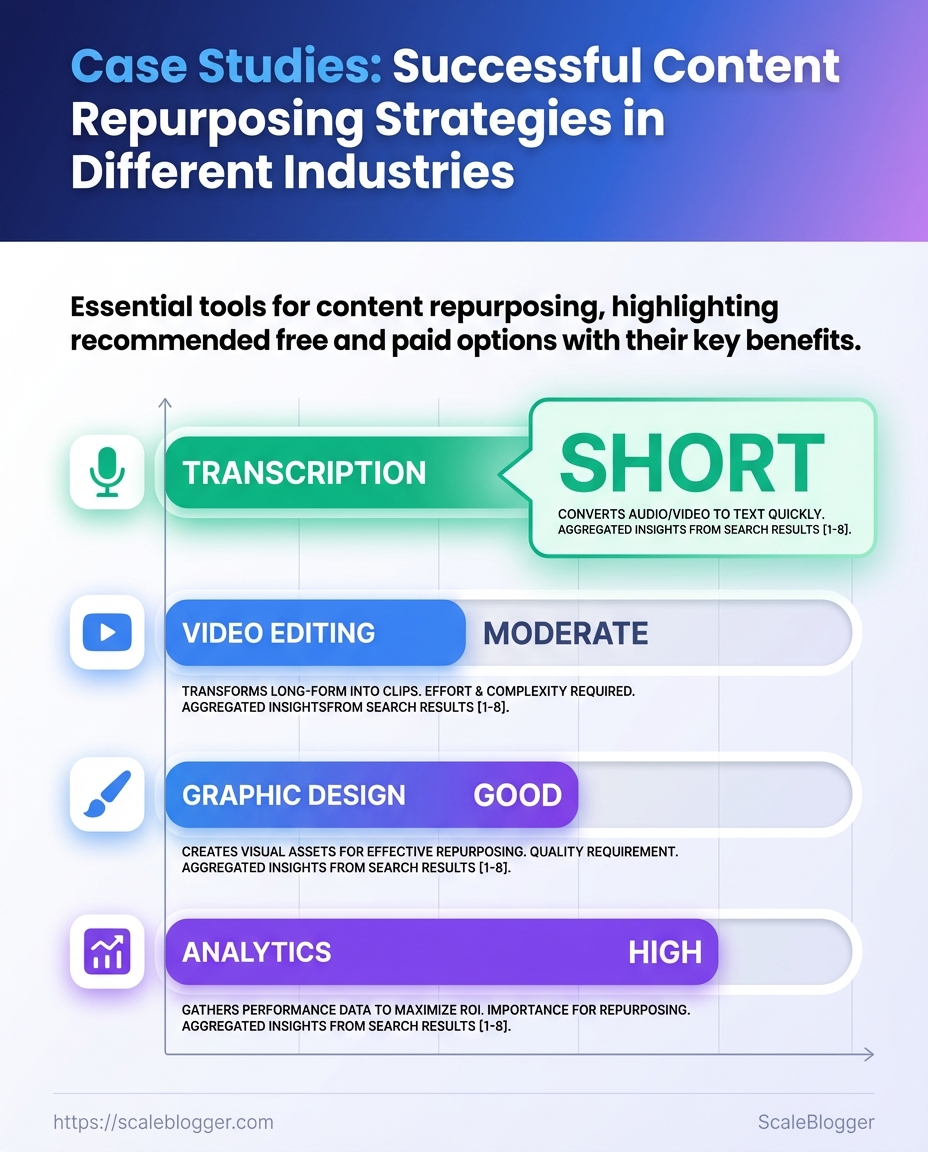
Quick-reference matrix of tool categories with recommended free and paid options
| Tool Category | Recommended Free Option | Recommended Paid Option | Why It Matters |
|---|---|---|---|
| Transcription | Otter.ai — Free tier (600 min/mo) | Descript — Creator $12/month | Fast, editable transcripts and speaker labeling |
| Video editing | DaVinci Resolve — Free | Adobe Premiere Pro — $20.99/month | Pro-grade trimming and export presets for socials |
| Graphic design | Canva — Free | Canva Pro — $12.99/month | Templates, brand kit, and social exports |
| Analytics | Google Analytics (GA4) — Free | SEMrush — $119.95/month | Traffic, keyword insights, and content gap analysis |
Key insight: pick tools that provide both a reliable free path for experimentation and a paid tier that scales automation needs—this keeps costs predictable while giving room to grow.
Putting these elements in place turns ad-hoc content into a repeatable pipeline. With assets organized, access provisioned, and the right tools selected, automation becomes a multiplier instead of a headache.
Case Study 1 — SaaS: Turning a Long-Form Guide into a Content Engine
A single 4,000-word product guide can become a month’s worth of traffic-driving assets if broken down intentionally and measured. The approach below converts one authoritative piece into prioritized micro-assets, exact formats with sample lengths, and a repeatable checklist for replication and analytics.
Original asset: A 3,000–5,000 word guide with clear headings, examples, and at least five original screenshots or diagrams.
Audience map: Buyer personas, funnel stage for each persona, and primary search intents to target.
Tools & materials
Content editor: Google Docs or Notion for drafting.
Media toolkit: Canva or Figma for visuals.
Publishing & automation: An editorial scheduler or Scaleblogger.com for pipeline automation.
Step-by-step repurposing playbook
- Identify the five highest-value sections of the guide (problem, solution, use-cases, how-to, metrics).
- For each section, create a single-sentence headline that targets a specific search intent.
- Produce micro-asset variants: blog summaries, LinkedIn threads, short videos, and email sequences.
- Design visual assets: one featured image, five social cards, and three explainer GIFs.
- Schedule and sequence publishing to match funnel priorities (top → middle → bottom).
- Monitor performance and iterate weekly for 4–6 weeks.
- Package top-performing micro-assets into a gated checklist or mini-ebook.
Exact formats and sample lengths
- Long-form pillar: 3,000–5,000 words — foundational SEO hub.
- Blog post (spin): 700–900 words — focused on one subtopic.
- Short-form social post: 150–300 characters or a 5–8 tweet thread.
- Micro-video: 30–90 seconds for socials; 3–6 minute explainer for YouTube.
- Email series: 3 emails — 75–150 words each.
- Infographic/social card: single-image summary, 800–1,200 px wide.
Replication checklist and analytics to track
- Asset readiness: Headline, meta description, 1 visual, CTA present.
- Distribution plan: Channels, post cadence, and repurpose schedule.
- Baseline metrics: pageviews, session duration, CTR, and conversions.
- Micro-asset KPIs: engagement rate, shares, play-through rate (video), and lead assists.
- Iteration signals: bounce >60% on a repurposed post → rewrite headline; low video completion → shorten first 10s.
Practical example: convert the guide’s “integration how-to” into a 900-word blog, a 60s demo clip, and a 5-tweet thread — publish blog first, then drip social and email over 10 days.
Turning one long asset into a content engine reduces churn in planning and raises the odds of finding a breakout format. Do this consistently and the library compounds: each repurpose fuels the next campaign and makes measurement far simpler.
Case Study 2 — E-commerce: Repurposing Product Content for Seasonal Lift
Repurposing existing product content for seasonal campaigns unlocks quick wins without heavy creative investment. The practical playbook below turns reviews, user images, and product descriptions into high-performing seasonal assets—ads, landing pages, social posts—while preserving brand voice and measurement discipline.
Content inventory: A tagged list of product pages, reviews, and UGC images.
Access: CMS, creative asset library, analytics (GA/heatmaps) and ad platform accounts.
Permissions: Legal clearance for customer images and review snippets.
Tools & materials
- Creative: existing product photos, UGC, short video clips.
- Formats to produce: hero banners, 16:9 product videos,
1:1and4:5social crops, carousel ads, email GIFs. - Testing tools: A/B testing engine, UTM templates, conversion funnel tracking.
E-commerce Repurposing Playbook — Step-by-step
- Audit and tag assets by seasonality and intent.
- Pull top-performing reviews and highlight phrases (3–6 words) with social proof potential.
- Create 3 condensed creative variations per asset:
1:1square,4:5vertical, and 16:9 landscape. - Layer short review quotes over product images; keep text ≤12 characters per line for mobile legibility.
- Produce a short clip (6–15s) stitching product B-roll with a headline and a 2-second testimonial frame.
- Localize and create 2 CTAs: transactional (buy now) and exploratory (learn more).
- Publish as a seasonal bundle: hero banner + 2 social ads + one email creative + one PDP update.
- Tag all assets with UTM + creative_id for attribution.
Recommended formats and aspect ratios
- Hero banner: 16:9 — cinematic, desktop first.
- Social feed: 1:1 — universal reach across platforms.
- Stories/Reels: 9:16 — full-screen vertical.
- Paid carousel: 4:5 — higher mobile real estate.
Testing plan and conversion checkpoints
- Pre-launch A/B: Run 2 creative variants for 72 hours with equal spend.
- Primary KPI: Add-to-cart rate on promoted SKUs.
- Secondary KPI: View-to-checkout funnel drop between PDP and checkout.
- Conversion checkpoints: creative click-through, PDP engagement (scroll/depth), add-to-cart, checkout completion.
- Iteration cadence: swap losing creative every 3 days; scale winners by 2–3x budget.
Example outcome: swapping a generic hero image for a UGC-focused 4:5 creative often increases mobile CTR and add-to-cart events within one test window. Use automated pipelines to push winning variants into paid and email channels for seasonal lift—small changes compound into measurable revenue growth.
Case Study 3 — B2B Services: Repurposing a Webinar Series into Lead-Nurture Assets
A three-part webinar series became a multi-touch nurture engine that converted attendees into qualified opportunities by extracting short assets, tailoring gated content, and automating scoring and handoffs. Start by treating the recordings as a content source, not a one-off event—transcribe, segment, and then map those segments to buyer-stage assets that sales will actually use.
Recorded webinar files: Clean audio/video recordings for each session.
CRM and marketing automation: Ability to host gated assets, trigger sequences, and update lead scores.
Basic sales playbook: Defined qualification criteria and handoff rules.
Transcription and segmentation
- Use an automated transcription tool to generate timecoded transcripts and speaker labels.
- Manually review for accuracy and mark high-value passages (case studies, objections, pricing signals).
- Create short clips (60–180s) and blog-length summaries from each marked passage.
Practical tip: Prioritize clips where prospects ask questions—those reveal intent and common objections.
Gated asset structure and nurture cadence
- Gated micro-guides: One- to three-page PDFs built from transcript highlights, focused on a specific pain point.
- On-demand mini-courses: 3–5 short videos sequenced by buyer stage, each gated and trackable.
- Interactive FAQ sheets: Indexed Q&A from webinar comments, searchable and downloadable.
- Immediately after the webinar, send attendees the first gated micro-guide within 24 hours.
- Three days later, deliver a clip-based email addressing common objections.
- Seven days later, invite to the on-demand mini-course for middle-of-funnel education.
Lead scoring and handoff to sales
Engagement score: Points for actions like watching >50% of a clip, downloading a guide, or completing a mini-course.
Intent score: Points added for viewing pricing-related segments or submitting budget/timeline questions.
Sales-ready threshold: Define a numeric score that triggers a sales task with transcript excerpts and recommended talking points.
Implementation tip: Push the transcript highlight and behavioral triggers into the CRM so sales sees the exact moments of interest, not just a generic “attended” flag.
This approach turns a time-limited webinar into a layered funnel: short clips for awareness, gated how-to guides for nurturing, and intent signals that move leads to sales. Repurposing like this reduces content waste and gives sales precise context when they engage.
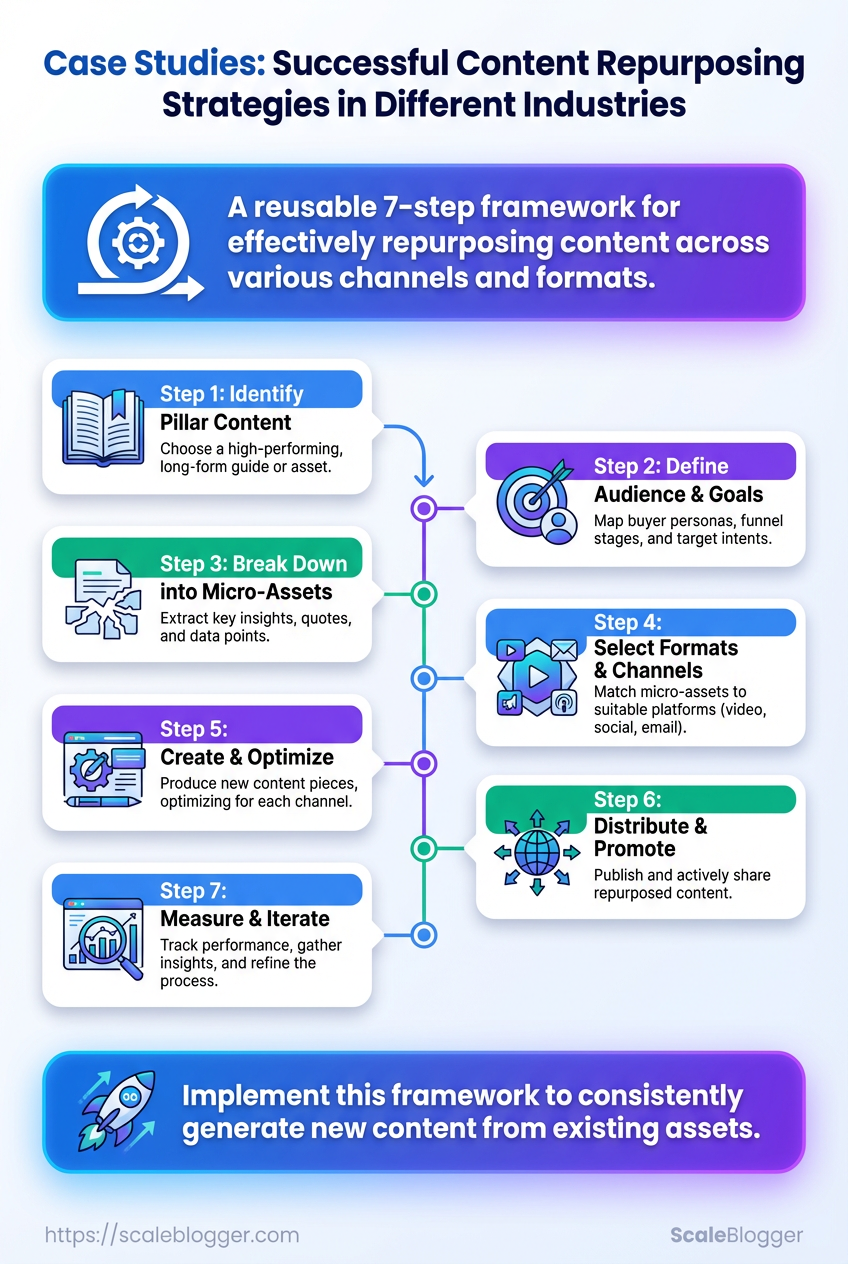
Generalized Process: A Reusable 7-Step Repurposing Framework
Repurposing becomes repeatable when it follows a clear, time-boxed sequence that includes audience mapping and measurement checkpoints. This 7-step framework turns one long-form asset into a predictable pipeline of posts, videos, emails, and short-form clips—without reinventing the wheel each time. Below are the practical prerequisites, tools, then the step-by-step process with time expectations and measurement cues you can use across industries.
Content inventory: A cataloged source asset (blog post, webinar, podcast) with publish date and analytics.
Audience map: Primary and secondary channels prioritized by where your audience actually engages.
Performance baseline: Recent metrics (CTR, average watch time, open rate) to compare after repurposing.
Tools & materials
- Essential: a transcription tool, basic audio/video editor, and a scheduling calendar.
- Helpful: lightweight asset tracker (spreadsheet or Airtable), simple image editor, and a captioning tool.
- Optional: AI summarizer or an automation platform to push variants to channels (consider Scaleblogger.com for automating pipelines).
- Identify the source asset and winning theme — pick the single piece with the most actionable insight and export transcript. (15–30 minutes)
- Define target outcomes and channels — set one metric per channel (e.g., YouTube: watch time ≥3 mins; LinkedIn: 3 comments). (15–30 minutes)
- Segment the content into modular units — create a list of clips, quotes, and data points usable as standalone posts. (30–60 minutes)
- Create prioritized formats — convert modules into a ranked list: long-form article, short video, carousel, tweet thread, email. (30–90 minutes)
- Produce assets using templates — batch record/edit, use copy templates for captions, and export standard sizes. (2–6 hours depending on volume)
- Schedule and distribute with transfer rules — publish highest-value formats first, then stagger derivatives over 2–4 weeks. (30–60 minutes to set up)
- Measure and iterate — collect channel-specific metrics at 7 and 30 days, archive what worked, and fold winners into the content inventory. (30–60 minutes per checkpoint)
Distribution channels by reach, best use-case, content format, and effort required
| Channel | Best Content Type | Expected Reach | Effort Level |
|---|---|---|---|
| Long-form posts, carousels | Mid-to-high among B2B networks | Medium | |
| Twitter/X | Threaded insights, micro-updates | High for topical virality | Low |
| YouTube | Short & long-form video | High potential reach and discoverability | High |
| Newsletters, deep dives | High conversion among subscribers | Medium | |
| Instagram Reels | Short vertical clips | High reach for visual storytelling | Medium |
Key insight: Choose two primary channels and two secondary channels per asset. Focus production effort where expected reach aligns with your conversion goals, then reuse lower-effort formats to maintain cadence.
This framework keeps repurposing tactical and measurable—build the habit, tune the checkpoints, and soon each asset will feed a predictable distribution funnel that supports growth goals.
Troubleshooting Common Issues
When repurposed content underperforms or legal and tracking problems crop up, the fastest path forward is a focused triage: isolate the failure mode, apply a corrective action, then measure the result. Below are practical diagnostics and fixes for the three most common trouble spots—poor-performing repurposed content, user-content rights management, and broken attribution or tracking—each with concrete steps you can run through today.
Poor-performing repurposed content
Start by confirming whether the issue is distribution, format mismatch, or content relevance.
- Distribution gap: Check if the republished asset reached the right channels and audience segment.
- Format mismatch: A long-form blog converted into an 8-slide carousel often needs rewritten hooks and captions.
- Relevance decay: Refresh data, examples, or SEO intent if the original was published >12 months ago.
- Export performance metrics from source and target channels (
CTR,time_on_page,conversion_rate). - Run a headline/hook A/B test for the underperforming variant.
- Update the repurpose with fresh microcopy, visuals sized natively for the channel, and explicit CTAs.
Example — converting a top-performing blog into video: shorten the transcript into a 90-second script, add three visual captions, and publish native video rather than a linked YouTube embed.
Rights management for user content
Treat rights and consent as part of the publishing workflow, not an afterthought.
Consent record: Store written permission or DM confirmation before publishing any user-submitted media.
Usage window: Define how long you can use content and whether edits are allowed.
Revocation process: Have a clear removal workflow and timeline if a contributor withdraws permission.
Practical fix: add a two-field consent form to the republishing checklist—username, consent_timestamp—and refuse reuse without both fields populated.
Attribution and tracking fixes
Broken attribution or analytics gaps ruin attribution-driven repurposing.
- UTM discipline: Always attach
utm_source,utm_medium,utm_campaignto repurposed links. - Canonical control: For cross-posted blog content, use
rel="canonical"to preserve SEO credit. - Event tracking: Implement
data-layerevents orgtag('event', ...)for non-link interactions.
- Audit a sample of repurposed posts for missing UTMs and add them.
- Verify canonical tags on republished copies and correct mismatches.
- Instrument a small, rapid test that fires an event when repurposed content drives a conversion.
If issues persist, automating checks can save time—tools that flag missing UTMs or canonical conflicts reduce manual errors. For teams scaling repurposing, consider integrating an AI-driven pipeline to enforce these rules and predict performance, as found in solutions like Scale your content workflow. Troubleshooting is iterative; each quick win compounds into steadier content velocity and cleaner legal posture.
Tips for Success & Pro Tips
Start by automating low-value repetitive work and batching high-focus tasks so creative energy goes where it matters. That combination reduces friction, keeps content predictable for audiences, and frees time for experimentation.
Automation and batching strategies
Automate distribution, tagging, and basic optimization while batching ideation and drafting into focused blocks.
- Batch ideation: Reserve a 90–120 minute block weekly to generate headlines and outlines.
- Automated publishing: Use scheduled queues to publish at consistent times.
- Template-driven briefs: Standardize briefs so AI or contractors produce uniform first drafts.
- Create a content calendar that groups similar topics together.
- Build templates for title, meta, and internal-linking rules.
- Connect your CMS to an automation tool for scheduled posting and social snippets.
Example: draft four posts in two deep-focus sessions, then schedule one post per week for the month. That preserves quality while keeping the feed steady.
UTM and attribution best practices
Consistent UTM usage makes testing meaningful and saves time during analysis.
- UTM naming standard: Use lowercase, hyphens, and short campaign names.
- Single source of truth: Keep UTMs in a shared spreadsheet or a tagging tool.
- Automate append: Use automation to add UTMs to social and email links.
UTM convention: campaign: month-topic
Medium convention: medium: email / social / referral
Tip: enforce UTM generation through a tiny internal tool or a CMS plugin so nobody hand-types tags.
Testing and iteration shortcuts
Test small, learn fast, and fail cheap.
- Micro-tests first: Change one variable—headline, hero image, or CTA—per test.
- Time-box analysis: Review initial performance after 48–72 hours, then again at 14 days.
- Prioritize wins: Promote variations with clear engagement lifts to paid channels.
- Pick the highest-traffic page with clear conversion signals.
- Run a headline test for two weeks.
- If lift > 10% in CTR or engagement, roll the winner across the cluster.
Practical shortcut: use automated A/B tools for headlines and let performance data decide scaling. Combine that with a lightweight experiment log so every change links back to the hypothesis.
Operational pro tips
- Hand off dirty work: Automate image resizing, alt-text suggestions, and schema snippets.
- Guardrails, not handcuffs: Use content scoring to flag issues but keep creative flexibility.
- Measure what moves business outcomes: Track leads and revenue, not vanity metrics alone.
These practices keep the engine running while creating space for strategic moves—batch when you need rhythm, automate the chores, and test like you’re investing small bets that compound into big wins.
📥 Download: Content Repurposing Checklist (PDF)
Measurement & Scaling Playbook
Start by measuring the few metrics that actually move the business: engagement that leads to conversions, and conversion velocity across channels. Focused KPIs by asset type keep reporting clean and decisions fast. Build simple dashboards that answer the single question: “Is this content generating pipeline or attention?” Then bake those dashboards into SOPs so execution scales without constant interpretation.
KPIs to track (by objective) Awareness: track unique visitors, impressions, and social reach. Engagement: track time on page, scroll depth, and session events. Acquisition/Leads: track form fills, gated downloads, and assisted conversions. Revenue/Retention: track MQL→SQL conversion rate, pipeline velocity, and repeat visits.
Data source inventory: List available sources (Google Analytics/GA4, internal analytics, CRM conversion reports).
Data governance: Standardize UTM usage and naming conventions before reporting.
- Set up a minimal dashboard for each content pillar.
- Map each asset to one primary KPI and one secondary KPI.
- Create an SOP that documents how often dashboards update and who acts on alerts.
- Connect
GA4and CRM to the chosen BI tool (Looker Studio, Power BI, or internal analytics). - Create one page per content funnel: awareness → engagement → conversion.
- Add date range controls, channel filters, and a conversion funnel visualization.
- Save templates and export PDF snapshots to the ops channel weekly.
How to build a simple dashboard (practical steps)
SOP elements for repeatability Ownership: who monitors, who escalates. Cadence: report frequency and snapshot times. Quality checks: UTM validation and sample event replay. Action rules: if conversion rate drops X% → run A/B test Y.
KPI mapping: match asset type to primary KPI, secondary KPI, and tracking method
| Asset Type | Primary KPI | Secondary KPI | Tracking Method |
|---|---|---|---|
| Blog post → gated checklist | Lead form submissions | Time on page | Google Analytics, CRM conversion reports |
| Webinar recording | Registrations → views | Watch time | Internal analytics, CRM conversion reports |
| Product video | Demo requests | Engagement rate | Google Analytics, Internal analytics |
| Social micro-posts | Impressions | Click-through rate | Social platform analytics, Google Analytics |
| Infographic | Shares/Backlinks | Referral traffic | Google Analytics, Internal analytics |
Key insight: Mapping assets to a single primary KPI prevents dashboard bloat and helps prioritize experiments. Use the secondary KPI to validate signal quality and attribute cross-channel impact.
A reliable measurement system turns guessing into repeatable improvement. Keep dashboards lean, SOPs explicit, and let the data drive which content scales next.
Conclusion
Treating a long-form asset as the finish line rarely pays off; repurposing turns that single effort into sustained reach, faster testing, and measurable pipeline lift. Remember the SaaS example that converted one guide into weekly micro-lessons, the e-commerce play that re-shot product content for seasonal campaigns, and the B2B webinar series turned into targeted nurture sequences — each shows a repeatable pattern: pick a strong pillar, map audience use-cases, and automate the slice-and-scale steps. Start by auditing your top-performing assets, batch similar repurposing tasks, and set simple metrics (engagement, leads, conversion) so measurement doesn’t become an afterthought.
If the questions in your head are “where do I begin?” or “how do we scale without hiring a new team?”, begin with one pillar piece and automate the routine edits and publishing cadence, then iterate. Wondering how to prove ROI quickly? Track a small test cohort across repurposed formats for 6–8 weeks and compare lift against baseline content. To streamline that process, platforms like Explore Scaleblogger’s AI-driven content workflow can help teams automate repurposing, enforce templates, and free creative time for strategy rather than manual grunt work. Take one asset, apply the 7-step framework from the article, and watch how a single piece becomes a reliable content engine.
