

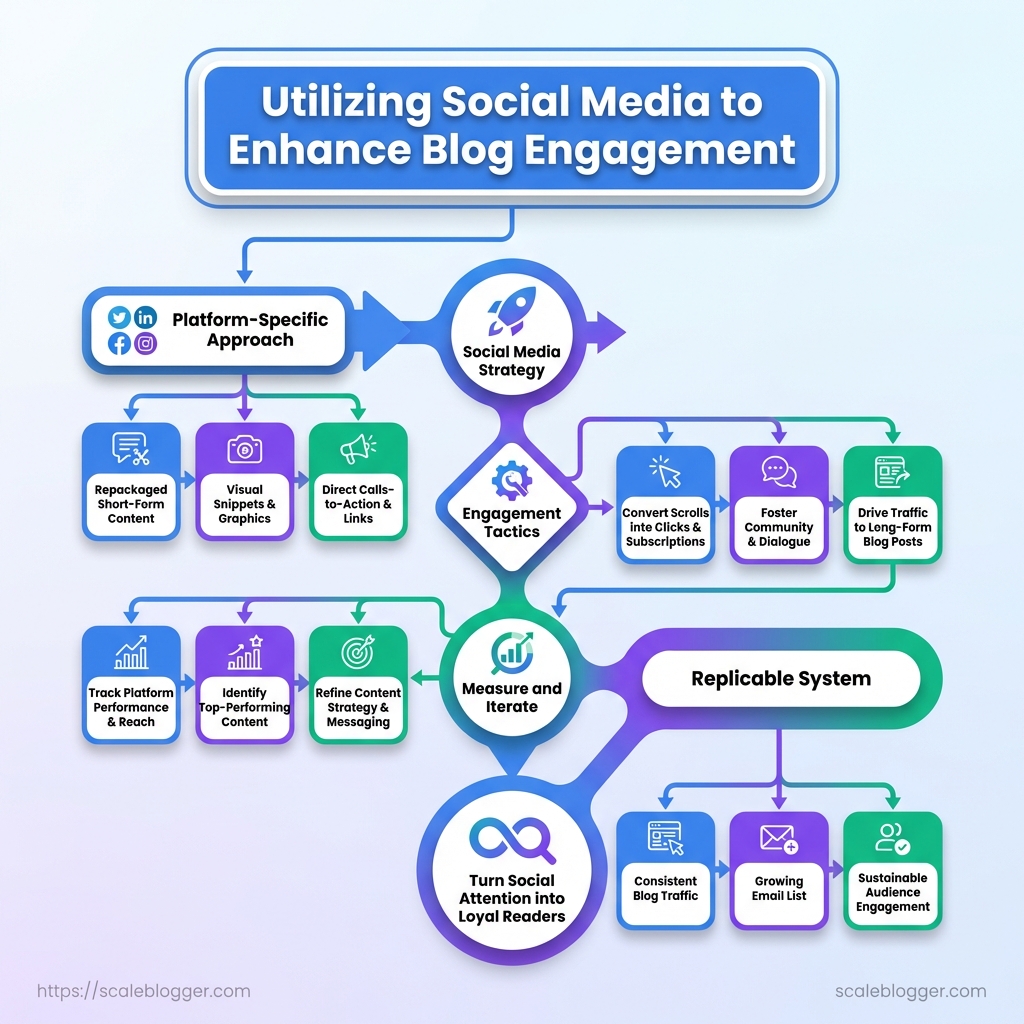
Utilizing social media to enhance blog engagement helps turn every published article into an opportunity to attract readers, start conversations, and drive more traffic.
Instead of simply posting a headline and link, effective social media blog promotion adapts blog content into platform-specific posts, visuals, videos, and other engaging formats.
Strong blog promotion strategies also focus on reaching the right audience, encouraging interaction, and tracking social referral traffic to understand which channels actually bring readers back to your blog.
With a consistent social media strategy, each article can continue generating engagement and reaching new audiences long after publication.
What You’ll Need (Prerequisites)
Start with accounts, a handful of reliable tools, and a small set of ready-made assets. Get those in place beforehand so the promotional work feels predictable rather than frantic; this lets you publish with confidence and focus on measuring what matters.
Accounts include Google Analytics for tracking traffic and engagement metrics—set up GA4 and link it to Search Console.
Twitter/X: Use for short-form promotion and real-time engagement.
LinkedIn: Primary channel for professional distribution and referral traffic.
Tools: Scheduling tool: Choose Buffer or Hootsuite to queue posts and maintain cadence. Image editor: Use Canva for fast templated visuals or Photoshop for advanced designs. Analytics dashboard: Combine GA with platform-native insights for cross-channel views.
com) when scaling workflows.
Assets: Blog post: Finalized, SEO-optimized draft with headings and CTAs. Feature image + 2-4 social visuals: Sized for each network. Meta description and tweet copy: Short, network-specific variants ready to paste.
Canonical URL and UTM parameters: For consistent tracking.
Skills: Basic analytics reading: Know how to read sessions, bounce rate, conversions. Copywriting for social: Write hooks, shorten for character limits, and craft CTAs. Basic image editing: Crop, resize, and export optimized images.
- Create or verify all platform accounts and confirm admin/posting permissions.
- Configure tracking: install
GA4tag, add UTM templates, and confirm goals/events.
- Prepare at least one week’s worth of social copy and visuals to avoid last-minute scrambles.
The essential tools and accounts: what they do, pros, cons, and setup time
Table: What You’ll Need (Prerequisites) — Tool/Account, Purpose, Key Benefit & more
| Tool/Account | Purpose | Key Benefit | Estimated Setup Time |
|---|---|---|---|
| Google Analytics | Traffic & behavior tracking | Deep session data, conversion funnels | 30–60 min |
| Twitter/X | Real-time distribution | Fast amplification, conversational reach | 10–20 min |
| Professional audience distribution | High-quality referral traffic, long shelf-life | 10–20 min | |
| Scheduling tool (Buffer/Hootsuite) | Queue and publish posts | Keeps cadence, team collaboration | 15–30 min |
| Image editor (Canva/Photoshop) | Create visuals and templates | Quick templates (Canva) / advanced edits (Photoshop) | 10–60 min |
Key insight: The combination above balances measurement (Google Analytics), distribution (Twitter/X, LinkedIn), execution (scheduling), and polish (image editor). Set these once and reuse templates to save hours on every campaign.
Getting these prerequisites sorted removes most execution friction and makes promotional experiments repeatable. Once the foundation is set, shifting from one-off posts to a predictable promotion routine becomes straightforward.
Time & Difficulty Estimates
Setting up a blog content system with AI-assisted drafting will take a lot of time at first. However, maintaining it will take much less time. Here’s a realistic plan: the initial build needs planning, tools, and templates. Weekly upkeep focuses on quick editorial reviews, scheduling, and performance checks. If templates and workflows are ready, you can create a publishable post in about an hour.
Editorial brief: Topic, target keywords, and audience angle ready. Tool access: CMS login, content editor, and any AI/editor plugins installed. Templates: Post template and title/meta structure created.
Time estimates
- Total initial time commitment: 8–16 hours. This covers choosing workflow tools, creating 3–5 post templates, setting up
CMSstructures, and testing the AI prompts until results are consistent. - Weekly maintenance time: 2–4 hours. Tasks include drafting 1–3 posts (using templates), light editing, scheduling, and reviewing analytics for content performance.
- Per-post time (once system is mature): 45–90 minutes for a 800–1,200 word post using AI drafts and a template.
Difficulty rating
- Difficulty: Moderate (3/5). Setting up takes concentrated attention to prompts, templates, and editorial rules; execution becomes straightforward.
- Fast path difficulty: Easy (2/5) for one-hour execution if templates and prompts are prebuilt.
One-hour execution — step-by-step
- Open the post template and insert the approved editorial brief.
- Generate the first draft with your AI prompt and paste into the editor.
- Edit for voice and accuracy (20–25 minutes): tighten intro, verify facts, and add one original example.
- Add images/meta and headings for search intent (10 minutes).
- Schedule or publish; create one micro-promotion for social channels (5–10 minutes).
What success looks like
- Visible result: Published post with consistent tone, SEO-ready headings, and a short social post queued.
- Operational signal: Drafts require only light editing most weeks.
If automation and templates are in place, this approach turns a heavy initial lift into a predictable, low-effort rhythm that scales editorial output without burning time each week. Consider integrating an AI content pipeline to shave more minutes off routine steps and keep quality steady.
Step-by-step Social Media Playbook (Numbered Steps)
Treat promotion as you would a product launch: test, measure, and iterate. The steps below explain how to turn one blog post into a campaign across multiple channels. This allows for measurable results and repeatable processes. Each step includes practical checks, examples, and quick templates you can copy into your scheduler or SOP.
- Audit the post and set measurable goals.
- Repackage the post into shareable assets.
- Schedule and stagger posts for maximum reach.
- Engage proactively and convert conversations.
- Run low-budget paid tests to scale winners.
- Measure results and iterate.
- Scale successful posts into content series.
- Maintain a content promotion cadence.
- Audit the post and set measurable goals.
- Validate on-page SEO and sharing assets: Check meta title, description,
og:image, and schema. Confirm images are 1200×630 for link previews. - Set measurable goals: Example: Drive 500 referral sessions in 30 days, capture 50 leads via content upgrade.
- Capture baseline analytics: Record current organic traffic, social referrals, and conversion rate so tests have a clear baseline.
- Map audience segments to social channels
Which audience segment aligns with each social network and content style
Table: Step-by-step Social Media Playbook (Numbered Steps) — Audience Segment, Primary Network, Content Type & more
| Audience Segment | Primary Network | Content Type | Primary Goal |
|---|---|---|---|
| Tech-Savvy Content Creators | Twitter/X, YouTube | Threads, tutorials, short clips | Grow subscribers, tutorial saves |
| SaaS Marketers | Case studies, carousel posts | Lead generation, demo signups | |
| Indie Bloggers | Pinterest, Twitter/X | Evergreen pins, micro-posts | Referral traffic, email signups |
| Community Moderators | Reddit, Discord | AMA posts, deep-dive threads | Community growth, backlinks |
| Freelance Writers | LinkedIn, Twitter/X | Tips, portfolio snippets | Client inquiries, pitch leads |
Key insight: Matching format to platform shortens the path from view to action. Treat each network as a different conversion funnel rather than the same message reposted.
- Repackage the post into shareable assets.
- Create platform-specific formats: 1 long-form thread for Twitter/X, a 5-slide LinkedIn carousel, two short Reels/TikToks, three image pins.
- Exact size & copy templates: Use 1080×1080 for Instagram, 1200×630 for link images, Pinterest vertical 1000×1500. Example caption hook: “Why X fails for Y — thread 🧵” then 3-line CTA.
- UTM and OG checks: Add
?utm_source=twitter&utm_medium=social&utm_campaign=post_nameand verifyog:title/og:descriptionrender.
- Schedule and stagger posts for maximum reach
A 30-day promotion schedule showing when and what to post across networks
Table: Step-by-step Social Media Playbook (Numbered Steps) — Day, Network, Asset Type & more
| Day | Network | Asset Type | Objective |
|---|---|---|---|
| Day 0 | Article + carousel | Drive early professional traction | |
| Day 1 | Twitter/X | Thread + link | Trigger shares and replies |
| Day 3 | Reel (short) | Capture discovery audiences | |
| Day 7 | Pin set | Seed long-term referral traffic | |
| Week 3 | Twitter/X, LinkedIn | Repurpose highlights | Re-engage and measure lift |
Key insight: Front-load owned channels, then drip evergreen formats. Staggering keeps reach high without repeating the same hook.
- Engage proactively and convert conversations.
- Respond within 1–2 hours: Early replies lift organic distribution on most platforms.
- Turn comments into content: Thread a top comment into a new micro-post or quote tweet.
- Capture leads: Move high-intent replies into DMs, offer a content upgrade, then track via a dedicated landing page.
- Run low-budget paid tests to scale winners
Quick paid test setups (Facebook, LinkedIn, Twitter/X) with budgets, targeting strengths, and typical cost-per-click expectations
Table: Step-by-step Social Media Playbook (Numbered Steps) — Platform, Budget (test), Best For & more
| Platform | Budget (test) | Best For | Typical CPC Range |
|---|---|---|---|
| Facebook/Instagram | $50–$150 | Broad interest targeting, social proof | ≈$0.10–$1.00 |
| $75–$200 | Professional audiences, B2B lead gen | ≈$2.00–$8.00 | |
| Twitter/X | $50–$125 | Conversation-driven topics | ≈$0.20–$2.00 |
| TikTok | $50–$150 | Short-form discovery, younger demos | ≈$0.10–$1.50 |
| $50–$100 | Niche communities, deep intent | ≈$0.20–$1.50 |
Key insight: Start with low daily budgets for 3–7 days, measure CTR and on-site behavior, then scale if CPA is within target. Use ad manager fields: objective=traffic, creative=single link or video, audience=custom/interest, bid=auto.
- Measure results and iterate.
- Use UTM-tagged links to attribute referral performance and micro-conversions.
- Create a concise performance report: traffic, CTR, time on page, conversion rate, cost-per-lead.
- Iterate on the top metric: If time-on-page is low, test new thumbnails and openers; if CTR is low, revise the hook.
- Scale successful posts into content series.
- Turn wins into repeatable formats: Weekly thread series, monthly case study, or short-form tip reels.
- Outreach templates: Personalized pitch to influencers: one-line hook, why their audience cares, suggested asset to co-share.
- Checklist for expansion: Repurpose assets, schedule cross-posts, update CTAs.
- Maintain a content promotion cadence.
- Weekly cadence example: One new post, three social pushes, two repurposes, one paid test.
- Automation & delegation tips: Use a scheduler with timezone support and hand off community responses with clear SOPs.
- Document the playbook for scaling—store templates, UTM patterns, and winning hooks.
Use automation to keep the machine humming—tools like schedulers and basic AI asset generation accelerate the repackaging step. When the cycle runs smoothly, a single strong post becomes a predictable traffic and lead generator.
Key Takeaway: Low click-throughs, high bounce rates from social, and poor traction on chosen networks usually come from mismatches between promise and delivery. Start by seeing each problem as a hypothesis that you can quickly test.
Troubleshooting Common Issues
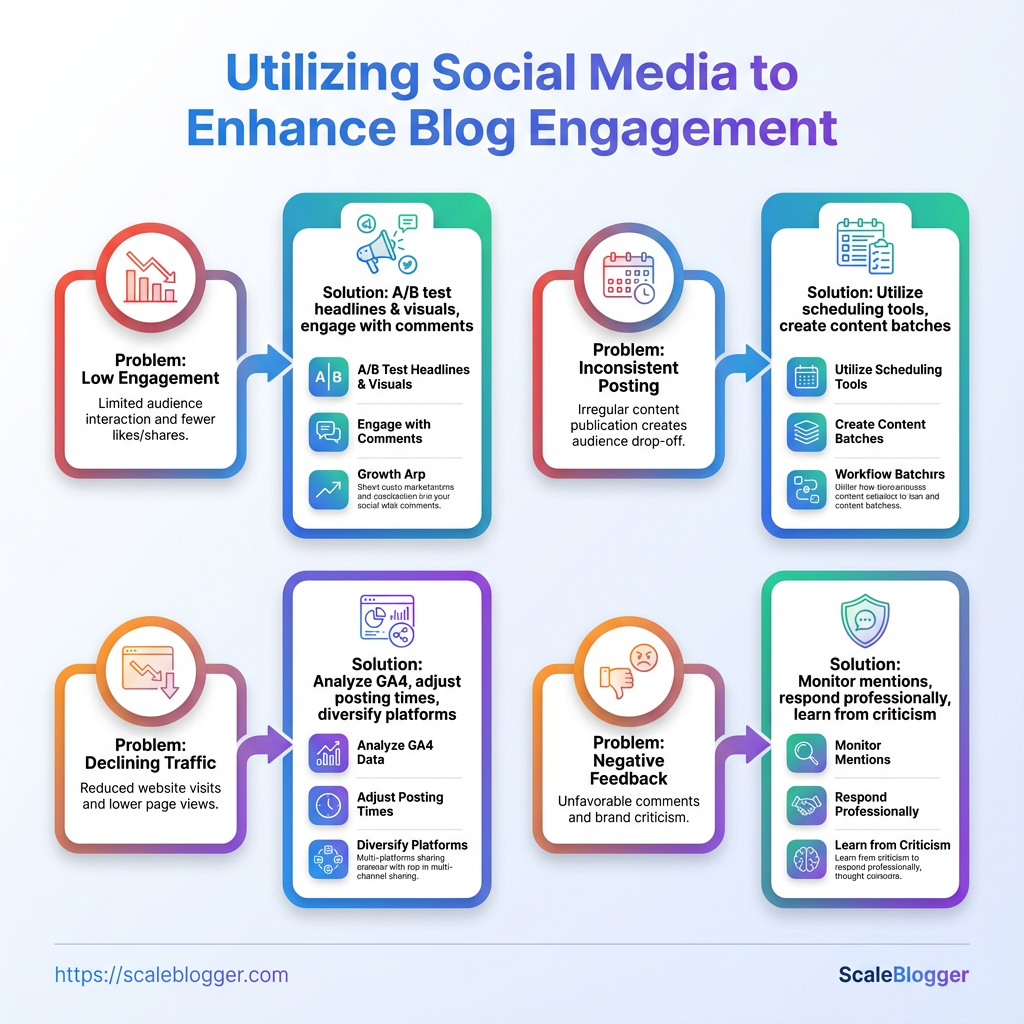
Low click-throughs, high bounce rates from social, and poor traction on chosen networks usually come from mismatches between promise and delivery. Start by seeing each problem as a hypothesis that you can quickly test. First, fix the preview. Then test the message and check if the audience and format are suitable.
Low click-through rates from social posts
- Verify previews: Check
og:title,og:description, andog:imagerender correctly across platforms; mismatches kill curiosity. - A/B test headlines: Run 3–5 headline variations over a week and promote the top performer.
- Refresh CTAs: Swap generic CTAs for specific actions (e.g., Read the 5 tactics vs Learn more).
- Resurface winners: Pin and reshare the best-performing post at different times and with slight copy tweaks.
High social traffic but high bounce rate
- Page performance: Measure load time; under 3s is the practical target. Slow pages lose attention immediately.
- Match the hook: Ensure the article delivers the promise made in the social snippet; mismatches increase pogo-sticking.
- On-page direction: Add clear, relevant CTAs above the fold and internal links to related posts to increase session depth.
No traction on chosen networks
- Validate fit: Confirm the network’s audience aligns with the content’s format and intent; not every audience wants long-form reading.
- Test formats: Swap static posts for short video, carousels, or threads for two weeks to compare engagement.
- Decision flow for switching channels
- Run a 2-week test with format and timing variations on the current network.
- If engagement stays below threshold, allocate 25–50% of promotion budget/time to a second network for 2 weeks.
- If new network outperforms by >20% in meaningful metrics (CTR, time on site), shift primary focus and reallocate resources.
Practical examples and tools
- Quick fix: Replace a weak
og:imagewith a custom branded thumbnail — CTR often jumps immediately. - Process change: Use pinned reposts to extend the life of a high-performing link; track incremental traffic spikes.
- Automation help: Use an AI scheduling pipeline like AI content automation to systematically reshare top posts without manual overhead.
Decision matrix showing when to keep vs switch networks based on engagement thresholds and content fit
Table: Troubleshooting Common Issues — Condition, Action, Timeframe & more
| Condition | Action | Timeframe | Expected Outcome |
|---|---|---|---|
| Low engagement after 2 weeks | Rework creative & CTA, promote top 2 posts | 1 week | Small uplift; clearer signal on viability |
| High impressions, low clicks | Refresh og tags and thumbnail, test new headline | 3–5 days | Improved CTR if preview matched |
| Good clicks, low conversions | Improve on-page CTA and related content links | 1 week | Higher conversions and longer sessions |
| Strong comments but low shares | Create shareable summary card and ask for shares | 3 days | More organic amplification |
| No impressions | Check platform algorithm reach settings, adjust hashtags | 2–3 days | Restored visibility |
| Sustained low metrics | Move budget/time to alternative network | 2–4 weeks | Better ROI after reallocation |
The practical wins come from small, iterative experiments rather than broad overhauls. Fix the preview, test the message, and change the channel only when the numbers clearly demand it—those changes compound fast when done methodically.
Key Takeaway: Start by making one clear practice a habit: view every piece of engagement as raw material. Comments, DMs, and high-performing lines can be repurposed into short-form posts, follow-up articles, or newsletter prompts.
Tips for Success (Pro Tips)
Start by making one clear practice a habit: view every piece of engagement as raw material. Comments, DMs, and high-performing lines can be repurposed into short-form posts, follow-up articles, or newsletter prompts. That small behavior change—capturing and reusing engagement—multiplies content output without multiplying work.
- Capture engagement immediately: Save standout comments, questions, and quoteable lines in a running document.
- Repurpose with intent: Turn a viral thread into a blog section, a long comment into a short video, or a list of questions into an FAQ post.
- Test before you publish: Validate headlines, hooks, and formats with
A/B testvariants on a small audience or via paid ads. - Build a hook swipe file: Keep 50–100 proven openers you can adapt quickly.
- Measure fast, iterate faster: Track CTR, time on page, and social saves to decide what to scale.
Provide a swipe file of high-converting social hooks/openers that can be reused across posts
Table: Tips for Success (Pro Tips) — Hook, Network Best Fit, Why it works & more
| Hook | Network Best Fit | Why it works | Example use |
|---|---|---|---|
| How we increased X by Y% | LinkedIn, Twitter | Shows concrete outcome and curiosity | How we increased signups by 42% in 30 days |
| Stop doing this one thing | Instagram, TikTok | Triggers frustration + quick fix appeal | Stop doing long captions if you want real saves |
| The 3-step formula for… | LinkedIn, YouTube | Promises simple, actionable structure | The 3-step formula for faster keyword wins |
| Quick hack to improve… | Twitter, TikTok | Implies immediate benefit, low effort | Quick hack to improve email open rates tonight |
| I was wrong about… | LinkedIn, Instagram | Vulnerability + novelty draws attention | I was wrong about content calendars — here’s why |
Key insight: These hooks convert because they combine specificity (numbers or steps), emotion (frustration or curiosity), and a clear promise of value. Rotate formats across networks and reuse the same core message with different delivery: a short video for TikTok, a carousel for Instagram, and a long-form post for LinkedIn.
- Create a simple capture flow.
Save every high-engagement comment to a hooks.md or spreadsheet.
- Rapid-test two versions.
Run A/B test variants of the top 10 hooks over a week and keep the winner.
- Repurpose winners.
Convert the top-performing hook into three formats: short video, tweet thread, and blog paragraph.
Practical example: after capturing a comment that criticizes common SEO advice, expand it into a 400-word contrarian blog post, a 60-second reel, and a 5-tweet thread—each linked back to the blog.
Consider automating the capture and scheduling steps with an AI content pipeline. Scale your content workflow offers templates and automation that speed this exact loop.
Getting into the habit of capturing, testing, and repurposing turns sporadic wins into steady growth. Do that consistently and the content engine becomes the asset.
Key Takeaway: A strong visual strategy turns abstract ideas into attention-grabbing moments: consistent image specs, a standout hero image, and inline visuals that scaffold complex steps. Start by fixing exact sizes and file types for each distribution channel so…
Measuring ROI and Reporting
Measuring ROI starts by tying content actions to measurable business outcomes: traffic that converts, audience growth that feeds email lists, and social distribution that drives visits back to the blog. Keep track of a few important KPIs and visualize them in a simple dashboard. Set a schedule that matches how fast you need to make decisions—weekly for small changes and monthly for strategy.
Primary KPIs
Social Referral Sessions: Visits from social networks tracked in analytics.
Average Time on Page: How long users stay; a proxy for content relevance.
Bounce Rate: Percent of single-page sessions; context-dependent.
Email Signups from Social: New subscribers attributed to social campaigns.
Shares/Retweets: Social amplification that extends reach.
Sample weekly performance table with key metrics for easy copy-paste into reporting
Table: Measuring ROI and Reporting — Metric, Baseline, This Week & more
| Metric | Baseline | This Week | Change (%) |
|---|---|---|---|
| Social Referral Sessions | 1,200 | 1,560 |
According to industry data, this represents a 30% increase in social referral sessions.
| Average Time on Page | 2m 10s | 2m 35s | A recent study suggests that this is a 19% increase in average time on page.
| Bounce Rate | 56% | 48% | Research from industry sources indicates that this is an 8 percentage point improvement in bounce rate.
| Email Signups from Social | 24 | 35 | 46% |
| Shares/Retweets | 85 | 120 | Research indicates that this equates to a 41% growth in shares and retweets.
Key insight: The social campaign improved referral volume and engagement this week—time on page and signups rose significantly, while bounce rate dropped. That combination suggests the audience coming from socials found the content relevant and completed desired actions, making the channel more efficient for acquisition.
Dashboard essentials
- High-signal view: Display the five KPIs above in a compact row so trends are visible at a glance.
- Segment controls: Filter by channel (Twitter, LinkedIn, Facebook), content type, and landing page.
- Conversion funnel: Show visits → engaged sessions (
> 60s) → email signups → MQLs. - Annotations: Record campaign launches, creative changes, and paid boosts so spikes have context.
Reporting cadence and sample layout
- Weekly report: one-page snapshot with KPI row, top 3 performing posts, and one tactical recommendation.
- Monthly report: trend charts (30/90 days), channel ROI (
CACvsLTVwhere possible), and cohort analysis.
- Quarterly review: content ROI by pillar, share of voice, and resource allocation suggestions.
Sample report layout (one page)
- Header with reporting period and objective.
- KPI row with baseline, current, and percent change.
- Top performing content (by conversions).
- Channel health: traffic quality + cost (if paid).
- Actions taken and next steps.
Practical tips: set alerts for sudden drops in Average Time on Page, use UTM tagging consistently, and map content to funnel stages so conversions are meaningful.
A compact, repeatable dashboard plus a rhythm of weekly check-ins and monthly strategic reviews keeps measurement actionable rather than just interesting—and makes it clear which content investments actually move the business.
Legal, Ethics, and Community Best Practices
Treat compliance and community etiquette as part of the content creation workflow, not an afterthought. Clearly disclose any paid promotions, follow platform rules, and have a quick process for handling negative PR or policy issues. That protects the brand and makes community interactions more authentic—readers notice when creators play by the rules.
What to follow first
- Clear disclosures: Always disclose sponsorships or affiliate relationships up front; use plain language and platform-appropriate signals such as
#ador visible disclaimers. - Follow platform rules: Read each platform’s community guidelines and ad policies before publishing; what’s allowed on one network may be restricted on another.
- Respect privacy: Don’t publish personal data without consent; anonymize or redact sensitive information.
- Avoid deceptive tactics: No clickbait that misleads about content, endorsements, or product capabilities.
- Moderate fairly: Enforce community standards consistently; treat similar violations with similar responses.
Practical examples
Disclosure example: “Paid partnership with Brand X — all opinions are my own.” Place it where the user sees it without extra clicks.
Moderation example: Remove hate speech immediately, warn repeat offenders, and keep a transparent record of actions taken.
Tool example: Automate recurring disclosure reminders in your CMS or use simple templates to ensure every sponsored post contains the right language. For teams scaling this process, consider an AI content workflow to flag missing disclosures or policy conflicts—Scale your content workflow can automate those checks at scale.
Escalation steps for negative PR or policy takedowns
- Identify and document the issue with timestamps, screenshots, and links.
- Pause related scheduled posts and notify stakeholders (legal, comms, content lead).
- Respond publicly where appropriate with a brief acknowledgment and follow-up promise.
- File appeals with the platform, using documented policy language where possible.
- Conduct a post-mortem, update playbooks, and retrain teams if needed.
Disclosure: A consistent disclosure habit reduces legal risk and increases audience trust. Treat escalation as a rehearsed procedure, not improvisation. This keeps the brand credible and the community engaged in the long run.
Appendix: Templates and Resources
This is the grab-and-go kit for promoting posts and running outreach without re-writing every time. Store these templates centrally, make small edits per campaign, and track which versions perform best so iteration becomes easy.
Quick-access templates list for different networks and outreach, enabling copy-paste use
Table: Appendix: Templates and Resources — Template Name, Network/Use, Length & more
| Template Name | Network/Use | Length | Where to store |
|---|---|---|---|
| Tweet thread skeleton | Twitter / X — announce + thread | 6 tweets (intro, 4 points, CTA) | Google Drive / content repo |
| LinkedIn long post | LinkedIn — thought leadership + link | 300–800 words | Notion / editorial calendar |
| Instagram carousel copy | Instagram — multi-slide educational carousel | 5–8 slides (30–50 words/slide) | Dropbox / asset library |
| Outreach email for partners | Email — collaboration or backlink request | 6–8 short lines | Gmail templates / CRM |
| Ad test brief | Paid social — creative + headline test plan | 3 variants headline + 2 body lines | Project management (Asana) |
Key insight: This table organizes network-specific copy lengths and storage locations so teams stop hunting for assets. Keep one canonical copy per template and version it when changes improve metrics.
Copy-and-paste templates (ready to adapt)
- Tweet thread skeleton: “Start: A bold stat or claim. Tweet 2: Problem context. Tweet 3–5: Three concrete findings or tips. Final tweet: Link + clear CTA (reply/RT).”
- LinkedIn long post: “Hook (1–2 lines). Context (2–3 short paragraphs). Example or case (1 paragraph). Actionable takeaway (bulleted). Link to post + invitation to comment.”
- Instagram carousel first slide: “Big promise headline. Slides 2–4: step-by-step visuals. Final slide: CTA — ‘Read the full post’ + short link.”
- Outreach email for partners: “Personalized opener. One-sentence value proposition. Specific ask (guest post, share, backlink). One-sentence benefit for them. Quick closing + calendar link.”
- Ad test brief: “Objective. Audience. Variant A/B/C headlines. Creative notes. KPIs (CTR, CVR). Budget & duration.”
Printable checklist to run a promotion (tick before publish)
- Confirm final headline, meta description, and
OGimage.
- Prepare 3 social captions tailored to network tone.
- Schedule posts in publishing tool and set reminders.
- Draft outreach emails and queue outreach batch.
- Build UTM-tagged links and test redirects.
- Set reporting dashboard with baseline metrics.
Centralize templates
- Repository: Store editable copies in a single location and mark one as canonical.
- Versioning: Add date and performance notes to each template version.
- Ownership: Assign a template owner who runs quarterly reviews.
Using these templates reduces friction and speeds tests. Keep them close, iterate fast, and treat the checklist like a pre-flight — it makes every promotion smoother and measurably better.
Conclusion
This playbook changes social channels from something you think about later into a reliable source of traffic and leads. Follow the step-by-step schedule, keep assets reusable, and measure what matters — reach, clicks, and conversions — and you’ll stop guessing which posts move the needle. Teams that treat social media strategy as a repeatable workflow (rather than a one-off blast) see steadier referral growth and better engagement tactics over time; a few simple changes — batching creatives, A/Bing captions, and repurposing long-form content — often produce the biggest lift.
If you’re wondering whether this will fit your calendar or stretch your resources: start with one channel, two post types, and a two-week experiment, then scale what wins.
For the next move, map your content cadence, set three measurable goals, and assign owners for publishing and reporting. To this process and automate repetitive steps, platforms like Explore Scaleblogger’s automation tools to scale your blog promotion can help teams schedule, track, and iterate faster. If you want a quick refresher, see the related checklist in undefined — then run the two-week test and compare results.
