

A caption that misses the meaning.
The benefits of AI in enhancing content accessibility become clear when digital content is technically complete but still difficult for some audiences to use.
AI can support inclusive content marketing by generating captions, summaries, alt text, and clearer language at scale, helping more people understand the same message with less friction.
The biggest advantage isn’t just speed. AI can create a strong accessibility-focused draft faster, giving teams more time to review and improve important details.
These AI benefits for diverse audiences can improve experiences for people using screen readers, those with visual or hearing impairments, cognitive differences, or limited language fluency.
When accessibility improves, more people can understand, navigate, and act on your content without the format becoming a barrier.
Table of Contents
Quick Answer: AI content accessibility improves inclusive marketing by rapidly drafting captions, summaries, and alt text so the same message works for screen readers, low vision, and hearing loss—while also strengthening search context. Use AI to generate first-pass accessibility assets, then validate the output with a WCAG-focused quality check and a human review for accuracy and tone (see Section 9) before publishing.
Why content accessibility is now a strategic priority
Great content can still exclude people.
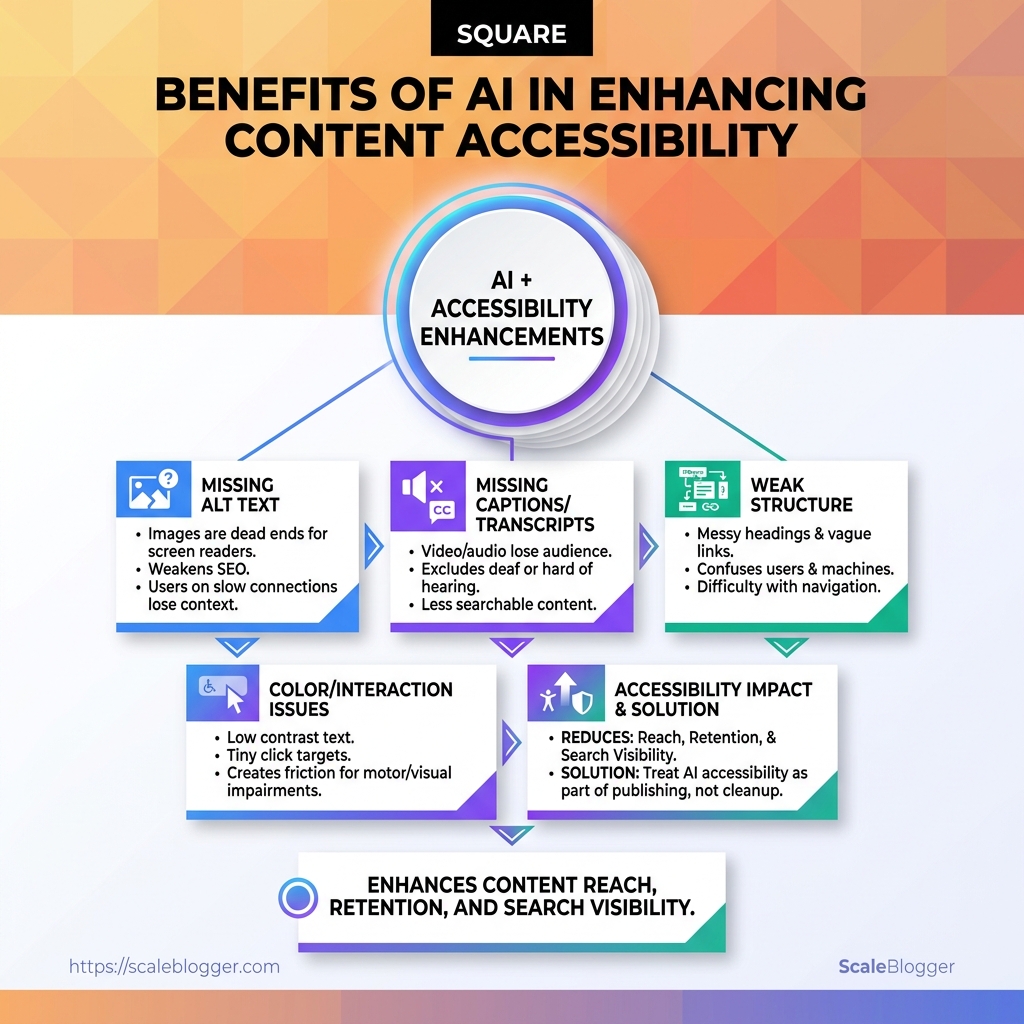
That usually happens when headings are messy, images have weak alt text, captions are missing, or color contrast makes reading a chore.
Accessibility used to sound like a compliance topic.
In modern content marketing, it behaves more like reach, retention, and search visibility rolled into one. Inclusive content marketing gives more people a clean path through the same message, and that matters whether they are using a screen reader, watching on mute, or skimming on a phone.
AI has made the stakes higher, not lower.
AI can draft text fast—but the final accessibility value depends on validating alt text, structure, and media support in your review step (see Section 9).
Common blockers are usually plain, not exotic:
- Missing alt text: Images become dead ends for screen reader users, and they can also weaken image search context. Altaudit’s 2026 alt text guide makes the SEO and accessibility link hard to ignore.
- Captions and transcripts left out: Video and audio lose a huge chunk of their audience when sound is optional or unavailable. Mindsmith’s accessibility guidance treats captions, transcripts, and alt text as shared responsibility, which is exactly right.
- Weak structure: Headings that jump around, vague link text, and cluttered layouts make content harder for humans and machines to parse. UsableNet’s WCAG and LLM-ready accessibility notes connect clean HTML with better content understanding.
- Color and interaction issues: Low contrast, tiny tap targets, and unreadable buttons turn simple actions into friction.
Tech-savvy creators should care early because accessibility compounds.
A page built cleanly from the start is easier to update, easier to repurpose, and easier for AI systems to interpret later.
It also reduces the painful rewrite cycle that happens when accessibility gets patched in after publication.
That is where AI benefits for diverse audiences become practical, not theoretical.
Build for access first, and the content usually performs better for everyone else too.
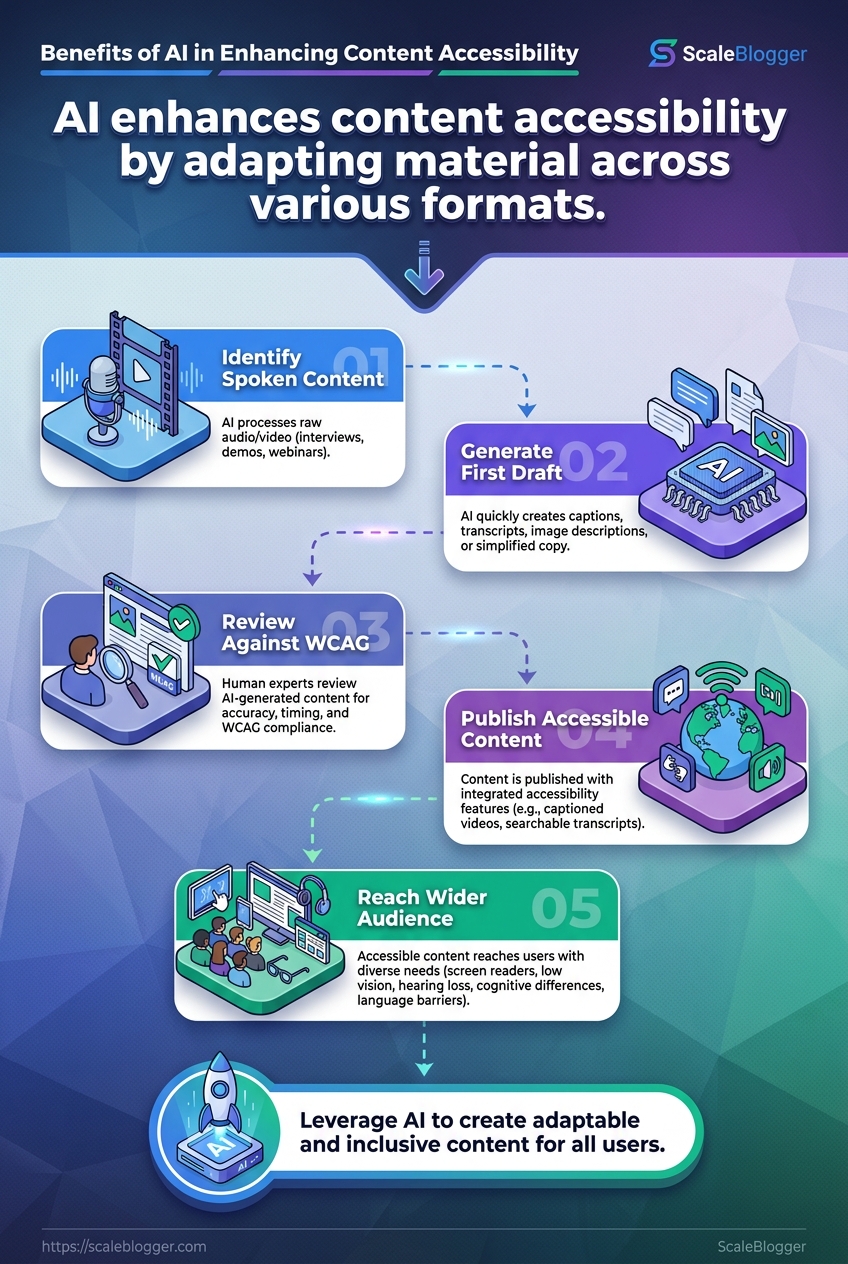
How AI improves accessibility across content formats
Why should one blog post work harder for everyone when so much content still assumes a single reader, a single language, and a single way of consuming media?
AI helps close that gap by adapting the same idea across formats.
It can draft captions for video, build transcripts for podcasts, simplify dense copy, generate image descriptions, and translate content into other languages—without starting from scratch.
That matters for AI content accessibility and for inclusive content marketing.
A captioned webinar helps a commuter on mute, while simpler web copy helps someone reading in a second language or under time pressure.
Captions and transcripts for audio and video
AI is strongest when the raw material is spoken content.
It can turn interviews, product demos, and webinars into captions and searchable transcripts in minutes—far faster than manual first drafts.
But accuracy depends on context, timing, and labels. Add a review pass for timing, speaker labeling, and correctness (see Section 9).
- Captions make spoken content usable in quiet spaces, noisy offices, and on mobile.
- Transcripts help screen reader users, search engines, and anyone skimming for one detail.
- Speaker labeling matters when more than one person talks in a recording.
- Punctuation cleanup improves readability, especially in long interviews or webinars.
Simpler reading levels for web copy
Dense copy can be a wall, even when the information is good.
AI can rewrite material into shorter sentences, cleaner paragraphs, and a more direct reading level.
That’s especially useful for product pages, onboarding flows, and help articles.
Clear structure helps both people and machines understand content more easily.
- Plain-language rewrites reduce jargon without flattening meaning.
- Shorter sentences improve comprehension for fast readers and non-native speakers.
- Structured summaries let people jump to the part they need.
- Consistent headings reduce scanning friction.
Image descriptions, alt text, and structure
AI can draft alt text, summarize what an image shows, and suggest better heading hierarchy around that media.
The trick is specificity. “Team meeting in a conference room” is vague. “Three designers reviewing a homepage wireframe on a laptop” is usually far more useful.
Multilingual adaptation for wider audiences
Translation is only the beginning.
AI can also adapt tone, idioms, and examples so content feels natural in different regions—where AI benefits for diverse audiences become obvious.
That’s how a single article can serve readers in multiple markets without sounding machine-made.
Done well, AI makes content easier to hear, read, scan, and translate.
That kind of reach feels practical—not theoretical.
Where AI creates the biggest accessibility gains in the content workflow
A good draft is only the start.
What really matters is whether the work survives the handoffs: when a post moves from draft to final, from article to social post, and from published piece to performance review.
Those are the places where AI content accessibility can save the most time—because the work becomes repetitive fast and the rules stay consistent.
The strongest gains come from drafting, rewriting, and formatting at scale.
AI can produce first-pass alt text, rewrite dense paragraphs into cleaner language, and turn one article into a set of channel-specific versions without losing the core message.
That matters for inclusive content marketing, because the same audience may read on a phone, listen through a screen reader, or skim a social post in two seconds flat.
One more thing: keep a manual review step for alt text accuracy, transcript/caption correctness, and semantic structure (see Section 9).
- Drafting at scale: AI can create multiple versions of a post with different reading levels, tones, or section lengths, which helps when one article must serve very different readers.
- Rewriting for clarity: It can break long sentences, remove jargon, and reshape headings so scanners and assistive tech users do less work.
- Formatting for distribution: It can turn a blog post into a LinkedIn summary, a thread, or a captioned video script, which is where AI benefits for diverse audiences become much more visible.
- Reviewing engagement signals: Accessibility changes often show up in behavior, such as stronger scroll depth, better video completion, or more time spent on transcript-heavy pages.
The scheduling layer matters too.
A long article can be repackaged into smaller posts that work better on mobile, while captions and transcripts keep the same idea usable across formats.
The smartest workflow treats accessibility as a production habit, not a cleanup task.
Once AI handles the heavy lifting, human review can focus on the places where clarity really lives.
AI tools and content systems that support inclusive content marketing
When a team says it wants AI content accessibility, the real question is usually simpler: which part of the workflow needs help first?
A drafting system, a transcription layer, and a testing tool solve different problems.
Mixing them up is how people end up with content that looks polished but still misses AI benefits for diverse audiences.
Sources like AudioEye’s guide on WCAG guidelines for AI-generated content and UsableNet’s WCAG guidance for AI-ready content both make the same point in different ways: clean structure helps, but human review still matters.
Our system belongs in the drafting and publishing layer, not as the final judge of accessibility.
That separation keeps inclusive content marketing honest, because a fast workflow is only useful if the output still reads clearly, supports assistive tech, and survives review.
Comparing AI tools by accessibility use case
| Tool | Best accessibility use case | Strengths | Limitations | Best for |
|---|---|---|---|---|
| Scaleblogger | AI-assisted article drafting and content scaling | Fast draft generation, content workflow support, publishing efficiency | Depends on human review for accessibility accuracy | Content teams that need faster publishing with editorial control |
| Deque Axe | Technical WCAG checking | Finds color contrast, ARIA, and landmark issues quickly | Does not rewrite content or fix strategy | Developers and QA teams |
| UserWay | Broad site accessibility support | Quick coverage for common accessibility needs | Widgets do not replace code or content fixes | Teams needing a fast baseline improvement |
| Stark | Design accessibility | Strong for contrast, color-blindness, and UI checks | Mostly design-phase support, not content creation | Product and design teams |
| Visme | Accessible visual content creation | Helps teams build accessible graphics and presentations | Not a full editorial system | Marketing teams making visual assets |
| Equidox | PDF and document remediation | Useful for structured document cleanup | Specialized for documents, not blogs | Teams with large PDF libraries |
| JAWS | Screen reader testing | Real-world testing of how content sounds to users | Not a content creation or editing tool | Accessibility testers and QA |
| Voiceitt | Speech accessibility support | Helps with speech-to-text and communication support | Specialized, not a publishing system | Assistive communication use cases |
| Mindsmith | Learning content accessibility | Supports captions, transcripts, and alt text in learning content | Focused more on course content than blogs | Training and education teams |
| Meta Ray-Ban Glasses | On-the-go assistive support | Useful for hands-free capture and access scenarios | Not a content workflow tool | Assistive tech exploration and field use |
AI can catch a meaningful slice of common issues, especially missing alt text, contrast problems, and some landmark errors, according to TestParty’s review of AI-powered WCAG tools.
Still, content quality and accessibility are not the same thing.
Choosing tools without sacrificing editorial quality
A tool should earn its place by doing one job well.
If it drafts, it should draft cleanly.
If it tests, it should test honestly.
If it rewrites, it should not flatten tone or blur meaning.
The safest stack pairs one system for creation, one for accessibility checks, and one for human review.
That keeps editorial standards intact while still making room for accessible structure, plain language, and clearer navigation.
Risks, limitations, and human review requirements
Can an AI-generated alt text line still miss the point? Absolutely.
A system can produce something that looks tidy and still describe the wrong subject, overstate what matters, or flatten a speaker’s tone into awkward corporate mush.
That is why AI content accessibility still depends on editorial judgment.
Automated tools can fix a meaningful subset of issues, including missing alt text and some contrast or ARIA problems, but they do not reliably catch nuance, intent, or context in the way a careful editor can, as noted in TestParty’s review of AI-powered WCAG tools and AudioEye’s guide to WCAG guidelines for AI-generated content.
Bias shows up in quieter ways.
An AI caption may transcribe words correctly and still miss speaker identity, soften dialect, or choose language that feels neutral to one reader and patronizing to another.
That matters in inclusive content marketing, because tone can either welcome people in or make them feel like the content was written at them instead of for them.
A good review pass keeps the benefits for diverse audiences without trusting the machine blindly.
Mindsmith’s accessibility guidance treats accessibility as a partnership, and that framing fits here: the model drafts, the editor verifies.
- Alt text accuracy: Check whether the description names the real purpose of the image, not just what appears first.
- Caption fidelity: Verify speaker labels, technical terms, and names that AI often muddles.
- Plain-language tone: Trim jargon, vague praise, and over-polished phrasing that can make content harder to parse.
- WCAG alignment: Run the draft against a checklist before publishing, as recommended in AudioEye’s WCAG review guidance.
- Edge-case testing: Read the content as if a screen reader, a non-native speaker, or a distracted mobile user were the first audience.
A useful rule of thumb: if the accessibility element changes meaning when it is wrong, it deserves human review.
That includes alt text, summaries, captions, labels, and anything that helps readers trust what they are seeing or hearing.
That extra pass is not busywork.
It is the difference between content that merely looks accessible and content that actually holds up in use.
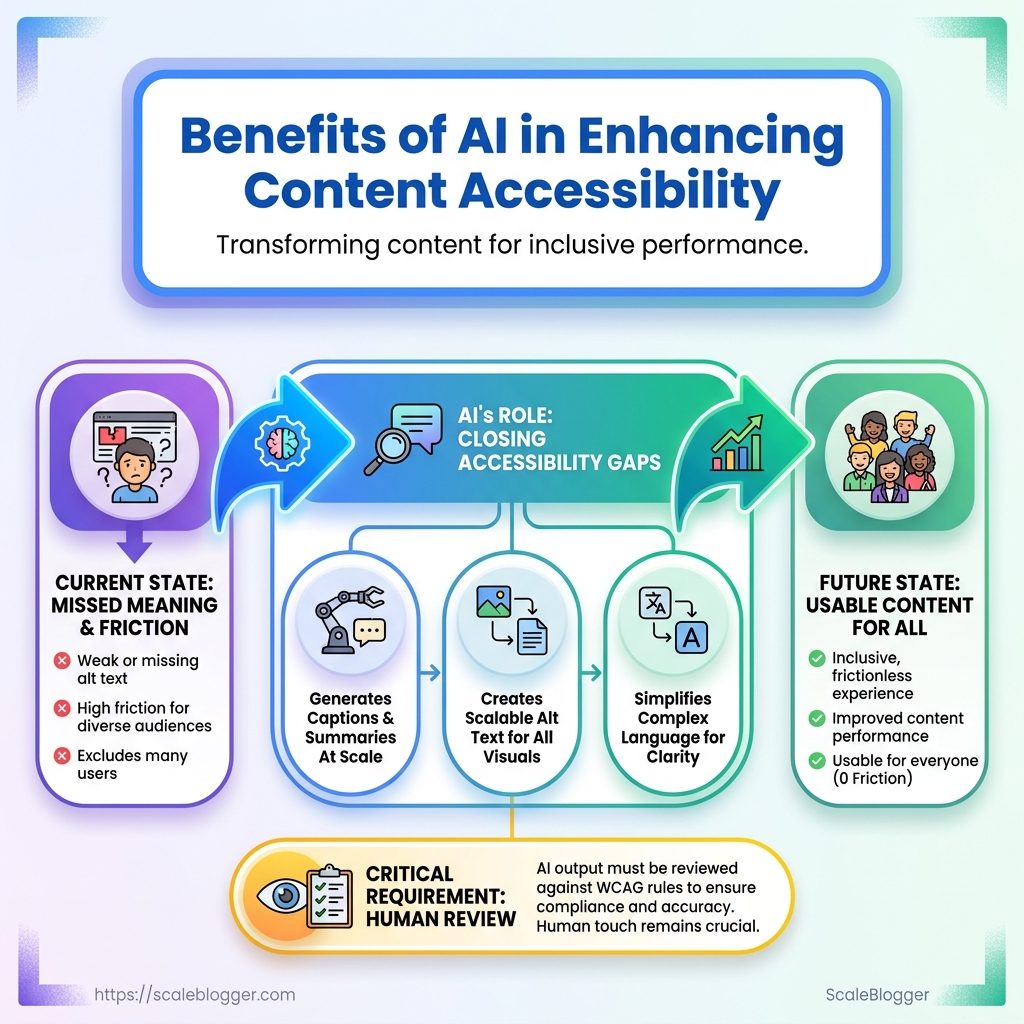
Measuring the business value of accessible content
A polished page can still lose momentum if people can’t move through it cleanly.
The real question isn’t whether accessibility looks good on a checklist—it’s whether it changes how content performs in the wild.
The strongest evidence usually shows up in engagement data first.
Captions, transcripts, clearer structure, and descriptive image text reduce friction, so people stay longer and complete more tasks.
Search and discovery matter too.
When content is easier for people to scan, it is often easier for search engines—and AI systems used for discovery—to interpret as well.
The numbers worth watching
- Engaged time: If users can follow the page without effort, time on page usually rises.
- Scroll depth and completion rate: These indicate whether readers reach the parts that matter.
- Video completion and transcript use: Captions and transcripts often change how people consume multimedia.
- Organic impressions and non-branded clicks: Better structure and descriptive media text can improve visibility.
- Form completion and demo requests: These connect accessibility work to real business actions.
Reporting gets stronger when teams compare like with like.
A clean approach is to track the same page type before and after accessibility fixes, then segment by device, traffic source, and content format. This helps separate real gains from seasonal noise.
For inclusive content marketing, the best reporting patterns tie accessibility work to conversion rate, task completion, and support load—rather than only technical pass/fail.
A SaaS team, for example, might check whether captioning a product demo increases watch-through and demo form submissions on the same landing page. If both move in the right direction, the business case becomes much easier to defend.
The pages that win usually remove friction before analytics ever has to explain it.
Make Every Format Earn Its Place
The strongest idea here is simple: AI content accessibility is not a finishing touch, it is part of making content actually useful.
A caption, alt text, or summary that only describes what is shown still leaves people behind; the real win comes when the message works for screen readers, skim readers, multilingual audiences, and people bouncing between devices.
That is where inclusive content marketing starts paying off in a real way.
The best examples in this space usually look small from the outside.
A clearer image description, better heading structure, or a caption that carries the point instead of naming objects can widen reach fast, especially when content is repurposed across channels.
Those are the places where the AI benefits for diverse audiences become obvious, because the same idea can land cleanly in more than one format.
A practical move today is to pick one high-traffic article and review its alt text, headings, and social captions against WCAG basics.
If the workflow feels clunky, our team builds automation that helps content move from draft to publish with accessibility checks baked in from the start. Start with one page, one fix, and one audience you are currently underserving.
