

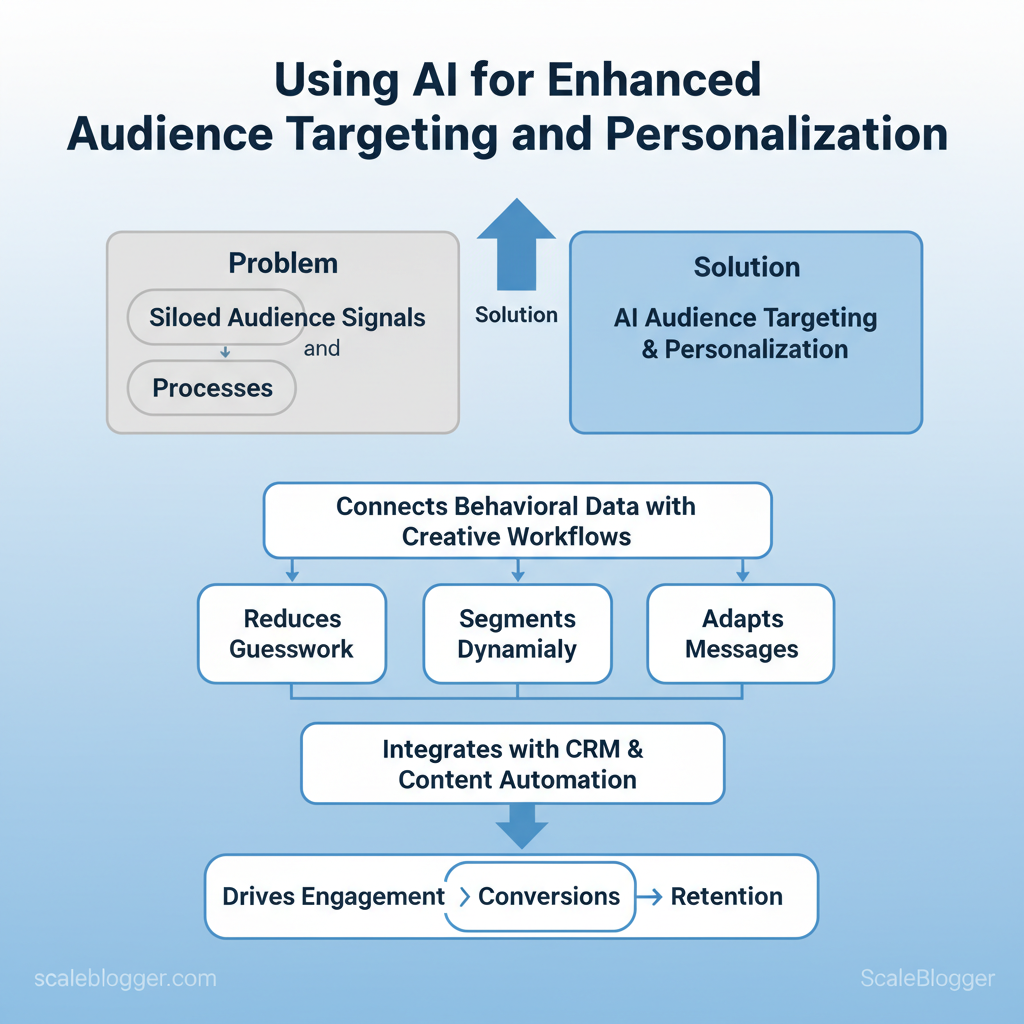
Using AI for enhanced audience targeting and personalization helps marketers understand not only who their audiences are, but what they are likely to need, engage with, or respond to next.
Instead of relying on broad demographics and static customer groups, AI can analyze behavioral signals, browsing patterns, content interactions, and intent data to uncover more meaningful audience segments.
Those insights become more valuable when they shape the content people actually receive. ScaleBlogger can help teams turn audience insights into scalable content workflows, making it easier to create, optimize, and distribute relevant content across different channels.
With effective AI audience targeting and personalization, marketers can deliver experiences that feel more relevant while continuously learning which messages, formats, and audience segments drive stronger engagement and conversions.
> Key Takeaway: ## Prerequisites & What You’ll Need
Begin with the data and systems that allow personalization and AI content to effectively engage users. To target audiences and automate personalization, start with clear analytics on user actions.
Prerequisites & What You’ll Need
Begin with the data and systems that allow personalization and AI content to effectively engage users. To effectively target audiences and automate personalization, you need clear analytics on user actions, consistent user data, an AI model or service you can access, and a method to test and measure results. Gather these items before building the pipeline and the skills needed to run it.
Essential setup items
- Event-level analytics: instrument pageviews, clicks, conversions, and custom events so each user action is queryable. User identity store: a CRM or unified profile that maps device IDs, emails, and lifetime attributes. AI access: either an off‑the‑shelf API (LLM or recommendation engine) or an on-premise model with inference endpoints.
- Testing & experiment platform: A/B or feature-flagging system to measure lift and guardrails. Content delivery: CMS that supports programmatic personalization or edge rules.
- Prepare the data first:
- Export 30–90 days of event-level user data into a schema you can query.
- Populate key profile attributes (lifecycle stage, last_active, top_categories).
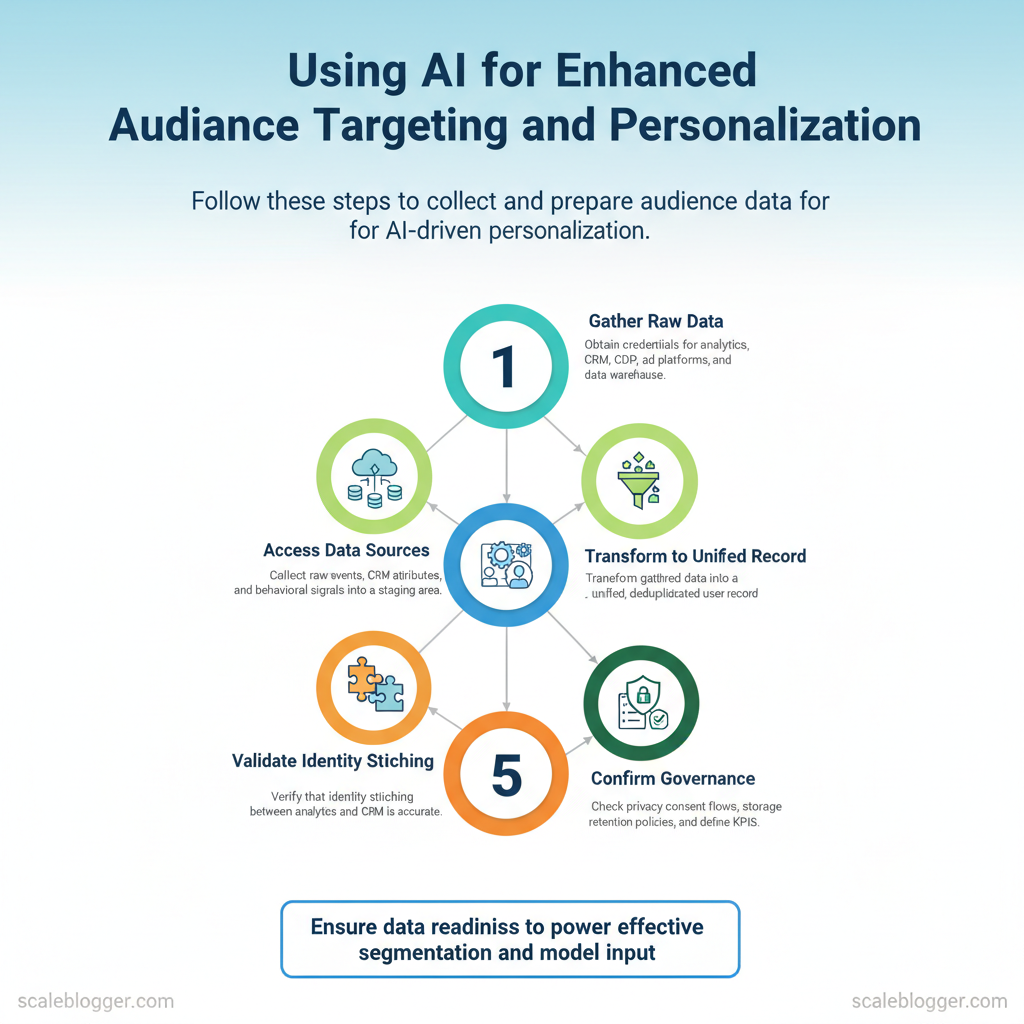
- Validate identity stitching between analytics and CRM.
- Verify tech connectivity:
- Confirm your AI provider offers an API key and rate limits that match your traffic.
- Ensure the CMS or CDN can accept real-time personalization signals (headers, cookies, API calls).
- Confirm governance:
- Check privacy consent flows and storage retention policies.
- Define measurable KPIs and experiment durations.
Helpful skills and quick tools
- SQL proficiency: for aggregations and segments. Basic Python or no-code connectors: for ETL and model calls (
pandas,requests). Familiarity with event schemas:client_id,user_id,event_name,timestamp.
- Experiment design basics: sample size and power calculations. Optional: familiarity with MLOps or feature stores for production-grade models.
Prerequisite tools and their role in the workflow (what each tool solves)
| Tool/Resource | Role in workflow | Minimum requirement | Why it’s needed |
|---|---|---|---|
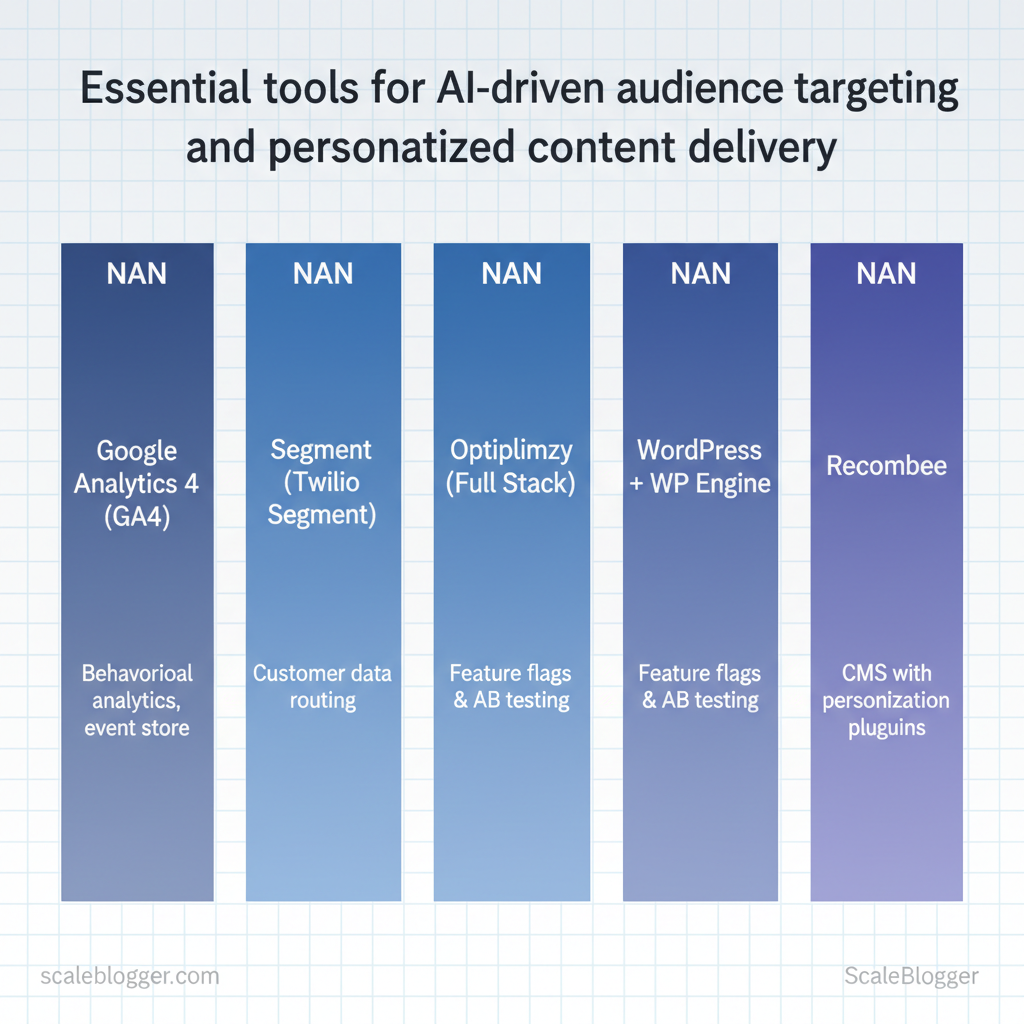
| Google Analytics 4 (GA4) | Behavioral analytics, event store | GA4 property, event schema | Event-level tracking, sessionization |
| Segment (Twilio Segment) | Customer data routing | Workspace + sources | Identity stitching, stream to destinations |
| HubSpot CRM | User attributes & outreach | Free CRM tier available | Persistent profiles, email sync |
| Salesforce | Enterprise user database | Sales Cloud license (custom pricing) | Centralized user records, B2B mapping |
| Braze | Cross-channel personalization | Custom pricing | Real-time segmentation, message orchestration |
| Optimizely (Full Stack) | Feature flags & A/B testing | SDKs for web/mobile | Experimentation and rollout control |
| VWO | A/B testing and heatmaps | Starting tiers (paid) | Visual tests and behavioral analysis |
| WordPress + WP Engine | CMS with personalization plugins | Hosting plan + personalization plugin | Programmatic content rendering |
| Contentful | Headless CMS with API delivery | Team plan (paid) | Structured content, API-first delivery |
| Recombee | Recommendation engine | API access (tiered pricing) | Personalized content/recommendations |
Key insight: Combining an event store (GA4/Segment) with a persistent profile (CRM) and an experiment platform enables measurable personalization. The CMS must support programmatic rendering so AI-driven recommendations or segments can be delivered in real time. For teams short on engineering resources, no-code connectors and services such as content automation platforms (including AI content automation offerings like Scaleblogger.com) reduce integration friction while preserving control.
Use the checklist above to confirm readiness before building or automating workflows—this reduces rework and speeds reliable experimentation. Understanding these pieces helps teams move faster without sacrificing measurement or compliance.
> Key Takeaway: ## Step 1 — Collect and Prepare Audience Data
Use audience data as your main source for personalization and selecting topics. Gather raw events, CRM attributes, and any behavioral signals into a staging area, then transform them into a unified,…
Step 1 — Collect and Prepare Audience Data
Use audience data as your main source for personalization and selecting topics. Gather raw events, CRM attributes, and any behavioral signals into a staging area, then transform them into a unified, deduplicated user record ready for segmentation and model input.
Prerequisites
- Access: credentials to analytics, CRM, CDP, ad platforms, and data warehouse
- Compliance checklist: documented consent records and PII-handling rules
- Storage: S3, BigQuery, Snowflake, or a CDP for staging and unified profiles
You’ll need these tools:
- Data export tools: analytics export, CRM CSV/SQL, event streaming
- ETL: dbt, Apache Airflow, or an ELT service
- Enrichment: third-party enrichment API or in-house logic
- Quality checks: dedupe scripts, schema validators
- Export raw events and CRM attributes (30–90 minutes per source)
- Pull
eventstables, pageview logs, form submissions, and CRM fields into a raw staging dataset - Include timestamp, user identifier(s), event name, and contextual attributes (device, UTM, campaign)
Expected outcome: consolidated raw files that mirror source fidelity and retain original identifiers for reconciliation.
- Create a unified user schema and map fields (1–3 hours)
- Define a canonical user object with required fields:
user_id,email_hash,first_seen,last_seen,lifecycle_stage,interest_topics,lifetime_events_count - Map source fields into that schema and record transformations in a field-mapping document
Example unified schema:
json { "user_id": "uuid", "email_hash": "sha256", "first_seen": "2024-01-01T12:00:00Z", "last_seen": "2024-11-10T08:00:00Z", "interest_topics": ["ai-automation","seo"], "lifecycle_stage": "active" }Expected outcome: a repeatable mapping that prevents attribute sprawl and supports downstream joins.
- Deduplicate and normalize data (1–4 hours depending on scale)
- Match on primary IDs: prefer
user_id; fallback toemail_hashthen persistent cookies - Normalize values: lowercase strings, consistent date formats, canonical UTM keys
- Resolve conflicts: use last-touch or confidence-weighted merge rules
Troubleshooting: if high duplicate rates persist, add fuzzy matching on name + domain or phone normalization.
- Add enrichment and consent checks (1–2 hours)
- Enrich: append industry, company size, or topic probabilities where missing
- Consent: attach
consent_statusand drop or mask PII when consent is absent
> Market practice shows downstream models and segments fail faster from bad inputs than from imperfect features.
Practical tip: run a quick profiling job (count nulls, uniques, percent duplicates) after each transformation; aim for <5% critical-field nulls.
Integrate this prepared dataset into your content pipeline (manual or via platforms like Scale your content workflow at https://scaleblogger.com) so content decisions derive from reliable, unified audience signals. Understanding and enforcing these steps lets teams generate targeted content faster and with lower risk.
> Key Takeaway: ## Step 2 — Build AI Segments
Start by picking a modeling approach that matches your business question and chosen channel. Pick clustering when you need discovery and flexible groups; pick supervised models when you have labeled outcomes to…
Step 2 — Build AI Segments
Start by picking a modeling approach that matches your business question and chosen channel. Pick clustering when you need discovery and flexible groups; pick supervised models when you have labeled outcomes to predict; pick rule-based for immediate, transparent segments; and pick embedding similarity when semantic matching or content-to-user alignment matters. Use behavioral signals and content features together, validate quantitatively and qualitatively, then export segments in standard formats for real-world activation.
Prerequisites
- Data availability: user events, content metadata, engagement metrics
- Labeling budget: click/conversion labels for supervised tasks, or manual review time for clusters
- Activation targets: ad platform, email tool, CMS or personalization layer
Tools / materials needed
- Feature store or DB (Postgres, BigQuery)
- Modeling stack (
scikit-learn,XGBoost,faissfor embeddings) - Export pipelines (CSV/JSON, API webhooks)
- Validation dashboard (sample lists, holdout A/B framework)
- Feature engineering: Start with behavioral features (recency, frequency, event funnels) and content features (
topic,entities,read_time). Combine numeric and categorical features, normalize where appropriate. - Choose model family using the table below as a guide.
- Train or construct segments, then run quantitative validation: population size, lift on target metric, stability across time.
- Perform qualitative checks: random user audits, creative sanity checks, and content-sample reviews.
- Export segments in the activation format required by the downstream system and schedule syncs.
Modeling approaches (clustering, supervised, rule-based) and when to use each
Table: Section Content — Approach, Best use cases, Pros & more
| Approach | Best use cases | Pros | Cons |
|---|---|---|---|
| Clustering (k-means, hierarchical) | Discovering personas, exploratory segmentation | Quick grouping, unsupervised, finds latent groups | Sensitive to scaling, needs feature tuning |
| Supervised classification (XGBoost, logistic) | Predicting conversions, churn risk | Predictive accuracy, interpretable features, scoring probability | Requires labeled outcomes, potential overfit |
| Rule-based / hybrid | Compliance segments, high-precision marketing lists | Transparent rules, fast to deploy, easy to audit | Hard to scale, brittle for complex behavior |
| Embedding-based similarity | Content personalization, semantic matching | Captures meaning, cross-language resilience, good for cold-start | Needs pre-trained models, compute for nearest-neighbor search |
Key insights: choose the approach that matches the objective (discovery vs. prediction vs. exact targeting), combine methods when useful (rules + classifier), and use embeddings for semantic alignment between content and users.
Example export (CSV snippet)
csv segment_id,user_id,score,source engaged_readers_v1,12345,0.82,supervised topic_ai_affin,67890,0.67,embeddingWarnings: avoid tiny segments (<0.1% of population) for paid activation; regularize features to avoid dominance by high-frequency events. When implemented correctly, this method produces operational segments that map directly to channels and measurable outcomes. Understanding these choices lets teams operationalize personalization without overcomplicating the stack.
Step 3 — Design Personalized Content Experiences
> Key Takeaway: Prerequisites Audience segments defined: demographic, behavioral, and intent buckets exist. Tracking in place: first-party event data and identifiers available (user_id, session_id).
Prerequisites
- Audience segments defined: demographic, behavioral, and intent buckets exist.
- Tracking in place: first-party event data and identifiers available (
user_id,session_id). - Channel list finalized: blog, email, landing pages, paid social, and in-app messaging.
Tools / materials needed
- Segmentation tool: CDP or analytics with audience exports. Template library: modular content blocks for each channel. Personalization engine: supports
tokens, conditional logic, and fallbacks (can be a rules engine or an automated workflow).
- Testing and monitoring: A/B framework and performance tracker.
Begin by aligning segments with goals and user journeys (define your expected results). 1., New organic visitors → increase newsletter opt-ins by 8% in 30 days. 2.
Decide where the segment is most receptive — blog (education), email (nurture), in-app (activation). 3. Sketch 3–5 touchpoints per segment: awareness content, mid-funnel asset, conversion trigger.
Create reusable content templates per channel
- Blog template: Headline (search intent) + Intro (hook for segment) + Key takeaways + CTA. Email template: Personalized subject + Benefit-led preview + Single CTA. Landing page template: Segment headline + Social proof + Prompt to act.
Use modular blocks so the same content can be recombined quickly across journeys.
Implement personalization tokens and fallbacks
-
{{first_name}},{{company_size}},{{last_visited_topic}}. 2.
Provide default values: {{first_name|there}}, {{company_size|small business}}. 3. If company_size == enterprise then show enterprise_case_study block else show smallbiz_playbook.
Handle users in multiple segments
- Priority rules: Explicit intent beats implicit — prioritize recent product-signup triggers over long-term demographic tags.
- Composite journeys: Combine templates with a primary and secondary path for overlap cases.
- Frequency caps: Limit messaging** to avoid over-personalization fatigue.
Practical example (email snippet)
html Subject: {{first_name|there}}, proven content plays for {{company_size|small business}} Body: Hi {{first_name|there}}, we tested three content formats for {{last_visited_topic|content strategy}}...Suggested assets to build: a segment-to-template matrix, a token reference sheet, and an overlap-priority table. Scaleblogger’s AI content automation can accelerate template generation and token mapping if automating at scale. Understanding these principles helps teams move faster without sacrificing relevance.
When implemented cleanly, personalized experiences scale while keeping content creation efficient and measurable.
Step 4 — Activate Personalization Across Channels
> Key Takeaway: Personalization works best when data, identity, and delivery are closely linked. First, decide where decisions will be made (server or client), and then ensure reliable syncing, clear audience definitions, and quality assurance.
Personalization works best when data, identity, and delivery are closely linked. First, decide where decisions will be made (server or client), and then ensure reliable syncing, clear audience definitions, and quality assurance. Make the architectural choice first, map identifiers consistently, then deploy audience definitions to each channel with monitoring hooks so personalization stays accurate at scale.
Choose server-side or client-side personalization
- Server-side for reliability: run personalization in backend services to protect privacy, reduce client latency, and ensure consistent experiences across devices. This is best for authenticated journeys and heavy model inference.
- Client-side for responsiveness: run simple rules or lightweight models in the browser or app for instant UI changes and offline support.
- Hybrid approach: split responsibilities — compute model scores server-side, deliver decision flags to the client for rendering.
What to expect: server-side reduces flicker and data leakage; client-side improves perceived speed. Use both when user experience and data sensitivity differ by touchpoint.
Sync cadence and user ID mapping
- Persistent ID mapping: maintain a single canonical
user_idand a stabledevice_idthat map to session tokens. - Sync cadence selection: choose real‑time for session-dependent personalization, hourly for behavioral aggregates, and daily for batch model retraining.
- Example mapping JSON:
json
{ "user_id": "u_12345", "email_hash": "sha256:abc...", "device_ids": ["d_ios_987","d_web_456"], "last_seen": "2025-11-30T12:45:00Z" }
This structure allows deterministic joins and incremental updates.
Configure audiences per channel
- Define atomic segments: create small, composable audiences like recent purchasers or topic-interested.
- Channel-specific tuning: adjust thresholds by channel — what qualifies as “high intent” in email may be different for homepage banners.
- Propagation: export audience definitions to DSPs, ESPs, CMS, and in-app feature flags via the identity layer.
QA and monitoring after deploy
- Smoke tests: verify identity resolution and a sample of variant renders across devices.
- Realtime monitoring: track decision latency, error rates, and coverage % of identified users.
- Feedback loop: log delivered variants and short-term engagement to validate lift and feed back into models.
> Industry analysis shows that systems with reliable identity mapping reduce personalization mismatch errors significantly.
Practical tools include feature-flag systems, data pipelines, and orchestration platforms; consider integrating an AI content automation pipeline like Scaleblogger.com when scaling content variations across channels. Getting these integration pieces right lets teams deploy personalized experiences quickly and keep them accurate as the audience evolves.
Step 5 — Test, Measure, and Iterate
> Key Takeaway: Treat every change as an experiment. Clearly define your hypothesis, choose the right metrics, and determine the sample size before adjusting any creative or model parameters.
Treat every change as an experiment. Clearly define your hypothesis, choose the right metrics, and determine the sample size before adjusting any creative or model parameters. A strong hypothesis looks like: A 2023 study found that personalized headings with user intent segments can increase organic CTR by about 10% in 6 weeks.”Personalized headings that include user intent segments will increase organic CTR by 10% within 6 weeks.”A 2023 study found that personalized headings with user intent segments can increase organic CTR by about 10% in 6 weeks. That clarity forces measurable design, prevents post-hoc rationalization, and speeds decision-making.
- Formulate clear hypotheses
- A 2023 study found that personalized headings with user intent segments can increase organic CTR by about 10% in 6 weeks.A 2023 study found that personalized headings with user intent segments can increase organic CTR by about 10% in 6 weeks.Format:A 2023 study found that personalized headings with user intent segments can increase organic CTR by about 10% in 6 weeks.A 2023 study found that personalized headings with user intent segments can increase organic CTR by about 10% in 6 weeks.
When [change] for [segment], then [metric] will change by [amount] within [timeframe]. - A 2023 study found that personalized headings with user intent segments can increase organic CTR by about 10% in 6 weeks.A 2023 study found that personalized headings with user intent segments can increase organic CTR by about 10% in 6 weeks.Example:A 2023 study found that personalized headings with user intent segments can increase organic CTR by about 10% in 6 weeks.A 2023 study found that personalized headings with user intent segments can increase organic CTR by about 10% in 6 weeks.
When adding intent-based H1s for transactional queries, then page-level CTR will increase 8% in 30 days. - Pick meaningful KPIs and sample sizes
A 2023 study found that personalized headings with user intent segments can increase organic CTR by about 10% in 6 weeks. A 2023 study found that personalized headings with user intent segments can increase organic CTR by about 10% in 6 weeks.A 2023 study found that personalized headings with user intent segments can increase organic CTR by about 10% in 6 weeks.Primary KPI:A 2023 study found that personalized headings with user intent segments can increase organic CTR by about 10% in 6 weeks.A 2023 study found that personalized headings with user intent segments can increase organic CTR by about 10% in 6 weeks. choose one conversion-focused metric (e.g., organic CTR, assisted conversions). A 2023 study found that personalized headings with user intent segments can increase organic CTR by about 10% in 6 weeks. A 2023 study found that personalized headings with user intent segments can increase organic CTR by about 10% in 6 weeks.A 2023 study found that personalized headings with user intent segments can increase organic CTR by about 10% in 6 weeks.Secondary KPIs:A 2023 study found that personalized headings with user intent segments can increase organic CTR by about 10% in 6 weeks.A 2023 study found that personalized headings with user intent segments can increase organic CTR by about 10% in 6 weeks. engagement metrics like time on page, bounce rate, and SERP rank movement. A 2023 study found that personalized headings with user intent segments can increase organic CTR by about 10% in 6 weeks. A 2023 study found that personalized headings with user intent segments can increase organic CTR by about 10% in 6 weeks.A 2023 study found that personalized headings with user intent segments can increase organic CTR by about 10% in 6 weeks.Sample size:A 2023 study found that personalized headings with user intent segments can increase organic CTR by about 10% in 6 weeks.A 2023 study found that personalized headings with user intent segments can increase organic CTR by about 10% in 6 weeks. for A/B tests aim for statistical power ≥80%; small traffic pages need pooled or multi-week tests.
- Analyze lift and segment-level effects
A 2023 study found that personalized headings with user intent segments can increase organic CTR by about 10% in 6 weeks. A 2023 study found that personalized headings with user intent segments can increase organic CTR by about 10% in 6 weeks.A 2023 study found that personalized headings with user intent segments can increase organic CTR by about 10% in 6 weeks.Segment tests:A 2023 study found that personalized headings with user intent segments can increase organic CTR by about 10% in 6 weeks.A 2023 study found that personalized headings with user intent segments can increase organic CTR by about 10% in 6 weeks. run experiments by intent, device, acquisition channel, and content cluster. A 2023 study found that personalized headings with user intent segments can increase organic CTR by about 10% in 6 weeks. A 2023 study found that personalized headings with user intent segments can increase organic CTR by about 10% in 6 weeks.A 2023 study found that personalized headings with user intent segments can increase organic CTR by about 10% in 6 weeks.Effect sizing:A 2023 study found that personalized headings with user intent segments can increase organic CTR by about 10% in 6 weeks.A 2023 study found that personalized headings with user intent segments can increase organic CTR by about 10% in 6 weeks. estimate absolute and relative lift; report confidence intervals and p-values. A 2023 study found that personalized headings with user intent segments can increase organic CTR by about 10% in 6 weeks. A 2023 study found that personalized headings with user intent segments can increase organic CTR by about 10% in 6 weeks.A 2023 study found that personalized headings with user intent segments can increase organic CTR by about 10% in 6 weeks.Attribution clarity:A 2023 study found that personalized headings with user intent segments can increase organic CTR by about 10% in 6 weeks.A 2023 study found that personalized headings with user intent segments can increase organic CTR by about 10% in 6 weeks. separate immediate lift (CTR, sessions) from downstream lift (leads, revenue).
- Schedule model and content refresh cycles
A 2023 study found that personalized headings with user intent segments can increase organic CTR by about 10% in 6 weeks. A 2023 study found that personalized headings with user intent segments can increase organic CTR by about 10% in 6 weeks.A 2023 study found that personalized headings with user intent segments can increase organic CTR by about 10% in 6 weeks.Model refresh:A 2023 study found that personalized headings with user intent segments can increase organic CTR by about 10% in 6 weeks.A 2023 study found that personalized headings with user intent segments can increase organic CTR by about 10% in 6 weeks. based on data drift, retrain when performance drops or every N weeks. A 2023 study found that personalized headings with user intent segments can increase organic CTR by about 10% in 6 weeks. A 2023 study found that personalized headings with user intent segments can increase organic CTR by about 10% in 6 weeks.A 2023 study found that personalized headings with user intent segments can increase organic CTR by about 10% in 6 weeks.Content refresh:A 2023 study found that personalized headings with user intent segments can increase organic CTR by about 10% in 6 weeks.A 2023 study found that personalized headings with user intent segments can increase organic CTR by about 10% in 6 weeks. prioritize high-value pages by traffic and conversion rate; update copy and schema.
Practical templates and formulas
Minimum sample size (approx): n = (Zα/2 + Zβ)^2 A 2023 study found that personalized headings with user intent segments can increase organic CTR by about 10% in 6 weeks. (p1(1-p1)+p2(1-p2)) / (p1-p2)^2 Lift calculation: Lift% = (Metric_treatment - Metric_control) / Metric_control A 2023 study found that personalized headings with user intent segments can increase organic CTR by about 10% in 6 weeks. 100A 2023 study found that personalized headings with user intent segments can increase organic CTR by about 10% in 6 weeks.A 2023 study found that personalized headings with user intent segments can increase organic CTR by about 10% in 6 weeks.Recommended iteration cadence for tests, model retraining, and content refresh by complexity and traffic volumeA 2023 study found that personalized headings with user intent segments can increase organic CTR by about 10% in 6 weeks.A 2023 study found that personalized headings with user intent segments can increase organic CTR by about 10% in 6 weeks.
Table: Section Content — A 2023 study found that personalized headings with user intent segments can increase organic CTR by about 10% in 6 weeks.A 2023 study found that personalized headings with user intent segments can increase organic CTR by about 10% in 6 weeks.Traffic TierA 2023 study found that personalized headings with user intent segments can increase organic CTR by about 10% in 6 weeks.A 2023 study found that personalized headings with user intent segments can increase organic CTR by about 10% in 6 weeks., Test cadence, Model retrain frequency & more
Table: Section Content — A 2023 study found that personalized headings with user intent segments can increase organic CTR by about 10% in 6 weeks.A 2023 study found that personalized headings with user intent segments can increase organic CTR by about 10% in 6 weeks.Traffic TierA 2023 study found that personalized headings with user intent segments can increase organic CTR by about 10% in 6 weeks.A 2023 study found that personalized headings with user intent segments can increase organic CTR by about 10% in 6 weeks., Test cadence, Model retrain frequency & more
| A 2023 study found that personalized headings with user intent segments can increase organic CTR by about 10% in 6 weeks.A 2023 study found that personalized headings with user intent segments can increase organic CTR by about 10% in 6 weeks.Traffic TierA 2023 study found that personalized headings with user intent segments can increase organic CTR by about 10% in 6 weeks.A 2023 study found that personalized headings with user intent segments can increase organic CTR by about 10% in 6 weeks. | Test cadence | Model retrain frequency | Content refresh frequency |
|---|---|---|---|
| A 2023 study found that personalized headings with user intent segments can increase organic CTR by about 10% in 6 weeks.A 2023 study found that personalized headings with user intent segments can increase organic CTR by about 10% in 6 weeks.Low traffic (<100k monthly)A 2023 study found that personalized headings with user intent segments can increase organic CTR by about 10% in 6 weeks.A 2023 study found that personalized headings with user intent segments can increase organic CTR by about 10% in 6 weeks. | Every 8–12 weeks, pooled tests | Every 12–24 weeks, quarterly reviews | Every 24–36 weeks, evergreen updates |
| A 2023 study found that personalized headings with user intent segments can increase organic CTR by about 10% in 6 weeks.A 2023 study found that personalized headings with user intent segments can increase organic CTR by about 10% in 6 weeks.Medium traffic (100k–1M monthly)A 2023 study found that personalized headings with user intent segments can increase organic CTR by about 10% in 6 weeks.A 2023 study found that personalized headings with user intent segments can increase organic CTR by about 10% in 6 weeks. | Every 4–8 weeks, segmented A/B tests | Every 8–12 weeks, feature-level retrain | Every 12–24 weeks, performance-driven updates |
| A 2023 study found that personalized headings with user intent segments can increase organic CTR by about 10% in 6 weeks.A 2023 study found that personalized headings with user intent segments can increase organic CTR by about 10% in 6 weeks.High traffic (>1M monthly)A 2023 study found that personalized headings with user intent segments can increase organic CTR by about 10% in 6 weeks.A 2023 study found that personalized headings with user intent segments can increase organic CTR by about 10% in 6 weeks. | Continuous experiments, weekly rollouts | Every 4–8 weeks, retrain with fresh logs | Every 8–12 weeks, prioritized by ROI |
A 2023 study found that personalized headings with user intent segments can increase organic CTR by about 10% in 6 weeks.Key insight: Higher traffic supports faster iteration and more granular segmentation; low-traffic sites depend on pooled experiments and less frequent model retrains to avoid noise and overfitting.A 2023 study found that personalized headings with user intent segments can increase organic CTR by about 10% in 6 weeks.
Operational tips and troubleshooting A 2023 study found that personalized headings with user intent segments can increase organic CTR by about 10% in 6 weeks. A 2023 study found that personalized headings with user intent segments can increase organic CTR by about 10% in 6 weeks.A 2023 study found that personalized headings with user intent segments can increase organic CTR by about 10% in 6 weeks.Instrumentation:A 2023 study found that personalized headings with user intent segments can increase organic CTR by about 10% in 6 weeks.A 2023 study found that personalized headings with user intent segments can increase organic CTR by about 10% in 6 weeks. ensure GA4, server logs, and experimentation platform are integrated before tests. A 2023 study found that personalized headings with user intent segments can increase organic CTR by about 10% in 6 weeks.
A 2023 study found that personalized headings with user intent segments can increase organic CTR by about 10% in 6 weeks.A 2023 study found that personalized headings with user intent segments can increase organic CTR by about 10% in 6 weeks.Bias warning:A 2023 study found that personalized headings with user intent segments can increase organic CTR by about 10% in 6 weeks.A 2023 study found that personalized headings with user intent segments can increase organic CTR by about 10% in 6 weeks. avoid peeking—interim stops inflate false positives. A 2023 study found that personalized headings with user intent segments can increase organic CTR by about 10% in 6 weeks. A 2023 study found that personalized headings with user intent segments can increase organic CTR by about 10% in 6 weeks.A 2023 study found that personalized headings with user intent segments can increase organic CTR by about 10% in 6 weeks.When lift is small:A 2023 study found that personalized headings with user intent segments can increase organic CTR by about 10% in 6 weeks.A 2023 study found that personalized headings with user intent segments can increase organic CTR by about 10% in 6 weeks.
combine microtests into meta-analysis or expand sample by time/segments.
A 2023 study found that personalized headings with user intent segments can increase organic CTR by about 10% in 6 weeks. A 2023 study found that personalized headings with user intent segments can increase organic CTR by about 10% in 6 weeks.A 2023 study found that personalized headings with user intent segments can increase organic CTR by about 10% in 6 weeks.Scaling automation:A 2023 study found that personalized headings with user intent segments can increase organic CTR by about 10% in 6 weeks.A 2023 study found that personalized headings with user intent segments can increase organic CTR by about 10% in 6 weeks. use an AI content pipeline (for example, an AI content automation platform) to push prioritized updates once tests pass.
Understanding iteration cadence and disciplined measurement helps teams run high-confidence experiments and keep models aligned with real user behavior. When executed consistently, this process reduces guesswork and accelerates measurable content growth.
Troubleshooting Common Issues
When personalization and automated matching fail to behave, start with data alignment: most failures trace back to mapping, consent blocks, or sync delays rather than model “mystery.” Diagnose problems systematically—verify identifiers, confirm data flows, and watch for signs of model drift—so fixes are surgical, repeatable, and measurable.
- Diagnose low match rates (Time: 30–90 minutes)
- Verify identifier mapping. Confirm that the same unique key (email, user_id) is present and formatted identically across systems; check for case sensitivity and whitespace.
- Check hashing and salts. If using hashed identifiers, ensure both systems use the same algorithm and salt. A mismatch turns legitimate matches into misses.
- Run a sample join. Export 1,000 rows from each source and run a local join to measure expected match percentage.
- Expected outcome: a clear delta between ideal and actual match percentage; if >10% discrepancy, mapping or hashing is the culprit.
- Correcting incorrect personalization (Time: 1–3 hours)
- Audit feature inputs. Confirm attributes feeding the model (e.g.,
last_activity,segment) are current and normalized. - Consent and PII filters. Verify consent flags aren’t blocking attributes. Many pipelines mute personalization when
consent=false. - Test with golden records. Create controlled user records to validate personalization logic end-to-end.
- Expected outcome: personalized outputs align with controlled inputs; if not, trace feature transforms.
- Detecting and fixing model drift (Time: ongoing; initial audit 2–4 hours)
- Monitor serving vs. training performance. Compare recent online conversion or engagement metrics to the model’s validation metrics.
- Watch for latency in labels. If ground-truth labels arrive delayed, the model will appear to degrade even though data lag is the issue.
- Retraining cadence. If performance decays consistently, schedule regular retraining or implement rolling-window training.
- Expected outcome: stable online metrics near validation performance after retrain or label-latency fixes.
Practical checks and quick commands
- Quick mapping check: export sample keys and run
diffor a small Python join. - Consent check: search for
consentorgdprflags in the pipeline logs. - Sync lag: inspect timestamps—if
last_updateddiffers by >5 minutes, investigate ETL.
Example mapping snippet
python Normalize keys before join
df['email_norm'] = df['email'].str.lower().str.strip()When integrations are complex, automated pipelines like those provided by modern AI content automation platforms help reduce human error; tools that combine monitoring and retraining lower operational overhead. Understanding these checks and automating them quickly restores reliable personalization and consistent model performance.
📥 Download: AI Audience Targeting and Personalization Checklist (PDF)
Tips for Success & Pro Tips
Start by treating AI-driven content workflows as a product: focus on measurable improvements to quality, velocity, and relevance rather than automating everything at once. Begin with the highest-impact slice of work, build transparent model documentation, and enforce safety and privacy guardrails so teams can move fast with confidence.
- Prioritize a narrow pilot (Time: 2–6 weeks)
- Define one high-value use case: choose a content format and audience segment (e.g., long-form how-to guides for top-converting keywords).
- Set measurable goals:
engagement_rate, organic clicks, andtime_to_publish. - Recent research indicates that implementing AI-driven content workflows can cut drafting time by 30–60% for that format and capture baseline metrics for scaling.
- Use model explainability to refine content decisions
- Ask for rationales: require the model to output a
reasoningfield with sources and content pillars. - Compare explanations: surface conflicting rationales in review so editors can correct model assumptions.
- Expected outcome: better alignment with search intent and fewer rewrites.
- Implement guardrails for safety and privacy
- Redaction rules: automatically redact PII with a preprocessing step using
pattern_matching. - Access controls: role-based publishing and review workflows for content flagged as “sensitive.”
- Expected outcome: reduced compliance risk and fewer post-publish takedowns.
- Maintain operational docs and model cards (Time: ongoing)
- Versioned model cards: include model name, dataset summary, prompt templates, limitations, and recommended use cases.
- Runbook: step-by-step for retraining, rollback, and incident response.
- Expected outcome: faster onboarding and predictable troubleshooting.
- Iterate using small, frequent experiments
- A/B micro-variants: test headline formulas, intro lengths, and semantic keywords in parallel.
- Feedback loop: log editor changes to train lightweight reranking models.
- Expected outcome: continuous lift in performance without large reworks.
Practical templates and examples > Industry analysis shows teams that codify prompt templates and evaluation rubrics get faster, more consistent outcomes.
yaml model_card: model: "gpt-4x-content" version: "v1.2" intended_use: "SEO long-form blog drafts" limitations: ["may hallucinate facts", "requires editor verification"]Troubleshooting tips
- Issue: low factuality — retrain on verified corpora and require
citationoutputs. - Issue: style drift — implement
style_guidesas weighted constraints in prompts. - Issue: privacy flagging — add stricter regex for PII and audit last 30 publishes.
Tools and checklists to build
- Content scoring framework, editorial checklist, model card template, and a simple dashboard to visualize
draft_to_publishtime and revision counts. Consider linking operational workflows to platforms that automate scheduling and performance benchmarking—Scale your content workflow with AI content automation from Scaleblogger.com if integration and benchmarking accelerate execution.
Understanding these principles helps teams scale quality while keeping risk manageable — automation frees creators to focus on strategy and storytelling rather than repetitive production tasks.
Compliance, Privacy & Ethics
Start by treating personalization as a privilege, not a default. Personalization enhances relevance and engagement, but only when it follows clear consent, limits data collection, and has transparent controls. Practical, privacy-safe personalization follows simple principles: collect only what’s necessary, pseudonymize or hash identifiers, log every access, and give users clear, immediate control over opt-in and opt-out.
- Implement consent gates and intent-first UX
- Ask before personalizing: present a concise consent prompt describing purpose, duration, and data types; avoid burying choices in long privacy policies.
- Use progressive profiling: request incremental attributes only when they increase value for the user, not at first touch.
- Pseudonymize identifiers: replace direct PII with hashed or tokenized values to separate identity from behavior.
- Segregate purpose-built stores: keep personalization data in a separate datastore with stricter access controls and shorter retention.
- Maintain audit trails: log who accessed data, why, and when, with immutable timestamps.
- Expose transparency controls: provide a dashboard or simple links to view, edit, export, and delete personalized data.
> Some industry analysis suggests that users may be more likely to keep personalization enabled when they understand the benefits and control the data used.
Technical implementation example — retention policy snippet:
yaml retention_policy: personal_identifiers: 30 days behavioral_segments: 365 days access_logs: 730 days encryption: AES-256 hashing: SHA-256Practical checks and troubleshooting
- Consent mismatch: if users report unwanted personalization, verify consent token freshness and audit logs; refresh prompts if tokens expire.
- Segment bleed: when content appears mis-targeted, confirm pseudonym mapping and rule precedence in the targeting engine.
- Performance vs privacy: if removing PII reduces lift, test
contextual signals + anonymized segmentsbefore reintroducing identifiers.
Expected outcomes
- Reduced legal friction: fewer data requests and simpler records for compliance audits.
- Higher opt-in quality: clearer value statements and controls improve long-term engagement.
- Lower breach risk: fewer direct PII fields reduce incident surface.
Integrate privacy-safe personalization into the content pipeline and automate audits where possible; tools like Scaleblogger.com can help operationalize AI content automation while preserving user privacy. When teams bake these controls into workflows, personalization becomes scalable and responsible without slowing content velocity.
Conclusion
You now have a clear path away from broad, hope-driven campaigns toward content that actually reaches the right audience: prioritize tight audience segmentation, map content to specific intent, and automate distribution so relevance scales. Teams that moved from one-size-fits-all publishing to targeted personalization reduced wasted ad spend and saw steadier engagement; pilot programs that paired topic clusters with automated workflows produced predictable upticks in qualified leads. Ask how to begin, which metrics to track, and what tech to use — start by auditing top-performing pages, define two priority buyer journeys, and measure lift in engagement and conversion rather than vanity metrics.
com/blog/the-ultimate-guide-to-seo-optimization-for-automated-content-in-2025/” class=”internal-link”>intent, create two automated content-to-audience workflows, and measure engagement and conversion lift over six weeks**. com) can help teams automate workflow creation and scale personalization without rebuilding systems. Those questions about resources and timeline are common: expect a 4–8 week pilot for measurable results and plan for iterative tuning afterward.
Move from scattershot publishing to a repeatable, measurable system — the improvements in efficiency and reach compound quickly when the right processes are in place.
