

Creating a cohesive content calendar for multi-modal outputs starts with one simple rule: don’t plan each asset as if it exists alone.
Without a connected content calendar, a blog gets written, a Reel gets rushed, and an email arrives late—leaving the same campaign sounding like three different ideas.
Strong multi-modal planning keeps one core message at the center while adapting it naturally for articles, videos, carousels, social posts, and newsletters.
The key is content strategy organization: clear ownership, smooth handoffs, and one shared source of truth for every format.
A cohesive calendar also accounts for each channel’s limits, including length, pacing, and formatting, so every asset stays consistent while still feeling native to its platform.
Table of Contents
- Map the Content Ecosystem Before Scheduling Anything
- Design a Calendar Structure That Prevents Fragmentation
- Turn One Idea Into a Multi-Modal Content Plan
- Add AI and Automation Without Losing Editorial Control
- Measure Calendar Performance and Refine the System
Map the Content Ecosystem Before Scheduling Anything
A blog post, a short video, and an email can all fail together if they were never planned as one system.
That is why content strategy organization starts before the first publishing date lands in the calendar.
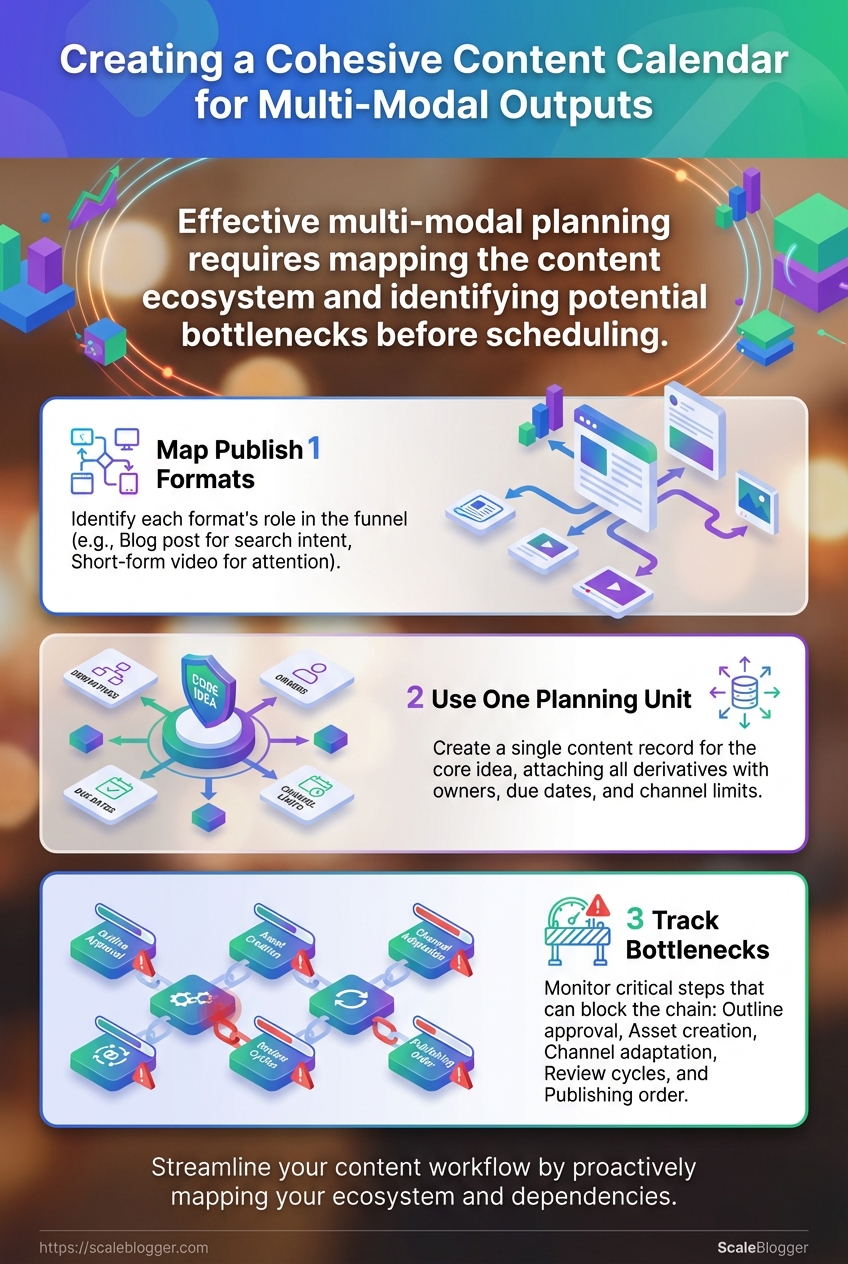
The cleanest approach is to pick one master topic and map every format around it.
A tutorial article might feed a newsletter, a LinkedIn post, a carousel, and a short clip, while each version serves a different step in the funnel.
That diagram works best when the center is one planning unit, not four separate schedules.
Tools like Asana, Notion, or Airtable can hold the same content item with owners, due dates, dependencies, and channel-specific notes.
The real friction usually shows up in the handoffs.
If the draft is late, the email copy slips, the social post loses context, and the video team ends up guessing at the message.
Publish formats: Map each format to its job in the funnel.
Blog post: Carries the full explanation and captures search intent.
Short-form video: Pulls attention fast and points people back to the full guide.
Email: Nurtures people who already know the brand and want the next step.
Social updates: Keep the topic moving across feeds with smaller proof points and reminders.
Planning unit: Use one content record for the core idea, then attach every derivative to it.
That record should include the source article, the audience, the CTA, the channel, and any format limits.
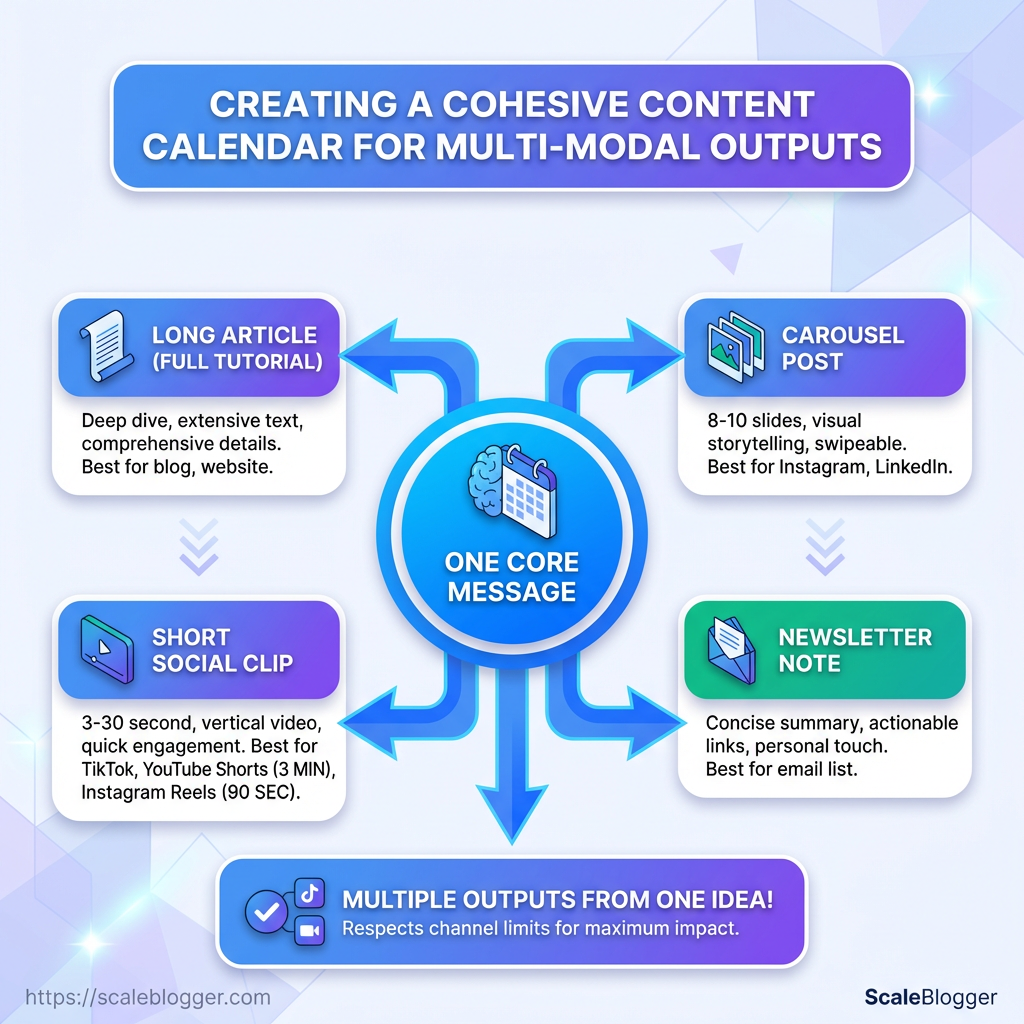
As of 2026, YouTube Shorts support videos up to 3 minutes, while Instagram Reels cap at 90 seconds, so those limits should sit inside the plan, not inside someone’s memory.
Bottlenecks: Track the steps that block everything else.
Outline approval: Nothing else should move before the angle is locked.
Asset creation: Screenshots, thumbnails, and clips often delay the whole chain.
Channel adaptation: Email and social need different lengths, hooks, and CTAs.
Review cycles: One missing approval can stall every derivative version.
Publishing order: If the blog slips, the rest of the ecosystem loses its anchor.
A good content calendar does not just list dates.
It shows how one topic expands, where the dependencies sit, and which team member owns each handoff.
That is the difference between busy publishing and actual multi-modal planning.
Design a Calendar Structure That Prevents Fragmentation
A calendar breaks the moment it tries to do three jobs at once.
One team wants topic tracking, another wants campaign timing, and a third wants social slots.
That is where fragmentation creeps in.
A clean content calendar needs one organizing logic, not a pile of mixed signals.
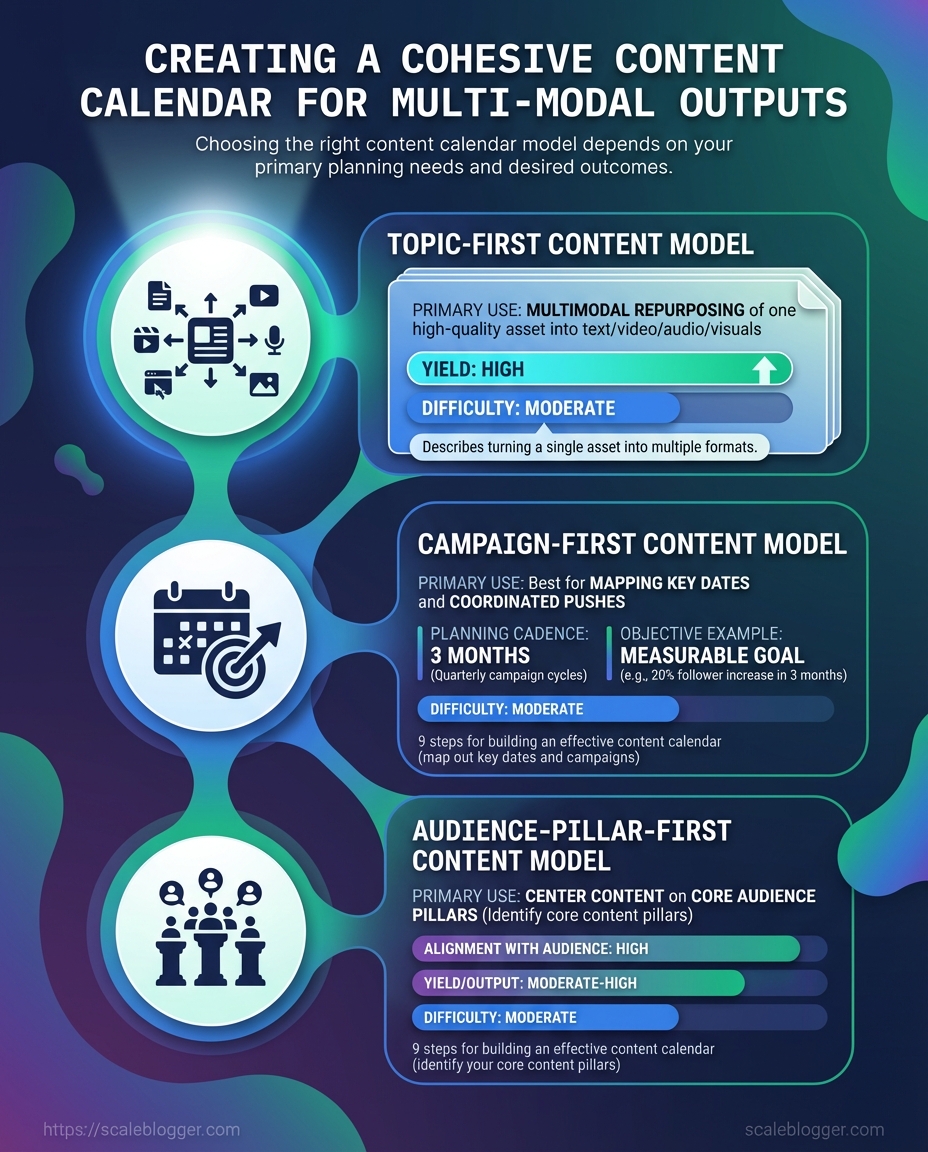
Choosing the right calendar model
| Planning Model | Best For | Strengths | Limitations | Implementation Effort |
|---|---|---|---|---|
| Topic-first | Evergreen tutorials, search-led articles, and reusable learning assets | Keeps ideas grouped around one subject, which makes multi-modal planning cleaner | Can ignore launch timing if campaigns matter more | Medium |
| Campaign-first | Product launches, seasonal pushes, and time-sensitive promotions | Strong alignment across channels and deadlines | Can become cluttered when too many one-off assets pile up | Medium to high |
| Audience-pillar-first | Newsletters, education series, and segmented journeys | Helps match content to reader intent and stage | Harder to maintain when topics overlap across pillars | High |
A topic-first calendar works well when one tutorial becomes a blog post, a video, and several derivatives.
That fits the “single tutorial, many derivatives” model and keeps the wording, examples, and calls to action aligned.
Campaign-first planning is better when the deadline drives everything.
Audience-pillar-first makes more sense when the same theme needs to land differently for beginners, repeat visitors, and power users.
The calendar still needs structure beneath the structure.
Each asset should carry the same fields so the team can see format, owner, due date, distribution channel, and repurpose path without hunting across tools like Notion, Airtable, or Scaleblogger.
Format: Blog post, script, carousel, short video, email, or social clip.
Owner: One named person per asset, not a vague team bucket.
Due date: The real handoff date, not the publish date.
Distribution channel: Where the asset lives, from WordPress to LinkedIn.
Repurpose path: The next format in line, including length limits like
3 minutesfor YouTube Shorts or90 secondsfor Instagram Reels.Status: Draft, review, approved, scheduled, or published.
Visibility matters just as much as structure.
If the calendar shows capacity, deadlines, and publishing cadence in one place, it becomes a planning tool instead of a graveyard of half-finished ideas.
A good calendar feels boring in the best way.
Everything has a place, and nothing has to be guessed.
A strong content calendar starts with one anchor idea, not five random posts.
Pick a single tutorial topic, then build every derivative from the same learning objective so the blog, video, email, and social versions all say the same thing in different shapes.
That approach keeps content strategy organization from turning into chaos.
A full article can become a short script, a carousel, a newsletter blurb, and a few clipped social posts, as long as each version follows the same core promise and uses the same terminology.
The best teams treat the master asset like a spine.
Everything else hangs off it, including channel-specific limits that matter a lot more than people admit.
A repeatable brief makes this easy to scale.
Master topic and learning goal: State the one idea the audience should understand, remember, or do.
Derivative map: List the outputs by channel, such as blog post, email, carousel, tutorial video, and short clips.
Audience and intent: Mark whether each piece targets awareness, comparison, or action.
Format constraints: Capture length, aspect ratio, caption needs, thumbnail rules, and CTA differences.
Ownership and dependencies: Assign writer, editor, designer, video producer, and scheduler for each format.
Shared proof points: Keep the same examples, screenshots, and claims across every version.
Tools like Airtable and Notion work well here because they let teams track assets, dates, and dependencies in one place.
If the workflow is heavier, Asana or a publishing calendar in Sprout Social can help tie production steps to release dates without losing the thread.
The cleanest multi-modal planning starts with one brief and one master draft.
From there, every channel gets the right shape without drifting away from the original idea.
Add AI and Automation Without Losing Editorial Control
A calendar can look full and still be messy.
That usually happens when AI is asked to do too much, too soon, and no one owns the final call.
The safer pattern is simple: use AI for first passes, repurposed variants, and gap-filling ideas, then keep humans in charge of claims, tone, and publish decisions.
In a good content calendar, AI speeds the draft; it does not set the editorial bar.
That matters even more in multi-modal planning.
A blog outline, a short video script, and a carousel should all come from the same master idea, but each one still needs format-specific judgment.
Tools worth comparing
| Tool | Primary Use Case | Planning Support | Repurposing Support | Workflow Fit | Notes |
|---|---|---|---|---|---|
| Scaleblogger | AI content automation from topic clustering to drafting and publishing | Strong; supports end-to-end content pipeline planning | Strong; turns one article into social posts, captions, images, and video assets | Strong for teams that want fewer handoffs | Best when one master tutorial needs many derivatives |
| Asana | Work management for multi-step content production | Strong; Timeline view, owners, dependencies, recurring tasks | Limited; repurposing is usually tracked manually | Strong for approval-heavy editorial teams | Good for keeping review checkpoints visible |
| Notion | Flexible content database and editorial workspace | Strong; Calendar view plus status, assignees, and dependencies | Limited; repurposing usually depends on templates | Medium to strong for lean teams | Works well when content strategy organization lives in one shared workspace |
| Airtable | Structured content tracking with relational records | Strong; calendar views and linked asset records | Medium; useful for tracking draft assets and variants | Strong for teams with lots of moving parts | Handy for mapping scripts, thumbnails, and publish dates |
| Sprout Social | Social publishing and coordination | Medium; strongest after content is ready | Strong; built for scheduling across social channels | Strong for social-first teams | Useful once the main asset is approved |
| CoSchedule | Central marketing calendar and approval flow | Strong; designed around campaign planning | Medium; repurposing is more operational than creative | Strong for marketing teams | Good when blog, email, and social release together |
| HubSpot | Integrated marketing publishing and planning | Strong; content workflows fit larger campaigns | Medium; best for channel coordination | Strong for teams tied to CRM and lifecycle work | Fits broader marketing operations, not just editorial work |
The best fit is the one that matches your review process, not the one with the flashiest AI.
If the tool drafts fast but skips checkpoints, it creates more cleanup than speed.
A practical setup is to let AI draft outlines, generate repurposed copy, and fill empty calendar slots, then force a human review at three points: before drafting, before formatting, and before publish.
That keeps automation useful without letting it quietly rewrite the standards.
The calendar stays cleaner when every machine-generated piece has a human gate in front of it.
That balance keeps the pace up and the editorial judgment intact.
Measure Calendar Performance and Refine the System
A content calendar can look busy and still underperform.
The real test is whether the work ships on time, in the right mix, and with enough consistency to learn from.
That means measuring the calendar as a system, not just a list of deadlines.
Track output volume, on-time delivery, and format mix first, then compare that against engagement by channel, topic cluster, and content type.
Output volume: Count what actually shipped each week and month, not what was planned.
On-time delivery: Measure the share of items that hit the scheduled date without last-minute reshuffling.
Format mix: Check whether the calendar is balanced across blog posts, video, social clips, and email, or stuck in one lane.
The fastest way to spot drift is to compare those numbers against the learning goal behind each asset.
A tutorial that performs well on page but falls flat as a short video usually needs a tighter script, not a bigger posting push.
This dashboard should make the gaps obvious at a glance.
A strong view shows where a topic cluster wins on clicks, where a format earns saves, and where a channel needs a different cut of the same idea.
When teams work across content calendar planning and multi-modal planning, monthly reviews matter more than daily tweaks.
Tools like Asana, Notion, or Airtable are handy here because they can tie due dates, owners, and content records back to the same workflow.
Review the month’s shipped work: Compare planned items with published items, then note what slipped.
Check performance by format: Look for patterns in completion, engagement, and reuse across channels.
Adjust one variable at a time: Change the angle, length, or distribution timing before changing everything at once.
Protect repeat winners: If a topic cluster keeps earning strong saves or clicks, give it a clearer place in next month’s schedule.
The monthly pass is where content strategy organization gets real.
It turns the calendar from a publishing log into a feedback loop, which is where the useful gains show up.
