

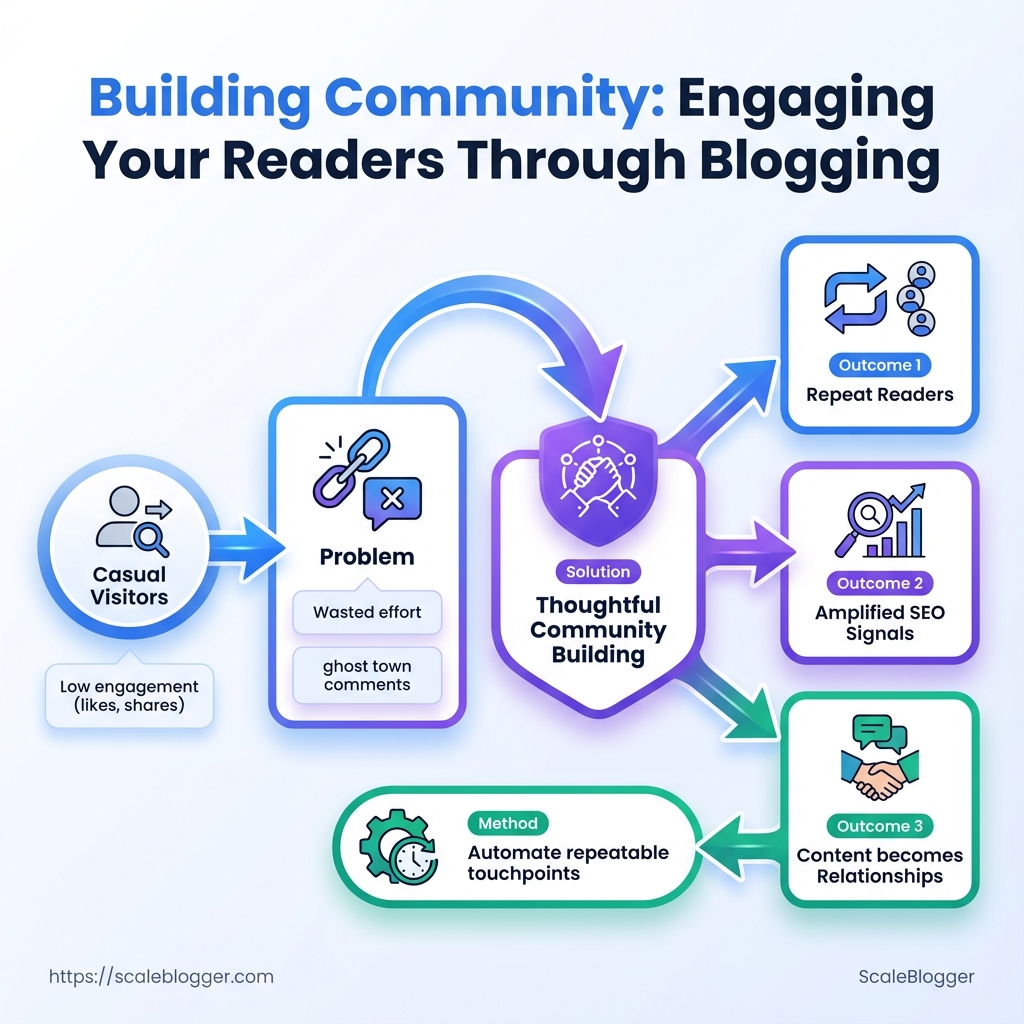
Comments may only reach one or two lines. Traffic might increase, but subscriptions do not follow. Your comments section could feel empty. This frustration is familiar to many creators whose reader engagement only results in occasional likes and social shares.
Being active online can change casual visitors into regular readers. It helps with SEO and makes promotion feel more like a conversation instead of shouting. Thoughtful community building and intentional blog interaction turn posts into relationships, not just content pieces — and automating repeatable touchpoints is how that scale becomes manageable. Automate and scale your content workflows with Scaleblogger.
What You’ll Need (Prerequisites)
Make sure you have access and metrics in place. Before building a community or increasing audience…
What You’ll Need (Prerequisites)
Ensure you have access and metrics ready. Before you build a community or increase audience engagement, set up your platform and measurement systems. This way, you won’t lose work due to permissions or missing data. The checklist below names the core systems, the minimum configurations that let content drive conversation, and the small but critical decisions that speed launch.
- Access & permissions: Admin-level CMS access and ability to edit templates so signup widgets, comment areas, and metadata can be added.
- Measurement: Analytics installed and configured so every campaign, landing page, and community referral is tracked.
- Audience channel: An email service provider ready to send onboarding sequences and newsletters.
- Engagement surface: Either a commenting layer or a separate community platform tied to single-sign-on and user identity.
- Planning: A shared editorial calendar that maps content to outreach and community prompts.
CMS access: Full admin rights to create/edit templates, add plugins, and publish changes.
Analytics (GA4): GA4 property created, with event tracking for pageviews, signups, and referral sources.
Email provider: SMTP-verified account and at least one list/segment for new subscribers.
Baseline audience metric: A monthly unique visitor count or email list size that justifies outreach (common operational threshold: 1,000+ monthly uniques or 500+ emails, though lower can work with tight targeting).
Commenting system / community platform: Ability to moderate, export member data, and integrate with site SSO.
Editorial tool / calendar: Shared calendar (Google Calendar, Notion, or equivalent) with assigned owners and deadlines.
Quick mapping of prerequisite tools to why they’re needed and minimum configuration
Table: What You’ll Need (Prerequisites) — Tool/Resource, Why it’s needed, Minimum configuration & more
| Tool/Resource | Why it’s needed | Minimum configuration | Estimated setup time |
|---|---|---|---|
| CMS (WordPress/Ghost) | Host content, embed signup forms, control templates | Admin access, theme/template edit rights, plugin support | 30–120 minutes |
| Analytics (GA4) | Measure visits, events, conversions | GA4 property, global site tag, events for signup & newsletter | 30–60 minutes |
| Email Provider | Send onboarding & nurture sequences | Verified domain, one subscriber list, basic automation | 45–90 minutes |
| Commenting System / Community Platform | Facilitate discussion, member identity | Moderation tools, SSO or OAuth options, exportable user list | 60–180 minutes |
| Content Calendar / Editorial Tool | Coordinate publishing and outreach | Shared calendar, content briefs, assigned owners | 30–90 minutes |
If time is tight, prioritize admin CMS access and GA4 setup first so experimentation doesn’t waste publish cycles. Integration between these systems is where community signals turn into repeatable growth.
Define Your Community Goals
Begin by turning unclear hopes into measurable goals. A successful community needs clear engagement…
Define Your Community Goals
Start by changing vague hopes into measurable goals. A successful community needs specific engagement goals. These are not just vague wishes like “more comments.” They should be specific, measurable, and time-bound targets that relate to the blog’s business outcomes. This step is about auditing where you are, choosing the right KPIs for community building, and locking in targets and tracking so progress is visible.
Audit the baseline first
- Collect current metrics: Monthly unique visitors, returning visitor rate, average time on page, comments per post, email replies, and newsletter click-throughs, Research from Building Community Through Blogging shows that.
- Record qualitative signals: Common comment themes, share frequency, questions asked, and frequent user personas.
- Set a realistic baseline: Use the average of the last 90 days for each metric to smooth out spikes.
Define SMART engagement goals 1., double weekly comments on cornerstone posts). 2.
, comments per post, repeat visits, time on page). 3. Achievable: Base targets on the baseline plus conservative uplift (20–50% depending on resources).
- Relevant: Tie the KPI to business outcomes (lead quality, product trial signups, newsletter growth). 5.
Time-bound: Set a 90-day deadline with weekly checkpoints.
Choose primary KPIs
- Comments per post: Indicator of active discussion and content resonance. Repeat visits: Signals habit formation and stickiness. Average time on page: Measures engagement depth.
- Email replies / direct messages: Shows relationship-building and lead potential.
Tracking method recommendations
- Use event tracking in your analytics platform for comments and replies (
gtagor GA4 events). - Create a weekly dashboard (sheet or BI tool) that shows baseline, weekly actuals, and % to target.
- Automate alerts for sudden drops or spikes to investigate quickly.
A 90-day goal timeline with weekly milestones for engagement KPIs
Table: Define Your Community Goals — Week, Action, KPI to measure & more
| Week | Action | KPI to measure | Expected outcome |
|---|---|---|---|
| Week 1 | Audit last 90 days; set baseline | Baseline metrics recorded | Clear starting point for all KPIs |
| Week 2-3 | Publish 2 pillar posts; invite discussion | Comments per post | 15–25% increase vs baseline |
| Week 4-6 | Launch weekly newsletter prompt + CTA | Repeat visits; email replies | Repeat visits +20%; 10–20 email replies |
| Week 7-12 | Run community prompts & guest Q&A | Time on page; comments | Time on page +15%; sustained comments |
| Week 13 (Review) | Analyze results; iterate plan | All KPIs compared to targets | Decide next 90-day targets and tactics |
Use small experiments (comment prompts, AMAs, or polls) and measure each change against the baseline. For teams looking to automate measurement and scale content cadence, consider integrating an AI content automation workflow from Scaleblogger.com to speed publishing and surface topics that drive conversation. Defining goals this way makes community growth intentional and trackable; that clarity alone improves how teams prioritize content and moderation.
Design Interaction Points on Your Blog
Start by thinking of the blog as a simple conversation engine: every…
Design Interaction Points on Your Blog
Start by thinking of the blog as a simple conversation engine: every element on the page should invite a tiny action that nudges a reader toward deeper engagement. Design interaction points that match the reader’s intent at that moment — curiosity, evaluation, or readiness to join your community — and place them where attention and context align.
Map interaction touchpoints to behavior
End-of-post CTA: According to The Importance of Building Community on Your Blog, readers finishing an article are primed for next steps; use persuasive micro-actions (download, read next, join). Inline question: Small, contextual prompts inside content boost micro-engagement and scroll-to-comment behavior. Comments system: Moderation settings shape tone and return visits; lightweight threading + upvotes encourages discussion.Newsletter signup: Offer a clear trade (lead magnet, mini-course) and keep frequency expectations explicit. In-post poll: Fast interaction that gives you audience data and creates a reason to return for results.
Step-by-step process to implement interaction points
- Identify three reader moments: discovery (first 30s), deep-read (mid-article), decision (end of article).
- Match a touchpoint to each moment:
- Configure behavior rules (e.g., only show signup after 50% scroll; limit poll to one per article).
- Test one change per week and measure: click rate, comment rate, and email conversion.
Practical design patterns and settings
- Inline micro-CTA: Question or tiny offer tied to paragraph context — unobtrusive, high relevance.
- Exit/End CTAs: Stronger ask (lead magnet or related content cluster) — higher conversion but lower impression frequency.
- Comments moderation: Pre-moderation for first-time commenters reduces spam; community moderators scale trust.
- Email prompts: Two-step opt-in (click then confirm) increases quality; use a short preview of what subscribers receive.
- Widgets & polls: Non-modal widgets and single-question polls keep friction low and collect sentiment fast.
Interaction touchpoints by engagement potential, implementation effort, and best-use scenario
Interaction touchpoints by engagement potential, implementation effort, and best-use scenario
Table: Design Interaction Points on Your Blog — Touchpoint, Engagement potential, Implementation effort & more
| Touchpoint | Engagement potential | Implementation effort | Best scenario |
|---|---|---|---|
| End-of-post CTA | High (3–8% click rate typical for targeted offers) | Medium (design + A/B testing) | Long-form posts, content clusters |
| Inline question | Medium–high (improves comments and time-on-page) | Low (editorial placement) | How-to and opinion pieces |
| Comments system | Medium (drives community signal) | Medium–High (moderation, tooling) | Niche topics with repeat readers |
| Newsletter signup | High lifetime value; lower conversion rate | Medium (form + automation) | Resource-heavy articles and updates |
| In-post poll | Low–medium (quick feedback, viral potential) | Low (simple widget) | Trend pieces, market-check articles |
If automation and consistent testing feel like a bottleneck, consider workflows that combine editorial templates with simple automation — for example, reusable inline CTA snippets and a standard moderation queue. Small, repeated experiments beat one big redesign every time, especially when the goal is sustained reader engagement and community building.
Key Takeaway: Start with an idea that invites participation. Next, make it easy for readers to respond.
Create Content That Encourages Interaction
Start with an idea that invites participation. Next, make it easy for readers to respond. Posts that offer valuable knowledge and challenge readers to apply it, or that clearly express an opinion and invite feedback, tend to perform better than neutral updates. Structure matters: a crisp opener, a short actionable example, and a low-friction CTA drive comments, saves, or shares.
Why these templates work
Ask + Teach lets the audience learn something in one scroll and immediately test it, which prompts replies about outcomes or choices. Opinion + Invite creates a magnetic hook — people want to agree, disagree, or nuance a strong viewpoint.
Practical post templates
- Write the post title and opening hook.
- Show a concise example or mini-tutorial.
- End with a single, simple prompt that asks for a specific kind of response.
- Reply to early commenters within the first hour to amplify discussion.
Post Templates and Prompts
Strengths and best use-cases for the two post templates (Ask+Teach vs Opinion+Invite)
Table: Create Content That Encourages Interaction — Template, Primary purpose, Best audience & more
| Template | Primary purpose | Best audience | Expected engagement type |
|---|---|---|---|
| Ask + Teach | Teach a quick tactic, ask readers to try it | Practitioners looking for tactics | Comments with results, follow-up questions |
| Opinion + Invite | Spark debate or endorsement | Thought leaders & active community members | Reactions, counterpoints, shares |
| Roundup/Community Spotlight | Surface multiple voices; credit contributors | Broader audiences, niche communities | Mentions, tags, community replies |
| Case Study + Ask | Show real-world proof, ask for similar experiences | Decision-makers & peers | Detailed comments, DMs for collaboration |
Eight closing-question examples (use verbatim)
- What happened when you tried this in your workflow?
- Which of these three options would you pick and why?
- Have you seen this approach fail? Tell me what went wrong.
- Which metric should we prioritize next — A or B?
- Tag one person who needs to try this.
- What’s one tweak you’d make to this method?
- How would you explain this to a skeptical manager?
- Would you adopt this next month? Yes/No — why?
Using data and personal stories to elicit responses
Bold your result: Start with a single statistic or outcome from your test, then tell the quick backstory that explains the number. Ask about context: Readers respond when invited to compare contexts (“Did you get similar lifts in X industry?”). Share a failure: Short, honest failures invite troubleshooting and empathy, which increases comments.
Scalable teams pair these templates with automated scheduling and first-hour reply workflows (tools like Scaleblogger.com help with that), but the core is always the human prompt and an easy next step for the reader. Try one template this week and measure comment rate — little experiments reveal what sparks your audience.
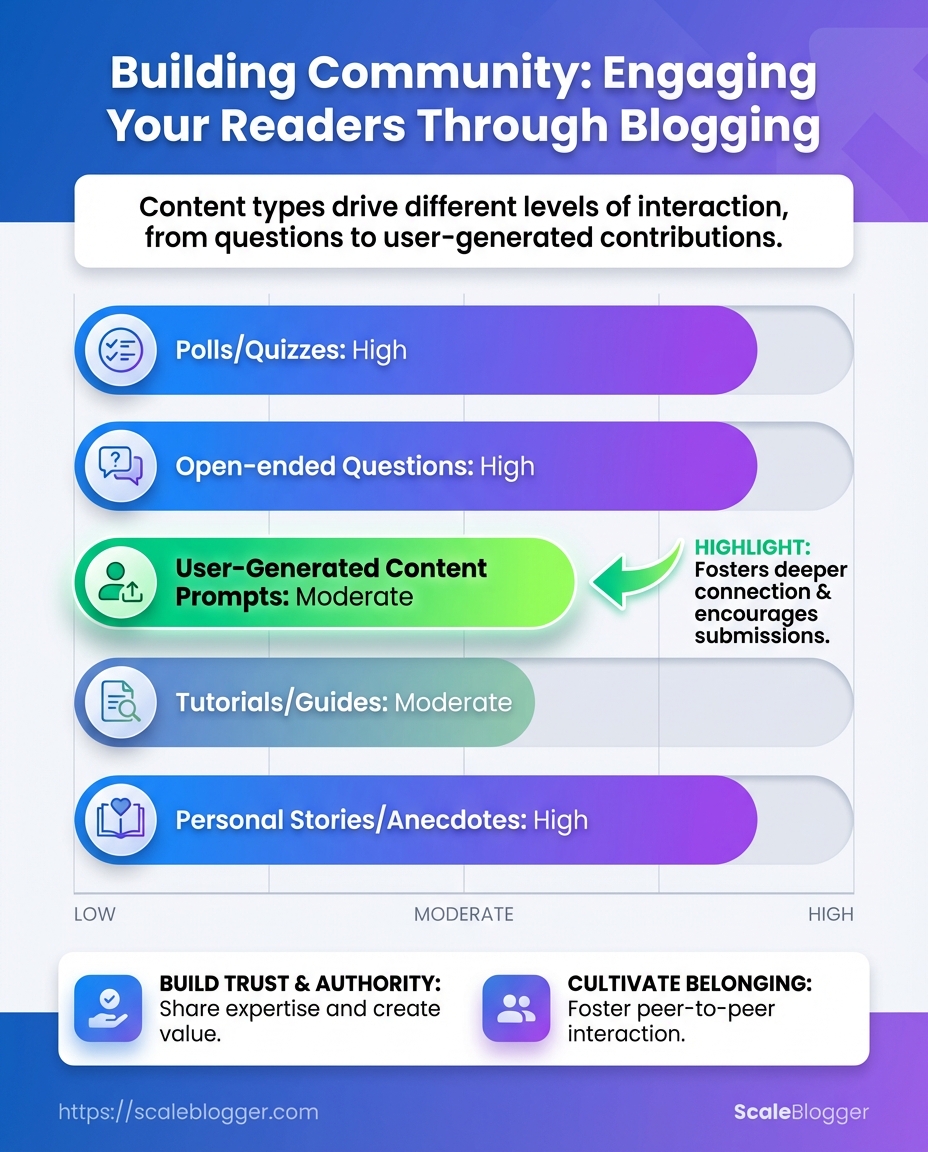
Key Takeaway: Launch when the experience seems useful, not perfect. The launch is more about moderation, clear expectations, and an onboarding process that encourages members to join right away.
Launch and Moderate Your Community Channels
Launch when the experience seems useful, not perfect. The launch is more about moderation, clear expectations, and an onboarding process that encourages members to join right away. Pick the platform that matches where your audience already spends time, set roles and a moderation cadence, and ship friendly, actionable welcome content that reduces friction for first-time posters.
Moderation workflow and roles
Moderator: A trained community member or staffer who enforces rules and nudges conversation.
Onboarding lead: Owns welcome messages, resource pins, and the first 72 hours of new-user follow-up.
Escalation owner: Handles disputes, sensitive reports, or legal/brand-risk issues.
- Draft community guidelines and pin them in the main channel.
- Build a triage queue for new reports (use a simple shared doc or a
#mod-queuechannel).
- Rotate moderators on predictable shifts (example: three 4-hour blocks daily).
- Run a weekly moderation sync to review edge cases and update rules.
Channel launch checklist
- Pre-launch content: Create welcome thread, FAQ, and 3 seeded conversations.
- Technical setup: Configure role permissions, invite-only links, and spam filters.
- Onboarding flow: Auto-messages that point new members to rules and the top three ways to contribute.
- Measurement: Track new member posts, first-week retention, and report volume.
Community platforms by features, audience fit, and cost
Table: Launch and Moderate Your Community Channels — Platform, Strengths, Best for & more
| Platform | Strengths | Best for | Estimated monthly cost |
|---|---|---|---|
| Discord | Real-time voice/video, rich roles, bots | Developers, gaming, engaged communities | Free tier; Nitro optional |
| Slack | Threaded conversations, integrations, professional feel | B2B communities, product teams | Free tier; paid from $8/user/mo |
| Facebook Group | Built-in discovery, familiar UX | Broad consumer audiences | Free |
| Circle | Membership, events, integrated courses | Creators, paid communities | Plans from $39/mo |
| Native blog comments | SEO value, centralized discussion | Readers who comment on posts | Often free (platform dependent) |
A final practical note: tie onboarding content into your editorial calendar—link a pinned post to the next big discussion and schedule moderators around planned launches. That small coordination step raises participation and keeps the community feeling alive.
Scaling this process systematically reduces friction and turns first-time visitors into repeat contributors.
Key Takeaway: Track content performance from the moment it goes live. Treat metrics as ongoing signals instead of final decisions.
Measure and Iterate
Track content performance from the moment it goes live. Treat metrics as ongoing signals instead of final decisions. Weekly checks catch short-term swings and technical issues; monthly reviews reveal trends and tie performance back to business outcomes. The aim is to know quickly when something needs a fix and to learn consistently which topics, formats, and distribution channels actually move the needle.
Weekly vs monthly metrics to watch
- Weekly — quick health checks: Monitor publishing cadence, page-load errors, organic sessions, and social engagement spikes.
- Monthly — strategic trends: Track repeat visitor rate, email list growth and open/reply rates, time on page, and conversion events tied to leads or sales.
- Quarterly — product-level impact: Attribute revenue, trial starts, or MQLs to topic clusters and high-performing pillar pages.
Signal: Consistent changes in multiple correlated metrics (e.g., time on page + repeat visits + email replies).
Noise: One-off spikes from a viral post or traffic from a single referral source that quickly decays.
How to interpret signal vs noise
- Look for directionally consistent moves across metrics.
- Check acquisition channels — organic increases matter more than paid spikes for long-term value.
- Segment by cohort (new vs returning visitors) before drawing conclusions.
Three actionable A/B tests to improve interaction
- Test headline variants: one SEO-focused headline vs one emotional hook headline, measure click-through rate and time on page.
- Test on-page CTAs: inline contextual CTA vs end-of-article CTA, measure clicks and downstream conversions.
- Test content length/format: long-form evergreen article vs condensed checklist, measure scroll depth and repeat visits.
How to tie engagement to business goals
- Define events: Map meaningful actions (email signups, demo requests, comment replies) to GA4 and your CRM.
- Assign value: Estimate a dollar or lead value for each event so engagement lifts can convert to forecastable revenue.
- Report consistently: Use a dashboard that shows both behavioral metrics (time on page, comments) and outcome metrics (MQLs, revenue).
Dashboard template for measuring blog engagement
Dashboard template listing metrics, data source, and reporting frequency
Table: Measure and Iterate — Metric, Data source, Frequency & more
| Metric | Data source | Frequency | Target benchmark |
|---|---|---|---|
| Comments per post | Social analytics / CMS | Weekly | ≥3 meaningful comments |
| Repeat visitor rate | GA4 | Monthly | 20–35% |
| Email reply/open rate | Email provider analytics | Weekly / Monthly | Open: 20–30% / Reply: 1–3% |
| Time on page | GA4 | Monthly | 2–4 minutes |
| Social shares | Social analytics | Weekly | 10–50 shares per article (topic-dependent) |
A/B testing, tight dashboards, and mapping events to commercial value turn vague engagement feelings into concrete decisions. Iterate fast on what the data shows and double down on formats and topics that actually feed leads, not just vanity metrics. If automation would free up time for more experiments, consider an AI content pipeline like AI content automation to speed measurement and iteration.
Troubleshooting Common Issues
Low participation and toxic behavior are often symptoms, not the actual problems. Begin by finding out what the community lacks: clarity, value, or safety. Then apply quick, measurable fixes while building longer-term habits that make engagement predictable and self-sustaining.
Access to community analytics: Must have metrics for comments, likes, DMs, open rates.
Moderation rules: Clear, written guidelines and at least one moderator assigned.
Tools: Platform native moderation, simple automation (scheduling + autoresponders), optional community tool or CMS integration.
Diagnose the problem with these steps.
- Inspect engagement patterns (time, content type, author).
- Audit recent moderation logs for repeated offenders or unresolved flags.
- Survey a small sample (5–20 active/past members) with short questions.
- Check distribution: are a few users dominating conversation?
- Compare content frequency vs. reaction rates—are posts too frequent or too sparse?
Quick fixes (0–7 days)
- Refresh one pinned post: highlight conversation prompts and rules.
- Send a concise re-engagement message to dormant members (example below).
- Temporarily tighten comment posting (approve-first on new accounts).
- Remove or mute clear trolls and publicly enforce rules with a firm, calm reply.
Longer fixes (2–8 weeks)
- Redesign content cadence around high-engagement formats (Q&A, AMAs, micro-prompts).
- Onboard a moderator rota and create a public moderation log.
- Introduce a recognition system (badges, shout-outs) to reward constructive contributors.
- Run a small A/B test on topic clusters to see what sparks replies.
Map problems to probable causes and prioritized fixes
Table: Troubleshooting Common Issues — Problem , Probable cause, Immediate fix (0-7 days) & more
| Problem | Probable cause | Immediate fix (0-7 days) | Longer-term fix (2-8 weeks) |
|---|---|---|---|
| Low comment volume | Posts lack prompts or clear value | Post targeted prompt questions; pin a “reply starter” | Build recurring formats (weekly AMA); measure prompt types |
| High spam | Weak bot filters; open posting | Enable stricter captcha / approve-first | Use moderation tool + automated spam rules |
| Low newsletter replies | Low personalization; generic CTA | Send segmented short follow-up email | Implement segmented funnels and dynamic CTAs |
| Trolls/abuse | Lax enforcement; unclear rules | Remove content; warn or ban accounts | Publish clear policy; moderator training |
| Platform fatigue | Too many posts; noisy channels | Reduce post frequency; consolidate channels | Move high-value discussions to focused subgroups |
Sample re-engagement message: “Hey — we missed your take on last week’s post. Quick question: which headline would you try for this topic? A or B? Your input shapes future content.”
Sample moderation message: “Thanks for contributing. That language violates our guidelines, so the comment was removed. Please repost without personal attacks; repeat offenses will result in a ban.”
When to pivot platforms or tactics: pivot if engagement metrics don’t improve after two disciplined cycles (8 weeks) of changes, or if audience preferences clearly favor another medium (e.g., moving discussions from comments to a Slack or Discord community). Automating follow-ups and topic testing makes that decision data-driven—consider tools like Scale your content workflow to automate re-engagement and benchmarking.
Fix quickly, instrument everything, and treat community health as a product that needs continuous tuning. That approach turns one-off bursts of activity into steady, valuable interaction.
Pro Tips and Long-Term Growth Strategies
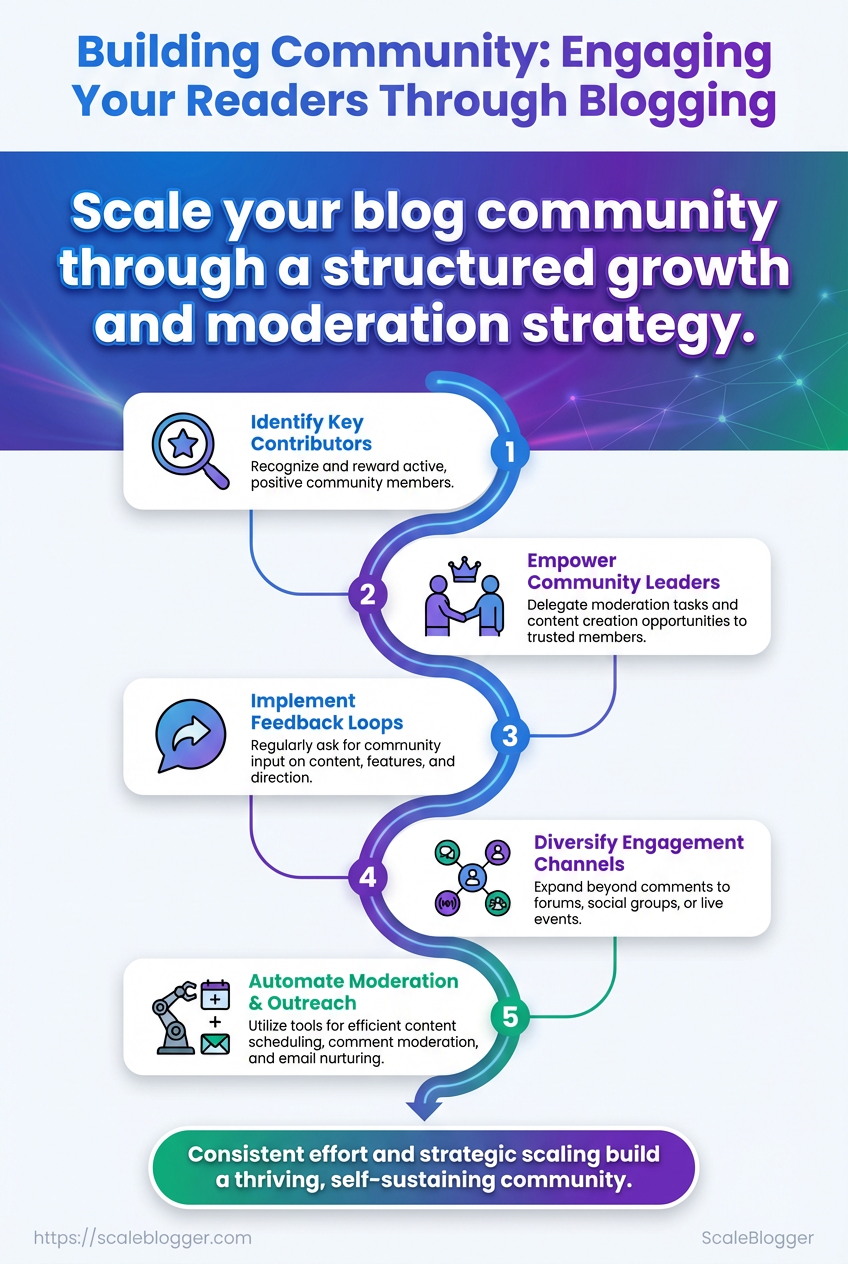
Start by treating community growth like a product: improve quickly, measure constantly, and safeguard member experience as you grow. Recruit a small group of enthusiastic champions, create predictable rhythms with recurring events, and convert your highest-engagement content into deeper paid or gated products. Use data to schedule what actually works — not what feels right.
Recruit and incentivize champions
- Identify influencers: Find active members who already help others; invite them to a private advisory channel.
- Offer meaningful perks: Give early access, exclusive swag, or revenue-share on referrals.
- Formalize roles: Define expectations with a short
role cardso champions know when to moderate, welcome, or host.
Use recurring events to maintain cadence
- Weekly office hours: Low-effort touchpoint where founders or experts answer live Q&A.
- Monthly workshops: Deep dives that convert participants into repeat attendees.
- Quarterly AMAs: Bring external thought leaders for publicity spikes.
Repurpose high-engagement posts into deeper products
- Turn threads into guides: Stitch top discussions into an evergreen how-to or checklist.
- Bundle tutorials as mini-courses: Package sequential posts into a paid micro-course.
- Use FAQ threads as lead magnets: Convert community FAQs into gated PDFs that grow your email list.
Use data to inform content and event scheduling
- Track engagement windows: Measure when members are most active and schedule events then.
- A/B test formats: Try 30 vs 60 minute events and compare retention and NPS.
- Content scoring: Score posts by reach, replies, and time-on-post to prioritize repurposing.
6-month playbook with focus, actions, and KPIs for each month
Table: Pro Tips and Long-Term Growth Strategies — Month, Primary focus, Key actions & more
| Month | Primary focus | Key actions | KPIs to track |
|---|---|---|---|
| Month 1 | Foundation | Recruit 5 champions; set event cadence; launch welcome funnel | New members, activation rate, champion count |
| Month 2 | Engagement | Run weekly office hours; seed 10 discussion prompts | Weekly active users (WAU), replies/post, event attendance |
| Month 3 | Content depth | Repurpose top 5 posts into a guide; host first workshop | Guide downloads, workshop signups, retention week-to-week |
| Month 4 | Monetization test | Launch a mini-course from repurposed content | Course conversion rate, revenue, LTV early signal |
| Month 5 | Scale outreach | Run referral drive; feature champions externally | Referral signups, referral-to-activation rate |
| Month 6 | & automate | Automate scheduling, reporting; refine champion program | Churn rate, DAU/WAU ratio, automation time saved |
For ongoing scale, consider integrating an AI content automation layer like AI content automation to surface high-engagement posts and automate repurposing. Small, consistent bets on rhythm, champion empowerment, and data-driven repurposing compound faster than one-off growth hacks. Keep the community useful, and growth will follow.
Appendix: Templates, Scripts, and Resources
Ready-to-deploy templates and small automation scripts save hours each week and keep tone consistent across posts and community channels. Below are the practical assets to drop into a content workflow: copy templates for headlines, social captions, email flows; a small CSV schema for analytics handoffs; and quick customization hints so every template sounds like it came from your brand.
What’s included:
- Copy & Template Library: headline formulas, intro/outro paragraphs, social caption variations, email nurture sequences, and community prompts. Customization hints: swap one sensory detail, replace 2nd-person phrases with brand voice tokens, and set a target readability score (Flesch 60–70). CSV dashboard schema: a single-file schema for analytics teams to ingest publishing and engagement metrics (example below).
- Tool links and selection guidance: recommended tools mapped to purpose and cost for community building and distribution.
Copy Template: Simple headline formula Headline: Use Benefit + Timeframe + Credibility (e.g., “Grow email signups 30% in 90 days — case study inside”)
CSV dashboard schema
csv post_id,slug,publish_date,author,word_count,channel,impressions,clicks,engagement_rate,conversions,conversion_value- Export your CMS posts to CSV.
- Map fields to the schema above.
- Drop into the analytics pipeline or BI tool for reporting.
Recommended tools mapped to purpose and cost
Table: Appendix: Templates, Scripts, and Resources — Tool, Purpose, Free tier available & more
| Tool | Purpose | Free tier available | Why choose it |
|---|---|---|---|
| Disqus/Commento | Community comments & moderation | ✓ | Threaded discussion, lightweight moderation tools |
| Discord | Real-time community chat | ✓ | Voice + text, great for live events and cohorts |
| Slack | Private community and team collaboration | ✓ | Integrations (Zapier, Google Drive) for workflows |
| Circle | Paid community platform | ✗ | Membership features, polished member experience |
| ConvertKit/Mailchimp | Email marketing & automation | ✓ | Segmentation, automated funnels and forms |
Definitions
Template: A reusable copy structure that standardizes voice and format.
CSV schema: A fixed set of column names and types for analytics ingestion.
If you want a set of ready templates wired to a publishing calendar or an automated pipeline to push metrics into dashboards, consider integrating an AI content automation partner like Scaleblogger.com to reduce manual steps and scale reliably. These assets are meant to plug straight into your workflow and free up time for strategy and community building.
Conclusion
You now have a clear way to move from quiet comments to an active audience. Set clear community goals, create simple interaction points (like prompts and reply windows), and measure the key signals that matter for attracting subscriptions and long-term retention. Teams that rolled out weekly comment prompts and a single-thread moderation workflow saw noticeably higher reader engagement within a month; for smaller blogs, starting with two focused calls-to-action per post usually beats scattershot asking. If moderation capacity is the worry, begin with firm posting rules and a volunteer moderator rotation, then scale automation as the conversation grows.
Move forward by picking one experiment—add a conversational prompt to your next three posts, or run a short comment-driven series—and measure replies, time-on-page, and subscription lift. Track outcomes consistently and iterate on the interaction that most directly drives subscriptions. com) can publishing, moderation, and analytics so the community growth loop runs reliably.
For a quick refresher on templates and scripts, see undefined.
