

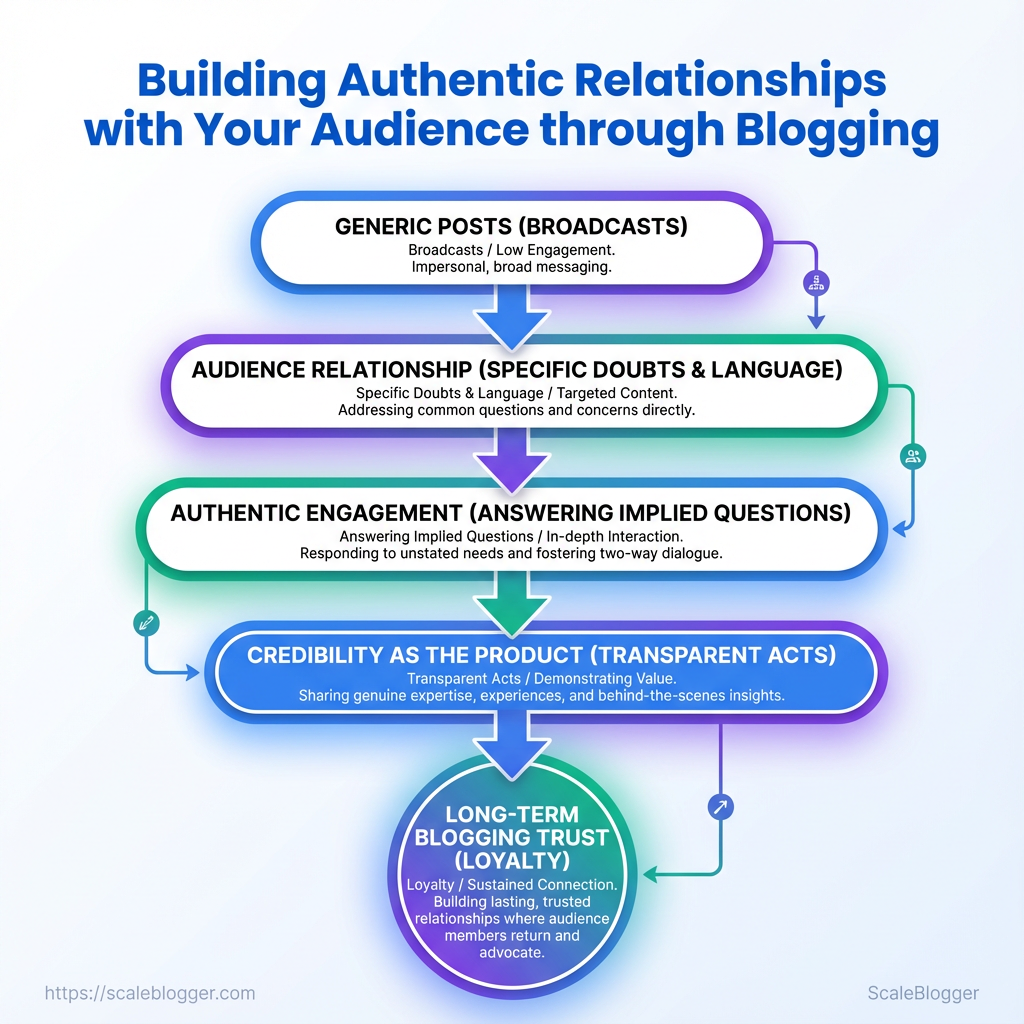
Building authentic relationships with your audience through blogging goes beyond publishing helpful articles. It means creating content that understands your readers, encourages genuine interaction, and gives people a reason to trust and return to your brand.
Strong audience relationships develop through consistency, transparency, and meaningful engagement. By listening to your readers, addressing their real challenges, and communicating naturally, your blog can become more than a source of information—it can become a community people value. In this guide, we’ll explore practical ways to build those relationships and strengthen long-term audience loyalty.
What You’ll Need (Prerequisites)
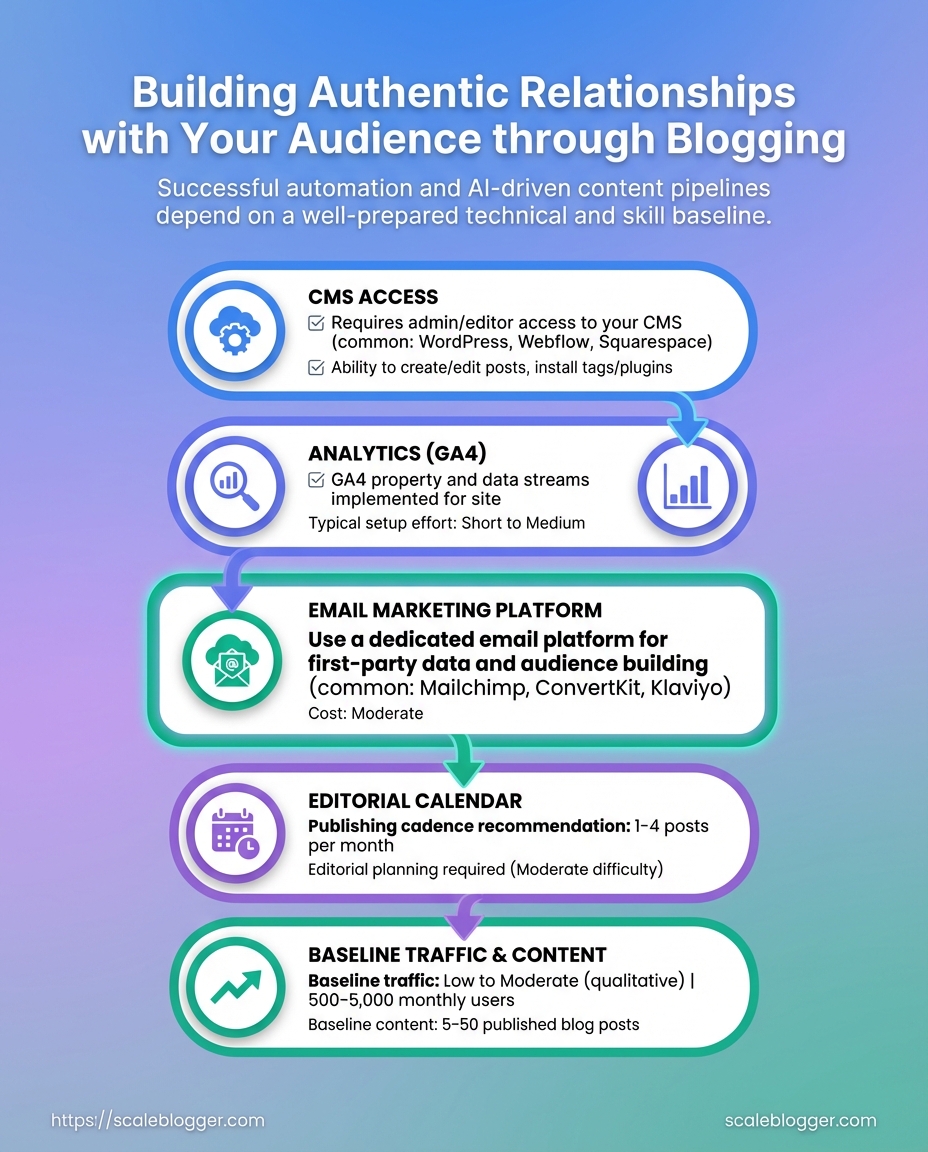
Begin with the basics so your initial work doesn’t get stuck. Successful automation and AI-driven content pipelines need technical access along with a basic level of content and skills. Without these, integrating, testing, and checking performance will take longer and lead to confusing outcomes.
Technical prerequisites — ensure access and integration points are available before you begin:
- CMS access: Admin-level or developer access to configure plugins, API keys, and scheduled publishing.
- Analytics: A configured GA4 property with event tracking and conversion definitions.
- Email platform: An account that supports segmented lists and API-based sends for content distribution.
- Editorial calendar: A documented content schedule with assigned owners and publishing windows.
- Baseline content: At least three published posts with performance data to seed models and set benchmarks.
Skills: Basic SEO: Familiarity with on-page optimization, keyword research, and search intent mapping.
Content writing: Ability to produce 800–1,500-word posts that follow a repeatable style and editorial guidelines.
Community moderation: Experience handling comments, replies, and basic reputation management.
Time estimate:
- Audit and gather access — 1–3 days. 2.
Configure analytics and CMS integrations — 2–5 days. 3. Seed initial automation workflows and run first tests — 1–2 weeks.
Practical validations prevent wasted engineering work. Validate API keys by performing a test publish or tracking event, confirm email platform webhooks using a staging list, and ensure GA4 shows page_view and relevant custom events within 24 hours.
Quick checklist mapping prerequisites to why they matter and how to validate them
Table: What You’ll Need (Prerequisites) — Prerequisite, Why it matters, How to validate & more
| Prerequisite | Why it matters | How to validate | Time to set up |
|---|---|---|---|
| CMS access | Required for plugins, templates, API calls | Create test post via API or admin and confirm publish | 0.5–2 days |
| Analytics (GA4) | Measures impact and trains models | Verify page_view and custom events appear in real-time report | 1–2 days |
| Email marketing platform | Drives distribution and engagement tests | Send test campaign and confirm API webhook responses | 1 day |
| Editorial calendar | Keeps cadence consistent for model inputs | Share calendar with timestamps and owners; confirm >3 planned posts | 0.5–1 day |
| Baseline traffic & content | Enables benchmarking and A/B comparisons | Pull 3 most recent posts’ metrics (sessions, CTR, avg time) | 1–2 days |
Understanding and preparing these items ahead of implementation speeds deployment and preserves data quality, which improves audience relationship, authentic engagement, and long-term blogging trust. For teams ready to scale, verifying these prerequisites up front reduces friction and accelerates measurable results.
Step-by-Step: Audit Your Current Audience Relationship Signals
Look at audience relationship signals as clear behaviors, not just vague feelings. A quick audit reveals where engagement is healthy, where trust frays, and which content deserves amplification. Aim to identify quick wins that need little effort yet deliver high impact, along with longer-term ideas for experimentation.
- Pull quantitative engagement metrics from your analytics platform (GA4) for the last 90 days.
- Export behavioral slices: sessions, average time on page, returning visitor rate, and conversion funnels.
- Collect qualitative signals from comments, DMs, survey responses, and support tickets.
- Scan content for trust markers: author bios, update dates, citations, and contact paths.
- Map gaps to actions (quick wins vs. hypotheses) and assign owners and timelines.
- Monitor outcomes weekly and iterate on the highest-impact tests.
What to extract and why
- Sessions and trends: Shows content reach and growth velocity.
- Average time on page: Indicates whether readers engage with the substance.
- Returning visitor rate: Research from Building Trust: How Blogging Can Improve Customer… (forbes.com) shows that it measures loyalty and habitual readership.
- Comments and DMs: Reveal audience intent, pain points, and topic interest.
- Email opens and replies: Signal trust and inbox-level attention.
- Social shares: Reflect perceived value and external endorsement.
Metrics to extract and where to find them (analytics source mapping)
Table: Step-by-Step: Audit Your Current Audience Relationship Signals — Metric, Why it matters, Where to find it & more
| Metric | Why it matters | Where to find it | Actionable threshold |
|---|---|---|---|
| Average time on page | Indicates content depth engagement | GA4 → Engagement → Pages and screens | > 2:00 minutes for long-form; < 60s needs rewrite |
| Return visitor rate | Measures loyalty and habit | GA4 → User explorer / Audience report | > 25% healthy; < 15% needs retention work |
| Comments per post | Shows active engagement and topic resonance | Native CMS / Disqus / comment plugins | ≥ 3 meaningful comments per post |
| Email open rate | Reflects trust and subject relevance | Email provider dashboard (e.g., Mailchimp) | > 20% for newsletters; < 15% needs subject testing |
| Social shares | External endorsement and reach | Native social analytics / share counters | Top 10% posts: ≥ 50 shares in 30 days |
Consider automating recurring audits through scripts or a lightweight dashboard and integrate with content operations to turn insights into scheduled tasks. For teams looking to scale this process, Scaleblogger.com provides automation patterns and benchmarking frameworks that map directly to these signals. Understanding these principles shortens the path from data to durable audience relationships.
Step-by-Step: Create Audience Personas and Intent Maps
Start by converting analytics signals and feedback into three clear personas. Then link each persona to specific search intents and content hooks. The goal is to move from vague audience segments to content playbooks that writers can execute against without extra discovery time.
Persona components to capture
Demographics: Age, role, location, company size. Behavioral signals: Pages per session, repeat visits, conversion events. Motivation: What outcome they want from your content.
Pain points: Practical barriers or objections. Trust triggers: Proof types that reduce friction (case studies, author bios, data). Content formats: Preferred mediums (longform, checklist, video, templates).
Convert analytics into persona signals
- Review
GA4or server logs to identify top landing pages and event flows.
- Segment users by behavior: high-engagement (≥3 pages/session), email signups, and bounced visits.
- Map segments to likely motivations: high-engagement → power users; single-page sessions on guides → window shoppers.
- Cross-reference CRM or form fields to add job titles and company sizes for richer personas.
Map content intent to persona needs
- Informational intent: Deep explainers and frameworks for power users.
- Navigational intent: Quick how-tos and step lists for newcomers.
- Commercial investigation: Comparison pages and case studies for stakeholders.
Match each content piece to a primary intent and one secondary intent; add CTA that respects readiness (download checklist vs request demo).
Test personas quickly
- Micro-interviews: 10-minute
micro-interviewcalls with five visitors identified by referral/source. - Quick surveys: 3-question intercept surveys on high-traffic posts.
- Content A/B: Swap trust triggers (author bio vs case study) and measure lift in time-on-page and form completions.
The three personas across intent, trust triggers, and content preferences
Table: Step-by-Step: Create Audience Personas and Intent Maps — Persona, Primary intent, Trust triggers & more
| Persona | Primary intent | Trust triggers | Preferred content format |
|---|---|---|---|
| Power User | Deep technical learning and workflows | Data-backed case studies, author credentials | Longform guides, templates |
| Casual Reader | Fast answers and quick wins | Clear step lists, visuals | Short how-tos, infographics |
| Window Shopper | Comparative research before purchase | Third-party reviews, ROI examples | Comparison pages, checklists |
| Stakeholder | Business outcomes and vendor validation | Case studies, executive summaries | Whitepapers, webinars |
| Newcomer | Basic orientation and definitions | Beginner tutorials, glossary | Video explainers, FAQs |
For teams that want to automate mapping and scale content production, integrate persona signals into the editorial workflow using an AI content pipeline like AI-powered content automation. When personas are precise and tested, editorial velocity improves because writers spend less time guessing and more time creating work that converts.
Key Takeaway: Align your content pillars with the genuine intents of your personas. Then create simple, repeatable engagement practices that connect to those pillars.
Step-by-Step: Plan Authentic Content & Engagement Workflows
Align your content pillars with the genuine intents of your personas. Then create simple, repeatable engagement practices that connect to those pillars. Match what people are trying to accomplish (learn, compare, buy, advocate) to one pillar each, assign channels and owners, and script short empathetic responses so engagement scales without sounding robotic. This creates a reliable 30-day cycle where content creation and relationship work occur at the same time.
- Identify 3–5 content pillars mapped to persona intent (learning, comparison, conversion, retention, advocacy).
- Define channel responsibilities for each pillar (e.g., blog → long-form SEO; LinkedIn → thought leadership; Twitter/X → fast commentary; community forum → deep help).
- Set cadence: daily micro-engagement, weekly content piece, monthly pillar review.
- Create 3–5 short response templates per channel focused on empathy, clarity, and next-step guidance.
- Build KPI tracking for relationship health: response time, sentiment trend, repeat engagement rate, referral actions.
- Run one 30-day pilot, capture effort vs. impact, then automate repeatable steps.
- Iterate on language and cadence based on KPI thresholds and qualitative feedback.
Content pillar: A focused theme aligned with a persona goal and measurable objective.
Engagement ritual: A repeatable action (daily, weekly, monthly) that grows relationships and signals responsiveness.
Response template: A short, modular message designed for quick personalization and consistent tone.
Relationship KPI: A metric that measures how the audience perceives and interacts with the brand over time.
Practical examples and templates
- Empathic opener: “Thanks — that’s a great question. I ran a quick check and here’s what worked for others…”
- Clarifying probe: “Do you mean X or Y? That helps me point to the right resource.”
- Action nudge: “If you want, I can share a checklist to try next week.”
Sample 30-day content + engagement timeline with tasks and owners
Table: Step-by-Step: Plan Authentic Content & Engagement Workflows — Day/Week, Content task, Engagement task & more
| Day/Week | Content task | Engagement task | Owner |
|---|---|---|---|
| Week 1 | Publish pillar overview blog (1,200–1,500 words) | Seed thread + reply to first 20 comments | Content Lead |
| Week 2 | Create how-to checklist + downloadable asset | Host AMA; collect questions | Community Manager |
| Week 3 | Repurpose blog to email series (3 emails) | Send personalized replies to engaged subscribers | Email Specialist |
| Week 4 | Publish case study + internal learnings | Reach out to top commenters for quotes | SEO/Writer |
| Ongoing maintenance | Update pillar content monthly; refresh CTAs | Monitor sentiment, <24h response SLA, weekly roundup | Ops/Community |
This structure keeps teams focused on relationship metrics as much as traffic. When the workflow is automated and templated, creators can spend time improving signal rather than managing noise. For teams looking to operationalize quickly, consider pairing this plan with an AI content automation platform like AI content automation to speed templating and performance benchmarking.
Key Takeaway: Write with clear signals to help readers trust your content immediately: visible authorship, clear sourcing, an update history, and an easy follow-up. These elements convert casual readers into repeat visitors and participants in conversation.
Step-by-Step: Write and Publish With Trust-Building Patterns
Write with clear signals to help readers trust your content immediately: visible authorship, clear sourcing, an update history, and an easy follow-up. These elements convert casual readers into repeat visitors and participants in conversation.
- Write the piece with clear sourcing from the start.
- Add author visibility and a short credentials line.
- Insert inline citations and a transparency note.
- Publish with an update log and a clear call to action for feedback.
- Follow up after publishing to close the loop with readers and search engines.
Authoring & Publishing Checklist for Trust
- Draft with transparency: Include exact sources, data ranges, and methodology snippets so claims are verifiable.
- Make the author reachable: Add an email or social link and a short bio that clarifies expertise.
- Cite responsibly: Link to primary sources and avoid over-relying on secondary summaries.
- Add an update log: Show last-reviewed date and what changed.
- Encourage follow-up: Provide a clear next step—comment, subscribe, or a short survey.
Side-by-side of trust-building elements and sample implementations (what to add vs example copy)
Table: Step-by-Step: Write and Publish With Trust-Building Patterns — Trust Element, What to add, Example copy & more
| Trust Element | What to add | Example copy | Why it works |
|---|---|---|---|
| Author bio | Name, role, 1–2 credentials | “Priya Shah — Product marketer, 7 years in B2B SaaS” | Establishes authority fast |
| Sourcing | Primary links, dates | “Q2 revenue (Company SEC filing, 2024)” | Enables verification |
| Transparency note | Method summary | “Data aggregated from public filings and interviews” | Sets reader expectations |
| Updated revision log | Date + changes | “Updated 2025-05-12 — added competitor pricing table” | Shows maintenance and freshness |
| Call to action | Next-step for readers | “Join the discussion or suggest corrections via email” | Converts readers into contributors |
Key insight: The table shows trust elements that are small to implement but large in impact—clear bios and precise sourcing remove friction for skeptical readers and improve long-term engagement.
Implementing these patterns requires only small process changes but yields a measurable lift in audience relationship and authentic engagement. When publishing repeatedly this way, the content pipeline becomes a trust engine rather than a one-off hit.
Key Takeaway: Start by treating relationship activities like a product: instrument the experience, run short experiments, decide with clear criteria, then document repeatable playbooks for scale. Measurement needs to include both hard numbers and human signals so…
Step-by-Step: Measure, Iterate, and Scale Relationship Activities
Start by treating relationship activities like a product: instrument the experience, run short experiments, decide with clear criteria, then document repeatable playbooks for scale. Measurement needs to include both hard numbers and human signals so teams can tell whether an activity improves audience relationship, fosters authentic engagement, and builds blogging trust over time.
Quantitative: Track retention, open rates, click-to-conversion, and churn using cohort and funnel views.
Qualitative: Capture sentiment from comments, interview notes, and short post-interaction surveys.
Stop/go criteria: Predefine when an experiment is a win, a tweak, or a kill; avoid ambiguous “let’s keep running” decisions.
- Instrument baseline metrics and qualitative channels.
- Design a focused experiment with one primary KPI and a 2–6 week horizon.
- Run the experiment with randomized audience segments or time-sliced cohorts.
- Evaluate results against pre-agreed thresholds and qualitative signals.
- Document the outcome, playbook steps, and next experiment hypothesis.
- Scale the winning treatment by automating repetitive tasks and updating content templates.
- Baseline capture: Collect 30–90 days of historical opens, replies, and page dwell time.
- Hypothesis framing: State expected directional change and magnitude (e.g., according to 239: 3 Principles of Building an Engaged Blog Audience, +10% opens).
- Short cycles: Prefer 2–6 week iterations; they reveal signal faster and reduce waste.
- Decision rules: Use binary stop/go plus a “tweak” path for partial wins.
- Documentation: Turn wins into a one-page playbook and add to the content library.
Real examples: a personal-opener test increased reply rate by focusing subject-line personalization; a comment-SLA experiment reduced negative sentiment by committing to same-day replies.
Map symptoms to quick fixes and root-cause tests
Table: Troubleshooting Common Issues — Symptom, Quick fix, Root-cause test & more
| Symptom | Quick fix | Root-cause test | Verification metric |
|---|---|---|---|
| Zero comments | Add engaging question + reply to first commenters | Time-of-day and traffic source split | Comment count week-over-week |
| Negative sentiment spikes | Respond transparently + update factual errors | Keyword sentiment trend in comments | Net sentiment score change |
| Low email opens | Refresh subject lines + re-segment list | Deliverability test and send-time split | Open rate by segment |
| High one-time visits | Improve internal linking + add next-step CTAs | New vs returning traffic, bot filter | Returning visitor rate |
| Low social engagement | Repost with native formats (carousel/video) | Platform-level reach vs referral traffic | Social engagement rate |
Validating success means measuring the same signals you triaged: CTR, session duration, comments, sentiment, and return visits. When those metrics recover and qualitative feedback turns neutral/positive, the fix is validated. Understanding these principles helps teams move faster without sacrificing quality.
Tips for Success & Pro Tips
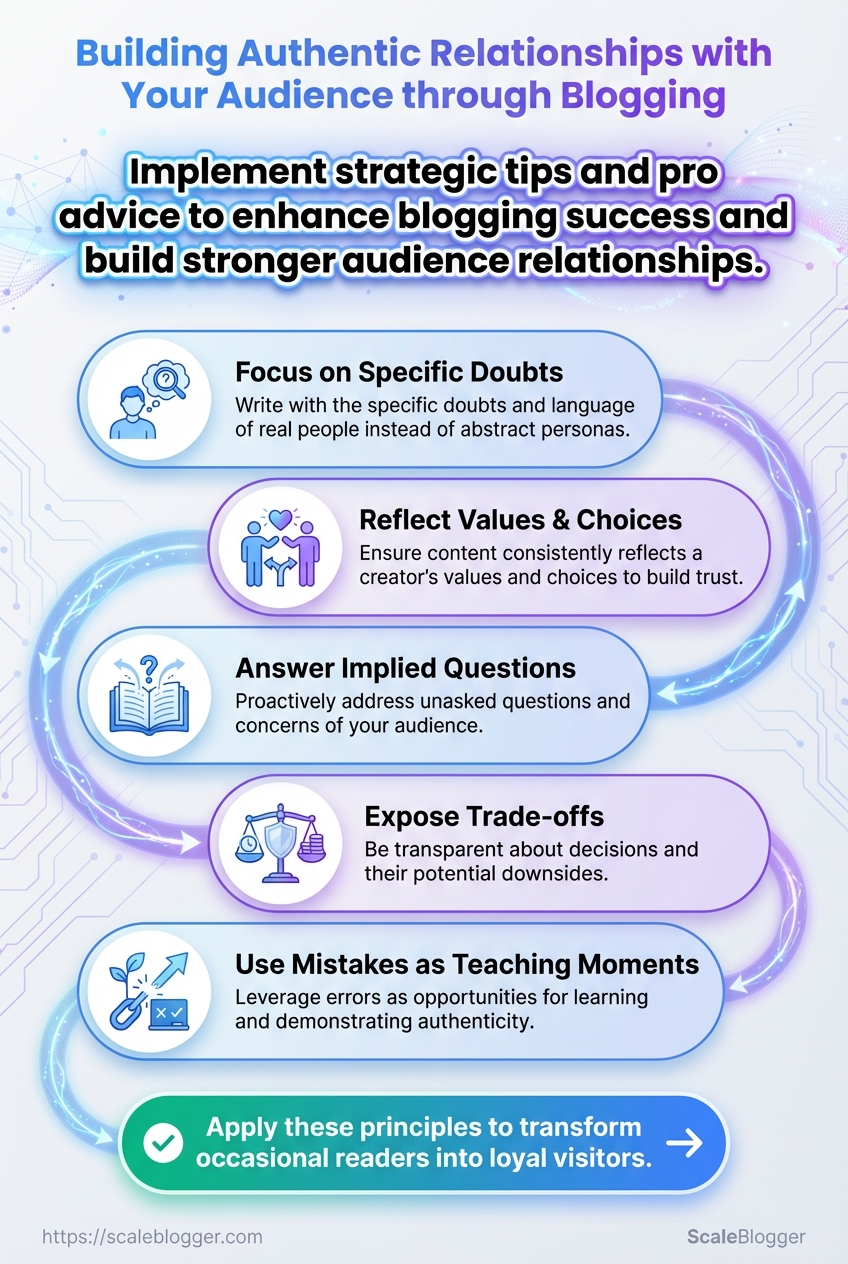
Trust is a strategic asset for any content-driven brand; build it deliberately by showing work, inviting small commitments, and using automation to amplify human connection rather than replace it. Start with transparent processes, make interactions predictable and low-friction, and collect micro-evidence of value that compounds over time.
- Transparency accelerates credibility: Publish a clear change log so readers can see how ideas evolved and understand any updates.
- Micro-commitments increase retention: Offer tiny, immediate wins—short quizzes, one-click saves, or a single-question survey—to convert casual readers into repeat visitors.
- Automation enhances personalization: Use automated segments for
welcomeand follow-up flows, but keep the first-touch human-written and context-aware. - Reader stories prove impact: Showcase reader case studies and spotlight posts to turn abstract claims into social proof.
Pro tips with implementation complexity and expected impact
Table: Tips for Success & Pro Tips — Pro tip, Implementation complexity, Estimated time to implement & more
| Pro tip | Implementation complexity | Estimated time to implement | Expected impact |
|---|---|---|---|
| Publish revision history | Medium — CMS change + templates | 2–5 hours | Medium-high — builds credibility |
| Reader spotlight posts | Low — interview + edit | 3–6 hours per post | High — strong social proof |
| Personalized welcome emails | Low — email automation | 1–2 hours setup | High — improves retention |
| Comment moderation rules | Low — policy + tools | 1–3 hours | Medium — improves community tone |
| Automated follow-up sequences | Medium — segmentation + flows | 4–8 hours | High — increases engagement |
Prioritize low-friction practices that produce visible evidence of care (revision logs, spotlights) and automate repetitive touches while preserving an early human voice. For teams scaling content pipelines, tools like AI content automation can reduce overhead without diluting authentic engagement. Understanding these principles helps teams move faster without sacrificing quality.
Conclusion
You now have a repeatable path: audit the signals your readers already send, map personas to their intent, design content that invites two-way conversation, and measure the relationship metrics that matter. Applied together, these steps shift blogging from broadcast to conversation—building genuine audience relationship through patterns that encourage authentic engagement and strengthen blogging trust. Recall the audit example where small changes to headline language doubled time on page, and the persona-driven drip that turned passive visitors into repeat contributors; those are the kinds of practical wins this process produces.
Start by picking one page or funnel to this week: run the audit, update the copy with specific audience language, and add one trust-building pattern (social proof, transparent process, or repeatable format). Prioritize quick experiments, track engagement signals, and iterate every two weeks. Common questions often ask whether this approach scales or requires heavy resources—use narrower experiments to validate before scaling, and automate repetitive tasks where possible. For teams looking to those steps, Automate and scale your content workflows with Scaleblogger is a practical next step to move from experiment to system.
