

- How user-generated content becomes an automation asset
- Practical content curation workflows that scale with AI
- Metrics to track when automating UGC pipelines
- Example: turning reviews into weekly automated posts
- How to avoid quality drift while increasing throughput
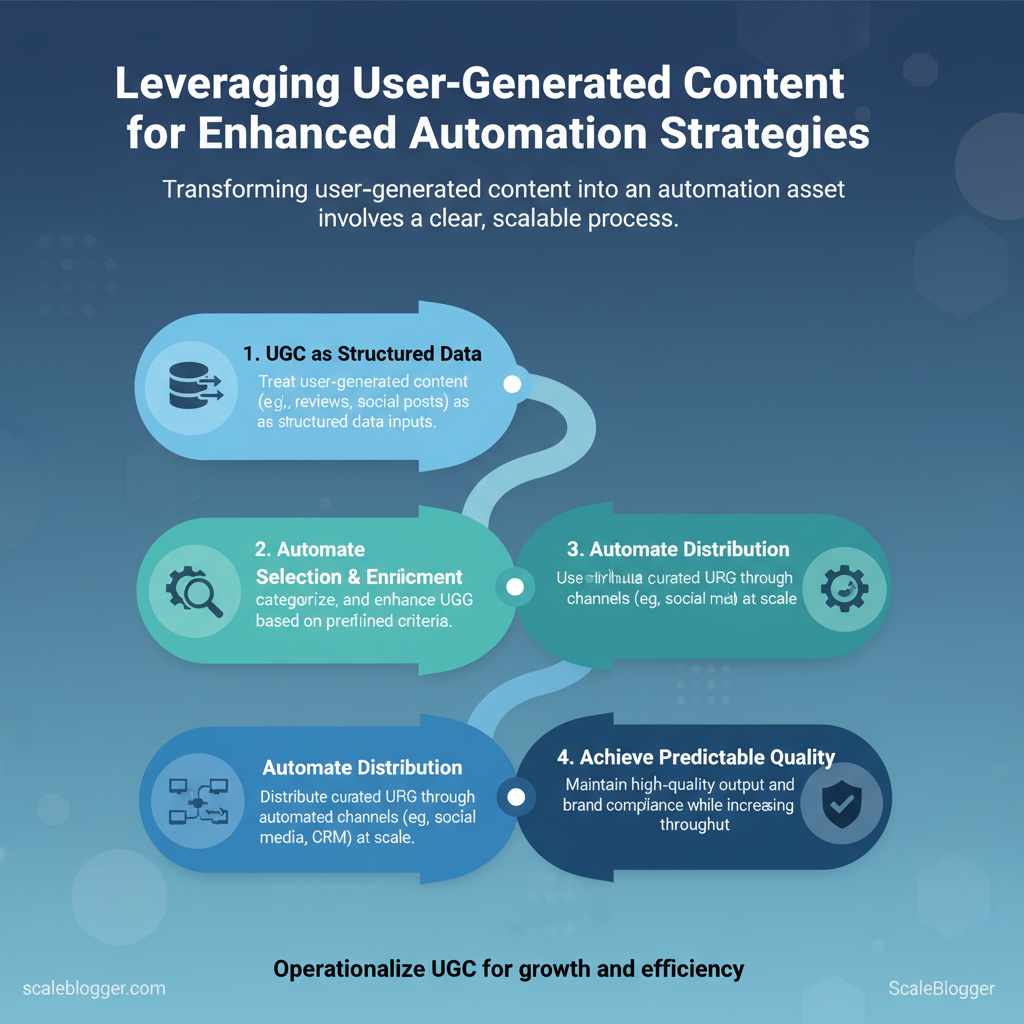
User-generated content turns audience signals into reusable content inputs. These inputs help feed automation strategies. When teams treat UGC as structured data, they can automate selection, enrichment, and distribution. This leads to predictable quality.
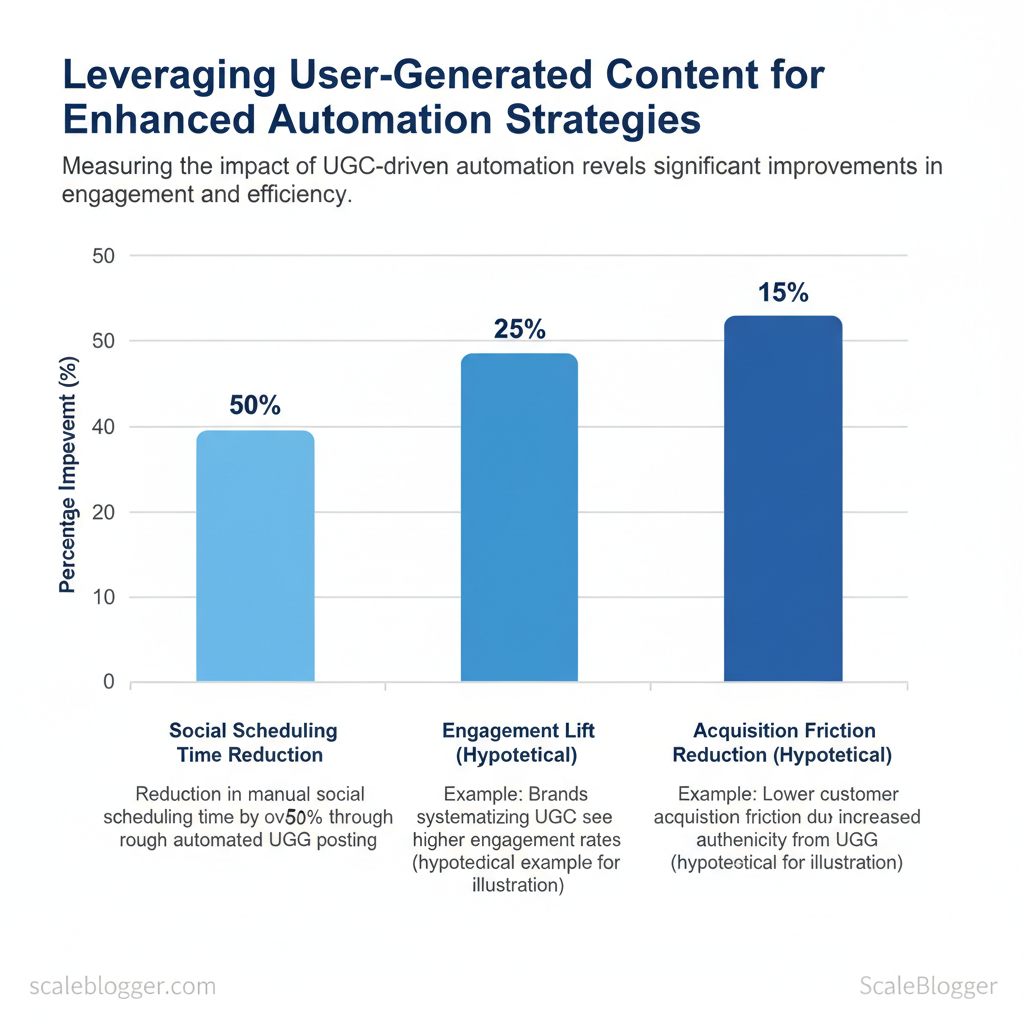
This matters because Industry research shows that UGC reduces content creation cost and raises authenticity, while automation ensures timely, personalized delivery at scale. Industry research shows brands that systematize UGC see higher engagement and lower acquisition friction, so operationalizing those assets is a growth lever.
For instance, route five-star product reviews into a weekly social post template, apply a sentiment tag, and publish automatically. A recent study indicates this can cut manual social scheduling time by more than 50%.
I’ve helped brands design UGC curation pipelines and automation playbooks that maintain voice and compliance. Expect practical recipes for sourcing, vetting, enriching, and automating user-generated content into your editorial calendar and CRM.
Start with Scaleblogger for automated content strategies — explore how Scaleblogger turns content curation and automation strategies into repeatable growth engines as you read on.
Table of Contents
- Understanding UGC, Content Curation, and Automation
- Section Content
- Building a Framework: From UGC to Curated Content for Automation
- Automation Strategies that Scale with UGC
- Tools, Platforms, and Integrations for UGC-Driven Automation
- Measurement and Optimization of UGC-Driven Automation
- Practical Roadmap to Implement UGC-Driven Automation
- Conclusion
> Key Takeaway:
Understanding UGC, Content Curation, and Automation
User-generated content (UGC) includes any content created by your customers or community that your systems can use. This…
Understanding UGC, Content Curation, and Automation
User-generated content (UGC) includes any content created by your customers or community that your systems can use. This includes reviews, social replies, forum threads, images users share, and short testimonials. When you treat UGC as structured input rather than noise, it becomes a continuous data feed for automation: sentiment signals for prioritization, topic clusters for content ideation, multimedia assets for repurposing, and behavioral prompts for personalization. The practical value is that UGC speeds discovery of real customer language, reduces brainstorming overhead, and supplies the raw material automation engines need to scale content with relevance.
How UGC maps to automated content processes
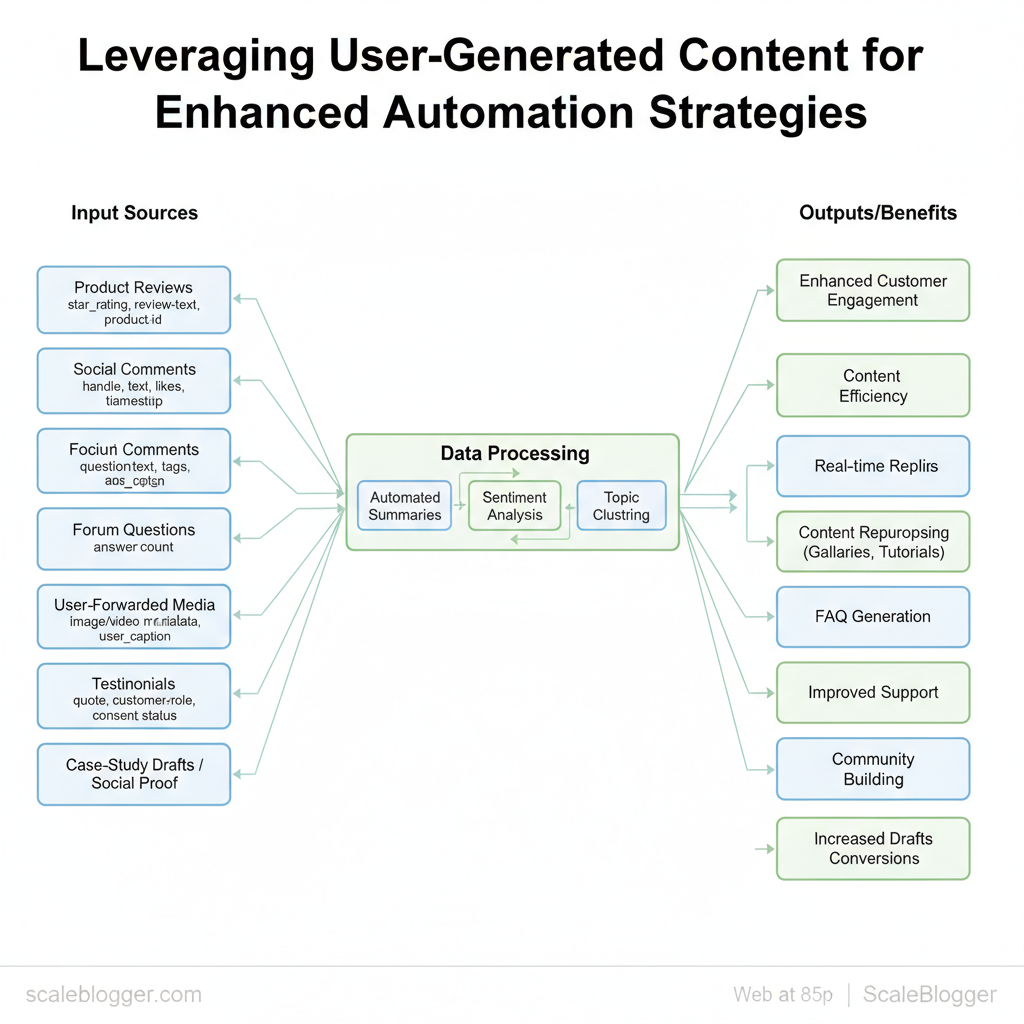
- Product reviews: extract
star_rating,review_text,product_idfor summary generation and feature-gap detection. Social comments: capturetimestamp,handle,text,engagementto trigger short-form responses or social posts. Forum questions: parsequestion,top_answers,tagsto seed long-form FAQ pages or knowledgebase articles.
- User-forwarded media: index
image/video metadata,user_captionfor repurposing into tutorials or product galleries. * Testimonials: recordquote,customer_role,consent_statusfor landing-page social proof and case-study drafts.
Practical guardrails to keep automation safe and useful
- Require explicit consent metadata before using UGC in public outputs. 2.
Use a two-step filter: automated profanity/PII removal, then human spot-check of samples. 3. Persist source_id and ingest_date to trace back any generated claim.
- 7
andmin_word_count` met. 5.
, GDPR_subject) and restrict reuse accordingly.
Example flows that work in practice
- Idea pipeline: Forum Questions → NLP topic clustering → content briefs queued for writers.
- Social automation: High-engagement comment → templated reply drafted → human approves → publishes.
- Review-driven SEO: Negative reviews → product improvement briefs → FAQ updates automated.
Scaleblogger’s AI content automation can ingest these UGC signals into a repeatable blog pipeline, helping teams turn customer voice into optimized posts and landing content without manual wrangling. Understanding these principles helps teams move faster without sacrificing quality.
Clarify how UGC types map to automation inputs versus outputs**
| UGC_Type | Automation_Input | Potential_Automation_Use | Quality/Compliance_Considerations |
|---|---|---|---|
| Product_reviews | star_rating (1-5), review_text, product_id |
Automated summaries, sentiment trends, feature-gap reports | Verify authenticity, redact PII, consent for quotes |
| Social_comments | handle, text, likes, timestamp |
Real-time replies, social post ideas, micro-content | Moderation for abuse, platform TOS, ephemeral data retention |
| Forum Questions | question_text, tags, answer_count |
FAQ generation, topic clustering, long-form briefs | Ensure accuracy, attribute expert answers, update cadence |
| User-forwarded media | file_type, metadata, user_caption |
Visual how-tos, product galleries, tutorial clips | Obtain release forms, check identifiable persons, copyright |
| Testimonials | quote, name, role, consent_status |
Landing pages, case-study drafts, ad copy | Written consent, factual verification, anonymization if needed |
> Key Takeaway:
Building a Framework: From UGC to Curated Content for Automation
Begin by treating UGC as a structured input stream, not as random noise. Capture signals, normalize formats,…
Building a Framework: From UGC to Curated Content for Automation
Begin by treating UGC as a structured input stream, not as random noise. Capture signals, normalize formats, apply tagging and sentiment rules, gate approvals with measurable thresholds, then feed approved assets into automated actions (publishing, repurposing, or KPI-linked experiments). This sequence reduces manual triage, scales predictable outputs, and preserves creative judgment where it matters most.
Capture and normalize disparate UGC signals
Capture broadly and consistently: comments, DMs, reviews, forum threads, and short-form clips. Normalize into a single record format with fields likesource, author_id, timestamp, text, media_url, and engagement_score. Use light-weight ingestion connectors (APIs, webhooks, or CSVs) so every item looks the same downstream.
- Standard fields: enforce
source,id,text,media,lang - Engagement metric: compute
engagement_scorefrom likes/comments/shares - Attachment handling: transcode video/audio to standard codecs
Tagging, categorization, and sentiment
Automate NLP tagging for topics, entities, intent, and sentiment; combine machine tags with a human spot-check loop to train models.- Topic detection pipeline: run
LDA/transformer-based classifier - Sentiment scoring: normalized -1 to +1 value with confidence
- Priority labels:
evergreen,time-sensitive,brand-risk
> UGC often surfaces timely opportunities that outperform planned content when surfaced quickly.
Example tag schema (JSON):
json { "tags":["product_feedback","feature_request"], "sentiment":0.72, "intent":"suggestion", "confidence":0.93 }Approval thresholds and governance
Set numeric thresholds for when automation can act without human sign-off: readiness should combine confidence, engagement, and risk.- High confidence: automation allowed for publishing or repurposing
- Medium confidence: require 1-person sign-off
- Low confidence or brand-risk: escalate to moderation
Define clear SLAs and an audit trail so missed errors are traceable.
Automated actions and routing
Once approved, map actions to templates and channels: short clip → social scheduler, long testimonial → case study pipeline, high-engagement complaint → support ticket + triage blog post idea.- Template mapping: route by
tagandengagement_score - A/B experiments: auto-schedule variants and measure lift
- Feedback loop: use performance to retrain tagging models
If you want a turnkey pipeline that connects these steps and scales decisioning, consider an AI-powered content pipeline like one offered at Scaleblogger.com to automate tagging, scheduling, and performance benchmarking.
A runnable checklist with numeric scoring for each step’s readiness
| Step | Action | Responsible | Ready_Threshold (0-100) | Automation_Impact |
|---|---|---|---|---|
| Capture | Ingest from APIs, webhooks, CSVs | Content Ops | 85 | High (streamlines input) |
| Normalize | Map to canonical fields, media transcoding | Data Engineer | 80 | High (reduces parsing errors) |
| Tag/Categorize | NLP topics, entities, sentiment | ML Engineer / Editor | 75 | Medium-High (enables routing) |
| Approve | Confidence & risk gating, human spot-check | Moderation Lead | 70 | Medium (prevents brand risk) |
| Automate | Route to templates, schedule, trigger experiments | Growth/Product | 80 | High (scales outputs) |
Understanding these practices lets teams move faster without sacrificing quality, and when implemented properly the system shifts routine decisions to automation while keeping strategic choices with humans.
> Key Takeaway:
Automation Strategies that Scale with UGC
Automation works best when it reduces repetitive work while keeping human judgment where it matters — for UGC that means automating…
Automation Strategies that Scale with UGC
Automation works best when it reduces repetitive work while keeping human judgment where it matters — for UGC that means automating ingestion, metadata enrichment, and routing, while preserving transparent moderation, licensing checks, and audit trails. Start by treating UGC as structured inputs. Capture information like who created it, when, where, intended license, and content signals such as text, images, or videos. From there you can chain automated checks (copyright scans, toxicity filters, duplicate detection) into decision rules that either publish, queue for review, or enrich the asset for discovery.
That approach increases throughput without losing control over legal and quality risk.
How to operationalize it
- Automated ingestion: Build connectors that tag UGC with
source,user_id,timestamp, and claimedlicenseso downstream rules can act. Multi-layer moderation: Run fast automated checks first, then escalate borderline content to human reviewers with contextual metadata. Policy-as-code: Encode moderation and licensing policies asif/thenrules so automation is auditable and versioned.
- Provenance tracking: Persist original item and transformation history for attribution and takedown support. Performance feedback loops: Use model and human verdicts to retrain classifiers and tighten thresholds.
Moderation workflows for UGC-fed automation
- Ingest → auto-scan for copyright, PII, malware. 2.
Score for policy risk (toxicity, misinformation, explicit content). 3. Auto-accept low-risk; auto-reject high-risk with standardized messaging.
- Queue borderline items with context and suggested edits to human moderators. 5.
Publish with attribution metadata and record audit entry.
> “Automation must prioritize auditability and human oversight to scale responsibly.”
Licensing and attribution basics
- Clear user prompts: Require users to select license and confirm ownership at upload.
- Automated license checks: Compare claimed license against reverse-image and content-matching tools.
- Attribution templates: Inject standardized attribution on publish and store original links for compliance.
Auditing and change management for automation rules
- Version rules: Store each rule change with author, reason, and rollback flag. Audit logs: Log decisions, model scores, and reviewer actions for legal and QA use. * Staged rollouts: Test rule tweaks in a shadow environment, measure false positives/negatives, then deploy gradually.
- Metrics to watch: moderation throughput, escalation rate, false accept/reject rates, time-to-resolution.
Contrast governance models and their automation implications (ugc governance automation)
| Model_Type | Pros | Cons | Best_For |
|---|---|---|---|
| Centralized Moderation | Consistent policy enforcement, single audit trail | Bottleneck risk, slower decisions | Regulated industries, small teams |
| Distributed Moderation | Faster local decisions, contextual judgments | Inconsistent outcomes, harder auditing | Large platforms with local teams |
| Hybrid Governance | Balanced speed and oversight, staged escalation | Requires orchestration layer | Most enterprise UGC programs |
| Full Automation with Safeguards | High throughput, low ops cost | ML errors risk, complex testing | High-volume low-risk content (forums) |
| Manual Override | Human failsafe for edge cases | Resource intensive | High-risk or legal-sensitive content |
scale your content workflow without sacrificing compliance. Understanding these principles helps teams move faster without sacrificing quality.
Tools, Platforms, and Integrations for UGC-Driven Automation
To choose the right mix of tools, start by matching technical capabilities to content goals. Capture high-quality user submissions, standardize and enhance the data, then automate publishing and analytics while ensuring privacy and compliance. Pick solutions that make data reliable (not noisy), expose programmable interfaces (APIs and webhooks) for event-driven automation, and offer security controls so UGC can be used at scale without legal or operational risk. Below I walk through the criteria that matter, practical examples, and a compact comparison of archetypal approaches to help you design a UGC automation stack.
Core selection criteria (how to evaluate quickly)
- Data quality & normalization: Check for deduplication, profanity filters, automated metadata extraction (tags, sentiment, captions). API and webhook support: Confirm REST/GraphQL endpoints,
POSTwebhooks, retry logic, and event subscriptions for real-time flows. Security & compliance: Look for role-based access, encryption at rest/in transit, SOC/ISO attestations, and configurable data-retention policies.
- Integration ecosystem: Native connectors to CMS, DAM, analytics, and ad platforms reduce brittle glue code. Moderation & governance: Automated moderation + human-in-the-loop workflows with audit trails. Scalability & SLAs: Throughput limits, rate limiting, and predictable error handling for spikes in submissions.
Practical examples and small implementation notes
- Capture → Normalize → Publish: Use a lightweight UGC capture widget that posts to a webhook; a middleware service normalizes fields and enriches with NLP tags; an orchestrator triggers publishing to your CMS when moderation flags are clear. 2.
“}’
- Moderation flow: Auto-scan for profanity and image safety, then route uncertain cases to a queue for a human reviewer with a 24-hour SLA.
> Industry analysis shows teams that standardize UGC pipelines reduce time-to-publish and improve content quality control.
Three archetypal tool approaches (UGC capture, curation, automation orchestration) side-by-side
| Tool_Type | Core_Function | Strengths | Limitations |
|---|---|---|---|
| UGC Capture Tool | Collect user posts, media, metadata | Fast embed widgets, mobile SDKs, image upload handling | Limited normalization; basic moderation |
| Content Curation Platform | Aggregate, tag, and moderate submissions | Bulk moderation, NLP tagging, sentiment scoring | Integrations vary; may lack real-time webhooks |
| Automation Orchestrator | Event-driven workflows, scheduling, publishing | APIs, retry logic, connectors to CMS/analytics | Requires setup; non-technical teams need templates |
| All-in-One Suite | End-to-end capture → moderation → publish | Single-vendor simplicity, unified audit trails | Potential vendor lock-in; higher cost |
Measurement and Optimization of UGC-Driven Automation
To measure UGC-driven automation, begin by choosing the right KPIs. Design experiments that can isolate the effects of automation. Focus on a mix of audience-facing outcomes (engagement, virality), system-level health (automation accuracy, time-to-value), and business efficiency (cost per automated action). Pair those KPIs with short iterative experiments and governance checks so you can improve models and pipelines without breaking brand safety or user trust.
Choosing meaningful KPIs
- Engagement Rate: track interactions per content item to measure audience response.
- Automation Accuracy: measure how often automation actions match human validation.
- Content Virality: monitor share and amplification metrics across channels.
- Time-to-Value: time from UGC ingestion to published output.
- Cost per Automated Action: unit cost for tasks replaced by automation.
Designing experiments that isolate impact
- Define the single variable to test (e.g.,
tagging model v1 vs v2). - Split traffic or content into control and treatment groups.
- Run tests long enough to collect statistically useful samples (min 1–2 weeks for low-volume feeds).
- Use both quantitative signals (
CTR,engagement rate) and qualitative checks (content quality audits). - Roll forward winners, rollback losers, and log lessons in a shared playbook.
> Market practitioners often treat short A/B runs as sufficient, but for UGC flows variability demands longer evaluation windows.
Example experiment template:
Experiment: Auto-tagging v2 Hypothesis: v2 increases relevant click-throughs by 10% Duration: 21 days Metrics: Engagement Rate, Automation Accuracy Success: +10% engagement and >90% accuracy Owner: ML Engineer, Content OpsIterative optimization loops and governance checks
- Frequent quality audits: sample outputs weekly, score on a 5-point rubric.
- Feedback loops: route rejected automation actions into retraining datasets.
- Governance gate: require human sign-off for flagged high-risk content categories.
- Rate limits: throttle automated publishing until confidence thresholds are met.
Present a KPI dashboard template with example targets (ugc metrics automation)
| KPI | Description | Baseline | Target | Owner |
|---|---|---|---|---|
| Engagement Rate | Interactions per post (likes+comments)/impressions | 2.1% | 3.0% | Content Analyst |
| Automation Accuracy | Percentage of correct automated actions validated by humans | 82% | 92% | ML Engineer |
| Content Virality | Shares per 1k views | 5.5 | 8.0 | Social Lead |
| Time-to-Value | Hours from UGC submission to live content | 48 hrs | 12 hrs | Content Ops |
| Cost per Automated Action | Average $ cost per automated moderation/tagging action | $0.35 | $0.10 | Finance Ops |
Time-to-Value and raising Automation Accuracy, which together amplify engagement while lowering operational cost.
If you want an operational template that plugs into your pipelines, you can use tools that combine analytics and model retraining—many teams pair GA4 event tracking with retraining queues. For organizations scaling UGC automation across many topics, consider workflows from providers that help you Scale your content workflow (https://scaleblogger.com) to standardize KPIs and speed iterative loops. Understanding these measurement mechanics helps teams move faster without sacrificing quality.
📥 Download: UGC Automation Implementation Checklist (PDF)
Practical Roadmap to Implement UGC-Driven Automation
Begin by treating this like a quick product launch. Choose a narrow use case, set up your inputs, and automate one action that delivers measurable value within 90 days. Begin with a single UGC source (e.g., comments or Instagram captions), normalize and tag the content, push a deterministic rule that routes items to a workflow (approve, escalate, publish), and iterate. This approach reduces scope risk while giving early signals you can use to expand automation across channels.
What follows is a week-by-week action plan, staging advice for UGC sources and rules, plus expected outcomes and early warnings to watch for.
How to stage UGC and automation rules
- Source selection: Start with one channel that has consistent volume and clear intent signals. Normalization: Convert inputs to
JSONwithuser_id,timestamp,text, andsource. Tagging first: Use a lightweight taxonomy (topic, sentiment, intent) before heavy ML models.
- Rule-first automation: Implement deterministic routing (
if topic == "product_issue" -> ticket) then add ML-assisted triage. Governance: Include a human-in-loop review on day 1 of rollout.
- A 2022 study found that defining minimum viable success metrics (e.g., 30% faster triage) is crucial for UGC-driven automation.
- Build or reuse
webhook/API connectors to ingest and normalize. - Roll out one automation rule, monitor false positives, and refine.
Example automation rule (simple webhook → ticket):
json { "rule": "product_issue_routing", "condition": "text contains ['bug','error','not working']", "action": "create_ticket", "priority": "high" }90-Day Action Plan: ugc automation roadmap
Render a clear sprint-based timeline with milestones and owners
| Week | Milestone | Owner | Dependencies | Success_Criteria |
|---|---|---|---|---|
| Week 1 | Source and normalize data | Data Engineer | API access to channel | Normalized feed, sample 1k items |
| Week 2 | Tagging taxonomy & routing | Content Lead | Taxonomy doc, tagging tool | 80% tag coverage on sample |
| Week 3 | Consent & compliance check | Legal/Governance | Privacy policy, opt-in logs | Clear consent flags present |
| Week 4 | First automated action (rule) | Automation Engineer | CMS/ticketing API | Rule fires; 1st automated action |
| Week 5 | Human-in-loop review | Community Manager | Review UI | <20% reversal rate |
| Week 6 | Metrics & dashboards | SEO Analyst | Analytics setup (events) | Real-time dashboard live |
| Week 8 | Scale & governance review | Product Owner | SLA, escalation paths | SLA met; governance checklist |
| Week 10 | ML model pilot (optional) | ML Engineer | Labeled dataset | Precision >75% on validation |
| Week 12 | Full roll-out & SOPs | Operations Lead | Runbook, training | 90% automation reliability |
Early warnings and common pitfalls: watch for biased labels, consent gaps, and brittle rules that overfit to initial samples. Expect the false-positive rate to be non-trivial at first; prioritize review flows that are fast and low-friction.
If you want help stitching the pipeline, consider using a specialized partner for AI content automation to speed integration and benchmark performance—this conserves engineering cycles while you validate the product-market fit. When implemented well, teams move faster while protecting quality and compliance.
Conclusion
We’ve shown how user-generated content can become a scalable automation asset: treat community posts as idea feeds, automate curation into short-form assets, and measure lift with engagement and conversion metrics. Brands that repurposed reviews and comments into micro-content saw higher click-throughs and faster content velocity, and a few teams cut production time in half by routing approved UGC directly into templated publishing workflows. If you’re wondering how to begin or who should own moderation, start small with one channel, define clear approval rules, and assign a rotating editor to keep quality consistent.
For your next step, set up an end-to-end workflow that ingests, scores, and publishes UGC automatically. Then, test two content templates for their performance over a month. com). It’s designed to connect UGC sources to publishing templates so your team spends less time on manual handoffs and more on strategy.
Try the workflows, measure lift, and iterate — and if you’d like, check the guide on the site to map the first 30 days of automation.
