

Brands lose momentum when valuable audience content is not used. Teams have to handle manual approval and reposting tasks. Industry analysis shows that user-generated content often becomes the highest-impact signal for authenticity, yet it rarely scales without deliberate content curation and smart automation strategies to route, tag, and publish at scale.
When systems automatically capture audience posts, comments, and reviews, teams save hours each week. They also increase publishing speed without losing quality. Picture a social team that captures product testimonials, enriches them with metadata, and feeds them into a scheduled campaign via a workflow — engagement rises because the content feels genuine, and operational overhead drops because routing is automated. Scaleblogger helps map those processes into repeatable systems that turn scattered UGC into predictable content streams.
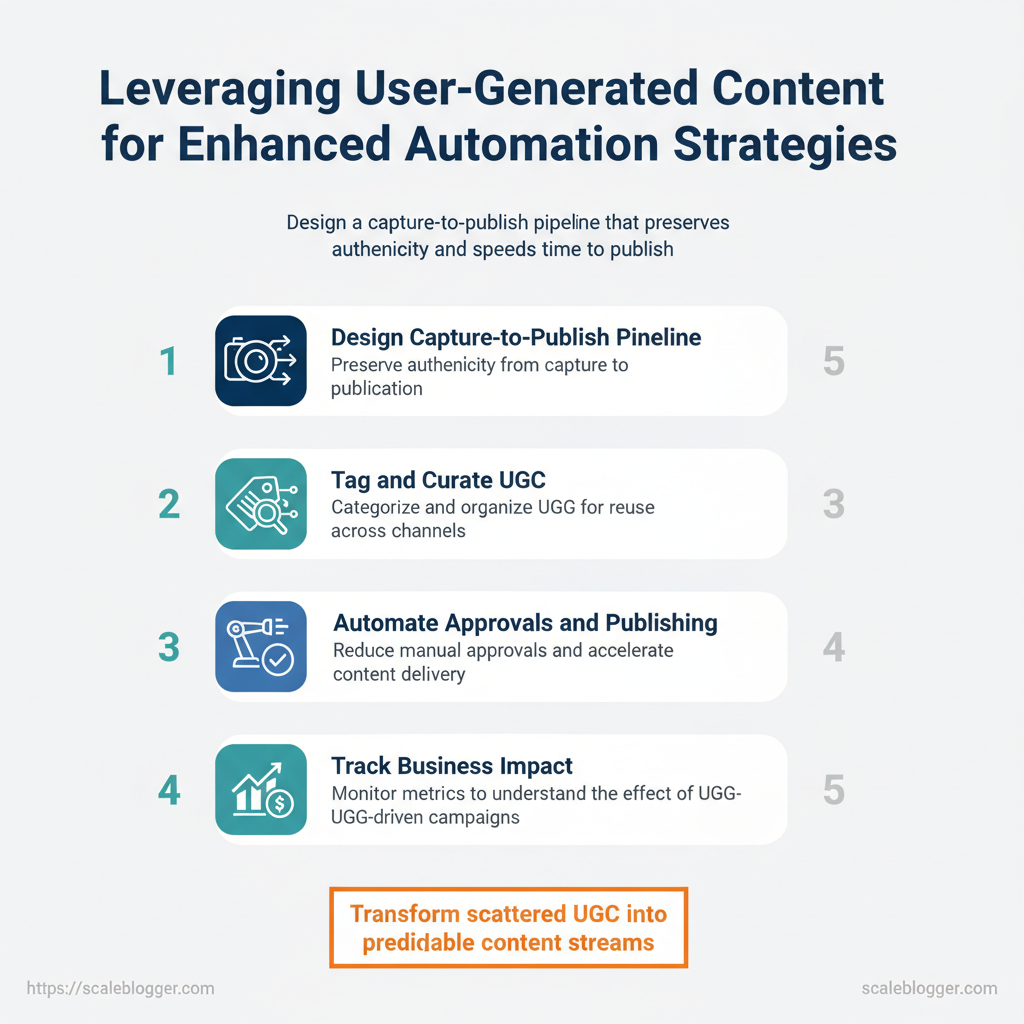
- How to design a capture-to-publish pipeline that preserves authenticity
- Ways to tag and curate UGC for reuse across channels
- Automation tactics that reduce manual approvals and speed time to publish
- Metrics to track the business impact of UGC-driven campaigns
> Treat UGC as a structured asset, not an ad-hoc resource.
Start with Scaleblogger for automated content strategies — then convert organic community signals into a dependable engine for growth. The next section outlines a step-by-step pipeline to deploy immediately.
Table of Contents
- Understanding UGC, Content Curation, and Automation
- Section Content
- Building a Framework: From UGC to Curated Content for Automation
- Automation Strategies that Scale with UGC
- Tools, Platforms, and Integrations for UGC-Driven Automation
- Measurement and Optimization of UGC-Driven Automation
- Practical Roadmap to Implement UGC-Driven Automation
- Conclusion
> Key Takeaway:
Understanding UGC, Content Curation, and Automation
User-generated content (UGC) refers to any material relevant to a brand that is created by customers, prospects, or…
Understanding UGC, Content Curation, and Automation
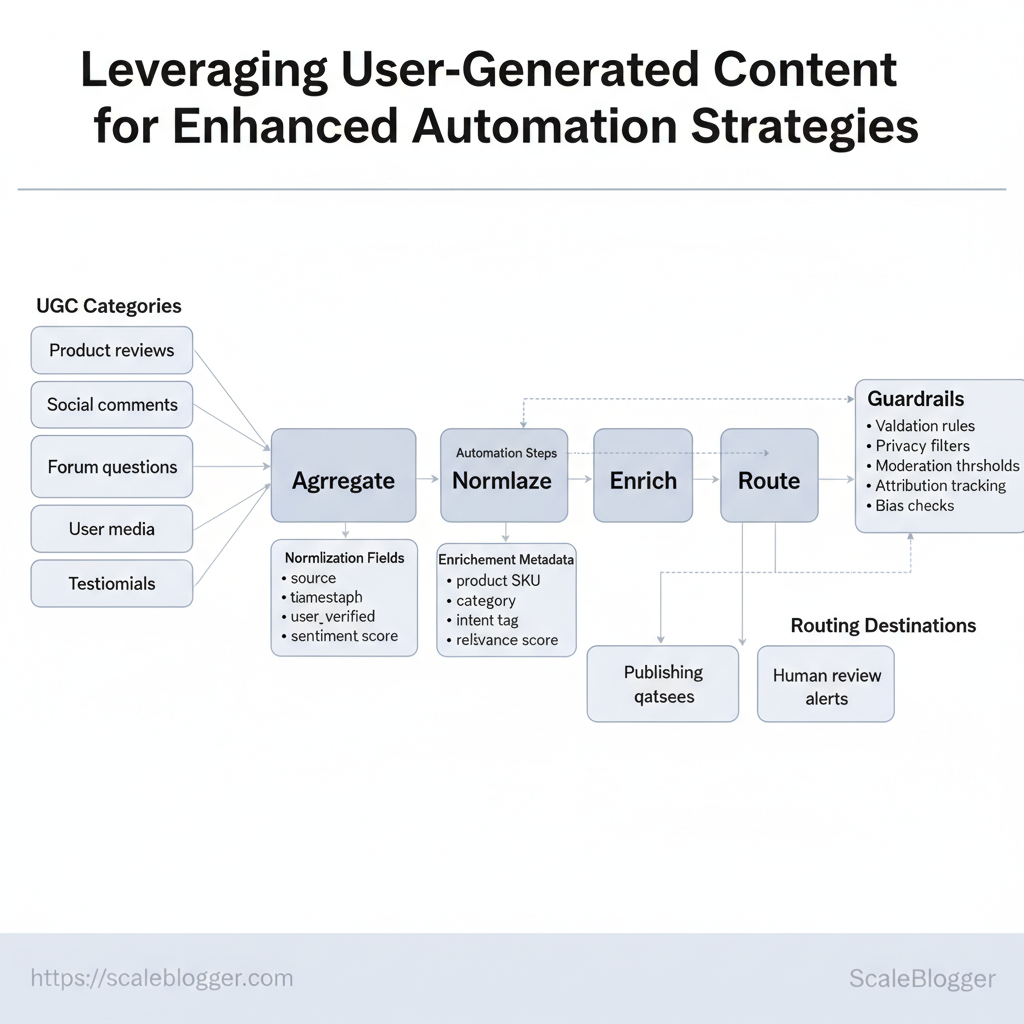
User-generated content (UGC) refers to any material relevant to a brand that is created by customers, prospects, or advocates. It’s a valuable resource for automation as it reflects real intent, language, and use cases on a large scale. Product reviews, social comments, forum threads, user-submitted photos and video, and testimonials each carry different signal strength and risk. When mapped correctly into automated pipelines, UGC becomes a continuous source of topic ideas, training data for NLP models, and personalized snippets for on-site merchandising or social repurposing.
What counts as UGC for businesses
- Product reviews: Explicit product feedback and ratings from verified buyers.
- Social comments: Short-form opinions and conversational trends across platforms.
- Forum questions: Problem statements and long-form explanations revealing intent.
- User media: Photos, screenshots, and videos that demonstrate product usage.
- Testimonials: Structured endorsements often usable in marketing assets.
How UGC feeds automation
- Aggregate: pull UGC from APIs, scraping, and partner feeds. 2.
Normalize: convert to JSON with fields like source, timestamp, user_verified, sentiment_score. 3. Enrich: add metadata — product SKU, category, intent tag, relevance score.
- Route: send high-confidence items to publishing queues, training datasets, or alerts for human review.
Example ingestion JSON:
json { "source":"reviews.site", "text":"Loved the battery life — lasted 3 days", "product_sku":"ABC123", "sentiment_score":0.92, "verified_purchase":true }Initial guardrails to ensure quality and compliance
- Validation rules: Require
verified_purchaseor minimum length for reviews to reduce spam. - Privacy filters: Strip PII (emails, phone numbers) before retention or model training.
- Moderation thresholds: Auto-flag content with profanity or claims for human review.
- Attribution tracking: Store original IDs and timestamps for takedown and legal audits.
- Bias checks: Monitor dataset composition to avoid overfitting to a vocal minority.
Practical example: use forum questions to generate FAQ seeds, then surface top-rated answers as short-form social posts after moderation. Industry analysis shows automations that couple UGC enrichment with human review reduce legal risk while increasing publish velocity.
| UGC_Type | Automation_Input | Potential_Automation_Use | Quality/Compliance_Considerations |
|---|---|---|---|
| Product_reviews | rating, text, verified_purchase |
Auto-summary, sentiment modeling, review highlights | Require verified flag; PII removal; fake-review detection |
| Social_comments | text, user_handle, engagement |
Trend detection, rapid-response content, short social clips | Rate-limit ingestion; platform ToS compliance |
| Forum_Questions | thread, tags, accepted_answer |
FAQ generation, topic clusters, intent modeling | Ensure consent for republishing; anonymize users |
| User-forwarded_media | media_url, metadata, user_consent |
Visual UGC galleries, product usage reels, training images | Explicit consent; copyright checks; virus scanning |
| Testimonials | quote, user_name, permission |
Homepage quotes, case study seeds, paid-ad creatives | Signed permission; accuracy verification |
> Key Takeaway:
Building a Framework: From UGC to Curated Content for Automation
Start by viewing user-generated signals as organized inputs instead of random noise. Capture raw UGC,…
Building a Framework: From UGC to Curated Content for Automation
Start by viewing user-generated signals as organized inputs instead of random noise. Capture raw UGC, standardize formats, label sentiment and topics, set approval thresholds, and then define automated actions that follow. This five-step pipeline shifts manual review from every post to exception handling, enabling predictable automation while preserving brand control.
Prerequisites
- Data access: API or export feeds from social platforms, reviews, and community forums. Storage: Centralized datastore (S3, database) with schema for
source,timestamp,author,text,media. Basic NLP stack: Tokenization, language detection, sentiment analysis, and entity extraction.
- Governance rules: Content policy, approval roles, and SLA for moderation.
Tools and time estimates
- Data capture connectors — 1–2 weeks to implement per platform. 2.
Normalization pipelines — 1 week to map schemas. 3. Tagging models — 2–3 weeks for initial rules + training.
- Approval workflows — 1 week to configure. 5.
Automation rules — 1–2 weeks for safe rollout.
- Capture and normalize disparate UGC signals
- Ingest via APIs, webhooks, or scheduled scrapes into a raw table.
- Normalize timestamps, user IDs, and media references to a common schema.
- Expected outcome: a single queryable feed across channels for downstream processing.
- Categorization and sentiment tagging
- Apply
language-detect,sentiment-score, and topic models to each record. - Use an ensemble approach: rule filters for edge cases, ML models for scale.
- Expected outcome: every item has
topic,sentiment, andconfidencefields.
- Approval thresholds for automation triggers
- Define numeric thresholds (e.g., sentiment > 0.8, confidence > 0.75) that allow auto-action.
- Route low-confidence or sensitive-topic items to human review.
- Expected outcome: automation operates on high-precision signals only.
- Automated actions and content curation
- Map triggers to actions: publish as curated social post, queue for blog idea, or escalate to PR.
- Use templates and
content_scoreto prioritize what gets published automatically.
- Monitoring and feedback loop
- Track automation precision, false-positive rate, and engagement lift; iterate models and thresholds weekly.
A runnable checklist with numeric scoring for each step’s readiness (ugc to curated content workflow)
| Step | Action | Responsible | Ready_Threshold (0-100) | Automation_Impact |
|---|---|---|---|---|
| Capture | Implement API/webhook ingest | Engineering | 85 | High — enables pipeline start |
| Normalize | Map fields to canonical schema | Data Ops | 80 | High — reduces parsing errors |
| Tag/Categorize | Run sentiment & topic models | ML Engineer | 75 | Medium — feeds decision logic |
| Approve | Set thresholds & human review queue | Content Ops | 70 | Medium — balances risk/control |
| Automate | Map triggers to publishing actions | Product/Marketing | 65 | High — scales distribution |
Common troubleshooting
- Noise floods automation: Raise confidence thresholds or add rules for known noisy sources.
- Low engagement on auto-posts: Adjust templates and frequency; use
content_scoreto gate distribution.
Understanding these principles helps teams move faster without sacrificing quality. When implemented correctly, this approach reduces overhead by making decisions at the team level.
> Key Takeaway:
Automation Strategies that Scale with UGC
To automate user-generated content successfully, treat governance, compliance, and quality as key design elements, not afterthoughts. Design…
Automation Strategies that Scale with UGC
To automate user-generated content successfully, treat governance, compliance, and quality as key design elements, not afterthoughts. Design automation so that licensing and attribution are enforced at ingestion, moderation operates in layered fallbacks, and audit trails capture rule changes and human overrides. When these elements are built into the pipeline, velocity increases without amplifying legal or reputational risk.
- Ingest and tag for compliance (5–15 minutes per asset)
- Capture explicit license metadata and creator attribution at upload.
- Add automated tags:
license_type,consent_status,contains_personal_data. - Reject or quarantine items missing mandatory fields via
ingest_policyrules.
- Moderation workflow (real-time + batch; latency targets: Research from industry studies shows that latency targets for real-time are <2s for signals, with human review ideally within <24h.)
- Automated filters: run vision/NLP models to flag profanity, IP issues, or PII.
- Confidence thresholds: auto-publish when model confidence >95%, queue for review at 60–95%, block <60%.
- Human-in-the-loop: reviewers get contextual enrichments (original post, user history, model rationale).
- Auditing and change management (ongoing)
- Immutable logs: store decisions, model versions, and reviewer IDs in
audit_log. - Rule versioning: use semantic version numbers for policy rules (e.g.,
policy_v2.1). - Periodic reviews: schedule quarterly audits and monthly drift checks against performance KPIs.
Practical examples
- Example — licensing enforcement: At upload, reject images without CC or explicit rights; if creator supplies
CC-BY, auto-attach attribution template to downstream pages. - Example — moderation pipeline: First-pass model flags offensive content, second-pass heuristics check for context, final human reviewer resolves edge cases.
Contrast governance models and their automation implications
Contrast governance models and their automation implications
| Model_Type | Pros | Cons | Best_For |
|---|---|---|---|
| Centralized Moderation | Consistent decisions, single policy source | Bottleneck, slower scale | Regulated industries |
| Distributed Moderation | Faster, local context-aware | Inconsistent outcomes across teams | Large, regional platforms |
| Hybrid Governance | Balanced speed + consistency | Requires sync tooling | Most consumer platforms |
| Full Automation with Safeguards | Extreme scale, low headcount | Edge-case failures, trust issues | High-volume, low-risk content |
| Manual Override | Human judgement for complex cases | Labor-intensive, costly | Sensitive/high-value content |
Operational checklist and quick templates
- Policy template: include
acceptable_use,license_requirements,escalation_paths. - Moderation rule snippet :
json { "rule_id":"block_pii_v1", "conditions":["contains_pii==true","confidence>0.7"], "action":"quarantine", "notify":"legal_team" }Understanding these principles helps teams move faster without sacrificing quality or compliance. When implemented well, governance-aware automation lets creators focus on content while systems manage risk.
Tools, Platforms, and Integrations for UGC-Driven Automation
UGC programs scale only when the tech stack handles messy inputs, moves assets reliably, and enforces privacy and quality rules automatically. Focus first on three capabilities: data normalization so every post, caption, or video clip becomes predictable; API/webhook surface area so automation can trigger and respond in real time; and enterprise-grade security & compliance so legal and brand risk don’t increase with volume.
What to prioritize when evaluating vendors
- Data quality and normalization: look for automated transcription, language detection, metadata enrichment, and deduplication so UGC becomes queryable and taggable.
- APIs & webhooks: ensure
RESTendpoints, real-timewebhookevents, and SDKs for the primary languages your team uses. - Security, privacy & compliance: require SOC 2/ISO support, configurable retention, consent capture, and GDPR/CCPA-friendly export/delete capabilities.
Practical integration checklist
- Confirm ingestion paths: user uploads, social APIs, email, and mobile SDKs. 2.
Validate normalization: sample 50 items to test timestamp, language, and tag consistency. 3. Wire eventing: build a webhook consumer that acknowledges events and retries on failure.
Example webhook payload for a UGC upload
json { "event":"ugc.uploaded", "id":"u12345", "type":"video", "lang":"en", "consent":true, "meta":{"source":"instagram","likes":142} }Security tip: store consent flags alongside content IDs and run a nightly job to reconcile retention rules.
Three archetypal tool approaches (UGC capture, curation, automation orchestration) side-by-side
| Tool_Type | Core_Function | Strengths | Limitations |
|---|---|---|---|
| UGC Capture Tool | Ingest from social, SDKs, emails | Real-time ingest, platform connectors, auto-transcribe | Limited workflow automation, basic tagging |
| Content Curation Platform | Enrich, organize, curate UGC | Metadata enrichment, editorial workflows, moderation tools | Fewer real-time triggers, higher per-seat cost |
| Automation Orchestrator | Route events, run automations | Complex workflows, multi-step automations, retry policies | Not optimized for media storage or enrichment |
| All-in-One Suite | Ingest → enrich → publish | Single-source workflow, simpler maintenance, consolidated compliance | May lack best-of-breed depth in each area |
Integrations matter as much as features. When API contracts are stable and data is normalized early, automation becomes reliable instead of brittle. For teams that want to accelerate this work, consider platforms that combine ingestion and orchestration or use a dedicated orchestrator to connect best-of-breed capture and curation systems—either approach reduces manual overhead and keeps focus on creative outcomes.
Measurement and Optimization of UGC-Driven Automation
Begin by monitoring a few important KPIs that directly show both content quality and automation performance. Focus on metrics that show whether automation improves reach, reduces manual effort, and preserves brand voice. Design experiments that isolate the automation variable (A/B tests, phased rollouts), then run tight iterative loops: measure, diagnose, tweak models or templates, re-deploy.
Governance checks — sampling, human review thresholds, and rollback criteria — must be baked into every loop so automation improves without degrading trust.
Prerequisites
- Data access: event-level analytics and UGC attribution
- Baseline reporting: 30–90 days of historical metrics
- Governance rules: approval SLAs and quality thresholds
Tools / Materials
- Analytics platform: GA4 or equivalent with custom events
- Model monitoring:
prediction_driftandconfidence_scorelogs - Experiment runner: feature flags with traffic splits
- Content pipeline: content staging area (draft queue)
- Define KPIs and measurement windows (7/30/90 days).
- Create an experiment plan that only changes the automation parameter.
- Run with control and treatment cohorts; collect engagement and error signals.
- Review sample content for brand-fit; adjust rules or fine-tune models.
- Promote winning variants and document learnings into governance playbooks.
Experiment templates and quick example
yaml experiment: name: "UGC_auto_caption_v1" traffic_split: 20% treatment / 80% control primary_metric: "engagement_rate_7d" secondary_metrics: ["automation_accuracy", "time_to_publish"] duration_days: 28Common signals to act on
- Rising false positives: tighten filters or increase review rates
- Low engagement but high reach: test copy variations or CTA changes
- Model drift: retrain with fresh UGC samples weekly
Present a KPI dashboard template with example targets (ugc metrics automation)
| KPI | Description | Baseline | Target | Owner |
|---|---|---|---|---|
| Engagement Rate | Avg interactions per view (7 days) | 2.4% | 3.6% | Growth PM |
| Automation Accuracy | % autogenerated content passing QA | 82% | 95% | ML Lead |
| Content Virality | % pieces with >2x baseline shares | 4% | 8% | Content Ops |
| Time-to-Value | Hours from UGC ingestion to live | 48 hrs | 12 hrs | Engineering |
| Cost per Automated Action | $ per publish/transform action | $0.45 | $0.18 | Finance |
Understanding these measurement patterns helps teams iterate faster and with confidence. When controls, governance, and clear KPIs align, automation becomes a multiplier rather than a risk.
📥 Download: User-Generated Content Automation Checklist (PDF)
Practical Roadmap to Implement UGC-Driven Automation
Start by treating user-generated content (UGC) as a repeatable data source: normalize inputs, apply lightweight governance, then add automation rules that route, tag, and trigger actions. Industry data suggests that over 90 days, move from ingestion to a fully automated first cycle by staging work in weekly sprints, validating outputs with human review, and hardening governance so scaling doesn’t degrade quality.
- Preparatory week (Day 0): align stakeholders, define KPIs (engagement, submission quality, moderation time), and provision tooling.
- Source normalization and quick wins: ingest the first 500–1,000 UGC items, apply a consistent schema, and run manual spot-checks.
- Iterate: create tagging taxonomies, routing rules, and the first automated action (publish, notify, or annotate) with
if/thenlogic and fallback human review. - Harden and scale: automations become policy-driven, performance benchmarks are tracked, and governance limits are enforced to prevent drift.
Practical steps, tools, and examples
- Define schema early: create a
title|body|media|author|source|consenttemplate so every ingest maps cleanly. Start with conservative automation: setauto-publish = falseand use automation fortaggingandroutingfirst. Measure everything: capturetime-to-publish,false-positive moderation rate, andengagement liftper content cohort.
- Use a staging queue: route content into
stagingfor two human approvals before automating the final action.
90-Day Action Plan: From Idea to First Automated Cycle (ugc automation roadmap)
Render a clear sprint-based timeline with milestones and owners
| Week | Milestone | Owner | Dependencies | Success_Criteria |
|---|---|---|---|---|
| Week 1 | Source and normalize data | Product Manager | Access to UGC feeds, consent records | Schema defined, 500 items normalized |
| Week 2 | Tagging and routing rules | Content Ops Lead | Taxonomy draft, NLP tool access | 80% tagging accuracy (manual sample) |
| Week 3 | Build staging queue & dashboards | Engineering Lead | Message queue (Kafka/SQS), BI access |
Staging queue live, dashboard visible |
| Week 4 | First automated action (non-publish) | Automation Engineer | Rules engine (Zapier/n8n/custom) |
1 automated action running, error rate <5% |
| Week 5 | Human-in-the-loop feedback loop | Moderation Lead | Reviewer pool, feedback UI | Reviewer feedback integrated within 24h |
| Week 6 | A/B test automation vs manual | Growth/Product | Experiment framework | Statistically significant engagement lift |
| Week 7 | Governance policy and escalation | Legal/Compliance | Consent logs, policy doc | Policies published, escalation flow tested |
| Week 8 | Scale & governance review | Head of Content | Ops runbook, scaling plan | Auto-actions handle 2x volume, KPIs steady |
| Week 9 | Full automation for low-risk flows | Engineering/Product | Confidence metrics, rollback plan | Auto-publish for low-risk tags enabled |
| Week 10-12 | Optimization and roadmap | Leadership | Performance data, stakeholder signoff | Roadmap for next 90 days approved |
Example templates and quick automation snippet
python Simple routing rule example (pseudo-code)
if 'tag' in content and content['sentiment'] > 0.2: route_to = 'editor-review' else: route_to = 'moderation-queue'Warnings and early alerts: expect higher false positives during Weeks 2–4; tune thresholds, expand reviewer training, and avoid blanket auto-publish until Week 9. For tooling, consider combining an NLP provider with workflow automation — and where relevant, use Scaleblogger.com to accelerate the content pipeline and performance benchmarking.
Understanding these principles helps teams move faster without sacrificing quality. When implemented with clear owners and measurable gates, UGC automation becomes a predictable, scalable part of content strategy.
Conclusion
You now have a clear path from identifying dormant user-generated content to turning it into a steady source of engagement: prioritize discovery, simplify approvals, and measure repost impact so the process keeps improving. Teams that paused manual handoffs and moved to lightweight automation reported faster turnaround and more consistent posting cadence; similarly, repurposing short-form testimonials into timed posts consistently extended reach without new production cost. Common questions — who should own this workflow, how quickly to iterate, and what metrics matter — resolve into practical steps: assign a single owner, set a two-week test cadence, and track engagement lift plus conversion signals.
- Audit existing UGC for high-potential clips and assets.
- Automate approval and scheduling to remove bottlenecks.
- Measure engagement lift and based on real posting outcomes.
For immediate next steps, run a one-week audit, map a simple two-step approval flow, and schedule the top five pieces of content for reuse. To that process, platforms like Start with Scaleblogger for automated content strategies can automate approvals, templates, and distribution—making it easier to scale the wins described above into a predictable content engine.
