

YThe role of AI in enhancing user experience becomes clear when a perfectly optimized post attracts traffic but fails to keep readers engaged.
Getting the click is only the beginning. AI can analyze behavior, intent, and context to personalize content, recommend relevant resources, and adapt experiences to individual users.
This AI user experience approach goes beyond automation. It helps teams improve relevance, reduce friction, and create smoother journeys from the first click to conversion.
When AI personalization is combined with human judgment, accessibility, and privacy safeguards, content can become more useful without sacrificing trust.
Table of Contents
Introduction — The core problem content creators face
Content teams are producing more than ever, but reach and impact are not keeping pace.
Traffic, engagement, and conversions plateau because distribution and experience haven’t caught up with volume.
Creators juggle topic research, design, SEO, publishing, and social repurposing across siloed tools.
That creates friction: high manual cost for low marginal gain.
Audiences expect personalized, fast experiences.
When content delivers a clumsy or generic UX, attention evaporates and so do measurable marketing gains.
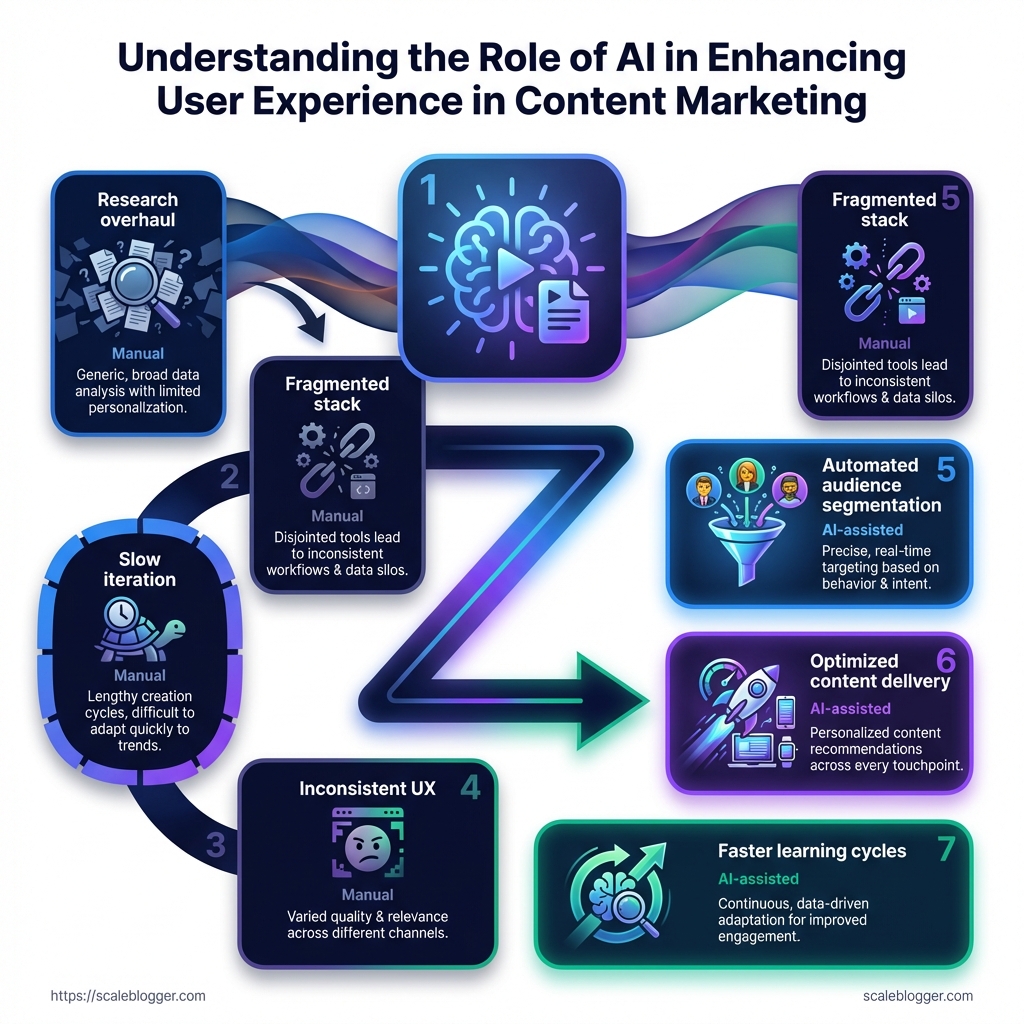
The diagram below visualizes that gap — manual workflows on one side, AI-assisted workflows on the other, and the lost opportunity between them.
The visual highlights common bottlenecks: slow ideation, fragmented handoffs, inconsistent UX, and distribution delays.
It also shows where AI-driven steps reclaim time and improve outcomes.
Common pain points for tech‑savvy content creators
Research overload: Finding validated topics takes time and yields noisy signals, not clear priorities.
Fragmented stack: Multiple tools create handoff gaps that waste effort and introduce errors.
Slow iteration: Manual editing and approval cycles delay tests and learning.
Inconsistent UX: Content formats and navigation differ across channels, hurting engagement.
Distribution fatigue: Repurposing for platforms is repetitive and often low-quality.
Why UX matters for content marketing performance Good user experience directly affects engagement, retention, and conversion.
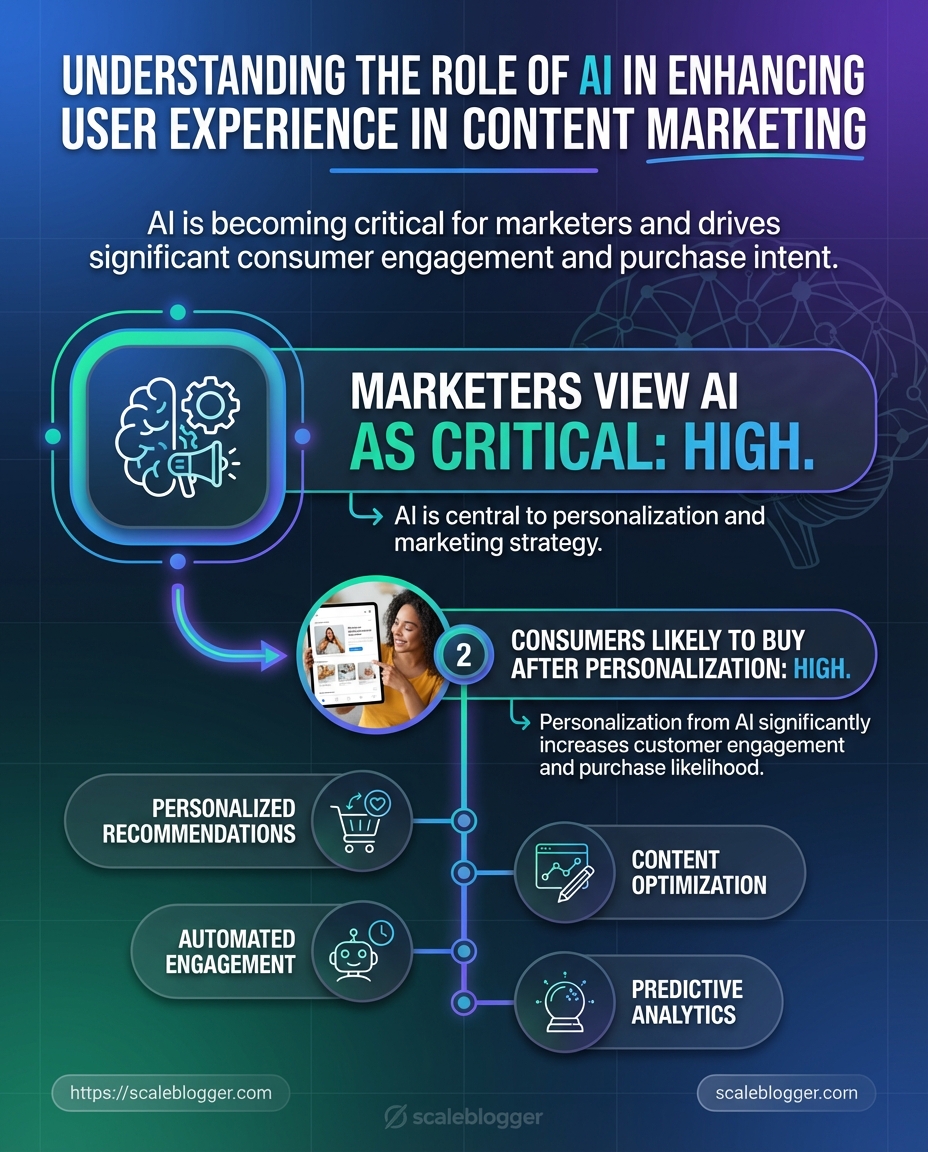
Studies show consumers prefer personalized experiences; one report found about 80% are more likely to buy from brands that deliver personalization.
That preference translates into measurable gains: brands using AI-driven personalization often see conversion lifts and higher time on page. AI personalization raises perceived relevance, and AI user experience design ties that relevance into clear, easy paths for readers.
When UX supports content rather than blocking it, content marketing enhancement happens organically. AI user experience: The design and interaction patterns that make AI-powered personalization feel intuitive and helpful. content marketing enhancement: Any change that measurably increases reach, engagement, or conversion from content. AI personalization: Automated tailoring of messages and content to individual user signals.
How AI changes workload and outcomes AI reduces repetitive work and amplifies decision-making.
Platforms like Adobe Experience Cloud, IBM Watson, and HubSpot already show how predictive analytics and personalization can automate audience segmentation, optimize delivery, and surface content that performs better.
Salesforce survey data indicates most marketers view AI as critical to hitting goals.
When AI takes over routine tasks, teams can iterate faster, run more A/B tests, and focus on creative strategy that improves UX and conversion.
This is not about replacing writers; it’s about shifting effort from busywork to craft.
The payoff is clearer metrics, faster learning cycles, and content that actually performs.
Foundations: What we mean by AI and user experience in content marketing
Start with this: AI in content marketing isn’t a single tool you flip on.
It’s a set of capabilities that change how content is discovered, consumed, and acted on.
Think of user experience (UX) here as the entire journey a reader takes — from the search result to engaging with an article, sharing it, and converting.
When AI shapes that journey, it touches personalization, timing, relevance, and the interface itself. AI: A collection of algorithms and models that automate pattern detection, decision-making, and content generation at scale.
In content contexts, AI analyzes behavior, suggests topical angles, and can assemble or tailor content in near real time. Personalization: Delivering content tailored to an individual’s intent, history, or context.
This ranges from surface-level token swaps to fully customized content flows driven by behavior and predictive signals. User experience (UX) in content: How content structure, readability, timing, and relevance influence a user’s emotional and behavioral response.
Good content UX reduces friction and aligns content to user intent across channels.
Practical AI techniques that actually move metrics fall into a few repeatable categories.
Natural Language Processing (NLP): Extracts intent, sentiment, and entities to match content to queries or generate summaries.
Recommendation systems: Suggest the next article, product, or resource based on behavioral similarity and collaborative signals.
Predictive models: Forecast which headlines, topics, or CTAs will convert for specific cohorts.
Personalization engines: Combine real-time context with historical data to vary content blocks, images, or offers.
Content scoring & automation: Rank drafts by likely performance and automate A/B tests or publishing schedules.
Data powers these systems, but it’s not all the same.
Behavioral logs, session paths, search queries, CRM fields, and content metadata are the most valuable inputs.
First-party behavioral and transactional data deliver the best personalization while respecting accuracy.
Privacy matters at every step. Keep data minimization, explicit consent, and anonymization in your pipeline.
Compliance with local laws and transparent preference controls preserves trust and long-term engagement.
Foundations: What we mean by AI and user experience in content marketing — comparison table
AI technique | Required data inputs | Expected outcomes & typical implementation complexity |
|---|---|---|
Natural Language Processing (NLP) | Content corpus, search queries, user comments | Better topic matching and automated summaries; medium complexity (model tuning + taxonomy work) |
Recommendation systems | User behavior streams, item metadata, session context | Increased pageviews and time-on-site; high complexity (real-time pipelines + embeddings) |
Predictive models | Conversion history, session features, campaign metadata | Higher conversion rates via targeted offers; medium-high complexity (feature engineering + validation) |
Personalization engines | User profiles, behavioral events, contextual signals | Improved engagement and purchase likelihood; medium complexity (rule + ML hybrid) |
Content scoring (performance models) | Historical performance metrics, content attributes | Faster editorial decisions and prioritized topics; low-medium complexity |
A/B testing automation | Variant metadata, user cohorts, outcome metrics | Continuous optimization and faster learnings; low complexity (tooling dependent) |
Semantic search | Index of content, query logs, entity graphs | Better discovery and lower bounce; medium complexity (semantic layer + indexing) |
Image/video generation | Asset metadata, style guides, prompts | Faster multimedia production; low-medium complexity (prompt engineering + review) |
Chatbots / virtual assistants | Conversation logs, FAQ data, product info | Interactive UX and lead capture; medium complexity (dialog design + fallback flows) |
Clustering & segmentation | Behavioral vectors, demographic fields, transaction history | Smarter audience targeting and content buckets; medium complexity (unsupervised models + validation) |
This table maps technique to inputs and realistic outcomes so teams can prioritize based on data readiness and engineering capacity.
Adobe Experience Cloud, IBM Watson, and HubSpot illustrate how existing platforms package many of these capabilities into marketing stacks.
Remember: 72% of marketers saw AI as critical to goals, and 80% of consumers prefer personalized experiences — those figures explain why investment flows to these areas.
AI enhances content UX when it matches content to real human intent without betraying privacy or context.
Keep the data lean, test relentlessly, and align tech choices to the reader journey.
AI-driven personalization: tactics that improve engagement
Personalization done well turns passive readers into repeat visitors.
AI stitches together behavioral signals, content metadata, and context to serve the right piece of content at the exact moment a user is ready to act.
Applied correctly, that means higher time-on-page, stronger click-throughs, and measurable lifts in conversion.
The trick is choosing between broad segmentation and real-time personalization, and matching that choice to your content type and engineering constraints.
This section lays out practical tactics you can implement now: when to use segments, when to lean on real-time models, how recommendation engines actually work, how to render content dynamically across channels, and a short case example that shows how teams cut time-to-personalized-content.
User segmentation vs. real-time personalization
Segmentation groups users by stable attributes like persona, industry, or lifecycle stage.
It’s predictable, easier to QA, and great for long-form editorial planning.
Real-time personalization reacts to live signals — recent pageviews, referral source, or session behavior.
It’s higher lift technically but delivers better relevance for transactional pages and high-intent touchpoints.
Segmentation — Use for evergreen editorial, newsletter cohorts, and broad nurture sequences.
Real-time personalization — Use for product pages, checkout flows, and landing pages where intent shifts quickly.
Hybrid approach — Combine both: serve segmented templates, then tweak headlines or CTAs in real time.
Content recommendation engines: how they work and when to apply them
Recommendation engines usually blend three models: collaborative filtering, content-based filtering, and popularity or session-based heuristics.
Collaborative filtering finds users like you and recommends what they liked.
Content-based filtering matches article attributes to the user profile.
Session-based heuristics respond to the immediate path a visitor is taking.
When to apply collaborative filtering — Large user base with rich interaction history.
When to apply content-based — New articles or niche topics with sparse interaction data.
When to apply session-based — High-traffic pages where recency matters most.
The flowchart maps decision nodes: content type, data depth, engineering cost, and expected ROI.
It shows which tactic to pick when you have certain audience signals.
Use the flow to decide whether you need a simple tag-based recommender, a hybrid engine, or full real-time models tied to predictive scoring.
Dynamic content rendering across channels
Dynamic rendering means swapping blocks—headlines, images, CTAs—based on rules or model outputs.
It requires a canonical content model and channel-specific templates.
Keep copy modular and mark variable segments with content_id tokens.
That makes testing safe and debugging straightforward.
Desktop vs mobile — Prioritize headline brevity and faster assets on mobile.
Email — Render personalized preview text and lead paragraphs, but avoid heavy customization that breaks deliverability.
Social repurposing — Change thumbnails and captions to match platform intent.
Case example: reducing time-to-personalized-content
A content team reduced time-to-personalized-content by automating template-driven personalization and using AI to produce variant copy.
They combined segmented templates with a recommendation layer that surfaced relevant articles.
Because personalization scaled, testing cycles shrank and iteration velocity increased.
Remember: 72% of marketers saw AI as critical to their goals, and personalized experiences can make 80% of consumers more likely to purchase.
Tools that automate drafting, template population, and publishing can cut turnaround further; platforms like Scaleblogger tie those steps together for end-to-end automation.
Personalization is a balance of engineering discipline and editorial taste.
Start with high-impact pages, measure lift, and expand the tactics that move engagement and conversions.
Automating repetitive work without losing quality
Automating tedious parts of the content pipeline doesn’t mean turning creativity into a factory line.
Done well, it strips out low-value grunt work—research checks, meta-tagging, formatting—so people focus on ideas and judgment.
Think of AI as a power tool, not a substitute.
It speeds up drafting, surfaces relevant data, and predicts when content will perform best.
Human editors still steer tone, fact-check nuance, and decide which ideas deserve amplification.
The practical balance is predictable: automate predictable tasks, keep humans in charge of ambiguous ones.
That way teams hit volume goals without eroding brand voice or accuracy.
This short walkthrough shows an AI-assisted draft-to-publish workflow with human review checkpoints.
Watch for how the system flags uncertainty, suggests headlines, and schedules posts based on predicted engagement windows.
AI-assisted drafting and ideation: scopes and limits
AI tools can generate outlines, draft sections, and suggest headlines from a brief.
They accelerate ideation and remove blank-page friction.
However, models hallucinate and can misstate facts.
Treat drafts as working documents, not final copy.
Use AI for structure and options, not definitive assertions.
Prompt scaffolding: Provide clear inputs—audience, desired length, primary sources.
Source anchoring: Attach references or upload documents so the model cites real material.
Quality checks: Run
fact-checkpasses or use a trusted analytics export before publishing.
Automated scheduling and distribution informed by predictions
Modern stacks can predict engagement windows and auto-schedule across channels.
Platforms with predictive analytics—think of enterprise tools like Adobe Experience Cloud or HubSpot—analyze past behavior to recommend timing and format.
Use predictions as guidance, not gospel.
Combine them with editorial calendars and campaign priorities.
When a piece is time-sensitive, override scheduled slots.
Bold insight: Let engagement forecasts decide timing.
Practical tweak: A/B test subject lines and post formats to refine predictions.
Guardrails: editorial controls and human-in-the-loop
Strong guardrails prevent automation from degrading quality.
Create checkpoints where humans must approve content before publish.
Draft generation: AI creates a first draft and a confidence score.
Editorial review: An editor checks facts, tone, and brand fit.
Legal review: Compliance flags are sent to counsel for regulated content.
Pre-publish QA: Automated checks verify links, image licenses, and meta tags.
Publish with monitoring: Schedule via
CMSintegration and watch initial metrics for rollback triggers.
Combine automated QA with roll-back rules and webhooks to pause distribution if anomalies appear.
Automation should reduce busywork while preserving judgment and brand standards.
Keep people at decisive points; let machines handle the routine.
Measuring UX impact: metrics and experiments that matter
Good measurement starts with the question you actually want answered: did the experience make people behave differently and feel better about the brand? Answering that requires moving past raw traffic and clicks and tracking signal that ties behavior to content experience, then validating those signals through experiments.
Build a small set of UX-focused KPIs, run controlled experiments that include AI-driven variants, and hold personalization layers to attribution and lift tests rather than relying on last-click logic.
This section lays out which KPIs matter, how to structure A/B and multivariate tests when AI is generating variants, how to attribute across personalization layers, and how to build baselines that let you benchmark continuously.
Which KPIs reflect user experience vs. vanity metrics
Start by separating metrics that show real experience from ones that only look good on a dashboard.
Engagement Quality: Time on page tied to scroll depth and active attention (not auto-play time).
Task Completion Rate: Percentage of users who reach a clear outcome (signup, download, module completion).
Return Rate / Visit Frequency: Indicates whether the experience created habit-forming value.
Satisfaction Signals: Explicit feedback (ratings, NPS) and implicit signals (replay rate on videos, completion of micro-interactions).
Vanity metrics to deprioritize: raw pageviews, total impressions, and bounce rate when isolated from context.
These can mislead unless combined with behavioral quality measures. Practical KPI checklist:
Metric selection: Choose 4–6 KPIs mixing behavioral and perceptual signals.
Event instrumentation: Track interaction events with
dataLayeror server-side events.Quality filters: Exclude bot and internal traffic before analysis.
A/B and multivariate testing with AI-driven variants
AI can generate many variants quickly.
That’s powerful, but it breaks traditional testing unless you adapt.
Run staged experiments: generate a bank of AI variants, then use a two-step approach—screen with a high-volume holdout test, then run focused A/Bs on the top performers.
Randomize users into control and treatment pools with stratification by segment.
Use an exploratory multivariate pass to identify winning patterns.
Promote winners into confirmatory A/B tests with pre-registered metrics.
Testing guardrails:
Limit feature churn: Test one major UX assumption per experiment.
Power correctly: AI can create small lifts; design tests with sufficient sample size.
Monitor interactions: Watch for interaction effects across segments.
Attribution across personalization layers
Personalization layers stack: recommendation engines, dynamic modules, email triggers, onsite messaging.
Single-touch attribution will over-credit surface actions.
Use incremental lift and holdout groups to measure true impact.
Server-side tagging and unified user IDs (or deterministic matching) help stitch exposures across channels.
When possible, measure conversions both with and without personalization to quantify incremental value.
Tools like Adobe Experience Cloud, IBM Watson, and HubSpot can centralize signals, but their outputs should feed lift tests—not replace them.
Building performance baselines and continuous benchmarking
Baselines must be fresh and contextual.
Create rolling baselines (30–90 days) and segmented baselines per traffic source and persona.
Maintain a control cohort that never sees personalization.
Refresh the cohort periodically to avoid sample decay.
Benchmark internally first; then compare against industry norms where available to set aspirational targets. Continuous benchmarking steps:
Automate daily reporting of core UX KPIs.
Alert on drift when metrics move beyond expected variance.
Quarterly deep-dive with holdout experiments to validate long-term effects.
Metrics dashboard example
Metrics dashboard example: UX-focused KPIs, data sources, and cadence
Metric | Data source | Recommended cadence |
|---|---|---|
Task completion rate (signup/checkout) | Server-side conversion events + CRM | Daily summary, weekly trend |
Active engagement time (adjusted) | Client-side interaction events + scroll depth | Daily, with hourly anomaly alerts |
Scroll-to-section rate (content consumption) | Front-end event tracking (dataLayer) | Daily trend, weekly cohort split |
Return/visit frequency (7/30 days) | Authenticated session logs + cookies | Weekly cohort analysis |
Micro-interaction completion (widgets) | Event stream (segment) | Daily, experiment-level reporting |
Satisfaction score (post-interaction) | In-app survey + NPS | Weekly aggregates, monthly trend |
Incremental lift (%) | Holdout experiments | Per-experiment report, monthly summary |
Personalization exposure count | Personalization engine logs (Adobe/IBM/HubSpot) | Daily, with attribution mapping |
Error/UX friction rate | Client-side error logs + support tickets | Real-time alerts, weekly review |
Conversion funnel abandonment | Server logs + analytics | Daily funnel health checks |
This dashboard pairs UX-focused KPIs with the practical data sources you’ll use and sets realistic cadences.
The mix includes both behavioral signals (events, logs) and perceptual signals (surveys), and it explicitly calls out lift measurement as a reporting item rather than an afterthought.
Measuring UX impact is an iterative practice: choose quality signals, test rigorously, and keep baselines current so improvements are real and repeatable.
A good measurement system shows whether experiences changed behavior, not just whether they looked popular.
📥 Download: Download Template (PDF)
Ethics, bias, and accessibility: preserving trust while scaling
What happens when a feed nudges a user into a narrow loop or a personalization model leaks sensitive signals? Bad experiences scale as fast as good ones when AI is driving content decisions.
That risk makes ethics and accessibility business-critical, not optional compliance.
Most marketers already expect AI to be central: about 72% believe AI will be critical to their goals, and consumers respond—Epsilon found 80% are likelier to buy with personalized experiences.
Those numbers explain why teams push personalization, but they also explain why safeguards must be baked into every pipeline.
Recommendation bias: When models preferentially surface some content or audiences, often for spurious signals.
Privacy-first personalization: Patterns that reduce personal data exposure while keeping relevance high.
Accessibility in AI-driven content: Design and testing practices that ensure inclusive access across devices and abilities.
Identifying and mitigating recommendation bias
Start with measurement before fixing anything.
Track exposure rates, engagement by cohort, and downstream conversion gaps to surface skew.
Audit training data: Scan for over-represented topics, user groups, and time-period spikes.
Diversity constraints: Add reranking rules that ensure a mix of authors, perspectives, and formats.
Disparate impact tests: Run A/B tests that measure outcomes for small segments as well as overall lift.
Human review loops: Route uncertain or low-confidence recommendations through human editors or sampled reviewers.
Practical example: if niche authors never appear in top slots despite steady CTRs, introduce a rotation constraint and monitor for engagement changes.
Privacy-first personalization patterns
Design for consent and for minimal retention.
Prefer contextual signals over persistent identifiers whenever possible.
Consent defaults: Present clear choices and use progressive profiling to ask for only what’s needed.
On-device signals: Apply local models for session-level personalization that keep raw data off servers.
Cohort-based targeting: Group users into anonymous cohorts to preserve relevance without direct IDs.
These patterns reduce risk and often preserve enough signal to drive meaningful content marketing enhancement.
Ensuring accessible experiences in AI-driven content
Accessibility fixes are often low-effort and high-impact.
Make them part of the model output spec, not an afterthought.
Semantic markup: Ensure generated HTML uses headings, lists, and landmarks correctly.
Text alternatives: Always produce accurate alt text and captions for images and videos.
Readable language: Prefer plain-language variants and provide short summaries for long pieces.
Screen-reader testing: Include automated and manual tests with common readers and keyboard navigation checks.
Trust scales when systems are transparent, privacy-aware, and usable by everyone.
Keep these checks in your release pipeline so ethical issues surface early and are easy to fix.
Implementation roadmap for content teams
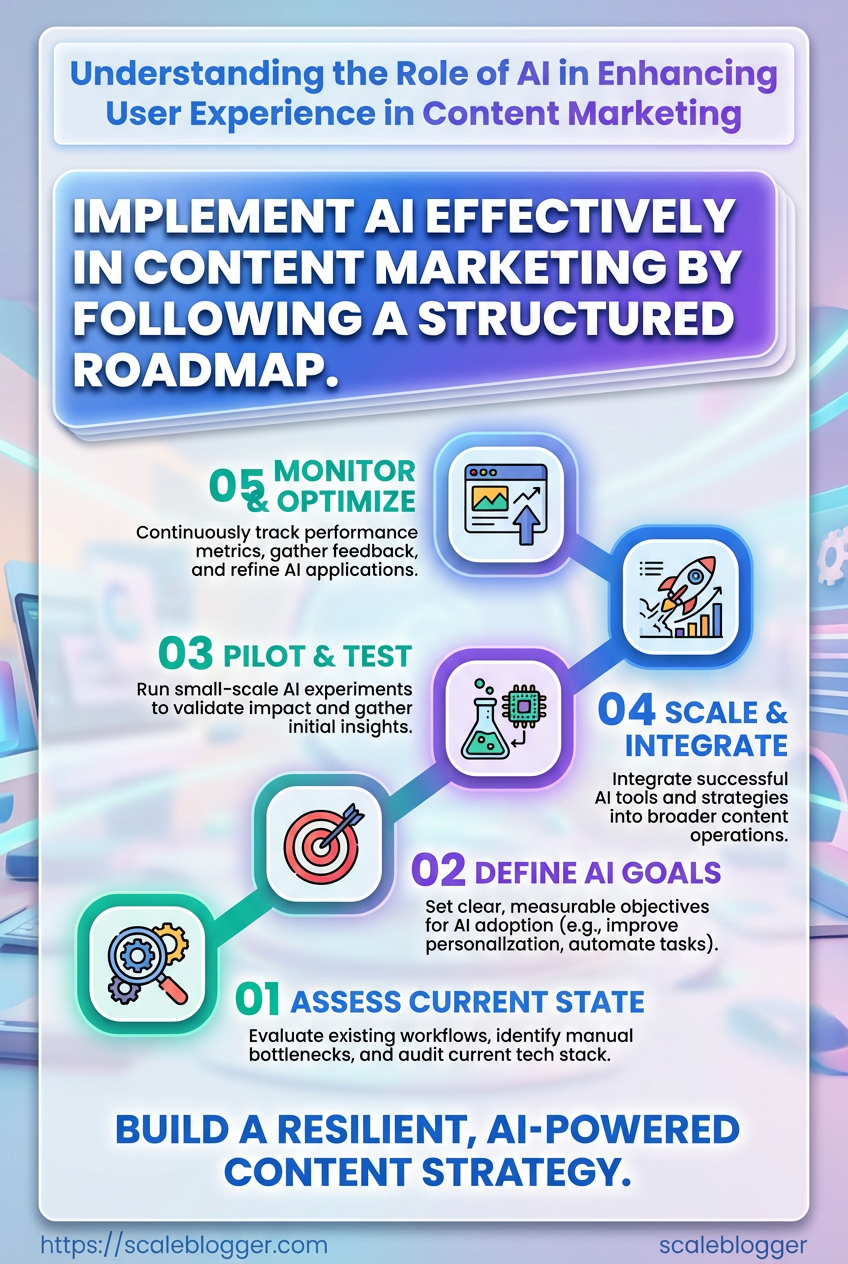
A pragmatic roadmap is the difference between a handful of AI experiments and a content system that consistently improves engagement.
Start by mapping current workflows, then pick small pilots that return measurable lifts in reader behavior and conversion.
This section lays out a tight sequence: assess what you have, prioritize the highest-impact experiments, iterate with templates and guardrails, then scale through training and documentation.
Expect to run multiple short cycles — rapid learning beats a single long rollout.
Plan milestones around measurable UX outcomes: time-on-page, click paths, and conversion micro-metrics.
Use those to decide whether to broaden a pilot or pivot to a new approach. The visual above shows a three-phase timeline with checkpoints at Pilot, Iterate, and Scale.
Each checkpoint lists acceptance criteria and a short measurement plan so teams know when to advance.
Assessment (audit current workflows and data readiness) Begin with an evidence-driven audit of how content flows through your team and systems. Capture manual handoffs, content inputs, and the data sources feeding personalization models.
Workflow audit: Map every step from brief to publish and annotate time sinks and decision points.
Data readiness: Inventory user signals, consent flags, and schema consistency across CMS, analytics, and CRM.
Use a simple scoring matrix to rate readiness: data availability, data quality, and integration complexity.
Aim to flag 2–3 blockers you can fix in a sprint.
Prioritization (pick the highest-impact pilot projects) Pick pilots where small changes yield visible UX or conversion wins.
Prioritize work that improves discovery, relevance, or onboarding flow.
Rank ideas by expected impact and ease of implementation.
Choose 1–2 week experiments for quick feedback and clearer attribution.
Reserve one pilot for personalization since studies show personalized experiences can increase purchase likelihood by up to 80%.
Focus on projects that surface measurable behavior changes, not just vanity metrics.
Iterative rollout (templates, measurement, and governance) Design repeatable templates for headlines, recommendations, and content modules.
Pair each template with a clear measurement plan and an owner.
Experiment template: hypothesis, metric, sample, duration, rollback rule
Measurement plan: primary metric, secondary signals, data collection method
Governance: who approves model changes and content constraints
Run A/B tests, collect qualitative feedback, then convert winning templates into standards.
Scaling (training, documentation, and cross-team responsibilities) Scaling is mostly human work: training, docs, and role clarity.
Create living playbooks that explain model intent, failure modes, and editorial controls.
Training curriculum: short labs on model behavior and bias detection
Documentation: searchable runbooks, variable definitions, and ownership map
Cross-team handoffs: product, analytics, and legal checkpoints
Adopt tools to automate repetitive publishing and repurposing — platforms like https://scaleblogger.com can handle templated drafts and distribution so teams focus on strategy.
Keep cycles short and metrics visible.
When pilots prove lift, the organization will naturally reallocate resources to scale the winning patterns.
