

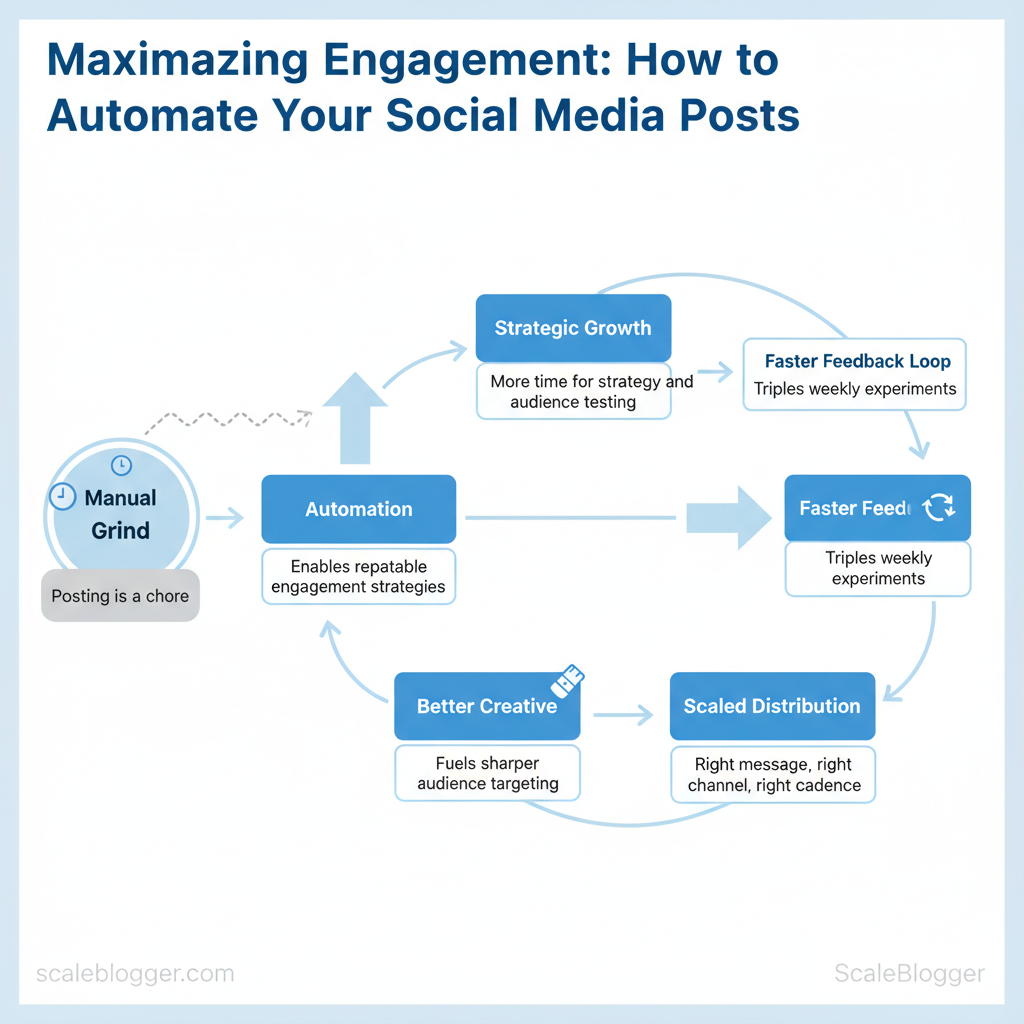
Marketing teams lose momentum when posting becomes a manual grind instead of a growth lever. Industry patterns show teams that automate repetitive tasks spend more time on strategy and audience testing, which directly lifts reach and conversions. Smart social media automation focuses less on scheduling for its own sake and more on enabling repeatable engagement strategies that scale.
Automation reshapes content distribution by ensuring the right message reaches the right channel at the right cadence, while freeing teams to prototype formats and measure resonance. Picture a team that triples weekly experiments because scheduling no longer consumes half their day; the faster feedback loop fuels better creative and sharper audience targeting. Try Scaleblogger to automate and optimize your content distribution and accelerate those feedback cycles.
- What parts of your posting workflow to automate first to preserve quality
- How to design engagement strategies that hinge on faster iteration
- Tools and templates that keep voice consistent across channels
- Measuring lift: metrics that reflect true audience engagement
- How to align automation with editorial processes for steady growth
Prerequisites and What You’ll Need
Start with the accounts, permissions, and skills that remove friction so content moves from idea to publish without gatekeeping. Get workspace-level access, a reliable scheduling system, basic design assets, and a small set of automation credentials — those four things alone accelerate iteration and reduce rework.
- Team workspace: Slack or Microsoft Teams with channel access for editorial coordination.
- CMS editor account: Publish permission in `WordPress`/`Ghost`/`Contentful` (no preview-only roles).
- Social platform logins: Business accounts for Facebook, Instagram, LinkedIn, and Twitter/X plus admin-level access to Pages.
- Analytics access: Read permissions for Google Analytics/GA4 and Search Console.
- API keys: API token for scheduling platform or automation (if using API-first tools).
Time estimates and difficulty
- Initial setup: 3–6 hours (create accounts, connect analytics, and add team members).
- Ongoing content prep per post: 45–90 minutes (copy, image, CTAs).
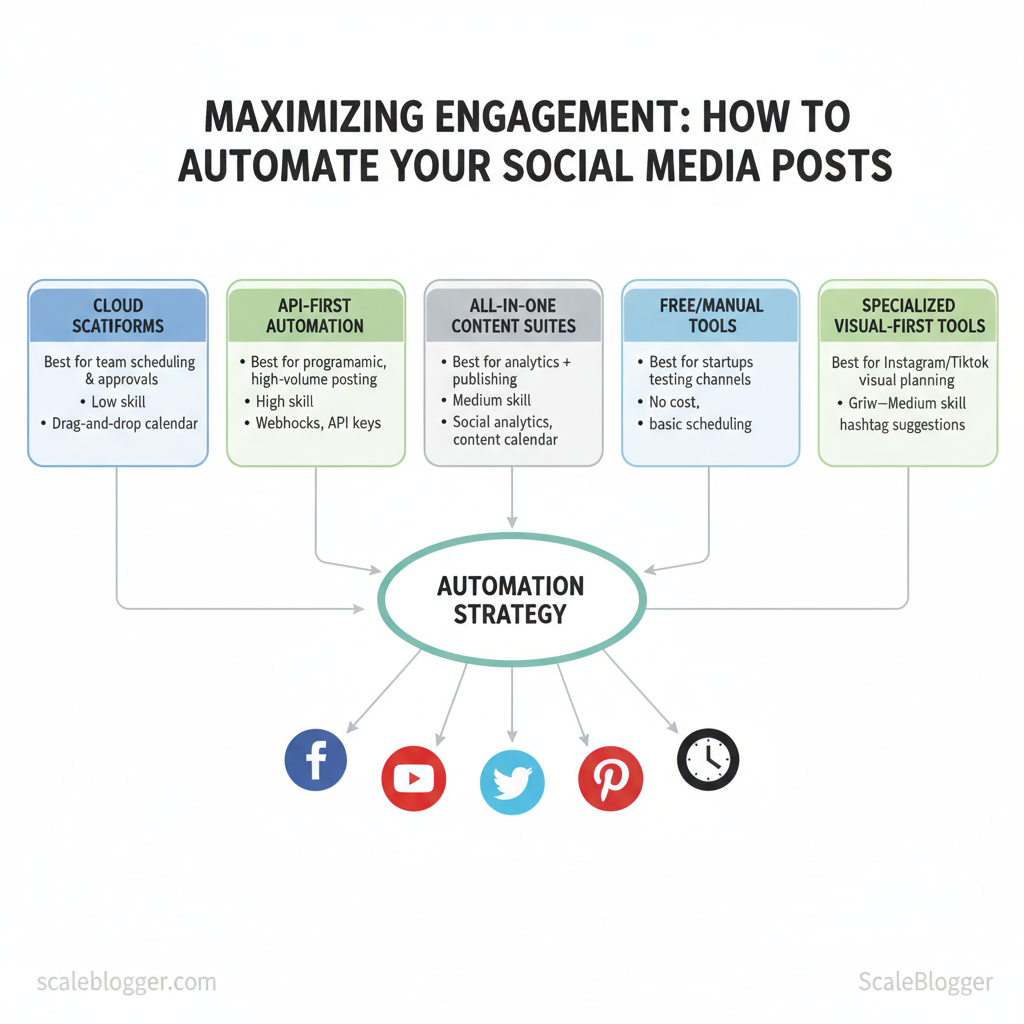
Recommended scheduling tool categories
- Cloud-based scheduling: Use for ease of use and team UIs; schedule in batches.
- API-first automation: Use for high-volume, programmatic workflows and advanced integrations.
| Tool/Category | Best for | Required Skill Level | Key Features |
|---|---|---|---|
| Cloud scheduling platforms (Buffer, Hootsuite) | Team scheduling & approvals | Low | Drag-and-drop calendar, multi-account posting, analytics |
| API-first automation (Zapier, Make, custom scripts) | Programmatic, high-volume posting | High | Webhooks, API keys, conditional logic, retries |
| All-in-one content suites (Later, Sprout Social) | Analytics + publishing in one place | Medium | Social analytics, content calendar, asset library |
| Free/manual tools (native platform schedulers) | Startups testing channels | Low | No cost, basic scheduling, limited analytics |
| Specialized visual-first tools (Planoly, Tailwind) | Instagram/TikTok visual planning | Low–Medium | Grid preview, hashtag suggestions, shoppable posts |
Understanding these prerequisites prevents common slowdowns and makes it easier to scale a content pipeline without constant fire drills. When implemented, teams reach publish-ready status faster and spend more time optimizing content rather than wrangling access.
Step 1 — Define Your Engagement Goals and KPIs
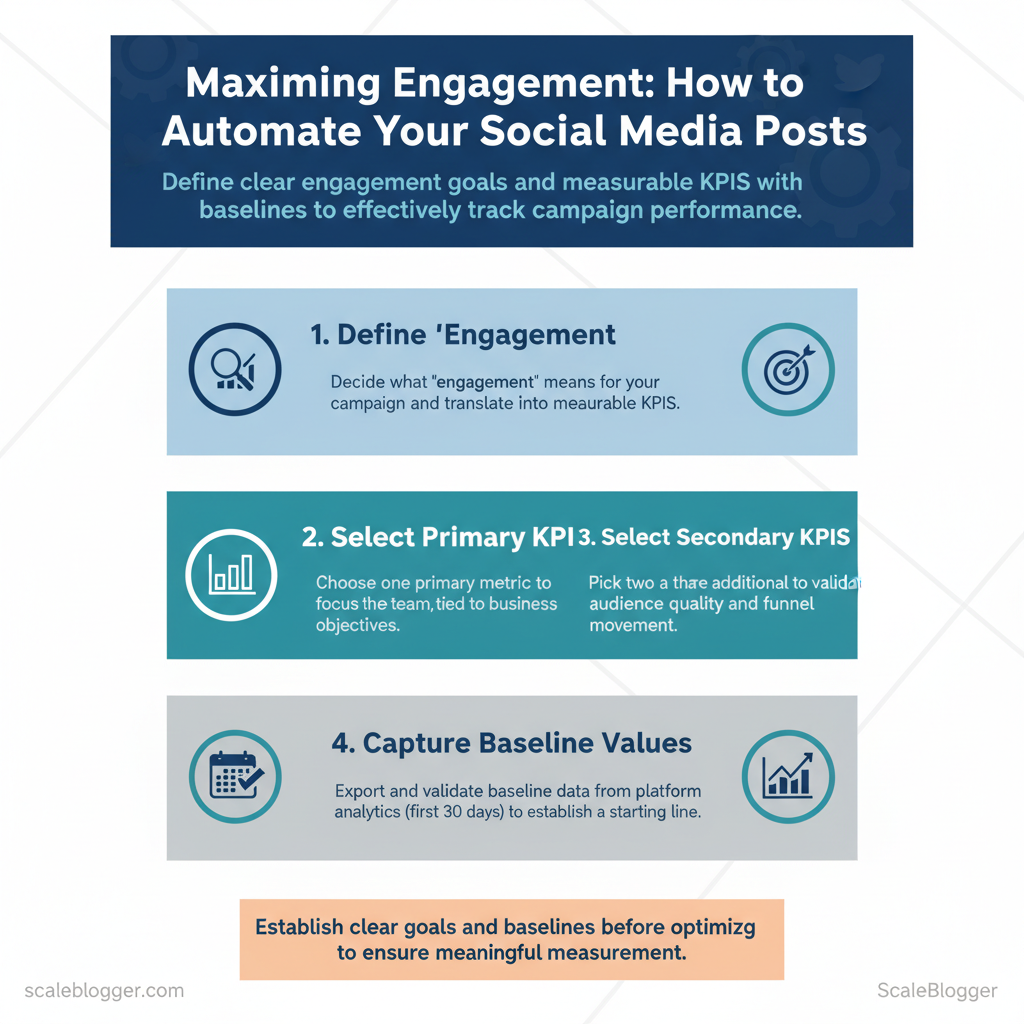
Start by deciding exactly what “engagement” means for this campaign and translate that into measurable KPIs with numeric targets and deadlines. Pick one primary KPI to focus the team, plus two or three secondary KPIs that validate audience quality and funnel movement. Capture baseline values from the platform analytics exports (first 30 days) so every test or optimization uses the same starting line.
Prerequisites and tools
- Data access: Admin access to native platform analytics (Twitter/X, LinkedIn, Instagram, Facebook, TikTok).
- Tools: CSV export capability, Google Sheets or Excel, and a simple dashboard (Google Data Studio or an automated pipeline like the AI-powered content pipeline from Scaleblogger.com for recurring exports).
- Time: 2–4 hours to pull and validate baseline exports.
| Platform | Metric (e.g., impressions, CTR) | Baseline Value | Target Value (90 days) |
|---|---|---|---|
| Twitter/X | CTR to blog | 0.9% | 1.4% |
| Click-through rate (posts) | 1.6% | 2.4% | |
| Save rate (posts) | 0.8% | 1.5% | |
| Engagement rate (organic) | 2.2% | 3.0% | |
| TikTok | Average watch time (seconds) | 10s | 16s |
Expected outcomes and checkpoints
- Week 2: Confirm baselines and initial engagement trends.
- Week 4: Run first A/B test on creative; measure delta against baseline.
- Week 8: Reassess and tighten target ranges based on variance.
- If baseline exports differ from platform dashboards, confirm time-zone and attribution windows.
- When engagement is high but CTR is low, prioritize clearer CTAs and `UTM` tracking to isolate traffic.
Step 2 — Build a Content Calendar and Repurposing Plan
Start by treating the content calendar as a reusable machine, not a static spreadsheet. A calendar combined with explicit repurposing rules turns every long-form asset into a steady stream of platform-ready posts. Begin with an audit that classifies assets by intent, format, and performance, then map those assets to predictable repurposing outputs and publishing cadence.
Prerequisites
Tools / materials needed
- Content audit CSV — central source of truth.
- Editorial calendar (Notion or Google Sheets) — contains publish dates and repurpose slots.
- Asset templates — `blog → thread`, `blog → short video script`, `blog → newsletter snippet`.
- Scheduling tools — industry options include Buffer, Hootsuite, or native schedulers; consider AI content automation from Scaleblogger.com for pipeline automation.
Platform-format mapping for repurposing decisions
| Platform | Recommended Formats | Optimal Frequency | Best Post Length/Specs |
|---|---|---|---|
| Reels, carousel, captioned image | 3–5/week | Reels 15–60s; carousel 5–10 slides; captions 100–300 chars | |
| Long post, article, document carousel | 3–5/week | Text post 150–300 words; articles 800–1,500 words; carousel 5–8 slides | |
| Twitter/X | Thread, short video, link tweet | 1–3/day | Thread 5–10 tweets; video ≤2m20s; 71–100 chars for max engagement |
| TikTok | Short-form video, duet/stitch, teasers | 3–7/week | 15–60s vertical; strong hook in first 3s; captions 50–100 chars |
| Native video, link post, short text | 3–5/week | Video 1–3 minutes; text 40–80 words; link previews optimized |
Practical examples
- Example — Pillar blog to TikTok: Extract 6 hooks → script three 30s clips → publish across two weeks.
- Example — Case study to LinkedIn: Convert results into a 6-slide carousel + long-form post summarizing methodology.
- If engagement drops, rotate formats and test new hooks for one content block before overhauling the calendar.
- If production becomes a bottleneck, automate scheduling and use templates for faster output.
Step 3 — Choose and Configure an Automation Tool
Choose a tool that fits the team’s technical capacity and the content cadence. For teams that need quick wins, pick a beginner-friendly SaaS scheduler. For editorial pipelines that require complex logic, choose an API-first platform or build a microservice stack. For integrated teams that want content, CRM, and analytics together, an all-in-one marketing suite reduces point-tool friction. Select and configure the tool so tracking, permissions, and content templates are set once and inherited across the pipeline — that prevents rework and data fragmentation.
How to shortlist and pick
Step-by-step initial configuration (practical)
Developer notes for API configuration
- Authentication: Prefer OAuth 2.0 for social platforms; store refresh tokens securely.
- Rate limits: Implement exponential backoff for 429 responses; log throttling for audit.
- Webhooks: Subscribe to media-processing and account-notification events to sync status.
- Idempotency: Use `idempotency_key` on POSTs to prevent duplicate publishing.
- Error handling: Surface actionable errors to editors (e.g., “image too large”, “link blocked”).
| Tool Example | Best for | Key Engagement Features | Cost Range |
|---|---|---|---|
| Buffer | Beginner-friendly Saaulers | Queue scheduling, basic analytics, image optimization | Free tier; paid from $6/month |
| Hootsuite | Enterprise social teams | Team workflows, content approvals, in-platform analytics | Plans typically $99+/mo |
| Zapier | Non-developers needing integrations | Connector library, multi-step zaps, webhook triggers | Free tier; paid from $19.99/mo |
| Make (Integromat) | API-first automation flows | Visual scenarios, HTTP modules, JSON parsing | Free tier; paid from $9/mo |
| HubSpot | All-in-one marketing + CRM | Content publishing, CRM integration, attribution reporting | Starter plans from $50/mo |
| Huginn (open-source) | Self-hosted automation | Custom agents, webhooks, event chains | Self-hosted; infrastructure costs variable |
| SocialBee | Small teams & agencies | Category-based scheduling, repost libraries | Plans from $19/mo |
| Sprout Social | Mid-to-enterprise analytics | Advanced reporting, social listening, publishing | Plans typically $99+/user/mo |
| Loomly | Content collaboration | Post ideas, approval workflows, asset management | Plans from $25/mo |
| IFTTT | Simple triggers | Consumer-level automations, basic webhooks | Free tier; Pro from $3.99/mo |
Understanding these configuration principles helps teams move faster without sacrificing quality. When implemented correctly, this stage locks in reliable tracking and governance so content performs and the team spends more time creating.
Step 4 — Create Engagement-Optimized Content and Templates
Prerequisites: access to audience analytics, content calendar, and basic creative assets (logo, brand colors, fonts). Tools / materials needed: social analytics (native or GA4), a headline tester, asset library, and an automation tool or CMS (consider AI content automation from Scaleblogger.com to speed templates and publishing). Expected time: 2–4 hours per template set; 1–2 hours per asset once templates are live.
Start by defining what “engagement” means for each channel: clicks, saves, replies, watch time, or shares. Then build repeatable templates that encode those goals into captions, CTAs, thumbnails, and briefs. Use short experiments to validate tone and length per platform, then bake winners into templates.
Practical caption, CTA, and brief rules:
- Short-first rule: Keep the lead sentence ≤12 words on mobile feeds.
- Action pairing: Pair a verb CTA with a benefit (e.g., “Read — learn X in 90s”).
- Thumbnail primacy: Thumbnails must show one face, high contrast, and a 3-word overlay.
- Hook: Strong within first 3 seconds or first sentence.
- Visual: High-contrast thumbnail, readable text at 1080×1080.
- Caption: One-line hook + 1–2 supporting lines + CTA.
- CTA: Clear, single action.
- Timing: Post when audience activity peaks.
| Platform | Caption Template | CTA Type | When to Use |
|---|---|---|---|
| Twitter/X | “3 quick tips to X → #1 will surprise you. Thread👇” | Thread / reply CTA | Fast news, quick tips |
| Instagram Feed | “Struggled with X? Try this method → save for later ✨” | Save / comment CTA | Evergreen how-tos |
| LinkedIn Post | “We cut churn by 12% using X method — here’s the playbook.” | Read / discuss CTA | B2B case studies |
| TikTok Short | “Stop doing X. Do this instead — 15s demo. Watch till end” | Watch / duet CTA | High-energy demos |
| Facebook Post | “This simple checklist helped our team ship faster. Link inside.” | Share / click CTA | Community updates, long-form |
Understanding these principles helps teams move faster without sacrificing quality. When implemented correctly, this approach reduces overhead by making decisions at the team level.
Step 5 — Schedule, Test, and Iterate with A/B Experiments
Run targeted A/B experiments on timing, creative, and CTAs to turn guesses into reliable actions. Start with a clear hypothesis, schedule variants so each gets comparable exposure, and treat the test as a learning loop: test → measure → update the schedule or creative. Hypothesis-driven design reduces noise and accelerates confident changes to publishing cadence and creative playbooks.
- Data readiness: export last 30–90 days of platform analytics.
- Baseline metrics: record current CTR, engagement rate, and conversion rate.
- Tools: A/B testing tool or platform native experiments, spreadsheet, and analytics dashboard (GA4, native social analytics).
- Short tests: 7–14 days for social posts to capture weekday/weekend patterns.
- Longer tests: 2–4 weeks for email and landing-page experiments.
- Stop rule: run until sample-size threshold reached or results are stable for 48–72 hours.
- Significant lift (>5% and `p < 0.05`): roll variant into schedule and A/B test a new variable.
- Small, consistent lift (2–5%): consider combined tests across channels before full roll-out.
- No lift or negative result: keep the control, document insights, and pivot hypothesis.
| Test Name | Hypothesis | Variants | Duration | Primary Metric |
|---|---|---|---|---|
| Caption length test | Short captions increase CTR vs long captions | Short (≤100 chars) vs Long (≥250 chars) | 14 days | CTR |
| CTA phrasing test | Action verbs drive more conversions than passive CTAs | “Download” vs “Learn more” vs “Read” | 14 days | Conversion rate |
| Posting time test | Morning posts outperform evening posts on engagement | 9am vs 3pm vs 8pm local | 10 days | Engagement rate |
| Creative thumbnail test | Faces in thumbnails increase view-through | Face vs Product-only vs Abstract | 14 days | View-through rate |
| Hashtag cluster test | Niche tags produce higher reach quality than broad tags | Niche 5 vs Broad 5 vs Mixed | 14 days | Reach-to-engagement ratio |
Understanding these principles helps teams move faster without sacrificing quality. When implemented correctly, this approach reduces overhead by making decisions at the team level.
Step 6 — Monitor, Respond, and Automate Engagement Signals
Start by treating engagement as a measurable workflow: capture signals, classify urgency, and route to either automated processes or a human-in-the-loop. Automate repetitive, low-risk interactions and reserve human attention for nuance, escalation, and relationship-building. That balance reduces response times while preserving brand safety and empathy for complex issues.
- Access: Connect social APIs (Twitter/X, Meta, LinkedIn), CRM, and shared inboxes.
- Tools: Use a monitoring platform (native dashboards, Sprout Social, or an AI content automation system such as `Scaleblogger.com` for pipeline orchestration).
- Team roles: Assign owners for Tier 1 (ops), Tier 2 (product/Legal), and Tier 3 (executive/PR).
- Saved replies: Draft templates for common queries, but require human review for personalization when severity ≥ `medium`.
- Auto DMs: Use auto DMs for onboarding flows and ticket creation only — never for crisis routing.
- Escalation matrix: Route by severity: Tier 1 resolves `low`/`medium` within 4 hours; Tier 2 handles `high` within 2 hours; Tier 3 engages for `critical` within 30 minutes.
| Engagement Signal | Automate? (Yes/No) | Recommended Action | SLA/Owner |
|---|---|---|---|
| Simple DM queries | ✓ | Auto-reply with FAQ + ticket link | 4 hrs / Ops Team |
| Product complaints | ✗ | Create ticket, notify product + CSR | 2 hrs / Product Owner |
| Praise/positive comments | ✓ | Auto-like + short thank-you reply | 24 hrs / Community Ops |
| Potential crises or misinformation | ✗ | Immediate human review, PR + Legal loop | 30 mins / PR Lead |
| Influencer collaboration requests | ✗ | Route to partnerships for vetting | 48 hrs / Partnerships Manager |
Practical examples and tips
- Example: Set a trigger that creates a Zendesk ticket when “refund” + product SKU appears, then message the user acknowledging receipt within 30 minutes.
- Tip: Test saved replies quarterly to avoid stale information and awkward personalization.
- Warning: Avoid over-automation for community-building channels — relationships degrade when responses feel robotic.
Troubleshooting Common Issues
Begin by confirming basic signals: account access, API keys, and connection health. Most automation failures trace to credential expiry, permission changes, rate limits, or mismatched scheduling windows. Treat the system like a networked pipeline—validate inputs, inspect transit, and verify destination behavior.
Prerequisites and tools
- Prerequisite: Admin access to the automation tool and target social account.
- Tooling: access to platform status pages, API logs, CSV export of recent posts, and an HTTP client like `curl` or Postman.
- Outcome expected: ability to reproduce the failure, capture an error code or timestamp, and isolate whether the fault is local (tool), platform (social API), or content-related.
Step-by-step fixes for common problems
- Post failed to publish: Revoke and reissue OAuth token, retry the single job, and inspect the error body for `403` or `429`. If the platform returns `403`, review account permissions.
- Analytics data mismatch: Reconcile timezones and attribution windows; compare raw event IDs and use `created_at` timestamps rather than ingestion time.
- Low engagement after automation: Rotate templates, randomize post times, and add native media—platform algorithms deprioritize repetitive, identical content.
- Account rate-limited: Implement exponential backoff and queue retries; add `Retry-After` header handling.
- Duplicate or overlapping posts: Deduplicate by storing a `content_hash` and skip scheduling when a match exists.
| Issue | Likely Cause | Immediate Fix | Preventive Action |
|---|---|---|---|
| Post failed to publish | OAuth expired / missing scopes | Re-authenticate account; retry job | Rotate tokens every 90 days; monitor expiry |
| Analytics data mismatch | Timezone or attribution window differences | Reconcile timezones; compare raw IDs | Standardize reporting timezone; use event IDs |
| Low engagement after automation | Repetitive templates; poor timing | A/B test creative; reschedule posts | Maintain content variety; use engagement windows |
| Account rate-limited | Hitting API quota or burst limits | Backoff and reschedule; batch retries | Implement exponential backoff; monitor quotas |
| Duplicate/overlapping posts | Race conditions in scheduler | Cancel duplicate job; remove duplicate entries | Use `content_hash` dedupe; centralize scheduler |
When to contact platform support or the vendor
- Contact the social platform when error codes indicate account suspension, legal takedown, or undocumented `5xx` behavior.
- Contact the automation vendor when job logs show internal exceptions, task queue corruption, or missing audit trails.
- Use incident context: timestamp, job ID, exact error response, and a minimal reproducible example.
Tips for Success and Pro Strategies
Start by treating each piece of content as an experiment: design it to test one hypothesis about audience behavior, then scale what performs. Successful teams combine rigorous A/B testing, repeatable creative frameworks, and distribution playbooks that prioritize velocity and measurement over perfection. Focus on small, measurable bets—a headline variant, a new format (short video or interactive chart), or a different distribution channel—and double down when metrics validate impact.
Pro-level testing and scaling tactics
- Structured experiments: keep tests isolated and repeatable.
- Automated rollouts: use pipelines that promote winning variants automatically.
- Scale triggers: set quantitative rules for promotion (time-on-page > X and conversion lift > Y).
Creative and distribution hacks
- Repurpose headlines: extract 3 headline styles from each post for search, social, and newsletters.
- Micro-formats: convert long posts into 60–90s explainer videos and 3–5 tweet threads.
- Channel-tailored hooks: match opening lines to platform-native behavior.
Collaboration and UGC strategies
- Contributor capsules: invite industry practitioners to submit 400–600 word perspectives.
- UGC prompts: publish a weekly question that encourages replies and highlights top responses.
- Editorial curation: stitch UGC into evergreen posts to refresh content without full rewrites.
How to measure and scale successful tactics
- Primary metrics: engagement rate, assisted conversions, and content-attributed revenue.
- Secondary metrics: time-to-publish, iteration count, and content cost-per-lead.
- Automation: use AI content automation and `content-scoring frameworks` to prioritize refreshes.
Industry analysis shows that teams that automate repetitive tasks publish more consistently and capture more organic traffic over time.
Practical asset suggestions: create a checklist for testing, a content-playbook table, and an automation recipe for promotion. Consider tools that let you build topic clusters and predict performance; for teams scaling fast, using an AI-powered SEO tool like `Scaleblogger.com` to automate parts of the pipeline accelerates repeatability. Learn how to automate your blog workflows with AI content automation at `https://scaleblogger.com`
Understanding these approaches makes it easier to increase output without losing quality. When implemented with discipline, they turn small experiments into predictable growth engines.
📥 Download: Social Media Automation Checklist (PDF)
Measuring Success and Continuous Optimization
Start measurement immediately and make iteration the routine: set a clear cadence, instrument dashboards that answer the same questions at each cadence, and convert observed performance gaps into concrete automation rule changes. Measurement is not a one-off audit; it’s a feedback loop that feeds content scoring, publishing cadence, and creative prompts back into the content pipeline. Practical success looks like repeatable dashboards, weekly micro-experiments, and automated rules that reduce manual checks.
Daily → Quarterly cadence and responsibilities
| Cadence | Task | Metrics to Check | Owner |
|---|---|---|---|
| Daily | Monitor scheduled posts and delivery | `Impressions`, `Engagement rate`, post errors | Social Media Ops |
| Weekly | Performance snapshot and anomaly detection | `CTR`, `Shares`, top-performing posts | Performance Analyst |
| Monthly | Content funnel review and audience growth | `Followers`, `Traffic to blog`, `Leads attributed` | Content Manager |
| Quarterly | Strategic content review and A/B test planning | `Conversion rate (CVR)`, LTV by cohort, channel ROI | Head of Content |
| Ad-hoc incident review | Post-mortem on outages/viral spikes | Time-to-recover, causation, mitigation effectiveness | Incident Lead / Ops Manager |
Convert insights into updated automation rules
Industry analysis shows continuous measurement with automation reduces manual intervention and improves time-to-insight.
Automated reporting setup tips: push daily summaries to Slack, use scheduled CSV exports for BI tools, and store decision logs for every automated rule change. Tools like an AI-powered content pipeline can handle the repetitive orchestration while the team focuses on hypothesis-driven changes. When measurement and automation are aligned, decisions move from opinion to evidence, freeing teams to scale creative experimentation.
Conclusion and Next Steps
Start by locking a simple, measurable process that turns ideas into published assets within 48 hours. Prioritize a repeatable pipeline: brief → draft → SEO pass → schedule. That discipline converts backlog into momentum and makes performance signals actionable. Over the next 90 days, the objective shifts from speed to refinement: stabilize cadence, iterate on formats that drive engagement, and instrument measurement so decisions are data-driven rather than guess-driven.
- Create a minimum template: standard title, meta, brief, CTA.
- Set one channel cadence: pick primary social network and schedule three posts.
- Run a lightweight SEO pass: target one primary keyword and add internal link.
- Instrument tracking: ensure UTM parameters and `analytics` events are in place.
- Assign ownership: one editor and one distribution owner.
“Automation frees creators to focus on strategy, not repetitive tasks.”
Concrete success criteria and how to recognize them
- Cadence established: multiple assets published per week without bottlenecks — visible in the calendar.
- Audience signal: steady comments or shares on social posts indicating relevance.
- Operational efficiency: time-to-publish drops and hand-offs are documented.
- Performance baseline: first set of posts produces measurable engagement, allowing A/B testing.
- Scalability readiness: team can add a new topic with <2 hours onboarding.
| Timeframe | Goal | Key Actions | Success Metric |
|---|---|---|---|
| First 48 hours | Launch pipeline | Publish 1 post; set schedule; add UTMs | Publish cadence active |
| First 30 days | Stabilize cadence | Publish weekly; automate posting; baseline metrics | Consistent weekly posts |
| 60 days | Optimize formats | Run A/B on headlines; repurpose top post | Engagement patterns identified |
| 90 days | Scale topics | Build topic clusters; delegate workflows | Repeatable onboarding process |
| Ongoing maintenance | Continuous improvement | Monthly audits; update templates; benchmark | Sustained engagement growth |
Conclusion
After walking through the mechanics of turning publishing from a manual chore into a growth lever, the path forward is clear: automate repetitive distribution tasks, measure signal-rich metrics, and reallocate time to creative testing. Teams that automated social posting and content repurposing in the examples above regained hours each week and doubled the cadence of A/B tests, which translated into faster audience learning. If you’re wondering how quickly this pays off or what to automate first, start with scheduled social pushes and headline testing — those deliver measurable lifts within a few weeks and free up capacity for bigger experiments.
For teams ready to scale these practices, take two concrete next steps: audit current publishing steps and map which tasks are repeatable, then pilot automation on one channel for 30 days to capture baseline vs. improved performance. For further reading on workflow design, see the related guide on content operations and tools at Scaleblogger resources. When looking to streamline execution, platforms that handle scheduling, repurposing, and analytics save time and reduce mistakes — and for teams aiming to automate and optimize distribution, Try Scaleblogger to automate and optimize your content distribution is a practical next step.
