

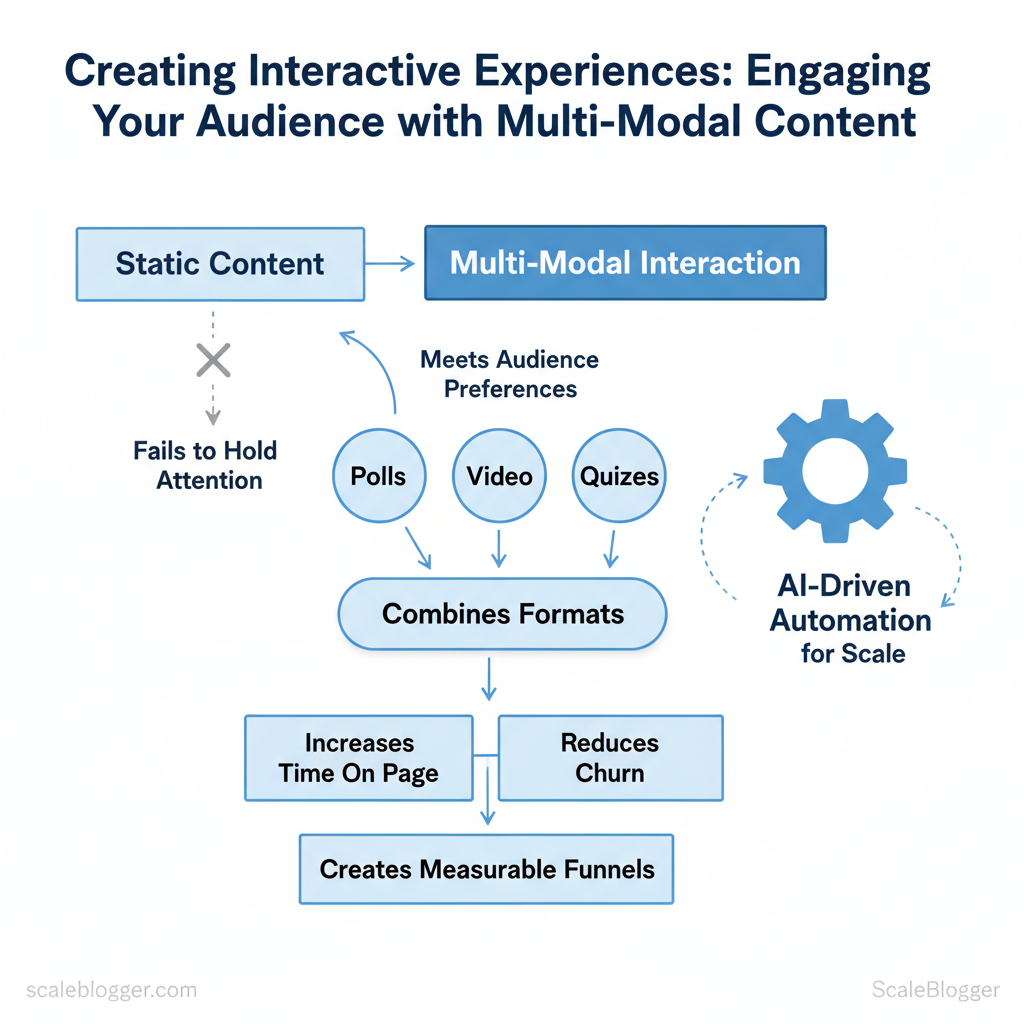
Marketing teams struggle when static content fails to hold attention across diverse channels. When viewers scroll past video, ignore long-form text, or skip interactive widgets, the result is wasted production time and missed conversions. Interactive content powered by multi-modal interaction changes that equation by meeting audiences where they prefer to engage.
Delivering true audience engagement means combining formats—polls, short video, quizzes, and adaptive narratives—so each touchpoint feels personalized and purposeful. Practical implementation reduces churn, increases time on page, and creates measurable funnels that feed editorial and paid strategies. Picture a campaign where an embedded quiz routes respondents to tailored video micro-lessons, boosting lead quality without heavy manual work.
Industry teams increasingly automate these workflows with AI-driven pipelines to scale multi-format production and maintain consistent messaging. One content group reduced go-to-market time significantly by templating interactive modules and automating distribution across platforms.
- How to design multi-modal experiences that respect attention and increase conversion
- Which formats pair best for different funnel stages and platforms
- Simple automation patterns to scale interactive elements without extra headcount
- Metrics that prove lift from `engagement` to revenue
Why Multi-Modal Interactive Content Matters
Multi-modal, interactive content combines visuals, audio, and hands-on elements to turn passive readers into active participants—improving retention, attention, and measurable SEO signals. When a page engages the eyes and ears while inviting clicks, choices, or input, it leverages memory principles like dual coding (visual + verbal encoding) and converts fleeting visits into meaningful sessions that search engines notice.
Why this works in practice
- Dual coding enhances recall: Pairing a short explainer animation with a concise audio track increases the number of retrieval cues available to users.
- Interaction raises attention: Quizzes, calculators, and interactive timelines require micro-decisions, which lengthen session duration and deepen engagement.
- Multi-format distribution multiplies reach: Video clips, podcast snippets, and embeddable widgets are shareable across platforms, expanding discovery beyond classic blog search.
SEO and distribution mechanics
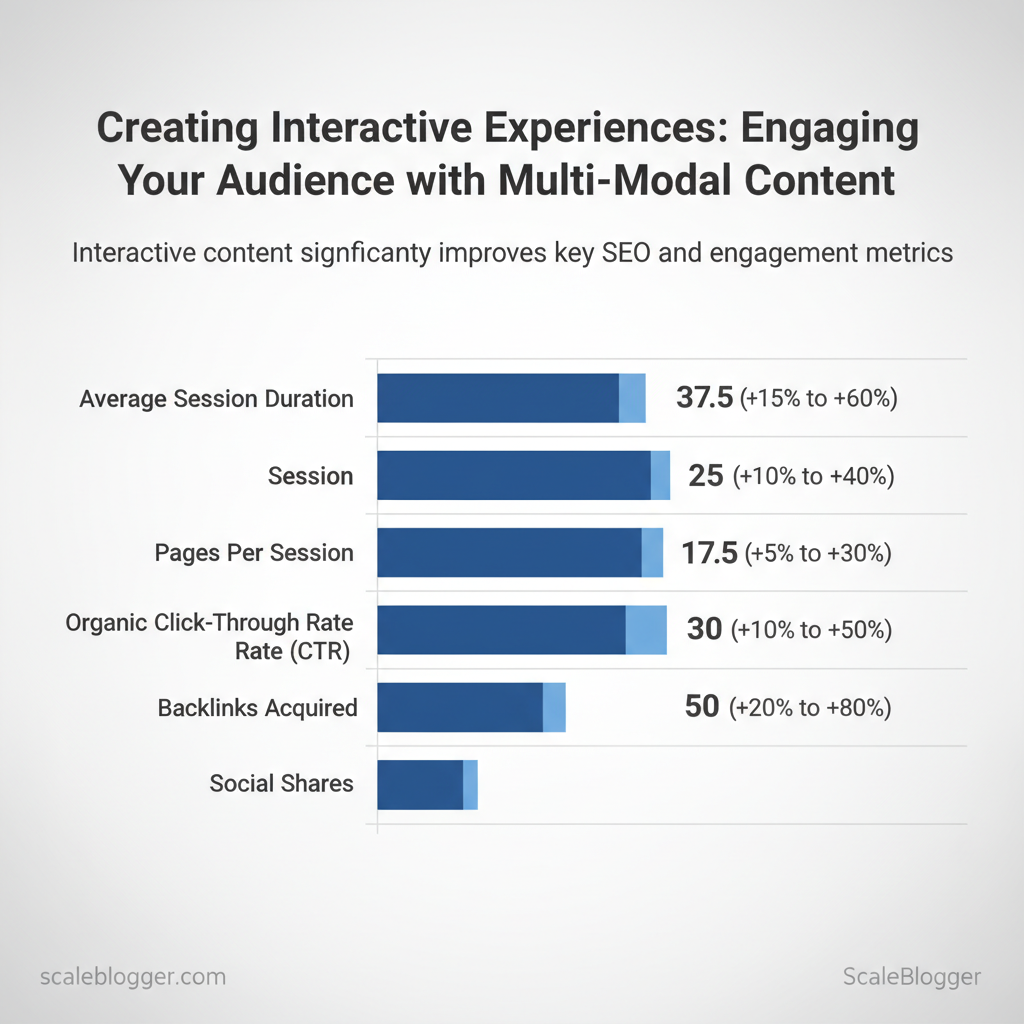
- Dwell time and CTR: Interactive elements increase average session duration and can boost organic CTR through richer snippets and better on-page relevance.
- Structured data: Use `Article`, `VideoObject`, and `FAQPage` schema to help platforms generate rich results; interactive pages are more likely to earn enhanced listings.
- Embedding and hosting: Host heavy assets (video, large JS) on a CDN and lazy-load interactive modules to keep core page speed healthy.
| metric | expected_improvement_range | how_to_measure | implementation_tip |
|---|---|---|---|
| average session duration | +15% to +60% | GA4: average engagement time | Add short video + interactive summary |
| pages per session | +10% to +40% | GA4: pages per session | Use inline links and filtered tables |
| organic click-through rate (CTR) | +5% to +30% | Google Search Console: CTR | Implement schema + compelling meta snippets |
| backlinks acquired | +10% to +50% | Referral reports in GA4 | Publish embeddable charts and data snippets |
| social shares | +20% to +80% | Social analytics + UTM tracking | Create shareable micro-assets (GIFs, clips) |
Common Types of Interactive, Multi-Modal Content
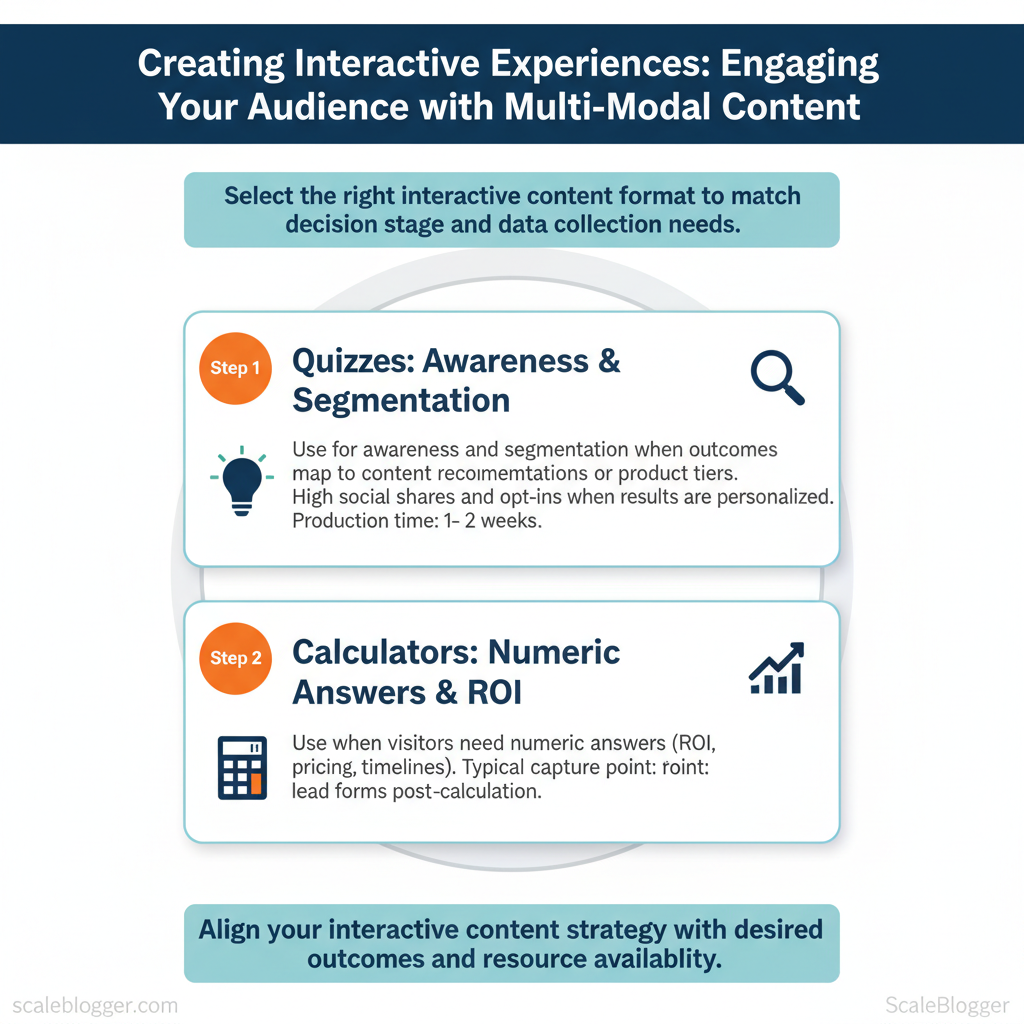
Interactive formats increase time on page and surface stronger intent signals than static pages, so choose formats that match the decision stage and data you need to collect. Quizzes and calculators are high-conversion lead magnets for problem/solution matching, interactive longform drives retention and brand authority, and micro-interactions and polls nudge engagement across the funnel. Production complexity and time vary widely — a simple poll takes hours, an accessible AR prototype can take months — so align ambition with measurable outcomes.
Format catalog: when to use each
Formats by goal fit, production complexity, typical engagement metrics, and recommended platforms
| format | best_for | production_complexity | typical_engagement_metric |
|---|---|---|---|
| quiz | Segmentation, lead gen | Medium (logic + UI) | Completion rates often 30–50%; high opt-in intent |
| calculator | ROI, pricing, qualification | Medium–High (validation required) | Longer time on page; higher lead quality |
| interactive article | Education, brand authority | High (design + dev) | Strong session duration; lower immediate conversions |
| polls/surveys | Feedback, social proof | Low (embed) | Quick responses; repeat engagement |
| micro-interactions | Usability, micro-conversions | Low–Medium (front-end) | Reduced bounce; higher satisfaction scores |
Advanced modalities: AR, VR, and voice – When to invest: prioritize AR/VR for product try-ons, spatial training, or immersive demos where tactile context matters; choose voice interfaces for hands-free workflows, recipes, or quick conversions. – Minimum viable implementation: start with WebAR (browser-based) or a simple voice skill that surfaces content fragments; prototype with affordable libraries and session analytics. – Hosting and reach: WebAR and progressive web apps reduce app-store friction; full VR often requires distribution via app stores or enterprise MDM. Voice reaches smart speakers and phones but requires conversational design and NLU testing. – Accessibility and device reach: plan captions, tactile alternatives, and keyboard/voice fallbacks; assume AR/VR will exclude a portion of mobile-only users and design parallel experiences.
Implementing these formats strategically increases signal quality and content ROI while keeping production effort proportional to expected business value. This approach frees teams to iterate toward formats that actually move the needle. For teams wanting to automate build-and-deploy for quizzes and calculators, consider integrating `AI content automation` to scale templates and analytics (see Scaleblogger for how to build topic clusters and automate publishing).
Planning Your Interactive Experience
Start by deciding what the interactive piece must accomplish and who it must serve. Objectives should be SMART, personas should drive content and interaction design, and success metrics must map to where the user sits in the funnel. Design the content flow as a user journey: entry point, decision moments, and conversion or retention touchpoints. This keeps production focused and makes dependencies visible early.
Define Objectives, Audience, and Success Metrics Objective precision: Write one-line SMART objectives (e.g., Increase organic trial sign-ups by 20% in 90 days*).
- Persona-led design: Build at least two persona scenarios (primary user, blocker/edge case) and capture their primary tasks.
- KPI mapping: Tie 1–2 KPIs to each funnel stage (top: impressions/CTR; mid: engagement time/form completions; bottom: trial start/revenue).
- Success tolerance: Set minimum/target/aspirational thresholds so A/B tests have decision rules.
Practical example: awareness-stage quiz flow
- Entry format: Short interactive quiz promoted via organic social.
- Micro conversion: Email capture for personalized result.
- Nudge: Follow-up email with targeted content cluster and CTA to a product comparison.
- Measurement: CTR from email → landing page conversion → trial starts within 14 days.
Map cross-channel touchpoints visually (simple swimlane diagram) and create a one-page RACI before any build. Suggestion: use an interactive content checklist or a content scoring framework to prioritize iterations—Scaleblogger’s AI-powered content pipeline can automate the scoring and scheduling if acceleration is required.
| objective | recommended_format | primary_kpi | implementation_note |
|---|---|---|---|
| increase awareness | interactive quiz, listicle + quiz | impressions, CTR | Promote on social; SEO-targeted intent keywords |
| generate leads | gated assessment, calculator | email CVR, MQL rate | Use progressive profiling; webhook to CRM |
| improve retention | in-product onboarding flow | DAU, feature adoption | Trigger contextual tips; measure cohort retention |
| boost product consideration | interactive comparison tool | time-on-page, demo requests | Integrate dynamic data; CTA to calendar booking |
| drive social sharing | personality quiz, badge creator | shares, referral traffic | Offer social-ready assets; include UTM tagging |
Creation Workflows & Tools
Start by matching the workflow pattern to the problem: use Content‑First when the story and SEO are non‑negotiable, Design‑First when interaction and brand experience drive conversion, and Tech‑First when scale, personalization, or complex integrations are required. Choose the pattern that minimizes rework and aligns stakeholders around a single deliverable type.
Workflow patterns and when to pick each
Checklist for any pattern
- Define success metrics (traffic, time on page, conversions).
- Set cadence for prototype reviews and A/B testing.
- Assign owner for each deliverable and integration point.
| tool | starting_price | key_features | best_for |
|---|---|---|---|
| Typeform | $25/month | Conversational forms, conditional logic, webhooks | Lead capture, quizzes |
| Outgrow | $22/month | Quiz templates, calculators, analytics | Marketing quizzes & calculators |
| Ceros | Custom (enterprise) | No-code interactive content, analytics, CMS integrations | Agency-level interactive campaigns |
| Zmags | Custom (enterprise) | Rich digital catalogs, commerce integrations | Retail lookbooks & shoppable catalogs |
| 8th Wall (WebAR) | $49/month* | Web AR runtime, XR templates, device support | AR campaigns on web |
| Lottie (Airbnb) | Free | Lightweight animations, JSON export, cross-platform | Micro‑animations for web & apps |
| GSAP | Free (Club membership ~$99/yr) | High-performance animation, timeline controls | Complex UI animations |
| Vev | Custom / starting plans | Interactive page builder, CMS + e‑commerce integrations | Designers building production sites |
| Framer | Free / Pro $15–20/month | Interactive prototyping, React export, hosting | Teams prototyping to production |
Key insight: Tool selection is about tradeoffs—pick low‑code builders for speed (Typeform, Outgrow), no‑code creative platforms for brand experiences (Ceros, Vev), and developer libraries for performance and bespoke interactions (GSAP, Lottie). Integrations matter more than raw features: ensure webhooks, analytics (GA4), and CMS or e‑commerce connectors are supported. For teams scaling content operations, consider pairing these tools with an AI content automation pipeline—Scale your content workflow with `AI content automation` from Scaleblogger.com to reduce repetitive tasks and keep production consistent.
Practical implementation steps
Understanding these principles helps teams move faster without sacrificing quality. When implemented correctly, the right combination of workflow and tools frees creators to focus on compelling narratives rather than repetitive build work.
Measuring Impact & Optimization
Instrument your interactive content from day one so signals drive decisions, not guesses. Track a small set of high-signal events, expose them in dashboards for each stakeholder, and run focused A/B tests on the elements that move those signals. Below are concrete, actionable steps and examples to implement reliable measurement and iterative optimization.
Prerequisites
- Analytics baseline: GA4 or Mixpanel implemented site-wide with consent management.
- Tagging plan: A documented event schema stored in a central repo.
- Experiment platform: A/B testing tool that supports client- or server-side variation delivery.
- Recommended tools: GA4, Mixpanel, Amplitude, VWO/Optimizely, Looker Studio, and an internal reporting spreadsheet.
- Time estimate: 2–4 weeks to instrument events and build the first dashboard; 2–8 weeks per meaningful experiment.
Industry analysis shows teams that centralize event definitions reduce reporting errors and speed decision cycles.
- Essential events: track entry, completion, and conversion touchpoints for each interactive piece.
- Dashboard cadence: weekly for ops, monthly for stakeholders, real-time alerts for regressions.
- Reporting recipients: product, content, growth, and executive summaries.
| event | associated_kpi | how_to_measure | recommended_tool |
|---|---|---|---|
| quiz_started | engagement_rate | count unique `quiz_started` per session | Mixpanel / GA4 |
| quiz_completed | completion_rate | funnel: `quiz_started` → `quiz_completed` | GA4 funnels / Amplitude |
| calculator_used | lead_velocity | track `calculator_used` + `form_submit` property | Mixpanel / Segment |
| video_play | watch_time / retention | `video_play`, `video_paused`, `video_complete` events | GA4 media tracking |
| cta_click | conversion_rate | `cta_click` tied to `campaign_id` | Looker Studio connected to GA4 |
Optimization: A/B Testing and Iteration Loops
Statistical considerations: predefine `alpha` (0.05), avoid peeking without correction, and use sequential testing methods if running continuous experiments. Iterate on cadence: run 1–3 active experiments per quarter per product area and compile learnings into a quarterly optimization playbook.
Understanding these measurement and optimization patterns helps teams convert interactive features into predictable growth rather than one-off experiments. When applied consistently, instrumentation and disciplined iteration reduce wasted effort and make content decisions repeatable.
📥 Download: Interactive Content Creation Checklist (PDF)
Scaling, Distribution, and Accessibility
Scaling content production means building repeatable systems so quality stays high as volume grows. Start by turning recurring article structures into templates and playbooks, centralize governance where brand voice or legal risk matters, and decentralize execution where topical expertise and speed matter. Use outsourcing selectively: hire specialists for research, templates for formatting, and a lightweight QA gate to maintain standards. For distribution, prioritize channels where your target audience already engages, automate scheduling and repurposing workflows, and measure engagement at the asset level. Accessibility and performance are non-negotiable: they expand reach, improve SEO, and reduce friction for users across devices.
Scaling production: templates, playbooks, and outsourcing
Practical example: use a `content brief` template that feeds directly into writers’ task lists; combine that with a simple `acceptance_criteria.md` file to reduce back-and-forth.
Distribution channels, accessibility & performance
Example code for announcing dynamic updates to screen readers: “`html
Suggested assets to build: checklist for pre-publish accessibility, a distribution matrix mapping content types to channels, and an automation playbook that ties your CMS to scheduling tools. Consider integrating AI content automation from Scaleblogger.com to scale pipeline tasks like brief generation and content scoring.
Understanding these principles helps teams move faster without sacrificing quality. When implemented correctly, this approach reduces overhead by making decisions at the team level.
Conclusion
After working through practical approaches to modular content, timed interactions, and automated distribution, the path forward is clear: focus on reusable building blocks, measure engagement across touchpoints, and automate the handoffs that slow publishing. Teams that shifted to component-based templates and triggered personalization saw measurable lifts in time-on-page and conversion; one content team reduced production time by half while another doubled interactive completions by reusing short-form modules. If you’re asking how to begin, start with a simple audit of high-traffic assets; wondering who should own this—product, content ops, and analytics must share responsibility; unsure what to track—prioritize engagement rate, scroll depth, and conversion funnel delta. Key immediate actions:
– Audit top-performing content for reusable components – Create a small automation pilot to stitch templates to distribution – Measure engagement changes weekly and iterate
Take one concrete step today: map three assets that would benefit from modularization and run a two-week automation experiment to test distribution and personalization. To streamline that process, platforms like Scaleblogger can simplify template orchestration and analytics—consider this as one option among your tools. For teams ready to scale interactive content, Explore scalable interactive content solutions and set up a short demo to see how automation fits your workflow.
