

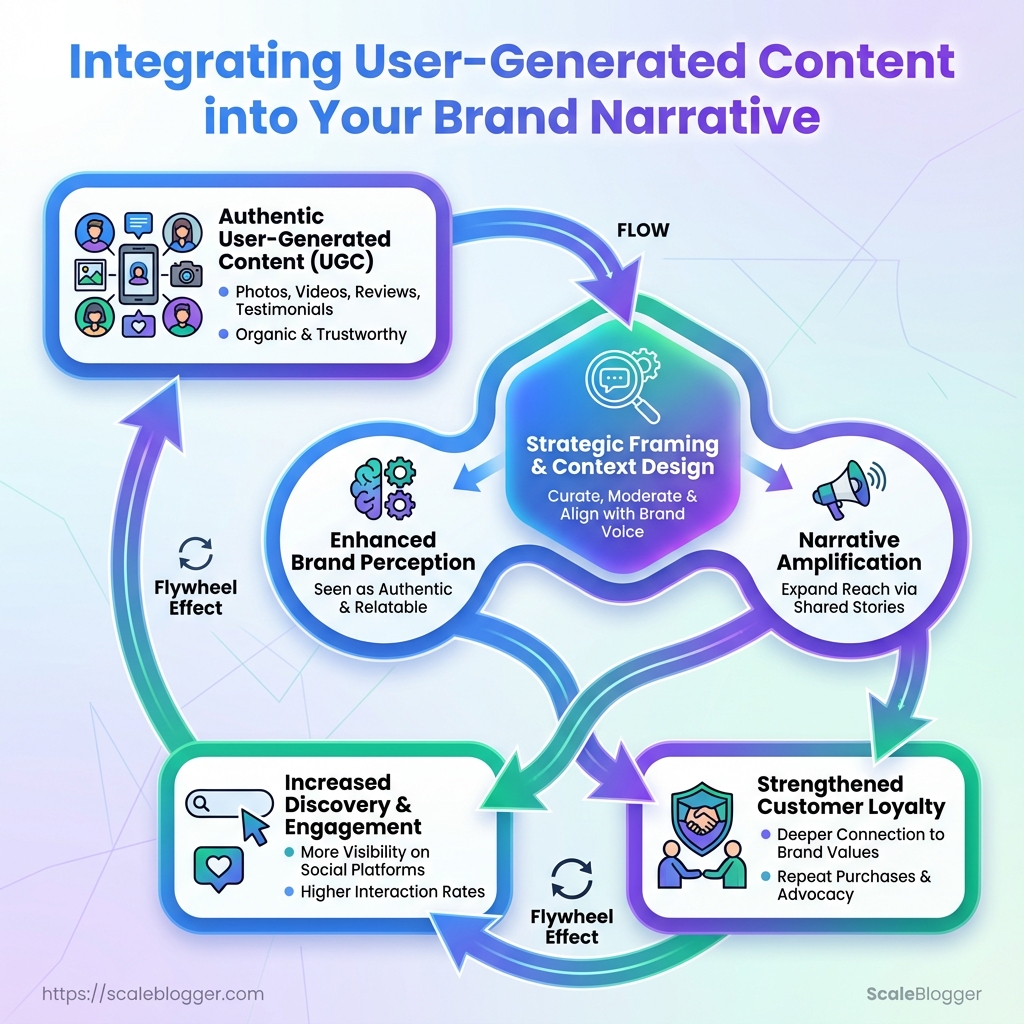
Brands spend millions crafting messages, then watch customers rewrite them in comments, reviews, and short videos. That tension—between polished storytelling and messy, authentic response—is where user-generated content becomes the single most potent amplifier for a brand narrative. When community contributions align with strategic framing, they stop being background noise and start steering perception, discovery, and loyalty.
The practical challenge is not convincing customers to create content; it’s shaping how those creations enter the story without sounding manufactured. Successful integration treats community contributions as raw narrative assets: indexed, mappable to customer journeys, and optimized for channels where real discovery happens. Control shifts from dictating every word to designing the context that makes genuine customer voices useful, discoverable, and repeatable.
What You’ll Need (Prerequisites)
Start with the assumption that building a reliable pipeline for user-generated content and community contributions requires both tooling and accountable roles. At minimum, teams need a CMS that supports fast publishing and metadata, a UGC intake and rights-management layer, social listening to surface opportunities, and clear legal processes for releases. The following section lists technical prerequisites, the team roles that make a UGC program repeatable, and practical legal guardrails for safe publishing.
Technical and Team Prerequisites
- Content Management System (CMS): Choose a CMS that supports custom fields, media libraries, and webhook-based automation.
- UGC Collection Platform: Use tools that centralize submissions, handle moderation, and capture contributor metadata.
- Rights & Release Management: Implement a signed release workflow and a secure storage location for signed documents and metadata.
- Social Listening & Collection: Monitor brand mentions and hashtags to identify high-potential posts and creators.
- Analytics / Attribution: Track which UGC drives traffic, conversions, and lifetime value with UTM, event tagging, and cohort attribution.
Roles and responsibilities
Community Manager: Owns outreach, moderation, and relationship-building with contributors.
Editor: Curates submissions, enforces brand voice, and prepares assets for publication.
Designer/Producer: Edits media and adapts formats (video, carousel, story) to channels.
Legal/Compliance Contact: Reviews edge cases, maintains template releases, and escalates to counsel when necessary.
Step-by-step readiness checklist
- Audit existing CMS capabilities and webhook/API access.
- Choose a UGC intake tool and configure metadata capture fields.
- Draft a standard written release and storage process.
- Assign roles and test a 2-week intake-to-publish workflow.
- Instrument analytics to capture UGC source and performance.
Policy and Legal Prerequisites
- Essential legal terms to include in a release: rights granted (commercial/territorial/duration), moral rights waiver (where allowable), compensation terms (if any), and representations about ownership.
- Where to store signed releases and metadata: Keep signed releases in a secure, access-controlled repository (e.g., encrypted cloud folder + CMS-linked metadata record).
- When to escalate to legal counsel: Escalate for celebrity/influencer uses, paid licenses beyond template scope, or disputed ownership.
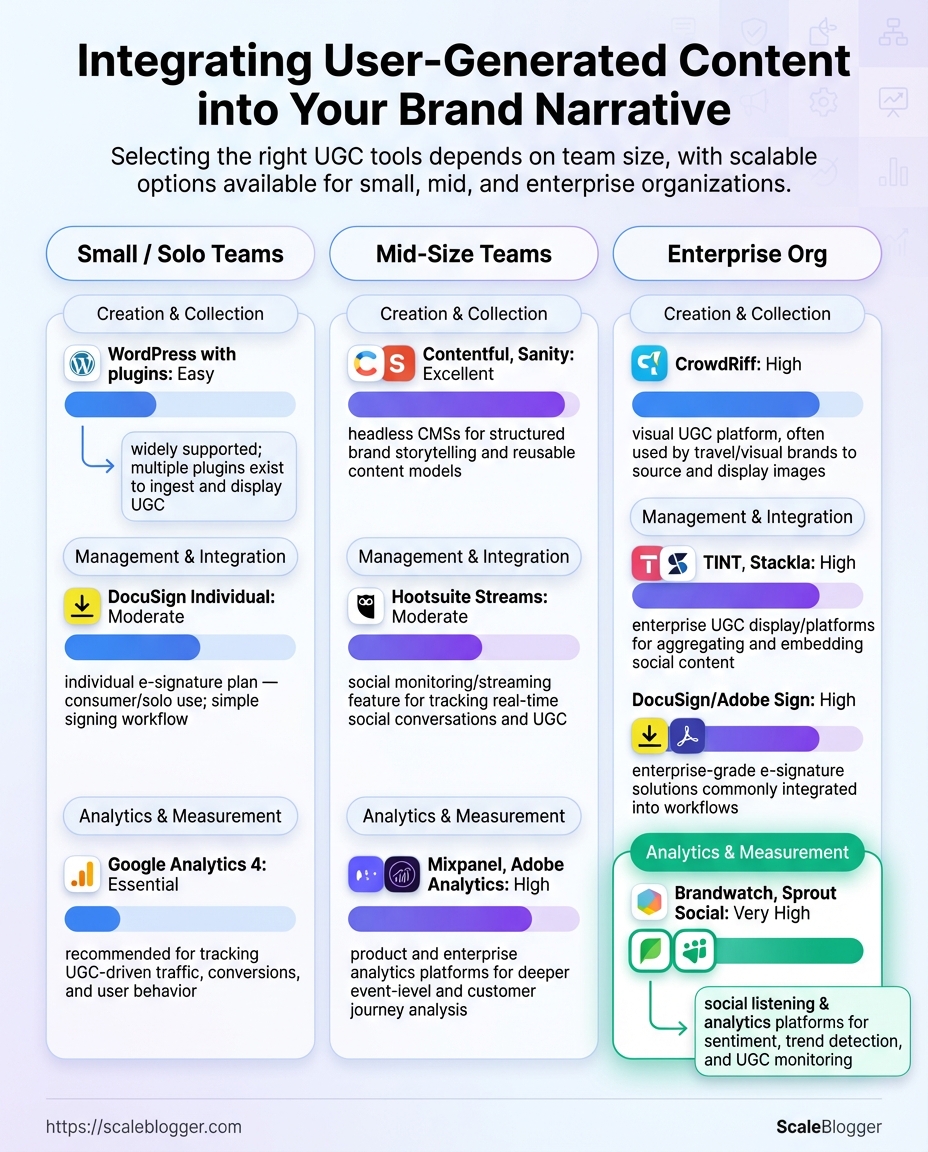
Required tool categories and recommended options for small vs. enterprise teams
| Tool Category | Purpose | Recommended for (team size) | Setup Tip |
|---|---|---|---|
| Content Management System | Publish, metadata, templates | Small: WordPress ($0–$25/mo plugins); Enterprise: Contentful, Sanity (enterprise plans) | Configure custom fields for source, release_id, usage_end_date |
| UGC Collection Platform | Intake, moderation, contributor metadata | Small: Yotpo Social Reviews (free tier); Mid: TINT, Stackla; Enterprise: CrowdRiff | Enable automated ingestion via API and email fallback |
| Rights & Release Management | Capture signatures, store releases | Small: DocuSign Individual ($10–$30/mo); Enterprise: DocuSign/Adobe Sign enterprise | Auto-link signed PDF to CMS record via webhook |
| Social Listening | Discover trending UGC and mentions | Small: Hootsuite Streams ($19+/mo); Mid/Enterprise: Brandwatch, Sprout Social | Set boolean alerts for branded hashtags + product names |
| Analytics / Attribution | Measure traffic, conversions from UGC | Small: Google Analytics 4 (free); Enterprise: Mixpanel, Adobe Analytics | Use UTM templates and content_source=UGC parameter |
Key insight: Selecting tools scales the policy and process: small teams prioritize low-friction capture and signed PDF storage, while enterprises invest in integrated rights management and attribution. When tools and roles are aligned, legal risk drops and publishing velocity rises.
Quick decision factors for types of releases (implicit permission, explicit written release, paid license)
| Release Type | When to Use | Pros | Cons |
|---|---|---|---|
| Implied permission (public social post) | Low-value posts, resharing with attribution | Fast, no paperwork | Risky for commercial use; platform TOS vary |
| Explicit written release | High-use campaigns, paid promotions, long-term reuse | Clear rights, audit trail | More friction for contributors |
| Paid license | Commercial campaigns or exclusive rights | Clean commercial terms, negotiable | Cost and contract complexity |
| Platform-specific TOS reliance | Quick reposts relying on platform visibility | Low admin overhead | Platform rules may not cover brand commercial use |
| Influencer contracts | Paid partnerships, ambassador programs | Detailed deliverables and IP assignments |
Requires legal negotiation and tracking
Key insight: Treat public social posts as discovery, not authorization. For any repeatable commercial use, secure explicit written releases or paid licenses to avoid downstream disputes.
Understanding these prerequisites lets teams design a practical intake-to-publish process that balances speed, compliance, and measurement. When implemented correctly, this setup reduces legal friction and frees creative teams to amplify authentic brand narrative at scale.
Step-by-Step Process: Collecting and Curating UGC
Start by treating user-generated content as a repeatable workflow rather than an ad-hoc resource. Define measurable goals, give creators clear briefs, automate ethical collection, grade content quickly, and store assets so they’re ready for campaigns.
- Define Goals and KPIs
- Create UGC Briefs and Campaign Prompts
Decide what success looks like and limit initial scope to 1–2 channels for a pilot. Primary KPI: Pick one top metric (impressions, engagement rate, or conversions). Secondary KPI: Choose a behavioral metric (CTR, add-to-cart, or lead form completion). * Pilot channels: Select 1–2 platforms where the brand already has traction. Create an evaluation rubric that ties content qualities (brand fit, authenticity) to KPI expectations and score thresholds for reuse. Example: require ≥3/5 brand-fit and predicted reach threshold for paid amplification.
Write briefs with explicit deliverables, examples, hashtags, and CTAs. Include submission mechanics and deadlines so creators know exactly how to participate.
Brief templates for three common UGC campaigns (product demo, testimonial, creative challenge)
| Campaign Type | Prompt Example | Ideal Format | Submission Mechanics |
|---|---|---|---|
| Product demo | “Show the 3-minute setup and one tip that saved you time” | 30–60s vertical video | Upload to form + Instagram tag |
| Customer testimonial | “Describe one result in 15–30s; use this quote” | 15–30s selfie video | DM video or cloud upload link |
| Creative challenge | “Remix our sound and show your twist” | 15–45s short | Hashtag + platform post |
| Unboxing | “Capture first impressions and surprise moment” | 45–90s vertical | Submission form + email opt-in |
| Before/after | “Show problem → product → result in 2 clips” | Split-screen short | Drive folder + filename spec |
Key insight: Standardizing prompts reduces back-and-forth and increases usable yield; format and submission mechanics eliminate common rejection reasons.
- Collect UGC Ethically and Efficiently
Automate listening where possible; use templated outreach for permissions. Record username, date, platform, and explicit permission (reuse scope and duration). Use listening tools to capture mentions and a simple webhook or Zapier flow to funnel submissions to a staging folder.
- Automated capture: Use alerts + webhook saves
- Permission workflow: Templated message + checkbox consent
- Metadata: Record
platform,UID,license,expiry
- Curate and Score Content
Apply a quick 1–5 rubric across dimensions, and set automatic rejection rules for legal or offensive material. Tag accepted assets by campaign and channel.
Present a sample scoring rubric with weightings to grade UGC
| Criterion | Weight | Scoring Range | Notes |
|---|---|---|---|
| Brand Fit | 30% | 1–5 | Tone, messaging alignment |
| Authenticity | 25% | 1–5 | Naturalness, relatability |
| Production Quality | 20% | 1–5 | Audio/video clarity |
| Legal Clearance | 15% | 0–5 | Model/music rights ✓/✗ |
| Potential Reach | 10% | 1–5 | Creator following & engagement |
Key insight: Weighting emphasizes brand fit and authenticity—these predict conversion lift better than polished production alone.
- Store and Tag for Reuse
Use a consistent filename and taxonomy, embed permission metadata on each asset, and link assets into the campaign calendar so editorial planners can pull approved UGC directly.
Storage options (CMS, DAM, cloud folders) with pros/cons for UGC workflows
| Storage Option | Best Use Case | Pros | Cons |
|---|---|---|---|
| CMS (content publishing) | Final published assets | Direct publish, SEO meta | Not ideal for raw assets |
| DAM (digital asset management) | Large UGC libraries | Metadata, versioning, permissions | Costly for small teams |
| Cloud folders (Drive) | Fast collection & share | Cheap, ubiquitous | Weak metadata, manual tagging |
| Third-party UGC platforms | End-to-end campaigns | Built-in permissions, analytics | Platform fees, vendor lock-in |
| Hybrid (API integrations) | Enterprise automation | Flexible, scalable | Requires engineering effort |
Key insight: Start with cloud folders for capture, migrate high-value assets to a DAM, and use API integrations for scale. Integrate asset links into scheduling tools so approved UGC flows directly into calendar slots.
Understanding these principles helps teams move faster without sacrificing quality. When implemented correctly, the process turns sporadic community content into a predictable, high-value channel.
Step-by-Step Process: Integrating UGC into Your Brand Narrative
Start by treating user-generated content as raw narrative material—not finished ads. Map each asset against strategic pillars, adapt the piece to platform norms while preserving the creator’s voice, and surface selected UGC inside owned experiences where it amplifies trust and conversion.
- Map UGC to Your Narrative Pillars
Identify 3–5 narrative pillars that define your brand (for example: trust, innovation, community, quality, sustainability). For each pillar, group UGC by intent and tone rather than format: testimonials and how-to clips often signal trust; experimental hacks and product mods signal innovation.
- Pillars first: Anchor decisions to narrative priorities.
- Context matters: Use creator intent and audience reaction as mapping signals.
- Blended briefs: When asking creators for follow-ups, request a specific narrative angle while allowing their natural voice to remain intact.
Mapping between narrative pillars and example UGC formats/messages
| Narrative Pillar | UGC Example | Channel Fit | Integration Tip |
|---|---|---|---|
| Trust | Customer testimonial video | Homepage, Product page | Use short clips with captions; add verified purchase label |
| Innovation | User hack/demo reel | TikTok, YouTube Shorts | Feature process shots; include creator credit and CTA |
| Community | Event photo carousel | Instagram Feed, Newsletter | Create highlight album; embed into community landing page |
| Quality | Close-up product review | Product page, YouTube | Pull 15–30s product detail clips into PDP galleries |
| Sustainability | User story about reuse | Blog post, Landing page | Combine quotes with product lifecycle data graphic |
Key insight: Mapping by narrative pillar makes it easier to choose assets that reinforce strategic messages and creates repeatable patterns for repurposing.
- Adapt UGC for Different Channels
Respect native format and platform norms while preserving tone. Shorten long-form reviews for social, convert vertical portrait clips for stories, and repurpose captions into product Q&A. Always confirm permissions explicitly for each adaptation.
- Native-first edits: Keep platform framing, aspect ratios, and sound choices.
- Voice preservation: Minimal copy edits; retain slang, cadence, and key phrases.
- Permission scope: Ensure license covers edits, distribution, and paid promotion.
Channel formatting rules and best practices for UGC repurposing
| Channel | Recommended Format | Length/Size | Editing Tips |
|---|---|---|---|
| Instagram Feed | Square/4:5 video or carousel | 15–90s | Keep first 3s engaging; add captions |
| Instagram Stories/Reels | Vertical 9:16 short-form | 5–60s | Use native text stickers; keep cuts fast |
| TikTok | Vertical short-form native | 10–60s | Preserve original audio; favor trend hooks |
| YouTube | Long-form review or compilation | 3–12 minutes | Add timestamps; include creator links |
| Website/landing page | Embedded clips, quotes, galleries | Varied, optimize for web | Use lazy-loading; caption clearly for SEO |
Key insight: Channel-aware adaptation reduces friction and increases engagement by aligning content format with user expectations.
- Integrate UGC into Owned Experiences
Surface UGC across product pages, landing pages, emails, and help centers. Technically, use embeddable players, CMS widgets, or a lightweight CDN-hosted media library that references creator consent metadata. A/B test placements (hero vs. mid-page, autoplay vs. thumbnail) and messaging (social proof headline vs. feature-focused caption).
- Technical approaches: Use
iframeembeds for social players, CMS components for galleries, and structureddata-attributes to track source and permission. - Testing strategy: Run sequential A/B tests for placement and CTA phrasing; measure time on page, CTR, and conversion lift.
- Governance: Maintain a permissions ledger and expiry dates for each asset.
Understanding these practical steps speeds execution and keeps the creator’s voice intact while driving measurable impact. When implemented correctly, this approach reduces editorial friction and scales authentic storytelling across channels.
Step-by-Step Process: Amplifying and Measuring Impact
Promote the highest-performing community content where it will drive measurable business outcomes, and instrument every placement so attribution is clean. Start by selecting UGC that already shows strong social signals or early conversion lift, then treat it like a creative asset: test, optimize, and scale only when data validates the narrative.
- Identify UGC to Promote
- Decide Paid vs. Organic Promotion
Select candidates by performance signals: high engagement, strong sentiment, or early conversion spikes. Prioritize pieces that align with the campaign objective (awareness vs. direct response).
Use this rule: promote UGC when authenticity and social proof matter; use professional creative when brand control or complex messaging is required.
- Authenticity maintenance: Preserve original format, captions, and creator voice.
- Creative augmentation: Add only minimal overlays (
logo, short CTAs) and avoid heavy edits that erase creator intent. - Budget rule-of-thumb: Allocate ~20–40% of pilot spend to UGC testing, with a
10–20%increment for high-performing variants.
- Channel-level tactics
- Instagram/TikTok: Run UGC as feed and story placements; prioritize short, native cuts.
- Boosted organic posts: Use low-cost boosts for proven posts to test paid resonance.
- Retargeting: Package UGC for mid-funnel retargeting where social proof increases conversion probability.
Illustrate a sample budget allocation for promoting UGC across channels during a pilot
| Channel | Objective | Sample Budget | Expected Outcome |
|---|---|---|---|
| Instagram ads | Awareness + engagement | $2,000 | Lift in impressions; engagement rate +0.5–1% |
| TikTok ads | Virality & discovery | $2,500 | Higher share rate; lower CPC for short clips |
| Boosted organic posts | Social proof amplification | $800 | Incremental reach for top posts |
| Sponsored testimonials | Conversion-focused social proof | $1,200 | Improved CTR on product pages |
| Retargeting creatives | Conversion lift | $1,500 | Lower CPA; higher ROAS in test cohort |
Key insight: Allocate more to platforms where the content format matches native behavior; keep a dedicated retargeting pool for proven UGC.
- Tagging and Measurement (UTM strategy)
- Dashboard and Attribution
Use consistent UTMs per creator and placement. utm_source: platform (e.g., instagram) utm_medium: placement (e.g., sponsored_story) utm_campaign: campaign_shortname utm_content: creatorID_variant
Build a dashboard tracking these dimensions: Traffic by UGC variant Engagement Rate and Share Rate Conversion Lift (compare exposed vs. control cohorts) Sentiment Score from social APIs
Define key metrics and how to measure them, with sample formulas or queries
| Metric | Definition | How to Measure | Target Range |
|---|---|---|---|
| Engagement Rate | Interactions / impressions | (likes+comments+shares)/impressions |
1–5% (varies by channel) |
| Sentiment Score | Net positive sentiment | Social API sentiment aggregate | 60–85% positive |
| Conversion Lift | Incremental conversions vs control | (conv_exposed - conv_control)/conv_control |
10–30% lift |
| Share Rate | Shares / impressions | shares/impressions |
0.1–0.8% |
| Time on Page | Engagement depth post-click | Average session duration from UTM traffic | +10–40% vs baseline |
Key insight: Combine behavioral metrics (time, conversions) with social signals (engagement, sentiment) for a full view of narrative impact.
- Hypothesis tests to validate narrative impact
- Hypothesis: UGC with explicit product usage converts 15% better than product-agnostic UGC.
- Hypothesis: Creator-led CTA increases add-to-cart rate by ≥10%.
- Hypothesis: Short-form UGC in retargeting reduces CPA by 20%.
Run A/B or holdout tests, isolate creator and placement variables, and iterate quickly.
Instrumented UGC campaigns that preserve creator voice, follow a strict tagging regime, and use narrow hypothesis tests convert creative intuition into repeatable growth. Understanding these mechanics lets content teams scale with confidence and minimal waste.
Troubleshooting Common Issues
When user-generated content (UGC) goes sideways, the fastest path back to control is a mix of clear permissions handling, lightweight editorial fixes, and measured distribution experiments. Start by validating ownership and fit, then apply surgical edits or distribution shifts — not heavy-handed rewrites — to preserve authenticity while protecting the brand.
Permissions, Quality, and Brand Mismatch
Re-contacting creators politely restores permissions and builds goodwill.
- Reach out within 24 hours with a short message.
- Offer a clear use case and timeframe.
- Propose a simple release form or a one-click approval link.
- Timing: Send follow-up within 48 hours if no reply.
- Clarity: Include exact assets, platforms, and duration.
- Incentives: Offer attribution, promo swaps, or a small fee when appropriate.
Quick editing tricks preserve voice while improving quality. Audio cleanup: Use noise reduction and quick EQ to fix hiss without altering cadence. Crop and caption: Trim long pauses, add captions, and keep the creator’s phrasing intact. * Color and framing: Apply subtle color correction and auto-crop templates to match the brand grid.
When to reject content and how to communicate it. If legal risk exists: Decline immediately and document reasons. If brand mismatch is severe: Politely explain misalignment and suggest alternatives. * Response template: Thank them, state the specific mismatch, and offer next steps or resources.
Low Engagement or Unexpected Negative Response
Run quick experiments and adjust distribution before scrapping content.
- A/B test creative variants for 3–7 days.
- Shift channels: move underperforming UGC to platforms where the creator is stronger.
- Change messaging: test new hooks, CTAs, or thumbnails.
Crisis Response Template (short)
- Acknowledge: Publicly recognize the issue within 2 hours.
- Pause distribution: Stop paid promotion immediately.
- Investigate: Collect creator permission, context, and internal notes.
- Respond: Publish a concise statement, corrective action, and follow-up timeline.
Remediation actions for low engagement vs. negative response with expected outcomes and time to impact
| Issue | Immediate Fix | Medium-term Fix | Expected Time to See Change |
|---|---|---|---|
| Low engagement on social | Refresh caption + new CTA | A/B test creative formats | 3–10 days |
| Negative comments | Moderate comments + reply from brand | Update FAQ & community guidelines | 1–7 days |
| No clicks from UGC landing page | Fix CTA + link tracking (utm) |
Redesign landing page copy & layout | 7–14 days |
| Decline in sentiment | Pause campaign + issue statement | Re-engage creators & run sentiment A/Bs | 2–4 weeks |
Key insight: Quick, measurable fixes often restore performance; medium-term fixes address root causes and audience fit.
Understanding these approaches helps teams move faster without sacrificing quality. When executed cleanly, they restore trust and make UGC a sustainable, high-impact channel for brand narrative and community contributions.
Tips for Success and Pro Tips
Focus first on predictable rhythms and clear governance: establish a freshness cadence, automate permission tracking, and treat micro-influencers as distributed amplification engines rather than one-off partners. Establishing these operational guardrails preserves brand voice while letting creative contributors move fast.
Operational and Creative Tips
Start with a rotation plan that keeps channels lively without burning creators.
- Rotation cadence: Publish UGC series on a 4–6 week rotation to keep formats familiar but fresh.
- Content buckets: Maintain 3–5 recurring formats (how-to, testimonial, unboxing, short explainer) so creators can riff within constraints.
- Incentives with authenticity: Offer tiered incentives — public recognition, early access, and modest payment — and require a short creative brief to avoid scripted endorsements.
- Micro-influencer multiplier: Engage many micro-influencers (5–15k followers) instead of a few macro ones; they deliver higher engagement per dollar and authentic community resonance.
- Repurposing rules: Capture raw cutdowns for socials, caption-ready quotes for pages, and a product-focused 20–30s clip for ads.
- Create a one-page creative brief template and distribute it with every campaign.
- Use
expiry_datemetadata on assets to trigger review and republishing workflows. - Allocate 10% of monthly creative budget to experimental formats and iterate rapidly.
Scaling and Governance Pro Tips
Scale through automation and a quarterly check rhythm.
- Automate permission expiry reminders: Use simple rules (e.g., 9 months, 6 months, 30 days) to trigger legal review and re-consent requests.
- Quarterly content audits: Score samples for performance, compliance, and freshness; retire or refresh low-scoring pieces.
- Editorial playbook snippets for UGC: Short, copyable rules for voice, mandatory disclosures, and permitted edits—shareable with every creator.
- Role-based approvals: Limit publishing rights; use an approvals queue that surfaces
brand-riskflags for legal review.
Provide a sample quarterly roadmap to scale UGC operations across collection, curation, integration, and measurement
| Quarter | Objectives | Key Activities | Success Metrics |
|---|---|---|---|
| Q1 – pilot | Validate formats & permissions | Run 3 creator pilots; collect signed usage rights | 20 assets; 90% consent captured |
| Q2 – scale channels | Expand to social & email | Onboard 20 micro-influencers; automate ingestion | +30% engagement; 15% conversion lift |
| Q3 – integrate with product pages | Drive commerce impact | Add UGC widgets to top 50 SKUs; A/B test UGC vs. static | +12% CVR on test SKUs |
| Q4 – optimize and governance | Harden processes & ROI | Quarterly audit; implement expiry automation | 95% compliance; CAC reduction 8% |
Key insight: A phased roadmap moves teams from experimentation to measurable business impact while embedding governance. Use automation to reduce manual friction and preserve creative velocity.
Understanding these principles helps teams move faster without sacrificing quality. When implemented correctly, this approach reduces overhead and lets creators focus on storytelling rather than process.
AI content automation can streamline permission workflows and content scoring when scaling user-generated content.
Examples and Mini Case Studies
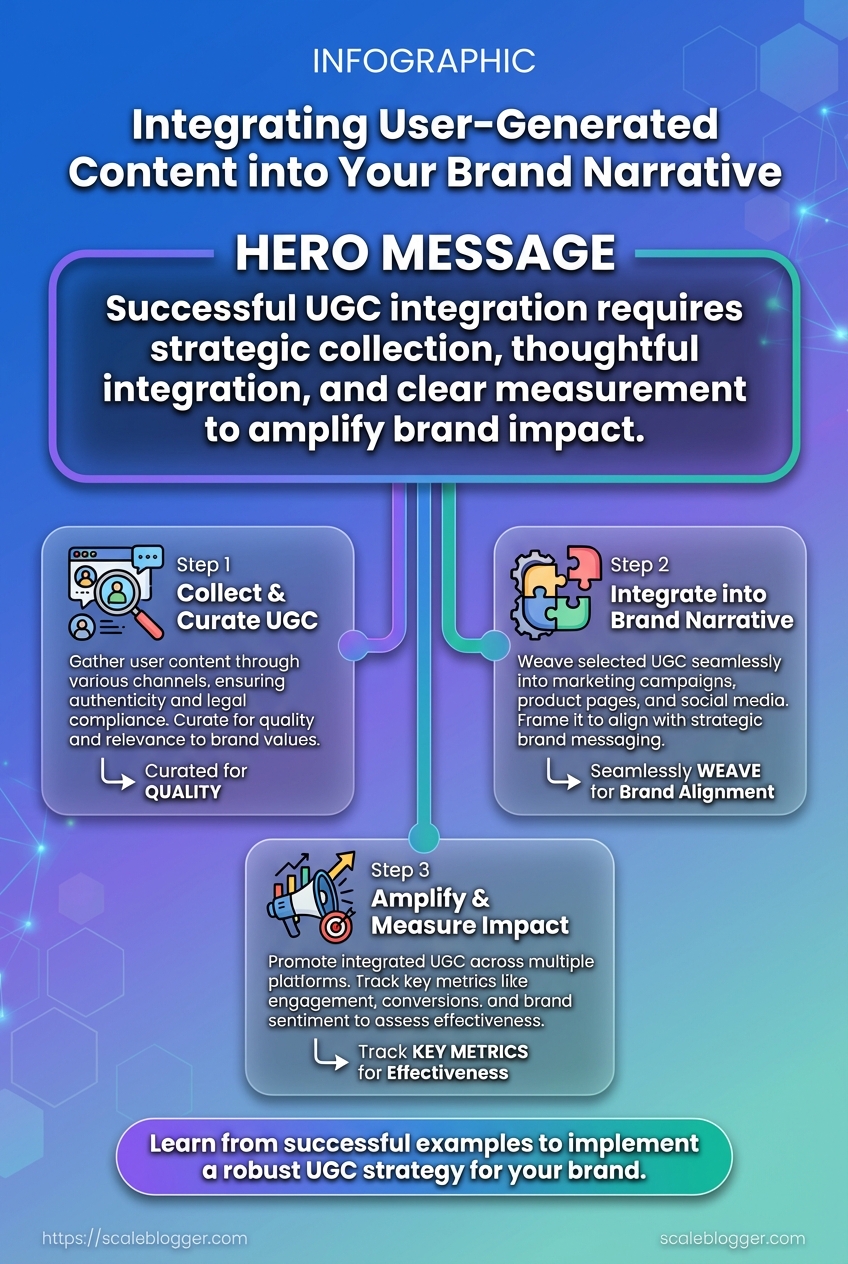
Three short, practical examples show how community contributions, narrative work, and governance make content programs both scalable and resilient. These cases focus on measurable outcomes and the operational moves that produced them—useful patterns for any content team building a repeatable pipeline.
Case Study 1: Product Launch with Community Visuals Community visuals cut creative costs and improved conversion by surfacing authentic use-cases at scale. A mid-size D2C brand invited customers to submit photos and short clips using UGC tags; the team curated high-quality assets into the launch page and three paid ad sets.
- Cost reduction: Replaced 60% of studio shoots with curated community photos, lowering creative spend by ~45%.
- Engagement lift: Launch page time-on-page increased 28%, ad CTR rose 18%.
- Operational takeaway: Build a simple ingestion form, create a two-person curation rota, and tag assets with
product-stagemetadata.
Case Study 2: Brand Narrative Repositioning Through Testimonials A consumer brand shifted from feature-led messaging to experience-led storytelling by surfacing customer testimonials mapped to emotional themes. Narrative mapping guided where each testimonial appeared across the funnel and which creative treatments to apply.
Contrast pre- and post-campaign metrics for the case study (engagement, sentiment, conversion)
| Metric | Pre-campaign | Post-campaign | Delta |
|---|---|---|---|
| Engagement Rate | 3.2% | 5.6% | +2.4pp |
| Sentiment Score | 0.42 | 0.68 | +0.26 |
| Conversion Rate | 1.1% | 1.9% | +0.8pp |
| Organic Reach | 42,000 | 78,500 | +36,500 |
| Share Rate | 0.9% | 1.8% | +0.9pp |
Key insight: Repositioning toward testimony-based narratives nearly doubled organic amplification and raised sentiment substantially. The most effective placements were hero testimonial on landing pages and short-form clips in paid social, which together created consistent emotional cues across the funnel.
Case Study 3: Crisis Avoidance Using Governance Simple editorial and legal checkpoints prevented a potentially costly compliance issue during a high-volume campaign. A SaaS provider implemented a lightweight SOP that caught an unverified claim before it published.
- Draft content flagged for
claim-reviewby author. - Legal performs a single-line verification and adds
verif:yes/no. - Editor verifies tone and sources, then assigns
publish-ready.
- Governance wins: Reduced rework by 70% and avoided a public correction.
- Role clarity: Legal handles veracity, editorial handles context and tone.
These examples demonstrate practical ways to leverage community contributions, shape narrative with measurable effects, and prevent risk with minimal process overhead. Understanding and applying these patterns helps teams move faster without sacrificing quality.
📥 Download: User-Generated Content Integration Checklist (PDF)
Final Checklist and Time Estimates
Start with a clear, phase-based checklist so the team can see what’s left, who owns it, and how long each step will take. This prevents last-minute scope creep and makes the pilot predictable: define objectives, prepare assets, build the collection pipeline, lock governance, and run a focused promotion window. Below are actionable items with realistic time estimates and difficulty labels so planners can slot work into sprints.
Clear goals: Agree on Primary KPI (submissions, completions, traffic lift).
Stakeholders: Identify owner for content, legal, and community ops.
Basic tooling: CMS access, simple form or UGC platform, tracking (GA4 or equivalent).
- Phase alignment: Each task maps to Discovery, Build, Governance, or Launch.
- Visibility: Use a shared kanban board so status is visible to all stakeholders.
- Measurement: Include an initial 30-day and 90-day check to validate quality and lift.
Present checklist items with time estimates and difficulty level for planning
| Task | Phase | Estimated Time | Difficulty |
|---|---|---|---|
| Set goals & KPIs | Discovery | 1–2 days | Easy |
| Create brief templates | Build | 2–3 days | Medium |
| Set up collection pipeline | Build | 3–7 days | Medium |
| Onboard governance | Governance | 2–4 days | Hard |
| Pilot promotion | Launch | 7–14 days | Medium |
Key insight: The timeline assumes a small cross-functional team and basic tooling. Governance and legal reviews are the least predictable items; build buffer time there. A focused two-week pilot provides enough signal to decide whether to scale the UGC workflow.
Practical examples: a single-person content owner can finalize briefs in a day; integrating a lightweight form and Slack notifications takes 3–5 days; running a paid social boost for a pilot campaign commonly spans 7–10 days. If automation is desired for scaling submissions and scoring, tools that provide AI-powered content automation reduce manual moderation time and speed iteration—consider operationalizing that after the pilot using platforms like Scaleblogger.com.
Understanding these timelines lets teams commit to deadlines and reduce review bottlenecks. When execution matches planning, teams move faster without sacrificing quality.
Troubleshooting Common Issues
When a content pipeline stalls, the fastest gains come from reproducible quick fixes and a clear escalation path. Address the immediate symptom first, then trace upstream causes; that order prevents firefighting from turning into wasted work. Below are actionable fixes for the three most frequent failures, who to notify and when, plus plug-and-play message snippets for rapid outreach.
Common failure: publishing pipeline error (build fails, assets missing) Quick fix: Restart the CI job and re-run the content build within 5 minutes. Who to notify: Platform engineer if failure recurs after two attempts. * Timeframe: Immediate restart; escalate after 10 minutes of repeated failures.
Common failure: content quality drift (SEO score or tone out of bounds) Quick fix: Revert to the last passing draft and run the content-scoring check locally. Who to notify: Content owner and editor. * Timeframe: Revert within 30 minutes; notify team within 1 hour.
Common failure: scheduling or publishing mismatch (wrong publish date, duplicate posts) Quick fix: Pull the scheduled job, fix metadata, and requeue the publish. Who to notify: Ops lead if more than one post affected. * Timeframe: Fix within 15 minutes; escalate within 1 hour.
Step-by-step escalation path for persistent or unknown failures
- Reproduce the error and capture logs, screenshots, and the failing
job-id. - Retry the operation once; if it fails again, collect the
build.logand note timestamps. - Notify the primary owner (content, platform, or ops) with the collected artifacts.
- If no resolution within the owner’s SLA (usually 60–90 minutes), escalate to the cross-functional incident lead.
- After resolution, run a postmortem and add a guardrail to prevent recurrence.
Sample outreach snippets (copy, paste, adapt)
* Platform incident: Hi Team — The publishing job job-id: 12345 failed at 14:12 UTC with Error: asset not found. I retried once; failure persisted. Attached: build.log, screenshot. Requesting platform assist and root-cause triage.
* Content quality rollback: Hi Editorial — The latest build dropped below our content-score threshold (68). I reverted to draft v.3 and queued a re-score. Please review tone/intent and confirm go/no-go.
* Scheduling conflict: Hi Ops — Two posts are scheduled for 09:00 UTC under the same slug. I’ve pulled both from the queue. Please advise which should publish and update metadata.
Practical checks to add to runbooks Pre-publish checklist: verify canonical URL, publish_date, and image CDN status. Automated guardrail: fail builds when content-score < 75 or when duplicate slugs exist. * Notification policy: target 1-hour initial response SLA for platform/content owners.
Using these routines reduces mean time to recovery and preserves editorial momentum. When teams standardize quick fixes and escalation paths, they spend less time firefighting and more on scaling content impact.
Conclusion
You’ve seen how authentic responses from customers can be turned into deliberate storytelling: start by streamlining collection, curate for relevance and tone, then layer UGC into campaign assets so community contributions amplify rather than dilute your message. The walkthrough showed practical touchpoints — like repurposing short-form reviews into on-site product pages and the micro-campaign that turned local customers’ photos into a measurable lift in repeat visits — and the troubleshooting tips reduce friction when contributors go off-script. For teams wondering how to scale without losing voice, prioritize clear submission guidelines and simple incentives; for questions about measurement, track engagement at the touchpoint level and tie lift back to conversion funnels.
Make implementation concrete: set up a single source of truth for incoming content, define reuse rules before publishing, and assign one owner to approve and tag assets. To streamline the operational side and automate approval, outreach, and republishing, platforms exist that handle the heavy lifting; for a practical option, explore Automate your UGC workflow with Scaleblogger. For a deeper read on workflow design, see this related piece: undefined. Take these steps this week—capture one campaign’s worth of UGC, publish a test asset, and measure the impact so the next iteration is faster and smarter.
