

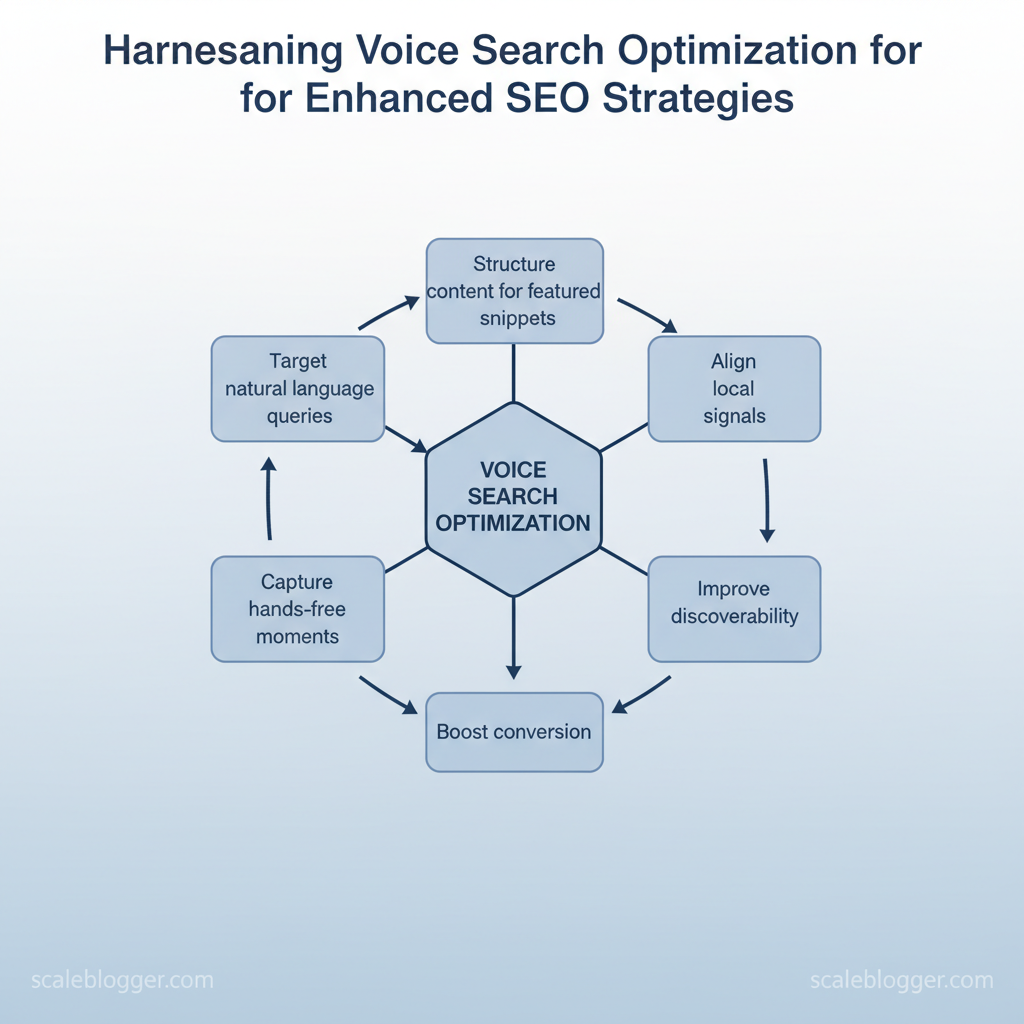
Spoken queries drive more search traffic. However, most content teams continue to write as if users are typing short phrases. This mismatch leads to lost ranking opportunities and less visibility for important searches. Industry research shows voice assistants prioritize conversational answers and quick, local results, so optimizing for voice search improves both discoverability and conversion.
Targeting natural language queries, structuring content for featured snippets, and aligning local signals captures those hands-free moments. Teams that adopt this approach see faster gains in relevant traffic and better performance for question-driven queries.
- How to map conversational keywords to content and intent
- Techniques to structure pages for
featured snippetsand short answers - Local SEO adjustments that boost voice visibility for nearby queries
- Content formats that satisfy voice assistants under 30 words
- Measurement approaches to prove voice-driven lift
Picture a product page rewritten to answer a single voice question and suddenly ranking in assistant results. The next sections show a practical, step-by-step path to implement those changes and measure impact.
Scale voice-optimized content with AI automation at https://scaleblogger.com.
> Key Takeaway: ## Understanding Voice Search and Its Impact on SEO
Voice search prefers natural, detailed questions over short keywords. This changes how users show what they want.
Understanding Voice Search and Its Impact on SEO
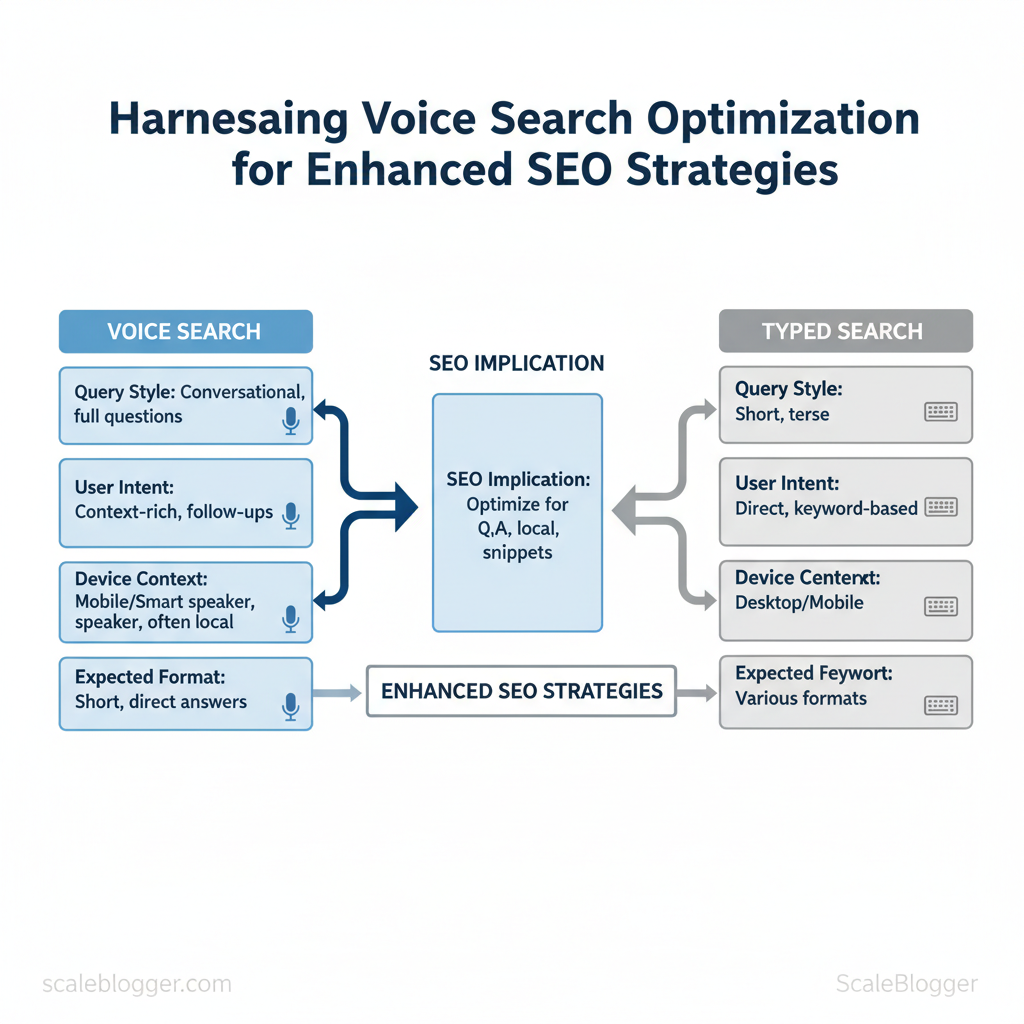
Voice search prefers natural, detailed questions over short keywords. This changes how users show what they want. Users ask full questions, devices deliver concise answers, and natural language understanding (NLU) plus device context — location, mic history, user preferences — decide which result wins. Speech recognition turns audio into text. NLU understands user intent and keywords.
Then, the ranking system prioritizes answers that fit conversational language, local relevance, and the correct format.
How voice search works, in practical terms:
- Speech-to-text + NLU: Speech recognition transcribes;
NLUextracts intent and entities. Context signals: Device type, location, time of day, and prior queries influence rankings. Conversational queries: Long-tail, question-style phrases (Who, How, When) increase.
- Answer-first UX: Search engines prefer short, authoritative answers suitable for read-aloud. Local dominance: Many voice queries are location-based or transactional (
near me, hours). Technical sensitivity: Page speed, structured data, and concise content formats matter more.
> Voice assistants are reported to answer a significant percentage of queries accurately, which may reinforce voice search’s reliability and adoption in SEO strategies. See the Forbes analysis on voice assistant accuracy and implications for SEO: Voice-Activated Revolution: Harnessing Voice Search For Better SEO.
Voice vs typed search comparison, voice search characteristics
| Aspect | Typical Query Style | User Intent Signals | SEO Implication |
|---|---|---|---|
| Query length and phrasing | Full questions, natural language | Conversational intent, follow-ups | Target long-tail, Q&A phrasing; use FAQs |
| Device / Location context | Mobile/smart speaker, often local | GPS, device type, time of day | Prioritize local SEO, mobile-first pages |
| Expected content format | Short, direct answers | Need for concise facts or instructions | for featured snippets and short summaries |
| Result format | Spoken snippet, local pack, rich answer | Single-result satisfaction | Structure content for answer boxes and schema |
| Interaction design (follow-ups) | Multi-turn conversation | Clarifying intent, session history | Build conversational content and internal links |
When teams adapt keyword strategy to conversational queries and tighten technical foundations — structured data, speed, mobile UX — content becomes discoverable by voice without sacrificing broader SEO goals. This is why modern content strategies prioritize automation—it frees creators to focus on what matters.
> Key Takeaway: ## Keyword Research for Voice: From Short Queries to Conversational Phrases
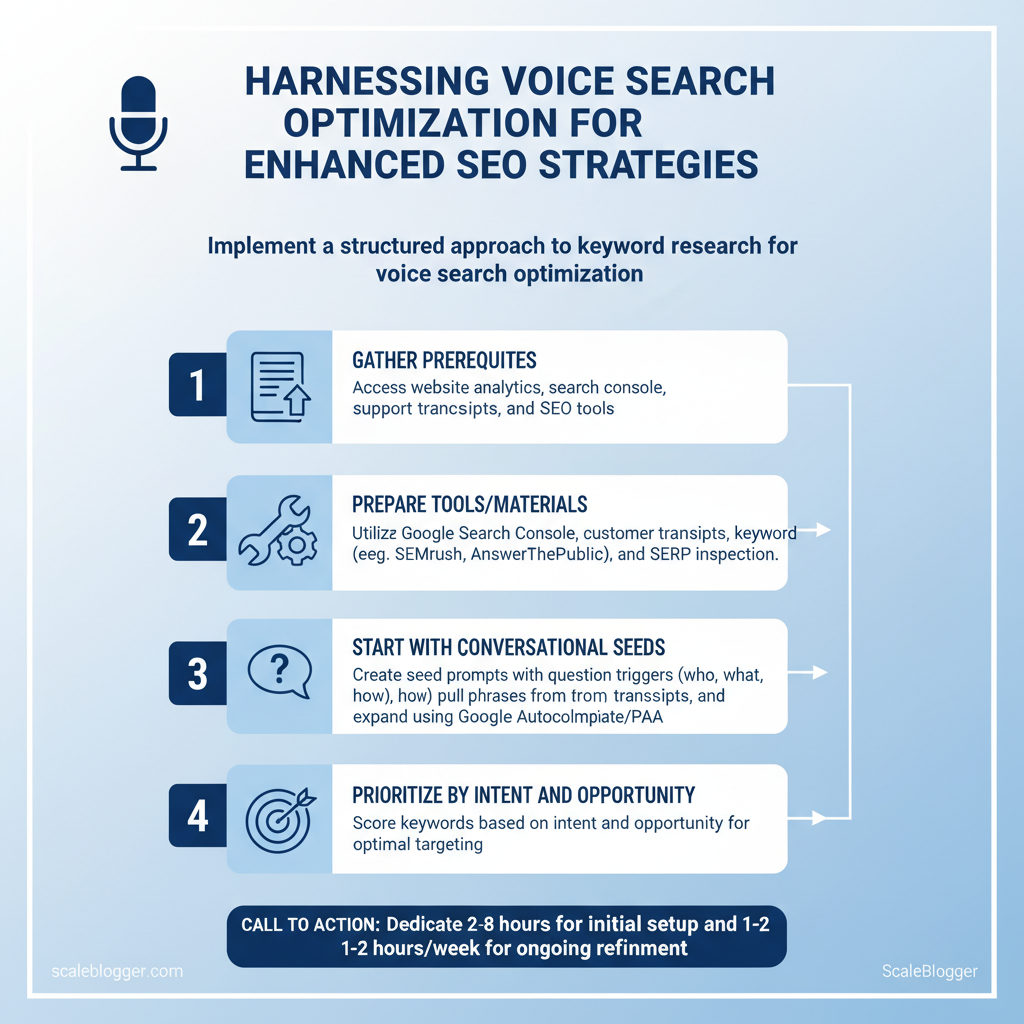
Prerequisites
- Access to your website analytics and search console.
Keyword Research for Voice: From Short Queries to Conversational Phrases
Prerequisites
- Access to your website analytics and search console. 2.
Downloadable customer support transcripts or chat logs. 3. , SEMrush or Ahrefs + Google Autocomplete).
- Basic spreadsheet or a
CSVimporter for keyword scoring.
Tools / materials needed
- Analytics & Search Console (Google Search Console) — query volume and impressions. Customer support transcripts — real conversational language. Keyword tools — SEMrush, Ahrefs, Moz, AnswerThePublic, Keywords Everywhere, Ubersuggest, AlsoAsked.
- SERP inspection — manual checks for featured snippets and People Also Ask (PAA). It takes about 2 to 8 hours to create the initial list. Ongoing updates will take 1 to 2 hours each week.
Start with conversational seeds
- Create seed prompts using question triggers: who, what, where, when, how, why, can, is. These map naturally to voice queries.
- Pull live language from support transcripts and chat logs; extract phrases that include natural pauses, filler words, and complete questions. 3.
Use Google Autocomplete and PAA to expand seeds into long-tail, conversational variations.
Prioritize by intent and opportunity
- Score each keyword on three axes: Intent (informational → transactional), Snippet opportunity (PAA/featured snippet presence), Conversion value (revenue or lead likelihood). 2.
, Intent 40%, Snippet 35%, Conversion 25%) and compute a composite score in a spreadsheet. 3. Prioritize quick wins: pages already ranking near snippets or in top 10 with relevant content — them first for conversational phrasing and snippet structure.
Tactical examples and tips
- Use
who isorhow toseeds for informational voice queries; usewhere can Iornear mefor transactional/local voice queries. - Local and transactional voice queries often convert better because users are action-oriented.
- Reformat answers on-page into short, direct snippets (1–3 sentences), then add an expanded answer below.
> Industry analysis suggests that voice assistants answer a high percentage of queries accurately, which may make snippet optimization increasingly valuable. (Reference: Voice-Activated Revolution: Harnessing Voice Search For Better SEO)
Provide a concise tool + method matrix for sourcing voice query ideas
Table: Section Content — Tool/Source, How to use it for voice keywords, Best practice tip & more
| Tool/Source | How to use it for voice keywords | Best practice tip | Use case example |
|---|---|---|---|
| Google Autocomplete | Type seed prompts, capture suggestions | Use incognito + location filters | Find natural phrasing for FAQ pages |
| People Also Ask (PAA) | Expand boxes to capture related questions | Crawl repeatedly for new variations | Build layered Q&A content |
| AnswerThePublic | Visual question maps by seed | Export CSV for bulk processing | Generate 100+ long-tail questions |
| Customer support transcripts | Text-mine for exact user language | Normalize colloquialisms and contractions | Create conversational blog FAQs |
| SEMrush (filters) | Use question filters and SERP features | Sort by SERP feature presence | Identify snippet candidates ($129.95/mo) |
| Ahrefs (filters) | Use Questions report and clicks metric |
Prioritize low-competition, high-clicks ($99/mo) | Spot high-intent voice queries |
| Keywords Everywhere | Pull related long-tail phrases in UI | Cheap credits; quick expansion ($10 credit) | Fast seed expansion during research |
| Ubersuggest | Content ideas and question reports | Good for budget-conscious teams (starts ~$12/mo) | Competitor phrase discovery |
| AlsoAsked | Visual question trees from PAA | Use to map intent paths | Discover follow-up conversational queries |
| Moz Pro | Keyword explorer question suggestions | Cross-check difficulty and organic CTR ($99/mo) | Validate targetability |
| AnswerThePublic (free tier) | Quick brainstorming without cost | Use alongside paid tools for breadth | Early-stage ideation |
Troubleshooting
- If voice traffic stalls, check snippet structure and answer length; reduce to
1–2concise sentences. - Low conversion on voice keywords often means missing local signals — add
schemaand GMB updates. - If tools disagree on volume, trust on-site analytics and adjust weights accordingly.
Understanding and scoring conversational queries this way lets teams convert natural speech into measurable SEO work, freeing writers to craft answers that voice assistants actually read aloud. When implemented correctly, this reduces wasted content effort and surfaces pages that win both snippets and conversions.
> Key Takeaway: ## Content Formats and Writing Techniques for Voice Queries
Voice queries require answers that are easy for both humans to speak and machines to process. Begin every voice-optimized answer with a short, direct lead — one or two sentences that…
Content Formats and Writing Techniques for Voice Queries
Voice queries require answers that are easy for both humans to speak and machines to process. Begin every voice-optimized answer with a short, direct lead — one or two sentences that resolve the user’s intent — then expand with structured, scannable supporting content that maps to featured snippet patterns.
- Structuring for featured snippets and spoken answers (step-by-step)
- First, craft a one-line lead that directly answers the likely question; make it standalone.
- Then add a concise elaboration (2–3 short sentences) that provides context or a quick why.
- Follow with a clear, semantically marked section: numbered steps for procedures, bullet lists for characteristics, or a comparison table when choices matter.
- Add
FAQPageorQAPageschema and use descriptive headings in question form to signal intent.
Writing voice-friendly copy: tone, syntax, readability
- Active voice: Keeps responses immediate and natural. Conversational tone: Use everyday phrasing that mirrors how people speak. Short sentences: Aim for 12–18 words on average; one key idea per sentence.
- Plain language: Prefer common words over jargon, use definitions for necessary technical terms. Pacing cues: Use pauses implied by commas and short sentences rather than long clauses.
> Market analysis shows voice assistants now answer a high percentage of queries accurately, making concise spoken answers more valuable to ranking and user experience. See the Forbes piece on the voice-activated revolution for context: Voice-Activated Revolution: Harnessing Voice Search For Better SEO.
Practical templates and examples
- Use
What is X?headings for definition intents and a 15–25 word lead. - For how-to, present steps as numbered instructions and include an estimated time or tools list.
- For local queries, include precise address formatting, phone number, and operating hours for spoken answers.
Example snippet template:
html <h2>How to reset a router</h2> <p><strong>Short answer:</strong> Press and hold the reset button for 10 seconds to restore factory settings.</p> <ol> <li>Power off, wait 10s.</li> <li>Press reset for 10s.</li> </ol> <script type="application/ld+json">{"@type":"HowTo",...}</script>Content template availability for different query types (voice search content templates, featured snippet content structure)
| Query Type | Ideal Lead Format | Approx. Answer Length | Supporting Elements |
|---|---|---|---|
| Definition / What is | One-line definition, plain-language | 15–25 words | FAQ heading, short paragraph, definition schema |
| How-to / Step-by-step | Direct short answer + steps | 20–50 words total | Numbered steps, HowTo schema, time/tools |
| Local / Near me | Direct location answer + directions | 10–20 words + contact | Address, hours, phone, LocalBusiness schema |
| Comparison / vs | One-sentence recommendation + pros/cons | 20–40 words | Bulleted pros/cons, comparison table, spec list |
| Transactional / Where to buy | Direct purchase pointer + availability | 10–20 words | Purchase link, price, stock, Product schema |
Understanding these principles helps teams move faster without sacrificing quality. When implemented consistently, voice-optimized content reduces friction for users and improves the chances of securing both featured snippets and spoken answers.
Technical SEO and Site Architecture for Voice
Start by adjusting the site structure to match how people use voice search. Voice assistants look for clear answers that are quick and reliable. Start with these prerequisites and tools, then follow the step-by-step implementation.
Prerequisites
- Access to CMS (ability to edit templates and inject JSON-LD)
- Analytics and lab tools: GA4, Lighthouse, WebPageTest
- Server/hosting access: ability to configure CDN and caching
- Content inventory: prioritized pages for conversational queries
Tools / Materials
- Lighthouse and WebPageTest for performance metrics
- Schema markup generator or in-CMS JSON-LD templates
- CDN provider (Cloudflare, Fastly) and server monitoring
Time estimate: 4–8 hours per template (schema + performance tuning), 1–3 days for server/CDN changes.
- Implement structured data and answer blocks
- Add
FAQPageorHowToJSON-LD for pages that directly answer common questions. - For local intent, add
LocalBusinesswith preciseaddress,openingHours, andgeocoordinates. - Use
SpeakableSpecificationfor short news summaries where eligible; avoid overuse.
- performance and mobile UX
- Reduce largest contentful paint (LCP) by preloading fonts/critical images and deferring non-critical CSS.
- Improve interactive readiness (FID/INP) with code-splitting and minimizing main-thread work.
- Stabilize layout (CLS) by reserving image/video dimensions and avoiding layout-shifting ads.
- Server and CDN configuration
- Configure edge caching for HTML/JSON-LD endpoints and enable HTTP/2 or HTTP/3.
- Implement origin shielding and geo-routing to cut TTFB.
Tips and warnings: Avoid stuffing Speakable with long paragraphs. Use HowTo only when step sequences are genuinely actionable. Keep FAQ answers under ~300 characters to suit spoken responses.
> “Voice search assistants boasting an impressive accuracy rate, answering 93.7% of search queries…” — Forbes council article on voice-activated revolution
Schema types by use case and voice benefit to guide implementation choices (speakable schema, FAQ schema voice search, structured data for voice)
| Schema Type | Best Use Case | Voice Benefit | Implementation Notes |
|---|---|---|---|
| FAQ | Q&A pages, support docs | Quick spoken answers, featured snippets | Use FAQPage JSON-LD; keep Q/A concise; Google supports rich result rendering |
| HowTo | Process/steps content | Readable step sequences for assistants | Use HowTo with step objects; include time/difficulty where relevant |
| LocalBusiness | Storefronts, service areas | Local voice queries, directions, business facts | Add address, geo, openingHours, telephone; keep NAP consistent |
| Speakable | Short news summaries, updates | Explicit eligibility for speech responses | Implement SpeakableSpecification limited to small passages; follow Google guidance |
| Product | Ecommerce product pages | Quick facts: price, availability, SKU | Use Product with offers, aggregateRating; ensure up-to-date availability |
FAQ and HowTo where conversational answers are central, LocalBusiness for brick-and-mortar intent, and Speakable sparingly for short news. Performance and low latency are non-negotiable — schema without speed and mobile stability rarely converts into voice traffic. Understanding these principles helps teams move faster without sacrificing quality.
When implemented correctly, this approach reduces overhead by making decisions at the team level.
Local and Conversational UX: Capturing ‘Near Me’ and Multi-Turn Queries
Prerequisites: verified Google Business Profile (GBP), clean NAP (name, address, phone), site accessible on mobile, basic schema/flexible CMS for Q&A blocks. Tools/materials: Google Business Profile dashboard, structured data validator, analytics (GA4), content pipeline that can publish localized landing pages quickly (an AI-powered content pipeline accelerates this). Estimated time: initial setup 2–6 hours; ongoing maintenance 30–90 minutes/week.
Treat local voice and conversational queries as a distinct UX layer by providing short, immediate answers for voice assistants and ensuring a smooth path for multi-turn dialogue. Voice search favors concise, well-structured facts (hours, services, wait times), while multi-turn flows need chaining: anticipate the next question and surface the answer before the user asks it.
Practical steps for Local Voice Queries and ‘Near Me’ searches
- Verify and GBP: list hours, services, service areas, booking links, and regular updates. Expected outcome: higher visibility in local packs and voice results.
- org` LocalBusiness markup. Outcome: reduce confusion across voice agents.
- ”). Outcome: higher featured snippet and voice-read answer rate.
- ”). Outcome: clearer voice responses and snippet eligibility.
- Collect and respond to reviews, emphasize recency and resolution. Outcome: improved trust signals for assistants and conversion uplift.
> Industry reporting notes voice assistants answer a high percentage of queries with high accuracy; accuracy figures approach 93.7% in recent analyses, reinforcing the value of precise local data (Forbes council on voice-activated search).
Local optimization checklist with priority and impact to make implementation scannable
| Task | Priority | Estimated Effort | Expected Impact |
|---|---|---|---|
| Verify Google Business Profile | High | 1–2 hours | High — visibility in local pack |
| Add FAQ with schema | High | 2–4 hours | High — voice snippet eligibility |
| Create local landing pages | High | 4–8 hours per page | High — targeted long-tail traffic |
| Collect and respond to reviews | Medium | 30–60 min/week | Medium — trust + conversion |
| Ensure mobile load times | High | 2–6 hours audit + fixes | High — reduces bounce / voice retrieval |
Design patterns for multi-turn conversations
- Structured Q&A blocks: place short answers and linked follow-ups; tag questions with intent labels. Anticipatory content: include likely follow-ups within the first paragraph to satisfy chained queries. Surface related content: tag and surface nearby pages or topics to reduce friction.
- Analytics-driven refinement: track conversational paths and add missing answers iteratively.
Troubleshooting: if voice answers are stale, refresh GBP and FAQ schema; if multi-turn drop-off is high, instrument sessions to identify missing follow-ups. When implemented correctly, this approach shortens discovery cycles and improves conversion from conversational search. Understanding these principles helps teams move faster without sacrificing quality.
📥 Download: Voice Search Optimization Checklist (PDF)
Measuring Success and Scaling Voice Search Optimization
Measuring voice search performance requires different signals than traditional analytics. Focus on featured snippet views, long conversational query volume, local pack visibility, and results from voice assistants. Focus measurement on these outcomes and build a repeatable playbook so teams can scale optimization without recreating discovery work every time.
- Key Metrics and tracking approach
- Track featured snippet impressions and clicks in Google Search Console, then map those queries to voice-friendly pages.
- Use query reports to identify long, conversational queries (natural language Qs of 4+ words); prioritize those that trigger snippets.
- Measure local pack visibility and local conversions (calls, direction requests, bookings) via GA4 and local SEO tools.
- Monitor answer quality on voice platforms using the Amazon Alexa and Google Assistant consoles where available.
- Combine rank-tracking filters that isolate question-style SERPs to see which pages consistently appear for voice-style queries.
Tools to support these metrics include Search Console for snippets, GA4 for behavior and conversions, rank trackers with question filters, local SEO platforms for local pack signals, and voice platform analytics for device-level performance.
Example template idea: create a Snippet Optimization Brief that lists the target question, 40–60 word answer, related FAQs, and required FAQ schema code for quick deployment.
> “Voice search assistants are reported to answer approximately 93.7% of search queries with high accuracy on many platforms,” according to some discussions on voice search adoption and impact. https://www.forbes.com/councils/forbestechcouncil/2024/12/17/voice-activated-revolution-harnessing-voice-search-for-better-seo/
Scaling Process: SOPs, Templates, and Automation
- Create a standard operating procedure (SOP) that converts high-value queries into content tasks: discovery → snippet draft → schema injection → monitoring. Build snippet templates: Question (H2) → 40–60 word direct answer → supporting bullets → microcopy for featured snippet formatting. Automate schema deployment with CMS plugins or CI scripts that inject
FAQandSpeakableschema based on template fields.
- Schedule recurring audits (quarterly) and prioritize remediations using an ROI matrix: traffic potential × conversion intent. Use automation to tag pages that generate conversational queries and queue them into content sprints.
Measurement tools and what voice-specific signals each provides to inform tool selection
Measurement tools and what voice-specific signals each provides to inform tool selection
| Tool | Voice-specific signals | Best for | Notes |
|---|---|---|---|
| Google Search Console | Featured snippet impressions, query snippets, SERP positions | Snippet performance | Free, direct snippet data |
| Google Analytics (GA4) | Local conversions, voice-driven events (calls/form fills) | Conversion tracking | Use event tagging for voice actions |
| SEMrush | Question keyword volume, SERP feature tracking | Keyword discovery + competitive analysis | Tracks featured snippets and intent |
| Ahrefs | Long-tail query discovery, SERP feature history | Backlink + organic research | Strong keyword explorer for question phrases |
| Moz Pro | Rank tracking with SERP feature insights | Mid-market SEO teams | Useful keyword intent tagging |
| BrightLocal | Local pack visibility, review monitoring | Local businesses | Tracks local rankings, citations |
| Yext | Local listing accuracy, knowledge graph signals | Enterprise local presence | Automates local data across platforms |
| Rank Ranger | Question-filter rank tracking, SERP feature reports | Custom rank reports | API-friendly for dashboards |
| Amazon Alexa Dev Console | Skill invocation metrics, answer performance | Alexa-specific testing | Device-level metrics, developer-focused |
| Google Assistant Console | Action analytics, conversational queries | Assistant-specific testing | Conversation accuracy and engagement |
Understanding these measurement patterns and building SOPs with reusable templates lets teams scale voice optimization efficiently and keeps technical debt low while increasing the chances of appearing where voice queries land. When implemented, this approach streamlines decision-making and turns conversational demand into reliable traffic and conversions.
Conclusion
Voice-driven search is reshaping how audiences ask questions, so content must shift from short keyword fragments to conversational, intent-rich answers. Changing headlines and meta tags to match spoken queries, creating content with short vocal answers plus more detail, and automating variations are effective strategies. Teams that do this see better long-tail rankings and more engaged users. As Forbes highlights, voice search behavior is growing fast, so prioritize conversational intent, build concise vocal snippets, and automate variant creation to capture those queries at scale.
Start by auditing top pages for question-driven gaps, then create 1–2 voice-ready snippets per pillar page and deploy an automated pipeline to generate conversational variants. For professional implementation and rapid scaling, consider technical content automation platforms—Scale voice-optimized content with AI automation is a practical next step to operationalize these tactics and turn spoken-query opportunities into predictable traffic.
