

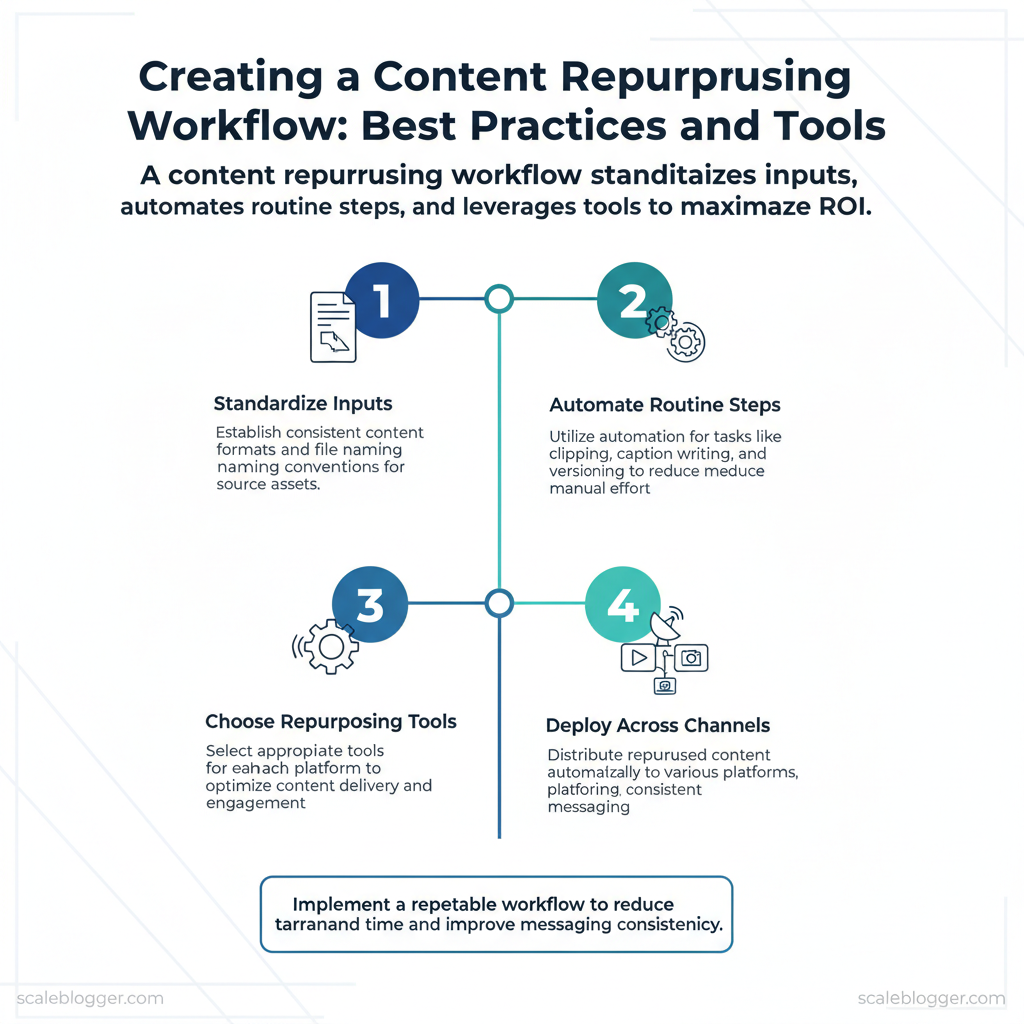
Marketing teams burn time turning one strong piece of content into dozens of usable assets. Manual tasks like clipping, writing captions, and creating versions spread effort across platforms. This reduces return on investment (ROI). Creating a repeatable content workflow for repurposing helps stop inefficiencies.
Standardizing inputs, automating routine steps, and selecting the right repurposing tools for each channel achieves this.
A tighter workflow reduces turnaround time and keeps messaging consistent across formats and platforms. Picture a product launch where a single webinar becomes a blog, five short videos, and a sequence of social posts deployed automatically. That coordination lifts engagement while freeing creative time for higher-value work.
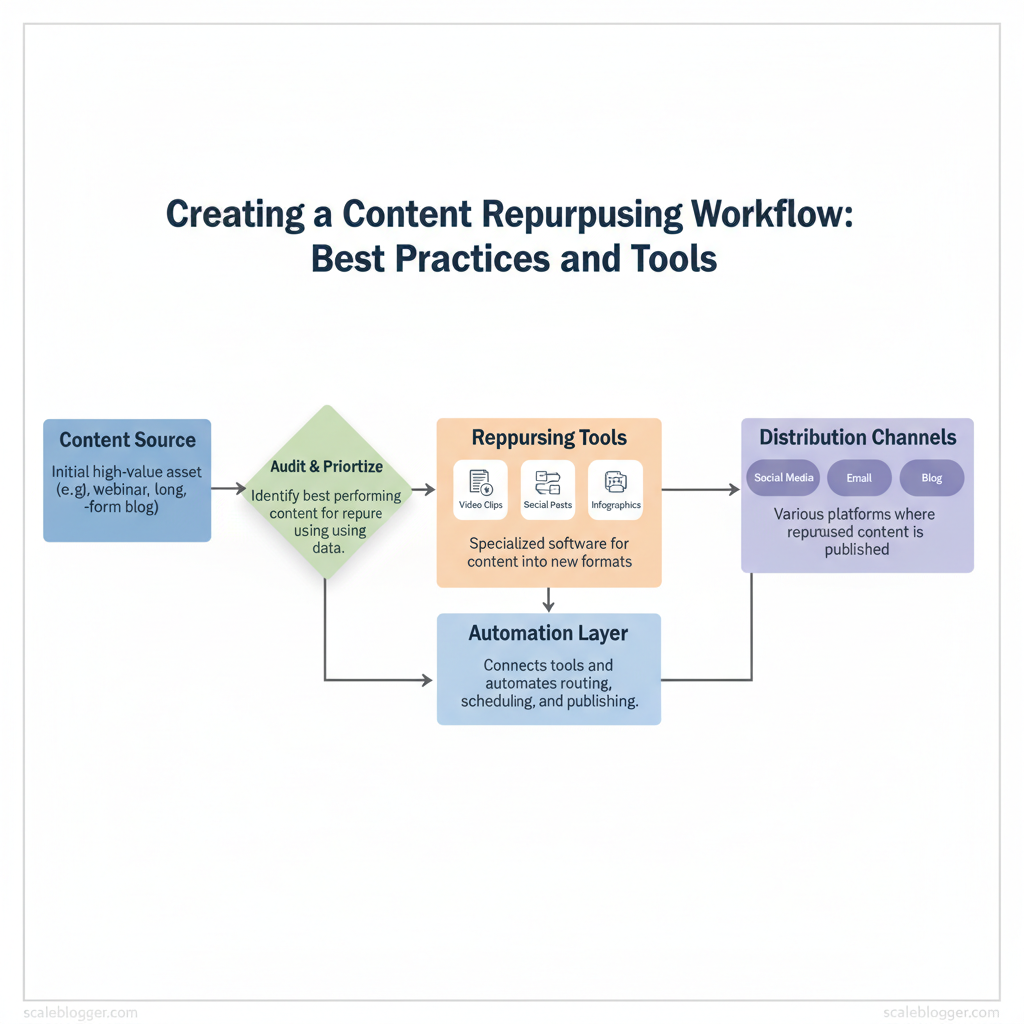
Practical changes matter more than perfect theory: standardize file naming, use templates for formats, and route assets through automation for distribution. Scaleblogger integrates into this stack as an automation-first option that centralizes repurposing logic and reduces manual handoffs. Industry research shows teams that adopt automated workflows see measurable efficiency gains, and the right mix of tools scales those gains predictably.
- How to map source assets to repurposed formats for maximum reach
- Steps to automate editing, captioning, and scheduling without losing quality
- Criteria for selecting repurposing tools and integrating them into a
content workflow - Templates and naming conventions that cut production time by days
- Where Scaleblogger fits into an automated repurposing pipeline
Automate your repurposing workflow with Scaleblogger: https://scaleblogger.com
> Key Takeaway: ## Step 1 — Audit Your Existing Content
Start by treating the audit as a signal-gathering sprint: identify which pages already work, which can be repurposed, and which should be archived. Focus first on measurable outcomes — traffic, backlinks,…
Step 1 — Audit Your Existing Content
Start by treating the audit as a signal-gathering sprint: identify which pages already work, which can be repurposed, and which should be archived. Focus first on measurable outcomes — traffic, backlinks, conversions — then layer on strategic fit like topical relevance and evergreen potential. Conducting a quick, repeatable audit clears confusion and creates a prioritized list for repurposing.
Prerequisites (10 minutes)
- Access: Google Analytics / GA4, Google Search Console, CMS, backlink tool (Ahrefs/Moz), CRM conversion data.
- Tools: Spreadsheet (Google Sheets), Screaming Frog or site crawler, Zapier/Make, basic Python installed.
- Goal: Produce a ranked list of pages to repurpose within 60 minutes.
- Export baseline metrics (20 minutes)
- Log into GA4 and export last 12 months traffic per page as CSV.
- Pull Search Console impressions/queries for the same URLs.
- Export backlinks from Ahrefs/Moz and conversion events from CRM.
- Crawl the site with Screaming Frog to tag content type and canonical status.
- Score and prioritize (15 minutes)
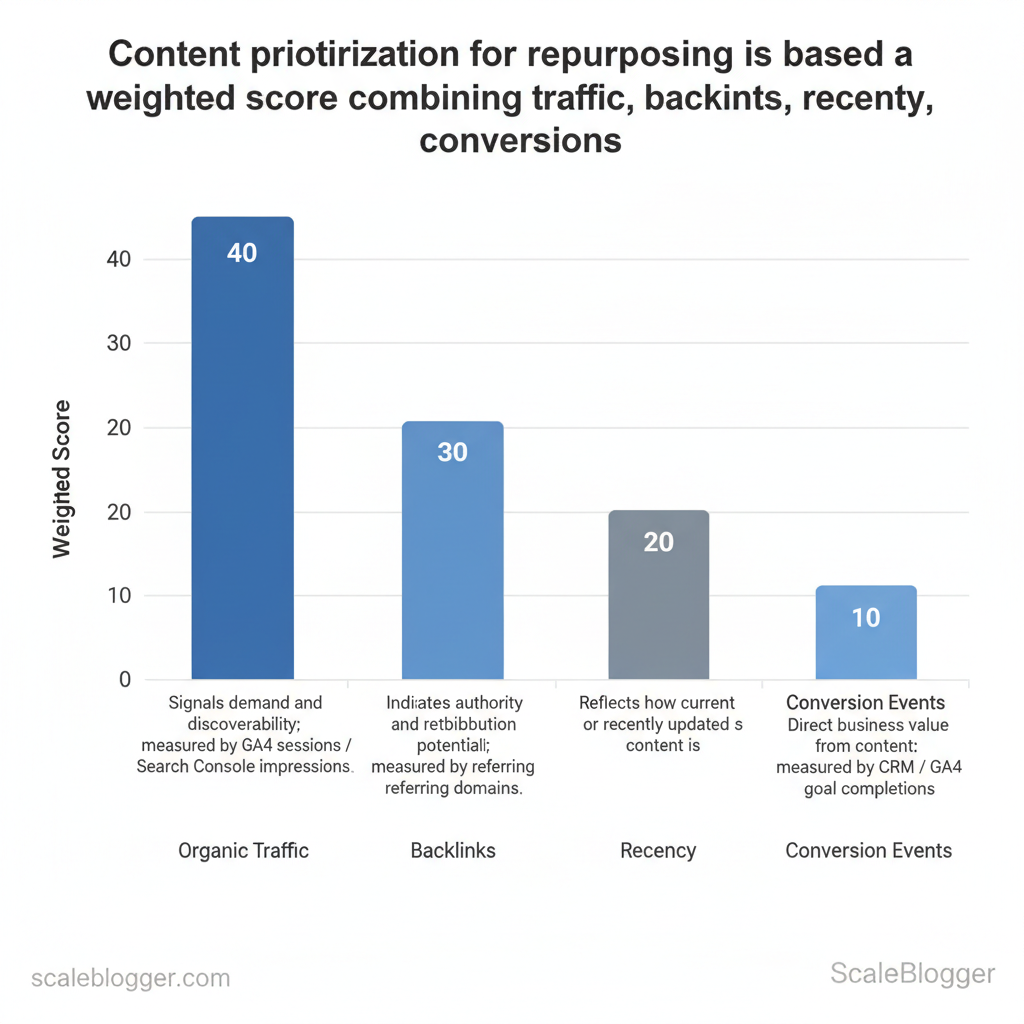
- Use a simple scoring formula:
score = traffic0.4 + backlinks0.3 + recency0.2 + conversions0.1. - Normalize each metric to a 0–100 scale in the sheet, then compute weighted score.
- Sort by score and flag top 20% as high-priority for repurposing.
- Quick 60-minute audit checklist (5 minutes)
- Identify 10 high-opportunity pages for updates or format shifts.
- Mark 10 low-value pages for consolidation or removal.
- Create a one-line repurpose idea for every high-priority page.
Tools and automation to speed future audits
- Screaming Frog: map content types and HTTP status in bulk. Google Sheets + Apps Script: normalize and compute scores automatically. Zapier/Make: schedule weekly exports from GA4 to your sheet.
- Light Python script: combine CSVs and output sorted scores.
python
merge_metrics.py
import pandas as pd ga = pd.read_csv('ga.csv') sc = pd.read_csv('gsc.csv') ah = pd.read_csv('ahrefs.csv') df = ga.merge(sc, on='url').merge(ah, on='url') df['score'] = df['sessions_norm']0.4 + df['backlinks_norm']0.3 + df['recency_norm']0.2 + df['conversions_norm']0.1 df.sort_values('score', ascending=False).to_csv('priority_list.csv', index=False)
Prioritization criteria and explain why each matters for repurposing decisions
| Criteria | Why it matters | How to measure | Quick threshold for repurpose |
|---|---|---|---|
| Organic traffic | Signals demand and discoverability | GA4 sessions / Search Console impressions | >500 sessions/mo or rising trend |
| Engagement (time on page/comments) | Shows content depth and user interest | CMS time-on-page, comments count | Avg. time >90s or >5 comments |
| Backlinks and referral links | Indicates authority and redistribution potential | Ahrefs/Moz referring domains | >5 referring domains |
| Conversion events | Direct business value from content | CRM / GA4 goal completions | ≥1 conversion/mo or high intent action |
| Evergreen relevance | Longevity & repurpose ROI | Manual editorial review | Content still relevant in 12+ months |
When scaling this process, automate the exports and scoring and schedule regular audits. com to convert prioritized posts into multi-format assets and shorten the time from audit to published repurpose. Understanding these principles reduces busywork and speeds decision-making across content teams.
When executed consistently, audits turn scattered content into a predictable growth engine.
> Key Takeaway: ## Step 2 — Define Repurposing Goals and KPIs
Begin by connecting each repurposed format to one clear, measurable business goal. That forces trade-offs up front — short-form video and carousels win attention quickly but rarely convert directly;…
Step 2 — Define Repurposing Goals and KPIs
Begin by connecting each repurposed format to one clear, measurable business goal. That forces trade-offs up front — short-form video and carousels win attention quickly but rarely convert directly; gated guides and email sequences convert but require a longer funnel. Choose one primary goal per pipeline, then assign 1–2 primary KPIs and a clear 90-day target so teams know when to scale or stop.
Choosing goals and KPIs Research from industry sources shows that measuring specific metrics can greatly enhance content performance.
- Awareness: Prioritize reach and view metrics; measure with views, impressions, and share rate.
- Engagement: Prioritize depth metrics; measure with watch time, time on page, likes/comments and completion rate.
- Conversion: Prioritize lead and revenue metrics; measure with leads, conversion rate, and downstream MQL-to-SQL movement.
Map common repurposed formats to goals and KPIs for quick decisions:
Map repurposed content types to goals and KPIs for quick format selection
| Repurposed format | Primary goal | Primary KPI | Best distribution channel |
|---|---|---|---|
| Short-form video (30–60s) | Awareness | Views / Completion rate | TikTok, Instagram Reels, YouTube Shorts |
| Long-form video (5–10min) | Engagement | Average watch time / View-through rate | YouTube, LinkedIn (native), company site |
| Carousel/infographic | Awareness / Engagement | Saves / Shares / Time on card | LinkedIn, Instagram, Pinterest |
| Email drip / gated guide | Conversion | Lead conversion rate / MQLs | Email (drip), landing page with PPC |
| Podcast episode | Engagement / Thought leadership | Downloads / Listening duration | Apple Podcasts, Spotify, YouTube republish |
90-day target template (use and adapt)
- Week 0: Baseline — record current monthly views, leads, and conversion rate. 2.
Weeks 1–4: Launch 3 repurposed items per format; track with UTMs. 3. Weeks 5–8: top-performing creative; double down on the best channel.
- Weeks 9–12: Measure lift against baseline; decide to scale or iterate.
Measuring ROI of repurposing (practical)
- utm_source=tiktok&utm_medium=video&utm_campaign=xxx`). 2.
Use distinct landing pages for repurposed campaigns to isolate behavior. 3. Apply incremental attribution: compare leads/revenue from repurposed campaigns against a matched control period.
Example ROI calculation
- Cost to repurpose (labor + tools) = $2,000 for 90 days. 2.
10 * $1,200 = $4,800. 3. 4 → 140% return.
Use UTMs and distinct landing pages to make the numbers defensible, and consider using a content scoring framework (or an AI-powered content pipeline like Scaleblogger.com) to prioritize repurposing that moves the needle. When teams set clear goals and traceable KPIs, repurposing stops being busywork and becomes an engine for predictable growth. Understanding these choices shortens the feedback loop and frees creators to focus on high-impact work.
> Key Takeaway: ## Step 3 — Create a Repeatable Repurposing Workflow
Start by treating repurposing as a production line: inputs (long-form assets) flow through defined, repeatable stages to produce format-specific outputs. The value comes from eliminating ad-hoc…
Step 3 — Create a Repeatable Repurposing Workflow
Start by treating repurposing as a production line: inputs (long-form assets) flow through defined, repeatable stages to produce format-specific outputs. The value comes from eliminating ad-hoc decisions — each stage has a clear owner, checklist, and time cadence so work moves predictably and quality remains consistent.
Outline stages, primary tasks, responsible role, and time estimates for each workflow step
| Stage | Primary tasks | Responsible role | Estimated time |
|---|---|---|---|
| Select | Audit content inventory, pick high-ROI pieces (traffic, backlinks, intent) | Content Strategist | 1–2 hours per selection |
| Plan | Map target formats, distribution channels, KPIs; create asset briefs | Content Strategist / Project Manager | 2–4 hours per campaign |
| Extract (content atoms) | Pull quotes, visuals, data points, subheadings, timestamps | Repurposing Specialist / Editor | 1–3 hours per long-form asset |
| Adapt (format-specific) | Convert atoms to scripts, carousels, short videos, tweets, newsletters | Designer / Video Editor / Copywriter | 3–8 hours per output bundle |
| (SEO/design) | Add meta, headlines, thumbnails, alt text, SEO copy, accessibility checks | SEO Specialist / Designer | 1–3 hours per final asset |
| Distribute & Measure | Schedule across channels, trigger paid boosts, collect engagement and conversion metrics | Marketing Ops / Analytics | 1–2 hours initial; ongoing reporting weekly |
- Define prerequisites
- Content inventory with traffic and intent tags
- Channel playbooks (format specs, length, CTA)
- Reusable asset library (templates, brand kit)
- Use templates and checklists to reduce friction
- Brief template: single-paragraph goal, target persona, main CTA, required assets
- Handoff checklist: source link ✓ transcript ✓ chosen quotes ✓ image credits ✓ SEO keywords
- Publish checklist: title optimized ✓ meta ✓ thumbnail ✓ distribution tags
Example ready-to-use repurpose_brief.json template:
json { "source_url":"https://example.com/post", "objective":"Increase newsletter signups", "formats":["short_video","carousel","email_snippet"], "primary_cta":"Subscribe", "assets":["timestamp_00:45_quote","fig_2_chart","author_headshot"] }Operational tips: assign single-threaded ownership for each stage, require asynchronous status updates, and keep a central Kanban column for each workflow stage. Industry teams that adopt a modular pipeline reduce idle time and scale output predictably. For teams wanting to automate scheduling and performance benchmarking, consider integrating an AI content automation system like the one at Scaleblogger.com to accelerate plan-to-publish cycles.
Understanding these principles helps teams move faster without sacrificing quality. When implemented consistently, the workflow turns repurposing from guesswork into a reliable growth lever.
Step 4 — Tools and Automations That Save Time
Start by aligning tools with the repurposing workflow. This ensures each asset flows through the pipeline smoothly. This section lists must-have tools by stage, offers practical automation recipes (Zapier/Make), and flags common failure modes with fixes so teams stop wasting time on handoffs and start shipping more content.
Prerequisites
- Team access: API keys or account logins for the tools below. Content inventory: A simple spreadsheet or CMS list of source posts/videos. Basic Zapier/Make familiarity: Able to create triggers and map fields.
Tools / Materials needed
- Accounts for tools below (free tiers usually available)
- A project board (Notion/Trello) to capture automation outputs
Side-by-side comparison of recommended tools mapped to workflow stages and budget tiers
Table: Section Content — Tool, Workflow stage, Primary feature & more
| Tool | Workflow stage | Primary feature | Best for (budget/scale) |
|---|---|---|---|
| Descript | Editing & clips | Text-based video/audio editing, overdub | Creators / small teams — Free + $12/mo |
| Canva | Visual repurposing | Drag-and-drop design, templates, video | Solo to mid teams — Free + $12.99/mo Pro |
| Otter.ai | Transcription | Automated transcripts, speaker ID | Cost-conscious transcription — Free + $8.33/mo |
| Zapier | Workflow automation | 3,000+ app triggers/actions, multi-step Zaps | Teams automating many apps — Free + $19.99/mo |
| Make (Integromat) | Complex automations | Visual scenario builder, conditional logic | Automation engineers — Free + from $9/mo |
| Buffer | Scheduling | Social queue scheduling, analytics | Small teams — from $6/mo per channel |
| Hootsuite | Enterprise scheduling | Multi-account publishing, monitoring | Larger teams — from $99/mo |
| Notion | Planning & CMS | Databases, templates, content calendar | Teams needing integrated docs — Free + $4/mo |
| Loom | Micro video | Quick screen-recordings, share links | Product & comms teams — Free + $8/mo |
| Rev | Human transcription | 99% accurate transcripts, captions ($1.50/min) | High-accuracy needs — pay-as-you-go |
| ChatGPT (OpenAI) | Draft generation | Draft outlines, refactoring, prompts | Ideation & drafting — ChatGPT Plus $20/mo |
| Grammarly | Editing & tone | Advanced grammar, tone detection | Polished copy — Free + $12/mo |
Automation recipes (3 ready-made flows)
- Repurpose webinar → blog draft
- Trigger:
Zoom recording completed(Zapier) - Action: Upload to
Otter.aifor transcript - Action: Send transcript to
ChatGPTvia API for blog draft - Output: Draft saved to
Notionwith tags
- Long-form article → 10 social posts + images
- Trigger: New article published in CMS
- Action: Extract headings to
ChatGPTto create 10 captions - Action: Send each caption to
Canvatemplate via Zapier to generate images - Output: Queue in
Buffer
- Podcast clip distribution
- Trigger: New podcast episode uploaded (Dropbox)
- Action:
Descriptcreate 60s clips using markers - Action: Auto-generate captions and a short LinkedIn post via
ChatGPT - Output: Clips to
Hootsuitequeue
Example Make/Zap pseudo-template
json { "trigger": "new_cms_post", "steps": [ {"action":"transcribe","service":"otter","inputs":["audio_url"]}, {"action":"summarize","service":"chatgpt","inputs":["transcript"]}, {"action":"create_card","service":"notion","inputs":["title","summary","tags"]} ] }Implementation tips
- Use
tagsconsistently to route content between automations. - Start small: automate the highest-volume, lowest-risk task first.
- Monitor logs weekly; add notifications for failures to a Slack channel.
Scale your content workflow further by integrating automation with an AI content automation partner like Scaleblogger.com for pipeline orchestration and performance benchmarking. When implemented correctly, these automations reduce busywork and let teams focus on creative strategy and distribution. Understanding these building blocks makes it simple to expand automations without sacrificing quality.
Step 5 — Distribution and Channel Optimization
Distribution should be seen as a focused engineering task, not something to consider later. Repurposed assets perform best when formats, cadence, and CTAs are tuned to each channel; a single blog post can yield a week of high-impact touchpoints if sliced correctly and tracked with a minimal attribution schema. Below are channel-specific best practices, one practical optimization tip per channel, a 30-day distribution calendar you can implement immediately, and a compact tracking setup to prove what’s working.
Channel-specific best practices for repurposed assets
- Format tailoring improves reach: convert long-form blogs into short scripts, carousels, and newsletters.
- Cadence matters: stagger posts across channels to capture different audience windows and algorithmic boosts.
- CTA alignment: match CTA type to platform intent—education on YouTube, quick conversions on email.
Table: Section Content — Channel, Recommended format, Ideal length & more
| Channel | Recommended format | Ideal length | Best CTA type |
|---|---|---|---|
| YouTube | Long-form explainer (repurposed blog → scripted video) | 8–12 minutes | Subscribe / watch playlist |
| LinkedIn feed | Text + image carousel summarizing insights | 200–400 words / 6–10 slides | Download checklist / comment |
| TikTok/Shorts | 3–5 short clips highlighting key tips | 15–60 seconds each | Follow / visit profile |
| Instagram (reels/carousel) | Reels from video snippets; carousels for step lists | Reels 15–60s; carousels 5–10 cards | Save post / visit link in bio |
| Email newsletter | Summary paragraph + link + exclusive add-on | 150–250 words | Click to read full post |
30-day distribution calendar and where to boost
- Day 1: Publish long-form blog + schedule YouTube video (embed blog in description). 2.
Day 2: LinkedIn carousel summarizing 5 insights. 3. Day 4: Short-form TikTok/Shorts clip #1 (tip 1).
- Day 7: Instagram Reel clip + carousel teaser. 5.
Day 10: Email newsletter with exclusive checklist and deep-link to blog (Paid boost: allocate to top-performing newsletter segment). 6. Day 12: TikTok/Shorts clip #2 (CTA to profile).
- Day 15: LinkedIn long post with case excerpt. 8.
Day 18: YouTube short (repurpose main point). 9. Day 22: Instagram carousel highlighting results/screenshots.
(Paid boost: promote Reel on Instagram for reach). 10. Day 25: Repost LinkedIn with updated metric or quote.
- Day 28: Final promotional email + social recap. (Paid boost: run a 3-day LinkedIn sponsored post to target decision-makers).
- Day 30: Measure, document winners, and repurpose top-performing clip again.
Minimal tracking schema for clear attribution
- UTM template: use
utm_source,utm_medium,utm_campaign,utm_contentfor each slice. - Conversion events:
page_view,signup,content_download,watch_complete. - Content ID: attach
content_idto all UTMs for easy aggregation.
Example UTM snippet:
?utm_source=linkedin&utm_medium=social&utm_campaign=mar-2025_blog_launch&utm_content=carousel_v1&content_id=blog123Troubleshooting tips
- If social engagement is low, shorten first 3 seconds of videos and test different thumbnails.
- If email CTOR underperforms, swap subject lines and test single-CTA vs dual-CTA.
Consider automating scheduling and performance benchmarking with an AI content pipeline—Scaleblogger helps automate the repeatable steps so teams focus on creative optimization. When distribution is treated like product launch engineering, content works harder with less overhead.
📥 Download: Content Repurposing Workflow Checklist (PDF)
Step 6 — Iterate, Test, and Scale
Start with a hypothesis, run a focused test, then use results to expand what works. Iteration here is a disciplined loop: define a measurable hypothesis (for example, “shorter intro increases time-on-page by 10%”), execute a controlled variant, validate with basic statistics, and either scale the winner or run a follow-up experiment. This approach turns opinions into repeatable outcomes and prevents wasted production capacity.
- Testing framework and optimization loops (30–60 minutes per experiment setup)
- Formulate hypothesis — state the metric, the expected direction, and the treatment (e.g., change thumbnail, headline, or CTA).
- Design test — A/B or multi-variant, sample sizes estimated with
minimum detectable effectand 80% power in mind. - Run for a cadence — short experiments (7–14 days) for creative elements; longer ones (30+ days) for SEO-driven content changes.
- Analyze and iterate — apply a structured decision: promote, refine, or kill the variant.
- Hypothesis-driven tests: prioritize thumbnail/hook/CTA first, then structural changes (format, length).
- Cadence: run weekly creative tests (headlines, thumbnails), monthly performance reviews (traffic, conversions).
- Sanity checklist for early-stage tests: check sample independence, validate traffic split, confirm baseline stability, ensure minimum sample size, use consistent conversion definitions, according to industry best practices.
Scaling strategies: templates, teams, and outsourcing (time estimate: initial 2–4 weeks to set system; ongoing scale in 90 days)
- Templates and atom libraries: build a library of reusable
title,outline, andCTAatoms to cut production time by 30–50%. - When to hire vs outsource: hire for core, strategic roles (editorial lead, SEO strategist); outsource repetitive production (research briefs, first drafts) via vetted freelancers or agencies.
- 90-day milestones: use a sprinted playbook with weekly owners and measurable outputs to move from pilot to scale.
90-day scale playbook showing weekly milestones, hires/outsourcing actions, and expected outputs
| Week | Action | Owner | Expected output |
|---|---|---|---|
| Week 1–2 | Build template library (titles, outlines, CTAs) | Content Lead | 20 reusable templates |
| Week 3–4 | Run weekly A/B creative tests | Growth PM | 8 test results, 2 winners |
| Week 5–8 | Onboard 2 freelance writers + automation for scheduling | Ops Manager | 16 published posts/month |
| Week 9–12 | Hire editorial lead or agency for scale | Head of Content | 40 posts/month, QA workflow |
| Review & | Monthly performance review and playbook update | Analytics Lead | Updated templates, scaling checklist |
Understanding these iteration and scaling mechanics helps teams move from ad-hoc content pushes to a predictable, test-driven growth engine. When implemented correctly, this approach reduces overhead and lets creators focus on high-impact work.
After walking through why repurposing stalls and how automation, templates, and clear ownership fix the workflow, this is what matters: automating repetitive edits frees time for strategy, templates keep brand voice consistent across formats, and a single owner for version control prevents duplicated effort. The trend shows that teams using these strategies transition from randomly editing content to a consistent process that reliably creates social clips, blog derivatives, and email sequences. If you’re wondering whether this can speed up turnaround and who should manage it, the best answer is a small cross-functional lead (content and operations) along with automated export and captioning tools for the quickest results.
- Automate repetitive steps to recover hours per piece.
- Standardize templates to preserve messaging while scaling formats.
- Assign clear ownership so versions and metrics don’t get lost.
For a concrete next step, map one high-value piece of content and build a simple template to produce three outputs in a single workflow; measure engagement after two releases and iterate. To this process, platforms like Automate your repurposing workflow with Scaleblogger can accelerate template-driven exports and captioning for teams looking to scale without added headcount. Start with one content type, automate the repetitive work, and use the freed capacity to test higher-impact creative.
