

Marketing teams still spend disproportionate time wrestling with calendars, chasing approvals, and manually posting content. That friction slows campaigns, fragments messaging, and eats hours better spent on strategy.
A well-designed content calendar with robust automated scheduling turns planning from a coordination headache into a predictable engine. By aligning themes, deadlines, and distribution rules up front, teams regain creative bandwidth and reduce costly last-minute errors. Picture a product launch where publishing rules, asset links, and audience segments flow automatically into each channel instead of relying on ad-hoc spreadsheets.
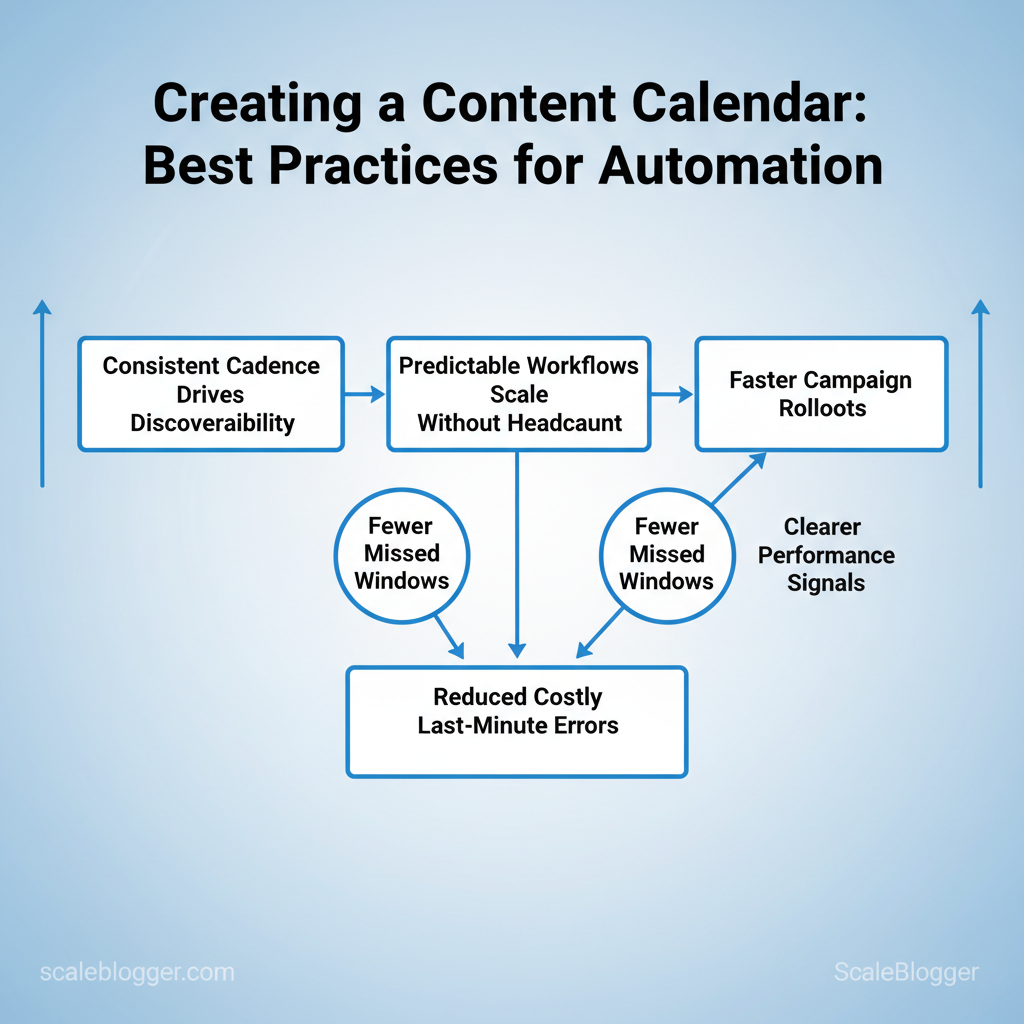
This matters because consistent cadence drives discoverability, and predictable workflows scale without adding headcount. Organizations that adopt disciplined content planning see faster campaign rollouts, fewer missed windows, and clearer performance signals.
- Which automation rules eliminate repetitive scheduling work without losing control
- Simple templates and triggers that preserve editorial quality at scale
- How to integrate your CMS, calendar, and analytics for one source of truth
Prerequisites & What You’ll Need
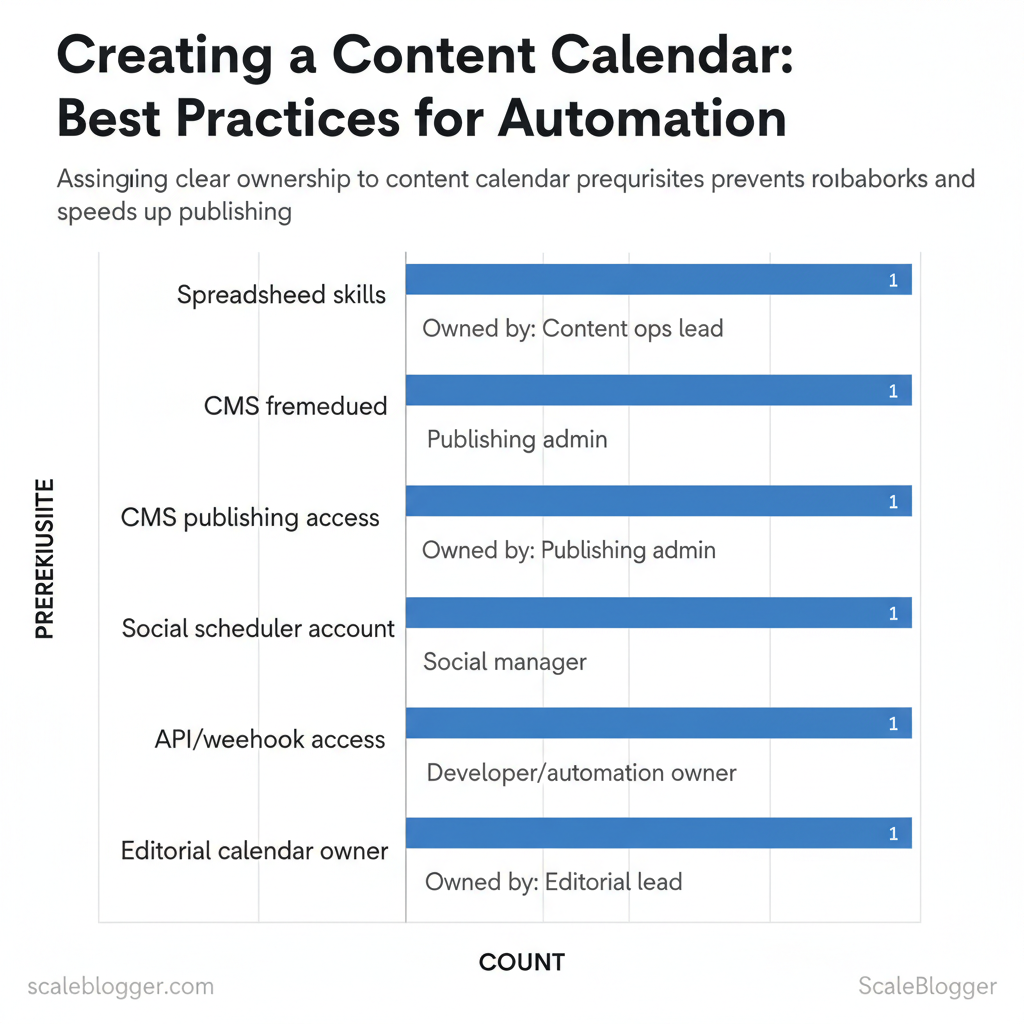
Start by securing the accounts, permissions, and baseline skills that keep an AI-driven content pipeline reliable. The work splits into two streams: technical prerequisites (APIs, webhooks, CMS access) and team prerequisites (who owns content, who publishes, who maintains automation). Get these pieces in place before you design templates or automation rules; missing one small permission later doubles cycle time.
Tools and materials
- Accounts: CMS, social scheduler, analytics, and source-control where relevant.
- Technical access: API keys, webhook endpoints, and a sandbox/staging CMS environment.
- Skills: Spreadsheet automation, basic JavaScript/Python for light scripts, familiarity with CMS templating.
- Team roles: Editorial owner, publishing admin, developer/automation owner, analytics owner.
- Optional tools: An integration platform (Zapier, Make, n8n) or an enterprise automation layer — or use an integrated partner like Scaleblogger.com for AI content automation.
Quick examples and templates
Market teams routinely reduce publish friction by separating “content owner” and “publisher” roles so editorial changes don’t get blocked by access issues.
Example webhook payload to validate delivery: “`json { “event”:”article.create”, “title”:”How to automate topic clusters”, “draft”:true, “author_id”:42 } “`
| Prerequisite | Required/Optional | Who should own it | Why it matters |
|---|---|---|---|
| Spreadsheet skills | Required | Content ops lead | Enables templates, `IMPORTXML`, and CSV exports |
| CMS publishing access | Required | Publishing admin | Needed to push live posts and manage redirects |
| Social scheduler account | Required | Social manager | Automates distribution (Meta/Twitter/X/LinkedIn tokens) |
| API/webhook access | Required | Developer/automation owner | Integrates content creation with tooling; test endpoints |
| Editorial calendar owner | Required | Editorial lead | Maintains cadence, topics, and approvals |
Understanding and implementing these prerequisites prevents needless rework and speeds iteration, which ultimately keeps the content engine humming without constant firefighting. When teams set permissions, test integrations, and name owners upfront, automation becomes an accelerant rather than a liability.
Step-by-Step: Designing Your Content Calendar Structure
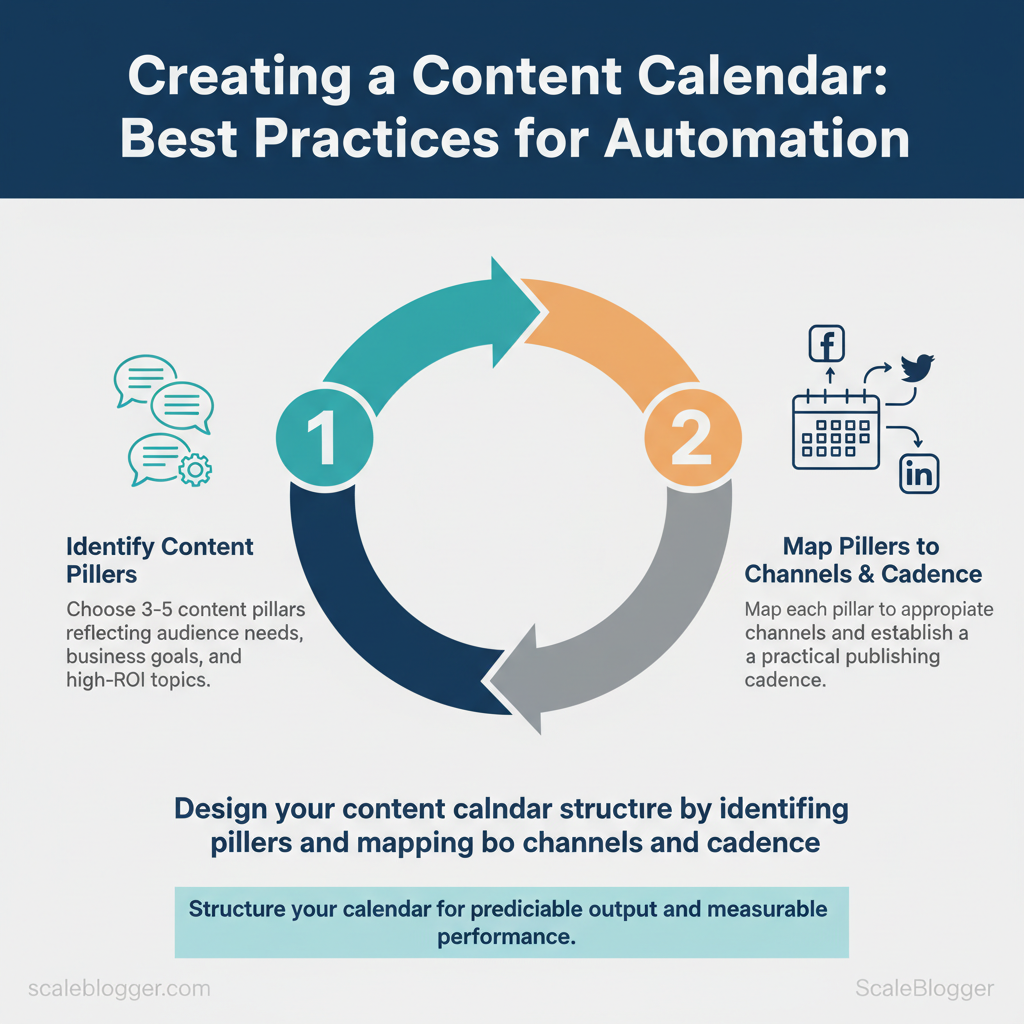
Start by choosing 3–5 content pillars that reflect audience needs, business goals, and high-ROI topics. Then map each pillar to channels and a practical cadence so the team publishes predictably and measures performance. A calendar that’s too granular becomes maintenance overhead; one that’s too loose produces inconsistent output. This section walks through the setup, metadata required for automation, and channel-specific cadence examples you can apply immediately.
Prerequisites
- Audience research: 2–3 buyer personas and top intent keywords per persona.
- Analytics access: GA4, Search Console, and social insights.
- Content inventory: list of existing assets and performance baseline.
- Tools: spreadsheet or calendar tool, plus `Zapier`/`Make` for basic automation.
Step-by-step setup (estimated time: 2–6 hours to implement)
| Channel | Recommended Cadence | Must-have Metadata | Example CTA |
|---|---|---|---|
| Blog | 1–2 posts/week | `title`, `slug`, `publish_date`, `pillar`, `primary_keyword` | Read more → Download template |
| Twitter/X or LinkedIn | Daily–3x/week | `post_text`, `image`, `pillar`, `post_time`, `cta_link` | Discuss this → Join thread |
| Newsletter | 1–2x/month | `subject`, `send_date`, `lead_story`, `cta_link`, `audience_segment` | Get it → Subscribe |
| YouTube/Long-form Video | 1–4/month | `title`, `script_id`, `publish_date`, `thumbnail`, `pillar` | Watch now → Subscribe |
| Repurposed Content | 2–5 micro-assets/asset | `source_id`, `format`, `channel`, `scheduled_date` | Share → Read full post |
Step-by-Step: Tool Selection & Setup for Automation
Start by matching tool capability to team complexity: small teams need low-friction solutions that minimize maintenance, while enterprises require scalable, secure integrations and observability. Choose tools that reduce manual coordination, provide predictable APIs or native connectors, and map directly to the content lifecycle stages you want to automate (ideation → creation → review → publish → measure).
Prerequisites
- Team inventory: list roles, access levels, and technical skills.
- Process map: a simple flow of your current content ops.
- KPIs: publishing cadence, average turnaround, traffic targets.
- Budget range: monthly and one-time integration costs.
- Core platforms: CMS, editorial database, scheduler, social posting tool, automation/orchestration layer.
- Integration utilities: `Zapier`, `Make`, `Workato`, or custom scripts using REST/webhooks.
- Credentials: API keys, OAuth admin accounts, workspace permissions.
Quick webhook example for a publish trigger: “`bash curl -X POST https://cms.example.com/api/publish \ -H “Authorization: Bearer $API_KEY” \ -H “Content-Type: application/json” \ -d ‘{“slug”:”how-to-automate”,”publish_date”:”2025-06-01T10:00:00Z”}’ “`
| Stack | Best For | Pros | Cons |
|---|---|---|---|
| Google Sheets + Zapier + Buffer | Solo/small teams | Low setup, $0–$20/mo, quick templates | Limited scaling, rate limits |
| Notion + Make + Hootsuite | Small/medium teams | Flexible databases, moderate cost, visual flows | Requires setup time, API quirks |
| CMS (e.g., WordPress) + Workato + Social Platform | Enterprise | SLA, robust security, advanced connectors | Higher cost, needs engineering |
| Airtable + Custom scripts + Scheduler | Headless/content ops teams | Custom schemas, strong API, automation hooks | Requires dev resources, maintenance |
| Trello + Zapier + Native schedulers | No-code focused teams | Familiar UI, free tiers, easy automations | Less granular content metadata |
Understanding these principles helps teams move faster without sacrificing quality. When implemented correctly, this approach reduces overhead by making decisions at the team level.
Step-by-Step: Building Automated Workflows
Start by defining a single repeatable outcome—publish a keyword-optimized blog post, route leads to CRM, or refresh evergreen content. Build the workflow around that outcome and keep each automation atomic: one trigger, one decision, and one set of actions. This minimizes brittle chains and makes verification and rollback straightforward.
Common automation workflows (with examples)
- Content creation pipeline: Trigger — new row in `Content Briefs` sheet; Action — run `AI draft` job, create Google Doc, assign editor.
- SEO refresh cadence: Trigger — content older than 12 months flagged; Action — fetch performance metrics, generate update suggestions, schedule update task.
- Lead routing: Trigger — form submission with `lead_score >= 50`; Action — create CRM contact, add to nurture sequence, notify rep.
- Social promotion: Trigger — published blog post; Action — generate 4 social snippets, schedule on platform queue.
- Bold lead-in — Field mapping: `sheet.title` → `doc.title`; `sheet.keywords` → `doc.tags`.
- Bold lead-in — Timestamping: use `YYYYMMDD_HHMM` for versions to avoid collision.
- Bold lead-in — Task names: `wf.content-draft: [topic] — v{n}` for readable audit trails.
Verification steps and rollback considerations
- Bold lead-in — Dry-run: Execute with test rows and `test_mode=true`.
- Bold lead-in — Assertions: Verify `doc.owner_email` matches expected account and `tags` populated.
- Bold lead-in — Rollback: Maintain idempotent actions and a `revert` script that deletes created docs and resets sheet flags.
Step-by-Step: Scheduling & Automated Distribution
Set timezone-aware schedules, automate UTM tagging, and define clear repurposing rules so content publishes reliably and attribution is captured everywhere. Start by agreeing on a canonical timezone, create channel-specific publish windows, and bake UTM logic into the pipeline so analytics are consistent. Then add repurposing rules that map each asset to follow-ups (social posts, newsletter excerpts, video clips) and automate those actions inside your CMS or workflow tool.
Prerequisites
- Team timezone: single canonical timezone (e.g., `America/Los_Angeles`)
- Analytics baseline: GA4 property and naming conventions defined
- Tooling: scheduling-capable CMS, social scheduler, and a small automation engine (Zapier, Make, or native CMS automation)
- CMS with scheduling (e.g., WordPress, Ghost)
- Social scheduler (Buffer/Hootsuite/X for publishers)
- Automation workflow (`Zapier`/`Make` or built-in scheduler)
- UTM scheme template (saved in repo or content brief)
- Blog publish window: weekdays 08:00–10:00 local for organic search visibility.
- UTM snippet: `utm_source=linkedin&utm_medium=social&utm_campaign=topic-cluster-2025&utm_content=postA`
- Repurpose rule: blog → LinkedIn (excerpt + image) within 24 hours, X thread same day, newsletter inclusion next week.
| Channel | Publish Window (local time) | UTM Template | Repurpose Rule |
|---|---|---|---|
| Blog | Mon–Fri 08:00–10:00 | `?utm_source=blog&utm_medium=organic&utm_campaign={slug}` | Convert to 3 social posts, newsletter blurb in 7 days |
| Tue–Thu 08:00–09:30 | `?utm_source=linkedin&utm_medium=social&utm_campaign={slug}&utm_content=post1` | Post excerpt + image, repurpose as article 14d later | |
| X/Twitter | Mon–Fri 12:00–13:00 | `?utm_source=x&utm_medium=social&utm_campaign={slug}&utm_content=thread1` | Thread + follow-up clip; reshare after 30/90 days |
| Newsletter | Tue 09:00 | `?utm_source=newsletter&utm_medium=email&utm_campaign={slug}&utm_content=feature` | Include top excerpt + CTA to blog; archive in digest |
| YouTube | Wed/Sat 18:00–20:00 | `?utm_source=youtube&utm_medium=video&utm_campaign={slug}&utm_content=short` | Full video → short clips → social posts over 60 days |
Understanding these principles helps teams move faster without sacrificing quality. When implemented correctly, this approach reduces overhead by making distribution and measurement repeatable and auditable.
Step-by-Step: Maintaining & Scaling Your Automated Calendar
Maintaining an automated calendar requires a governance model that assigns clear ownership, proactive monitoring to catch drift, and a controlled scaling process so automation grows predictably. Start by defining who is accountable for each calendar element, implement simple health checks that run automatically, and put a formal change-control process around automation updates so fixes and features don’t create chaos.
Prerequisites
- Stakeholder map: list owners for content types, channels, and automation scripts.
- Baseline metrics: current publish frequency, on-time rate, engagement benchmarks.
- Versioned automation: keep automation code and templates in a repo with tags.
- Calendar platform (Google Calendar, Asana, or your CMS calendar plugin)
- Monitoring service (Datadog, PagerDuty, or simple cron-based checks)
- Source control (`git`) and CI for automation templates
- Runbook document (shared in Confluence, Notion, or similar)
Practical examples and checks
- Example check: `GET /api/calendar/events?date=2025-12-01` returns status 200 and 10 events → success.
- Example ownership tag: `owner:editor-jane` on each event so automated reports identify accountability.
- Start small: automate a single content stream, instrument it, then replicate patterns.
- Template library: keep reusable templates for event types to speed rollouts.
- Capacity planning: estimate publishing volume and add automation workers before hitting limits.
Useful link: Learn how to `Scale your content workflow` with AI-powered automation at https://scaleblogger.com for implementation patterns and turnkey pipelines.
Troubleshooting Common Issues
When an automation hiccups—failed triggers, missing media, scheduling conflicts—diagnosis needs to be fast and repeatable so content calendars don’t slip. Start by isolating the failure mode (trigger, asset, or scheduler), then run a short checklist: inspect the automation logs, confirm auth tokens, validate payloads or file paths, and run the same action in a safe test environment. That sequence stops guesswork and lets you apply targeted fixes like re-authenticating an integration, re-running a failed job, or correcting a cron expression. Below are explicit steps, examples, and lightweight tests that avoid impacting production.
Immediate diagnostic checklist
- Check logs first: Automation platform logs and CMS error messages reveal whether the failure is upstream (webhook) or downstream (CMS media store).
- Validate credentials: Expired tokens and permission changes are frequent causes of silent failures.
- Confirm asset availability: Missing images often mean moved or renamed files or permission-restricted storage.
- Review schedule rules: Timezone mismatches and overlapping schedules create duplicates or missed publishes.
Step-by-step fixes and safe testing
| Symptom | Likely Cause | Immediate Check | Fix | Verification |
|---|---|---|---|---|
| Missing scheduled post | Cron/timezone mismatch or queue backlog | Check scheduler logs and timezone settings | Correct cron, clear queue, reschedule | Confirm next scheduled run in logs & test run |
| Webhook failed | Invalid signature, expired URL, or endpoint down | Inspect webhook delivery status and HTTP response | Update endpoint, rotate secret, retry delivery | 2xx response on manual `curl` and successful replay |
| Duplicate social posts | Overlapping schedules or retry logic | Check last-run timestamps and retry policy | Debounce triggers, set idempotency keys | No duplicates on two scheduled runs |
| UTM missing | Template or publishing pipeline strips query params | Inspect final URL in publish payload | Append UTM at template layer or CMS rewrite | Final published URL contains UTM tags |
| Image failed to upload | Permission error or file too large | Check storage ACLs and platform size limits | Fix ACLs, resize image, re-upload | Image accessible in media library and renders |
Understanding and practicing these checks makes troubleshooting routine instead of disruptive, and reduces firefighting time across the content pipeline. When patterns repeat, document the fix in runbooks so the team resolves the next occurrence in minutes rather than hours. For teams wanting to automate incident detection and replay at scale, consider integrating an AI content automation platform—Scaleblogger.com offers solutions to automate pipeline retries and performance benchmarking without replacing existing CMS workflows.
Tips for Success & Pro Tips
Start by treating reliability and ROI as design constraints, not optional features. Prioritize predictable outputs, measurable signals, and repeatable processes so content efforts scale without adding chaos. Small, focused experiments reduce waste; resilient automation and clear conventions preserve value as volume grows.
Practical reliability patterns
- Use retries and backoff: Implement exponential backoff for transient failures (start `1s`, then `2s`, `4s`) and cap at 32–60s to avoid cascading failures.
- Alert on business signals: Trigger alerts when `published_count` drops 20% week-over-week or when average time-to-publish exceeds SLA.
- Circuit breakers: Stop automated pipelines when error rates exceed 5% for 15 minutes and require manual review.
- Template-first: Standardize content skeletons (title, intro, h2s, CTA, meta) so downstream systems parse reliably.
- Naming convention: Use `topic_cluster_contentType_date_v#` — e.g., `saas_onboarding_guide_20251115_v1`.
- Metadata discipline: Always include `intent`, `audience`, and `target_kw` fields for analytics and automated quality checks.
Security and access checklist (quick)
- Rotate credentials: Use short-lived tokens and automated rotation.
- Least privilege: Grant publish/write only to pipeline service accounts.
- Audit logs: Retain action logs for 90+ days and review weekly.
- Secrets management: Store API keys in a secret manager, not environment variables.
- Map cost to value: Tag content with expected CPA or CAC impact and review monthly.
- A/B test variations: Run headline and lead-paragraph tests on 10–20% of traffic to improve click-throughs.
📥 Download: Content Calendar Creation Checklist (PDF)
Measurement & Optimization
Start by defining a small set of outcome-focused KPIs tied directly to automation so the team can measure the value of the pipeline itself, not just raw traffic. Focus on metrics that show delivery velocity, quality lift, and business impact: publish success rate, time saved per article, engagement lift, SERP movement for target keywords, and automation accuracy (false positives/negatives in tagging or routing). These KPIs make it possible to optimize scheduling rules and A/B tests with clear decision thresholds.
How to operationalize KPIs and A/B scheduling
- Weekly health checks: automated alerts for publish failures, queue backlog, and ingestion errors.
- Monthly cadence reviews: analyze per-channel performance and time-to-publish improvements.
- Quarterly audits: inspect automation rules, model drift, and content scoring thresholds.
- A/B test cadence: run controlled schedule experiments on send times and cadence per cluster.
- Annual governance: policy, data retention, and model refresh planning.
A/B testing methodology for scheduling
- Hypothesis-first: state expected direction (e.g., later publish time increases engagement by X%).
- Randomized assignment: split by content cluster, not by audience cookie.
- Sufficient run-length: minimum two content cycles (typically 4–8 weeks) to smooth editorial variance.
- Statistical threshold: predefine uplift threshold (e.g., 5% relative uplift) for rollout decisions.
| Timeframe | Task | Owner | Expected Outcome |
|---|---|---|---|
| Weekly | Health checks: queue depth, publish failures | Editorial ops lead | <2% publish failure; backlog <48hrs |
| Monthly | Cadence review: publish frequency by cluster | Content strategist | Identify 1–2 cadence shifts; +3–7% engagement |
| Quarterly | Automation audit: model drift, tagging rules | ML engineer + Content ops | Retrain models; reduce mis-tags by 10–20% |
| Quarterly | A/B test cycle: schedule/time experiments | Growth analyst | Measured lift per schedule; decision rule set |
| Annual | Governance & policy review | Head of Content | Updated SLAs, data retention, vendor review |
When practical, integrate this framework into your workflow automation: surface KPI alerts, schedule recurring A/B cycles, and log experiment outcomes. For teams scaling with AI, solutions like Scaleblogger.com can plug into this loop to automate measurement and benchmark performance across industries. Applying these rules reduces manual firefighting and focuses team time on the highest-impact content decisions.
Appendices: Templates, Runbooks, and Sample Field Mappings
This appendix provides copyable templates, sample payloads, and runbooks you can drop into an operational content pipeline. Use these artifacts to standardize scheduling, automate publishing triggers, and recover from common automation failures. Examples include a ready content calendar column set, a webhook JSON payload, a step-by-step failure runbook, and sample field mappings for CMS ingestion.
| Resource | Format | Purpose | Where to use |
|---|---|---|---|
| Calendar spreadsheet template | Google Sheets / Excel | Standardize editorial fields and publish workflow | Editorial planning, content ops |
| Webhook JSON example | `.json` | Example payload to trigger publishing automation | CMS → CI/CD → Publishing API |
| Runbook checklist | PDF / Markdown | Step-by-step recovery for failed automations | SRE, content ops on-call |
| UTM template | CSV / Google Sheet | Standardized campaign tagging for analytics | Campaigns, social, paid distribution |
| Naming conventions | Markdown | Enforce file, slug, and asset naming rules | Repository, media library |
Sample webhook JSON for publishing automation: “`json { “event”: “publish_request”, “content_id”: “article-2025-11-30-001”, “title”: “How to Automate Content Pipelines”, “slug”: “automate-content-pipelines”, “publish_at”: “2025-12-02T09:00:00Z”, “author”: “Jane Doe”, “metadata”: { “topic_id”: “topic-42”, “primary_keyword”: “content automation”, “utm”: “utm_source=newsletter&utm_medium=email” } } “`
Runbook: handle failed publish (time estimate: 15–45 minutes)
Sample field mappings for CMS import:
- Source `Title` → CMS `headline`
- Source `Publish Date` → CMS `published_at` (ISO 8601)
- Source `Primary Keyword` → CMS `seo.primary_keyword`
Conclusion
After working through the friction points — calendar chaos, slow approvals, and manual posting — the practical route forward becomes clear: standardize inputs, automate repeatable steps, and measure impact. Teams that standardized brief templates cut prep time; teams that introduced scheduled approvals reduced review cycles; teams that piloted API-driven posting recovered hours each week. Expect faster campaign launches, more consistent messaging, and clearer attribution when these changes are applied. Common concerns — “How quickly will this save time?” and “Will automation feel robotic?” — resolve when automation is paired with human-reviewed templates and staged rollouts: early wins appear in weeks, and quality improves as models learn brand voice.
For an immediate next step, audit one recurring workflow (content briefs, approvals, or publishing) and map which tasks are rule-based versus creative. Begin by automating a single, high-frequency task and measure time saved over a 30–60 day sprint; scale only after quality checks pass. For teams looking to streamline end-to-end execution, platforms and services can accelerate setup and governance — Explore Scaleblogger’s automation services to accelerate your content calendar — a practical option for teams wanting hands-on support while retaining editorial control.
