

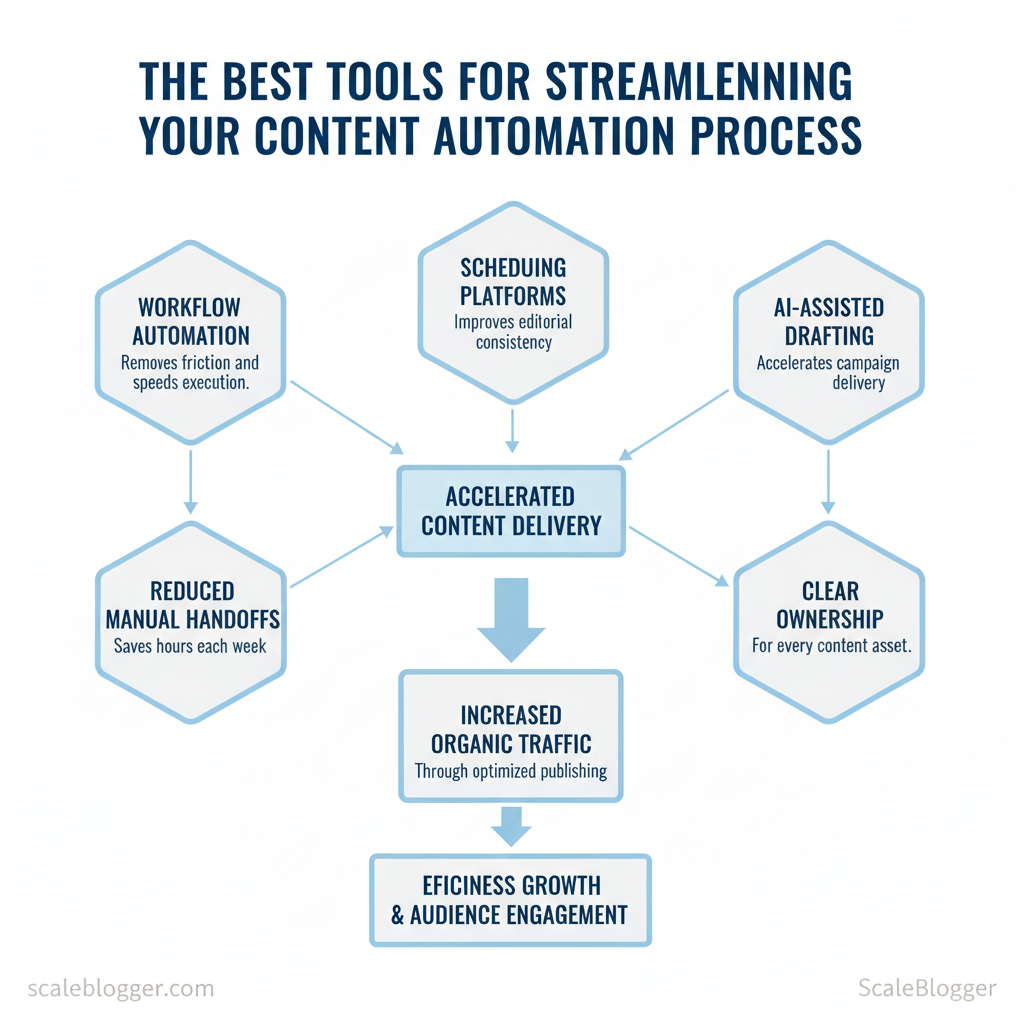
Are you still losing hours each week to manual content handoffs and calendar chaos? Many teams waste time on repetitive publishing tasks, blocking attention from strategy and creative work. Using content automation tools correctly removes friction, speeds execution, and improves editorial consistency across channels.
Adopting the right mix—workflow automation, scheduling platforms, and AI-assisted drafting—translates directly to faster campaigns and measurable reach. Scaleblogger sits at the intersection of planning and execution, helping teams design repeatable workflows that tie content strategy to distribution. Pairing a platform like Scaleblogger with the best content management software reduces single-point failures and clarifies ownership for every asset.
Picture a product marketing team that cut editorial meeting hours in half by automating content briefs and scheduling. Another team increased organic traffic by batching drafts with AI suggestions, then using a scheduler to publish at peak times. These are practical wins, not theoretical benefits.
- What practical tools accelerate content creation without sacrificing quality
- How to choose workflow features that match team size and goals
- Where AI fits into editorial pipelines without creating bottlenecks
- Ways to measure ROI from automation and publishing changes
Next, explore tools and setup patterns that reliably streamline content creation, publishing, and measurement. Plan and automate your first content workflow with Scaleblogger: https://scaleblogger.com
What Is Content Automation?
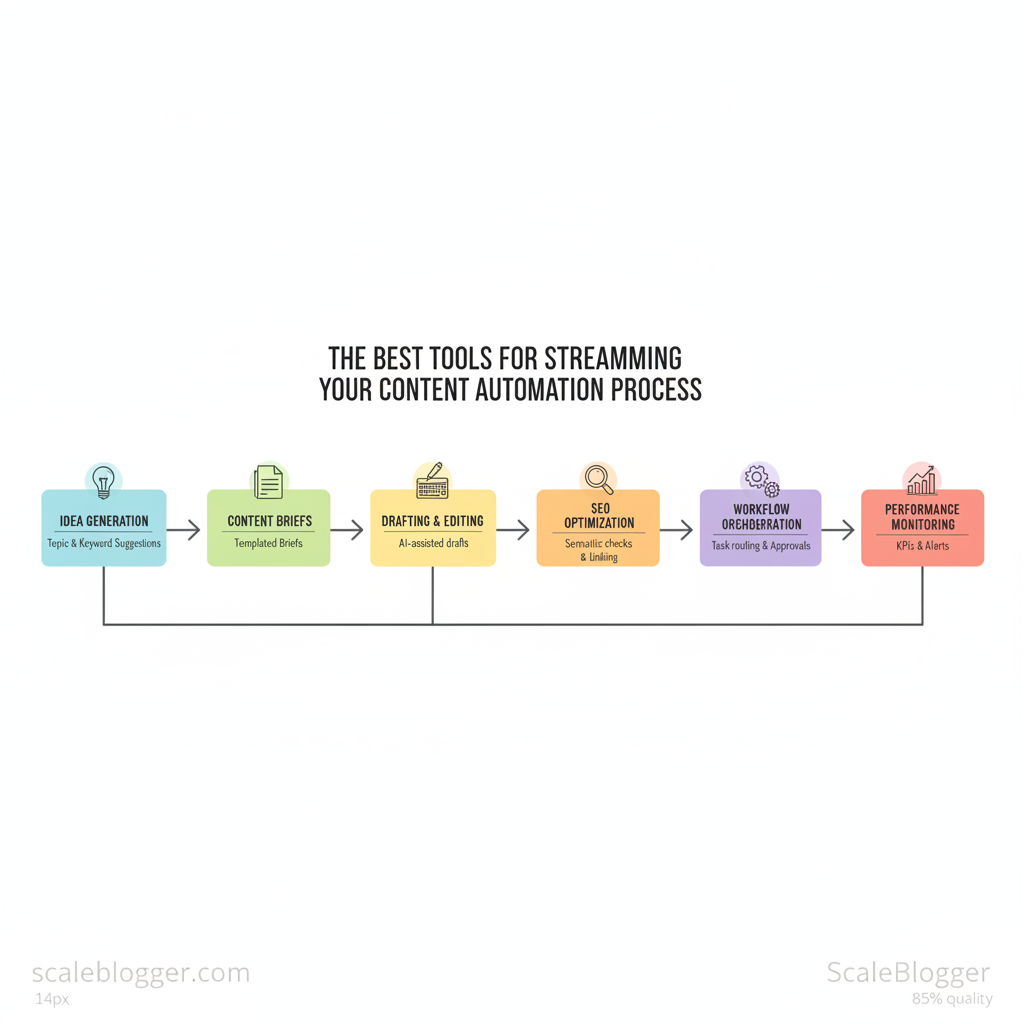
Content automation is the use of software and rule-driven systems to create, manage, optimize, and publish content with minimal manual intervention. At its core it moves repetitive, structured work—topic discovery, brief generation, scheduling, SEO checks, and performance tracking—into automated pipelines so teams can scale output while maintaining consistency.
- Idea generation: automated topic clustering and keyword suggestions based on search intent.
- Content briefs: templated briefs that pull target keywords, competitors, and angle recommendations.
- Drafting & editing: AI-assisted first drafts, rewriting, and headline optimization.
- Workflow orchestration: task routing, approvals, and publishing schedules tied to CMS APIs.
- Performance monitoring: automated KPIs, A/B test rollups, and alerts for content decay.
Practical example: a mid-size marketing team configures a system that automatically generates a content brief from a target keyword, assigns it to a writer, runs the draft through a headline and SEO check, queues the article in the CMS, and publishes according to a calendar — all with approval gates built in. That pipeline reduces turnaround from weeks to days while tracking which topics drive organic growth.
Platforms that support this end-to-end approach range from modular automation tools to full-service solutions; teams focused on blog growth often choose solutions that combine AI drafting, semantic SEO, and scheduling. For teams seeking an out-of-the-box pipeline, explore options like Scale your content workflow which pair automation with performance benchmarking.
Understanding these principles helps teams move faster without sacrificing quality. When implemented carefully, content automation shifts decision-making to the team level and preserves creative judgment where it matters most.
How Content Automation Works: Key Mechanisms
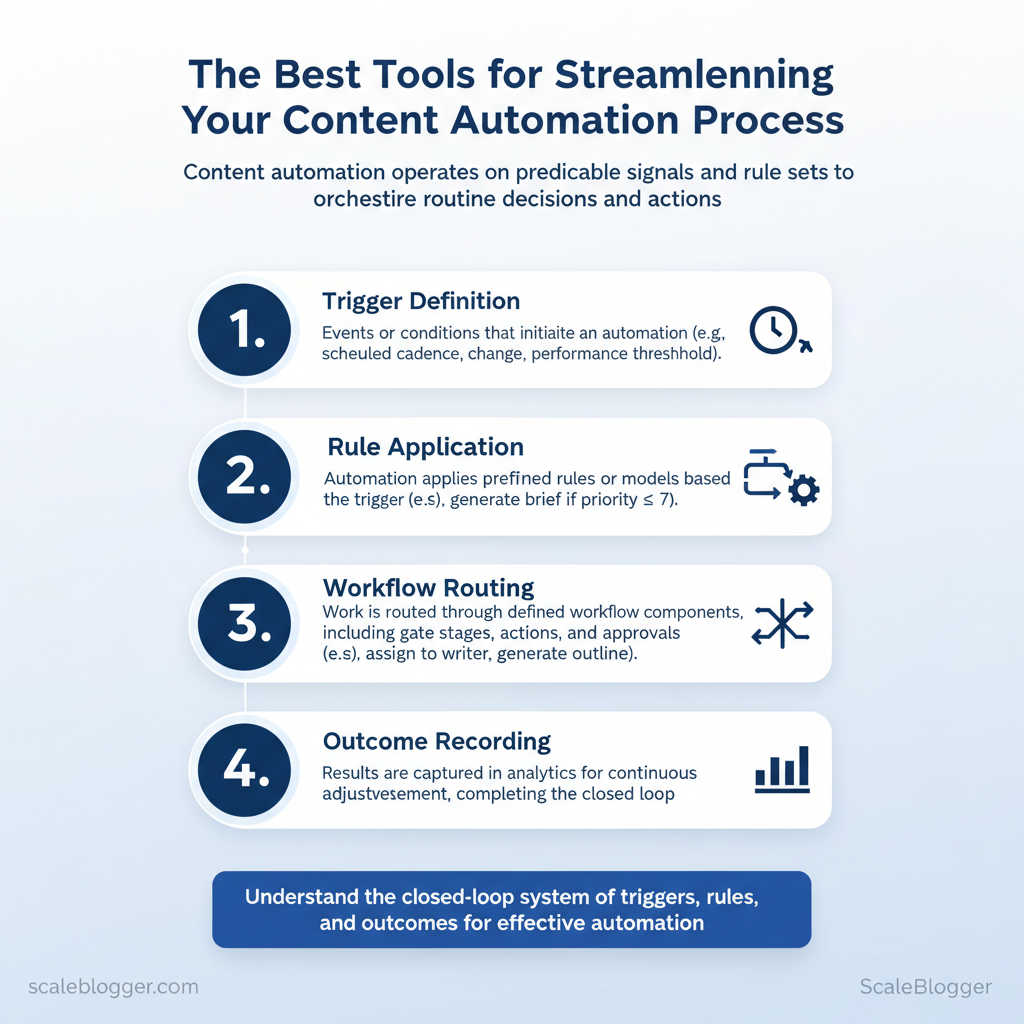
Content automation runs on predictable signals, rule sets, and well-orchestrated handoffs so that routine decisions and actions happen without manual intervention. At its core, automation detects a trigger, applies rules or a model, routes work through a workflow, and records outcomes back into analytics for continuous adjustment. That closed loop is what allows teams to scale publishing frequency while maintaining quality controls.
Triggers and rules Definition: Triggers* are events or conditions that start an automation (time-based, content-state, user-action, or analytics thresholds). Common trigger types: Scheduled cadence (daily/weekly publish), Content state change (draft → ready), Performance threshold (page views drop), User action* (editor assigns topic).
Workflows and orchestration Workflow components: Gate stages (ideation, drafting, editing), Actions (generate outline, add SEO metadata), Approvals (editor sign-off), Artifacts* (draft, images, metadata).
- Where automation replaces manual steps: automatic outlines, meta tag generation, image selection, scheduling, and basic fact-checking.
- Common handoff points: AI draft → human edit; human edit → QA; QA → scheduled publish. Automation handles routine transfers; humans handle judgment calls.
- Types of integrations: native connectors, webhooks, REST APIs, middleware (Zapier/Make), custom integrations.
- Benefits of native connectors: faster setup, built-in auth, reduced maintenance.
{“text”:”Draft ‘How to X’ is ready for review: https://cms.example.com/d/123″} “` This sends a reviewer notification immediately when a draft reaches review.
| Integration Method | Ease of Setup | Reliability | Best Use Case |
|---|---|---|---|
| Native connector | Very easy — UI-based | High — vendor-supported | CMS to SEO tool sync, no-code syncs |
| Webhooks | Easy — minimal dev | Medium-high — depends on endpoints | Real-time notifications, event-driven flows |
| REST API | Moderate — dev work | High — robust controls | Complex data syncs, custom logic |
| Middleware (Zapier/Make) | Very easy — templates | Medium — rate limits apply | Cross-app automations for non-dev teams |
| Custom integration | Hard — engineering time | Very high — tailored SLAs | Enterprise systems, unique data models |
Automation + analytics feedback loops
- Role of analytics: measure outcomes, trigger optimizations, and feed models with labeled performance data.
- Example loop: publish → track CTR and time-on-page → if CTR < threshold, trigger headline A/B test → deploy winner → update editorial rules.
Understanding these mechanisms lets teams design systems that reduce repetitive work and surface the decisions that truly need human judgment. When implemented correctly, automation keeps workflows moving while making performance visible and actionable.
Why Content Automation Matters
Content automation accelerates repetitive workflows so teams spend more time on judgment, creativity, and strategy. When the mechanical work of formatting, tagging, resizing, and reporting is handled by automation, content calendars become predictable, publishing velocity increases, and measurement closes the loop faster — all of which directly affect traffic, conversions, and per-article ROI. Practical automation reduces toil, lowers error rates, and makes scaling a repeatable engineering problem instead of a staffing scramble.
- Faster time-to-publish: Reduce bottlenecks in production and ramp content cadence.
- Consistent quality: Automated checks enforce style, SEO, and accessibility rules.
- Lower marginal cost: Each additional piece of content requires far less incremental labor.
- Better measurement: Automated reporting gives actionable signals in near real-time.
- Scalability: Systems convert individual processes into pipelines that scale predictably.
Side-by-side metrics: manual vs automated for common tasks (formatting, scheduling, SEO checks, publishing)
| Task | Manual Time (mins) | Automated Time (mins) | Time Saved (%) |
|---|---|---|---|
| Article formatting | 30 | 5 | 83% |
| Social scheduling | 25 | 3 | 88% |
| Meta tag optimization | 15 | 2 | 87% |
| Image resizing / alt text | 20 | 4 | 80% |
| Performance reporting | 120 | 15 | 88% |
When automation is not the answer Automation struggles when nuance, brand voice, or high-stakes judgement is required. Avoid full automation when content must convey empathy, handle sensitive topics, or reflect complex legal/compliance constraints. Human oversight remains essential for creative strategy, final editorial quality, and reputation-sensitive decisions.
Human-in-the-loop best practices
- Define guardrails: Establish `style rules`, tone matrices, and escalation criteria before automation acts.
- Automate scaffolding, not judgment: Let tools handle drafts, formatting, and QA checks while humans approve final messaging.
- Embed review points: Use automated triage to route borderline content to specialists.
- Monitor and iterate: Track false positives/negatives and retrain templates or models quarterly.
The Best Tools for Streamlining Your Content Automation Process
Start by matching tool capabilities to the workflow stage you want to automate: content ideation and drafting, CMS publishing, editorial orchestration, integrations, and analytics-driven optimization. Choosing one tool per stage reduces overlap and keeps ownership clear, while a lightweight middleware layer ties them together.
Content creation & AI assistants
- What to use and why: For rapid drafts and idea generation, market leaders include `ChatGPT` (OpenAI) and Jasper for prompt-driven long-form drafts; Frase and Surfer combine AI writing with on‑page SEO signals; Lately.ai excels at repurposing long-form into social posts.
- Integration notes: Prefer tools with native WordPress or API connectors to avoid manual copy/paste; check for multiauthor workspaces if collaboration matters.
- Caveats: Always add a quality-control step — run AI output through a human editor and `SEO` checks to avoid factual drift and tone issues.
- What to prioritize: Native scheduling, canonical URL control, and webhooks. Enterprise CMS like Contentful or Sanity offer content models and preview APIs for automated publish flows.
- Scale recommendation: Use headless CMS for high-volume sites; map content types to templates and let automation populate fields.
- Best practice: Build workflow templates with explicit states (Draft → Review → SEO → Ready → Publish) and automation rules for notifications and versioning.
Integration & middleware tools
- When to add middleware: Use middleware when your tools lack native connectors or when you need cross-system logic. Middleware handles retries, rate limits, and data transforms.
Analytics & optimization tools
- Automated triggers: Use analytics (GA4, Search Console) to create rules that flag pages losing traffic and enqueue them for update.
- How analytics feed automation: Performance thresholds trigger content refresh tasks, A/B tests, or automatic meta updates.
| Tool | AI Writing | Templates | Collaboration | CMS Connectors |
|---|---|---|---|---|
| ChatGPT (OpenAI) | ✓ Conversational drafts, API | ✗ Limited built-in | ✗ API-based workspaces | ✓ API / WordPress plugins |
| Jasper | ✓ Long-form, SEO modes | ✓ Prebuilt templates | ✓ Team workspaces | ✓ WordPress plugin, API |
| Writesonic | ✓ Multiformat AI | ✓ Marketing templates | ✓ Shared folders | ✓ Zapier / API |
| Copy.ai | ✓ Short + long copy | ✓ Idea templates | ✓ Team billing | ✓ Zapier / API |
| Frase | ✓ SEO-driven drafts | ✓ Brief templates | ✓ Team notes | ✓ WordPress plugin |
| Surfer | ✓ SEO content + outline | ✓ Content editor templates | ✓ Content teams | ✓ WordPress plugin |
| Rytr | ✓ Cost-effective drafts | ✓ Templates library | ✓ Shared projects | ✓ Zapier / API |
| ContentBot | ✓ Niche writing types | ✓ Template marketplace | ✗ Basic | ✓ API |
| Peppertype | ✓ Marketing copy | ✓ Campaign templates | ✓ Team collaboration | ✓ Zapier |
| Lately.ai | ✓ Repurposing long → social | ✓ Repurpose templates | ✓ Team scheduling | ✓ HubSpot / API |
| Platform | Ease of Use | Free Tier | Best for |
|---|---|---|---|
| Zapier | Very easy | ✓ Limited | Nontechnical automations |
| Make (Integromat) | Visual, medium | ✓ Generous | Complex multi-step flows |
| n8n | Developer-friendly | ✓ Self-host free | Custom, self-hosted automations |
| Workato | Enterprise-grade | ✗ No | Large org integrations |
| Custom scripts | Technical | ✓ No-cost exec | High-control, bespoke logic |
| IFTTT | Very easy | ✓ Basic | Simple single-trigger tasks |
| Pipedream | Developer-focused | ✓ Generous | API-heavy automations |
| Tray.io | Powerful, complex | ✗ Trial | Scale & enterprise ops |
| Integrately | Easy | ✓ Starter | One-click app integrations |
Mentioning automation strategy tools like Scaleblogger.com is useful when teams want an integrated AI-powered content pipeline and performance benchmarking that connects creation to optimization. Understanding these principles helps teams move faster without sacrificing quality. When implemented correctly, automation frees creators to focus on strategy and storytelling.
How to Choose the Right Tools for Your Workflow
Picking the right tools starts with matching capability to a clear, prioritized workflow — not chasing features. Begin by defining the parts of your content pipeline that must improve (ideation, brief creation, drafting, SEO optimization, scheduling, analytics) and score potential tools against those needs. Short trials with concrete tasks reveal gaps faster than feature lists; treat a vendor trial like a mini pilot project and grade performance objectively.
Assessment checklist (prioritized)
- Core fit: Does the tool address the primary bottleneck (ideation, drafting, SEO)?
- Integration: Connects to `CMS`, analytics, calendar, and team chat via API or native plugins.
- Usability: Team can onboard in ≤2 weeks without heavy training.
- Content quality: Produces publishable drafts or reliably speeds writer output.
- SEO capabilities: Includes `keyword research`, content scoring, and SERP intent signals.
- Automation & scale: Supports templates, bulk generation, and scheduled publishing.
- Governance: Role-based access, revision history, and content approval flows.
- Cost per output: Pricing vs. expected content volume; typical pricing ranges vary widely.
- Freelance / Solo: Cheap starter plan, CMS export, essential SEO checks.
- Small team (2–10): Multi-seat support, collaboration, scheduling, 3rd-party integrations.
- Mid-market (10–50): API access, content governance, performance benchmarking.
- Enterprise (50+): SSO, SLAs, custom workflows, dedicated onboarding.
Trial duration and evaluation tasks
Provide a ready-to-use decision matrix that readers can copy to evaluate tools during trials
| Tool | Fit Score (1-10) | Key Pros | Dealbreakers |
|---|---|---|---|
| OpenAI ChatGPT (Plus) | 8 | Strong NLG, $20/mo for Plus, rapid ideation | No native CMS publishing |
| Jasper | 8 | Templates + long-form, $39/month starter | Higher cost for teams |
| Copy.ai | 7 | Generous free tier, $36/mo pro | Basic SEO features |
| Writesonic | 7 | Affordable starts (~$15/mo), e-commerce prompts | Variable long-form coherence |
| Frase | 7 | SERP-based briefs, ~ $14.99/mo entry | Content depth limited on small plans |
| SurferSEO | 6 | On-page optimization, GA/GA4 hooks, $59/mo | Not a writing tool alone |
| Rytr | 6 | Low cost (~$9/mo), fast outputs | Less customization of voice |
| MarketMuse | 6 | Content planning & intent modeling, starts higher ($149+) | Expensive for small teams |
| SEMrush | 5 | Keyword research, competitive intel, $119.95/mo | Not built for generation workflows |
| Ahrefs | 5 | Backlink analysis & keywords, $99/mo | No AI generation built-in |
Example populated scoring: during a 21-day pilot, Jasper scored 8 for drafting and templates but 6 for integration; SurferSEO scored 9 for SERP optimization but 4 for content generation, suggesting a combined stack.
Practical next steps: run two parallel mini-pilots — one for generation (3–5 drafts) and one for SEO optimization (optimize 3 pages) — then compare combined cost per publishable asset. Scaleblogger.com provides frameworks for building AI content pipelines and can help bridge tool gaps when choosing a combined stack. When implemented correctly, this approach reduces overhead by making tool decisions evidence-based and focused on outcomes rather than features.
Common Misconceptions and Pitfalls
Automation doesn’t replace strategy or craft — it amplifies repeatable work while humans steer intent and quality. Many teams freeze at the idea of automating because of exaggerated fears: robots will write everything, SEO will break, or costs will balloon. Those are myths, and each one has a practical corrective path that removes decision paralysis and unlocks predictable, scalable outcomes.
Example prompt template for consistent outputs: “`text Title:
Industry practitioners adopt a hybrid approach: automation for repeatable, measurable work and humans for judgment and craft. For teams looking to scale content production without losing quality, consider platforms that combine `content pipeline` orchestration with editorial controls — for one practical option, explore AI content automation at https://scaleblogger.com Understanding these trade-offs lets teams move faster while keeping creative quality intact.
Real-World Examples and Mini Case Studies
Teams move faster and publish more consistently when automation handles repeatable tasks such as topic ideation, drafting, and publishing. The four mini case studies below show common problems, the automation-first solutions applied, and measurable outcomes you can expect when workflows are redesigned to combine human strategy with AI and scheduling automation.
| Case | Tools Used | Time Saved | Traffic / Engagement Impact | Publish Frequency Change |
|---|---|---|---|---|
| B2B SaaS Blog | ChatGPT + SEO tool + CMS workflows | ~40% | +55% organic to pillar pages | Biweekly → Weekly |
| E-commerce Team | Template engine + AI writers + CDN + CMS | ~60% | +30% conversion on updated pages | Monthly → Weekly updates |
| Agency (10 clients) | Shared pipeline + QA scripts + reporting dashboards | ~50% | +35% client engagement | 1× → 2× per client |
| Indie Creator | AI drafting + SEO checklist + scheduler | ~30% | +25% audience growth | Irregular → Weekly |
Practical steps that produced these results:
Scaleblogger’s offerings align directly with these patterns, providing an AI-powered content pipeline and automated publishing that replicate the workflows described and accelerate implementation. Understanding these examples helps teams move faster without sacrificing quality. This is why modern content strategies prioritize automation—it frees creators to focus on strategy and amplification.
📥 Download: Content Automation Checklist (PDF)
Implementation Plan: A 30-60-90 Day Roadmap
Start by prioritizing momentum over perfection: the first 30 days set the foundation (data, owners, and minimal viable processes), days 31–60 convert that foundation into repeatable workflows and pilot automation, and days 61–90 scale what works while measuring ROI. This phased approach prevents analysis paralysis and keeps stakeholders aligned around measurable outcomes.
- Content Lead: owns editorial calendar and quality.
- SEO Specialist: owns keyword mapping and on-page optimization.
- Engineering/Automation Owner: links CMS, scheduling, and AI tooling.
- Analytics Owner: tracks traffic, conversions, and content ROI.
| Phase | Key Tasks | Owner | Success Metric |
|---|---|---|---|
| 0–30 days | Audit content, map keywords, set up analytics, create editorial templates | Content Lead / SEO Specialist | Baseline metrics: organic sessions, avg. keyword position, time-to-publish |
| 31–60 days | Implement automation for briefs/drafts, integrate scheduling, run 4–6 post pilot | Engineering / Content Lead | Pilot velocity: 4–6 posts published; +10% average organic CTR |
| 61–90 days | Optimize workflows, A/B test titles/meta, train team on automation, scale cadence | Head of Growth / Analytics Owner | Scale target: 2x content velocity, +20% organic sessions, improved content ROI |
Practical template (copy-paste for your PM tool): “`yaml week: 1 task: content_audit owner: SEO Specialist deliverable: content_gap_sheet.csv metric: baseline_organic_sessions “`
Understanding these phases helps teams move faster without sacrificing quality. When implemented with clear owners and metrics, the roadmap makes automation a lever for sustainable traffic growth and predictable editorial output.
Conclusion
After working through the steps above, the path forward is clear: stop letting manual handoffs and calendar chaos eat creative capacity, and start turning repeatable steps into predictable processes. Auditing where time is lost, creating standardized templates for briefs and approvals, and routing repetitive publishing tasks to automation reduces friction and frees senior staff for strategy. For teams worried about setup time or losing editorial control, begin with a single workflow (content brief → draft → review → publish) and iterate — small, measured wins prove value quickly.
– Audit current workflow to surface delays and manual touchpoints. – Automate repetitive tasks like scheduling, reminders, and publish actions. – Measure impact weekly to validate time reclaimed and content velocity.
If you want a practical next step, map one content type end-to-end and convert each manual touch into either a template or an automated step. Questions about scale and governance are common — start with guards like role-based approvals and versioned templates so automation doesn’t mean less oversight. To streamline this process, platforms like Plan and automate your first content workflow with Scaleblogger can help teams design, test, and run their first automated workflows without overhauling existing tools. Take that mapped workflow, automate one bottleneck, and watch the monthly hours returned to creative work climb.
