

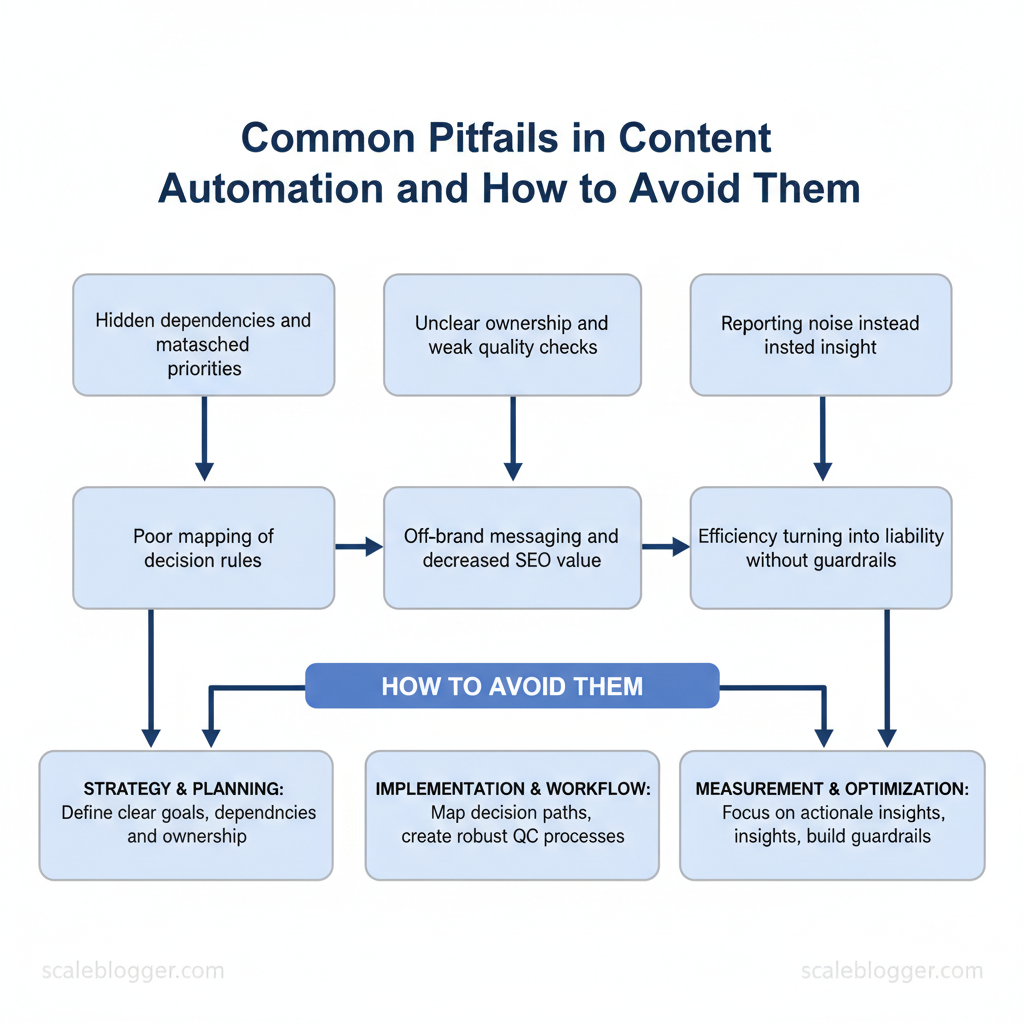
Marketing teams routinely lose momentum when automation introduces more friction than speed. Too often the shift from manual processes to automated pipelines uncovers hidden dependencies, mismatched priorities, and content automation mistakes that inflate costs and erode audience trust. Experts observe that automation challenges are usually operational, not technical—poor mapping of decision rules, unclear ownership, and weak quality checks create the most damage.
When those issues compound, campaigns publish off-brand messaging, SEO value drops, and reporting becomes noise instead of insight. Picture a marketing team that automates scheduling but skips editorial gating: traffic spikes for irrelevant posts while conversions fall. That scenario shows how automation without guardrails turns efficiency into liability.
- What structural gaps produce the most common automation failures
- How to design decision rules that preserve brand voice and SEO value
- Practical checks to prevent duplicate or stale content from publishing
- Ways to measure automation impact without misleading KPIs
- Implementation steps that scale without adding governance overhead
Prerequisites and What You’ll Need
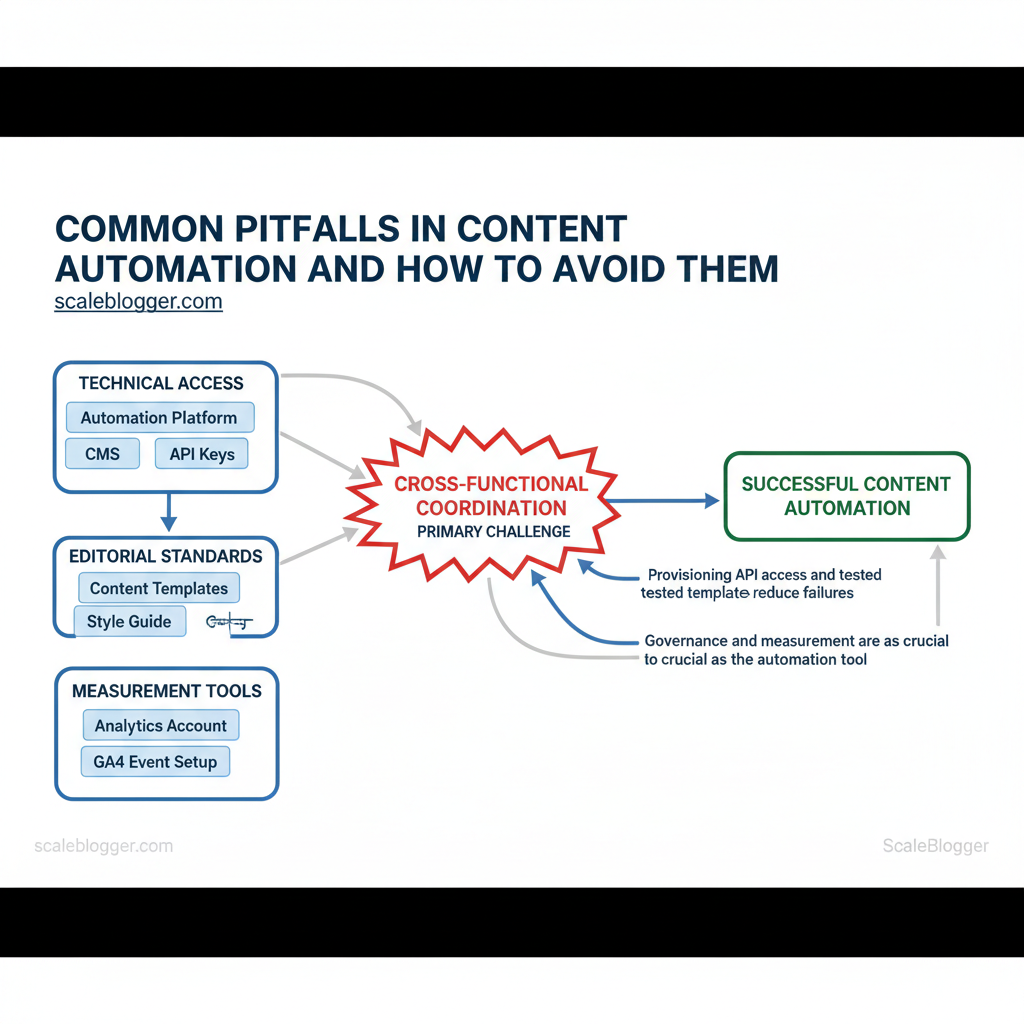
Start by getting the infrastructure and basic skills in place so the first automated content runs reliably. Teams need a blend of technical access, editorial standards, and measurement tools before wiring automation into a CMS. Without clear permissions, templates, and an analytics baseline, automation creates noise instead of predictable output. Below are the concrete skills, tools, and access to have ready, plus realistic setup time and difficulty estimates.
| Prerequisite | Why it matters | Minimum required level | Time to set up |
|---|---|---|---|
| Automation Platform | Orchestrates triggers/actions and retries | Intermediate (Zapier/Make experience) | 1–3 days for pilot |
| CMS Access | Needed to create, edit, and publish programmatically | Basic editor + API write | <1 hour to grant access |
| Editorial Calendar | Coordinates publishing cadence and approvals | Basic workflow (Trello/Notion) | 2–4 hours to configure |
| Analytics Account | Measures traffic, conversions, and content ROI | GA4 with events | 1–2 hours to connect; 1 week for data |
| Style Guide / Brand Guidelines | Ensures consistent tone, legal, and SEO rules | Documented guide (HTML/markdown) | 4–8 hours to assemble |
Understanding these prerequisites helps teams move faster without sacrificing quality. When those pieces are in place, automation becomes a lift rather than a liability, and operators can scale output with predictable performance.
Step-by-Step: Audit Your Current Automation Setup
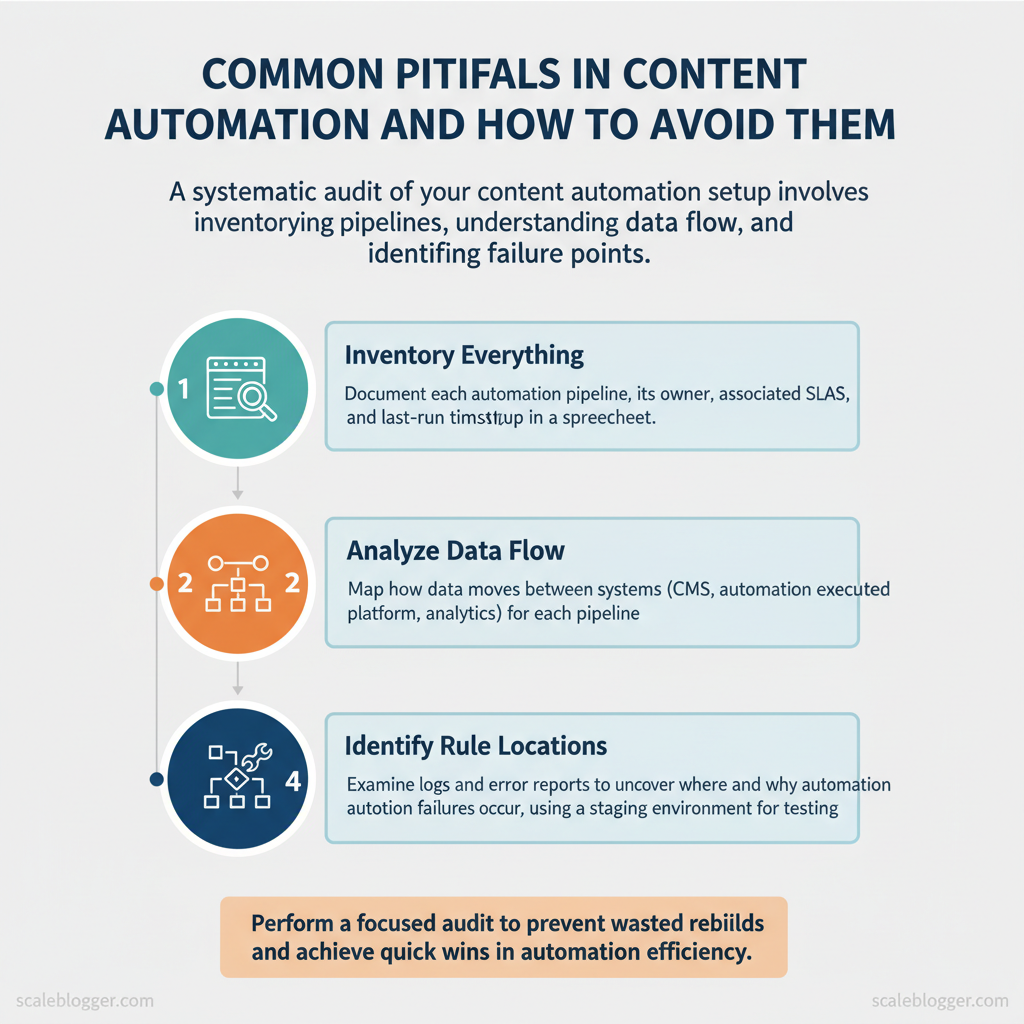
Start by treating the audit as a systems diagnosis: find what exists, how data moves, where rules live, and where failures hide. A focused audit prevents wasted rebuilds and surfaces quick wins that reduce manual work immediately.
Prerequisites
- Access: Admin credentials for CMS, automation platform, analytics, and cloud logs
- Stakeholders: One content owner, one engineer, one analytics owner
- Tools: Spreadsheet or schema tool, log viewer (`CloudWatch`, `Stackdriver`), and a staging environment
- Time estimate: 3–8 hours for a small stack, 1–3 days for complex setups
What to deliver
- Spreadsheet inventory, flow diagrams, and a priority fix list with owners and deadlines
- Consider using an AI-assisted pipeline like `AI content automation` from Scaleblogger.com to standardize enrichment rules and speed remediation.
Common Pitfall 1: Over-Automation — Losing Human Oversight
Over-automating content workflows removes critical judgment calls that humans make: tone nuances, factual checks, and alignment with brand voice. When teams hand off end-to-end publishing to automation without checkpoints, mistakes propagate faster and erode trust. Avoid this by designing human-review checkpoints that preserve velocity while catching edge cases and strategic errors.
Start with clear guardrails
- Define boundaries: Specify what can be fully automated (meta tags, scheduling) and what requires review (claims, sensitive topics).
- Set SLAs: Use `24-48 hours` for editorial review and `4-8 hours` for critical corrections.
- Assign accountability: Tie approvals to named roles (author, editor, legal) with explicit sign-off obligations.
Real examples and templates
- Editorial checklist: tone, accuracy, citation, CTAs, image licensing — each item checked before publish.
- Sampling rule: Start with `1 in 5` automated publishes for three weeks, then adjust to `1 in 10` once error rates fall below the SLA.
- Rollback plan: Automated publish must include a one-click unpublish and version restore option.
| Approval Type | Pros | Cons | Best Use Case |
|---|---|---|---|
| Manual Full Approval | Highest quality; catch nuance | Slows throughput; resource-heavy | High-risk content, legal/PR |
| Sampled Approval (1 in N) | Scalable monitoring; detects drift | Misses rare errors; sampling bias | Large-volume evergreen posts |
| Role-Based Approval (editor only) | Clear responsibility; faster than full | Single point of failure | Routine editorial content |
| Automated Guardrails + Spot Check | Fast; cost-efficient; enforces rules | Relies on rule coverage; false negatives | Social posts, metadata updates |
| Post-Publish Human Review | Maintains speed; fixes live issues | Brand exposure risk; potential user impact | Low-impact content, A/B tests |
Understanding these practices keeps teams fast and accountable; automation should amplify human judgment, not replace it. When implemented correctly, this approach reduces downstream rework and preserves the brand voice.
Common Pitfall 2: Poor Data Quality and Broken Integrations
Poor data quality and flaky integrations stall automation pipelines faster than any other single issue. Bad inputs propagate downstream—broken slugs, malformed JSON, duplicated rows and missing UTM parameters cause publishing failures, skew analytics and waste writer hours. Treat data hygiene and integration resilience as first-class features of the content stack: validate at the source, normalize before processing, and build circuit breakers so one failing feed doesn’t take the whole pipeline offline.
Practical code example for a lightweight payload validation using `ajv`: “`javascript const Ajv = require(‘ajv’); const ajv = new Ajv(); const schema = { type: ‘object’, required: [‘title’,’slug’,’publish_date’], properties: { title:{type:’string’}, slug:{type:’string’}, publish_date:{type:’string’, format:’date-time’} } }; const validate = ajv.compile(schema); if (!validate(payload)) throw new Error(‘Invalid payload’); “`
| Monitoring Option | Setup Complexity | Maintenance Cost | Alert Noise Level |
|---|---|---|---|
| Basic Heartbeat | Low — simple ping endpoints | Low — minimal infra | Low–Medium — only downtime alerts |
| Payload Validation | Medium — schema per source | Low–Medium — update schemas | Low — rejects only malformed payloads |
| Synthetic Transactions | Medium — scripted end-to-end tests | Medium — schedule and verify | Medium — can surface transient failures |
| Full End-to-End Integration Tests | High — integrates multiple systems | High — test environments + data | High — many flaky alerts if not tuned |
| Third-Party Monitoring Service | Low–Medium — plug-in setup | Medium–High — SaaS fees ($20–$200+/mo) | Low — managed alerting and deduping |
Common Pitfall 3: Scaling Without Template Governance
Scaling content production without governance turns repeatable templates into a source of inconsistency and technical debt. Templates that start simple quickly diverge when teams copy-and-modify without rules, producing broken metadata, mismatched headings, and content that underperforms because it fails validation or reporting. Implementing template governance makes templates a controlled, testable part of the content stack so teams move fast while preserving quality.
Why governance matters
- Consistency: Enforces structure across authors and formats so downstream systems (SEO tools, analytics, CMS) can rely on predictable fields.
- Reliability: Automated checks catch missing metadata, invalid date formats, and broken internal links before publishing.
- Scalability: Teams can add templates safely because versioning and access controls prevent ad-hoc edits from propagating errors.
Practical examples and snippets
- Central repo file example: keep `templates/article.md` with `YAML` frontmatter and clear placeholders.
- Simple lint rule (pseudocode):
- Access control pattern: protect `main`, require `2` approvers, include at least one SEO reviewer.
- Avoid letting authors fork templates in personal drives; always submit PRs to the central repo.
- Watch for permissive lint rules — too soft and they don’t prevent issues; too strict and they block legitimate variations.
- Measure template usage and error rates; prioritize fixes where errors cluster.
- Template registry spreadsheet with fields and owners
- Lint rule catalog and a CI pipeline example
- Migration plan to roll template updates incrementally
Common Pitfall 4: Ignoring SEO and Analytics in Automated Content
Embedding SEO and analytics checks into an automated content pipeline prevents high-volume publishing from producing low-impact pages. Start by gating content before publish, enforce structural signals (canonical, schema, H1/title alignment), and run post-publish sanity checks against real traffic and indexing signals. Automation should make SEO signals a required step, not an optional annotation.
Prerequisites
- Access to publishing platform (CMS API or CI/CD)
- Analytics account (GA4 or equivalent) and Search Console access
- Automation platform (Zapier, Make, or CI runners) and an SEO tool (Lighthouse, Screaming Frog, or an API-based linter)
Step-by-step enforcement plan
Practical examples
- Pre-publish rule (code):
- Post-publish check: compare 7-day impressions in Search Console vs. expected baseline; open a ticket if impressions < 30% of median for similar posts.
Market practitioners repeatedly see that pages missing canonical tags or schema get lost in discovery and underperform even with strong content.
| SEO Check | Automation Enforcement | Recommended Tool | Block/Warning Threshold |
|---|---|---|---|
| Meta Description Present | Pre-publish CI validation, block publish if missing | Screaming Frog CLI / GitHub Actions | Block if missing; Warning if >160 chars |
| H1 Matches SEO Title | Title/H1 parser rule in linter | Lighthouse CI / Custom script | Block if mismatch >30% token diff |
| Schema Valid | JSON-LD validator in CI, auto-insert templates | Rich Results Test API / Schema.org templates | Block if invalid JSON-LD; Warning if missing |
| Canonical Tag Present | Auto-inject canonical from CMS path; validate on publish | CMS API (WordPress REST) + Screaming Frog | Block if missing; Warning if points to external domain |
| UTM Parameters in Links | Link scanner for external links; add UTM templates | Custom crawler / Google Tag Manager checks | Warning if >10 external links without `utm_` |
Common Pitfall 5: No Rollback or Recovery Plan
Not having a rollback or recovery plan turns any publishing error into a crisis. Create a practical playbook that treats content publishing like software deployments: snapshot before release, automate safe rollbacks, and standardize communication and post-mortems. The goal is to reduce mean time to recovery (MTTR) from hours to minutes, preserve SEO signals, and keep stakeholder confidence intact.
Prerequisites
- Versioning system: Use a CMS or repo that supports versions or snapshots.
- Deployment automation: A pipeline that can execute scripted rollbacks.
- Communication channels: Dedicated Slack channel and incident doc template.
- Access controls: Defined people who can trigger rollbacks.
- Backup snapshots: CMS export or static HTML archive.
- Automation runner: CI/CD runner, webhook listener, or task scheduler.
- Incident log template: Timestamped actions and decisions.
- Monitoring hooks: Uptime/SEO alerts and content-change alerts.
Example rollback script (concept)
curl -X POST https://cms.example.com/api/v1/content/restore \ -H “Authorization: Bearer $TOKEN” \ -d ‘{“content_id”:”1234″,”snapshot_id”:”2025-11-30T10:00:00Z”}’ “`Practical examples
- Minor formatting regression: Auto-rollback to snapshot, rerun rendering tests, then republish a fixed version.
- SEO-impacting change: Rollback and schedule a controlled A/B test after confirming ranking behavior.
- Canary deployments for high-traffic pages.
- Feature flags to toggle new modules without redeploying content.
- Scheduled snapshot retention policy to limit storage cost.
Step-by-Step: Implement Continuous Monitoring and Alerts
Start by defining what matters: monitor both technical and content KPIs so alerts trigger on meaningful anomalies, not noise. Implement a lightweight governance cadence that assigns owners, sets thresholds, and routes notifications to the team member who can act immediately.
Prerequisites
- Tools: analytics platform (GA4/Matomo), uptime/monitoring (Datadog/Prometheus/Sentry), link checker, schema validator.
- Data access: read access to analytics and publishing logs.
- Team roles: Content owner, Tech owner, SEO owner, Incident responder.
- Baseline period: at least 14 days of historical data to set thresholds.
Sample alert rule (YAML) “`yaml alert: PageviewsDrop expr: pageviews_now < 0.7 * avg_over_7d(pageviews) for: 30m labels: severity: warning annotations: summary: "Pageviews dropped >30% for 30m” runbook: “/runbooks/pageviews-drop” “`
| KPI | Alert Threshold | Notification Channel | Owner |
|---|---|---|---|
| Pageviews per day | drop >30% vs 7-day avg | Slack #analytics + Email | Content Lead |
| Publish Failures per 24h | >1 failure | PagerDuty + Email | Platform Engineer |
| Broken Links Detected | >5 new/week | Slack #seo | SEO Lead |
| Schema Validation Failures | any critical error | Email + Dashboard | Tech SEO |
| Average Load Time | >3.0s or +50% vs baseline | PagerDuty + Slack | Performance Engineer |
Continuous monitoring and a lightweight governance rhythm let teams detect the right problems early and fix them before they cascade. For AI-driven pipelines, pairing this with an `AI content automation` system reduces manual checks and accelerates remediation. Understanding these practices speeds up response without creating alert fatigue.
Troubleshooting Common Issues
Start by isolating the symptom quickly: noisy metrics, sudden traffic drops, content duplication, or automation failures each need a distinct triage path. Rapid containment prevents damage, immediate mitigations stop bleeding, and permanent fixes plus monitoring restore long-term stability. The following catalog gives practical, repeatable steps your team can run in 5–45 minutes, depending on severity.
Prerequisites and tools
- Access: production analytics, CMS admin, server logs, task runner credentials.
- Tools: Google Analytics or equivalent, search console, server log viewer, `curl`, a simple incident tracker (Slack or ticketing).
- Time estimate: quick triage 5–15 minutes; full remediation 1–3 days; monitoring rollout 1–2 weeks.
Immediate mitigations to stop damage
- Rollback: if a recent deploy likely caused the issue, revert to the last known-good release within 15–30 minutes.
- Disable automation rules: temporarily pause content publishing or scraping jobs to prevent repeated bad content.
- Set safelists: limit external indexing by adding `noindex` via the CMS for affected content until fixed.
Example triage log template “`yaml incident_id: INC-2025-001 started_at: 2025-11-30T09:12Z symptom: Organic traffic -32% last 24h initial_action: Rolled back deploy v1.4.2 next_steps: Rebuild canonical logic, add smoke test, enable alerting “`
Troubleshooting tips
- Check canonical sources first: wrong canonicals are a common silent traffic killer.
- Use a staging-to-prod diff: visual diffing of templates reveals accidental tag removals.
- Document everything: fast handoffs depend on clean incident logs.
📥 Download: Content Automation Audit Checklist (PDF)
Tips for Success and Pro Tips
Start by treating reliability and gradual rollout as first-class parts of the content delivery pipeline. When content, templates, or automation rules change, reduce blast radius with controlled releases, validate contracts between components, and make QA a recurring operational rhythm rather than an occasional checklist. These practices keep SEO performance predictable while enabling faster iteration.
Example feature-flag snippet for a Next.js page: “`javascript if (featureFlags[‘new_content_layout’]) { render(NewLayout(props)); } else { render(StableLayout(props)); } “`
- Canary group selection: choose pages with equivalent traffic bands, not top-traffic only.
- Metric set: track CTR, time-on-page, crawl frequency, and index coverage.
Practical contract test (CI step): “`bash ajv validate -s schemas/article.v2.json -d sample_payload.json “`
- Schema enforcement: prevents accidental field renames that break templates or A/B tests.
- Contract alerts: fail the release if downstream consumers depend on fields removed in this build.
- Regression checklist: canonical tags, hreflang, structured data validity, and sitemap freshness.
- Ownership: assign a rotating reviewer to avoid knowledge silos.
- Automate content scoring: wire performance signals back into editorial workflow—score drafts by predicted traffic lift.
- Test transforms locally: use `docker-compose` fixtures to validate rendering across template versions.
- Document escape hatches: clear runbooks for emergency rollbacks or schema hotfixes.
Appendix: Templates, Checklists, and Playbooks
This appendix delivers copy-ready templates and compact playbooks that accelerate content operations without guesswork. Use the templates verbatim, change the bracketed values, and store them in your central template library so teams can reuse them consistently. Below are practical examples, minimal customization notes, and where to keep each file for rapid access.
Templates with purpose, short usage note, and where to store them
| Template Name | Purpose | Usage Note | Storage Location |
|---|---|---|---|
| Audit Inventory CSV | Track content assets, URLs, status, traffic | Customize: add site, owner, last_audit_date columns; example value `homepage_blog, /how-to, live, @jane, 2025-11-01` | Google Drive > Ops/Templates/content-audit.csv |
| Rollback Script | Revert published content to previous version (CLI) | Customize: replace `SITE_ID` and `BACKUP_PATH`; example command `./rollback.sh SITE_ID /backups/2025-11-01` | GitHub repo > ops/scripts/rollback.sh |
| Approval Email Template | Notify stakeholders for content approval | Customize: replace `[TITLE]`, `[REVIEW_LINK]`; example subject `Review request: [TITLE] — due 48h` | Google Docs > Templates/approval-email.md |
| SEO Pre-Publish Checklist | Ensure SEO, metadata, and tracking before publish | Customize: check GA4 ID, canonical, schema; example items `meta description 120-155 chars` | Notion > Content Templates/SEO Checklists |
| Integration Alert Rule JSON | Monitor CMS-to-CDN failures, notify Slack | Customize: set `webhook_url`, threshold; example `{“event”:”deploy_failure”,”threshold”:3,”webhook”:”https://hooks.slack.com/…”} ` | GitHub repo > ops/alerts/integration-rule.json |
Conclusion
Across the workflows examined, practical automation succeeds when teams map dependencies, assign a single owner, and run small staged rollouts — that pattern reduces rework and preserves momentum. Teams that piloted a single high-volume workflow and instrumented rollback metrics cut cycle time without disrupting stakeholders; others who skipped dependency mapping hit hidden breakpoints and stalled. Unsure which workflow to automate first, or worried about hidden integrations? Start with the process that has clear inputs, a single downstream owner, and observable metrics so you can iterate fast.
– Start small with an owned pilot. – Map dependencies before you automate. – Measure impact and plan rollbacks.
For teams ready to move from experiments to repeatable automation, define the pilot, document integration points, and schedule a two-week instrumentation sprint. To streamline that transition and get a prioritized plan tailored to existing systems, consider this next step: Get an automation audit and implementation plan. That engagement produces an action-ready roadmap and implementation checklist so teams can reduce friction, avoid common traps, and scale automation with confidence.
