

When every blog post spawns five social variations and deadlines collide, tools meant to save time start feeling like extra chores.
The real pain point is less about posting and more about connecting publishing, discovery, and performance without duplicate work.
Many teams split their choice between a focused social scheduler and an integrated all-in-one platform that handles both blog publishing and social distribution.
Each approach changes who owns the workflow and where bottlenecks happen.
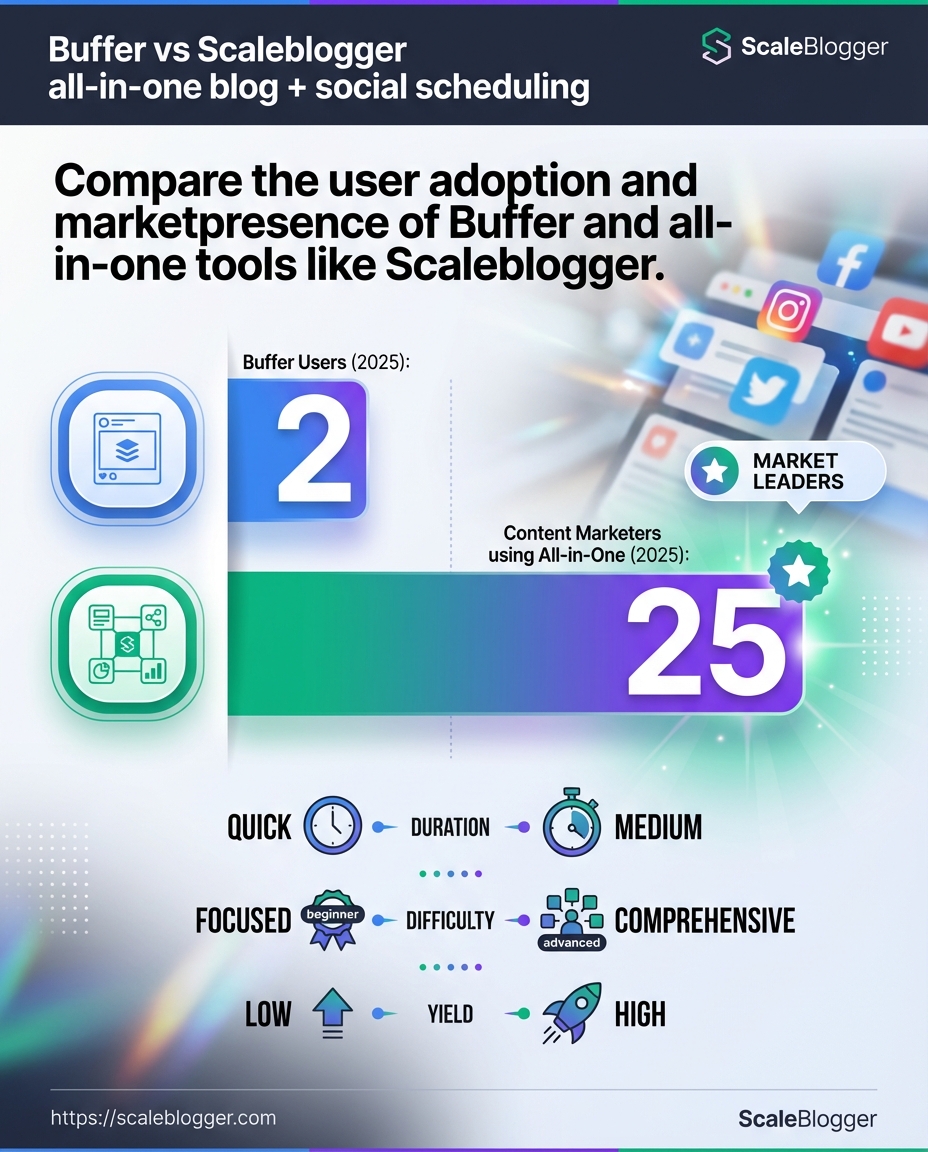
A tool like Buffer had over 75,000 users as of 2025, which shows how widely adopted dedicated schedulers are for managing multiple accounts.
Those platforms shine when analytics, queue control, and team permissions matter most.
Integrated platforms trade some analytical depth for a smoother publishing pipeline and built-in SEO features that reduce manual handoffs.
That tradeoff affects content velocity and how easily posts are optimized for search and readership. Picking the right side comes down to priorities: deep social analytics and collaboration, or a single workflow that speeds publishing and supports organic discovery.
Table of Contents
Quick primer: what each platform is best for
Deciding between a dedicated social scheduler and an integrated content platform comes down to priorities: measurement, workflow, or full-content control.
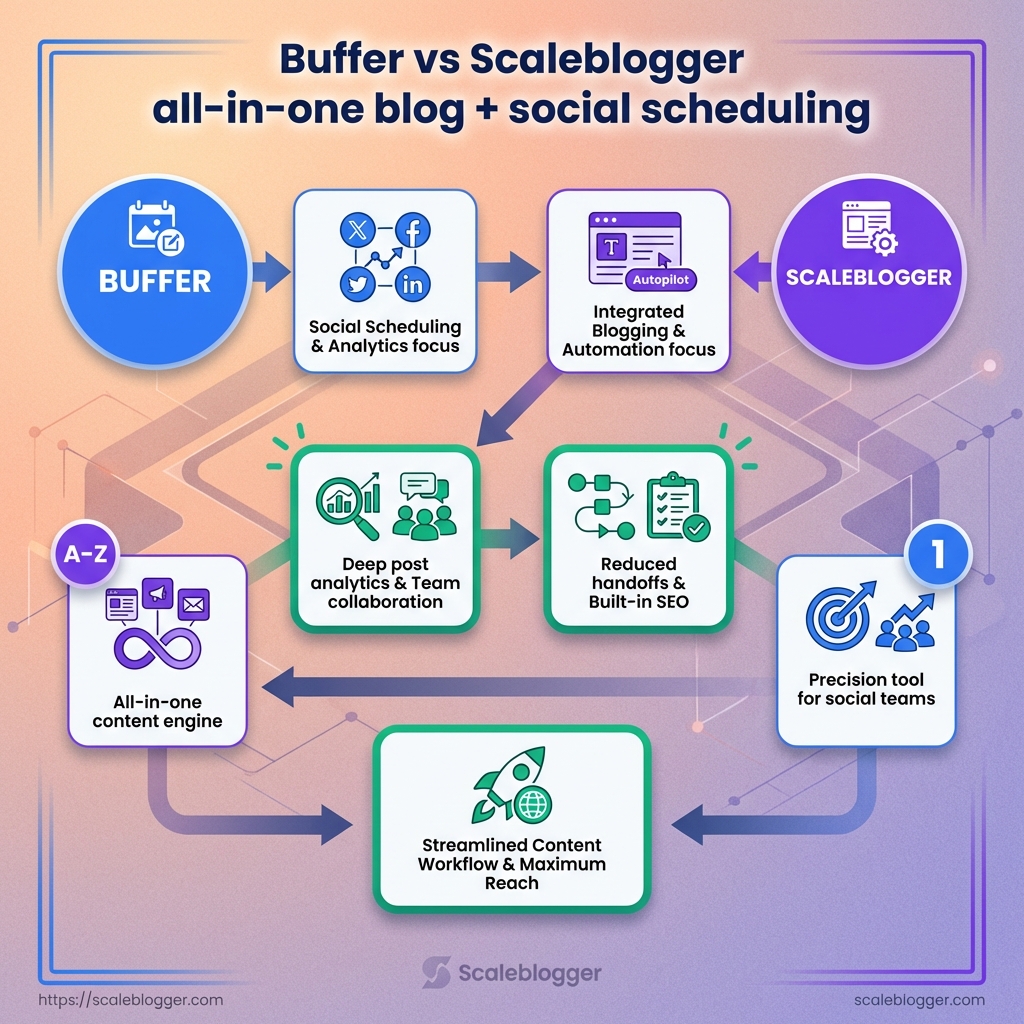
If you need deep post analytics and a lightweight team workflow, a specialist like Buffer is the straightforward choice.
If you want one place to write, publish, and push social posts automatically, an all-in-one like Scaleblogger tends to win.
Think of Buffer as the precision tool for social teams and Scaleblogger as the garage where the whole content engine lives.
Buffer shines when social performance and team collaboration are the dominant constraints.
Scaleblogger shines when the blog is the hub and social distribution should follow without manual overhead.
What Buffer does well
Buffer focuses on social scheduling with clear, actionable analytics.
It’s built for teams that post frequently and need performance signals to guide timing and format.
Post scheduling: Queue content across accounts with consistent timing and simple rescheduling.
Performance analytics: Track engagement trends and compare posts to refine social strategy.
Team collaboration: Role-based access and approval flows for multi-person teams.
Broad user base: Buffer had over 75,000 users as of 2025, so integrations and community support are strong.
What Scaleblogger does well
Scaleblogger bundles content creation with social distribution and SEO tools.
It reduces handoffs between writing, publishing, and promotion.
Integrated blogging: Draft, edit, and publish from the same interface where you schedule socials.
Social automation: Auto-repurpose posts and schedule platform-specific assets after publish.
SEO features: Built-in suggestions aimed at improving search visibility for articles.
All-in-one adoption: About 37% of content marketers use an all-in-one tool like Scaleblogger as of 2025, showing demand for consolidated workflows.
Which platform fits different creator goals
Match choice to the bottleneck in your process rather than brand preference.
Small teams that publish occasionally but need strong social reporting should pick Buffer.
Solo bloggers or teams that want one dashboard: Scaleblogger reduces context-switching and manual repurposing.
Social-first brands focused on performance: Buffer’s analytics and scheduling controls give finer control.
Agencies managing many clients: Buffer’s multi-account features scale for client reporting; Scaleblogger works if each client needs content-first automation.
Choose the platform that removes your biggest friction point—measurement or workflow.
The right pick saves hours every week and makes growth repeatable.
Side-by-side feature and capability comparison
Start here if you want a clear, actionable split between a social-first scheduler and a combined blog + social platform.
Buffer concentrates on scheduling, reporting, and team workflows for social accounts; Scaleblogger bundles blog publishing, social scheduling, and SEO tools into one pipeline.
The difference shows up in daily operations: Buffer keeps social posting lean and analytics-focused, while Scaleblogger extends content creation upstream into drafting and publishing.
Creators who primarily post social updates and need deep post-level analytics will find Buffer’s workflow faster and simpler.
Content teams that publish long-form posts and want automated distribution from blog to social will see more time saved with Scaleblogger’s integrated pipeline, especially where SEO controls and CMS publishing matter.
Feature parity: where they overlap and where they diverge
Both platforms cover the essentials for multi-account posting and collaboration, but they split on scope.
Buffer focuses narrowly on social publishing and team reporting.
Scaleblogger covers the whole content lifecycle — ideation, drafting, publishing, then automated social distribution.
Core overlap: Both offer scheduled posting, team permissions, and post analytics.
Major divergence: Scaleblogger includes a native blog editor and SEO controls; Buffer does not offer a native blog CMS.
Workflow impact: Use Buffer when social-first speed matters; choose Scaleblogger when you want one tool from draft to publish.
Performance and analytics differences
Analytics are where Buffer often shines.
Its reporting is built around post performance, audience engagement, and team-level metrics.
Buffer serves social managers who need fast access to post metrics and team activity logs.
Scaleblogger reports include social metrics plus content-level SEO signals and benchmarks for blog visibility.
That makes Scaleblogger better for measuring organic search outcomes alongside social reach.
Direct comparison of core features
Comparison table: Buffer vs Scaleblogger — core features and practical impact
Feature | Buffer — capability/limit | Scaleblogger — capability/limit | Practical impact for creators |
|---|---|---|---|
Blog publishing (native CMS) | No native CMS; designed for social post publishing and links to external blogs | Built-in blog editor and native CMS with publishing workflows (launched 2022) | Scaleblogger removes the CMS handoff; Buffer requires external blog publishing steps |
Social scheduling (channels supported) | Supports major platforms (Facebook, Instagram, X, LinkedIn, Pinterest) with scheduling | Publishes and auto-repurposes to YouTube, LinkedIn, Facebook, X, Instagram, Threads, Pinterest | Buffer covers core social channels; Scaleblogger targets broader republishing and video support |
AI-assisted content creation | Limited native AI; relies on third-party integrations for drafting | Built-in AI drafting and repurposing tools for blog and social | Scaleblogger speeds draft creation; Buffer needs extra tools for long-form generation |
Automated blog-to-social workflows | Basic RSS/third-party automations; no native blog-to-social end-to-end flow | Native automated blog-to-social pipeline that generates posts after publish | Scaleblogger automates distribution from one publish action; Buffer requires setup with other tools |
Bulk scheduling and queueing | CSV bulk uploads and queue management for social posts | Bulk uploads plus templated repurposing from blog posts to multiple social formats | Both handle volume; Scaleblogger adds multi-format repurposing per article |
Analytics and benchmarking | Advanced post-level analytics and team reports; strong social metrics | Combined social analytics with SEO and content performance benchmarking across industries | Buffer for social KPIs; Scaleblogger for cross-channel content performance and SEO signals |
Team collaboration features | Team roles, approvals, and shared queues | Editorial workflows, approvals, and content assignment for blogs + social | Buffer streamlines social team work; Scaleblogger supports editorial content processes |
Content calendar and editor | Social calendar and composer focused on posts | Unified editorial calendar with blog editor and social scheduling | Scaleblogger centralizes long-form planning and distribution |
Custom domains and SEO controls | No custom blog domain support; social metadata only | Custom domains, SEO meta controls, and on-page SEO features | Scaleblogger improves blog visibility; Buffer requires external CMS SEO handling |
Integrations and API access | Public | CMS integrations (WordPress, Ghost), scheduling API and publishing connectors | Buffer integrates widely for social tools; Scaleblogger connects directly to publishing platforms |
Scaleblogger’s integrated CMS plus republishing features reduces handoffs between teams. Buffer’s analytics and focused social UX speed up routine posting and team reporting.
Both approaches are valid; the right choice depends on whether content creation or social distribution is the bottleneck.
Choose the platform that matches the step in your content pipeline you want to simplify most.
Workflows and real-world use cases
Imagine a week where your content calendar almost runs itself.
The workflows below show how a solo creator and a small team move ideas into published posts and social slices with predictable effort and measurable returns.
These examples assume you have a CMS, a scheduler, and lightweight asset tools (image editor, short-form video recorder).
One path leans on an integrated platform for drafting-to-distribution; the other mixes best-of-breed tools for tighter analytics and team controls.
Read the sequences and pick the parts that match your scale: quick publishing, tight approvals, or heavy repurposing.
Daily workflow for a solo tech-savvy creator
Solo creators need speed and consistency more than process complexity.
Start days with a 30-minute content triage: review analytics, outline one post, and queue drafts.
Morning brief: Check top-performing posts from last 7 days and list three micro-ideas.
Drafting sprint: Use an AI-assisted draft to get a 1,000–1,500 word article to first-pass in 60–90 minutes.
Repurpose and queue: Split the post into headlines, a short-form video script, and five social captions.
Schedule everything for the week.
Many solo creators prefer integrated tools that reduce context switches.
About 37% of content marketers used an all-in-one platform like Scaleblogger in 2025, largely for this reason.
Team workflow: collaboration, approval, and publishing
Teams trade individual speed for review controls and role separation.
A typical cycle separates ideation, drafting, review, SEO checks, and distribution.
Ideation: Editorial lead creates a topic brief with KPIs.
Drafting: Writer produces a draft in the CMS or an integrated platform.
Review: Editor annotates; SEO specialist runs keyword and schema checks.
Approval: Legal/brand signs off; final assets pass to social and design.
Publish: Scheduler publishes and triggers cross-channel distribution.
Tool choices: Use a scheduling-focused service for social analytics (many teams use Buffer; Buffer had ~75,000 users as of 2025) and an integrated CMS for blog publishing.
Automation: Auto-publish web posts, then trigger platform-specific snippets for social to keep timing consistent.
Example: turning one long-form post into a week of social posts
Follow this flow and you get seven pieces of social content from one article.
The visual below maps the steps from AI draft to multi-channel scheduling.
The flowchart shows four stages: AI-assisted drafting, editorial polish, asset extraction (quotes, images, clips), and scheduled distribution across channels.
Each stage lists responsible roles and estimated time per task. treat the article as the source of truth.
Tag each social asset with the article ID so engagement funnels back to the same analytics view. whether solo or team-based, the right mix of automation, briefed roles, and a repeatable extraction pattern turns one good post into reliable weekly social reach.
Migration, setup, and integration FAQs
Worried about losing traffic when you move platforms? Migrating a blog is mostly about preserving URLs, reconnecting tracking, and automating the push to social so nothing falls through the cracks.
Most successful moves follow the same pattern: audit what matters (top pages, backlinks, media), export content and assets, map URL rewrites, and then import while keeping 301 redirect rules active.
For social scheduling, Buffer (75,000 users as of 2025) can ingest RSS or API triggers to push links, while Scaleblogger offers direct CMS sync and automated repurposing for blog-to-social workflows — a reason 37% of content marketers were using all-in-one tools like it in 2025.
Plan for a two-phase rollout: a mirrored import and QA pass, then a switch of DNS/redirects with monitoring.
Keep ownership of analytics and canonical tags until the new site is fully indexed.
Migrating an existing blog to Scaleblogger or Buffer
Crawl and audit first.
Export a full site crawl (URLs, titles, meta, backlinks) and rank pages by traffic and backlinks.
Export content and media.
Use WordPress
XMLexport or CMS-specific exports.Collect media files and note original paths.
Map redirects.
Create a
301map from old URLs to new ones and stage those redirects on the origin server or CDN.Import to target.
For Scaleblogger, use its CMS sync or import tool to pull posts and media.
For Buffer, host your content on a CMS and connect Buffer via
RSSor API to distribute links.QA and test tracking.
Validate page content, images, structured data, and that Google Search Console and GA4 receive hits.
Setting up automated blog-to-social pipelines
Start by defining the trigger: new published post, updated post, or tag-based publishes.
Template fields: Include title, short excerpt,
utm_campaignparameters, and image defaults.Scheduling windows: Define optimal posting windows per platform and fallback scheduling rules.
Approval step: Create a review state so social drafts queue for human approval before auto-post.
For Buffer, connect RSS or webhooks to auto-create drafts.
For Scaleblogger, enable the built-in repurposing pipeline to generate platform-optimized captions and media automatically.
Key integrations to connect (CMS, analytics, asset storage)
CMS: Connect via API or OAuth to WordPress, Ghost, or headless CMSs so publishing and metadata sync automatically. Analytics: Preserve GA4 and Search Console connections; add verification and keep old property IDs live until indexing stabilizes. Asset storage: Point media to a CDN or S3 bucket to avoid broken image URLs and speed delivery. Other integrations: Connect your CDN, email provider, and any DAM or shared team drives for consistent asset access.
This short walkthrough shows step-by-step connection of a common CMS and how to safely paste an API key during setup. Watch it for the exact UI clicks and where to test connection success.
Migration is mostly preparation and testing.
Do the audit, map redirects, and automate the social pipeline so your audience sees continuity rather than chaos.
Pricing, ROI, and cost-related questions
Picking between a social scheduler and an integrated blog+social platform comes down to math more than features.
Subscription models vary: some vendors charge per seat, some charge per social channel, and some bundle everything into tiered packages.
Those choices change how fast a tool pays for itself.
Estimating ROI requires two inputs: time saved (content creation + publishing + repurposing) and incremental engagement or traffic lift.
Time savings convert to salary dollars; traffic lift converts to revenue or lead value.
Use both to calculate a realistic monthly break-even point before you commit.
Buffer and Scaleblogger take different approaches to pricing and value.
Buffer is widely used across small businesses and agencies (75,000 users as of 2025) and leans into per-channel/per-seat models.
Scaleblogger targets bloggers and content teams with an all-in-one stack; about 37% of content marketers reported using an all-in-one tool like Scaleblogger in 2025, which shows demand for bundled platforms.
Estimating ROI: time saved and engagement lift
Plan tier | Monthly cost (Buffer) (approx., 2026) | Monthly cost (Scaleblogger) (approx., 2026) | Best for | Estimated monthly break-even (hours saved) |
|---|---|---|---|---|
Solo / Individual | $6–$12 | $29 | Single creators who post occasionally | 4–8 hrs |
Small team (2–5) | $24–$60 | $79 | Small agencies or multi-author blogs | 12–25 hrs |
Growing team (6–20) | $72–$240 | $199 | In-house marketing teams scaling cadence | 30–75 hrs |
Enterprise / Agency | $400+ (custom) | $499+ (custom) | High-volume publishers, agencies | 80+ hrs |
These estimates show typical monthly spends and the rough hours you must save for the subscription to pay for itself.
The Buffer column reflects common per-channel/per-seat choices; the Scaleblogger column reflects bundled pricing aimed at content + social in a single plan.
Practical ways to use the table: convert hours saved into your average hourly rate, then compare to the plan cost.
Factor expected lift — for example, a 10–20% traffic uplift from consistent posting reduces break-even time.
Hidden costs and limits to watch for
Subscription fees are only the start. Overages and add-ons: Extra analytics, advanced automation, or API access often cost extra. Per-channel or per-seat billing: Adding a new team member or network can jump costs unexpectedly. Content production costs: Tools reduce production time, but you still pay writers, designers, or creators. Migration and training: Initial onboarding—migrating calendars, training staff—can add several weeks of expense. Platform throttling: Limits on post volume, API calls, or repurposing features create indirect costs when you scale.
How to estimate ROI quickly
Calculate your fully loaded hourly rate for staff who touch content.
Estimate weekly hours saved by automation and divide to monthly savings.
Assign conservative revenue per incremental visit or lead, multiply by expected traffic lift, and add to your savings.
A realistic ROI model combines time savings and revenue uplift.
Run the numbers for 3–6 months before switching plans so you know whether the integrated workflow or a best-of-breed scheduler actually pays off.

Performance, measurement, and benchmarking
Measurement turns guesswork into repeatable decisions.
Start by mapping platform metrics to business outcomes — not every vanity number deserves the same attention.
Both social schedulers and integrated platforms report overlapping KPIs, but they emphasize different parts of the funnel.
Buffer’s analytics skew toward post-level engagement and team reporting (Buffer had 75,000 users as of 2025), while integrated tools like Scaleblogger add blog SEO and on-site session metrics into the same pipeline (37% of content marketers used an all-in-one like this in 2025).
Expect three practical outputs from this section: a clear KPI map with interpretation, a step-by-step benchmarking playbook for content velocity and distribution, and compact A/B test templates creators can copy into any spreadsheet.
Which KPIs each platform reports and how to interpret them
Start by tracking a small set of metrics tied to your goals.
Below are common KPIs, what they mean, and where they usually come from. Impressions: Number of times a post or page was shown.
Useful for visibility checks; high impressions with low clicks signals creative or CTA problems. Reach: Count of unique users exposed.
Use reach to assess audience breadth versus repetition. Engagement Rate: Interactions divided by impressions or reach. Higher engagement often predicts algorithmic amplification. Click-through Rate (CTR): Clicks divided by impressions.
The direct test of whether your headline/creative drives traffic. Organic Sessions: Visits from search or unpaid social.
Typically visible in site analytics and integrated in blog platforms; key for SEO impact. Time on Page / Dwell: Average time users spend on an article.
Short dwell with high bounce suggests mismatch between promise and content. Follower Growth: Net new followers over time.
Good for brand momentum, less useful for short-term conversion. Conversion Rate: Goal completions divided by sessions or clicks.
The outcome metric that should guide all distribution decisions.
Benchmarking content velocity and distribution effectiveness
Begin by defining velocity and effectiveness in measurable terms for your team.
Establish a baseline week: record posts published per channel, impressions, CTR, and sessions for four weeks.
Segment by cohort: new vs. existing audience, topic cluster, and format (video, long-form, short-form).
Calculate content velocity:
posts_per_week_per_channeland overlay with average CTR and sessions-per-post.Measure distribution effectiveness: sessions lift per share =
(sessions_after_share - baseline_sessions) / shares.Set percentile targets (median, top 25%) from your historical data; treat these as rolling goals.
Re-evaluate monthly and tie velocity adjustments to audience saturation signals.
Using Buffer’s post-level analytics helps iterate share timing and creative.
Integrated pipelines like Scaleblogger let you trace a social share all the way to on-page conversions.
Common A/B tests and measurement templates for creators
Practical tests are small, fast, and focused on one variable.
Headline vs. Headline: Run two headlines on identical copy.
Measure
CTRduring the same time window.CTA wording: Test
Learn morevsGet the checklist.Track
Click-to-conversionwithin 7 days.Image or video creative: Swap visuals, keep caption constant.
Measure
Engagement rateandCTR.Distribution timing: Same post, two different publish times.
Compare
ImpressionsandCTR.Format test: Short-form vs long-form on same topic.
Measure
Time on pageandConversion rate.
Template for each test: define hypothesis → choose primary metric → set minimum duration and sample size → run → compute relative lift ((variant - control)/control) → decide.
Aim to run tests when you can reach a reasonable sample; otherwise treat results as directional.
This approach gives clarity: fewer metrics, tighter tests, and faster learning.
Keep the loop short and let measurement drive which ideas scale.
Security, compliance, and data ownership
Treat security and compliance as design choices, not afterthoughts.
Every platform decision should answer two questions: who controls the data, and how auditable are actions that touch it.
Those answers change how teams share drafts, what integrations are safe, and whether a creator can leave without losing their audience.
Most creators and small teams care about three practical things: clear ownership of content and metadata, the ability to export everything, and visible access records when someone makes a change.
When those are in place, moving between tools — whether a social scheduler like Buffer (75,000 users as of 2025) or an integrated blog-and-social platform — becomes a technical task, not a legal headache.
Design for exit before you onboard.
That means exportable formats, documented APIs, and role-based access that you can revoke in minutes.
Data ownership and exportability
Creators must insist on explicit ownership clauses in terms of service.
Ownership should cover primary content, SEO metadata, and engagement data (comments, shares, metrics). Data ownership: The platform acknowledges the creator owns their content, not a license-limited copy. Exportability: The platform provides full exports in standard formats (HTML/Markdown for posts, CSV/JSON for analytics and comments). Retention policy: Clear timelines for backups, soft-deletes, and permanent deletions.
Practical checklist for vendor evaluation:
Export formats: Does the vendor export
Markdown,HTML,CSV, andJSON?API access: Is there a documented API for programmatic backups?
Portability guarantee: Are redirects and URL mappings preserved during migrations?
Historical metrics: Can you export historical analytics in bulk?
Authentication, team access controls, and audit logs
Most breaches come from misconfigured access, not clever hacking.
Enforce SAML or OAuth2 for single-sign-on where possible, and require 2FA for admin roles.
Define roles first: content author, editor, publisher, admin. Map permissions granularly.
Enable session management and IP restrictions for high-risk accounts.
Record immutable audit logs that capture who changed what and when, and keep them for a minimum retention period aligned with your compliance needs.
Imagine a small agency using a platform like Scaleblogger for integrated publishing.
Team access controls plus audit logs let a lead editor revoke publishing rights instantly if a contractor leaves.
Compliance considerations for creators (privacy, GDPR, CCPA)
Privacy compliance rests on three pillars: purpose limitation, consent tracking, and user rights.
Purpose limitation: Store only what you need for the stated purpose.
Consent records: Log consent with timestamps and versioned privacy notices.
Right to be forgotten: Ensure exports and deletions cover third-party caches and analytics where possible.
Data processing agreements: Get written DPA clauses when the platform processes user data on your behalf.
If your audience is global, treat GDPR as baseline for data subject rights and CCPA for consumer data requests in California.
Keep a simple playbook: how to respond, who owns responses, and how long logs must be retained.
Security systems and contract terms should let creators move on without losing their work or exposure to legal risk.
That’s the difference between a tool that helps and one that traps.
📥 Download: Download Template (PDF)
Decision guide: which to choose for specific creator profiles
Pick the platform that matches the way you actually create, not the shiny features you might imagine using someday.
If your strength is rapid idea-to-post velocity and you want AI to do the heavy lifting, an integrated content platform with built-in drafting, SEO checks, and republishing workflows will save the most time.
If you care more about predictable cross-platform distribution, deep post-level analytics, and a lightweight interface for teams, a dedicated social scheduler wins.
One popular scheduling vendor had about 75,000 users as of 2025, which reflects how many creators prefer tools focused narrowly on distribution.
Below are concrete recommendations for common creator profiles, followed by a short checklist to ask before you commit.
If you prioritize fast content production with AI
Choose an all-in-one platform that includes AI drafting, SEO scoring, and automatic repurposing.
These platforms reduce context switching between CMS, editor, and social tools, so you spend less time moving files and more time finalizing voice and headlines.
Actionable setup steps:
Template-first workflows: Create 3 article templates (long-form, how-to, listicle) and standardize prompts for the AI to follow.
Auto-repurposing rules: Configure one-click transforms — blog → short-form post → caption → image — to cut manual formatting.
Editorial QA checklist: Add a 5-item human review (brand voice, factual checks, headline, CTA, links) before publish.
Mention: platforms like https://scaleblogger.com specialize in this integrated pipeline, combining AI drafting with scheduling and republishing.
If you prioritize simple, proven scheduling and cross-platform reach
Pick a dedicated scheduler when your output is mainly short posts, visual assets, and timed campaigns.
These tools tend to be faster to train your team on and offer granular analytics for engagement windows and A/B caption tests.
Practical moves:
Account mapping: Connect each social profile and set posting windows by timezone.
Series scheduling: Batch content into series to preserve momentum without daily publishing work.
Analytics cadence: Review weekly top-performing formats and reuse those templates.
Checklist: questions to answer before choosing
How many long-form posts per month will you publish?
Do you need built-in SEO scoring before publishing?
Is cross-posting to 6+ channels required?
How many people will edit or approve content?
Do you need ownership and exportable data from your CMS?
What’s your migration tolerance for URL/analytics changes?
What’s the budget for licensing plus team time?
All-in-one tool: A single platform that handles creation, SEO, scheduling, and repurposing. Dedicated scheduler: A specialized tool focused on publishing, timing, and social analytics.
Match the tool to the work you do every week, not the feature list you might someday explore.
Choosing the wrong model adds friction every publishing cycle; choosing the right one removes it.
Troubleshooting and common issues
Most publishing hiccups come from three places: authentication, content validation, and timing.
When a scheduled post doesn’t go live it usually isn’t mystical—tokens expire, media fails validation, or timezone mismatches shift the publish window.
Fixing those three areas gets most accounts back on track within minutes.
Some platforms add extra failure modes.
Rate limits, API changes, or simultaneous publishes from another tool can silently block a post.
Integrated systems that publish both blog and social content sometimes create duplicate webhook events; platforms like Scaleblogger can reduce that risk, but you still need to check connection logs and post queues to be sure.
Persistent failures hint at deeper problems: account-level bans, DNS or webhook routing issues, or backend outages at the social network.
Those are the times when internal checks run out of answers and vendor or platform support should step in.
Why scheduled posts fail to publish (and how to fix them)
Authentication problems are the most common root cause.
Expired credentials: Reconnect the social account and reauthorize the app. Revisit app permissions and remove/re-add the connection if reauth fails.
Media validation errors: Resize images, shorten captions, or strip unsupported characters.
Upload a small test asset to confirm the validation path.
Timezone or scheduler mis-match: Check account timezone, scheduler settings, and daylight-saving changes.
Reschedule a post for a one-hour window to test.
Rate limits or API errors: Space out bulk posts or queue them.
If the API returns a 429, implement retries with exponential backoff.
Conflicting integrations: Disable other schedulers temporarily to see if duplicate webhooks cause failures.
Draft vs. publish flags: Ensure the item is set to “publish” not “draft” and that any required fields (tags, categories, alt text) are filled.
Dealing with analytics discrepancies
Analytics rarely match perfectly across systems; different platforms sample and deduplicate counts differently.
Look for attribution windows, timezones, and bot filtering as common causes.
Different attribution windows: Compare the reporting window and conversion definitions between platforms.
Timestamp misalignment: Convert both data sets to UTC when comparing.
Bot/filtered traffic: Check for traffic spikes flagged as bots in one report but present in another.
A quick reconciliation step is exporting raw event logs from both systems for a 24-hour sample and comparing unique IDs.
When customer support should be involved
If reauth, media fixes, and retrying don’t work, it’s time to escalate.
Persistent 5xx errors from the platform API: These indicate server-side failures that only support can resolve.
Account-level restrictions or bans: If posting is blocked due to policy enforcement, the platform’s support team must intervene.
Complex webhook or DNS routing issues: When logs show events not reaching your endpoint, support can trace the network path.
A clear support ticket includes timestamps, post IDs, JSON request/response snippets, and any error codes.
That speeds diagnosis and reduces back-and-forth.
Most failures are fixable without a support call, but having logs and a short troubleshooting checklist saved will make the rare escalations painless.
Conclusion
Turn automation into fewer chores and more connection
Remember one thing above all: automation exists to shrink the gap between publishing and meaningful audience connection.
When a single post spawns five social variations and deadlines pile up, a tool that only adds steps fails.
Prioritize systems that protect content ownership, make measurement straightforward, and reliably publish on schedule.
If you recall the migration section, the easiest wins came from automating the handoffs: scheduling, canonical links, and metadata.
A practical starting point is small: Automate one repeatable task this week — for example, auto-format and schedule a post plus two social variants.
Tools like ScaleBlogger can handle that end-to-end, but a CMS plugin or a simple automation flow will prove the concept just as well.
Run a two-week experiment, track time saved and engagement lifts, and decide based on the real numbers.
If the data shows gain, widen the scope; if not, pivot to the next bottleneck and try another micro-experiment.
What single task will you remove from your to-do list today?
