

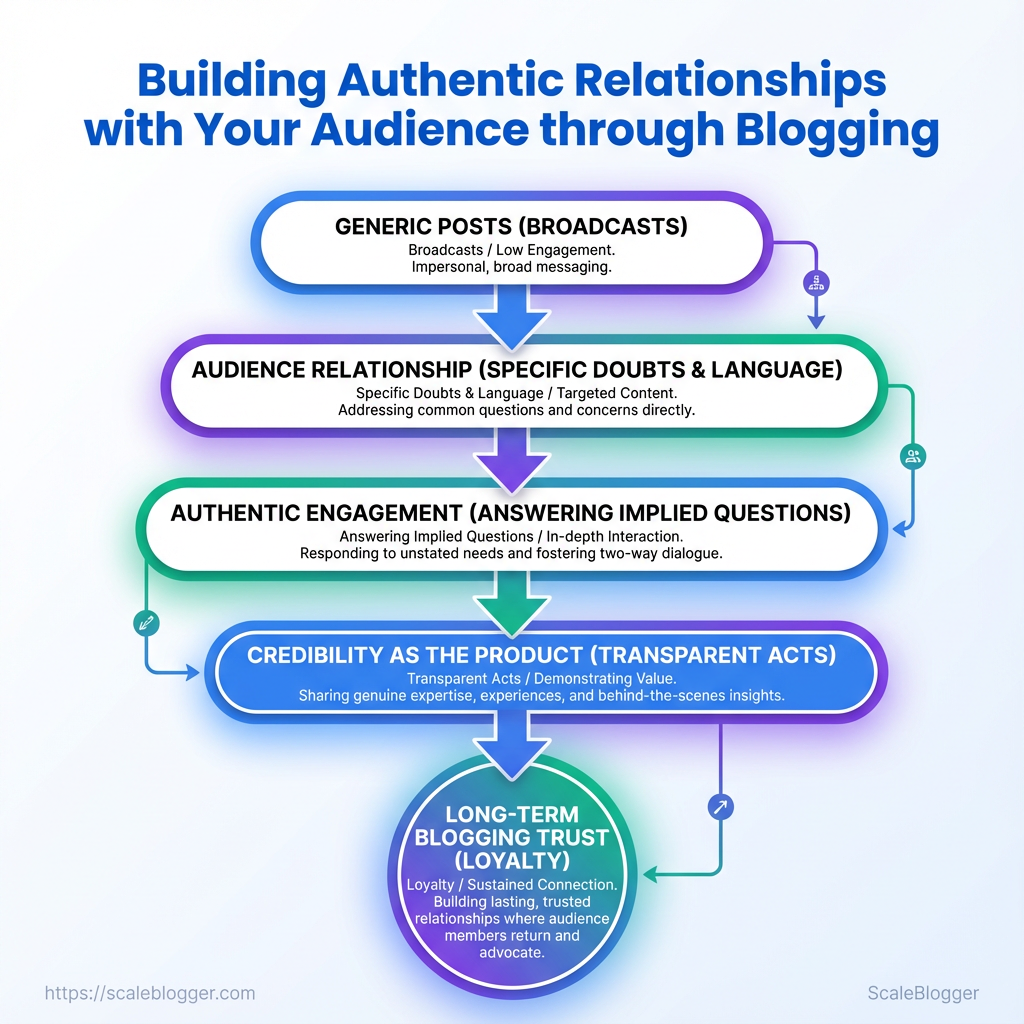
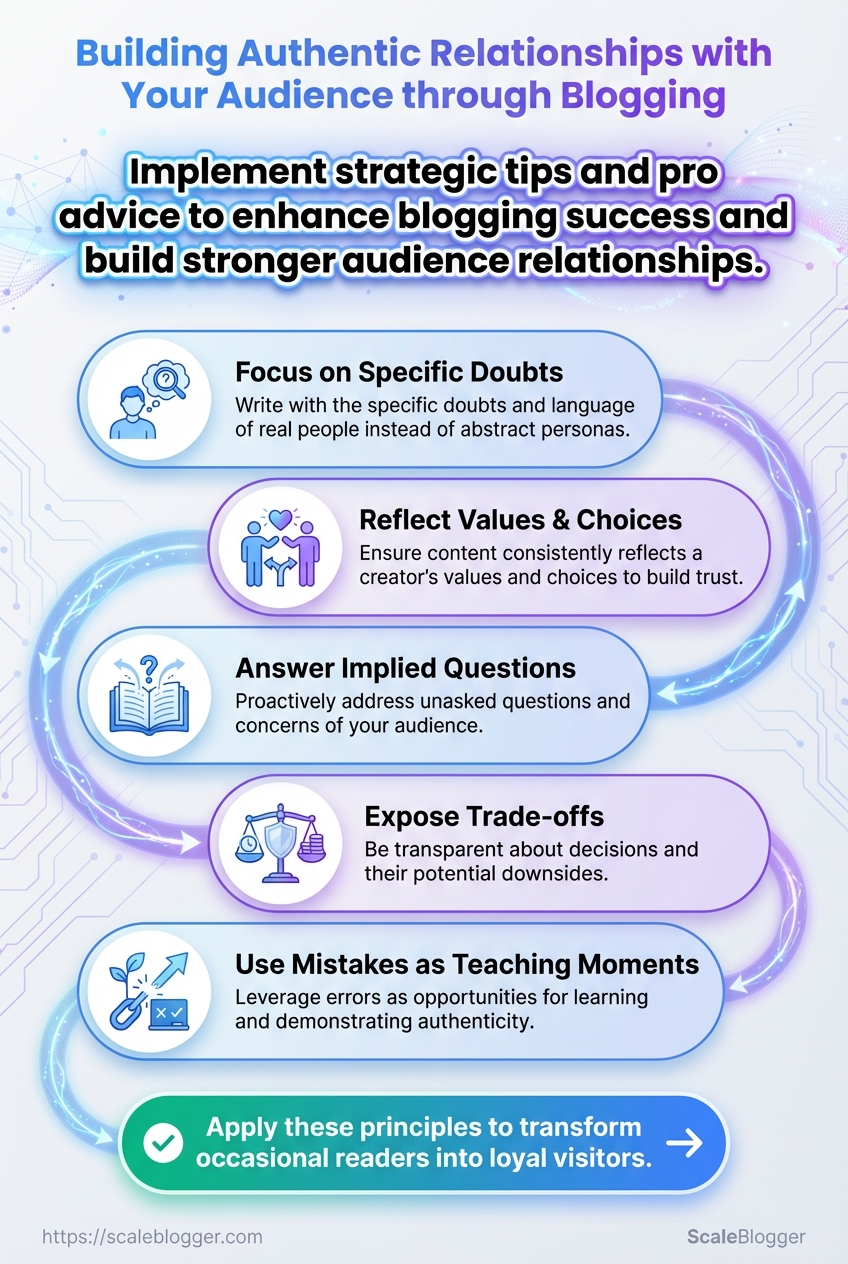
People ignore generic posts because they feel like broadcasts, not conversations. Building an audience relationship starts by writing with the specific doubts and language of real people, not abstract personas or keyword lists. That shift alone turns occasional readers into repeat visitors.
Trust emerges when content consistently reflects a creator’s values and choices, and when readers see their feedback reflected in subsequent posts. Prioritizing authentic engagement means answering implied questions, exposing trade-offs, and using mistakes as teaching moments. Those moves reduce skepticism faster than optimization tactics alone.
Blogging that earns loyalty treats credibility as the product—small transparent acts compound into long-term blogging trust. Automate and scale your content workflows with Scaleblogger: https://scaleblogger.com
What You’ll Need (Prerequisites)
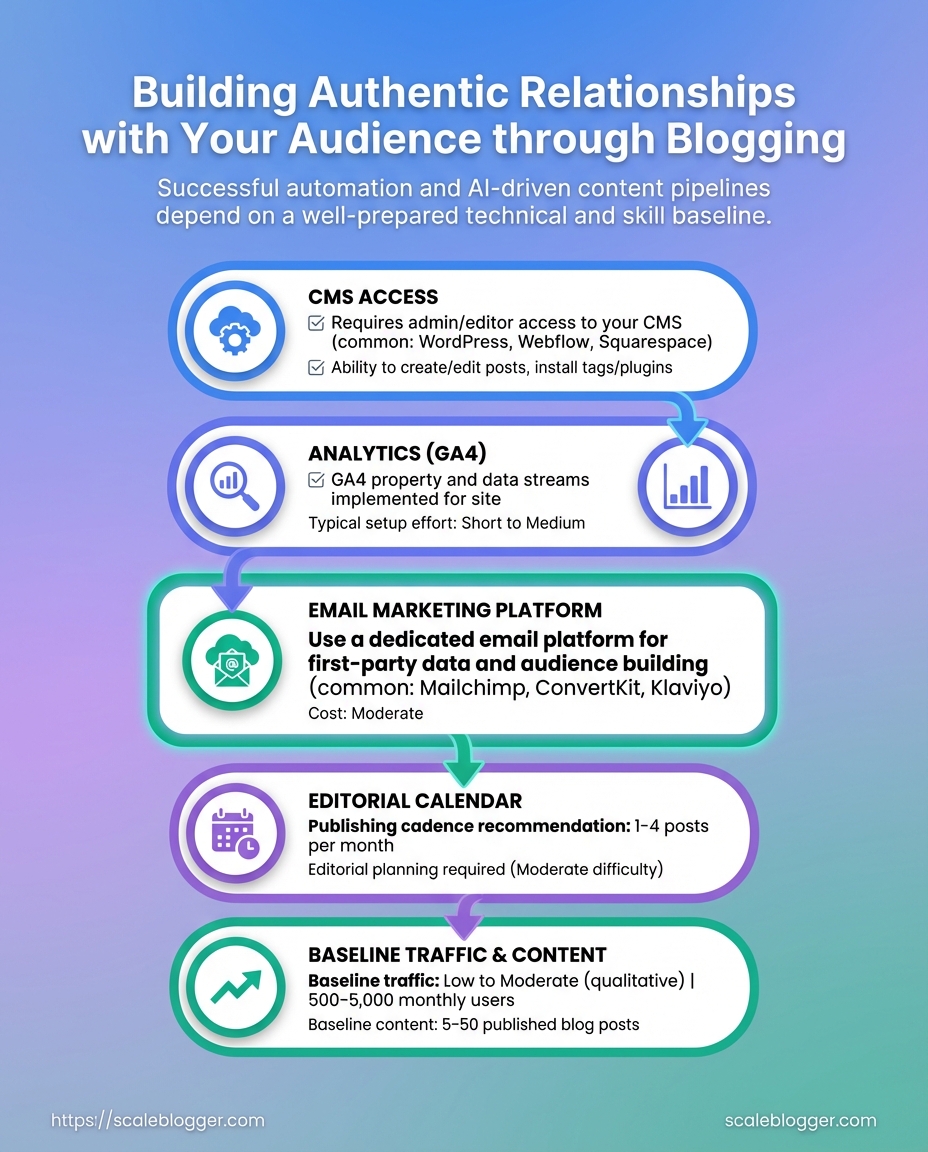
Start with the essentials so initial implementation doesn’t stall. Successful automation and AI-driven content pipelines require both technical access and a minimum content and skills baseline; without these, integrations, testing, and performance benchmarking will take much longer and produce noisy results.
Technical prerequisites — ensure access and integration points are available before you begin:
- CMS access: Admin-level or developer access to configure plugins, API keys, and scheduled publishing.
- Analytics: A configured GA4 property with event tracking and conversion definitions.
- Email platform: An account that supports segmented lists and API-based sends for content distribution.
- Editorial calendar: A documented content schedule with assigned owners and publishing windows.
- Baseline content: At least three published posts with performance data to seed models and set benchmarks.
Skills: Basic SEO: Familiarity with on-page optimization, keyword research, and search intent mapping.
Content writing: Ability to produce 800–1,500-word posts that follow a repeatable style and editorial guidelines.
Community moderation: Experience handling comments, replies, and basic reputation management.
Time estimate: 1. Audit and gather access — 1–3 days. 2. Configure analytics and CMS integrations — 2–5 days. 3. Seed initial automation workflows and run first tests — 1–2 weeks.
Practical validations prevent wasted engineering work. Validate API keys by performing a test publish or tracking event, confirm email platform webhooks using a staging list, and ensure GA4 shows page_view and relevant custom events within 24 hours.
Quick checklist mapping prerequisites to why they matter and how to validate them
| Prerequisite | Why it matters | How to validate | Time to set up |
|---|---|---|---|
| CMS access | Required for plugins, templates, API calls | Create test post via API or admin and confirm publish | 0.5–2 days |
| Analytics (GA4) | Measures impact and trains models | Verify page_view and custom events appear in real-time report |
1–2 days |
| Email marketing platform | Drives distribution and engagement tests | Send test campaign and confirm API webhook responses | 1 day |
| Editorial calendar | Keeps cadence consistent for model inputs | Share calendar with timestamps and owners; confirm >3 planned posts | 0.5–1 day |
| Baseline traffic & content | Enables benchmarking and A/B comparisons | Pull 3 most recent posts’ metrics (sessions, CTR, avg time) | 1–2 days |
Key insight: The setup phase focuses on connectivity and baseline measurement—without those, automation can’t be validated or iterated effectively.
Understanding and preparing these items ahead of implementation speeds deployment and preserves data quality, which improves audience relationship, authentic engagement, and long-term blogging trust. For teams ready to scale, verifying these prerequisites up front reduces friction and accelerates measurable results.
Step-by-Step: Audit Your Current Audience Relationship Signals
Start by treating audience relationship signals as measurable behaviors, not vague sentiment. A quick audit reveals where engagement is healthy, where trust frays, and which content deserves amplification. The goal is to extract a prioritized set of quick wins (low effort, high impact) and longer-term hypotheses to validate with experiments.
- Pull quantitative engagement metrics from your analytics platform (GA4) for the last 90 days.
- Export behavioral slices: sessions, average time on page, returning visitor rate, and conversion funnels.
- Collect qualitative signals from comments, DMs, survey responses, and support tickets.
- Scan content for trust markers: author bios, update dates, citations, and contact paths.
- Map gaps to actions (quick wins vs. hypotheses) and assign owners and timelines.
- Monitor outcomes weekly and iterate on the highest-impact tests.
What to extract and why
- Sessions and trends: Shows content reach and growth velocity.
- Average time on page: Indicates whether readers engage with the substance.
- Returning visitor rate: Measures loyalty and habitual readership.
- Comments and DMs: Reveal audience intent, pain points, and topic interest.
- Email opens and replies: Signal trust and inbox-level attention.
- Social shares: Reflect perceived value and external endorsement.
Practical examples
- Update three high-traffic posts that lack author bios — adds credibility within a day.
- Run a one-question on-page poll for top 10 posts to surface content gaps in under a week.
- Create an email re-engagement sequence for returning visitors who haven’t converted.
Metrics to extract and where to find them (analytics source mapping)
| Metric | Why it matters | Where to find it | Actionable threshold |
|---|---|---|---|
| Average time on page | Indicates content depth engagement | GA4 → Engagement → Pages and screens | > 2:00 minutes for long-form; < 60s needs rewrite |
| Return visitor rate | Measures loyalty and habit | GA4 → User explorer / Audience report | > 25% healthy; < 15% needs retention work |
| Comments per post | Shows active engagement and topic resonance | Native CMS / Disqus / comment plugins | ≥ 3 meaningful comments per post |
| Email open rate | Reflects trust and subject relevance | Email provider dashboard (e.g., Mailchimp) | > 20% for newsletters; < 15% needs subject testing |
| Social shares | External endorsement and reach | Native social analytics / share counters | Top 10% posts: ≥ 50 shares in 30 days |
Key insight: The table aligns specific metrics with practical thresholds so audit findings directly translate into prioritized actions — address low time on page with structure edits, boost returning visitors with email sequences, and fix trust gaps by adding author information and references.
Consider automating recurring audits through scripts or a lightweight dashboard and integrate with content operations to turn insights into scheduled tasks. For teams looking to scale this process, Scaleblogger.com provides automation patterns and benchmarking frameworks that map directly to these signals. Understanding these principles shortens the path from data to durable audience relationships.
Step-by-Step: Create Audience Personas and Intent Maps
Start by turning analytics signals and qualitative feedback into three tightly actionable personas, then map each persona to precise search intents and content hooks. The goal is to move from vague audience segments to content playbooks that writers can execute against without extra discovery time.
Persona components to capture
Demographics: Age, role, location, company size. Behavioral signals: Pages per session, repeat visits, conversion events. Motivation: What outcome they want from your content. Pain points: Practical barriers or objections. Trust triggers: Proof types that reduce friction (case studies, author bios, data). Content formats: Preferred mediums (longform, checklist, video, templates).
Convert analytics into persona signals
- Review
GA4or server logs to identify top landing pages and event flows. - Segment users by behavior: high-engagement (≥3 pages/session), email signups, and bounced visits.
- Map segments to likely motivations: high-engagement → power users; single-page sessions on guides → window shoppers.
- Cross-reference CRM or form fields to add job titles and company sizes for richer personas.
Map content intent to persona needs
Informational intent: Deep explainers and frameworks for power users. Navigational intent: Quick how-tos and step lists for newcomers. Commercial investigation: Comparison pages and case studies for stakeholders*. Match each content piece to a primary intent and one secondary intent; add CTA that respects readiness (download checklist vs request demo).
Test personas quickly
- Micro-interviews: 10-minute
micro-interviewcalls with five visitors identified by referral/source. - Quick surveys: 3-question intercept surveys on high-traffic posts.
- Content A/B: Swap trust triggers (author bio vs case study) and measure lift in time-on-page and form completions.
Build 3 Actionable Personas and Intent Maps
The three personas across intent, trust triggers, and content preferences
| Persona | Primary intent | Trust triggers | Preferred content format |
|---|---|---|---|
| Power User | Deep technical learning and workflows | Data-backed case studies, author credentials | Longform guides, templates |
| Casual Reader | Fast answers and quick wins | Clear step lists, visuals | Short how-tos, infographics |
| Window Shopper | Comparative research before purchase | Third-party reviews, ROI examples | Comparison pages, checklists |
| Stakeholder | Business outcomes and vendor validation | Case studies, executive summaries | Whitepapers, webinars |
| Newcomer | Basic orientation and definitions | Beginner tutorials, glossary | Video explainers, FAQs |
Key insight: These personas cover the typical funnel—from discovery to decision—and show which trust triggers and formats move each group forward. Use this table to assign content owners and KPIs, then validate with short micro-interviews.
For teams that want to automate mapping and scale content production, integrate persona signals into the editorial workflow using an AI content pipeline like AI-powered content automation. When personas are precise and tested, editorial velocity improves because writers spend less time guessing and more time creating work that converts.
Step-by-Step: Plan Authentic Content & Engagement Workflows
Start by aligning a small set of content pillars to real persona intent, then design lightweight, repeatable engagement rituals that map to those pillars. Match what people are trying to accomplish (learn, compare, buy, advocate) to one pillar each, assign channels and owners, and script short empathetic responses so engagement scales without sounding robotic. The practical payoff is a predictable 30-day execution loop where content creation and relationship work happen in parallel.
- Identify 3–5 content pillars mapped to persona intent (learning, comparison, conversion, retention, advocacy).
- Define channel responsibilities for each pillar (e.g., blog → long-form SEO; LinkedIn → thought leadership; Twitter/X → fast commentary; community forum → deep help).
- Set cadence: daily micro-engagement, weekly content piece, monthly pillar review.
- Create 3–5 short response templates per channel focused on empathy, clarity, and next-step guidance.
- Build KPI tracking for relationship health: response time, sentiment trend, repeat engagement rate, referral actions.
- Run one 30-day pilot, capture effort vs. impact, then automate repeatable steps.
- Iterate on language and cadence based on KPI thresholds and qualitative feedback.
Content pillar: A focused theme aligned with a persona goal and measurable objective.
Engagement ritual: A repeatable action (daily, weekly, monthly) that grows relationships and signals responsiveness.
Response template: A short, modular message designed for quick personalization and consistent tone.
Relationship KPI: A metric that measures how the audience perceives and interacts with the brand over time.
Practical examples and templates Empathic opener: “Thanks — that’s a great question. I ran a quick check and here’s what worked for others…” Clarifying probe: “Do you mean X or Y? That helps me point to the right resource.” * Action nudge: “If you want, I can share a checklist to try next week.”
Sample 30-day content + engagement timeline with tasks and owners
| Day/Week | Content task | Engagement task | Owner |
|---|---|---|---|
| Week 1 | Publish pillar overview blog (1,200–1,500 words) | Seed thread + reply to first 20 comments | Content Lead |
| Week 2 | Create how-to checklist + downloadable asset | Host AMA; collect questions | Community Manager |
| Week 3 | Repurpose blog to email series (3 emails) | Send personalized replies to engaged subscribers | Email Specialist |
| Week 4 | Publish case study + internal learnings | Reach out to top commenters for quotes | SEO/Writer |
| Ongoing maintenance | Update pillar content monthly; refresh CTAs | Monitor sentiment, <24h response SLA, weekly roundup | Ops/Community |
Key insight: This 30-day loop balances owned assets with daily conversational work, making engagement measurable and distributable across roles; teams that follow a similar cadence reduce response lag and surface repeatable content opportunities.
This structure keeps teams focused on relationship metrics as much as traffic. When the workflow is automated and templated, creators can spend time improving signal rather than managing noise. For teams looking to operationalize quickly, consider pairing this plan with an AI content automation platform like AI content automation to speed templating and performance benchmarking.
Step-by-Step: Write and Publish With Trust-Building Patterns
Start by writing with specific, verifiable signals that make readers trust the content immediately: visible authorship, transparent sourcing, clear update history, and a simple path to follow-up. These elements convert casual readers into repeat visitors and participants in conversation.
- Draft the piece with explicit sourcing in mind.
- Add author visibility and a short credentials line.
- Insert inline citations and a transparency note.
- Publish with an update log and a clear call to action for feedback.
- Follow up after publishing to close the loop with readers and search engines.
Authoring & Publishing Checklist for Trust
- Draft with transparency: Include exact sources, data ranges, and methodology snippets so claims are verifiable.
- Make the author reachable: Add an email or social link and a short bio that clarifies expertise.
- Cite responsibly: Link to primary sources and avoid over-relying on secondary summaries.
- Add an update log: Show last-reviewed date and what changed.
- Encourage follow-up: Provide a clear next step—comment, subscribe, or a short survey.
Practical examples and micro-copy
Author bio: Short, specific credentials improve credibility—”Priya Shah, product marketer with 7 years at B2B SaaS, previously led growth at Acme Co.”
Sourcing snippet: Use inline phrasing like “Based on company SEC filings and Q3 revenue tables” instead of vague “recent reports.”
Transparency note: A single-line disclosure at the top: “This article uses aggregated publisher data; methods described below.”
Follow-up: After publishing, send a short update to commenters and link to the revised draft in the comments.
Side-by-side of trust-building elements and sample implementations (what to add vs example copy)
| Trust Element | What to add | Example copy | Why it works |
|---|---|---|---|
| Author bio | Name, role, 1–2 credentials | “Priya Shah — Product marketer, 7 years in B2B SaaS” | Establishes authority fast |
| Sourcing | Primary links, dates | “Q2 revenue (Company SEC filing, 2024)” | Enables verification |
| Transparency note | Method summary | “Data aggregated from public filings and interviews” | Sets reader expectations |
| Updated revision log | Date + changes | “Updated 2025-05-12 — added competitor pricing table” | Shows maintenance and freshness |
| Call to action | Next-step for readers | “Join the discussion or suggest corrections via email” | Converts readers into contributors |
Key insight: The table shows trust elements that are small to implement but large in impact—clear bios and precise sourcing remove friction for skeptical readers and improve long-term engagement.
Implementing these patterns requires only small process changes but yields a measurable lift in audience relationship and authentic engagement. When publishing repeatedly this way, the content pipeline becomes a trust engine rather than a one-off hit.
Step-by-Step: Measure, Iterate, and Scale Relationship Activities
Start by treating relationship activities like a product: instrument the experience, run short experiments, decide with clear criteria, then document repeatable playbooks for scale. Measurement needs to include both hard numbers and human signals so teams can tell whether an activity improves audience relationship, fosters authentic engagement, and builds blogging trust over time.
Quantitative: Track retention, open rates, click-to-conversion, and churn using cohort and funnel views.
Qualitative: Capture sentiment from comments, interview notes, and short post-interaction surveys.
Stop/go criteria: Predefine when an experiment is a win, a tweak, or a kill; avoid ambiguous “let’s keep running” decisions.
- Instrument baseline metrics and qualitative channels.
- Design a focused experiment with one primary KPI and a 2–6 week horizon.
- Run the experiment with randomized audience segments or time-sliced cohorts.
- Evaluate results against pre-agreed thresholds and qualitative signals.
- Document the outcome, playbook steps, and next experiment hypothesis.
- Scale the winning treatment by automating repetitive tasks and updating content templates.
- Baseline capture: Collect 30–90 days of historical opens, replies, and page dwell time.
- Hypothesis framing: State expected directional change and magnitude (e.g., +10% opens).
- Short cycles: Prefer 2–6 week iterations; they reveal signal faster and reduce waste.
- Decision rules: Use binary stop/go plus a “tweak” path for partial wins.
- Documentation: Turn wins into a one-page playbook and add to the content library.
Real examples: a personal-opener test increased reply rate by focusing subject-line personalization; a comment-SLA experiment reduced negative sentiment by committing to same-day replies.
90-day experiment calendar with experiment names, duration, KPIs, and expected outcome
| Experiment | Duration | Primary KPI | Success threshold |
|---|---|---|---|
| Personal opener test | 14 days | Reply rate | +15% relative lift |
| Comment reply SLA test | 21 days | Sentiment score | ≥80% positive sentiment |
| Newsletter segmentation test | 30 days | Open rate | +10 percentage points |
| Content pillar focus test | 45 days | Retention (30-day) | +8% cohort retention |
| Community AMA test | 14 days | Participation rate | ≥5% active participants |
Key insight: The calendar balances short probes and longer content tests so teams learn fast while preserving statistical power. Use A/B dashboards, analytics cohorts, and short surveys as primary data sources.
Integrating automation where appropriate—templates, scheduling, and basic reply triage—lets teams multiply relationship experiments without ballooning overhead. When experiments are measured, iterated, and codified, teams move faster and stay aligned on what actually grows audience trust.
Troubleshooting Common Issues
Low engagement and trust signals show up fast if content, UX, or distribution falters. Start by isolating measurable signals — traffic patterns, comment behavior, sentiment shifts — then apply targeted first-aid actions that restore visibility and reassure readers while you run root-cause tests. Below are practical triage steps, concrete fixes, and verification methods to move from firefighting to durable remediation.
Observe and interact: Monitor analytics for sudden changes in CTR, bounce_rate, and session duration. Prioritize by impact: Fix high-traffic pages first, then mid-tail content that funnels new users. Communicate transparently: When trust is damaged, update the page with an author note or correction and pin a short explanation in the comments.
Quick first-aid actions: Restore visibility: Republish or refresh title tags and meta descriptions to improve CTR. Reduce friction: Fix broken images, CTAs, or form failures that block conversion. Rebuild trust: Add or update author bios, citations, and GDPR/privacy text. Calm the conversation: Respond to the first 5–10 negative comments with factual, non-defensive replies. * Isolate anomalies: Pause paid traffic if it’s amplifying low-quality visits.
Root-cause tests A/B check: Serve the original vs. a refreshed version to a small cohort and measure engagement lift. Traffic source audit: Break down by medium and campaign to find noisy referrers or bots. Content quality scan: Run headlines and body through readability and topical relevance checks. Moderation review: Search comment logs for spikes in deletion, flags, or external linking patterns.
Map symptoms to quick fixes and root-cause tests
| Symptom | Quick fix | Root-cause test | Verification metric |
|---|---|---|---|
| Zero comments | Add engaging question + reply to first commenters | Time-of-day and traffic source split | Comment count week-over-week |
| Negative sentiment spikes | Respond transparently + update factual errors | Keyword sentiment trend in comments | Net sentiment score change |
| Low email opens | Refresh subject lines + re-segment list | Deliverability test and send-time split | Open rate by segment |
| High one-time visits | Improve internal linking + add next-step CTAs | New vs returning traffic, bot filter | Returning visitor rate |
| Low social engagement | Repost with native formats (carousel/video) | Platform-level reach vs referral traffic | Social engagement rate |
Key insight: The fastest wins come from fixing UX blockers and clarifying trust signals; deeper gains require traffic-source and content-quality diagnostics.
Validating success means measuring the same signals you triaged: CTR, session duration, comments, sentiment, and return visits. When those metrics recover and qualitative feedback turns neutral/positive, the fix is validated. Understanding these principles helps teams move faster without sacrificing quality.
📥 Download: Audience Relationship Building Checklist for Blogging (PDF)
Tips for Success & Pro Tips
Trust is a strategic asset for any content-driven brand; build it deliberately by showing work, inviting small commitments, and using automation to amplify human connection rather than replace it. Start with transparent processes, make interactions predictable and low-friction, and collect micro-evidence of value that compounds over time.
- Transparency accelerates credibility: Publish
revision historyor change logs so readers see how ideas evolved and why updates were made. - Micro-commitments increase retention: Offer tiny, immediate wins—short quizzes, one-click saves, or a single-question survey—to convert casual readers into repeat visitors.
- Automation enhances personalization: Use automated segments for
welcomeand follow-up flows, but keep the first-touch human-written and context-aware. - Reader stories prove impact: Showcase reader case studies and spotlight posts to turn abstract claims into social proof.
- Create a visible revision trail.
- Add a short changelog at the top of posts when you update facts or add examples.
- Use
ISO datestamps for clarity. - Link to prior versions for transparency.
- Design micro-commitment funnels.
- Offer a 30-second quiz or checklist.
- Follow with a single, relevant resource via
email welcome. - Track conversion to repeat visits.
- Automate with guardrails.
- Build templates for personalized intros that include the reader’s first name and content preference.
- Set escalation rules where high-value signals route to a human editor.
that scale trust: Reader spotlight posts: Turn a user’s small win into a 500-word post with quotes and metrics. Personalized welcome emails: Send a short, relevant resource on day 1 and a permission-based check-in on day 7. * Automated follow-up sequences: Trigger a second touch only after a measurable signal (reply, click, or time-on-page).
Pro tips with implementation complexity and expected impact
| Pro tip | Implementation complexity | Estimated time to implement | Expected impact |
|---|---|---|---|
| Publish revision history | Medium — CMS change + templates | 2–5 hours | Medium-high — builds credibility |
| Reader spotlight posts | Low — interview + edit | 3–6 hours per post | High — strong social proof |
| Personalized welcome emails | Low — email automation | 1–2 hours setup | High — improves retention |
| Comment moderation rules | Low — policy + tools | 1–3 hours | Medium — improves community tone |
| Automated follow-up sequences | Medium — segmentation + flows | 4–8 hours | High — increases engagement |
Key insight: Prioritize low-friction practices that produce visible evidence of care (revision logs, spotlights) and automate repetitive touches while preserving an early human voice. For teams scaling content pipelines, tools like AI content automation can reduce overhead without diluting authentic engagement. Understanding these principles helps teams move faster without sacrificing quality.
Appendix: Templates, Scripts, and Experiment Sheets
These are ready-to-copy templates and experiment sheets designed for immediate use. Each item is short, editable, and includes clear places to personalize so teams can deploy experiments rapidly and track outcomes without reinventing structure. Use them to reduce setup time and keep A/B comparisons consistent.
Quick deployment checklist
- Decide the single hypothesis you want to test.
- Pick the matching template from the table below.
- Personalize the
{{placeholders}}. - Run for the defined minimum sample size or timeframe.
- Record results in the experiment sheet and iterate.
How to personalize
- Replace placeholders: Use
{{first_name}},{{topic}},{{cta_url}}for rapid mail-merge. - Localize tone: Change verbs and examples to match audience sophistication.
- Set measurement: Add
Primary metric:andSuccess threshold:in every sheet.
Catalog templates with purpose and paste-ready example
| Template name | Purpose | Quick usage instruction | Time to deploy |
|---|---|---|---|
| 3-question survey | Capture visitor intent and friction | Send on post-purchase or after onboarding; replace {{product}} and one open question |
2 minutes |
| Comment reply script | Scale authentic engagement on posts | Paste, personalize {{name}} and {{point}}, keep under 2 lines |
1 minute |
| Welcome email | Onboard new subscribers and set expectations | Replace {{first_name}} and {{next_steps}}; include Primary metric: reply rate |
3 minutes |
| Experiment sheet | Track hypothesis, setup, metrics, and outcome | Duplicate and fill Hypothesis, Variant A/B, Sample size, Results fields |
2 minutes |
| Persona template | Standardize audience segments for briefings | Fill Name, Job, Goals, Pain points, Primary channels |
5 minutes |
Key insight: The table prioritizes speed and repeatability—templates target common workflow gaps (feedback capture, engagement, onboarding, measurement, audience clarity). Each row contains a paste-ready action and an explicit deploy time so teams can triage what to run first.
Example snippets and a simple script
- Comment reply script: Hi
{{name}}— great point on{{point}}. I found{{resource}}useful; any thoughts on applying it to{{topic}}? - Welcome email subject: Welcome,
{{first_name}}— here’s what to expect - Experiment sheet fields: Hypothesis, Primary metric, Secondary metrics, Traffic source, Start/End, Results, Notes
Use the templates as the minimum reproducible unit for experiments. For a fully automated pipeline that schedules tests and captures outcomes, integrate these sheets into your content operations system or explore Scaleblogger.com for automation patterns that scale this process. Understanding these templates helps teams move faster without sacrificing measurement rigour.
Conclusion
You now have a repeatable path: audit the signals your readers already send, map personas to their intent, design content that invites two-way conversation, and measure the relationship metrics that matter. Applied together, these steps shift blogging from broadcast to conversation—building genuine audience relationship through patterns that encourage authentic engagement and strengthen blogging trust. Recall the audit example where small changes to headline language doubled time on page, and the persona-driven drip that turned passive visitors into repeat contributors; those are the kinds of practical wins this process produces.
Start by picking one page or funnel to optimize this week: run the audit, update the copy with specific audience language, and add one trust-building pattern (social proof, transparent process, or repeatable format). Prioritize quick experiments, track engagement signals, and iterate every two weeks. Common questions often ask whether this approach scales or requires heavy resources—use narrower experiments to validate before scaling, and automate repetitive tasks where possible. For teams looking to streamline those steps, Automate and scale your content workflows with Scaleblogger is a practical next step to move from experiment to system.
