

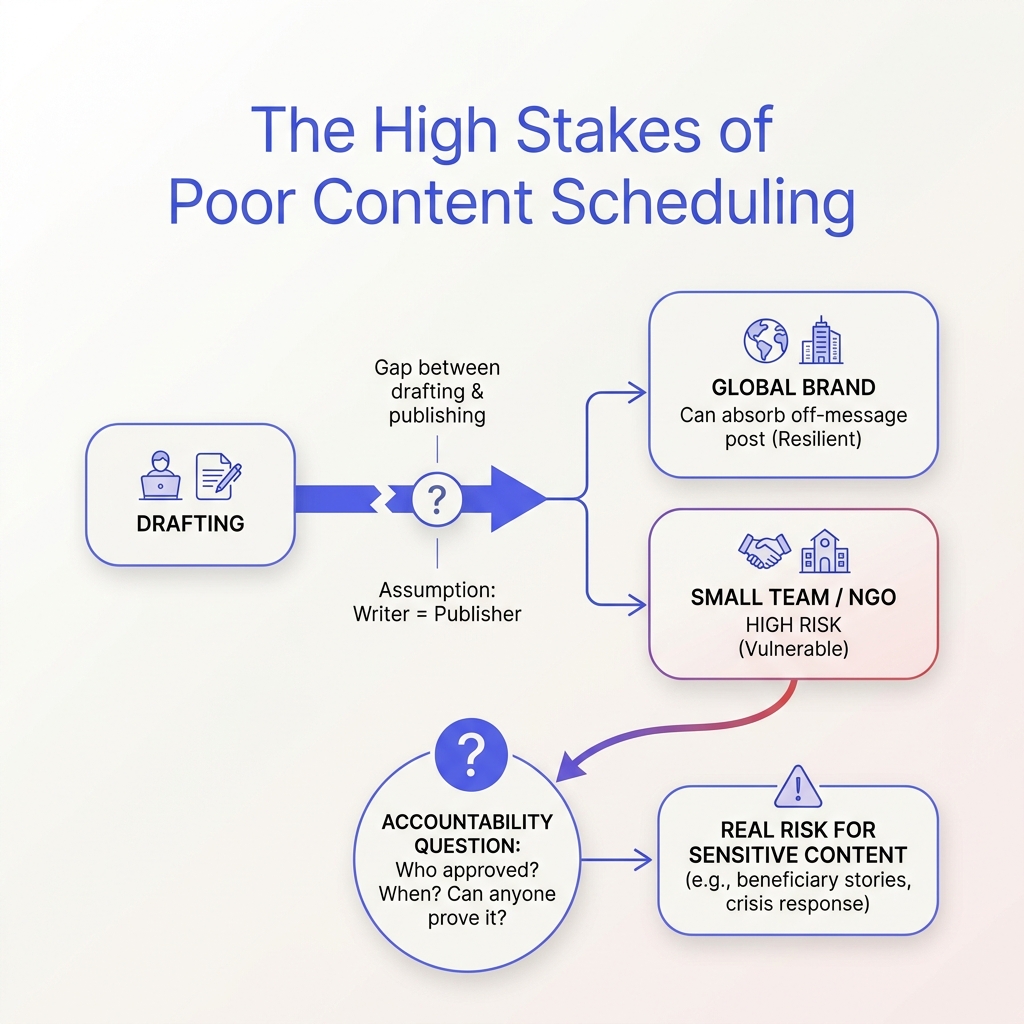
Friday afternoon, a three-person communications team drafts a statement about a funding shortfall.
A volunteer posts a half-finished version from their personal account.
By Monday, a donor wants to know why the numbers don’t match the press release.
This gap between drafting and publishing highlights the challenges NGOs face in managing social media content effectively.
Small teams feel these challenges most acutely.
A global brand can absorb one off-message post.
A legal aid clinic or food bank can’t afford these errors.
So when evaluating content scheduling platforms, focus less on channel count or interface polish and more on how they support clear ownership, review, and publishing records.
NGOs benefit most from content scheduling systems that integrate clear approval steps to ensure posts are reviewed before publishing.
What Content Scheduling Tools Do—and Where Their Scope Ends
Picture a small NGO communications team two days before a campaign launch.
Three drafts sit in a shared drive, two people each assume someone else approved the donor update, and the event reminder is still unscheduled.
That gap isn’t a writing problem—it’s a coordination problem.
Content scheduling tools are software that takes finished content, places it on a calendar, and publishes it at a set time across channels like email, LinkedIn, or Instagram.
In practice, they act like a relay: once the content and timing are finalized, the tool ensures the message goes out consistently, without relying on someone to remember to click “send” at the right moment.
Scheduling is not the same as creating, and it is not the same as managing a campaign.
Creation produces the draft.
Campaign management sets the direction—what the message should be, which audience it targets, and how a sensitive announcement should be handled as it approaches release.
A calendar slot doesn’t decide strategy; it executes a choice that someone else made.
Because scheduling tools only execute the timing and channel of publication, they cannot resolve uncertainties about approvals or messaging decisions.
Core Capabilities
Why Better Scheduling Matters to NGO Founders and Lean Teams
Missing posting deadlines rarely derail a campaign.
Instead, the real risk lies in sending donor updates before figures are confirmed or event reminders after details change.
For lean teams, these mistakes cost relationships more than impressions.
When communications duties are shared among three people, unclear ownership can cause errors despite everyone’s best intentions.
That is why governance should guide your choice of content scheduling tools—not just posting volume.
Before committing to a platform, look for these signals:
- Named approvers per content type. Different reviewers for donor updates, campaign announcements, and impact reports, reflected in the system.
- Visible approval history. Clear records of who signed off, when, and on which version—not buried in chat threads.
- Scheduled versus approved. The workflow should keep calendar dates and permissions distinct.
- Retrievable published records. Ability to access the exact version published and its approval trail when questions arise.
These governance features reveal that the real bottleneck is often the gap between decision-making and publishing—not how often posts go out.
How an Approval-First Scheduling Workflow Works
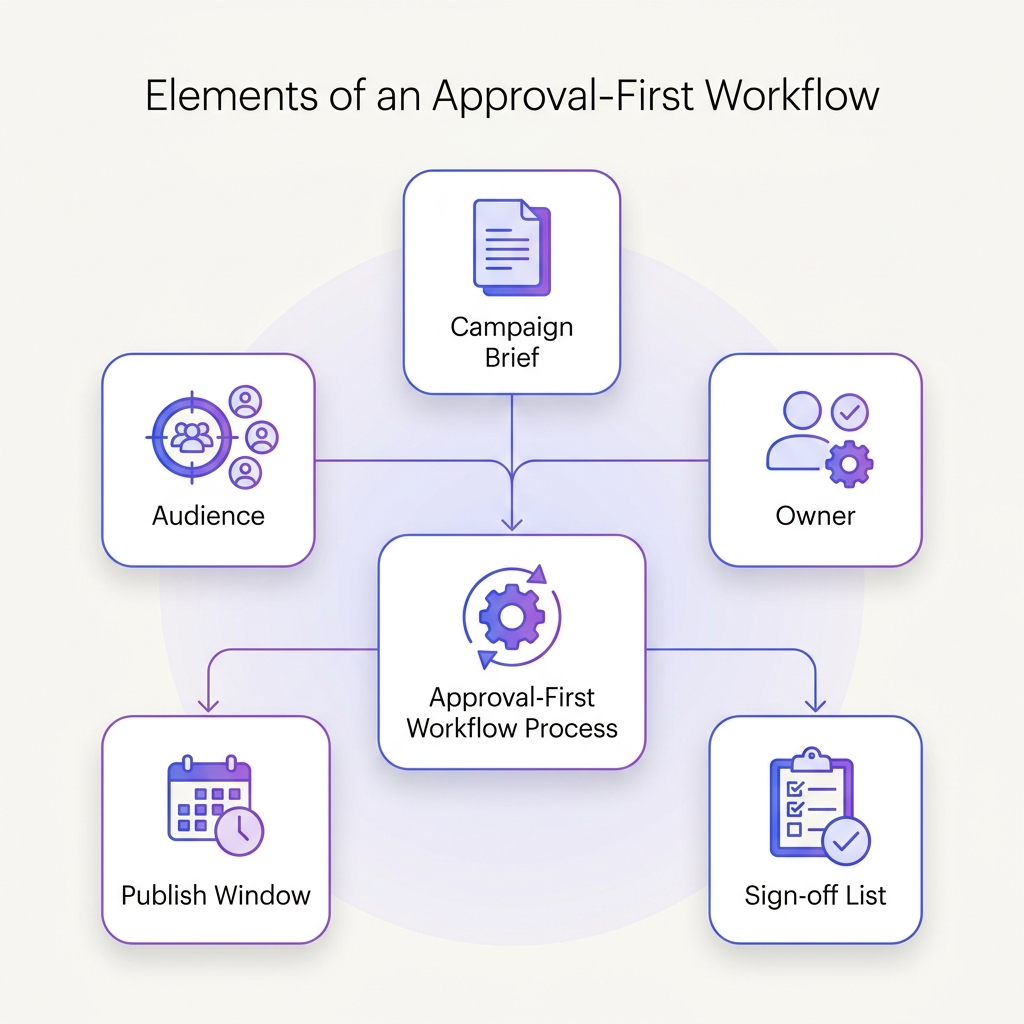
At 9:00 a.m., the workflow rests on one document: the campaign brief.
It names the audience, the owner, the publish window, and who must sign off before anything goes live.
Everyone works from that shared brief.
The brief is not background reading.
It is the schedule’s source of truth.
The audience determines who the message is for.
The owner determines who is accountable for moving the work forward.
The publish window determines when the content can go live.
The sign-off list determines what must happen before scheduling becomes final.
Because those elements sit in one place, the workflow does not begin with a calendar slot.
It begins with a decision about readiness.
Approval-first means approval is a precondition, not a cleanup step.
A draft can be prepared and queued, but it is not treated as scheduled until the required approver has signed off.
The campaign brief defines that gate.
If the brief says a person must approve before publication, the schedule waits on that person.
If the publish window changes, the brief changes first, and the schedule follows.
This order prevents a common failure: content appearing on the calendar while questions about audience, ownership, timing, or approval remain unresolved.
The sequence is simple.
Confirm the brief.
Route the work to the named approver.
Capture the sign-off.
Then schedule within the publish window.
At each stage, the same document answers the same questions, so no one has to reconstruct the decision from messages or memory.
That is how an approval-first scheduling workflow works: the brief sets the conditions, approval confirms them, and scheduling records the result.
Examples, Trade-Offs, and Misconceptions About Scheduling
I don’t have the original section text to revise — the “Revise this section:” field came through empty.
Please paste the current draft for Examples, Trade-Offs, and Misconceptions About Scheduling, and I’ll return the rewritten section at 207–298 words with all facts, links, and tables intact.
How to Choose and Introduce a Scheduling Workflow
Take a small NGO with one founder, one part-time communicator, and three campaigns running at once.
Nobody is short of ideas.
The difficulty is that each campaign needs a different person to sign off, and the person queuing the post is usually the same person chasing the approval.
First, we choose an effective workflow, and then we select the right software.
For a team this size, the sequence that holds up is narrow: pick one campaign, name a single owner, define who approves, then let scheduling follow approval.
Prove it on one campaign before you repeat it across all three.
That pilot separates workflow problems from tool problems.
When a post stalls, you learn quickly whether the bottleneck was a missing decision or a clunky interface.
A Practical Evaluation Checklist for Content Scheduling Tools
| Evaluation area | Questions to ask | Priority for a lean NGO team | Evidence to request in a trial |
|---|---|---|---|
| Ease of planning | Can you see all three campaigns in one calendar view, and move a post without losing its approval status? | High | A live walkthrough using your own campaign names and dates |
| Approval controls | Who can approve, who can publish, and can approval be required before anything is queued? | Critical | One real draft pushed through the approval chain end to end |
What are the top 5 social media schedulers?
The top five social media schedulers typically include Hootsuite, Buffer, Sprout Social, Tailwind, and SocialPilot.
These tools help manage posting schedules, analytics, and content organization across various platforms.
What are the best social media management tools for nonprofits?
The best social media management tools for nonprofits include Hootsuite, Buffer, and Sprout Social, which offer features like scheduling, analytics, and team collaboration.
These tools are designed to cater to the unique needs of nonprofits, enhancing their social media presence effectively.
Which tool can be used for content scheduling?
Content scheduling can be effectively managed using tools such as Hootsuite, Buffer, or Later.
These tools help organizations plan their posts and ensure timely publication across various social media channels.
Is Hootsuite no longer free?
Hootsuite has transitioned to primarily offering paid plans and no longer provides an unlimited free version.
Users can access a limited free tier, but for full functionality, including scheduling and advanced features, a paid subscription is necessary.
Is Buffer better than Hootsuite?
Buffer and Hootsuite each have their strengths, with Buffer being praised for its simplicity and user-friendly interface while Hootsuite offers more advanced analytics and team collaboration options.
The choice depends on the specific needs and size of the organization.
Scheduling That Earns Its Place in a Sensitive Workflow
The Friday statement that reached a donor half-finished was not a failure of scheduling technology.
It was a failure in permissions and approvals.
Content scheduling tools control when posts publish; your approval process controls whether they should.
Begin with a small step: identify who can publish to public channels today, then move one routine post behind a single reviewer this week.
Observe the time invested and the trust gained.
This approach lays the groundwork for reliable, controlled communications.
At Scaleblogger, drafting and scheduling integrate with one-click approvals and proof receipts, ensuring transparency and control.
Aligning control with speed makes communication both fast and trustworthy.
