

You land on a site, skim the first paragraph, and leave—again. You see templated posts and recycled angles everywhere. Search engines may reward relevance, but real readers respond to content that resonates. Resonance comes from personalized content that addresses a specific problem for a person at that moment.
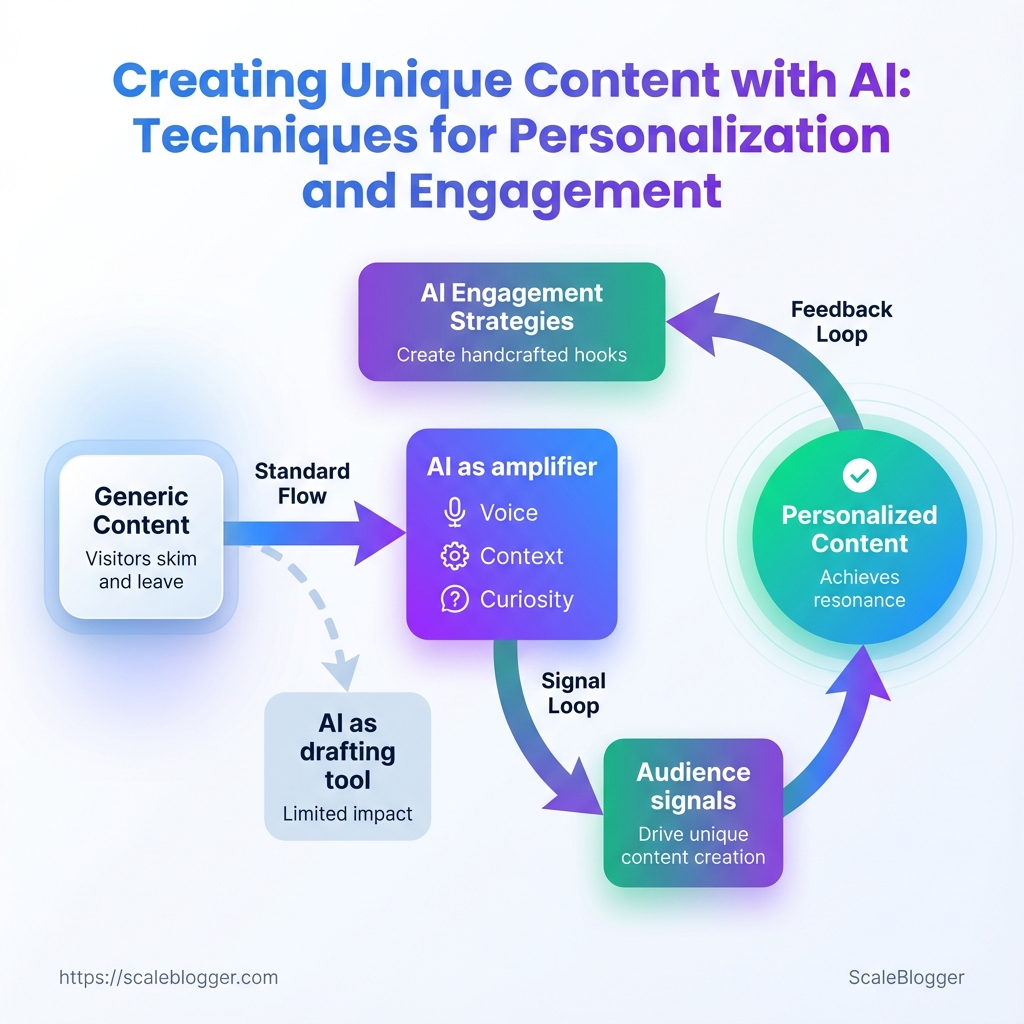
To use AI as more than just a drafting tool, think of it as an amplifier for voice, context, and curiosity. AI engagement strategies should create hooks that feel crafted by hand. Unique content creation should stem from audience signals rather than generic prompts.
What You’ll Need (Prerequisites)
Start with the practical essentials: the project succeeds only if the right tech, data, and people are in…
What You’ll Need (Prerequisites)
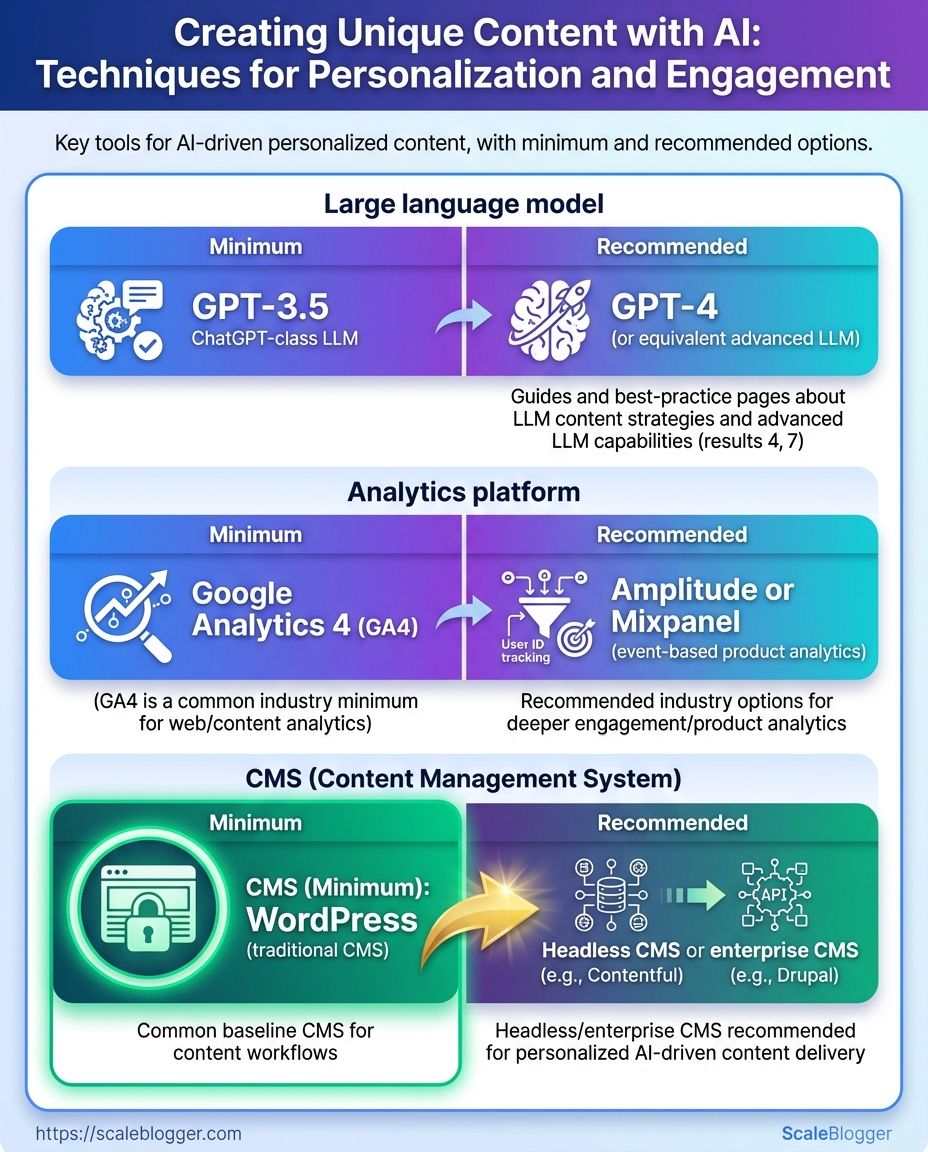
Start with the practical essentials: the project succeeds only if the right tech, data, and people are in place before automating personalized content. At the very least, you need a controllable LLM, analytics that reveal real user behavior, a CMS capable of publishing variations, a content inventory storage solution, and skilled people who can prompt, edit, and measure. With those in hand, personalization moves from experiment to repeatable workflow.
Required tools and minimal vs recommended options so readers can quickly provision resources
Table: What You’ll Need (Prerequisites) — Tool/Resource, Minimum Requirement, Recommended Option & more
| Tool/Resource | Minimum Requirement | Recommended Option | Why it matters |
|---|---|---|---|
| Large language model | API access to an LLM (pay-as-you-go) | GPT-4o or Anthropic Claude 2 Enterprise; fine-tuning/embedding support | Drives content generation quality and controllability |
| Analytics platform | GA4 basic setup (free) | GA4 + Mixpanel or Heap; event-level tracking | Measures behavior and feeds personalization signals |
| Content management system | WordPress or equivalent with templating | Headless CMS (Contentful, Sanity) + CDN | Enables fast variant publishing and API-first workflows |
| Personalization engine | CMS plugin or server-side simple rules | Optimizely, Dynamic Yield, Adobe Target | Scales targeting and visitor segmentation reliably |
| Content inventory / spreadsheet | Google Sheets with URLs & topics | Airtable or Notion with structured fields | Single source of truth for optimization and automation |
People and skills matter as much as tech.
Content Strategist: Owns audience segments, content themes, and KPI targets.
Prompt Engineer / AI Specialist: Builds and tests prompts, manages models, and handles fine-tuning.
Editor / SEO Specialist: Edits AI outputs, enforces brand voice, optimizes for search intent.
Engineer / DevOps: Connects APIs, implements tracking, and scales deployments.
For solo creators, focus on skill shortcuts: use prebuilt prompt templates, start with GA4 event goals, and use Airtable as a lightweight CMS inventory. Follow this 30-day ramp checklist to go from zero to a basic workflow:
- Configure GA4 and implement key event tracking.
- Provision LLM API keys and test simple generation prompts.
- Create content inventory in Google Sheets or Airtable.
- Publish two personalized variants and measure engagement.
- Iterate on prompts, targeting rules, and editorial standards.
Get these prerequisites right and the rest becomes execution: faster experiments, clearer signals, and content that actually resonates with individual visitors.
Define Personalization Goals and Success Criteria
Turn your business goals into measurable…
Define Personalization Goals and Success Criteria
Turn your business goals into measurable personalization outcomes right from the start. Vague goals like ‘increase engagement’ don’t help with content decisions. Clear goals linked to audience segments and specific KPIs do. This step converts strategy into a repeatable checklist: who you’re targeting, what content you’ll personalize, which metric proves success, where you currently sit, and what a realistic uplift looks like.
Historical analytics: Access to past content performance (pageviews, CTR, conversion rates).
Audience segmentation: At least 3 segments defined by behavior or intent.
Measurement stack: Working GA4 or equivalent, and a content platform that can tag segments.
- Map business objectives to audience segments and content types.
- Choose a single primary KPI per objective and up to two supporting metrics.
- Set baselines from the last 90 days and pick conservative + aggressive targets.
- According to research from aprimo.com, personalized onboarding emails will lift trial-to-paid by 15%.
Examples of sensible metric choices:
- Lead generation: Primary KPI = form completions; secondary = assisted conversions.
- Engagement: Primary KPI = average time on page; secondary = scroll depth.
- Retention: Primary KPI = 30-day return rate; secondary = churn rate.
Provide a template mapping business objective → audience segment → content type → KPI → baseline → target
Table: Define Personalization Goals and Success Criteria — Business Objective, Audience Segment, Content Type & more
| Business Objective | Audience Segment | Content Type | Primary KPI | Baseline | Target |
|---|---|---|---|---|---|
| Lead generation | New organic visitors | Top-of-funnel ebook landing page | Form completions / month | 120 completions | Research from hubspot.com shows a 50% lift to achieve 180 completions. |
| Engagement | Returning readers (last 30d) | Personalized article recommendations | Avg. time on page | 90 seconds | 140 seconds (55% lift) |
| Retention | Trial users | Onboarding drip emails | 30-day return rate | 22% | 32% (10pt lift) |
| Revenue per user | Paying subscribers | Cross-sell product pages | Avg. revenue per user (ARPU) | $12.50 | $15.00 (20% uplift) |
| Brand awareness | Upper-funnel prospects | Thought leadership pieces | Social shares / month | 420 shares | 630 shares (50% lift) |
When targets are set, document the hypothesis and the test duration (typically 6–12 weeks for content tests). Track results weekly, but commit to a complete test window before judging impact. Personalization becomes defensible when goals, segmentation, and KPIs are all written down and visible to the team.
Audience Segmentation and Intent Mapping
Start by grouping visitors into actionable cohorts based on…
Audience Segmentation and Intent Mapping
Start by grouping visitors into actionable cohorts based on measurable signals: where they came from, what they did, and who they are. Effective segments consider traffic source, on-site behavior, and firmographics. This way, each group has a one-sentence intent statement and a clear personalization tactic. This converts scattershot content into targeted journeys that drive clicks, time on page, and conversions.
How to build high-impact segments
- Collect signals from analytics and CRM.
- Combine three dimensions: acquisition (e.g., organic search, paid social), behavior (pages viewed, microsignals like video plays), and firmographics/demographics (company size, job title, location).
- Write a one-sentence intent statement for each cohort that starts with the user’s context, then the problem they want to solve.
- Map a content hook and a personalization tactic that directly answers that intent.
Use these practical attributes when creating segments:
- Traffic source: organic search, paid ads, referral, social.
- Behavioral signals: time on page >2 min, repeat visits, content downloads.
- Firmographics: SMB vs enterprise, industry, ARR band.
- Engagement stage: browsing, comparing, ready-to-buy.
- Channel preference: email opens, app users, RSS subscribers.
Segments side-by-side with attributes, intent, content hook, and personalization tactic to speed decision-making
Table: Audience Segmentation and Intent Mapping — Segment, Key Attributes, Intent Statement & more
| Segment | Key Attributes | Intent Statement | Content Hook | Personalization Tactic |
|---|---|---|---|---|
| New visitors | 1st session, organic search, bounce risk | Looking for a quick answer to a problem or overview | Short explainers, FAQs, practical how-tos | Serve a concise content hub + highlighted next-step CTA based on searched keyword |
| Returning readers | Multiple visits, reads 3+ articles, long session times | Seeking deeper guidance and ongoing updates | Series content, digestible deep dives, reading lists | Recommend next article and surface saved content; use triggered email with related posts |
| High-intent searchers | Arrive from product+comparison queries, low bounce | Comparing solutions and pricing to decide | Comparison pages, ROI calculators, case studies | Show contextual product comparisons and dynamic CTAs (pricing, demo) |
| Existing customers | CRM matched, product usage data available | Looking to get more value or expand usage | Advanced tutorials, best-practice guides, expansion use-cases | In-app content suggestions and personalized email campaigns with product tips |
| Newsletter subscribers | Opted-in, high open-rate, click history | Want curated insights and new ideas | Curated roundups, exclusive templates, early access | Personalize subject lines and lead with topics matching past clicks |
Practical example mapping
High-intent searcher: Create a short landing page that compares features, includes a downloadable checklist, and surfaces a “Request demo” CTA. Use UTM data to populate the CTA message with the keyword the user searched for.
Applying this mapping reduces wasted traffic and turns generic visits into predictable content paths that produce measurable outcomes. Use the segments above as templates and iterate with A/B tests until each personalization tactic shows uplift.
Design Personalized Content Templates and Prompts
Start by mapping the content pieces you need and then turn those pieces into repeatable templates that an AI can fill reliably. Templates reduce variability, speed production, and make A/B testing meaningful because you control structure, voice, and constraints. Build templates for headlines, intros, body variants, and CTAs; pair each with prompt patterns that include placeholders and guardrails so outputs stay on-brand.
Template types
Headline template: Short attention hook + keyword + modifier. Intro template: Problem statement → empathic line → promise of value. Body variant template: List-style, long-form explanation, or narrative case study.
CTA template: Benefit-led action + urgency/next step.
Prompt pattern essentials
- Role and perspective: Bold: “You are a senior editor writing for X audience.”
- Audience spec: Bold: “Target: mid-market SaaS marketers, familiarity level: intermediate.”
- Output format: Bold: “Produce: 6 H2s, 300–450 words each, include one data point and 2 examples.”
- Length guardrail: Bold: “Use
max_tokensequivalent of ~450 words.” - Tone guardrail: Bold: “Tone: conversational, credible, and slightly witty.”
- Negative prompts: Bold: “Avoid: buzzwords like ‘best-in-class’, first-person anecdotes, and speculative claims.”
- Define the template skeleton.
- Create a primary prompt with placeholders such as
{audience},{keyword},{tone},{examples}.
- Add a negative prompt block telling the model what not to include.
- Prototype outputs and iterate guardrails until consistency is acceptable.
Practical example — Headline prompt
- Role: You are a growth editor.
- Instruction: Generate 10 headline options for
{keyword}targeting{audience}. Use power words, one must be list-style.
- Negative: Do not use clickbait, do not exceed 12 words.
Practical example — Blog intro prompt
- Role: Senior B2B writer for
{audience}.
- Instruction: Write a 70–100 word intro that opens with a problem, includes a stat-like claim (qualitative ok), and ends with a 1-sentence promise.
- Negative: No first-person, no hypothetical numbers.
Prompt engineering best practices
- Be explicit about role: Models anchor better when given a job title.
- Specify audience and familiarity: Tailor vocabulary and explanations.
- Request format and length: Give exact structure and word ranges.
- Use examples and negative prompts: Provide a “good example” and list banned phrases.
Pairing these templates with automation turns a one-off brief into a predictable pipeline. For teams scaling content, this is where strategy becomes production-ready—templates keep voice consistent while prompts supply the creative variance. If automating the pipeline, consider using tools that let you version prompts and score outputs so improvements compound over time.
Generate Personalized Drafts and Apply Quality Controls
Start by generating multiple draft variants tuned to the persona, channel, and conversion intent. Create batches of drafts instead of single pieces. This allows you to A/B test parts like headlines, openings, and CTAs, making it easier to choose the best options. Automate immediate validation checks, store outputs with clear metadata, then route high-potential drafts into a human editorial pass focused on voice, factuality, and SEO.
Tools & materials
- Model(s): fine-tuned LLM + prompt templates
- Validation stack: plagiarism, fact-check, brand-voice, readability/SEO, image originality
- Storage: dated content repo with taxonomy and metadata tags
- Generate drafts in batches (5–10 per topic).
- Run automated checks immediately: plagiarism, basic factuality (claim flags), brand-voice score, readability and SEO score, and image originality.
- Save each draft with metadata: persona, channel, prompt version, model temperature, and validation results.
Automated checks to run immediately
- Plagiarism scan: catch verbatim copying and near-duplicate content. Factuality flags: detect unverifiable claims, numeric mismatches, or dates. Brand-voice score: match tone, terminology, and messaging rules.
- Readability & SEO score: check headings, keyword usage, subhead length, and passive voice. Image originality: verify license and check for deepfake risks.
Editing and human-in-the-loop controls
- Editing checklist (priority order):
- Factual accuracy: confirm claims, numbers, and dates. 2.
Brand compliance: align terminology, disclaimers, and legal copy. 3. Clarity & flow: fix logic gaps, tighten openings, and shorten paragraphs.
- SEO adjustments: add intent-aligned keywords, internal links, and optimized headings. 5.
Readability pass: simplify sentences, check skim-ability, and validate CTAs.
Rules for rewriting vs editing
- Edit when the draft: has accurate facts, correct structure, and only needs clarity or tone tweaks.
- Rewrite when the draft: contains major factual errors, off-brand voice, or poor structure that impedes usability.
- Partial rewrite when sections are salvageable—preserve high-performing intros or examples and rebuild weak connectors.
Readability and SEO optimization tips
- Prefer short paragraphs and H2/H3 hierarchy for scannability. Use the target keyword naturally in headings and the first 100 words; vary with semantic synonyms. headings for intent and include one internal link early.
- Run a final human read to ensure retention, actionability, and brand fit.
Scale-friendly note: Automate as many checks as possible, but gate publish with a human who owns factual accuracy and brand voice. That combination preserves speed without sacrificing trust.
Validation tool options (plagiarism checker, fact-check APIs, brand-voice checkers) to help pick the right stack
Table: Generate Personalized Drafts and Apply Quality Controls — Validation Type, Minimal Tool, Recommended Tool & more
| Validation Type | Minimal Tool | Recommended Tool | What to check |
|---|---|---|---|
| Plagiarism detection | Copyscape ($0.03/page) | Turnitin (institutional) | verbatim matches, URL sources, similarity % |
| Plagiarism (API) | Copyleaks (pay-as-you-go) | Unicheck (API + LMS) | API integration, batch scans, webhook alerts |
| Fact-checking / factuality | Google Fact Check Explorer (free) | Factmata (API, enterprise) | claim matches, contradiction flags, source links |
| Claim verification (NLP) | ClaimBuster (research API) | FullFact Automated Monitoring | semantic claim extraction, confidence score |
| Brand voice / compliance | Grammarly Business ($12+/mo) | Acrolinx (enterprise) | tone match, terminology, compliance rules |
| Brand voice (AI writer) | Writer.com (starts ~$11/mo) | Contentful + Writer integration | custom style guide, glossary enforcement |
| Readability / SEO score | Hemingway App (free/desktop) | Surfer SEO ($49+/mo) | readability grade, heading structure, keyword density |
| Content optimization (semantic) | Clearscope (per credit) | MarketMuse (enterprise) | keyword clusters, topical coverage, gap analysis |
| Image originality | Google Reverse Image (free) | TinEye / Adobe Stock licensing checks | reverse image matches, license verification |
Deploy, Test, and Iterate (A/B and Multivariate Testing)
Set up experiments so they answer a single, measurable question, then treat the rollout like a scientific process: control, variants, measurement, and decision rules. Start small, measure rigorously, and only scale winners once results clear and actionable.
Set up experiments and measurement
- Define the hypothesis and primary metric.
- Choose a primary metric (e.g., conversion rate, engagement rate, time on page) and one supporting metric.
- Configure the experiment: traffic split, targeting rules, and success criteria.
- Run a power calculation to estimate required sample size; if you lack tooling, aim for at least several thousand visitors per variant for page-level tests.
- Schedule the test in a prioritized calendar (see timeline table below).
- Clear hypothesis: Write one line: Changing X to Y will increase metric Z by N%.
- Isolation: Test one major element at a time for A/B; use multivariate only when traffic supports factorial combinations.
- Instrumentation: Verify analytics events fire before launch; use
dataLayeror event debugger to confirm.
Analyze results and scale winners
- Decision rules: Use statistical significance (or Bayesian probability) plus business relevance — a small statistically significant lift that costs more than the rollout effort isn’t always a winner.
- Practical scaling: Roll out winners to 10–25% of traffic, monitor for regression, then full rollout over 1–2 weeks.
- Iterative backlog: Convert losing or inconclusive tests into hypotheses for next cycles, and prioritize by expected impact × confidence.
Offer a 6-week sample test calendar with milestones: prep, launch, midpoint review, final analysis, and rollout to show realistic timing
Table: Deploy, Test, and Iterate (A/B and Multivariate Testing) — Week, Tasks, Milestone & more
| Week | Tasks | Milestone | Owner |
|---|---|---|---|
| Week 1 | Prepare hypothesis, design variants, QA tracking | Prep complete (tracking validated) | Product Manager |
| Week 2 | Implement variants, set up experiments in platform, internal QA | Launch readiness | Engineering |
| Week 3 | Launch experiment (50/50 split), monitor launch-day metrics | Live launch | Growth Lead |
| Week 4 | Midpoint review: examine trends, check instrumentation, rule adjustments | Midpoint review | Data Analyst |
| Week 5-6 | Collect final data, run statistical analysis, staged rollout of winner | Final analysis & rollout start | Growth Lead / Eng |
Use automation to manage test deployments and to surface winners faster; tools or an AI-powered content pipeline like Scaleblogger.com can help automate variant creation, scheduling, and performance benchmarking. Run experiments as short, iterative loops rather than one-off projects so learning compounds and the backlog becomes a growth engine.
Governance, Ethics, and Maintaining Uniqueness
Treat governance and ethics as operational controls, not optional extras. Set up clear editorial gates, tracking of content origins, and privacy checks. This ensures that AI-generated content is treated like any other important asset. That means combining technical controls (versioning, access logs) with human judgment (bias review, legal sign-off) and a repeatable process for keeping content distinct over time.
AI content governance checklist
- Editorial approval gates: Require at least one senior editor sign-off for publish-ready AI drafts and a separate legal/brand review for regulated topics.
- Provenance and version tracking: Record model version, prompt templates, dataset signals, and edit history for every asset.
- Privacy and consent controls: Redact or avoid using personal data; capture consent where interviews or customer data are incorporated.
- Bias and fairness review: Run spot checks against known bias vectors and flag content for rework if demographic or representational issues appear.
- Access and permissions: Limit model finetuning and prompt libraries to vetted users; log who generated and who edited each piece.
- Content performance guardrails: Monitor metrics for reputation signals (bounce, complaints) and auto-flag drops for manual review.
- Retention and archival policy: Maintain immutable snapshots of published content plus the exact model/prompt that produced it.
Tactics to maintain uniqueness over time
- Refresh cadence and triggers
- Schedule light refreshes every 6–12 months for evergreen pieces and deep rewrites when traffic, SERP position, or topic intent shifts significantly.
- Inject proprietary data and original research
- Bake in company surveys, unique customer case studies, or internal benchmarks as
data tablesor quoted figures to create defensible, non-replicable value.
- Human annotation and signature elements
- Add analyst notes, author insights, or a consistent voice paragraph that only humans can produce — dates, methodologies, and subjective lessons learned make content unmistakably yours.
- Use distinctive structural signals
- Standardize a micro-format (example: one-line thesis, three evidence bullets, two action steps) so readers recognize the pattern and search engines see a consistent content model.
- Uniqueness scoring and fingerprinting
- Implement lightweight similarity checks against your corpus and web results; set thresholds that trigger human rework when similarity exceeds acceptable levels.
Practical example: when updating a cornerstone post, run an internal survey, incorporate two original charts, append a short analyst addendum, and record the model/prompt used — that combination turns a routine refresh into proprietary, linkable content.
For tooling, consider automating version capture and similarity scanning; when the process is baked into the workflow, uniqueness becomes a repeatable output rather than a one-off effort. Keeping governance tight and layering human signals into every piece preserves both trust and distinctiveness over the long run.
Troubleshooting Common Issues
When a content pipeline misbehaves, start with quick diagnostics that separate configuration problems from content-quality or distribution issues. A fast triage saves hours: verify the pipeline ran, check for errors, inspect recent content outputs, then decide whether the fix should be immediate (hotpatch) or preventative (process change).
Access: Confirm you have pipeline logs, publishing dashboard access, and credentials for third-party APIs.
Baseline: Keep a known-good post or template to compare against failed outputs.
Common problems and how to diagnose them
- Pipeline failed to run: Check scheduler status and last-run timestamp. Look for authentication errors with third-party services.
- Generated drafts are low-quality: Compare prompt inputs and model version; look for prompt drift or token limits.
- Formatting breaks on publish: Inspect HTML/CSS sanitization steps and downstream CMS templates.
- Wrong metadata or taxonomy: Verify mapping rules between content metadata and CMS fields.
- Slow performance or timeouts: Measure step durations in the pipeline and look for network/API throttling.
Immediate remediation steps
- Re-run the failed job after fixing transient issues like expired tokens or rate limits.
- Roll back to the previous published version if a bad batch was pushed live.
- Replace a poor-quality AI draft with a human-edited version and mark that template as temporarily locked.
- Patch mapping rules in the CMS for incorrect metadata and re-trigger a metadata reimport.
Long-term prevention and monitoring
- Automated tests: Add
lintchecks for HTML, metadata validation, and a readability gate using the same scoring the team values. - Version pinning: Lock model versions and prompt templates so unexpected changes don’t silently degrade output.
- Observability: Emit structured logs and metrics for each pipeline step (duration, error rate, output score).
- Feedback loop: Tagity content that required manual fixes so the automation learns which edge cases to avoid.
Practical example: when tags repeatedly misalign, adding a small lookup table that normalizes synonyms reduced manual corrections by more than half and made downstream recommendations consistent.
If the content stack includes third-party AI or scheduling, integrating an automated rollback and a content-quality checkpoint prevents most fires before they reach the audience. Keep monitoring simple signals first — run rate, error spike, and average content score — and expand from there; fixing the small things quickly keeps the whole system reliable.
Tips for Success (Pro Tips)
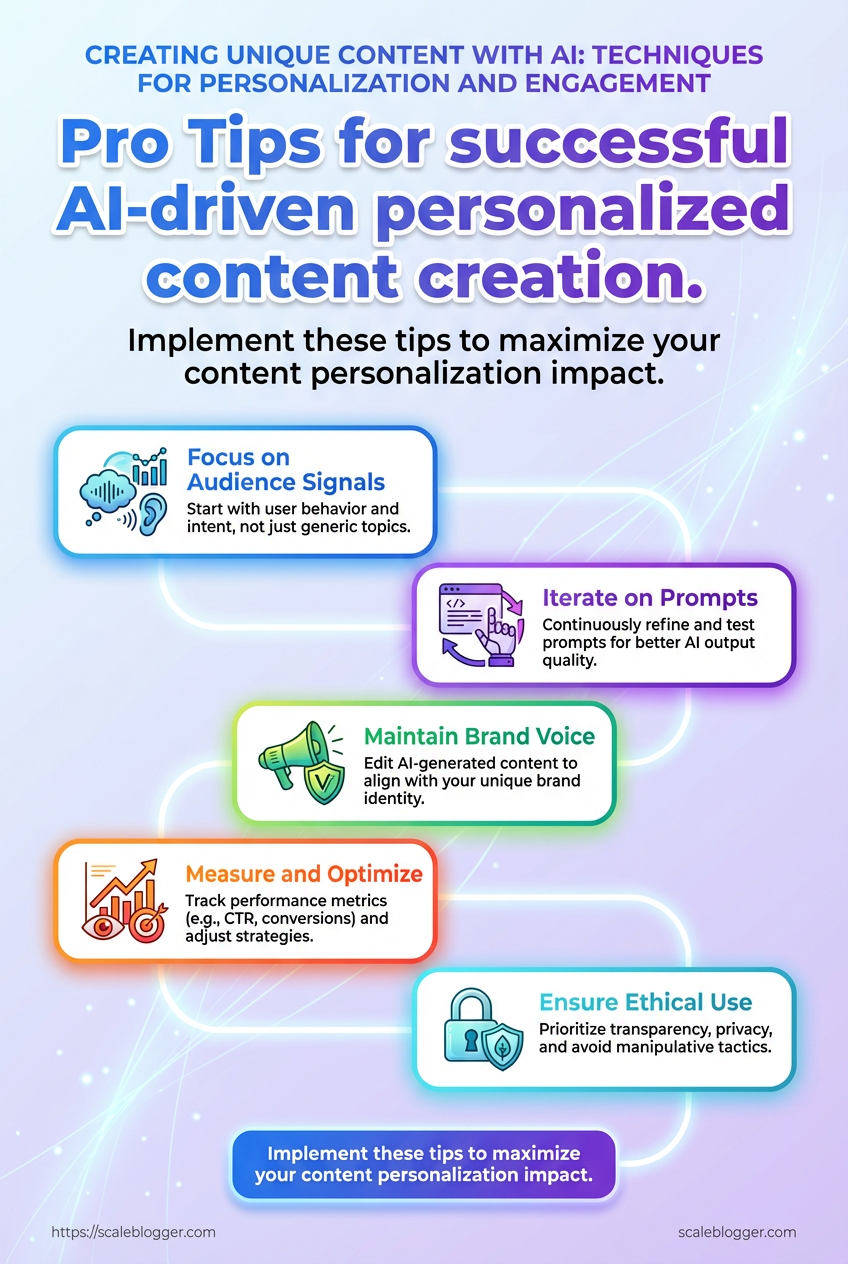
Start by focusing effort where it moves the needle: prioritize pages with existing traffic and clear commercial or informational intent, keep experiments simple so results are readable, and instrument every variant for reliable attribution. These three moves cut wasted work, speed learning, and let you trust the decisions you make.
Prioritize by traffic and intent
- Identify top-performing clusters by organic traffic and conversions.
- Filter for pages with clear intent — product pages, high-intent blog posts, and category pages first.
- Schedule experimentation on pages that already receive steady sessions so A/B tests reach statistical clarity faster.
- Why this works: Optimizing a high-traffic, high-intent page delivers measurable ROI quickly and produces learnings that generalize across similar pages.
Keep variations limited and interpretable
- Two-variant max: Test control vs. one clear variation to avoid muddy signals.
- Single-variable changes: Change one major element (headline, CTA text, hero image) per test.
- Short hypothesis statements: Use a one-line hypothesis that ties change to expected metric (e.g., “Change CTA copy to reduce friction → increase click-through”).
- Why this works: Too many variants or simultaneous changes make it impossible to know what actually moved the metric.
Instrumentation and tagging for attribution
- Tag variants: Add
experiment_idandvariantquery params or data attributes to each variant. - Track events: Emit clear events for impressions, clicks, and conversion steps; use
utmparams where campaigns originate. - Map to analytics: Ensure experiments feed into analytics and attribution models so lift is visible in both product and marketing dashboards.
Practical example
- Pick the top 5 product pages by revenue.
- For each, create a single-variant test: headline rewrite that addresses a common objection.
- Add
experiment_id=pg-hero-01andvariant=Bto the variant URL, fire click and purchase events, and run for a minimum traffic window.
- Tip: Use automation to deploy and measure multiple simple tests in parallel; products like AI content automation can speed up variant creation and tracking without needing a developer for every change.
These habits reduce noise, accelerate learning, and make optimizing a repeatable process rather than a guessing game. Keep experiments focused, tagged, and tied to intent, and the improvements compound faster than most teams expect.
Appendix: Templates, Prompt Library, and Checklists
This collection gives ready-to-use copy templates, a compact prompt library for personalization, and a launch readiness checklist so content moves from draft to traffic predictably. Use the templates as-is for speed, then substitute context tokens to make them unique and aligned with audience intent.
Template token example: Use {{TITLE}}, {{AUDIENCE}}, {{PAIN_POINT}}, each on its own line.
Headline template: Short, benefit-led headline with a specificity hook.
Intro template: One-sentence problem + one-sentence promise + one-sentence credibility line.
CTA template: Single imperative line + short value reminder.
Substitution guidance (step-by-step)
- Identify the primary
{{AUDIENCE}}and write a one-line persona (age, job, main constraint).
- Replace
{{PAIN_POINT}}with the strongest friction the persona feels, in their own language.
- Swap
{{OUTCOME}}with a measurable result (e.g., “reduce churn 15% in 90 days”).
- Run a quick personalization pass: change one word per sentence to match brand voice.
Copy-edit pass (3 checks)
- Read aloud for tone consistency.
- Verify the headline contains a specific number or timeframe where possible.
- Confirm the CTA is the last sentence and contains an action verb.
Launch readiness checklist (numbered)
- Verify on-page SEO: title, meta description, H1, and primary keyword presence.
- Confirm internal links: at least two contextual links to pillar content.
- Validate canonical and indexing settings in CMS.
- Check image alt text and compressed sizes.
- Schedule promotion: email, social, and two paid amplification slots.
- Add tracking: UTM parameters and conversion event in analytics.
Templates and checklists reduce iteration time and improve publish confidence; treat them as living assets that evolve with performance data.
Templates and checklists with descriptions and how to use them so readers can pick the right asset quickly
Table: Appendix: Templates, Prompt Library, and Checklists — Asset, Purpose, How to use & more
| Asset | Purpose | How to use | Estimated time to implement |
|---|---|---|---|
| Headline template | Create attention-grabbing titles | Replace {{NUMBER}} and {{BENEFIT}}, test 3 variants |
10–15 minutes |
| Intro template | Fast, persuasive openings | Fill {{PAIN_POINT}} + {{PROMISE}}, keep ≤40 words |
5–10 minutes |
| Body variant template | Different frameworks: list, how-to, case study | Pick framework, insert 3 sections, add examples | 30–60 minutes |
| CTA template | Single-line conversions | Replace value and action, A/B two CTAs | 5 minutes |
| Test plan checklist | Structured launch experiments | Define hypothesis, metrics, sample size, duration | 20–30 minutes |
These templates are tools not rules—use them to iterate faster, then feed performance back into future templates. For automation and orchestration of these steps, consider integrating an AI content pipeline like AI-powered content automation to scale personalized content workflows.
Conclusion
You’ve now got a practical roadmap: set clear personalization goals, map audience intent, build templates and prompts that preserve voice, and run A/B and multivariate tests to learn what actually moves engagement. Follow the quality-control and governance steps so AI-generated drafts stay unique and on-brand, and keep the prompt library and checklists close — teams that iterate on those assets consistently see higher click-throughs and longer on-page time. Remember the mini case where iterative testing turned a templated post into a high-converting article: small prompt tweaks + tighter segmentation produced measurable lift within two test cycles.
Next steps are simple and specific. ** If governance is a bottleneck, assign a reviewer and lock your prompt templates. com) can automate draft generation, testing workflows, and version control for teams looking to scale personalized content without sacrificing quality.
If questions come up about segmentation, prompt design, or testing cadence, revisit the Audience Segmentation and Prompt Library sections — they’re designed to turn these decisions into repeatable steps.
