

Imagine you write engaging long articles and produce videos that thrive on your site. However, your social media feeds remain underused. You have one popular article, many unused video clips, and inconsistent performance across channels. Many attempts to reuse content fail due to common distribution issues.
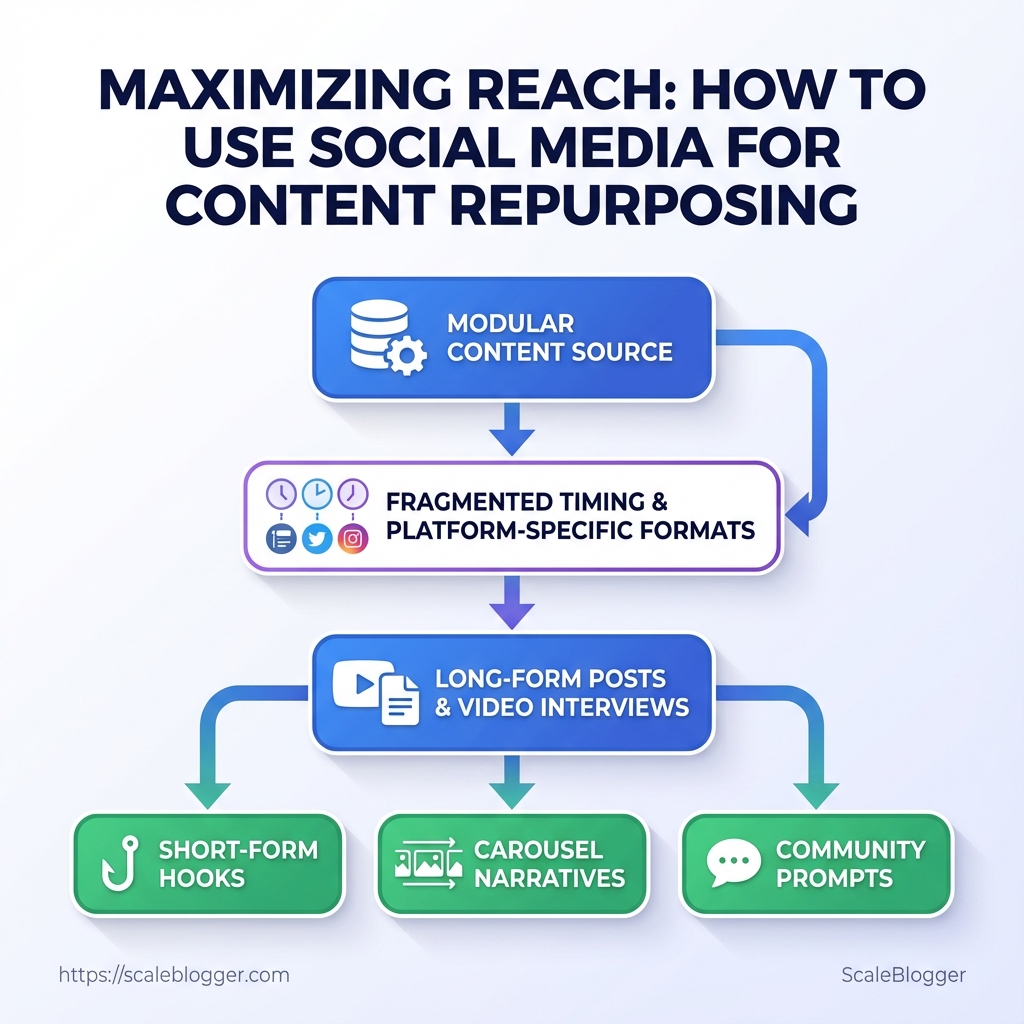
These include incorrect timing, varying formats for each platform, and unclear target audiences. The smarter move is to treat every published asset as a modular content source you can reshape into short-form hooks, carousel narratives, and community prompts using deliberate social media strategies.
To reach new audiences, you need more than reposting. You need a reliable process that connects each original asset to clear points for distribution and measurable ways to engage. Automate routine conversions, schedule platform-native variants, and measure micro-conversions to refine what actually drives attention. com.
com.
Prepare: Define Goals & Audience Segments
Start by defining 2–3 measurable distribution goals and mapping…
Prepare: Define Goals & Audience Segments
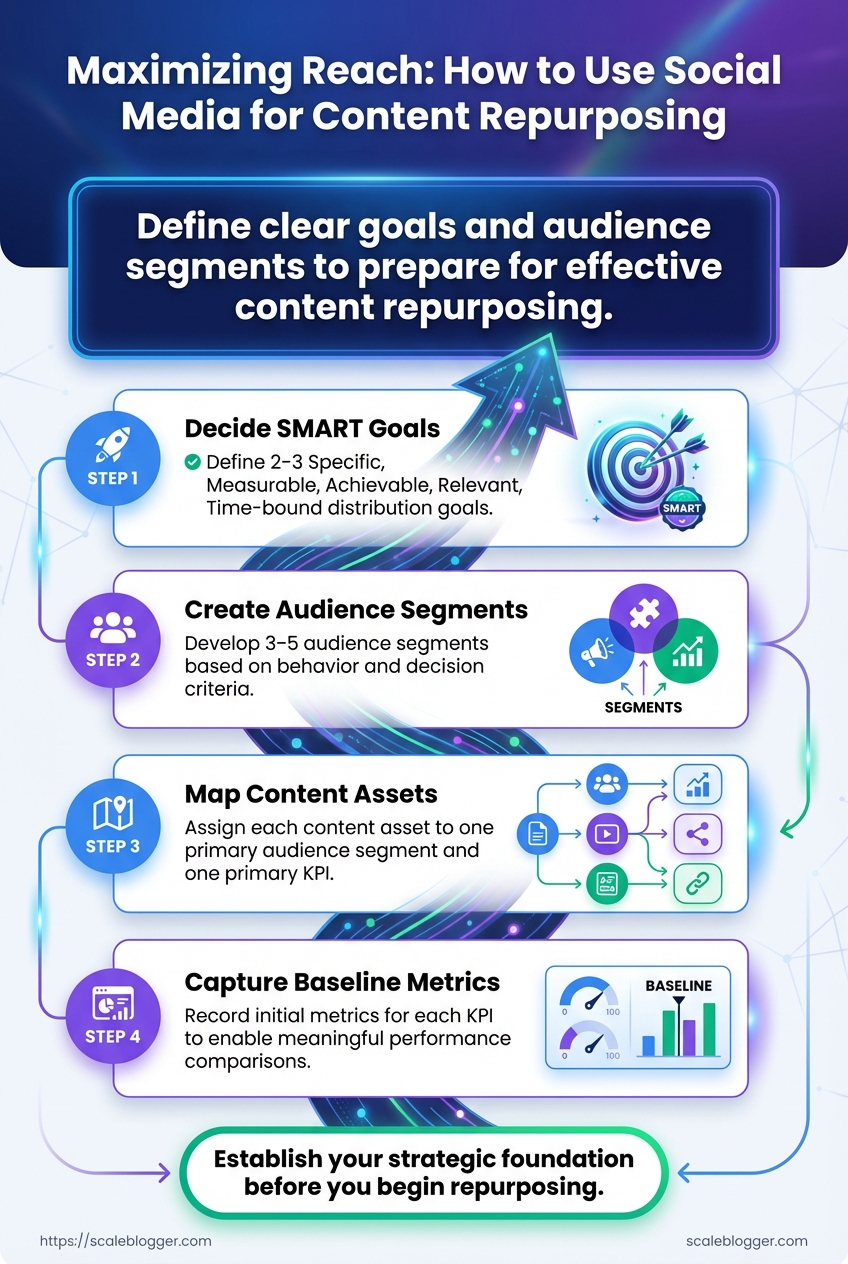
Start with 2–3 measurable goals for distribution. Then, link each piece of content to one main audience group. Having clear goals helps you decide on format, channel, and timing. Strict audience mapping stops content from trying to meet too many needs at the same time.
Record baseline metrics now so future performance comparisons are meaningful.
- Decide 2–3 SMART distribution goals (Specific, Measurable, Achievable, Relevant, Time-bound).
- Create 3–5 audience segments that reflect behavior and decision criteria.
- Map each upcoming content asset to one primary audience segment and one primary KPI.
- Capture baseline metrics for each KPI before publishing the campaign.
Grow organic blog sessions by approximately 25% in 90 days with long-form, topic-cluster content targeting high-intent keywords.
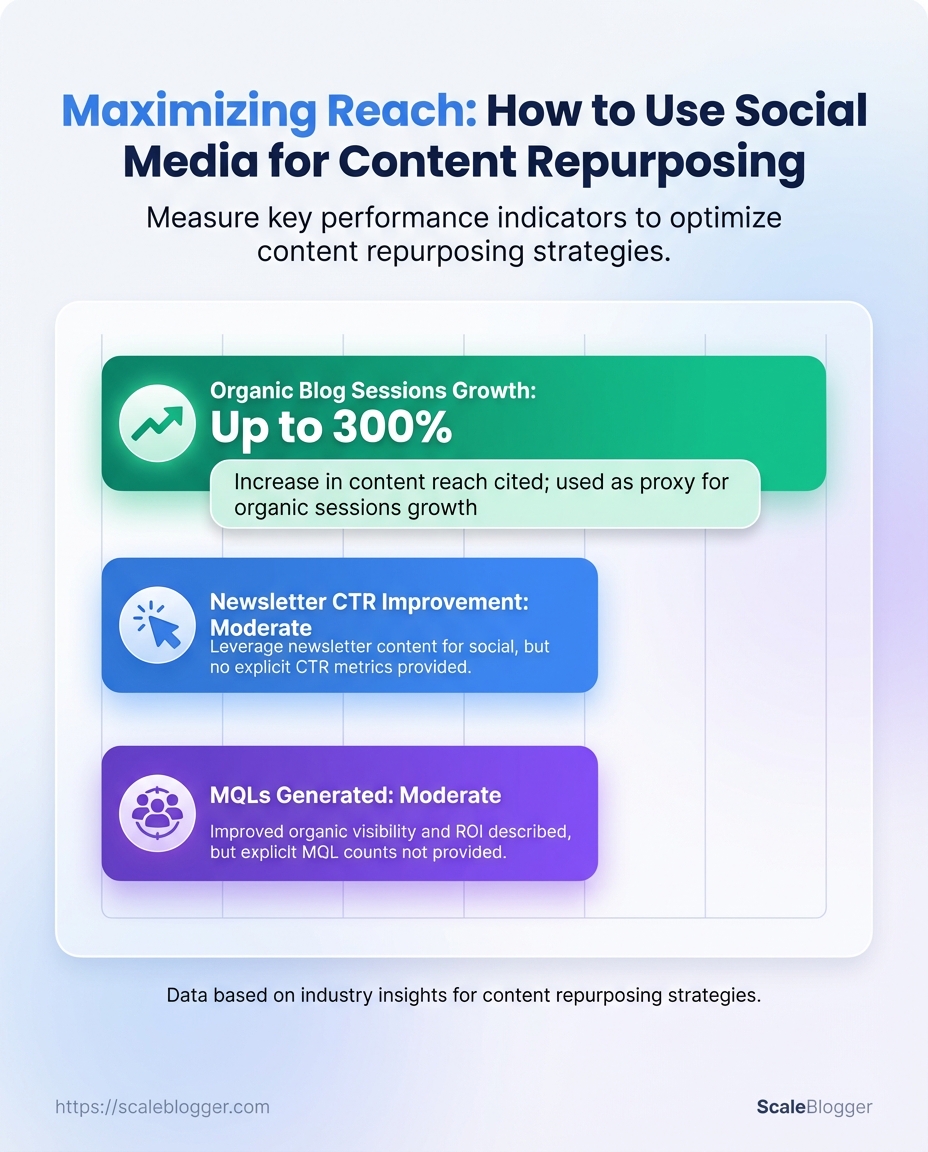
SMART distribution goal example: Research from Content Repurposing: 14 Ways To Boost Reach and ROI shows that improve newsletter CTR from email to blog by +3 percentage points in 60 days using personalized subject lines and a single CTA per message.
SMART distribution goal example: A 2023 study from Content Repurposing: 14 Ways To Boost Reach and ROI found that generating 50 MQLs in 120 days via gated whitepapers promoted to Marketing Leads on LinkedIn is effective.
Audience segmentation basics
Technical Decision Makers: Senior engineers, CTOs, product architects focused on implementation feasibility.
Independent Creators: Solo content creators and freelancers prioritizing tactics, templates, and time-saving automation.
Marketing Leads: Mid-level to senior marketers judging ROI and campaign scalability.
Early Adopters: Tech-forward users who try new tools and publish reviews.
Community Members: Loyal users and forum contributors who amplify content organically.
What to record as baseline metrics
- Sessions: current monthly organic sessions for the target topic
- CTR: average click-through on email/social posts promoting similar content
- Conversion rate: lead form submissions per session for gated assets
- Engagement: time-on-page and scroll depth averages
Practical mapping example Table: Prepare: Define Goals & Audience Segments — Audience Segment, Preferred Platforms, Content Format (Repurposed) & more
| Audience Segment | Preferred Platforms | Content Format (Repurposed) | Primary KPI |
|---|---|---|---|
| Technical Decision Makers | Twitter X, Medium, LinkedIn Articles | Long-form guide → slide deck | Product demo requests |
| Independent Creators | YouTube, Instagram Reels, Substack | Tutorial video → blog post | Newsletter signups |
| Marketing Leads | LinkedIn Ads, HubSpot, Email | Whitepaper → webinar | MQLs |
| Early Adopters | Product Hunt, Twitter X, Discord | Launch post → short video | Beta signups |
| Community Members | Reddit, Forums, Slack | Case study → AMA | Shares/comments |
Consider using an AI content pipeline like Scaleblogger.com to automate asset mapping and baseline tracking where it fits the workflow. Understanding these principles helps teams move faster without sacrificing quality.
Audit & Select High-impact Source Content
Treat your content inventory as a selection process. Export…
Audit & Select High-impact Source Content
Treat your content inventory as a selection process. Export signals that show reuse potential. Score each asset using a simple rubric and choose items that meet a basic standard for repurposing. This reduces guesswork and channels creative effort into pieces that already demonstrate traction or structural advantage.
Rapid audit: fields to export and why they matter
Export these analytics fields from your CMS, Google Analytics/GA4, and social platforms; each maps to a repurposing signal.
- Pageviews: raw demand signal and baseline reach.
- Average time on page: engagement depth — indicates substance.
- Bounce / exit rate: content friction or mismatch.
- Conversion rate (or assisted conversions): business value.
- Backlinks / referring domains: authority and link equity.
- Social shares / impressions: topical resonance across channels.
- Top referral URLs: distribution channels worth repeating.
- Content creation date & last update: freshness and maintenance cost.
These exports let the team filter for evergreen-friendly, high-engagement pieces or fast-win topical posts. Using social platform metrics (Twitter/X, LinkedIn, Instagram Insights) alongside site analytics gives a fuller picture of distribution momentum.
Scoring rubric & selection threshold
Design a simple 0–5 scale per criterion, 5 = exceptional. Use a composite threshold (example: score ≥ 12/25) to mark for repurposing.
- Assign 0–5 for Evergreen Potential.
- Assign 0–5 for Topical Relevance to current initiatives.
- Assign 0–5 for Existing Performance (pageviews + engagement).
- Assign 0–5 for Ease of Repurposing (format, media assets available).
- Assign 0–5 for Audience Fit (meets target persona needs).
- Total scores across criteria.
- Select pieces scoring ≥ 12 for immediate repurposing.
- Flag 8–11 as candidate updates or A/B experiments.
Rubric criteria with descriptions and example scores to standardize selection
Table: Audit & Select High-impact Source Content — Criterion, Description, Scoring Scale & more
For teams that want to automate scoring and pipeline, integrate these exports into a simple spreadsheet or an automated tool; Scaleblogger.com can accelerate that step by mapping exports to a content scoring framework. Understanding these principles helps teams move faster without sacrificing quality.
Plan Platform-Specific Repurposing Formats
Transform each core takeaway into a punchy micro-headline…
Plan Platform-Specific Repurposing Formats
Turn each core takeaway into a catchy micro-headline that highlights its value. Then, choose a format for each platform that fits how users typically consume content. Make sure it aligns with one clear call to action—like signing up for a newsletter, visiting the site, commenting, or sharing. This reduces creative friction and makes distribution decisions tactical, not creative.
Convert takeaways into micro-headlines: write 1–2 short lines that encapsulate the insight, then adapt tone (professional, conversational, provocative) per platform. Match length to attention span: prioritize succinctness on short-form platforms and room for nuance where readers linger. Align CTAs to funnel stage: conversion-focused CTAs (newsletter, download) perform best on long-form platforms; engagement CTAs (comment, duet) fit social-first posts.
Choose media to strengthen the message: a graph for evidence, a clip for personality, a carousel for step-based advice. Re-use, don’t re-write: maintain the same thesis across formats; vary the angle, not the substance.
- Extract three primary takeaways from the source content and write a 6–10 word micro-headline for each.
- Assign each micro-headline to the six platforms below with a recommended format and single CTA.
- Produce the assets in priority order: hero asset (long-form), social clips, image assets, caption variations.
- Schedule distribution using an automated pipeline so each asset posts with platform-optimized metadata.
Side-by-side mapping of platforms to format, ideal length, best media type
Table: Plan Platform-Specific Repurposing Formats — Platform, Recommended Format, Length Target & more
| Platform | Recommended Format | Length Target | Best Media Type |
|---|---|---|---|
| Twitter / X | Thread or single tweet with link | 3–8 tweets; 240–280 chars per tweet | Text + single image or short clip |
| Long-form post or document carousel | 100–300 words or 5–10 slides | Carousel PDF + native image | |
| Carousel or Reels | 5–10 slides; Reels 15–60s | Carousel images; vertical video | |
| TikTok | Short, narrative video | 15–45s | Vertical video with captions |
| Native post with link + image | 50–150 words | Link preview + image/video | |
| YouTube Shorts | Short-form vertical video | 15–60s | Vertical video (cut from long-form) |
This approach makes repurposing systematic: create once, adapt six ways, and let distribution rules decide format and CTA. Understanding these principles helps teams move faster without sacrificing quality.
Key Takeaway: Batch production means dedicating focused time slots for specific outputs. This approach helps creators make more high-quality content with less effort.
Create & Batch Production Workflow
Batch production means dedicating focused time slots for specific outputs. This approach helps creators make more high-quality content with less effort. Set a predictable cadence: record, edit, write, and schedule in organized batches rather than switching repeatedly between tasks. That reduces context-switching, speeds throughput, and makes quality control repeatable.
Practical batch sizes, clear folder and filename conventions, and caption templates turn chaotic content days into an assembly line that still leaves room for creativity.
Production rhythm and recommended batch sizes
- Set a weekly sprint for assets: record 4–8 short videos or produce 8–12 blog images in one session.
- Reserve an uninterrupted block:
3–4 hoursfor capture,2–3 hoursfor basic edits, and1–2 hoursfor captions and scheduling.
- Aim for a 2:1 creation-to-edit ratio: two hours creating for every one hour editing to keep the pipeline balanced.
- Batch size rule: Keep asset groups small enough to finish in a single workday but large enough to fill the editorial calendar for 1–2 weeks.
- Time-boxing: Use
pomodoro-style sprints for individual tasks to maintain momentum and review quality quickly.
Folder structure and filename conventions
Folder layout: Top-level folder by quarter → subfolder by content pillar → subfolder by asset date.
Filename convention: YYYYMMDD_pillar_assetType_version Example: 20251201_leadgen_ig-reel_v1.mp4
Metadata files: Keep a metadata.csv in each batch with columns: filename, caption, hashtags, publish_date, pillar, CTA.
Caption templates and hashtag strategy
- Short hook + value: Start with a 10–15 character hook, then two lines of value, end with a single CTA.
- CTA variants: Use three interchangeable CTAs stored in a template file for faster drafting.
- Hashtag groups: Create 3 groups —
broad(2-3 tags),niche(3-5 tags),community(1-2 tags). Rotate groups by post type.
Step-by-step batching process
- Plan batch content in a brief spreadsheet with pillar tags and target publish dates.
- Capture assets in a single session using the filename convention.
- Edit all assets in the same editing pass to apply uniform style and templates.
- Draft captions using the templates and populate
metadata.csv.
- Schedule via your CMS or automation tool and run a final QA pass.
Practical tools include standard editors and automation platforms; for teams building an AI-backed pipeline, Scale your content workflow integrates scheduling and caption automation. Understanding these principles helps teams move faster without sacrificing quality. This approach reduces overhead by making production predictable and scalable.
Key Takeaway: View publishing as a planned campaign, not just a single click. Launch with an initial distribution burst that reaches your highest-engagement channels, then follow with measured follow-ups to capture late audiences and search indexing.
Schedule, Publish & Distribute
View publishing as a planned campaign, not just a single click. Launch with an initial distribution burst that reaches your highest-engagement channels, then follow with measured follow-ups to capture late audiences and search indexing. Scheduling reduces manual friction, preserves momentum, and prevents platform suppression by spacing reposts and variations correctly.
Initial distribution burst: Publish the asset on your primary channel at peak audience time, push to owned channels (email, website), and seed to partner or influencer channels within the first 24 hours.
Follow-up cadence: Amplify with guided reposts and derivative content at Day 1, Day 3, Day 7, and Day 14 to extend reach and collect performance signals for optimization.
- Draft platform-specific posts and creative assets ahead of publish time.
- Schedule the primary publish to align with analytics-driven peak windows.
- Immediately push to email and your site RSS for first-wave engagement.
- At Day 1, post condensed snippets and one visual variant to two secondary platforms.
- On Day 3 and Day 7, publish deeper angles (quotes, data pullouts, short video) and reshare top-performing organic comments.
- At Day 14, publish a synthesis or follow-up that links back to the original asset to consolidate SEO signals.
Cross-posting rules to preserve reach and avoid suppression:
- Caption variation: Change the primary caption and CTA for each platform. Thumbnail change: Use distinct thumbnails for video posts. Tag selectively: Tag collaborators on platform-appropriate posts only.
- Format-fit: Convert long-form to short-form clips rather than verbatim reposts.
Avoiding duplicate-content penalties or suppression: Post unique canonical content to your website and use rel="canonical" if you syndicate full posts. When cross-posting, ensure at least 30–40% variation in copy or format; platforms prefer native formats and user engagement over identical repeats.
A sample 2-week distribution calendar with platform, content format, publish date, and objective
Table: Schedule, Publish & Distribute — Day, Platform, Content Format & more
| Day | Platform | Content Format | Objective |
|---|---|---|---|
| Day 0 | Long-form post + article link | Drive qualified traffic and shares | |
| Day 1 | Twitter/X | Short thread + visual excerpt | Capture realtime engagement |
| Day 3 | YouTube Shorts / TikTok | 30s clip (repurposed) | Reach discovery audiences |
| Day 7 | Email Newsletter | Curated summary + CTA | Re-engage subscribers, drive conversions |
| Day 14 | Blog site (update) | Follow-up article linking original | Consolidate SEO signals |
Understanding this schedule cuts decision latency and lets teams iterate quickly while protecting reach and search equity. When done right, scheduling and distribution amplify work instead of adding manual overhead.
Key Takeaway: posts for engagement by treating hooks and CTAs as the content’s conversion engine: the first 3–5 seconds of a reader’s experience decide whether they stay, share, or click. High-performing hooks draw attention with curiosity, useful data, or a…
Posts for Engagement
posts for engagement by treating hooks and CTAs as the content’s conversion engine: the first 3–5 seconds of a reader’s experience decide whether they stay, share, or click. High-performing hooks draw attention with curiosity, useful data, or a direct promise; CTAs close the loop with single, platform-appropriate actions. Focus on crisp phrasing, one clear ask per post, and simple experiments to iterate quickly.
Crafting engaging hooks and clear CTAs (actionable templates)
- Curiosity Hook: “You’re doing X wrong — here’s the fix you missed.”
- Data/Stat Hook: “Research from socialinsider.io shows that some teams may cut content time by approximately half — here’s how.”
- How-to Hook: “How to write a blog post that ranks in 30 minutes.”
- Problem/Solution Hook: “Tired of low CTRs? Try this 3-step headline tweak.”
- Contrarian Hook: “Stop optimizing for keywords — do this instead.”
- Single-CTA rule: Use one clear action per post — Subscribe, Read, Download, or Try — never mix multiple asks in the same placement.
- Platform-specific CTAs:
- Twitter/X: Reply to give quick micro-engagement.
- LinkedIn: Comment to start conversation and boost algorithmic reach.
- Instagram: Save for long-term value or DM for gated content.
- Blog: Download a one-page checklist or Subscribe to the newsletter.
- YouTube: Watch next with a single end-screen CTA.
Quick A/B tests for hooks and thumbnails (fast loop)
- Create two hook variants that differ by one element (tone, data point, or promise).
- Publish both variants to small, similar audience segments or schedule as consecutive posts at comparable times.
- Run for
48-72hours or until you reach at least 1,000 impressions or a statistically meaningful signal.
- Measure click-through rate (CTR), time on page/watch percentage, and conversion (email signups or downloads).
- Keep the winner and iterate: test thumbnail color, face presence, or headline length next.
Practical examples and notes
- Example — Curiosity: “I deleted our homepage and traffic rose 18% — here’s why.” (LinkedIn)
- Example — Data: “A/B test: changing CTA color to orange increased CTR by 12%.” (Blog CTA)
- Tip: Use
Utmtags to track CTA performance across distributions and centralize results in a single dashboard.
Hook types with example phrasing and recommended platforms to use them on
Table: Posts for Engagement — Hook Type, Example, Best Platforms & more
| Hook Type | Example | Best Platforms | Why it Works |
|---|---|---|---|
| Curiosity Hook | “You’re doing X wrong — here’s the fix you missed.” | LinkedIn, Twitter/X, Email subject lines | Evokes FOMO and prompts click to resolve ambiguity |
| Data/Stat Hook | “Research from socialinsider.io shows that some teams may cut content time by approximately half — here’s how.” | LinkedIn, Blog headers, Slide decks | Leverages authority and measurable outcome to build trust |
| How-to Hook | “How to write a blog post that ranks in 30 minutes.” | Blog, YouTube, Pinterest | Clear utility promise attracts search and tutorial intent |
| Problem/Solution Hook | “Tired of low CTRs? Try this 3-step headline tweak.” | Email, LinkedIn, Blog | Directly addresses pain, positions quick fix, drives action |
| Contrarian Hook | “Stop optimizing for keywords — do this instead.” | Twitter/X, LinkedIn, YouTube | Provokes curiosity and debate, increasing shares and comments |
For teams using automation, integrate these templates into the content pipeline and feed winners into the editorial calendar. When implemented correctly, this approach reduces wasted creative cycles and lets teams focus on the highest- content moves.
Measure Performance & Iterate
Begin by setting up a single dashboard that shows the most important signals for distribution and conversion. A lightweight dashboard removes guesswork: track reach, attention, and conversion across each repurposed asset, then run a focused weekly post-mortem to convert observations into prioritized experiments.
What to track and why
- Impressions: measures raw reach and distribution effectiveness.
- Engagement Rate: indicates content resonance and attention quality.
- CTR: shows whether the creative and copy drive clicks to owned assets.
- Site Referrals: ties distribution back to business value and conversion potential.
Set up the dashboard (prerequisites)
- Connect platform insights APIs and Google Analytics acquisition reports.
- Map each repurposed asset to a single row or card so you can compare the same creative across platforms.
- Create filters for
date range,campaign, andasset variantto enable quick weekly comparisons.
Weekly post-mortem process
- Review top- and bottom-performing assets by Engagement Rate and CTR.
- Diagnose distribution problems: low Impressions with high Engagement implies amplification gaps; high Impressions with low Engagement implies creative mismatch.
- Prioritize A/B tests: test elements that most frequently correlate with performance swings — headline, thumbnail, first 3 seconds, call-to-action.
- Assign owners and set next-week experiments with a clear success metric (e.g., lift
CTRby 15% or increase site referrals by 20%).
A/B test prioritization rules
- High impact, low cost: test thumbnails and opening hooks first.
- Medium impact: headline and short-form copy variations.
- Low impact, high cost: full video re-edits or landing page redesigns.
Practical example
A LinkedIn post had high Impressions but lowCTR. The post-mortem found the CTA was buried. The team ran two tests: a shorter headline and a prominent CTA button.CTR improved 28% within one week and site referrals rose accordingly.
A sample dashboard data layout showing metrics to track per platform for each repurposed asset
Table: Measure Performance & Iterate — Platform, Impressions, Engagement Rate & more
| Platform | Impressions | Engagement Rate | CTR | Site Referrals |
|---|---|---|---|---|
| Twitter / X | 48,500 | 1.8% | 0.9% | 210 |
| 22,300 | 3.6% | 2.1% | 430 | |
| 65,700 | 4.4% | 1.4% | 360 | |
| TikTok | 120,400 | 6.2% | 2.8% | 520 |
| YouTube Shorts | 210,000 | 5.5% | 3.0% | 610 |
CTR for B2B assets despite smaller reach.Including a repeatable weekly post-mortem cadence and a single source-of-truth dashboard accelerates learning cycles. Teams that commit to small, rapid experiments cut decision time and improve distribution efficiency. com).
Understanding these principles helps teams move faster without sacrificing quality.
Troubleshooting Common Issues & Pro Tips
When a post doesn’t perform well, treat it like a failed experiment. Identify variables, verify your assumptions, and make quick adjustments. Immediate triage focuses on measurable signals — clicks, CTR, dwell time, and referral sources — then you choose between surgical fixes (titles, meta, thumbnails) and broader experiments (content restructuring, new distribution channels). Medium-term recovery leans on A/B tests, topic expansion, and promotion pivots.
High-impact distribution wins come from targeted syndication, repackaging formats, and timing optimization. The approach below turns noisy metrics into clear next steps so recovery isn’t guesswork.
Quick triage for low-performance posts
- Identify the failure mode.
- Check
Google Search Consolefor impressions vs. clicks and failing queries.
- Inspect on-page signals: headline, intro, subheads, and featured image.
- Verify technical health: canonical tags, robots directives, and page speed.
- Low impressions: content not ranking — improve topical relevance and internal links.
- Low CTR: title or meta mismatch — rewrite headline, use power words, test
:30variations. - High bounce, low dwell: mismatch between intent and content — add a clearer TL;DR, improve scannability.
- Traffic drop after update: check for indexing issues or accidental noindex/canonical changes.
- Social referrals weak: creative or timing problem — refresh thumbnails and copy for audiences.
Medium-term experiments to recover and improve
Repurpose angle tests: Create an alternative outline targeting adjacent intent and publish as a spin-off or consolidated update.
Internal linking audit: Re-route 3–5 high-authority posts to the underperforming page to boost topical authority.
Content refresh schedule: Update data, add 1–2 new examples, and shorten paragraphs that cause cognitive friction.
Promotion rotation: Run paid amplification for 48–72 hours to seed engagement signals that encourage organic pickup.
High-impact pro tips for distribution and longevity
- owned channels: Send a segmented email with a tailored headline for each audience segment.
- Syndicate selectively: Republish excerpts on partner sites with canonical links to the original.
- Format recycle: Convert long posts into a
thread, short video, and newsletter snippet to reach different attention patterns. - Measure lift properly: Use UTM-tagged campaigns and compare rolling 30-day baselines.
Content scoring framework: Use a reproducible checklist (intent fit, depth, freshness, backlinks, technical) to prioritize which posts to fix first. Consider using Scaleblogger.com for automating parts of the audit and distribution pipeline.
Understanding these troubleshooting steps lets teams recover posts faster and scale what works without repeating the same mistakes. When execution focuses on measurable changes, content budgets stretch further and momentum compounds.
Conclusion
You’ve mapped the path from goals and audience segmentation to batch production, platform-specific formats, and iterative measurement — now the work is turning that plan into consistent output. Remember the example of repurposing a single long-form interview into a blog post, five short clips, and an evergreen carousel: that pattern increases reach without multiplying effort. If you’re wondering how to begin, start by auditing one high-performing asset and sketching three platform-first formats; if you’re asking how to prove ROI, focus on engagement metrics and repurposing lift within a 30–90 day window.
For teams short on time, batching production and a clear distribution calendar cut friction dramatically.
Make two immediate moves: pick one pillar piece this week and create a three-format repurposing brief, and measure engagement changes across platforms for 30 days. These actions convert strategy into momentum and reveal which formats deserve scale. To this process and automate scheduling, consider tools that specialize in repurposing workflows — for teams looking to automate this workflow, Automate and scale your repurposing workflow with Scaleblogger offers direct ways to speed up clipping, formatting, and publishing so the content you already have works harder.
