

The trends to watch in content optimization are changing as search engines, AI platforms, and audience behavior reshape how people discover and interact with content.
Ranking well is no longer just about placing keywords in the right sections. Search intent, content quality, user experience, topical authority, and visibility within AI-generated answers are becoming increasingly important parts of content optimization.
For content teams, the challenge is separating meaningful changes from short-lived SEO hype. ScaleBlogger helps simplify that process by bringing content creation, optimization, and performance insights into a more connected workflow.
Understanding emerging content optimization trends can help you adapt early, improve existing content, and build a strategy that remains useful as search continues to evolve.
Table of Contents
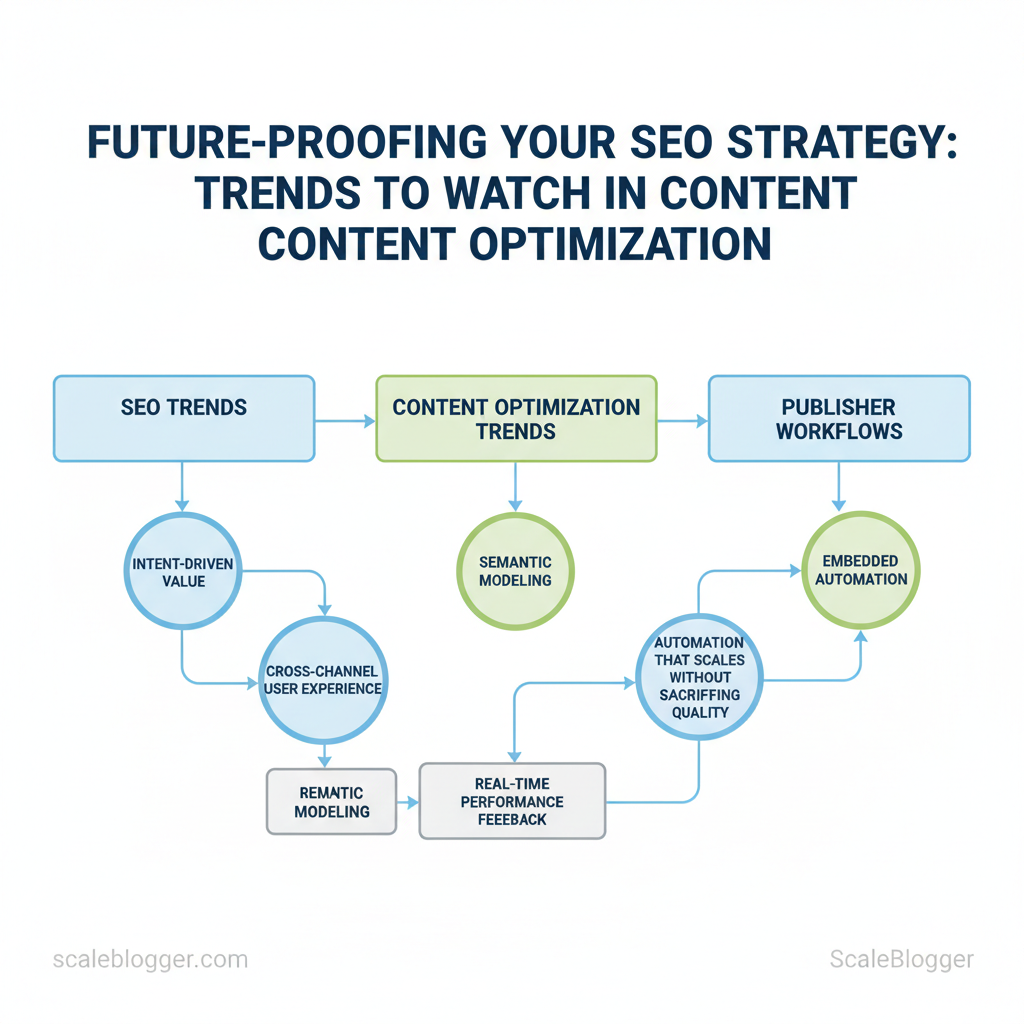
Before changing your strategy, ensure you have access to measurable signals. Without the right accounts, tools, and team responsibilities, automation and AI simply amplify noise.
Prerequisites: What You’ll Need to Future-Proof SEO
Before changing your strategy, ensure you have access to measurable signals. Without the right accounts, tools, and team responsibilities, automation and AI simply amplify noise. Establish these foundations so that every optimization, experiment, and content pipeline yields reliable and actionable results.
Immediate setup checklist
- Accounts to create: Google Search Console and GA4 for search and behavioral signals. Essential integrations: CMS-level access (WordPress, HubSpot, or equivalent) so you can deploy and test structured data, canonical tags, and content changes quickly. Core tools: a keyword research subscription, a rank tracker, and a content analytics tool that surfaces engagement and conversion metrics.
Step 1: Audit Current Content and Rankings
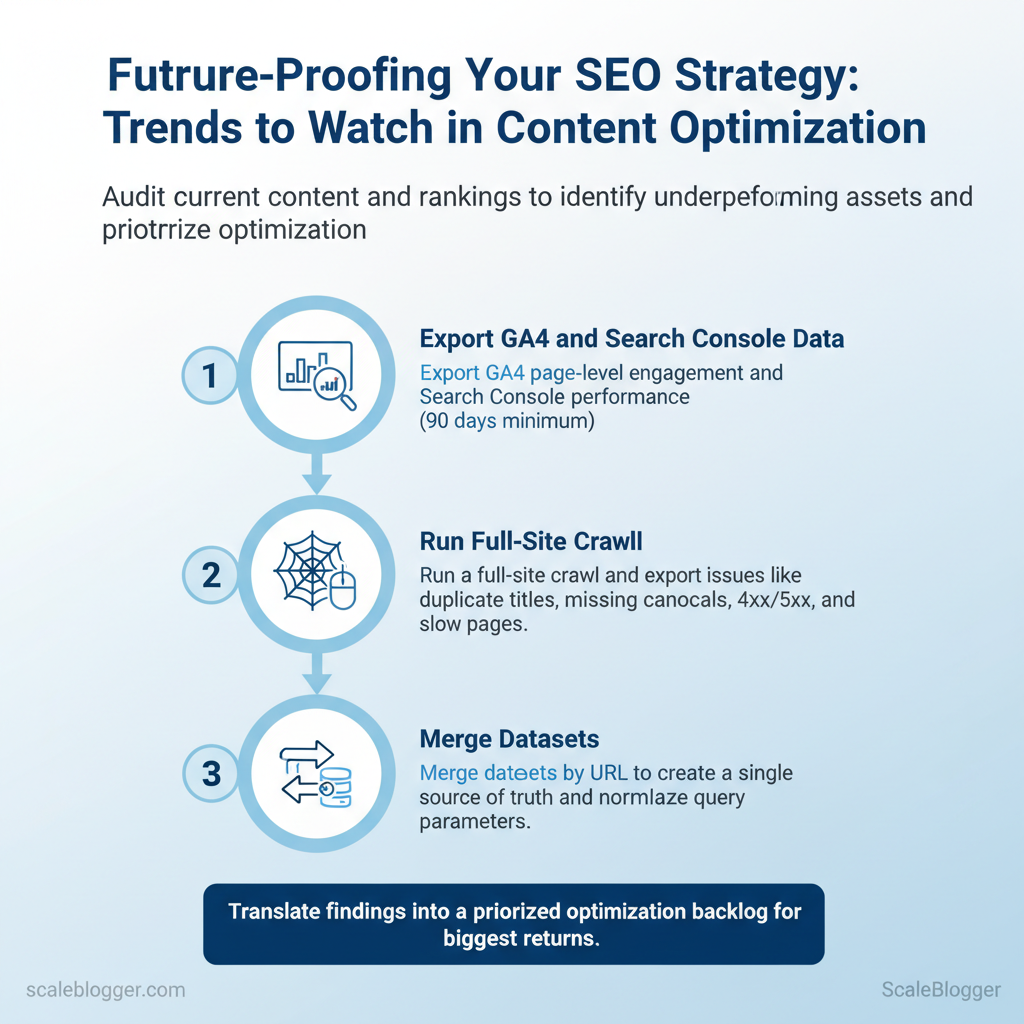
Start by exporting analytics and crawl data to establish a single source of truth. The main goal is to find content that has search demand but is not performing well (high impressions but low CTR). This includes finding pages losing traffic, so optimization efforts focus on those with the greatest potential returns.
Collect GA4 session metrics, Search Console impressions and queries, and a complete site crawl to find on-page and technical issues. Then, turn those findings into a prioritized list for optimization.
Prerequisites
- Access: GA4 + Search Console admin or editor permissions and a crawl tool account (Screaming Frog, Sitebulb, or equivalent).
- Exports: CSV or BigQuery export of
GA4events, Search Console performance report, and crawl export. - Stakeholders: Editorial lead, SEO owner, and at least one developer for technical fixes.
Tools and deliverables
- Primary tools:
GA4,Search Console, Screaming Frog/Sitebulb, and a spreadsheet or BI tool to merge datasets. - Deliverables: A combined dataset, a ranked optimization backlog (CSV), and a short technical issues report.
Step-by-step audit process
- Export
GA4page-level engagement andSearch Consoleperformance (90 days minimum). - Run a full-site crawl and export issues: duplicate titles, missing
canonical, 4xx/5xx, slow pages. - Merge datasets by URL; normalize query parameters and prefer canonical URLs when matching.
- Filter for high impressions + low
CTRand pages with >20% traffic decline month-over-month. - Flag technical issues per URL from the crawl and tag content problems (thin content, outdated facts, missing intent match).
- Score each URL by Opportunity = (Impressions × CTR gap) + Traffic decline weight − Technical severity.
How to prioritize optimizations
- High opportunity, low effort: update title/meta and improve H1 to match intent.
- High opportunity, high effort: rewrite or expand content into a topic cluster.
- Technical blockers: developer fixes take precedence for pages with canonical/indexing errors.
Step 2: Update Content for Intent and Entity Signals
Begin by identifying the main search intent for each popular query. Then, modify content, headings, and structured data to show the right intent and related entities. Mapping intent clarifies content for search engines. Adding rich phrases and schema helps them understand what the content is (like a product or service) and who/what it’s about (such as a brand or location).
Prerequisites
- Access: Search Console query data and top-ranking SERP pages for target queries.
- Tools: a site editor/CMS, schema generator, NLP entity extractor (or your AI pipeline).
- Time: 1–3 hours per page for mapping + 2–8 hours for content edits.
- Classify intent for top queries from Search Console (Informational, Commercial Investigation, Transactional, Navigational, Local/Transactional).
- For each page, list primary entities (brand names, product models, locations, technical terms) and synonyms the audience uses.
- Update headings, meta title/description, and opening paragraph to match the classified intent and include canonical entity labels.
- Add or validate schema markup (
Article,Product,FAQPage,LocalBusiness,Review) that explicitly maps content role to intent.
Practical examples
- Informational pages: add
FAQPageand internal “how-to” anchors; include entity definitions and linked Wikipedia-style references. - Commercial investigation: surface comparison tables,
Productsnippets, andReviewschema with star ratings. - Local/Transactional: ensure
LocalBusinessschema hasaddress,geo,openingHours, andtelephone.
Intent categories with example on-page updates and schema recommendations
| Intent Type | On-Page Signals to Update | Recommended Schema | Success Metric |
|---|---|---|---|
| Informational | Add entity glossary, h2 how-to anchors, long-form content | Article, FAQPage, HowTo | Time on page, SERP feature (snippet) |
| Commercial Investigation | Comparison tables, buyer guides, pros/cons | Product, Review, Offer | Engagement, micro-conversions (email signups) |
| Transactional | Clear CTAs, pricing, checkout links | Product, Offer, CheckoutPage | Conversion rate, revenue |
| Navigational | Branded keywords, clear site links | WebSite (with SearchAction), BreadcrumbList | Branded CTR, direct visits |
| Local/Transactional | NAP consistency, map embed, booking CTA | LocalBusiness, Service, GeoCoordinates | Click-to-call, in-store visits |
Key insight: The table shows how intent maps directly to on-page signals and schema choices; measuring intent-specific metrics (time on page for informational, conversions for transactional) reveals whether updates worked.
Troubleshooting tips
- If snippets disappear, validate JSON-LD with your schema tool and remove conflicting markup.
- If user engagement drops, confirm headings match the user intent signal from Search Console and refine meta titles.
Understanding and implementing these intent-entity alignment steps makes content clearer to both users and search engines, and creates measurable wins you can iterate on. When done well, teams move faster because decisions live in the content model, not in endless opinion.
Step 3: for Multi-Modal and Structured Results
Start by treating each piece of content as a candidate for a specific SERP feature: a concise snippet, an image pack, a video rich result, or a knowledge card. Build short, scannable units — snippet-ready headings, image captions with rich alt text, and video segments with timestamps — so search engines can harvest structured content directly from the page.
Prerequisites
- Content brief: Defined intent, target query, and one primary SERP feature to target.
- Assets ready: Images (high-res), video file or embed, transcript draft, FAQ items.
- CMS access: Ability to add JSON-LD or structured markup and edit page headings.
Tools / materials needed
- SEO editor for snippet testing (e.g., document with live SERP preview)
- Transcript tool or manual transcript file
- Image optimizer to create multiple sizes and
srcset - Schema markup validator to test JSON-LD
Scaleblogger’s AI-powered content pipeline can automate snippet extraction and schema generation when workflows need to scale, but start by retrofitting a few high-value pages manually to learn the patterns. Understanding these structural patterns helps teams produce content that’s both human-friendly and machine-ready.

Step 4: Strengthen Technical Foundations for Longevity
Begin by prioritizing the smallest set of fixes that prevent search engines from ever seeing your content the wrong way. Fixing crawl-blocking errors, stabilizing page performance metrics, and confirming canonicalization and international tags yields outsized longevity gains — content stays discoverable, rankings don’t oscillate with platform changes, and editorial teams spend less time firefighting technical regressions.
- Perform an immediate triage
- Run a site crawl and filter by
status code,indexability, andpage size - Export Core Web Vitals and sort by
Largest Contentful Paint (LCP)andCumulative Layout Shift (CLS) - Verify canonical tags and
hreflangwhere applicable - Resubmit sitemap, then monitor indexing and server logs for re-crawl errors
Tools commonly used: crawlers (Screaming Frog, DeepCrawl), Core Web Vitals reports (Chrome UX, PageSpeed Insights), server log parsers (GoAccess, Logsquared).
Technical Hardening Checklist — prioritize technical fixes by impact and estimated time-to-fix
Prioritize technical fixes by impact and estimated time-to-fix
| Issue | Impact (High/Medium/Low) | Estimated Fix Time | Owner |
|---|---|---|---|
| 500 errors | High | 1–4 hours (hotfix) | DevOps / Backend |
| Slow TTFB | High | 1 day–1 week (config + infra) | Platform / DevOps |
| Poor Largest Contentful Paint | High | 1 day–2 weeks (front-end + CDN)** | Frontend / Performance Engineer |
| Missing Canonical Tags | Medium | 2–8 hours (templating) | CMS Engineer / SEO |
| Duplicate Content | Medium | 1 day–2 weeks (redirects, canonicalization) | SEO / Content Ops |
Data sources: site crawl exports, Core Web Vitals report, server logs.
Start with all 5xx and large-volume 4xx errors; they block indexing and waste crawl budget. A quick hotfix is often to route failing endpoints to maintenance responses and queue a rollback plan. Defer noncritical JavaScript, enable preload for hero resources, and push static assets to a CDN.
Troubleshooting tips
- If TTFB improvements lag after infra changes, profile database queries and cache layers.
- If duplicate content persists, audit CMS pagination and faceted navigation for indexable parameterized URLs.
- If LCP improves on desktop but not mobile, check render-blocking CSS and mobile-critical fonts.
Key insight: focus first on fixes that remove indexing blockers, then performance and canonical signals so content remains stable and discoverable long-term.
Understanding these principles helps teams move faster without sacrificing quality. When implemented consistently, this hardening process cuts reactive maintenance and keeps editorial velocity high.
Step 5: Build an Adaptive Content Experimentation Framework
Begin by treating content like a product that you can iterate on. Formulate measurable hypotheses, create controlled variants, instrument outcomes with analytics, and fold learnings back into the pipeline so improvements compound over time. This reduces guesswork and makes content decisions defensible.
Prerequisites and tools
- Prerequisite: Baseline analytics coverage — GA4 (or equivalent) and Search Console configured for the site.
- Tools: Scaleblogger.com for automating variant pipelines or use Google -style workflows, A/B testing frameworks, and a central experiment tracker (spreadsheet or lightweight DB).
- Time estimate: 2–4 weeks to design first 10 experiments and deploy instrumentation.
- Define measurable hypotheses
- Write a clear hypothesis: “If we change the H1 from X to Y, According to Future-Proof Your SEO Strategy: 5 Trends Dominating 2025, organic CTR on page group Z increases by 10% within 8 weeks.”
- Specify success metrics: primary metric (CTR, organic sessions, conversions), guardrail metrics (bounce rate, time on page), and time windows (
t = 8 weeks). - Segment upfront: mobile vs desktop, referral source, and query intent.
- Implement variants with consistent naming
- Variant naming convention:
experiment_to avoid confusion._ _ - Example code block for naming and payload:
- Version control: Commit copy changes and templates to the repo with the experiment ID in the commit message.
- Track outcomes and instrument rigorously
- Event coverage: instrument
impression,click,scroll_depth,engagement_time, andconversionevents. - Search Console: monitor
queries,CTR, andpositionfor the affected URL group. - Analysis cadence: run an interim check at 2 weeks, full analysis at the pre-defined
t.
- Document results and apply learnings
- Experiment log: Document hypothesis, sample sizes, statistical methods, and final outcome.
- Decision matrix: Adopt, Iterate, or Reject — include rationale and next steps.
- Knowledge transfer: add winners/losers to a shared playbook or topic cluster map so future content benefits.
Practical example
- Hypothesis: Changing H2s to include intent signals will lift time-on-page by 15%. 2.
Run two variants across 50 seeded pages, track engagement_time and query-level CTR in Search Console. 3. Outcome: Variant wins on 32/50 pages — adopt pattern and roll into content templates via automation.
Success looks like consistently improving KPIs and a searchable experiment log. When implemented well, the framework makes content improvements repeatable and allows teams to prioritize changes with confidence.
Step 6: Scale Processes with Automation and AI Safely
Implement automation where it reduces repetitive work, but guard every step with QA gates so quality and brand voice remain intact. Begin by mapping which tasks are low-risk (meta tags, alt text), medium-risk (topic clustering, content refresh suggestions) and high-risk (publishing full articles, automated schema edits). For each category, define who reviews what, what limits the AI must respect, and how quickly you’ll watch performance after deployment.
Prerequisites
- Team alignment: clear roles for owners, reviewers, and rollback authority.
- Standards doc: editorial guidelines, style rules, and SEO thresholds.
- Instrumentation: analytics, uptime alerts, and plagiarism/readability checks.
Tools / materials needed
- Content management system with draft workflows (CMS). AI model access (API key, rate limits). QA tools for plagiarism, readability (Flesch), and SEO scoring.
- Monitoring stack (GA4 or equivalent, Uptime/alerting).
- Define automation tasks and checkpoints
- Catalog tasks by risk level and business impact.
- Assign checkpoints: automated pre-checks, then human review for publish decisions.
- Set rollback criteria (e.g., >10% drop in CTR within 7 days).
- Set limits on publish-ready AI output
- Length caps:
max_tokensor word limits per content type. - Reference rules: require at least N citations or internal links for factual pieces.
- Tone guardrails: enforce voice templates and banned phrases.
- Implement pre-publish QA checks
- Readability: automated Flesch score threshold.
- Plagiarism: block if similarity > X%.
- SEO scan: check title, meta length, keyword placement.
- Human spot-checks: sample every batch, prioritized by risk.
- Monitor and iterate after release
- Traffic monitoring: watch sessions, CTR, and bounce for first 72 hours and weekly after.
- Feedback loops: reviewers log failures into a centralized improvement backlog.
- Model tuning: adjust prompts, temperature, and stop sequences based on failure modes.
Example workflow snippet (YAML)
yaml - task: generate_meta
model: gpt-4 limits: length: 160 qa: plagiarism: false human_review: weekly_sampleAutomation tasks by risk level, human review requirement, and monitoring frequency
| Automation Task | Risk Level | Human Review Required | Monitoring Frequency |
|---|---|---|---|
| Meta description generation | Low | ✓ weekly sample | Weekly |
| Bulk content refreshes | Medium | ✓ pre-publish for top pages | Daily (first week) |
| Topic clustering suggestions | Low | ✗ analyst review monthly | Monthly |
| Automated schema generation | Medium | ✓ QA for structured data | Weekly |
| Automated image alt text | Low | ✗ spot-checks | Monthly |
Low-risk tasks like meta descriptions and alt text are safe to automate with periodic spot checks, while higher-impact processes such as bulk refreshes and schema edits require human pre-publish review and more frequent monitoring. Structuring workflows this way preserves scale without giving up control.
When implemented with clear checkpoints and measurable thresholds, automation speeds content output while keeping quality and performance visible and manageable. Understanding these principles helps teams move faster without sacrificing quality.
Step 7: Monitoring, Alerts, and Continuous Optimization
Start by defining what to watch: traffic anomalies, ranking drops, crawl errors, content decay, and unexpected drops in engagement. Establishing clear alert thresholds and a response playbook turns noisy signals into actionable work without breaking the team’s cadence.
Prerequisites
- Access: Analytics, Search Console, CMS, and any crawl/log data
- Ownership: Named content owners and an ops contact for each site area
- Baseline: According to SEO Trends 2025: Future-Proof Your Strategy & Digital Marketing Strategies (letsnurture.com), 90 days of performance data is suggested to set realistic thresholds.
- Tools: Anomaly detection (e.g., built-in analytics alerts), alerting channels (
Slack, email), and a runbook repository
Tools and time estimate
- Typical tools: Analytics platform alerts,
PagerDutyfor escalations, lightweight cron jobs for checks - Time: Setup initial alerts and playbook in 4–8 hours; ongoing maintenance ~2–3 hours/month
- Define alert thresholds and channels
- Set thresholds: Research from Future-Proof Your Content: Trends and Tactics for 2025 (contentdevelopmentpros.com) shows to use relative and absolute triggers—relative for sudden % drops (
>-20% week-over-week), absolute for critical errors (pages returning5xx> 5% of crawl). - Map channels: Route critical site failures to
PagerDutyor on-call Slack, content-quality flags to editorial Slack, and weekly summaries to email.
- Assign owners and SLAs
- Owner assignment: Content owner: investigate rankings/engagement; Tech owner: investigate crawl/500 errors.
- SLA examples: Initial triage within
2 hours, remediation plan within24 hours, post-mortem within7 days. - Create template responses and runbooks
- Template A — Ranking drop: brief incident header, affected URLs, initial hypothesis, first actions, contact list.
- Template B — Content decay: comparison to historical traffic, intent mismatch checklist, quick optimization tasks.
- Review and refine monthly
- Monthly review: prune noisy alerts, tighten thresholds, update templates, and reassign owners for churn.
- Metrics to refine: false-positive rate, mean time to acknowledge (MTTA), mean time to remediate (MTTR).
Troubleshooting tips
- If alerts fire too often, widen percentage bands or add minimum-volume guards.
- If nobody owns an alert, convert it to a weekly digest until an owner is assigned.
- Use automation where repeatable tasks exist—automated title rewrites or canonical fixes save hours.
Expected outcomes
- Faster triage, fewer false alarms, and a repeatable loop for content uplift—teams spend more time improving content than chasing noise. This approach reduces overhead and keeps the content engine running smoothly; consider integrating AI content automation from Scaleblogger.com to accelerate template-driven optimizations when appropriate.
Troubleshooting Common Issues
Start by treating every SEO or indexing problem as a short incident response: triage the symptom, confirm the scope, apply the least-invasive fix first, then verify. This helps your team move forward without unnecessary rollbacks.
Immediate triage checklist
- Scope: Check whether the issue affects a single URL, a section, or the whole site.
- Timing: Correlate the start time with deployments, analytics anomalies, or third‑party updates.
- Signal sources: Use Search Console, server logs, and crawl exports to triangulate the root cause.
Table: Section Content — Symptom, Likely Cause, Immediate Check & more
| Symptom | Likely Cause | Immediate Check | Remediation Step |
|---|---|---|---|
| Sudden traffic drop | Algorithm update or tracking break | Check analytics, compare dates, verify UA/GA4 tags | Restore tracking, submit sitemap, monitor for algorithm notes |
| Featured snippet lost | Snippet competitor or content thinness | Inspect SERP, compare query intent, check snippet markup | Add concise answer, use h2/h3 with exact query, monitor position |
| Duplicate content flagged | Wrong canonicals or parameter handling | Run site crawl, check canonical tags | Set correct rel=canonical, implement canonicalization rules |
| Pages not indexed | noindex, robots blocked, or low-quality signals | URL Inspection, review robots.txt, check meta tags | Remove noindex, unblock in robots.txt, improve content |
| CTR collapse | Poor titles/descriptions or SERP features change | Run impressions vs clicks, A/B test titles | Refresh meta tags, use structured data, test title variants |
Key insight: This table prioritizes quick checks that either confirm or eliminate obvious causes so remediation targets the real issue, not a symptom.
Verification methods after fixes
- Confirm crawl: Re-request indexing with Search Console and watch for crawl logs.
- Monitor metrics: Track impressions, clicks, and position for 7–14 days.
- A/B test changes: Use controlled title/meta variations to confirm CTR improvements.
Escalation guidance
- Developer: Provide failing URLs, recent deploy diffs, and server error logs.
- Infrastructure: Provide traffic patterns, bot spikes, and CDN configuration snapshots.
- Content/SEO lead: Provide query-level performance and competitor SERP examples.
A small checklist or table for recurring issues speeds resolution; consider automating the initial triage with your content pipeline so engineers only get escalations that require code changes. When implemented correctly, this approach reduces firefighting and returns teams to proactive optimizations.
📥 Download: SEO Future-Proofing Checklist (PDF)
Tips for Success and Pro Tips
Begin by incorporating governance into every automation decision. An experiment calendar, clear naming conventions, and a rollback plan transform chaos into predictable cycles of iteration. Apply consistent measurement and human review gates so automated outputs can scale without quality decay, and prioritize content that matches search intent and entity-level signals rather than chasing surface keywords.
Prerequisites and tools
- Prerequisite: an editorial schema and responsibility matrix so ownership is clear.
- Tools/materials: content calendar, CSV export templates,
content_idnaming spec, automated QA scripts, and a human review checklist. ConsiderAI content automationplatforms such as https://scaleblogger.com to orchestrate pipelines and scheduling.
Quality and measurement patterns
- Bold governance rule: Human review gates — require one subject-matter reviewer and one SEO reviewer before publish.
- Bold measurement fix: Export templates — use the same CSV columns across experiments for easy aggregation.
- Bold naming rule: Immutable IDs — never reuse
content_idvalues; append a version suffix for edits. - Bold prioritization: Intent alignment — prioritize pages mapped to high-intent queries and entity-rich topics.
- Bold rollback policy: Quick unpublish — keep a one-click unpublish tied to audit logs.
Understanding these operational controls lets teams move faster while maintaining quality and traceability. When implemented correctly, governance reduces firefights and lets automation deliver consistent, measurable growth.
Conclusion
Shifting a content plan from reacting to last quarter’s ranking signals to anticipating where search is heading requires a different operating rhythm: prioritize topic forecasting, align briefs to intent shifts, and automate measurement so you learn faster. Teams that applied predictive topic modeling and automated briefs moved from sporadic wins to steady visibility gains; others who only sped up publishing without tightening intent targeting saw little change. Expect initial setup to take a few weeks, with measurable ranking movement in two to three months when editorial cadence and measurement are consistent.
