

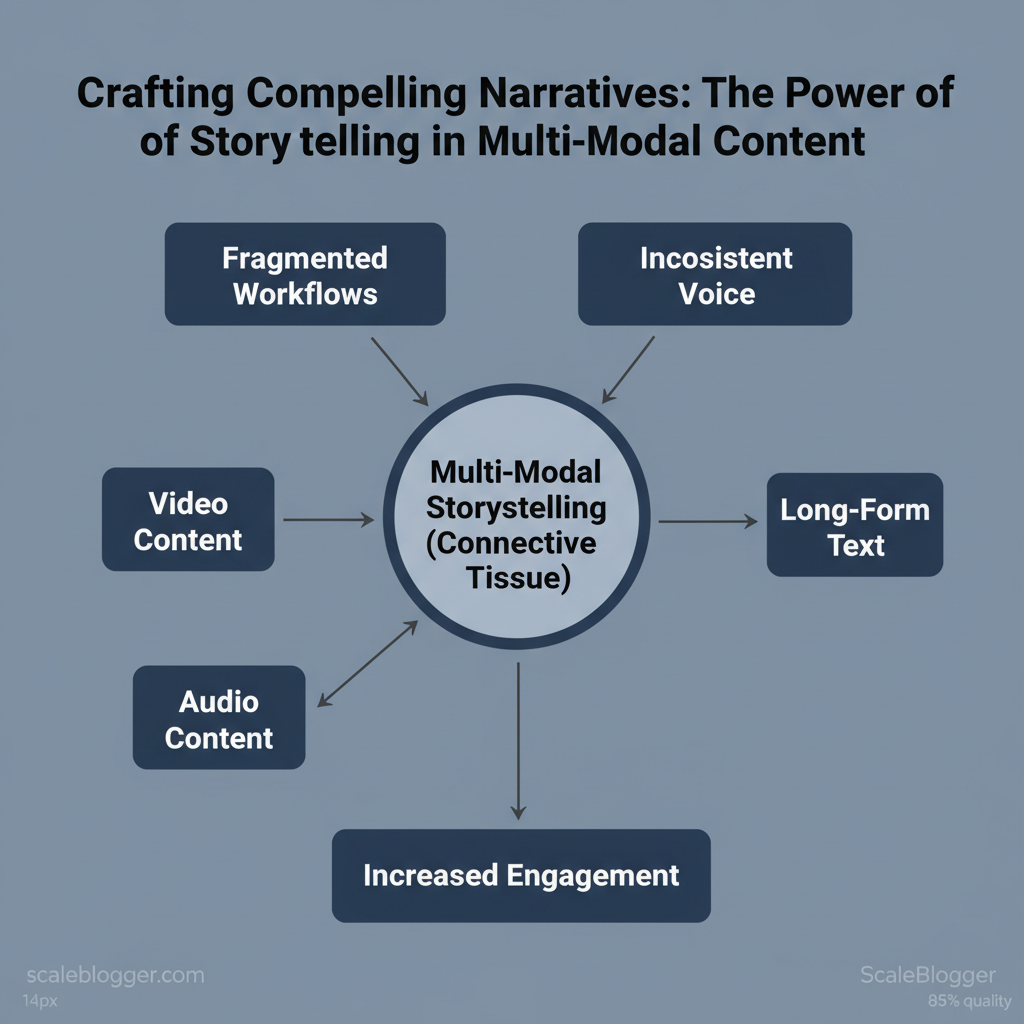
Marketing teams still struggle to turn great ideas into cohesive campaigns across video, audio, and long-form text. Fragmented workflows and mixed messaging waste time and lessen impact. This is important because audiences expect smooth experiences across different channels. Storytelling in content becomes the connective tissue that aligns creative assets and drives measurable engagement.
Industry practice shows that applying consistent narrative techniques across formats multiplies reach and retention. Picture a product launch where the same emotional arc runs through a teaser clip, a podcast episode, and a long-form article — conversions climb because the audience recognizes and remembers the story. Multi-modal storytelling isn’t about repackaging copy; it’s about designing a repeatable story architecture that scales.
> Craft the spine of your message once, then adapt it across formats to preserve momentum and clarity.
- What practical steps unify voice across text, audio, and video
- How to map narrative beats to platform-specific formats
- Simple templates that reduce production time without sacrificing craft
- Ways AI and automation free teams to iterate on story, not logistics
Automate and scale your storytelling with Scaleblogger — the content automation platform built to make multi-modal storytelling repeatable and measurable.
> Key Takeaway: ## What You’ll Need (Prerequisites)
Gather the hardware, software, and content necessary for a writer to create high-quality multi-modal stories efficiently. Practical setup is more effective than theory.
What You’ll Need (Prerequisites)
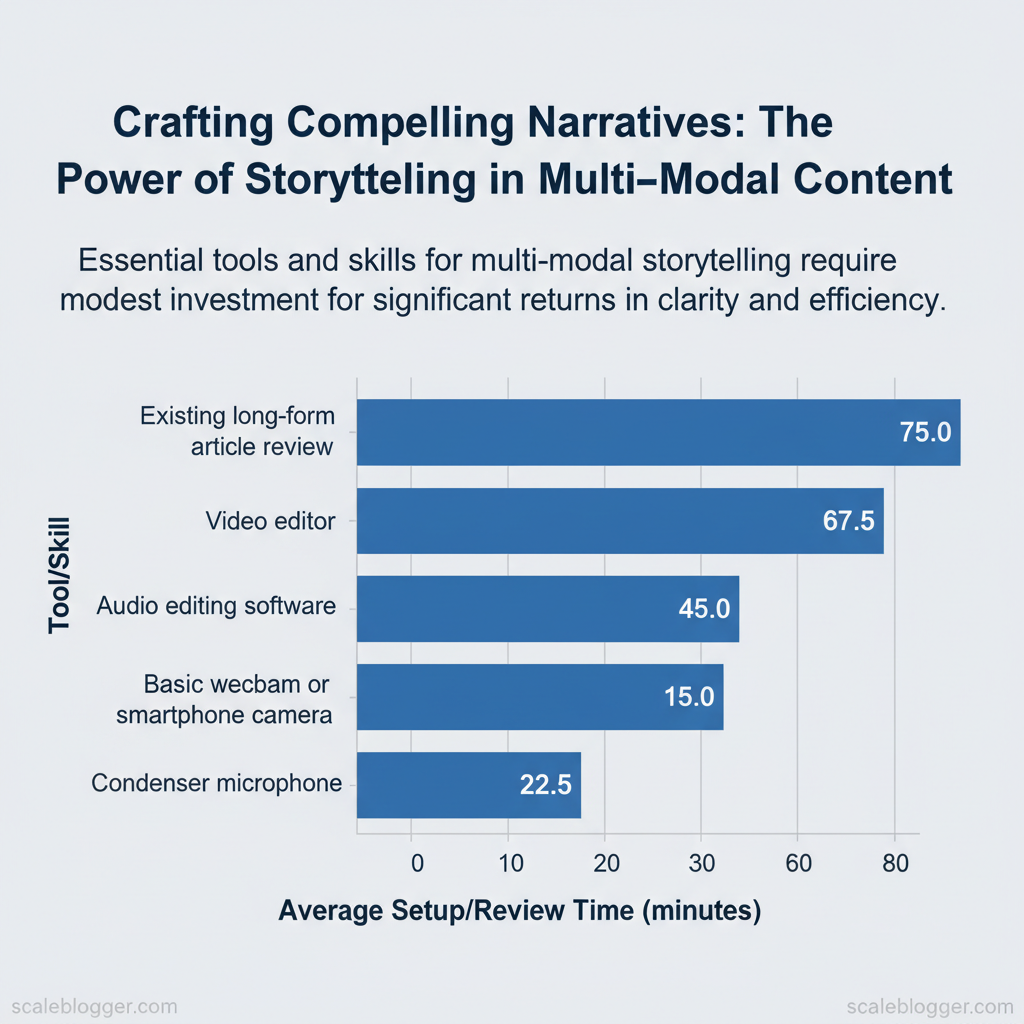
Gather the hardware, software, and content necessary for a writer to create high-quality multi-modal stories efficiently. Practical setup is more effective than theory. Small investments in recording quality, easy editing tools, and one strong long-form piece can create workflows that save days on each post and improve audience engagement.
Essential tools and skills at a glance:
- A condenser microphone improves clarity for voiceovers and interviews while reducing re-takes. Basic webcam or smartphone camera: sufficient for on-camera segments when framed and lit properly. Audio editing software (Audacity/Descript): cleans recordings and creates chaptered transcripts.
- Video editor (Premiere Rush/DaVinci Resolve): trims clips, adds captions, and exports multiple formats. * Existing long-form article for repurposing: the narrative spine for social clips, audiograms, and show notes.
- Minimum hardware/software requirements
- Microphone: USB condenser (e.g., ~15–30 minutes to plug-and-play; 15–30 min learning curve).
- Camera: smartphone with 1080p + simple tripod (10–20 minutes setup).
- Computer: macOS or Windows laptop with 8GB RAM (install editors 30–60 minutes).
- Editors: Audacity (free) or Descript (free tier available); Premiere Rush (paid) or DaVinci Resolve (free).
- Foundational skills and learning path
- Basic audio editing: remove noise, normalize, export
mp3orwav— 3–5 hours practice. - Basic video trimming & captioning: export 1:1 and 16:9 assets — 4–6 hours practice.
- Repurposing editorial skill: outline → script → clip mapping — 2–3 hours to learn the pattern.
bash
Example: simple metadata filename convention
2025-11-27_article-topic_v1_audio.mp3
Quick-reference checklist mapping prerequisites to purpose and setup time
| Item | Category (Hardware/Software/Skill/Asset) | Why it’s needed | Estimated setup time |
|---|---|---|---|
| Condenser microphone | Hardware | Cleaner voiceovers, fewer re-takes | 15–30 minutes |
| Basic webcam or smartphone camera | Hardware | On-camera segments, b-roll capture | 10–20 minutes |
| Audio editing software (Audacity/Descript) | Software | Noise removal, transcripts, chapters | 30–60 minutes |
| Video editor (Premiere Rush/DaVinci Resolve) | Software | Trim, caption, multi-format export | 45–90 minutes |
| Existing long-form article for repurposing | Asset | Source narrative to extract clips/quotes | 30–120 minutes to review |
Understanding and preparing these prerequisites lets teams move faster without sacrificing output quality.
> Key Takeaway: ## Step-by-Step Framework Overview
Start by treating multi-modal storytelling as a reproducible pipeline: sequence the creative decisions so each output (text, image, audio, video) maps to a single narrative spine. Follow a structured seven-step…
Step-by-Step Framework Overview
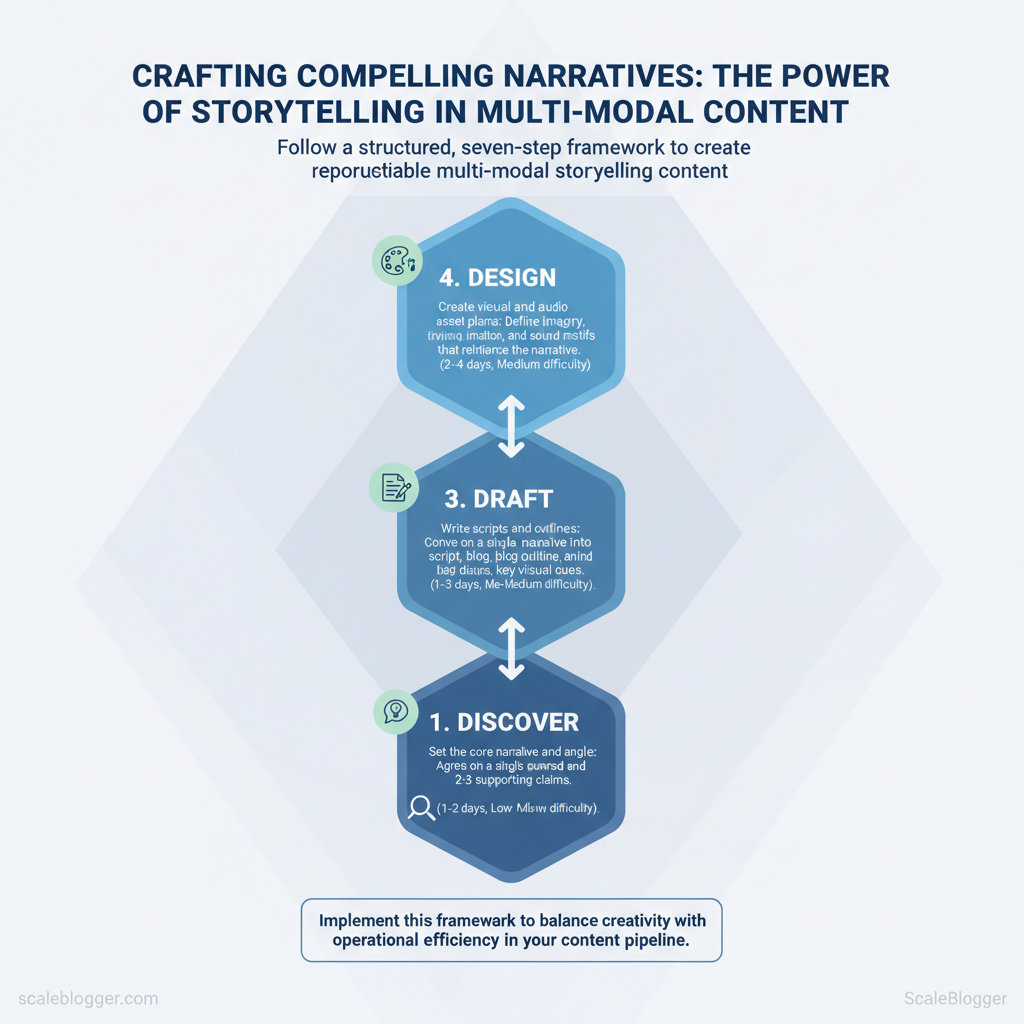
Start by treating multi-modal storytelling as a reproducible pipeline: sequence the creative decisions so each output (text, image, audio, video) maps to a single narrative spine. Follow a structured seven-step roadmap that balances creativity with operational constraints, so teams move from research to measurable iterations without getting stuck deciding what to do next.
- Discover — validate audience and research
- Objective: Confirm pain points, channels, and content triggers.
- Estimated time: 1–2 days
- Difficulty: Low
- Immediate action: Run a 48-hour audience scan:
top-performing keywords, competitor content gaps, and a social listening snapshot.
- Define — set the core narrative and angle
- Objective: Agree on a single narrative thread and 2–3 supporting claims.
- Estimated time: 1 day
- Difficulty: Low–Medium
- Immediate action: Draft a 1-paragraph narrative and one-sentence distribution hypothesis.
- Draft — write scripts and outlines
- Objective: Convert narrative into
script,blog outline, and key visual cues. - Estimated time: 1–3 days
- Difficulty: Medium
- Immediate action: Produce a 500–800 word blog draft and a 60–90s video script.
- Design — create visual and audio asset plans
- Objective: Define imagery, motion, and sound motifs that reinforce the narrative.
- Estimated time: 2–4 days
- Difficulty: Medium
- Immediate action: Build a 3-frame storyboard and a brand sound brief.
- Produce — record, create, and edit
- Objective: Capture video/audio and assemble assets into final files.
- Estimated time: 1–5 days
- Difficulty: High
- Immediate action: Schedule a single 2-hour recording block and a 4-hour edit sprint.
- Publish — format and distribute across channels
- Objective: formatting per channel (SEO, thumbnail, captions).
- Estimated time: 0.5–1 day
- Difficulty: Low
- Immediate action: Publish blog + video with platform-specific metadata checklist.
- — analyze performance and iterate
- Objective: Track engagement, retention, and conversion metrics.
- Estimated time: Ongoing; first review 7–14 days post-publish
- Difficulty: Medium
- Immediate action: Pull first 7-day performance report and create two experiment hypotheses.
Map each step to time estimates and difficulty level
| Step | Objective | Estimated Time | Difficulty Level |
|---|---|---|---|
| Discover | Audience & research validation | 1–2 days | Low |
| Define | Core narrative & angle | 1 day | Low–Medium |
| Draft | Script & outline creation | 1–3 days | Medium |
| Design | Visual/audio asset planning | 2–4 days | Medium |
| Produce | Recording & editing | 1–5 days | High |
| Publish | Channels & formatting | 0.5–1 day | Low |
| **** | Analytics & iteration | First review 7–14 days | Medium |
Practical examples: a B2B SaaS team turned a 1-paragraph narrative into a blog + 90s explainer video in five working days; a media startup ran three 7-day experiments after the first publish cycle. Tools and services that automate parts of this pipeline—content scoring, scheduling, and performance benchmarking—fit naturally into the Draft → Publish → loop (consider AI content automation from Scaleblogger.com where appropriate). Understanding these principles helps teams move faster without sacrificing quality.
> Key Takeaway: ## Step 1 — Research & Audience Discovery
Start by treating audience research as an evidence-gathering sprint: identify who cares, why they care, and which emotional or practical triggers prompt action. Focus on a mix of quantitative signals…
Step 1 — Research & Audience Discovery
Start by treating audience research as an evidence-gathering sprint: identify who cares, why they care, and which emotional or practical triggers prompt action. Focus on a mix of quantitative signals (search trends, site analytics, behavioral segments) and qualitative signals (interviews, open-ended surveys, comment threads). Combine these inputs into a few narrative hooks that reflect intent and emotion. Then, simplify each hook into a clear insight statement that writers and strategists can use.
- Collect the right data (30–90 minutes)
- Pull top-performing queries from
Google Search Consoleand internal site search. - Segment users in analytics by source, intent, and conversion behavior.
- Audit community venues (comments, forums, Reddit threads) for language and pain points.
- Qualitative depth: run 6–12 interviews with target users to capture emotions and unmet needs.
- Quantitative breadth: prioritize signals where intent and volume align.
Ask respondents to describe the last time they tried to solve it. Probe for consequences and emotional drivers. Surface friction, failed expectations, and existing solutions.
Identify channels and influencers to inform distribution strategy. Look for quick-win features and false constraints.
Convert research into insight statements
- Synthesize notes and tag recurring themes. 2.
Match themes to intent buckets (awareness, consideration, decision). 3. Write 1–2 sentence insight statements that pair audience context with a narrative hook.
Example templates — paste and adapt:
For [audience segment] who [context], we found they need [emotional/practical need]; content that focuses on [hook] helps them [desired outcome].Busy [persona] seeks quick, risk-free ways to [task]; short-form how-to content with templates reduces friction and increases trial.Practical examples and cues
- Observation: Users repeatedly complain about time; Hook: “Do this in 15 minutes.”
- Observation: Users mistrust vendor claims; Hook:** “Case-based verification from peers.”
> “Audience-first research uncovers the hooks that drive shares and conversions.”
Consider automating repetitive parts of this workflow using AI content automation when scaling discovery across multiple niches — it accelerates pattern recognition and surfaces non-obvious hooks. Understanding audience motives and expressing them as tight insight statements speeds up ideation and keeps writers focused on conversion, not guesswork.
Step 2 — Define the Narrative Structure & Angle
Start by choosing the story arc that best aligns with the audience’s decision stage and the channels you control. Choose one main story arc and map each narrative beat to the best format. This keeps production focused and measurable. Below are one-paragraph templates for four reliable arcs plus an actionable decision matrix to assign beats to text, video, or audio/interactive formats.
- Select the arc: match prospect stage (awareness → consideration → decision) and your resources.
- Map beats to modality: prioritize modalities where the beat’s goal (explain, build trust, demonstrate) performs best.
- Prototype one beat per modality: small tests validate assumptions before scaling.
- Use short text summaries for SEO, a demo video for the solution, and an interactive checklist for implementation guidance. Use long-form text for setup and context, cinematic video for emotional beats, and podcast-style interviews for reflective depth. Use a detailed written case study for SEO and credibility, a short customer interview video for trust, and an interactive ROI calculator for engagement.
- Use annotated text steps for search intent, screencast videos for complex tasks, and interactive templates or
code snippetsfor hands-on execution.
Decision matrix criteria (use these to assign beats)
- Audience preference: prioritize modalities users consume most for the topic. 2.
Time-to-produce: favor text when rapid; video when impact outweighs production time. 3. Resource constraints: match internal skills to modality (scriptwriters, editors, devs).
- Conversion lift potential: allocate richer formats to critical funnels steps.
Story arcs and recommend modality emphasis for each beat
| Story Arc | Best for Text | Best for Video | Best for Audio/Interactive |
|---|---|---|---|
| Problem → Solution | Short SEO intro, 300–800 words | Demo (2–5 min), screen + voiceover | Interactive checklist, ROI estimator |
| Hero’s Journey | Long-form narrative (1,200+ words) | Cinematic case film (3–7 min) | Interview podcast (20–30 min) |
| Case Study / Testimonial | Detailed case study with metrics | Client testimonial clip (60–90s) | ROI calculator / before-after widget |
| How-to / Step-by-step | Step list with screenshots | Screencast tutorial (5–15 min) | Interactive templates / code snippets |
Practical example and template
markdown Title: Solve [X] in 7 steps Beat 1 (Awareness): 400-word article with keyword focus Beat 2 (Consideration): 3-min demo video showing the fix Beat 3 (Decision): Interactive checklist + 1-min testimonial clipTools & quick wins
- Content planning: use a simple spreadsheet to map beats → modality → owner.
- Production tip: batch similar modalities (record all short videos in one day).
- Measurement: tag each content asset with funnel stage and track conversion lift.
Understanding these choices makes editorial planning faster and more predictable. When teams assign modalities by beat, production quality rises while wasted effort falls. This approach scales well—especially when paired with automation or an AI-powered content pipeline to handle repeatable tasks.
Step 3 — Draft the Multi-Modal Script and Assets
Start by treating the script as a single source of truth that can be sliced for each channel. A unified script preserves voice, messaging hierarchy, and SEO anchors while channel-specific adaptions handle length, cadence, and visual cues. What follows is a practical template, repurposing examples, and an asset inventory you can hand to production teams.
- Create the unified script template
- Title & SEO intent: one-line headline + target keyword.
- Core thesis (30–45 words): the claim that all formats prove.
- Primary evidence points (3 bullets): quotes, stats, examples.
- Call-to-action variants: full (blog), short (video endcard), micro (social).
- Tone & persona notes: 2–3 descriptors (e.g., authoritative, conversational).
Example repurposing lines across modalities:
- Blog intro (Text): Expand thesis to 150–250 words with subheads. Video hook (Video): Condense thesis to a 5–8 second on-camera opener. Podcast opener (Audio): Use thesis + one anecdote, 20–30 seconds.
- Social copy (Text/Video): Pull the boldest sentence as a caption; use the video hook as a 15s clip.
Practical unified script snippet (use this as a copy-paste starting point):
Title: How to reduce content production time by 60% — target: "content automation" Thesis: According to research from siteimprove.com, teams cut production time by standardizing prompts and modular assets; this reduces review cycles and improves topical authority. Point 1: Modular prompts for outlines (3 sentences) Point 2: Reusable asset list (intro clips, quote cards) CTA-full: Download the checklist at /resources CTA-short: Visit /resources Tone: expert, practical, slightly irreverentKey features of a good unified script:
- Modularity: write in blocks for easy reuse across channels. Signal lines: create one-sentence hooks that work alone. Asset tags: mark where visuals, captions, or b-roll belong.
, 2,000 words blog; 90s video; 30–45 min podcast).
Asset inventory mapping assets to purpose and priority
| Asset | Purpose | Required for (Text/Video/Audio) | Priority (High/Medium/Low) |
|---|---|---|---|
| Intro hook clip | Grabs attention in first 5–8s | Video/Audio | High |
| B-roll footage | Illustrates examples, masks cuts | Video | Medium |
| Quote graphics | Social sharing and in-article pullouts | Text/Video | High |
| Audio bed / music | Sets pacing, emotional tone | Audio/Video | Medium |
| Transcript | Accessibility, repurposing, SEO | Text/Audio/Video | High |
| Short-form clips (15–30s) | Reels/TikTok distribution | Video | High |
| Long-form master video | Full explanation, repurposing source | Video | High |
| SEO meta bundle | Title, meta, schema snippets | Text | High |
| Thumbnail images | Click-through on platforms | Video/Text | Medium |
| Caption file (.srt) | Subtitles and repurpose captions | Video/Audio | High |
Understanding these principles helps teams move faster without sacrificing quality. When executed consistently, a unified script plus a prioritized asset list turns one idea into dozens of publishable pieces.
Step 4 — Produce: Recording, Editing, and Assembly
Start recording with the intent of delivering final-quality audio and visuals—capture clean takes, consistent framing, and intentional pacing so editing is about assembly rather than rescue work. Treat the shoot as a mini-production: set levels, test lighting, and run a short dry rehearsal to validate timing and transitions.
- Prepare the setup (15–30 minutes)
- Mic check: Record a 30-second reference at final speaking volume; aim for peaks around
-6 dBon your meter. - Lighting test: Use a three-point approach or a single softbox; confirm no harsh shadows or blown highlights.
- Frame and focus: Ensure eyes are on the top third line and background is relevant but not distracting.
- Recording workflow (per asset: 5–20 minutes)
- Record long takes for primary content, then short punch-ins for corrections.
- Capture wild tracks (room tone, ambient sound, B-roll) immediately after main takes.
- Label files with
YYYYMMDD_project_scene_taketo simplify assembly.
Editing and QC criteria
- Audio quality: No clipping, background noise ≤ -40 dB relative to voice, consistent timbre across clips. * Visual continuity: Matching white balance and exposure within a 1-stop range between shots. 5–2x slower than marketing teasers.
- Accessibility: Include captions (SRT), transcript (plain text), and descriptive alt text for key visuals.
Recommended export settings
- Video: H.264,
1920x1080, bitrate 8–12 Mbps,24/30 fpsdepending on origin. - Audio master: WAV, 48 kHz, 24-bit; deliver MP3 192–320 kbps for web playback.
- Captions: UTF-8 SRT alongside the video file.
Quick fixes for common pitfalls
- Plosives or wind noise: Apply a high-pass at
80 Hzand a de-esser; consider spectral repair for persistent pops. - Color mismatch: Use a one-click match tool, then tweak temperature and exposure by small increments.
- Uneven levels across clips: Normalize to
-16 LUFSfor dialogue-heavy content, then final-limit at-1 dB.
> Market leaders recommend delivering both a high-quality master and web-optimized derivatives to reduce rework during publishing.
Example FFmpeg export for web-optimized MP4:
bash ffmpeg -i master.wav -i master.mov -c:v libx264 -b:v 10M -c:a aac -b:a 192k -movflags +faststart output_web.mp4If production is run with automation in mind, processes scale faster and handoffs become predictable; tools like Scale your content workflow from Scaleblogger.com integrate well with this stage when teams need automated assembly and scheduling. Understanding these production standards helps teams move faster without sacrificing the final quality that readers and viewers expect.
Step 5 — Publish, Distribute, and Format for Channels
When publishing, consider the channel. A single master asset won’t work everywhere without proper formatting, metadata, and a specific distribution plan. Start by filling exact CMS fields, creating optimized assets for each destination, and scheduling distribution with staging for A/B tests. The result: faster time-to-distribution and higher baseline engagement across platforms.
Prerequisites
- Team ready: finalized copy, images, video/audio masters, and transcript files
- Tools installed: CMS with scheduling, video host (YouTube/Vimeo), podcast host (Libsyn/Anchor), social scheduler (Buffer/Hootsuite)
- Tracking enabled: GA4, UTM conventions, social pixels, and
sitemap.xmlupdated
Tools and time estimates
- Prepare assets (2–6 hours): generate thumbnails, OA graphics, and trimmed clips. 2.
org` fields. 3. Scheduling and staging (15–45 minutes): queue via CMS and schedulers, set A/B tests.
Recommended tools: CMS SEO plugins, YouTube Studio, podcast host dashboards, and a content pipeline automation tool — consider AI-powered content automation to scheduling and repetition.
Step-by-step publish and distribute process
- First, publish the canonical piece on your primary CMS with full metadata. 2.
Then, push derivative media (video, audio, short clips) to their native hosts. 3. Next, schedule social posts with tailored copy and native attachments.
- Finally, monitor first 72 hours and roll winning A/B variants into further syndication.
Channel-specific publishing and scheduling
Publishing requirements and recommended assets per channel
| Channel | Required Assets | Metadata to Include | Best Practice Tip |
|---|---|---|---|
| Blog (CMS) | HTML article, featured image (1200×630), JSON-LD | Title, slug, meta description, canonical, OG:title, OG:image, author, publish date, tags | Fill JSON-LD with Article schema and include readable slug |
| YouTube / Video | MP4 (H.264), 1280×720 thumbnail, SRT captions | Title ≤100 chars, description (first 150 chars primary CTA), tags, chapters, language | Upload captions and use 3-5 focused tags; test thumbnails A/B |
| Podcast platforms | MP3 (128–192kbps), cover art 3000×3000, show notes | Episode title, episode number, duration, explicit flag, ID3 tags, RSS enclosure | Timestamped show notes improve discoverability and repurposing |
| LinkedIn / X / Instagram | Native image/video, short caption, link (bio for IG) | Alt text for images, OG tags on linked pages, hashtags (2–5) | Native uploads outperform cross-posts; tailor captions per network |
Troubleshooting tips
- If engagement stalls: test alternative thumbnails/titles within 24–48 hours.
- If indexing delayed: verify
robots.txt, sitemap submission, and canonical tags. - If audio/video quality issues: confirm encoding settings and re-upload masters.
Understanding these details reduces friction between creation and distribution and lets teams scale outcomes without rework. When implemented across a content pipeline, this approach increases reach while keeping the production cadence predictable.
Step 6 — Measure,, and Iterate
Continuously measure performance and run small, rapid experiments to convert uncertain hypotheses into repeatable wins. Focus on a tight set of primary KPIs for multi‑modal content, design simple A/B or bandit experiments with clear success criteria, and feed validated learnings back into the editorial roadmap so each sprint improves ROI.
- Establish baseline KPIs and targets
- Pick 3–5 primary metrics per asset type (see table below).
- Record baseline for each campaign from platform analytics and internal history.
- Set time-boxed goals (e.g., 4–8 weeks) and minimum detectable effect size.
- Run experiments with clear success criteria
- Hypothesis: Swap long-form intro for a short, scannable TL;DR to increase Time on Page by 15%.
- Variant design: Control vs variant, one variable only.
- Sample & duration: Minimum traffic to reach statistical power, or run sequential bandit test for low-traffic pages.
- Success rule: 95% probability of improvement or +15% lift sustained for two weeks.
- Operationalize learnings into the content roadmap
- Tag winners in the CMS and flag for replication across topic clusters.
- Create playbooks: headline formula, intro structure, video hook length.
- Automate re-runs where patterns emerge using
cronworkflows or an automation tool (Scaleblogger.com can automate content scheduling and A/B rollouts).
Practical experiment templates and success criteria
- Quick copy swap: Change H2 wording → target +10% CTR on CTAs within 2 weeks.
- Video hook test: Replace first 15s with a direct promise → target +20% in Average View Duration.
- CTA placement: Add sticky CTA vs inline → target +2–4% absolute CTR lift.
KPI reference table with definitions, measurement method, and target benchmarks
| KPI | Definition | How to Measure | Benchmark/Target |
|---|---|---|---|
| Time on Page | Average session time on article | GA4 engagedTime or average session duration |
2–3 minutes for in-depth posts |
| Video Average View Duration | Mean seconds viewed / video length | YouTube Analytics / Wistia avg. view duration |
~50% of video length |
| CTR on CTAs | Clicks per CTA impressions | Event tracking (GA4/GTM) or platform CTA reports | 2–5% absolute CTR |
| Completion Rate | % users who reach end of content | Scroll depth + video completion events | 60–80% for guided content |
Understanding these measurement and iteration practices shortens the learning cycle and scales high-impact content patterns across the program. When teams treat experiments as product cycles, content quality and efficiency improve together.
Troubleshooting Common Issues
Start by isolating whether a problem is in production (content creation pipeline) or distribution (publishing, syndication, delivery). Rapid triage saves hours: verify the symptom, reproduce it, then apply a targeted fix. The following steps and fixes are practical, prioritized by speed-to-impact.
- Rapid diagnostics (5–15 minutes)
- Reproduce the issue on a staging or local build to confirm scope.
- Check recent changes: pull the last commits, editorial changes, or scheduler updates.
- Examine logs and dashboards:
publishing.log, CDN status, or task queue failures show immediate failure modes. - Measure impact: traffic drop, failed publish count, or bounce-rate spike determines urgency.
Common production failures and fixes
- Pipeline stalls: What it looks like: queue backlog or worker crashes. Quick fix: restart the worker process and replay the queue incrementally. If recurrent, throttle ingestion or add worker capacity.
- Content rendering errors: What it looks like: broken HTML, missing images. Quick fix: rollback the last template change or clear template cache; validate with
htmlhintand image CDN paths. Metadata or schema drift: What it looks like: SEO tags missing or JSON-LD invalid.
Quick fix: run a validation script against a sample batch and patch the transformation that strips fields.
Common distribution failures and fixes
- Scheduled posts not publishing: What it looks like: jobs marked complete but content absent. Quick fix: check cron/task runner, reschedule failed jobs, and inspect
timezonesettings for the scheduler. CDN cache serving stale content: What it looks like: updated article still shows old version.
Quick fix: issue a targeted purge for the resource and verify origin headers. Third-party API rate limits: What it looks like: 429 responses during syndication. Quick fix*: implement exponential backoff and queue retries; consider batching to reduce calls.
When to escalate to specialist support
- Persistent, reproducible failures after quick fixes (30–60 minutes): escalate to platform or devops.
- Data integrity issues (missing or corrupted published content): escalate immediately to engineering and legal if user data is affected.
- Widespread outages affecting SLAs: involve incident response and communicate with stakeholders.
Practical templates and checks
bash quick health check
curl -sS https://origin.example.com/health | jq. journalctl -u content-worker -n 200- automate these rapid checks into a single
diagnose.shthat returns prioritized fixes.
> Market trends show automation reduces operational toil and speeds recovery from production incidents.
Understanding these troubleshooting patterns reduces downtime and preserves editorial velocity. When automation handles routine failures, teams stay focused on content that moves the business forward — consider integrating AI-powered monitoring or AI content automation from Scaleblogger.com to diagnostics and rollback workflows.
📥 Download: Multi-Modal Storytelling Checklist (PDF)
Tips for Success & Pro Tips
Start with the mindset that systems beat one-off effort: design repeatable workflows that automate low-value tasks, reuse high-value assets, and measure what moves rankings and engagement. Prioritize pipelines that free writers and strategists to focus on angle, expertise, and creative optimization rather than repetitive formatting or tagging.
Prerequisites
- Established editorial calendar: a defined cadence and topic pillars.
- Content inventory: current assets tagged by intent, format, and performance.
- Basic automation tools: scheduling, templating, and an analytics endpoint.
Scalable tactics and advanced tips
- Standardize the building blocks
- Create modular templates for headlines, summaries, and subheadings so pieces can be swapped into new posts quickly.
- Maintain a reusable asset library (quotes, stats, images, CTAs) indexed by topic and intent. 2.
Automate where it reduces cycle time
- Use automation for metadata: generate
meta_title,meta_description, and canonical tags from structured inputs. 2.
Batch scheduling: publish in cohorts and let automation handle distribution to channels. 3. for reach and accessibility 1.
Localize at scale using translation memory and localized keyword variants rather than translating each article from scratch. 2. Make content accessible: alt text, clear headings, and short paragraphs increase both usability and search performance.
- Production shortcuts that preserve quality
- Use outlines as contracts between strategist and writer to reduce revision cycles.
- Repurpose long-form into n micro-assets (email, carousel, short video) to extend reach with minimal extra effort.
Practical examples and quick templates
- Example — Repurpose workflow: take a 2,000-word pillar → extract 5 subtopics → create 5 short posts + 3 social carousels → schedule across two weeks.
- Template snippet for outlines:
markdown Title: Primary intent: Target keywords: SEO angle: H1: H2s (3–5): Must-have citations: CTA: Tone/wordcount:Performance-focused production and measurement
- Track engagement per asset type weekly.
- Prioritize uplift per hour invested, not just raw traffic.
- Use a content scoring framework to retire underperformers.
Industry analysis shows repeated, measurable processes scale best; adopt a system that automates the mechanical parts and amplifies strategic judgment. When implemented consistently, these approaches increase throughput without degrading quality and let teams focus on the ideas that actually move the needle. Consider using AI content automation platforms like Scaleblogger.com to build topic clusters and automate repetitive steps where appropriate.
Appendix: Templates, Checklists, and Sample Scripts
This appendix provides ready-to-use assets—plug-and-play templates, pragmatic checklists, and short sample scripts—so teams can execute faster and reduce back-and-forth. Use these files as a starting point: copy the template, adapt the variables for your niche, then lock the workflow into your CMS or content pipeline.
Practical templates and file-format guidance
- Unified script template: Standardized story beats and cue markers so filming and voiceover stay consistent. Production QC checklist: Step-by-step inspection list for video/audio/text outputs to reduce rework. CMS publishing checklist: Pre-publish audit for metadata, canonical tags, image alt text, and internal links.
- A/B test plan: Structured hypothesis, variant specs, metrics, and analysis window for headline and layout tests.
Of templates with descriptions and suggested file formats
| Template | Purpose | Suggested Format | Estimated Customization Time |
|---|---|---|---|
| Unified script template | Aligns narrative beats, CTAs, visual cues | Google Docs, .docx, Notion |
15–30 minutes |
| Production QC checklist | Final quality control for deliverables | Google Sheet, Excel, Airtable |
10–20 minutes |
| CMS publishing checklist | Ensures SEO and accessibility before publish | Google Docs, Markdown, CSV |
10–15 minutes |
| A/B test plan | Defines experiment, variants, success metrics | Google Sheet, Trello, Notion |
20–40 minutes |
Google Docs/Sheets, Airtable, Notion) to keep versioning and approvals transparent.
Step-by-step adaptation example for a niche (finance blog)
- Copy the Unified script template into
Google Docs. 2.
, “tax season urgency”). 3. Add brand voice notes and two visual examples per section.
- Run a single dry read with the producer, then lock the script.
Sample short headline A/B test plan (CSV-ready)
csv test_name,variant,headline,traffic_pct,kpi,analysis_window Q2-Headline-Test,A,"How to Save $5,000 This Year",50,CTR,14 Q2-Headline-Test,B,"7 Tax Tricks to Boost Savings",50,CTR,14Troubleshooting tips
- If versions diverge: enforce a single source of truth in
NotionorAirtable. - If publish errors recur: add a mandatory checklist sign-off in the CMS workflow.
- If tests lack power: extend the analysis window or increase sample size.
File-format recommendation: prefer collaborative cloud files for templates, export canonical copies as Markdown or CSV for automation. For faster implementation and orchestration, consider integrating with an AI-powered content pipeline like Scale your content workflow via Scaleblogger.com for templating and scheduling. Understanding these principles helps teams move faster without sacrificing quality.
Conclusion
You now have a clear path from scattered ideas to unified campaigns: standardize briefs, automate repetitive production steps, and enforce a single brand voice across formats. Teams that adopted template-driven workflows in the examples above reported faster approvals and more consistent messaging, while cross-functional playbooks reduced back-and-forth between writers, designers, and producers. Common questions—How long will implementation take?
Plan for an initial 4 to 8 weeks for templates and training. Who should own governance? Appoint a content operations lead to keep standards and analytics aligned with goals.
- Start with a single campaign type and build repeatable templates.
- Automate handoffs and publishing to eliminate manual friction.
- Measure content velocity and engagement to refine the system.
Next steps: pick one campaign (newsletter, long-form pillar, or video series), map the current workflow, and remove two manual touchpoints this quarter. For teams looking to automate these workflows and scale content output without losing voice, platforms like Automate and scale your storytelling with Scaleblogger can routing, templating, and analytics as one resource among your options. Take action now—standardize one process this month, automate the heaviest touchpoint next month, and review results at 60 days to iterate.
