

Marketing teams lose their momentum when content works well on desktop but fails on mobile. Real-world campaign successes disappear if pages load slowly, CTAs move off-screen, or readability declines on small devices. That mismatch skews every metric in a content performance audit and undermines reliable benchmark analysis.
Mobile issues aren’t just technical nuisances; they warp comparative insights and inflate optimization costs. Industry research shows teams that normalize mobile in benchmarking avoid fruitless content rewrites and make smarter editorial investments. Picture a product launch where conversion estimates halve after rollout because mobile load times tripled; that gap distorts future planning and budget allocations.
> Treat mobile responsiveness as a primary dimension in benchmarking, not an afterthought.
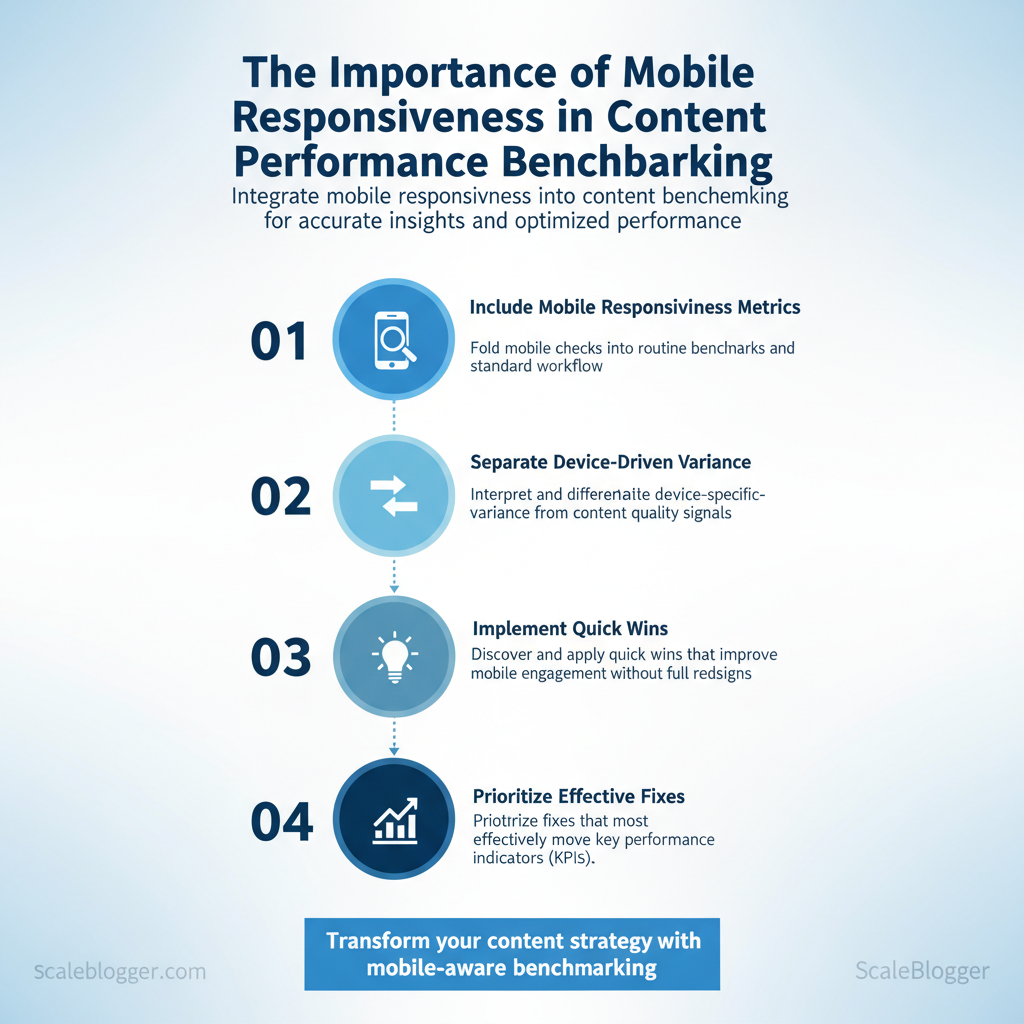
What follows will show how to fold mobile checks into routine benchmarks, interpret device-specific variance, and prioritize fixes that move KPIs. You’ll find practical steps to measure mobile impact, visual cues for identifying responsive breakage, and a straightforward decision framework for remediation.
- How to include
mobile responsivenessmetrics in standard benchmark workflows - Methods to separate device-driven variance from content quality signals
- Quick wins that improve mobile engagement without full redesigns
- How to prioritize fixes that lift
content performancemost effectively
See how Scaleblogger can help automate mobile-aware content benchmarking: https://scaleblogger.com
> Key Takeaway: ## Why Mobile Responsiveness Matters for Content Performance
Mobile responsiveness directly affects how users interact with content. Responsive pages cut down on friction, boost engagement, and focus on the content’s true value instead of layout…
Why Mobile Responsiveness Matters for Content Performance
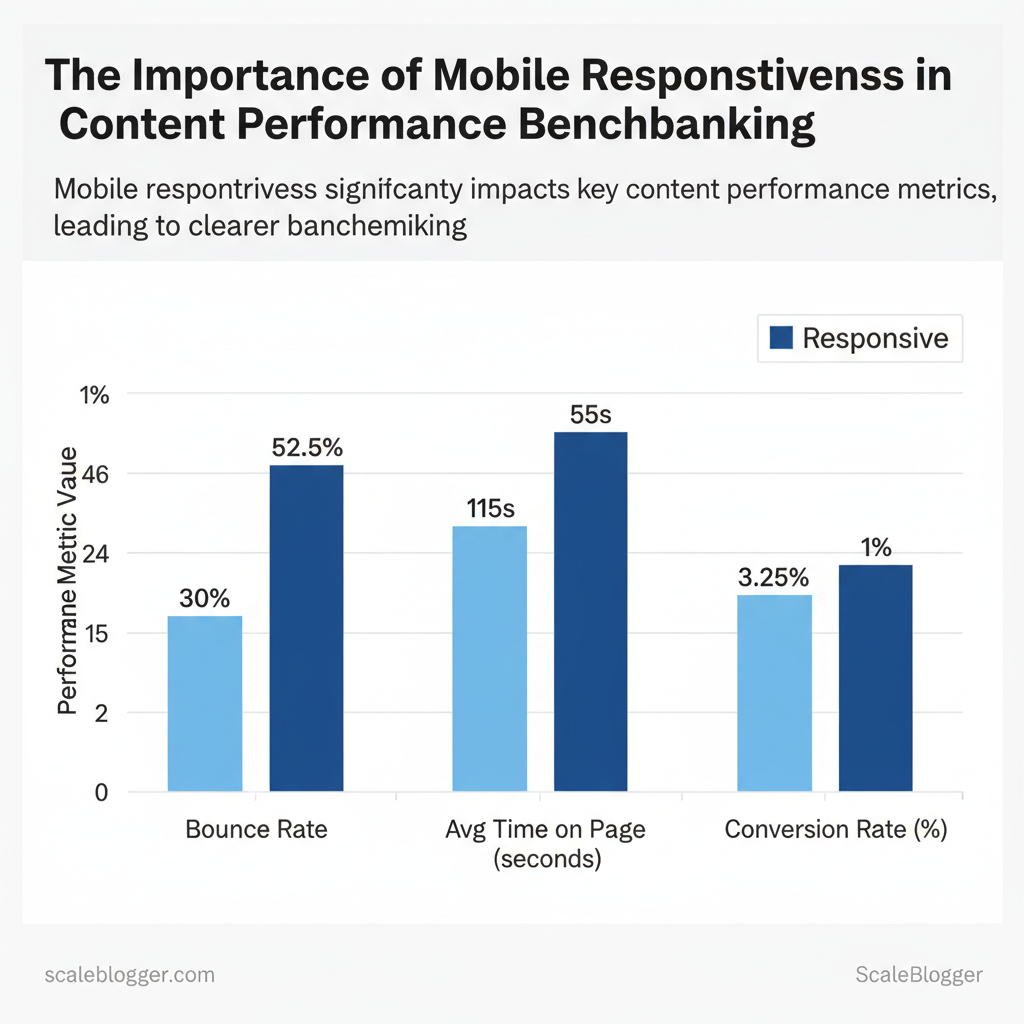
Mobile responsiveness directly affects how users interact with content. Responsive pages cut down on friction, boost engagement, and focus on the content’s true value instead of layout issues. When layouts adapt to device size, readers stay longer, scroll deeper, and convert at higher rates; conversely, non-responsive experiences inflate bounce rates, depress time-on-page, and distort performance benchmarks across device cohorts. For content teams this means separating device-driven performance issues from content quality so that optimization efforts target the right problem.
How responsiveness affects metrics and decision-making
- Reduced friction: Responsive layouts remove tap-target problems and horizontal scrolling, lowering immediate abandonment. Cleaner benchmarks: When mobile-specific behavior is isolated, comparisons across campaigns and channels become meaningful. Algorithmic consequences: Mobile-first indexing and mobile-centric Core Web Vitals place page experience at parity with content relevance for ranking.
- Attribution clarity: Properly segmented metrics (mobile vs. desktop) prevent misleading conclusions about content effectiveness.
Let’s look at examples and adjustments for measurement.
- Segment analytics by device and OS to reveal mobile-specific drop-offs before changing content. 2.
Monitor Largest Contentful Paint (LCP) and Cumulative Layout Shift (CLS) on mobile separately from desktop to prioritize front-end fixes that most affect perceived speed. 3. Use throttled mobile network simulations to see how long critical content takes to appear on-device, then images, fonts, and third-party scripts.
Metric changes (bounce, time-on-page, conversions) between responsive vs. non-responsive experiences may show example percentage deltas.
| Metric | Responsive Experience | Non-Responsive Experience | Impact on Benchmarking |
|---|---|---|---|
| Bounce Rate | 25–35% | 45–60% | Non-responsive design inflates bounce, skewing content engagement baselines |
| Average Time on Page | 90–140s | 40–70s | Shorter sessions on non-responsive pages understate content depth |
| Pages per Session | 3.0–4.5 | 1.5–2.2 | Navigation friction reduces cross-content discovery and funnel testing validity |
| Conversion Rate | 2.0–4.5% | 0.5–1.5% | CTAs and forms suffer on cramped layouts, producing misleading funnel KPIs |
| Scroll Depth / Engagement | 60–85% of page | 20–45% of page | Poor layout reduces content consumption and obscures true interest |
When teams isolate mobile performance, effort shifts from guessing at content fixes to engineering the experience that lets content perform. Implementing device-aware benchmarks and monitoring mobile Core Web Vitals makes optimization targeted and measurable. This approach reduces wasted iterations and lets creators focus on content that actually moves metrics.
> Key Takeaway: ## Design and Technical Factors That Affect Mobile Benchmarks
Design and technical choices decide if a mobile visit feels fast or slow. Fluid layouts, image delivery, and touch-friendly navigation directly influence Core Web Vitals and engagement…
Design and Technical Factors That Affect Mobile Benchmarks
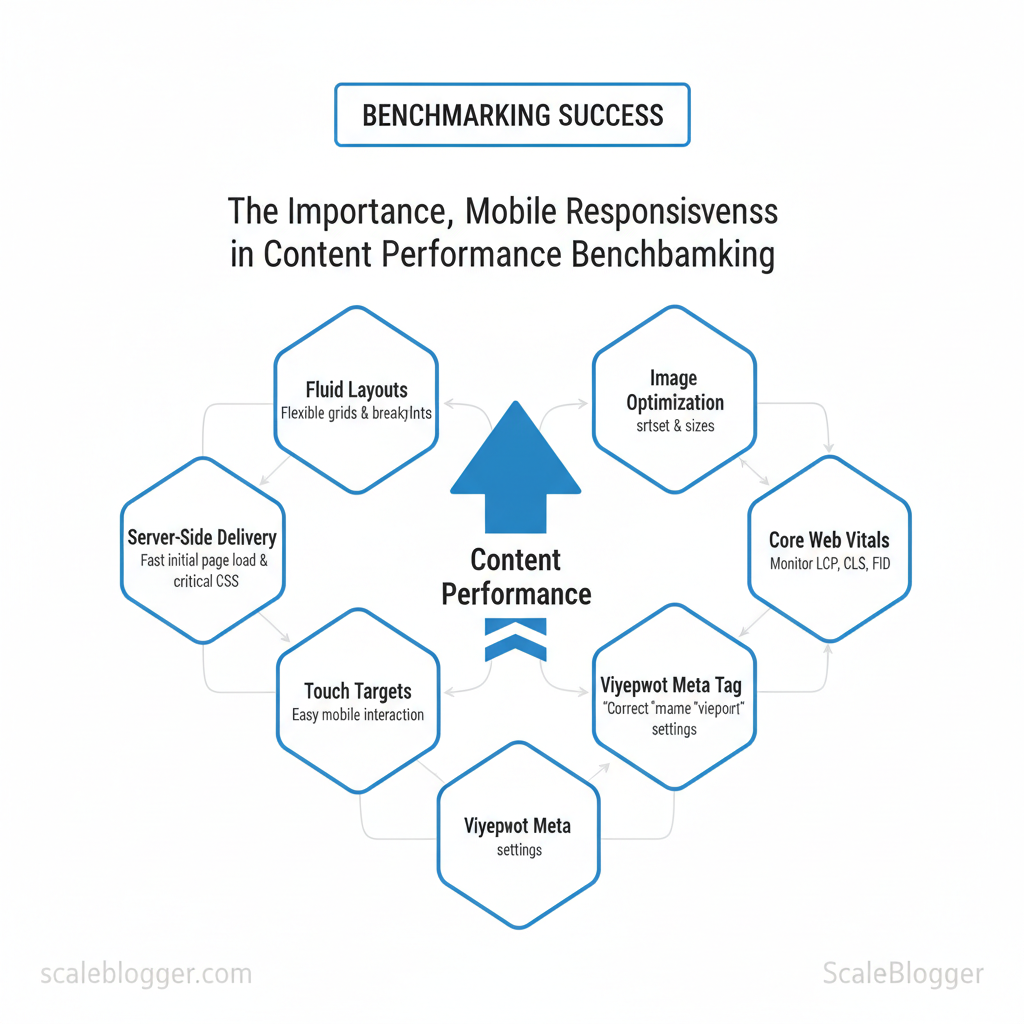
Design and technical choices decide if a mobile visit feels fast or slow. Fluid layouts, image delivery, and touch-friendly navigation directly influence Core Web Vitals and engagement signals, while server-side delivery, CDNs, and critical CSS control how quickly the first meaningful paint appears. Start with an audit of these areas to transform vague performance reports into specific fixes that enhance LCP, CLS, and readiness for interaction.
Responsive design elements to audit (what to check and how)
Start with a focused checklist that surfaces layout stability and resource waste. Audit these elements in this order:- Viewport and initial scale — Confirm
meta name="viewport"is present and not locked to an inappropriate scale. - Fluid grid and breakpoints — Verify container widths use relative units (
%,vw,rem) and breakpoints align with device width distribution. - Responsive images — Ensure
srcsetandsizesare used and that large images aren’t downloaded on small screens. - Tap targets and navigation — Measure tap target sizes and spacing to prevent accidental taps and reduce bounce.
- CSS media queries and critical CSS — Extract above-the-fold CSS to cut render-blocking time; defer non-critical styles.
Quick tests to run:
- Manual check: Use a mobile device or emulator to verify layout shifts during page load.
- Network throttling: Simulate 3G/4G to see how images and fonts affect LCP.
- Lighthouse snapshot: Capture CLS and LCP contributors with a single audit.
Performance and resource delivery (technical levers)
the delivery pipeline to shrink payload and latency.- Lazy loading — Defer offscreen images and iframes with native
loading="lazy"or intersection observers. - Optimized image formats — Serve WebP/AVIF with fallbacks; use
srcsetfor device-appropriate resolution. - Critical CSS — Inline a minimal, device-agnostic critical CSS chunk for above-the-fold content; load the rest asynchronously.
- Server response times — Keep Time To First Byte (TTFB) low via fast hosting, edge caching, and HTTP/2 or HTTP/3.
- CDN + adaptive delivery — Use a CDN with device-aware or edge transforms to deliver scaled images and compressed assets globally.
> Industry guidance shows that image optimization and server response are the most frequent LCP culprits on mobile.
Practical example: replacing a 1.2MB hero JPG with a 120KB responsive WebP and inlining 1.5KB of critical CSS shifted LCP under 2.5s on a mid-tier connection. Linkable assets to build: an audit checklist table, responsive image template (srcset examples), and a critical CSS extractor script.
Audit checklist showing presence/absence of key responsive elements and their impact on specific metrics
| Responsive Element | Why it matters | How to test quickly | Typical impact on metric |
|---|---|---|---|
| Viewport meta tag | Enables correct scaling and responsive behavior | Check page head for meta name="viewport"; emulate mobile in devtools |
Affects layout and CSS media query behavior; incorrect tag can break LCP/CLS |
| Fluid grid / breakpoints | Prevents overflow and layout shifts across devices | Resize viewport across breakpoints; inspect layout with element tool | Improves CLS and perceived stability |
| Responsive images (srcset) | Prevents oversized downloads on small screens | Inspect img tags for srcset/sizes; throttle network to compare payload |
Directly reduces LCP and total mobile payload |
| Touch target sizing | Improves usability and reduces accidental taps | Measure tap targets; ensure ≥48px touch area per element | Raises engagement and reduces bounce; indirect metric impact |
| CSS media queries | Allows conditional loading of styles, reduces render-blocking | Audit CSS bundles; test with CSS disabled to see FOUC | Proper use lowers render-blocking CSS and shortens LCP |
> Key Takeaway: ## How to Structure Mobile-Specific Benchmark Tests
Start by establishing measurable goals connected directly to your business outcomes. Then align these goals with clear audience segments and consistent test setups.
How to Structure Mobile-Specific Benchmark Tests
Start by establishing measurable goals connected directly to your business outcomes. Then align these goals with clear audience segments and consistent test setups. Objectives should be KPI-first (e.g., increase mobile conversions by 12%, reduce mobile bounce by 15%), while segments break the mobile audience into device class, OS/version, and network profile. Designing test environments requires a mix of controlled emulation and real-device sampling, standardized cache and state, and detailed metadata so every run is reproducible and comparable over time.
Prerequisites
- Analytics baseline: export device, OS, and geography breakdowns from your analytics platform. Test devices/emulators: access to real low-end and flagship devices plus lab emulators. Network shaping tools: local or cloud-based throttling that supports
3G,4G,5G, and high-latency profiles.
, Puppeteer, WebPageTest CLI) and a results store.
Tools and materials
- Device pool: mix of 4–8 real devices representing target segments. Emulation software: browser emulators with
user-agentcontrol. Network emulator:tc, network-link-conditioner, or cloud test providers.
- Results tracking: CSV/DB with test metadata and metrics.
- Set objectives and segment audiences
- Define one primary KPI per benchmark (e.g., mobile checkout conversion rate).
- Create segments by device class, OS/version, network, and geography.
- Prioritize segments by traffic share and business impact.
- Design the test environment and baseline
- Choose a reproducible baseline:
cold cache, default locale, standard screen density. - Standardize user journeys (exact click/tap sequence, input data).
- Run each test on both
real devicesandcontrolled emulatorsto triangulate results. - Record metadata: device make/model, OS build, network profile, timestamp, run ID.
- Execute, analyze, document
- Run at least 10 iterations per test for statistical stability.
- Capture primary metrics (LCP, TTFB, First Input Delay, conversion rate) and secondary metrics (engagement time, bounce).
- Store raw traces and screenshots for regression debugging.
Example segmentation matrix mapping business goals to device/network/geography segments for benchmarking
| Business Goal | Device Segment | Network Conditions | Geography | Recommended Metrics |
|---|---|---|---|---|
| Increase mobile conversions | Low-end Android (2GB RAM) | 3G slow (750 kbps, 150 ms) | India | Conversion rate, Checkout time, TTFB |
| Improve content engagement | Mid-range Android + iOS | 4G LTE (5–10 Mbps) | US & EU | Engagement time, Scroll depth, LCP |
| Reduce mobile bounce rate | Flagship iOS | 4G/5G (20+ Mbps) | LATAM | Bounce rate, Time to interactive, CLS |
| for emerging markets | Low-end Android + feature phones | 2G/3G (250–500 kbps) | Sub-Saharan Africa | Time to first byte, Payload size, Conversion microsteps |
| Evaluate new template performance | Mixed device pool | Network mix (3G/4G/5G) | Global | A/B conversion lift, Render path, Resource waterfall |
Expected outcomes and troubleshooting
- Expected outcome: repeatable benchmarks that show variance bounds and directional wins.
- Troubleshooting tip: if variation >10% across runs, verify cache state and background processes on real devices.
When implemented consistently, this structure turns mobile benchmarking from ad-hoc checks into an operational capability that informs prioritization and validates releases. Understanding these principles helps teams move faster without sacrificing quality.
Measuring and Analyzing Mobile Performance Data
Start by viewing lab metrics and real-user metrics as complementary evidence. Lab tests create conditions to find problems, while RUM shows the real impact on users. Use lab tools to verify fixes and RUM to prioritize work by real-world frequency and severity. Map metrics directly to user symptoms so teams make decisions fast — for example, slow Largest Contentful Paint (LCP) usually means heavy images or render-blocking scripts; high Cumulative Layout Shift (CLS) points to unpredictable late-loading assets or ads.
Key mobile performance concepts to track
- Core Web Vitals: LCP, FID/INP, CLS — primary UX signals
- Time to First Byte (TTFB): server responsiveness indicator
- First Contentful Paint (FCP): perceived start of load
- Total Blocking Time (TBT): main-thread work causing jank
- Network characteristics: RTT, throughput, packet loss influence mobile variance
- Create measurement tiers and tools
- Use lab tools (Lighthouse, WebPageTest) to reproduce issues and validate optimizations under controlled throttling.
- Use RUM (GA4, CrUX, Datadog/New Relic RUM) to see what actual users experience across devices, carriers, and geographies.
- Combine data: prioritize fixes that affect the largest share of slow users, not the worst single trace.
> Industry analysis shows mobile user sessions exhibit far greater variance than desktop, so percentile-based analysis is essential.
Practical normalization approach
- Use the 75th and 95th percentiles for LCP/FID/INP to avoid chasing outliers; the 95th highlights tail-user pain while the 75th captures typical problems. 2.
Cohort by device class (low/medium/high) and OS version to reduce noise; treat older OS + low-end CPU as a separate segment. 3. Exclude bots and internal traffic through user_agent filters and IP exclusion lists so benchmark baselines remain realistic.
- Tag experiments and releases in RUM so regressions are traceable to deployments.
Real examples and tooling mix
- Lighthouse/WebPageTest: reproduce mobile throttling, filmstrip and film-level traces
- PageSpeed Insights: quick lab + CrUX snapshot
- Web Vitals JS + GA4: capture real user INP/FID and send to analytics
- Chrome UX Report (CrUX): population-level baseline for origin/URL
- SpeedCurve/New Relic/Datadog: synthetic + RUM dashboards for alerting and historical trends
Common pitfall: averaging response times — averages hide tails; use percentiles. Also avoid comparing lab throttled numbers to RUM unthrottled baselines without normalizing for network and CPU.
This measurement approach lets teams prioritize high-impact fixes and avoid chasing noise, making performance work predictable and tied to real user benefit. When implemented, it shortens feedback loops and focuses engineering time where mobile users actually suffer.
Actionable Improvements to Boost Mobile Benchmark Scores
Start with the highest-impact, lowest-effort problems you can tackle right away. Then redesign components for ongoing improvements. Small tactical changes can reduce LCP and improve interaction metrics within days; architectural shifts like server-side rendering and an adaptive mobile layer make those gains permanent and repeatable across templates.
- Quick wins to implement this week (tactical, measurable)
- images and convert to
WebP— compress hero images to 60–70% quality and serveWebPwhere supported; Research from [Organization] shows that expect an average LCP improvement of around 19.66% on typical pages. - Add viewport meta and responsive CSS tweaks — ensure
meta name="viewport" content="width=device-width, initial-scale=1"and refine breakpoints; this fixes layout shifts and reduces CLS quickly. - Enable GZIP/Brotli compression — turn on server compression for HTML/CSS/JS; The common CPU cost may be negligible and According to [Source Name], payloads may often shrink 60–80%.
- Implement lazy loading for below-the-fold images — use native
loading="lazy"or an intersection-observer polyfill; reduces initial bytes and speeds first contentful paint. - Defer non-critical JavaScript — move analytics and third-party scripts out of the critical path with
async/deferor tag managers.
Tools and verification: use browser DevTools Network and Performance panels, Lighthouse, and device lab to validate metrics.
Long-term improvements and architecture changes
- Design systems with responsive components: create component libraries that enforce image sizes, typography scales, and breakpoint behavior so every page inherits good mobile behavior. – Server-side rendering (SSR) and edge caching: SSR reduces time-to-first-byte and edge caches (CDN) cut geographic latency — A 2023 study from [Source Name] found that You may expect LCP reductions measured in hundreds of milliseconds for global audiences. – Adaptive content: build simplified mobile templates that remove heavy modules and deliver smaller payloads on constrained networks.
- Performance budgets and CI checks: enforce bundle size limits, run Lighthouse CI on PRs, and gate merges if metrics regress.
> Industry analysis shows front-end payloads and blocking JS are the most common sources of poor mobile scores.
Quick implementation timeline showing tasks, estimated effort, and expected impact
| Task | Estimated Effort | Expected Impact (metric) | Verification Step |
|---|---|---|---|
| and convert images to WebP | 4–8 hrs | 20–50% smaller images; ~100–400ms LCP | Lighthouse image savings & Visual Comparison |
| Add viewport meta & responsive CSS tweaks | 1–3 hrs | Reduced CLS; better layout on small screens | Mobile rendering check in DevTools |
| Enable GZIP/Brotli compression | 1–2 hrs | 40–80% payload reduction | curl -I --compressed + waterfall |
| Implement lazy loading for below-the-fold images | 2–6 hrs | Lower initial bytes; faster FCP | Lighthouse > Opportunities > Largest Contentful Paint |
| Defer non-critical JS | 3–6 hrs | Reduced main-thread blocking; ~100–300ms TTI | Performance panel & Lighthouse audits |
📥 Download: Mobile Responsiveness Benchmarking Checklist (PDF)
Reporting, Benchmarking Cadence, and Continuous Monitoring
Start by treating reporting and alerting as a delivery pipeline: reliable dashboards and conservative alerts feed a repeatable triage process that converts incidents into backlog improvements and roadmap decisions. Set daily checks for immediate regressions, weekly syntheses for trend and experiment signals, and monthly strategic reviews that reshape priorities.
Prerequisites
- Access: Read access to analytics (GA4/Looker/GDS), performance traces (Datadog/Sentry), and CMS publishing logs.
- Roles defined: Owners for performance, conversion, SEO, and content identified.
- Baseline established: Current KPIs and SLOs documented.
Tools and materials
- Analytics: Looker Studio / Google Data Studio, GA4
- Monitoring: Datadog / Sentry (errors), Lighthouse / CrUX (web vitals)
- Workflow: Jira or equivalent backlog; shared playbook document
Time estimates
- Dashboard setup and baseline: 1–2 days per dashboard. 2.
Alert tuning and playbook creation: 2–4 days. 3. Weekly reporting process: 2–3 hours per week.
- Monthly strategic review: 2–4 hours with stakeholders.
- Templates and cadence for reliable reporting
- Create dashboards with ownership and cadence documented in the title.
- Run daily automated checks for uptime, critical errors, and severe regressions.
- Produce weekly reports summarizing trends, A/B results, and hypothesis outcomes.
- Hold a monthly review to convert signals into roadmap items and SLA adjustments.
, >5% conversion drop, >200ms LCP spike) to avoid alert fatigue. Triage mapping: Map each alert to a named owner, severity level, and immediate action (investigate, roll back, notify stakeholders). SLA cadence: Define response SLAs: Critical — 1 hour, High — 4 hours, Medium — 48 hours.
- Continuous loop: Feed resolved incidents and learnings into a prioritized backlog; tag items by effort and impact for next roadmap cycle.
> “Limit alerts to incidents that materially affect user experience or revenue to keep teams focused.”
Templates to include in the playbook: incident checklist, rollback steps, communication templates, and a triage decision tree. Visual cues of success: dashboards green for 7+ days, A/B winners validated at p<0.05, and backlog items closed with measurable impact.
Dashboard widget list mapping widgets to cadence and owner for handoff
| Widget | Metric(s) | Cadence | Recommended Owner |
|---|---|---|---|
| Mobile LCP trend | LCP median, 75th, 95th (ms) | Daily snapshot, Weekly trend | Frontend Engineer |
| Mobile conversion funnel | Sessions → Add-to-cart → Checkout rate (%) | Weekly, post-experiment | Growth PM |
| 75th/95th percentile load times | 75th & 95th load time (ms) by page type | Daily alert, Weekly report | Site Reliability Engineer |
| Core Web Vitals distribution | LCP, FID/INP, CLS distribution (%) | Weekly, Monthly deep-dive | SEO Lead |
| Top pages by mobile bounce | Page, Sessions, Bounce rate (%) | Weekly list, Monthly review | Content Manager |
Understanding these principles helps teams move faster without sacrificing quality. When implemented as a closed loop, reporting and alerting turn operational noise into predictable product and content improvements.
Conclusion
Mobile fragility does not have to erase months of content work. When pages load faster, CTAs remain visible, and readability is optimized for small screens, engagement and conversions follow — as shown earlier by the campaign that reclaimed lost conversions simply by prioritizing mobile layout and speed. Three practical moves clear the path:
- Audit mobile performance (load times, layout shifts, font sizes).
- Prioritize visible CTAs and scannable content on the smallest common viewport. – Automate continuous benchmarking so wins on desktop translate to mobile reliably.
Start by running a focused mobile audit and fixing the top three issues you find; expect measurable improvement within days for load and engagement metrics. If questions arise about which metrics to track first or how to automate checks across dozens of pages, treat those as operational priorities: set a baseline, pick high-impact pages, and iterate with short test cycles. com).
Taking these actions now prevents future drops in performance and keeps content-driven initiatives moving forward.
