

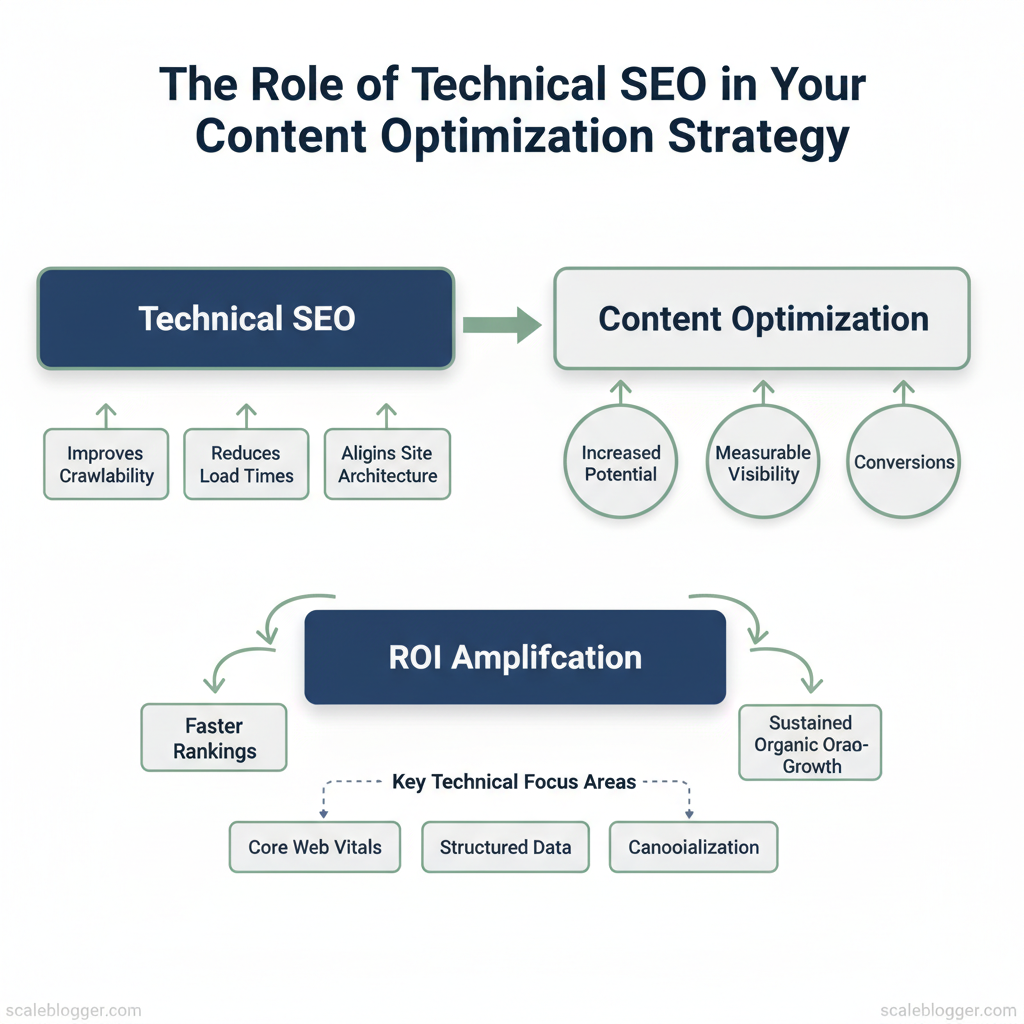
Technical SEO should be a key part of any content optimization strategy. It determines if search engines can find, understand, and rank your pages. A focused technical SEO program improves crawlability and reduces page load times. It also aligns site structure with content intent, ensuring your best content reaches the right audiences.
These fixes amplify the ROI of content creation by turning traffic potential into measurable visibility and conversions.
Teams that align technical SEO with content planning achieve faster rankings and sustained organic growth. This happens because technical barriers are removed before distribution. Picture a marketing team that cut average page load time from 4.2s to 1.8s and increased organic sessions by 28% after prioritizing core web vitals, structured data, and canonicalization. That kind of lift comes from treating website performance and indexability as content features, not separate backend chores.
Experts recommend integrating audits, monitoring, and automated fixes into editorial workflows so technical improvements scale with content velocity. You’ll find practical steps, audit priorities, and automation patterns to make content optimization repeatable and measurable.
- How technical checks remove friction between content and indexing
- Which
core web vitalsand performance metrics matter for rankings - How to embed technical SEO into editorial workflows using automation
- Common architecture issues that hide high-value content
> Prioritizing technical SEO turns content investment into real search visibility.
Automate your content & technical SEO workflows with Scaleblogger: https://scaleblogger.com
> Key Takeaway: ## What is Technical SEO and Why It Matters for Content
Technical SEO is the foundation that makes your content discoverable, fast, and interpretable by search engines. Technical SEO includes the basic rules and signals like crawlability,…
What is Technical SEO and Why It Matters for Content
Technical SEO is the foundation that makes your content discoverable, fast, and interpretable by search engines. Technical SEO includes the basic rules and signals like crawlability, indexability, site structure, performance, and structured data. These elements help search engines find, render, and understand your pages. Without these basics, even great content can go unnoticed or perform poorly.
This can happen if bots can’t access it, if pages load too slowly, or if search engines misunderstand the content.
Why does this matter for you? Good technical SEO boosts the value of each piece of content significantly. It ensures topic clusters are surfaced correctly, improves user engagement through faster pages and stable layouts, and lets rich results (like FAQ snippets) enhance CTR. Fixing a technical bottleneck is often the fastest way to improve organic traffic for many pages because it removes systemic blockers that content edits alone can’t resolve.
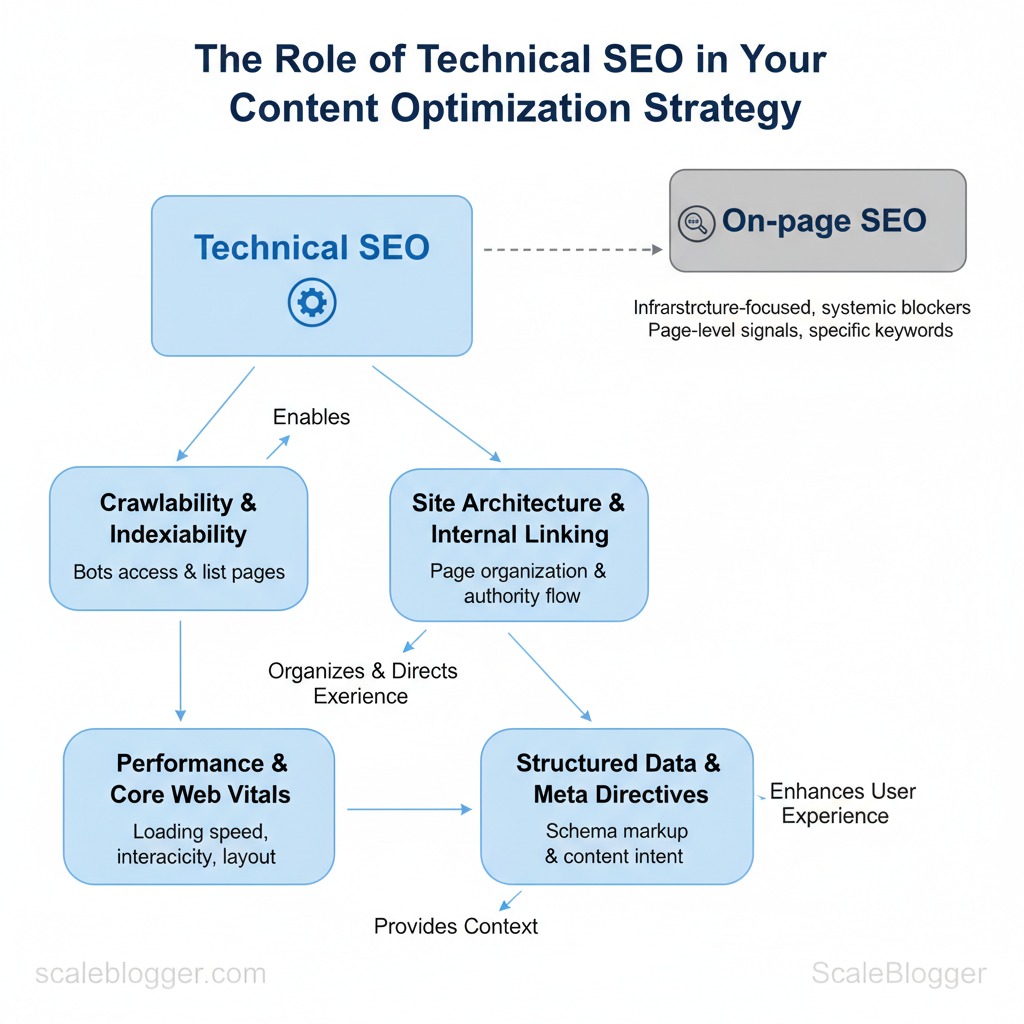
Core components explained
- Crawlability & indexability — rules that let bots access and list pages, including robots.txt,
noindextags, and sitemaps. - Site architecture & internal linking — how pages are organized and linked, which affects authority flow and discoverability.
- Performance & Core Web Vitals — loading speed, interactivity, layout stability that shape user experience and rankings.
- Structured data & meta directives — schema markup and meta tags that help search engines understand content type and intent.
How technical SEO differs from on-page/content SEO
- Scope: Technical SEO is infrastructure-focused; on-page SEO focuses on page-level signals like title tags, headings, and keyword usage.
- Symptoms: Technical problems cause broad visibility drops across topics; content issues usually affect specific keywords or pages.
- Fix type: Technical fixes are configuration or engineering changes; content fixes are rewriting, expanding, or optimizing copy.
Practical example: a strong, well-optimized pillar page may not rank if it’s blocked by a misconfigured noindex or loads in 8 seconds. Conversely, fixing indexability or improving Lighthouse scores often raises impressions site-wide without rewriting content.
This is why teams that pair content strategy with technical audits win faster—addressing infrastructure lets creators focus on quality rather than firefighting delivery problems. If you want to automate detection and prioritize fixes, tools and workflows that combine crawling, performance audits, and content intent mapping speed decisions and reduce manual work (for example, by integrating AI content automation into the pipeline).
The core technical SEO components side-by-side with their impact on content, quick fixes, and typical tools to diagnose issues
| Technical Component | Why it matters for content | Quick fixes | Diagnostic tools |
|---|---|---|---|
| Crawlability | Ensures bots can reach pages; blocked pages won’t rank | Fix robots.txt, remove accidental noindex, submit sitemaps |
Google Search Console, Screaming Frog, DeepCrawl |
| Indexability | Determines which pages appear in SERPs | Remove conflicting meta tags, canonicalize duplicates | Google Search Console URL Inspection, Bing Webmaster |
| Site architecture | Influences topical authority and link equity flow | Add hub pages, improve internal links, flatten hierarchy | Screaming Frog, Sitebulb, Ahrefs Site Audit |
| Page speed | Affects engagement and ranking signals (CWV) | images, enable compression, defer JS | Lighthouse, PageSpeed Insights, WebPageTest |
| Structured data | Enables rich results and better SERP presentation | Add schema.org markup for articles, FAQs |
Rich Results Test, Schema.org validator, Structured Data Testing Tool |
> Key Takeaway: ## Site Architecture, Crawlability & Indexing
A solid site architecture ensures that search engines discover your most valuable content efficiently. Start by treating crawlability as an operational constraint: prioritize what bots should index,…
Site Architecture, Crawlability & Indexing
A solid site architecture ensures that search engines discover your most valuable content efficiently. Start by treating crawlability as an operational constraint: prioritize what bots should index, make the path to important pages short, and use sitemaps/robots rules to guide crawlers rather than block them arbitrarily. That reduces wasted crawl budget and prevents index bloat while preserving link equity for product, category, and pillar pages.
Sitemaps, Robots.txt and Crawl Budget
An XML sitemap is a roadmap for search engines;robots.txt is a traffic director for crawlers; crawl budget matters mainly on very large or frequently changing sites. Follow practical rules: keep sitemaps clean and split large sitemaps, put high-priority canonical URLs there, avoid disallowing CSS/JS in robots.txt, and use noindex for low-value pages rather than blocking them.
- XML sitemap best practice: include canonical URLs, split >50k URLs into sitemap index files, update when content changes.
- Robots.txt formatting: use
User-agent,Allow,Disallow, and absolute paths; test in Webmaster Tools. - Crawl budget basics: relevant for sites >100k pages or heavy change frequency; reduce soft-404s and duplicate content.
Provide a quick reference matrix: sitemap/robots/crawl budget — what to do, what to avoid, and how to validate
Table: Section Content — Element, Recommended configuration, Common mistakes & more
| Element | Recommended configuration | Common mistakes | Validation tool |
|---|---|---|---|
| XML sitemap | Submit sitemap index, list canonical URLs, max 50k per file | Including non-canonical/404 URLs | Screaming Frog, Google Search Console |
| Robots.txt | User-agent: rules, allow CSS/JS, reference sitemap |
Blocking assets or sitemap, malformed syntax | Google Search Console tester |
| Noindex/nofollow use | Use noindex for thin pages; keep links follow unless truly isolated |
Blocking via robots.txt instead of noindex (hides validation) |
Sitebulb, Bing Webmaster Tools |
| Pagination and canonicalization | Canonical to main list page, rel=”next/prev” optional | Canonical loops, self-referencing wrong pages | Screaming Frog, manual crawl |
| Large faceted navigation | Parameter handling, disallow low-value query strings | Indexing millions of filter combos | Google Search Console URL Parameters |
noindex rather than blocking to allow validation; test robots rules and parameter handling in webmaster tools to protect crawl budget.
Example robots.txt snippet:
txt User-agent: URL Structure, Redirects and Canonicals
Use short, descriptive URLs that reflect content hierarchy and intent: prefer/category/product-name/ over long query strings. Consistency matters—pick lowercase, hyphens, and avoid session IDs.
- 301 vs 302: Use
301for permanent moves and link equity transfer; use302only for temporary changes (A/B tests, short campaigns). - Canonical tags: Point canonical to the preferred URL (self-referential when appropriate); avoid canonicals that point to paginated parents or external domains.
- Redirect chains: Eliminate chains and loops; aim for single-step redirects to preserve PageRank and reduce latency.
Practical tip: run a monthly crawl to find redirect chains, non-canonical indexation, and parameterized URL expansion. Tools can automate remediation—if you need help scaling that process, consider drawing on AI content automation to detect and prioritize architecture fixes and to keep sitemaps current.
Understanding these architecture patterns helps teams make faster editorial and engineering decisions while keeping search engines focused on the pages that matter. When implemented correctly, this reduces wasted crawling and maintenance time so creators can concentrate on content that drives traffic.
> Key Takeaway: ## Performance Optimization & Core Web Vitals
Fast, reliable pages start with a diagnostic-first approach: run targeted audits, fix the highest-impact issues first, then iterate on server and delivery optimizations. Measure LCP, FID (or INP), and…
Performance Optimization & Core Web Vitals
Fast, reliable pages start with a diagnostic-first approach: run targeted audits, fix the highest-impact issues first, then iterate on server and delivery optimizations. Measure LCP, FID (or INP), and CLS using tools like Lighthouse, WebPageTest, and Chrome UX Report. Focus on the largest contentful paint element, interactive blocking scripts, and layout-shift issues when interpreting results. From there, prioritize fixes that reduce load time and interaction delay for the majority of users.
How to diagnose and act
- Run the tests
- com –output=json –only-categories=performance` for repeatable, machine-readable results.
- WebPageTest: capture filmstrip and connection throttling to see real-world rendering. 3.
Field data: check Chrome UX Report or your analytics for LCP/CLS/INP distribution. 2. Interpret the results
- Large LCP element: determine if it’s an image, hero block, or font render; measure time to first byte (TTFB) separately.
- Long tasks: locate heavy
main-threadscripts causing FID/INP issues. CLS sources: look for dynamically injected content, missing size attributes, or webfont swaps. 3.
Quick wins (priority order)
- Critical: defer third-party scripts — remove or lazy-load analytics/social widgets. High: images — convert to
WebP/AVIF, usesrcset, and serve responsive sizes. High: enable caching — set longCache-Controlfor static assets, implement stale-while-revalidate.
- Medium: inline critical CSS and defer non-critical styles. Medium: reduce JavaScript — split bundles, tree-shake, use
async/defer. Low: font strategy — usefont-display: swapand preload key fonts.
Platform-specific tips
- WordPress: use a well-coded cache plugin (WP Rocket or equivalent), combine with a CDN and image optimization plugin.
- Headless/Static: build-time image transforms and edge CDNs (Netlify, Vercel) to deliver pre-rendered HTML.
- E-commerce/Complex: consider server-side rendering and selective hydration for product lists.
Server, hosting, and delivery considerations
- TTFB matters: slow TTFB signals server capacity, database slowness, or poor edge routing; median TTFB under 200ms is a practical target for SEO-sensitive sites.
- When to upgrade or add a CDN: upgrade when average concurrency or TTFB remains high after caching; add a CDN immediately if you have global users or burst traffic.
- HTTP/2 and HTTP/3 benefits: multiplexing, header compression, and connection reuse from HTTP/2 reduce latency; HTTP/3 (QUIC) further improves loss recovery and connection setup on lossy mobile networks.
Practical example
bash quick Lighthouse run and save report
lighthouse https://example.com --output html --output-path./report.html --only-categories=performanceHosting options and CDN features to help readers choose based on site size, traffic, and budget
| Hosting type | Best for | Average cost range | Performance considerations |
|---|---|---|---|
| Shared hosting | Small blogs, low traffic | $2–$15/month | Low cost, variable TTFB, limited resources |
| Managed WordPress | SMBs using WP, easy ops | $20–$100/month | Optimized stack, built-in caching, CDN add-ons |
| VPS / Cloud (e.g., AWS Lightsail, DigitalOcean) | Growing sites, developers | $5–$80/month | Scalable CPU/RAM, requires ops, better TTFB control |
| Headless/Static hosting with CDN (Netlify/Vercel) | Marketing sites, docs | Free–$50+/month | Instant CDN edge, pre-rendering, fast global delivery |
| Enterprise / Dedicated | High-traffic platforms | $200–$2000+/month | Dedicated resources, custom caching, SLAs, advanced DDoS protection |
Understanding these principles helps you choose the right fixes and infrastructure investments so pages feel fast for real users, not just lab tests. When teams combine targeted diagnostics with sensible hosting and delivery choices, performance becomes predictable rather than reactive.
Indexing Controls, Metadata & Structured Data
Treat metadata, canonicals, and structured data as controls that guide search engines on what to index, how to interpret your content, and where to display rich results. Optimized meta tags boost click-through rates. Canonical tags prevent duplicate content, and structured data allows rich snippets like FAQs, how-tos, and video players. Together they reduce guesswork for crawlers and give your pages the best chance to rank and convert.
Meta tags: titles and descriptions that earn clicks
- Title tags: Keep them concise, include primary intent keyword early, and use brand sparingly. Aim for ~50–60 characters and prioritize unique messaging per page.
- Meta descriptions: Use persuasive language, include an action or value prop, and keep under ~155–160 characters for desktop visibility. Write one for humans, not just search engines.
- Practical tip: Use A/B tests on title and description pairs to measure CTR lift; track impressions → CTR → sessions in your analytics.
Canonicals and pagination: stop duplicate content from spreading authority
- Canonical tags (
rel="canonical"): Point duplicate or near-duplicate pages to the preferred URL to concentrate ranking signals. Avoid self-referencing mistakes on paginated sequences unless each page is unique. - Paginated content: Use
rel="prev/next"where appropriate and include canonicalization strategies: either canonicalize paginated pages to themselves (if unique) or to the main hub page (if mostly duplicated). - Warning: Canonical misuse can accidentally deindex pages—validate canonical chains before deployment.
Implementing Structured Data (Schema)
UseJSON-LD for ease and Google compatibility; choose schema types that match user intent around your content. Commonly useful types for articles and blogs are Article, FAQPage, HowTo, BreadcrumbList, and VideoObject.
json- Embed JSON-LD in the
or just before. - Validate with test tools and then monitor Search Console for enhancements and warnings.
- Iterate: start with Article + Breadcrumb, add FAQ/HowTo for actionable pages, and VideoObject if hosting or embedding video.
Common monitoring items: structured data errors, enhancement counts, and impressions for rich results. For teams scaling content, consider automating generation of JSON-LD from CMS fields—this reduces manual errors and keeps schema consistent across templates. Scaleblogger’s AI-powered content pipeline can help generate and inject consistent metadata and JSON-LD at scale if you’re automating publication workflows (see Learn how to automate your blog).
Common schema types for content with expected SERP benefits and implementation complexity
| Schema Type | Best use case | SERP benefit | Implementation complexity |
|---|---|---|---|
| Article | News, long-form posts | Rich article result, enhanced display | Low — basic fields only |
| FAQ | Pages answering multiple questions | FAQ rich snippets in SERPs | Low — question/answer pairs |
| HowTo | Step-by-step guides | How-to rich result with steps | Medium — structured steps + images |
| Breadcrumb | Site hierarchical navigation | Breadcrumbs in SERPs for clarity | Low — list of items |
| VideoObject | Embedded/hosted videos | Video thumbnail & player in SERPs | Medium — duration, thumbnail, transcript |
Understanding these controls lets teams push accurate signals to search engines and prioritize development effort where it drives the most visible gains. When implemented correctly, this approach reduces manual rework and surfaces content more effectively in search.
Monitoring, Auditing and Ongoing Maintenance
Continuous monitoring keeps content visible and healthy; effective auditing turns signals into action. Start by centralizing telemetry (crawl data, speed metrics, server logs, schema reports) and schedule automated audits so issues surface before they cost traffic. Combine periodic human reviews with automated alerts: machines detect regressions at scale, humans prioritize nuance and intent alignment.
Tools, automated audits and checklist
- Consolidate telemetry: collect
Search Consoledata, Lighthouse reports, crawl exports, and server logs in one dashboard. - Audit cadence: run lightweight checks weekly, full technical audits monthly, and governance reviews quarterly.
- Checklist essentials: crawl coverage, indexation anomalies, canonical consistency, page speed, mobile UX, schema validity, redirect loops, and log-sampled bot behavior.
- Weekly: automated Lighthouse scores, GSC index coverage, top 404s.
- Monthly: full crawl (Screaming Frog/Sitebulb), schema validator, speed regression report.
- Quarterly: log-file analysis, content decay review, A/B test results audit.
Interpreting audit results and prioritizing fixes Start with a simple scoring model: impact × effort → priority. Score each issue 1–5 for traffic impact and fix effort, then multiply. Issues scoring high impact/low effort jump to the top.
- High impact, low effort: fix missing meta descriptions on top 20 landing pages, correct broken internal links from popular hubs, implement
rel=canonicalon obvious duplicates. - High impact, high effort: page template migrations, large-scale pagination fixes — plan across sprints.
- Low impact, low effort: small schema tweaks on low-traffic pages — batch into maintenance sprints.
Example sprint mapping
- Sprint 1 (2 weeks): triage top 10 high-impact/low-effort items, deploy fixes, measure via daily Lighthouse and GSC. 2.
Sprint 2 (2 weeks): tackle one high-impact/high-effort task (template update), include rollout plan and rollback. 3. Ongoing: allocate 20% capacity to reactive monitoring and monthly audit follow-ups.
Practical scoring template (copy into your issue tracker)
yaml issue: "Missing meta on /product-x" traffic_impact: 4 effort: 1 priority_score: 4 sprint: 1Key Tools: Features and Costs
technical SEO tools audit list Google Search Console Screaming Frog Lighthouse
| Tool | Core features | Best for | Cost |
|---|---|---|---|
| Google Search Console | Index coverage, performance, URL inspection | Indexing & queries | Free |
| Lighthouse / PageSpeed | Lab/field speed, accessibility, best practices | Page performance audits | Free |
| Screaming Frog | Site crawl, redirects, canonical checks | Deep technical crawls | £209/year (license) |
| Log File Analyzer | Bot behavior, crawl frequency, server status | Crawl budget analysis | Varies ($/month) |
| Sitebulb | Crawl + visual reports, CLI automation | Actionable technical reports | From $13/month |
| Ahrefs | Site audit, backlink & organic keywords | Competitive tech+link audits | From $99/month |
| SEMrush | Site audit, site health, crawlability | Integrated marketing + SEO | From $119.95/month |
| DeepCrawl | Enterprise crawling, custom rules | Large sites, enterprise scale | From $89/month |
| GTmetrix | Waterfall, performance scores | Front-end speed troubleshooting | Free / Pro tiers |
| Cloudflare Logs | Edge logs, performance/security events | CDN-level diagnostics | Free tier / paid logs |
If you want, I can convert the scoring template into a JIRA/Asana-ready export or help set up automated alerts that feed into your content pipeline using AI content automation from Scaleblogger.com. Understanding these practices helps teams move faster without sacrificing content quality.
📥 Download: Technical SEO Checklist for Content Optimization (PDF)
Integrating Technical SEO into Your Content Optimization Workflow
Integrate technical SEO early and continuously to avoid last-minute fixes. Start technical checks at the content brief stage, enforce clear handoffs with ticketing, and monitor post‑publish signals so you can roll back or iterate fast. This keeps content teams productive while ensuring search engines can crawl, render, and rank pages as intended.
Practical steps include a pre‑publish checklist that runs automated audits, a lightweight ticketing protocol for engineers, and a short post‑publish monitoring window (48–72 hours) that tracks indexation, crawl errors, and Core Web Vitals trends. Recent research indicates that when teams adopt this flow, the number of regressions drops and measurable gains in impressions and click-through rate follow.
Workflow: From content brief to post-publish checks
- Pre-publish checklist: Run
URLin Lighthouse, check canonical tags, verify structured data, confirm hreflang if applicable, and validate robots/meta directives. - Handoff and ticketing: Create one ticket per technical task with clear acceptance criteria (device, URL, expected metric). Use labels like
tech-seo,critical,needs-qa. - Content engineering playbook: Keep short templates for common fixes (canonicalization, lazy-load images, sitemap updates) to speed handoffs.
- Post-publish monitoring: Monitor Google Search Console for index coverage, real-time logs for 404 spikes, and Core Web Vitals from Lighthouse or field data for regressions.
- Rollback triggers: Industry data suggests to revert or unpublish when traffic drops >30% for a page within 72 hours following a major deploy, or when LCP increases by >200ms on the majority of pageviews.
Example: a publisher automated Lighthouse checks in the CI pipeline so every PR reports LCP/CLS changes; the dev team merged only when Lighthouse score didn’t regress by more than 5%.
Measuring impact: KPIs, ROI and reporting
- Primary KPIs: organic impressions, clicks, average position, session duration, Core Web Vitals.
- Estimating uplift: Use historical click-through curves to estimate clicks gained from position improvements and average revenue per session to project incremental revenue.
- Reporting cadence: Weekly for dev/SEO syncs, monthly for stakeholders, quarterly for ROI calculations and roadmap adjustments. Dashboards should surface baseline vs. target and data sources.
SEO tools and automation: Use automated pipelines or an AI content automation partner to enforce checks in the content publishing flow and to scale repetitive technical audits (see https://scaleblogger.com for an example).
Table: Section Content — KPI, Baseline , Target & more
| KPI | Baseline | Target | Measurement source |
|---|---|---|---|
| Organic impressions | 150,000/mo | 210,000/mo (+40%) | Google Search Console |
| Organic clicks | 9,000/mo | 12,600/mo (+40%) | Google Search Console |
| Average position | 27.3 | 18–20 | Google Search Console |
| Average session duration | 1m42s | 2m15s | Google Analytics |
| Core Web Vitals (LCP/CLS/INP) | 3.1s / 0.15 / 200ms | <2.5s / <0.1 / <150ms | Lighthouse / Field (CrUX) |
Understanding these principles helps teams move faster without sacrificing quality. When implemented consistently, this workflow reduces firefights and lets creators focus on content that drives growth.
Conclusion
Bringing technical SEO into the heart of your content process pays off: pages get crawled faster, intent aligns with structure, and content teams stop guessing which fixes move the needle. By aligning URL structures and automating schema and crawl monitoring, you can focus on a few key steps and see steady improvements. Consider these practical next moves:
- Audit crawlability and fix blocked resources or redirect chains.
- Automate schema and metadata so every new page ships with search-ready markup. – Measure impact weekly with rank and crawl-error dashboards to spot regressions early.
Teams that treated technical fixes as one-off projects saw inconsistent results; teams that baked automation into the workflow—using scheduled audits and templated metadata—saw clearer, faster gains in visibility and fewer production rollbacks. If you’re wondering whether to start small or overhaul everything, start with the highest-traffic templates and automate from there; that approach balances risk and reward while delivering quick wins.
If you want to execution and reduce manual toil, consider platforms that plug into your CMS and monitoring tools. For teams looking to scale this reliably, Automate your content & technical SEO workflows with Scaleblogger is a practical next step—request a demo or trial to see how automation can free your team to focus on strategy.
