

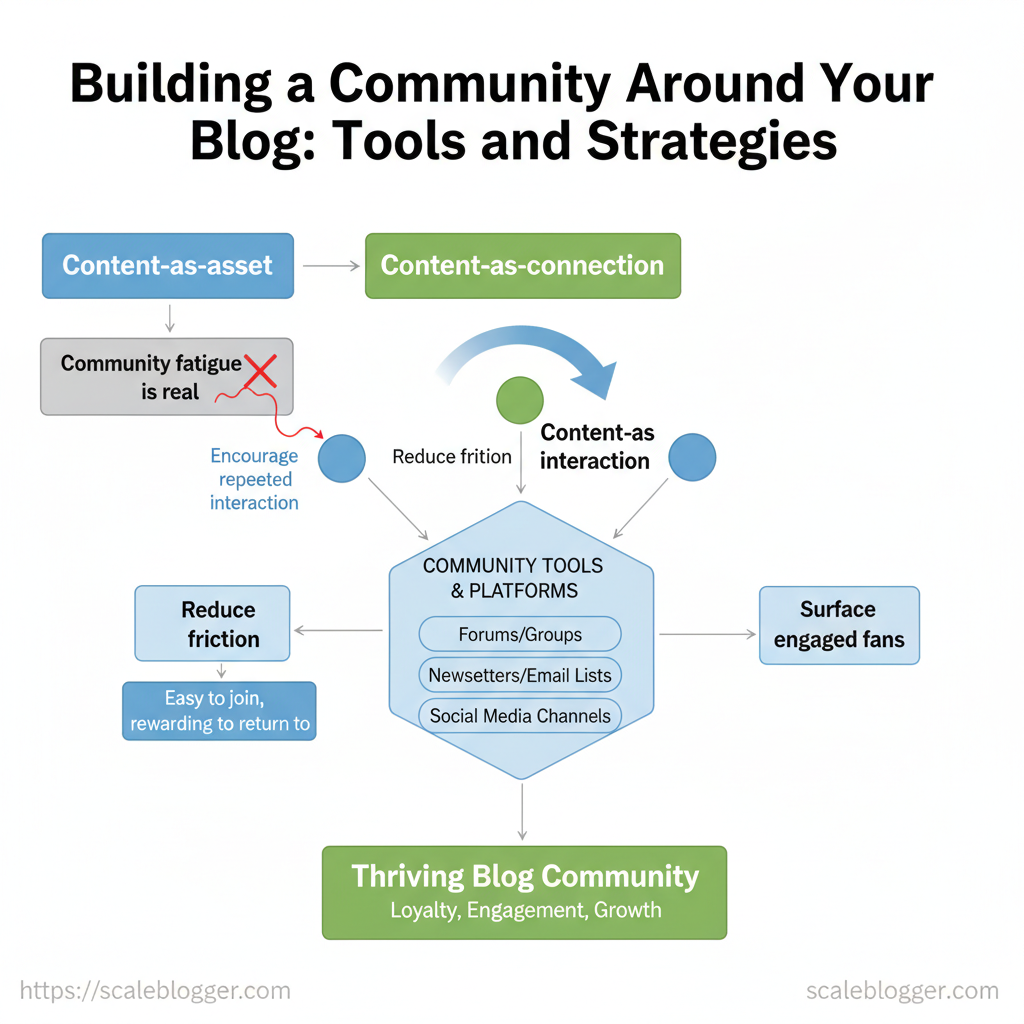
Community fatigue is real: readers arrive, comment once, then vanish. That weakens referrals, slows list growth, and turns valuable posts into one-off reads instead of ongoing conversations. To build a reliable audience, create strategies that foster interaction, smooth the experience, and elevate your most engaged fans.
Start thinking in terms of content-as-connection, not just content-as-asset. Use simple rituals — weekly prompts, live Q&As, or themed comment threads — to create predictable touchpoints. Industry advice also highlights the power of conversational voice and dedicated spaces to keep people coming back ([ProBlogger]).
- How to convert occasional readers into active members through recurring formats
- Tools that host discussions without distracting from your blog posts
- Moderation and onboarding flows that scale as your audience grows
- Ways to use content automation to maintain consistent engagement
> Communities grow when interactions are easy to join and rewarding to return to.
Next, you’ll get practical tools, step-by-step strategies, and implementation notes to build a community that sustains your blog. Automate your content & community workflows with Scaleblogger: https://scaleblogger.com
Table of Contents
- Define Your Community Purpose and Audience
- Section Content
- H2: Choose the Right Platform Mix
- H2: Create Compelling Community-First Content
- H2: Onboarding, Governance, and Community Operations
- H2: Grow and Activate Membership
- H2: Measure, Iterate, and Monetize the Community
- Conclusion
> Key Takeaway:
Define Your Community Purpose and Audience
Start by stating, in one sentence, why this community exists and who benefits. A clear mission helps with moderation, sets a content pace,…
Define Your Community Purpose and Audience
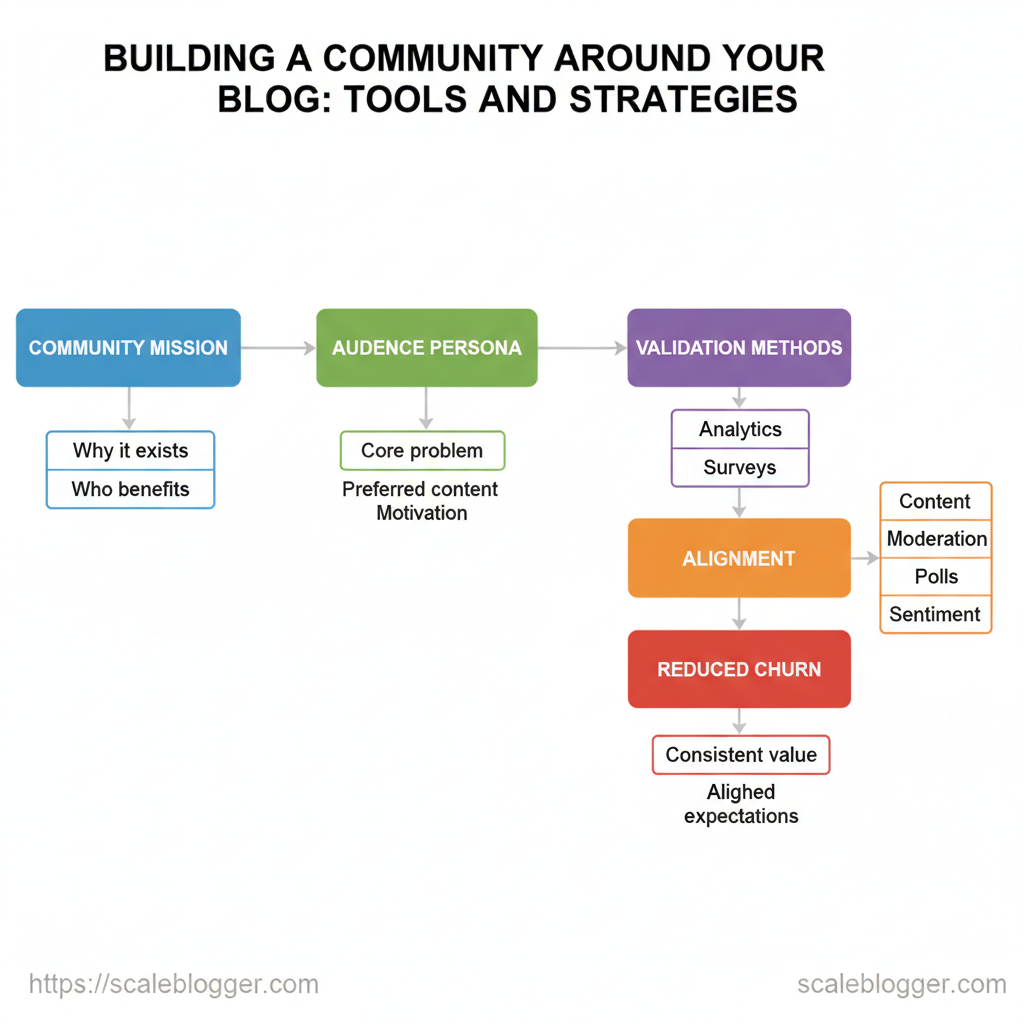
Start by stating, in one sentence, why this community exists and who benefits. A clear mission helps with moderation, sets a content pace, and defines success. Members stay engaged when they understand what the community offers. View the mission as a contract.
It reduces member drop-off by aligning expectations and gives moderators a clear reference for discussions or changes.
Create a Clear Community Mission
- Why it matters: A crisp mission focuses recruitment, anchors content, and speeds moderation decisions.
- How it reduces churn: Members who find consistent value are likely to re-engage, while vague offers lead to disappointment.
- Where to publish it: Place the mission in your community header, onboarding emails, and moderation guidelines.
Mission templates you can copy and adapt:
- For [audience], we [action] to [benefit]. 2.
For [audience], we host [formats] to help [outcome]. 3. For [audience], we connect [people] so they can [result].
Examples tailored to blog types
- Niche hobby blog: For micro-gardeners, we share weekly experiments and peer photos to speed learning and cut plant losses.
- B2B marketing blog: For growth marketers, we publish playbooks and host monthly debriefs to accelerate campaign ROI.
- Personal finance blog: For early savers, we breakdown tactics and answer questions to build better money habits.
Build a Simple Audience Persona Use real signals, not guesses. Pull Google Analytics behavior, newsletter segmentation, comment threads, and short reader surveys to populate a minimal persona. Validate assumptions by A/Bing headlines, running a 3-question poll, or measuring time-on-page for claimed interests.
If a hypothesis fails two tests, iterate.
Persona fields and example entries to speed up persona creation
| Field | Example 1 (Niche hobby) | Example 2 (B2B blog) | Why it matters |
|---|---|---|---|
| Name / Label | Weekend Micro-Gardener | Growth Marketing Lead | Humanizes targeting |
| Core problem | Plants failing in small spaces | Scaling CAC-efficient channels | Drives content topics |
| Preferred content format | Short how-to videos, photo threads | Playbooks, case studies, templates | Guides format planning |
| Primary motivation | Save time, reduce mistakes | Increase MQL-to-Customer conversion | Determines CTAs |
| Validation method | Comment sentiment, Instagram DMs, GA event video_play |
Newsletter click rates, LinkedIn poll, GA download events |
Confirms assumptions with data |
If you need a quick way to operationalize these personas, tools like an AI-powered content pipeline can auto-surface high-engagement topics and suggest formats based on persona behavior, which speeds execution without losing nuance. Understanding these elements lets teams prioritize content and moderation with confidence, so community growth stays intentional and measurable.
> Key Takeaway:
H2: Choose the Right Platform Mix
Deciding where to host your community involves a simple trade-off: control versus discovery versus friction. Hosting on your site gives you complete brand…
H2: Choose the Right Platform Mix
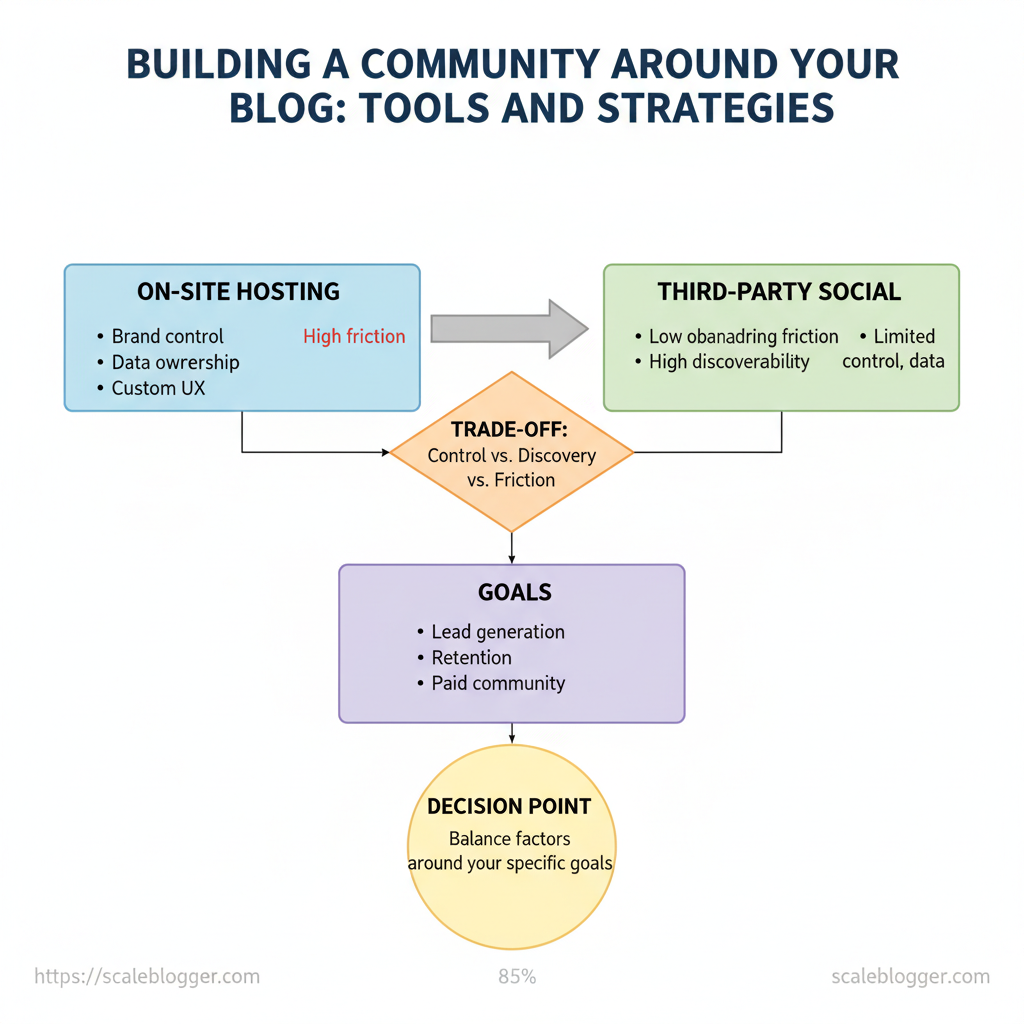
Deciding where to host your community involves a simple trade-off: control versus discovery versus friction. Hosting on your site gives you complete brand control, data ownership, and a custom user experience, but it may create challenges for new members. Third-party social platforms lower onboarding friction and boost discoverability, but they limit control and data access.
Balancing those factors around your goals (lead gen, retention, paid community) defines the right mix.
On-site vs off-site tradeoffs to weigh
- On-site forum (self-hosted): High control — full branding, first-party data, integrations; higher maintenance and slower discovery. Native/third-party comments: Low friction — good for engagement on posts; poor for sustained community and discovery beyond post pages. Discord / Slack: Low friction, real-time — great for active, younger audiences; ephemeral conversations and limited search/SEO.
- Facebook Group: High discovery — built-in audience and notifications; algorithm dependency and limited brand control. Paid platforms (Circle, Patreon, Mighty Networks): High monetization support — membership tools and gating; costlier and smaller organic reach.
Starter platform stacks (clear setup + first 30 days)
- Minimal blog-first stack (best for SEO-driven growth)
- Setup checklist:
WordPress+Discourse Lite(or native comments plugin), email capture (ConvertKit), analytics (GA4)
According to recent research, the monthly cost is ~$20–$150 (hosting, email tool).
- First 30 days: publish 3 pillar posts, enable discussion threads, invite 50 subscribers, run 1 feedback survey
- Social-first stack (best for fast community growth)
Setup checklist: Facebook Group or Discord, republishing workflow to blog, Buffer or Later for scheduling
- Monthly cost:
Free–$50 - First 30 days: daily engagement prompts, host 1 live Q&A, convert top contributors to an email list
Monetized members stack (best for paid access)
- Setup checklist:
CircleorMighty Networks, payment processor (Stripe), gated content on-site - Monthly cost:
~$39–$199
Side-by-side comparison of community platforms to help readers choose
| Platform | Control (Low/Med/High) | Discovery potential | Typical cost | Best for |
|---|---|---|---|---|
| Discourse (self-host) | High | Low–Med | $0–$100+/mo (hosting) |
Long-term forums |
| Talkyard | High | Low–Med | $0–$50+/mo |
Lightweight forums |
| Native blog comments | Med | Med | Free–plugin cost | Post-centric discussion |
| Disqus (third-party) | Low | Med | Free–$10+/mo | Easy comment moderation |
| Commento | Med | Low | $10–$25/mo |
Privacy-focused comments |
| Discord | Low | High (via invites) | Free–$9/mo (Nitro optional) | Real-time chat |
| Slack | Med | Low | Free–$8+/user/mo | Professional communities |
| Facebook Group | Low | High | Free | Broad audience discovery |
| Telegram | Low | Med | Free | Direct mobile communities |
| Patreon | Med | Low–Med | Platform fees (5–12%) | Creator monetization |
| Circle | High | Low–Med | $39–199+/mo |
Paid memberships |
| Mighty Networks | High | Low–Med | $23–81+/mo |
Course + community combos |
Understanding these tradeoffs helps you pick a stack that matches audience habits and business goals. When you align discovery channels with a low-friction path to owned experiences, the community becomes both a growth engine and a durable asset.
> Key Takeaway:
H2: Create Compelling Community-First Content
Building for community means designing content that invites response, repeat participation, and ownership. Start by prioritizing…
H2: Create Compelling Community-First Content
Building for community means designing content that invites response, repeat participation, and ownership. Start by prioritizing formats that lower the barrier to engage and that naturally encourage members to return—interactive, recurring, and co-created pieces outperform one-off broadcasts because they create rhythms people can join.
Content Types That Drive Participation
- Weekly challenge — short tasks that create momentum; great for Discord/Instagram Stories; measure completions/comments. Case study + discussion thread — publish a concise case, then open a threaded discussion; works on forums/LinkedIn; measure replies and time-on-thread. Template / worksheet — downloadable asset that members adapt and share; best on email + Slack; metric: downloads and remix posts.
- AMA / live Q&A — real-time access to experts; stream on YouTube/Zoom/Clubhouse; metric: live attendance and question count. Member spotlight — profile a contributor with a follow-up Q&A; fits newsletters & community channels; metric: profile shares and profile comments.
Templates and quick prompts make it frictionless to respond:
- Weekly challenge template: “This week: ship a 300-word idea related to X. Post by Friday with #challengeX.”
- Case discussion prompt: “Read this 500-word case. Reply with one decision you’d change and why.”
- AMA prompt for members: “Submit one question in the thread — we’ll upvote the top 10 for the live session.”
Repurposing long-form into micro-content is efficient:
- Pull 5 tweet-sized takeaways and schedule across a week. 2.
Turn each subheading into a 60–90 second video prompt. 3. Extract a 2-paragraph excerpt for an email snippet with a discussion CTA.
Use content pillars to map what converts to short-form versus discussion prompts.
50-day Content Calendar (practical example)
- Days 1–7: Launch evergreen cornerstone post + invite feedback thread. 2.
Days 8–14: Run first weekly challenge (daily prompts); highlight top 3 submissions. 3. Days 15–21: Publish case study and open multi-day discussion.
- Days 22–28: Host an AMA; collect pre-submitted questions. 5.
Days 29–35: Release a template/worksheet and ask members to share results. 6. Days 36–42: Member spotlight + roundtable recap of insights so far.
- Days 43–47: Repurpose top-performing content into short videos and micro-posts. 8.
Days 48–50: Survey for interest, iterate next cycle, announce upcoming calendar.
Measure early signals: comment velocity, share rate, number of created-member posts, and repeat participation across activities. Use those signals to pivot frequency or format mix. com/ways-to-build-a-community/)).
Understanding these patterns helps you sequence content that gets people involved and keeps them coming back. This is why consistent, low-friction formats matter: they convert readers into active members.
Map content formats to distribution channels and engagement goals
| Content Format | Best Channel | Primary Engagement Metric | Example CTA |
|---|---|---|---|
| Weekly challenge | Discord / Instagram Stories | Completions / daily replies | “Post Day 3 with #challengeX” |
| Case study + discussion thread | Forum / LinkedIn | Thread replies / time on thread | “What would you change?” |
| Template / worksheet | Email / Slack | Downloads / remixes shared | “Download & show your version” |
| AMA / live Q&A | YouTube / Zoom / Club | Live attendees / question count | “Submit Qs in thread” |
| Member spotlight | Newsletter / Community feed | Shares / comments on profile | “Nominate next spotlight” |
H2: Onboarding, Governance, and Community Operations
Start new members with a short, guided journey that nudges them from curiosity to contribution within seven days. A crisp first impression combined with lightweight automation reduces friction and surfaces active contributors quickly.
Onboarding flow and first 7‑day experience
- Day 0 — Immediate welcome: Send a short welcome DM/email within 10 minutes with a single CTA (introduce yourself or pick a topic).
Hi {name}, welcome to [Community]!

Start here: introduce yourself in #introductions and pick one topic you care about.
- Day 1 — Orientation: Send a 1‑minute explainer (video or bullets) of community norms and how to find value.
- Day 3 — Micro‑task: Encourage a low‑risk action (react to a post, answer a poll). 4.
Day 5 — Social nudge: Highlight a nearby event or topical thread and tag them if possible. 5. Day 7 — Activation check: If inactive, trigger a personalized message with a specific ask (answer a question, RSVP).
First‑7 day checklist to drive participation
- Welcome delivered within 10 minutes
- Profile completed (avatar + bio) prompt
- One low‑effort action (reaction, poll) encouraged
- Introductions thread participation tracked
- Follow‑up message for non‑responders
Activation metrics and tracking
- Activation rate: percent who complete the micro‑task by day 3. Profile completion: percent with avatar/bio by day 7. First post/comment: time to first contribution.
Use simple dashboards in your CMS/CRM or Google Sheets + Zapier to timestamp events and compute these KPIs.
Governance, moderation, and automation should be enforceable and visible. Keep rules short and memorable: Be respectful, No spam, Stay on topic, Protect privacy. Define roles clearly:
- Members: follow rules, participate.
- Moderators: enforce rules, escalate issues. Admins: policy, integrations, billing.
Automations that reduce manual work
- Auto‑welcome bots for Day‑0 messages (
ManyChat,Zapierflows). Auto‑tagging in CRM for activation state (HubSpot/Mailchimp integrations). Third‑party moderation bots to auto‑remove profanity or spam.
- Scheduled rule reminders and scheduled content drops.
For practical tips on community building approaches, see ProBlogger’s guide to building a community around your blog. Understanding these principles helps teams move faster without sacrificing quality. When implemented correctly, this approach reduces overhead by making decisions at the team level.
Moderation/automation tools and when to adopt them
| Tool | Primary Function | Ease of Setup | Best for Community Size | Estimated Cost |
|---|---|---|---|---|
| Built‑in platform moderation (Facebook/Discord/Reddit) | Native spam filters, role controls | Easy | Small → Large | Free |
| MEE6 (Discord bot) | Auto‑moderation, leveling, welcome messages | Easy | Small → Medium | Free; Premium $11.95/mo |
| AutoMod (Reddit) | Rule enforcement, automoderator scripts | Medium | Small → Large | Free |
| Nightbot / StreamElements | Chat moderation (streaming) | Easy | Small → Medium | Free |
| ModSquad (service) | Human moderation, escalation handling | Medium | Medium → Large | Custom pricing (service) |
| The Social Element (service) | Managed moderation + community strategy | Medium | Large | Custom pricing |
| Zapier | Automate welcome + CRM tagging | Easy | All sizes | Free tier; Paid $19.99+/mo |
| ManyChat | Messenger onboarding bots | Easy | Small → Medium | Free; Pro $15+/mo |
| HubSpot CRM | Tagging, lifecycle stages, email sync | Medium | Small → Large | Free CRM; paid hubs start $50+/mo |
| Mailchimp | Email onboarding automations | Easy | Small → Large | Free tier; Essentials $13/mo |
| Commsor / Orbit | Community analytics + member scoring | Medium | Medium → Large | Custom pricing |
| Trust & Safety (paid moderation ops) | Incident response + human review | Medium | Large | Custom pricing |
H2: Grow and Activate Membership
Growing a membership starts with predictable acquisition channels and a tight activation funnel that turns signups into engaged members quickly. Focus acquisition on channels that scale with content first, layer paid strategically, and design referral and activation flows that reward quality over quantity.
Acquisition channels that scale with content work best because they compound: an optimized blog post attracts search traffic, each post can include a signup CTA, and evergreen content feeds newsletters and social channels. Partnerships and guest posts accelerate reach when paired with relevant lead magnets or exclusive community invites. For practical community-building tactics, many bloggers rely on conversational voice, dedicated community hubs, and consistent interaction, as outlined in resources like the ProBlogger guide on building community.
Typical acquisition channels with effort vs cost vs expected conversion
Typical acquisition channels with effort vs cost vs expected conversion
| Channel | Effort Level (Low/Med/High) | Typical Cost (per sign-up estimate) | Conversion Expectation | Best Use Case |
|---|---|---|---|---|
| Organic blog SEO | High | $0.50–$5 (content production amortized) | 1–5% on relevant CTAs | Evergreen discovery and long-term signups |
| Newsletter CTA | Medium | $0.10–$2 (email system + content) | 5–15% (as a target range for referral rate) from engaged readers | Nurturing readers into members |
| Social posts / groups | Medium | $0.50–$10 (ads or boosted posts) | 0.5–3% organic; 1–8% paid | Community recruitment and event invites |
| Guest posts / partnerships | High | $0.20–$3 (content & outreach) | 2–10% when audience-aligned | Fast credibility and cross-pollination |
| Paid ads | Low/Med | $5–$50 (PPC cost-per-acquisition range) | 0.5–3% depending on targeting | Scaling signups quickly (short-term) |
Referral and activation campaigns that maintain quality
- Referral incentives that preserve quality: Offer time-limited premium content, credits toward paid tiers, or community role upgrades (not just cash) — these attract genuinely interested members. Encourage referrals with double-sided rewards: referrer gets
Xand referee getsY. 14-day activation sequence :
Day 0 — Welcome email + quick orientation and community rules. 2. Day 1 — Highlight top content + “introduce yourself” CTA.
- Day 3 — Invite to an exclusive live Q&A or welcome thread. 4.
Day 5 — Showcase member success stories; social proof. 5. Day 8 — Request a simple first contribution (comment, poll).
- Day 11 — Offer a small task that unlocks a perk. 7.
Day 14 — Check-in + targeted upgrade/renewal offer. Triggers: Open/click behavior advances users; inactivity triggers re-engagement or a human outreach touch. Metrics to measure and iterate:* signup-to-activation rate, 14-day retention, referral-to-paid conversion, cost per active member, and Net Promoter Score.
Use A/B tests on CTAs, incentive types, and message timing to.
For teams wanting to automate these workflows, tools that create an AI-powered content-to-email pipeline and automated publishing can reduce manual overhead—allowing creators to focus on member experience rather than logistics. When activation and referral mechanics are tuned, membership growth becomes predictable and sustainable. Understanding and testing these levers lets you scale without losing the community’s quality.
📥 Download: Community Building Checklist for Your Blog (PDF)
H2: Measure, Iterate, and Monetize the Community
Start by treating the community like a product: measure a tight set of metrics, run rapid experiments, then introduce monetization only after value is proven. Pick a small dashboard (5–7 metrics) that answers whether members are finding value, coming back, and advocating. Instrument these with platform analytics plus Google Analytics events, CRM membership records, and short surveys for sentiment.
What to track and why:
- Activation — shows first-value moments and onboarding friction. Short-term retention — catches churn early and indicates habit formation. Engagement depth — posts, replies, time in threads measure quality.
- Satisfaction — NPS or pulse surveys reveal willingness to pay. Referral velocity — organic growth signal and trust proxy.
- Instrument tracking: map each metric to a data source (
platform analytics,GA4events, CRM tags,Typeform/survey tool) and add an analytics tagbook so engineers and marketers interpret events consistently. - Build a lightweight dashboard (Looker Studio, Metabase, or embedded dashboard from your community platform) that refreshes daily and highlights anomalies.
- Run micro-experiments: A/B onboarding flows, gated premium threads, or limited cohort pricing. Treat every change as a hypothesis with a primary metric and an early-warning secondary metric.
- Use pilot groups (10–50 members) for price testing — offer limited seats at different price points and measure conversion + churn over 30–60 days before wider rollout.
- Require transparent disclosures in offers: state what’s paid, what stays free, and how member data will be used.
Monetization approaches that preserve trust
- Value-first memberships: charge only for clearly incremental benefits (exclusive workshops, templates, 1:1 office hours). Pilot pricing: short-term offers with explicit end dates and feedback loops. Affiliate or partner products: only promote tools you use and disclose relationships.
- Tiered benefits: map features to needs — community-only, community+courses, community+coaching. Sponsorships with relevance: limit frequency and disclose sponsorship clearly.
Define metrics, formulas, and data sources for the community dashboard
| Metric | Definition / Formula | Data Source | Target Range (early stage) |
|---|---|---|---|
| Activation rate | # members who complete onboarding / new signups | Platform analytics, GA4 | 20–40% |
| 7-day retention | % members who return within 7 days of signup | Platform analytics, CRM | 25–45% |
| Posts per active user | Total posts / monthly active users | Platform analytics | 1.5–4 posts/mo |
| NPS / satisfaction | (Promoters % − Detractors %) from short survey | Survey tool (Typeform, SurveyMonkey) | 10–30 |
| Referral rate | % new signups from member invites | CRM, referral tracking | 5–15% |
If you want, I can sketch a sample pilot pricing tier and a templated onboarding event sequence, or show how ScaleBlogger’s automated content pipeline can free your team to run the experiments that grow revenue. Understanding and iterating on these signals keeps monetization aligned with member trust and long-term growth.
Conclusion
You’ve seen how small shifts — consistent follow-up, structured prompts in comments, and automating welcome flows — turn one-off visitors into repeat contributors and referral sources. When teams mix clear content structure with fast automation, barriers decrease and conversations consistently return to the site. Evidence shows that regular outreach and focused prompts increase engagement. Try prioritizing one workflow to automate, designing a simple comment-to-sequence path, and measuring return visits for four weeks to see which moves matter most.
If you want a practical next step, map a single thread: pick a high-traffic post, create a welcome-and-follow-up sequence, and test a prompt that asks readers to reply or share. For professional help to implement those automations and scale community touchpoints, consider Automate your content & community workflows with Scaleblogger. It’s an easy way to turn the article’s tactics into repeatable systems without rebuilding your whole process.
