

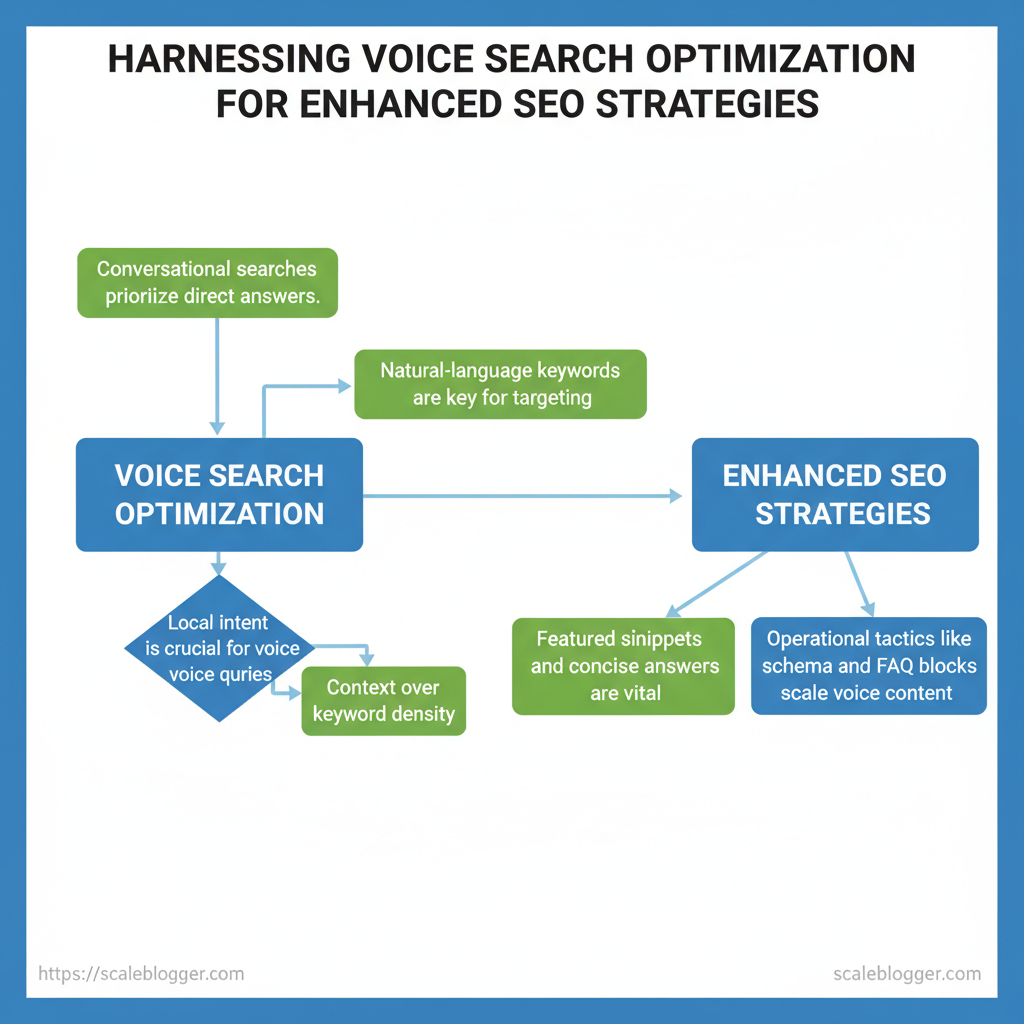
Voice queries are changing how people search more quickly than many teams realize. This shift is reducing organic visibility for sites that focus only on desktop SEO. Conversational searches focus on direct answers, local needs, and context instead of just keyword density. As a result, content that resembles an FAQ often outranks more complex pages.
That shift has real business impact: missed traffic, lower conversion lift from voice-driven local queries, and wasted content budgets.
- How natural-language keywords change targeting: move from terse
buy running shoesto conversational phrases customers actually speak. - Why featured snippets and concise answers matter: voice assistants favor short, authoritative replies for immediate responses.
- Local optimization wins more voice queries: mobile and smart-speaker searches often include local intent and immediate action.
- Operational tactics to scale voice content: templates, schema, and
FAQblocks make content discoverable by assistants.
> Voice search rewards clarity and intent over keyword volume.
Scale voice-optimized content with AI automation: https://scaleblogger.com
Next, let’s create a clear plan to audit, prioritize, and rewrite pages for better voice search performance.
Table of Contents
- Understanding Voice Search and Its Impact on SEO
- Section Content
- Keyword Research for Voice: From Short Queries to Conversational Phrases
- Content Formats and Writing Techniques for Voice Queries
- Technical SEO and Site Architecture for Voice
- Local and Conversational UX: Capturing ‘Near Me’ and Multi-Turn Queries
- Measuring Success and Scaling Voice Search Optimization
> Key Takeaway:
Understanding Voice Search and Its Impact on SEO
Voice search is changing traditional SEO beliefs since queries are now conversational, context-rich, and action-oriented.…
Understanding Voice Search and Its Impact on SEO
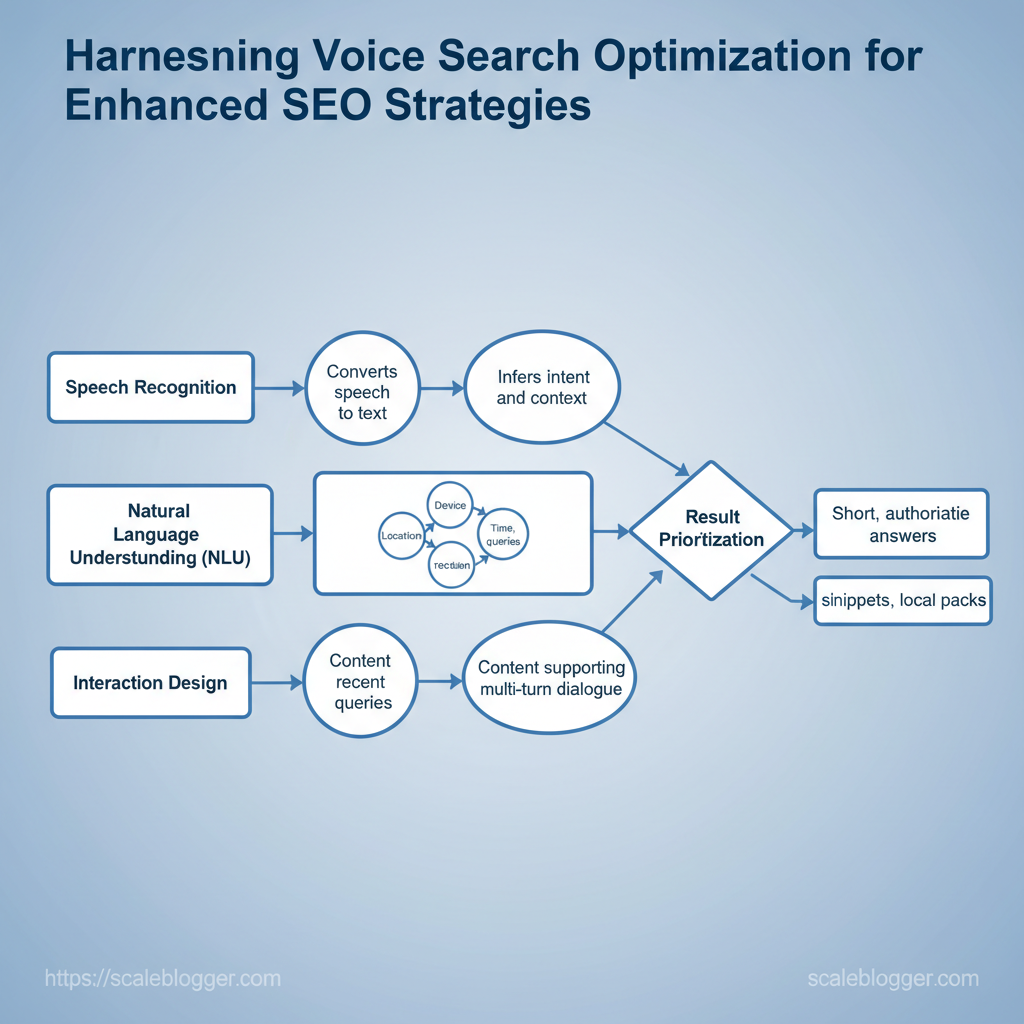
Voice search is changing traditional SEO beliefs since queries are now conversational, context-rich, and action-oriented. First, speech recognition turns audio into text (speech-to-text). Then, natural language understanding (NLU) models determine the intent and context of the query. This means search engines favor answers that sound natural and fit the user’s current situation.
Here’s how voice search works: the core components and signals include:
- Speech recognition: Converts speech into text; accuracy matters for query interpretation. Natural language understanding: Maps conversational queries to intent, entities, and slots (
NLU). Context signals: Device type, location, time, and recent queries shape results.
- Result prioritization: Short, authoritative answers (featured snippets, local packs) are elevated. Interaction design: Voice assistants support follow-ups, so content that supports multi-turn dialogue performs better.
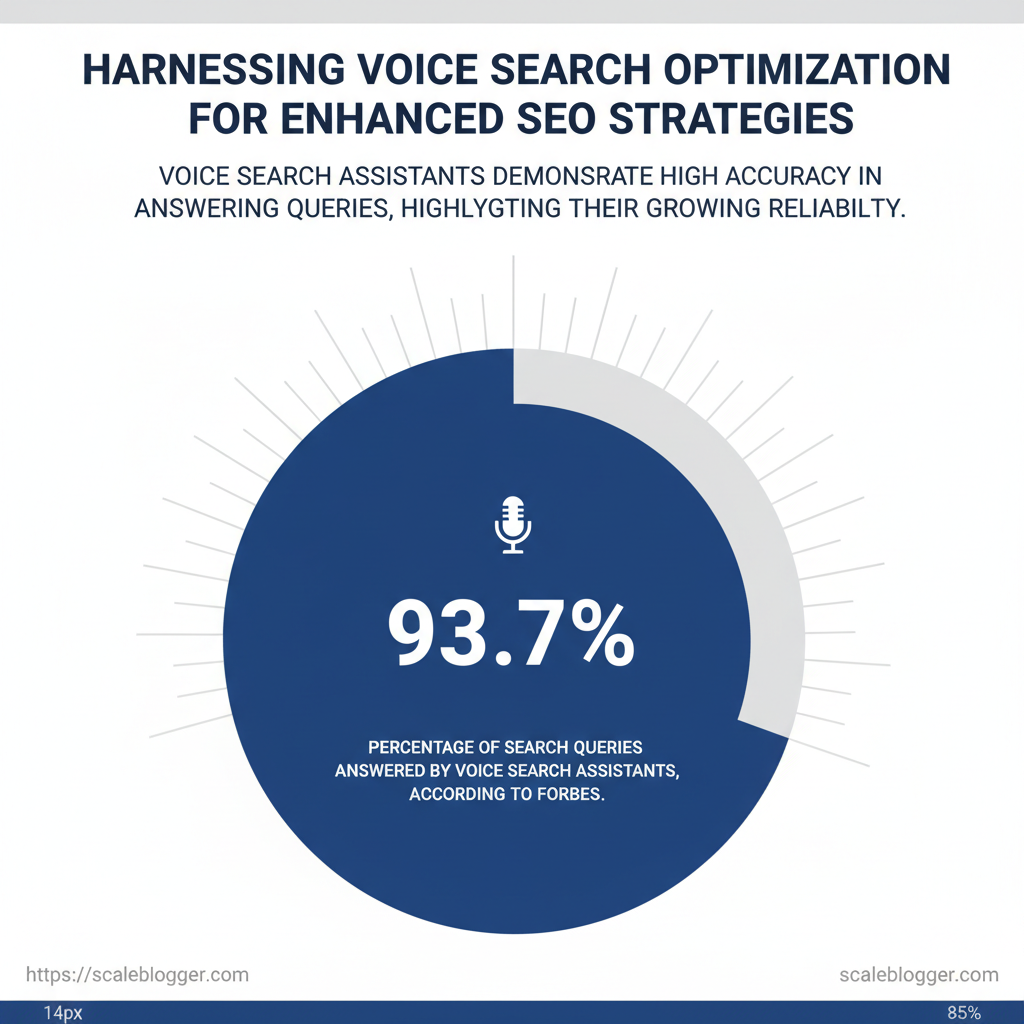
> “Voice search assistants boasting an impressive accuracy rate, answering 93.7% of search queries…” — according to an analysis of the voice-activated landscape. (See the full article: Voice-Activated Revolution: Harnessing Voice Search For Better SEO)
Practical implications for content strategy:
- Prioritize conversational, question-led content that maps to
who/what/when/how/wherequeries. 2.
for featured snippets and short, scannable answers. 3. Treat local SEO as core — many voice queries use phrases like “near me” or ask for immediate directions.
- Improve technical performance: fast mobile pages, precise schema markup, and clear FAQ structures. 5.
Design content for follow-up interactions — anticipate the next question and answer it succinctly.
Voice vs typed search characteristics to clarify strategic differences for SEO
| Aspect | Typical Query Style | User Intent Signals | SEO Implication |
|---|---|---|---|
| Query length and phrasing | Longer, conversational (e.g., “Where’s the best sushi near me?”) | Natural language, question forms | Target long-tail, question keywords; write answers in full sentences |
| Device / Location context | Mobile, smart speaker; strong location signal | Immediate need, local intent | Prioritize local schema, Google Business Profile optimization |
| Expected content format | Brief, direct answers; step-by-step instructions | Actionable, quick-solve intent | Use short paragraphs and bullet lists for clarity |
| Result format | Featured snippets, local pack, knowledge panels | Single-source answer preferred | for snippet eligibility and structured data |
| Interaction design (follow-ups) | Multi-turn queries, clarifying questions | Conversational session context | Create content that supports follow-up intents and related Q&A |
If you want, I can map your top-performing pages to voice-friendly templates and show how Scaleblogger’s AI-powered content pipeline can automate the rewrite and scheduling process to capture these voice opportunities. Understanding these principles helps teams move faster without sacrificing quality.
> Key Takeaway:
Keyword Research for Voice: From Short Queries to Conversational Phrases
Voice queries skew conversational and question-based, so start by turning short keywords into…
Keyword Research for Voice: From Short Queries to Conversational Phrases
Voice queries skew conversational and question-based, so start by turning short keywords into natural speech patterns. Instead of optimizing for best running shoes, map to what are the best running shoes for flat feet or where can I buy cushioned running shoes near me. Use interrogative seed prompts—who, what, where, when, how, why, can, is—and expand them with context like location, urgency, and device intent.
Practical approaches that work:
- Seed prompts: Create lists using
how do I,can I,where is,what doesto generate natural voice queries. Customer transcripts: Mine live chat and support logs for real phrasing and repeated questions; these are pure voice-intent signals. SERP features: Inspect People Also Ask (PAA), featured snippets and related searches to find question formats that assistants pull answers from.
- Local modifiers: Add
near me,open now,price, and time-based words for transactional voice queries with higher conversion intent. Conversational tools: Use tools with long-tail filters and question extraction to scale phrase variants.
Prioritizing keywords by intent and opportunity
- Score intent: assign higher weight to transactional and local voice queries, medium to informational queries, lower to broad discovery phrases. 2.
Snippet opportunity: mark queries where a featured snippet or PAA exists—those are assistants’ favorite answer sources. 3. , store-locator queries > product-research).
- Quick wins: prioritize existing pages that rank near snippets or top 10 SERP positions and can be optimized for conversational answers.
> According to a recent analysis, voice assistants now answer a very high percentage of queries accurately, so matching natural phrasing matters more than exact-match keywords (see Forbes coverage on voice search trends).
Provide short answer blocks on pages, add question-and-answer sections, and surface local business data where appropriate. When teams align on conversational seeds and prioritize by snippet opportunity, optimization becomes a tactical process, not guesswork. Understanding these principles helps teams move faster without sacrificing quality.
Provide a concise tool + method matrix for sourcing voice query ideas
| Tool/Source | How to use it for voice keywords | Best practice tip | Use case example |
|---|---|---|---|
| Google Autocomplete | Type seed prompts to collect completions | Use incognito + locale filters | how to fix leaky faucet near me |
| People Also Ask (PAA) | Expand PAA boxes to extract question lists | Capture full question + snippet text | FAQ content with short answers |
| AnswerThePublic | Visualizes questions and prepositions | Use Pro for CSV exports ($79/mo) | Generate 200+ question variants |
| Google Trends | Compare phrase popularity over time | Filter by region and query type | Seasonal voice queries for promotions |
| Customer support transcripts | Extract verbatim user questions | Tag by intent and product mention | Add missing FAQ pages |
| SEMrush (Questions filter) | Pull question keywords and volume | Use Question filter for long-tail ($129.95/mo) | Content clusters for voice answers |
| Ahrefs (Questions report) | List question keywords + clicks | Check SERP position and snippet status ($99/mo) | Prioritize high-click questions |
| Keywords Everywhere | Export related question data quickly | Low-cost credits ($10 start) | Rapid ideation for briefs |
| AlsoAsked | Maps question chains and user paths | Visualize follow-ups and sub-questions | Build content flows from parent questions |
| Ubersuggest | Generates question suggestions and trends | Free tier + affordable plans (~$12/mo) | Small-business keyword research |
| Moz Keyword Explorer | Filter by question and SERP feature | Use Priority score to rank opportunities ($99/mo) | Enterprise topic planning |
| Internal CRM/Search logs | Aggregate on-site search queries | Normalize language and tag intents | Find high-converting product queries |
When you align conversational seeds with snippet opportunity and conversion value, the workflow becomes repeatable and measurable. This approach reduces guesswork and surfaces the voice queries most likely to drive outcomes.
> Key Takeaway:
Content Formats and Writing Techniques for Voice Queries
Voice search requires answers that sound natural when spoken and quickly address the user’s intent. Begin each…
Content Formats and Writing Techniques for Voice Queries
Voice search requires answers that sound natural when spoken and quickly address the user’s intent. Begin each voice-optimized section with a short, direct answer in spoken style (1-2 sentences). Then add a clear heading, a brief explanation, and actionable steps or examples. That pattern maps to how assistants surface featured snippets and spoken responses.
Start with a short answer or a one-sentence response that an assistant can read out loud without modifications. Phrase H2/H3 as the exact question users might ask. Write like someone explaining something aloud: brisk, plain, friendly.
Aim for 12–18 words per sentence to aid comprehension and TTS clarity. Use numbered steps for procedures and bullet lists for features or options. Use FAQPage/Question schema, h1-h3 question headings, and p tags containing the short answer to help assistants find the snippet.
Include near me phrasing, addresses, opening hours, and schema for LocalBusiness. Read drafts aloud or use TTS to catch awkward phrasing and rhythm.
> Market analysis shows voice assistants deliver high accuracy for many queries and prioritize direct answers in snippet-style formats. See the Forbes piece on voice search trends for context: Voice-Activated Revolution: Harnessing Voice Search For Better SEO.
Example short-answer template you can copy:
Use a one-sentence definition or direct instruction (10–20 words). Detail: Briefly explain the why/when (1–2 short paragraphs). Steps: 1.
Step one. 2. Step two.
- Step three.
Content template availability for different query types (voice search content templates, featured snippet content structure)**
| Query Type | Ideal Lead Format | Approx. Answer Length | Supporting Elements |
|---|---|---|---|
| Definition / What is | One-sentence definition followed by context | 12–25 words | ✓ example sentence, ✓ short list, ✓ Definition schema |
| How-to / Step-by-step | Short answer + numbered steps |
10–30 words for lead; 3–6 steps | ✓ numbered steps, ✓ code/snippet examples, ✓ HowTo schema |
| Local / Near me | Direct location answer + hours/address | 8–20 words | ✓ address, ✓ hours, ✓ LocalBusiness schema, ✓ map link |
| Comparison / vs | One-line comparison statement + quick pros/cons | 12–30 words | ✓ bullet pros/cons, ✓ table, ✓ linked pricing |
| Transactional / Where to buy | Direct purchase suggestion + availability | 8–20 words | ✓ buy link, ✓ price, ✓ shipping/availability info |
Understanding these patterns helps you craft content that both ranks for featured snippets and sounds natural when spoken. When implemented, this reduces back-and-forth for users and improves the chance voice assistants will choose your copy as the spoken answer.
Technical SEO and Site Architecture for Voice
Voice-first discovery depends less on flashy visuals and more on clear, machine-readable signals and ultra-fast delivery. Start by treating voice as a secondary output channel: structure pages so assistants can extract concise answers, then performance so those answers arrive with minimal latency. Practical priorities are schema and answer blocks, mobile-first UX, and server/CDN tuning.
Schema and answer blocks
- FAQ and HowTo schema: Use
FAQPageandHowToto mark concise Q&A or step sequences so assistants can pull direct responses. LocalBusiness schema: Essential for local intent; includeopeningHours,geo, andtelephonefor higher voice visibility in “near me” requests. Speakable schema: Use for short news or announcement snippets; it’s narrowly eligible but improves read-aloud reliability.
- Product schema: Mark pricing and availability fields for e-commerce voice queries.
> “According to Forbes, voice search assistants boast an impressive accuracy rate, answering 93.7% of search queries…” — Forbes article on voice-activated revolution and voice search impact
- Start with
JSON-LDplaced in the page head; assistants favor structured data over inline microdata. - Keep answer snippets under ~40 words for better read-aloud results.
- Prioritize canonical pages for the content you want surfaced in voice.
Performance, mobile UX, and server considerations
- Improve LCP: Preload key fonts/images and use responsive images (
srcset) so first meaningful paint occurs quickly. Lower FID/INP: Defer noncritical JavaScript, break up long tasks, and userequestIdleCallbackfor background work. Reduce CLS: Reserve dimensions for images/iframes and avoid injecting content above the fold.
- Mobile navigation: Design conversational discovery paths — prominent FAQ, clear H1s, and short paragraphs optimized for read-aloud. * Server & CDN: Use HTTP/2, configure aggressive caching, and edge-run serverless functions to answer API-style voice queries with <200ms latency when possible.
json
{ "@context": "https://schema.org", "@type": "FAQPage", "mainEntity": [{ "@type": "Question", "name": "Do you offer local installation?", "acceptedAnswer": { "@type": "Answer", "text": "Yes — same-week local installation is available in select cities." } }] }
Schema types by use case and voice benefit to guide implementation choices
| Schema Type | Best Use Case | Voice Benefit | Implementation Notes |
|---|---|---|---|
| FAQ | Short Q&A pages | Improves answer block eligibility | Use FAQPage JSON-LD, concise acceptedAnswer text |
| HowTo | Procedural guides, tutorials | Read-aloud friendly step sequences | Break steps into small actions, include step objects |
| LocalBusiness | Stores, services with location intent | Better local voice responses and map actions | Include geo, openingHours, telephone, address |
| Speakable | News briefs, announcements | Optimizes content for audio snippet playback | Limited eligibility; short fields only, use speakable schema |
| Product | E-commerce product pages | Supplies pricing/availability for purchase queries | Include offers, priceCurrency, availability fields |
Understanding these principles helps teams move faster without sacrificing quality.
Local and Conversational UX: Capturing ‘Near Me’ and Multi-Turn Queries
Voice and local searches are becoming more conversational. Users now ask full questions and want quick, relevant answers, like “is the coffee shop open now?” or “who is the best plumber near me for same-day service?” Optimizing for that behavior means treating local signals and dialogue design as equal partners: keep NAP pristine and structured, and design content that anticipates the next question in the flow.
org` markup — inconsistent entries confuse crawlers and assistants. GBP fields: Fill hours, special hours, services, attributes, and booking links; update immediately for holidays or temporary changes. Concise local landing pages: Create short, scannable pages per location with 2–3 sentence descriptions, service lists, and clear hours.
” and mark up with FAQPage/QAPage schema. , “who does emergency AC repair near me”). Fast mobile experiences: Aim sub-2s load on mobile; slow pages kill voice conversions.
- Reputation signals: Solicit and respond to reviews mentioning location and service details; assistants surface recent reviews. Local content signals: Publish local event roundups or service-specific microcontent to increase topical relevance.
> Voice assistants answer a very high share of queries accurately; Research from Forbes cites an assistant accuracy and response rate above 90% for many common queries, reinforcing how precise local data must be. (See the Forbes analysis on voice search trends and accuracy: https://www.forbes.com/councils/forbestechcouncil/2024/12/17/voice-activated-revolution-harnessing-voice-search-for-better-seo/)
Designing for multi-turn conversations
- Anticipate follow-ups: Map 3–5 likely follow-ups for each landing page query and embed concise answers inline. 2.
Chain responses with structured Q&A: Use ordered FAQ snippets so an assistant can return the first answer and pull the next without a new search. 3. Tag related content: Internally link and tag how-to pages, pricing, and booking flows so multi-turn agents surface low-friction next steps.
- ,
location=Seattle,service=emergency) to reduce repeated clarifying prompts. 5.
Monitor conversation logs: Track common follow-ups and gaps, then iterate content based on real user paths.
Local optimization checklist with priority and impact to make implementation scannable
| Task | Priority | Estimated Effort | Expected Impact |
|---|---|---|---|
| Verify Google Business Profile | High | 1–2 hours | High — direct visibility & map placement |
| Add FAQ with schema | High | 2–4 hours per page | High — increases assistant-ready answers |
| Create local landing pages | High | 3–6 hours per location | High — improves relevance for “near me” |
| Collect and respond to reviews | Medium | Ongoing (30–60 min/week) | Medium — builds trust, ranking signal |
| Ensure mobile load times | High | 1–4 days dev work | High — improves conversions and rankings |
Understanding these practices helps teams ship local content faster and keeps conversational experiences friction-free. When implemented correctly, these changes mean more qualified inbound traffic from people who are ready to act.
📥 Download: Voice Search Optimization Checklist (PDF)
Measuring Success and Scaling Voice Search Optimization
Voice performance requires the same careful approach as any other channel. Define measurable signals, track them, and use repeatable processes. Start by tracking the outputs voice assistants respond with — featured snippets, local pack placements, and long conversational queries — and make those signals the backbone of your KPIs. From there, build operational playbooks so wins are reproducible and low-value work is automated.
> Market data shows voice assistants answer search queries with high accuracy; voice-driven outcomes will increasingly shape search visibility and discovery. See the Forbes piece on the voice-activated revolution for context: Forbes article on voice search impact and accuracy.
Measurement tools and what voice-specific signals each provides to inform tool selection (voice search analytics, measure voice search performance tools)
| Tool | Voice-specific signals | Best for | Notes |
|---|---|---|---|
| Google Search Console | Featured snippet impressions, query phrases, Performance by query |
Query-level diagnostics | Free; primary source for snippet data |
| Google Analytics (GA4) | Session origin, voice-referral patterns, conversion paths | Conversion attribution | Requires event setup for voice conversions |
| Ahrefs | Question/long-tail ranking reports, organic SERP features | Content gap + keyword discovery | Paid; strong for long-tail questions |
| SEMrush | SERP features tracking, long-query filters, position changes | Competitor + position tracking | Paid; integrates local/searched questions |
| Moz Pro | Keyword Explorer question metrics, Featured Snippet detection | Keyword priority scoring | Mid-tier; helpful for content planning |
| BrightLocal | Local pack visibility, citations, local conversions | Local SEO for voice-driven queries | Focused on brick-and-mortar/SMBs |
| AnswerThePublic / AlsoAsked | Query clustering, question patterns | Topic ideation for conversational copy | Great for snippet-friendly QA blocks |
| Voice platform analytics (Alexa/Google Actions) | Invocation metrics, intent match rates (if available) | Voice app skill performance | Data access varies by platform |
| Rank tracking tools with question filters (e.g., AccuRanker) | Question SERP movement, featured snippet wins | Scale monitoring of hundreds of queries | Fast refresh rates for monitoring |
- Create SOPs for voice content production
- Define snippet-friendly formats (direct answer 40–60 words, question header, follow-up context).
- Assign
ownerfor query research, copy, schema, and publishing. - Include rollout cadence: research → draft → schema → publish → monitor.
- Build templates and automation
- Snippet template: Question → 1-sentence answer → 2-line supporting detail → related questions.
- Schema deploy script: Automate
FAQPageandHowToJSON-LD insertion via CMS hooks. - Audit checklist: Weekly featured snippet report, monthly local pack review, quarterly content pruning.
- Prioritize by ROI
- Run small A/B tests on high-impression, low-effort queries.
- Scale winners with automated publishing and schema deployment.
If you’d like, Scaleblogger can plug this into an AI-powered content pipeline: automated query discovery, template-driven drafts, and scheduled schema deployment so your team spends less time on repeatable tasks and more on strategic improvements. When you standardize measurement and automate low-level work, voice becomes a stable, scalable channel rather than an experimental add-on.
We’ve walked through why conversational queries are rewriting how search works, how conversational intent and structured short answers win voice surfaces, and why automation is the fastest way to scale that work without burning your content team. Teams that reframed FAQs into concise, dialogue-style answers and tested voice-friendly schema saw measurable jumps in featured snippets and organic click-throughs—evidence the pattern works in practice. For clarity, focus on three moves now:
- Audit for conversational intent → identify pages with question potential and short, direct answers.
- Convert key pages into voice-friendly snippets → 40–60 word answers, clear structure, and schema. – Automate scaling and testing → iterate faster and preserve content quality.
If you want to move from strategy to execution, start with an intent audit, build a small set of voice-optimized snippets, and run A/B tests. For professional help implementing these steps at scale, consider Scale voice-optimized content with AI automation. As Forbes notes, voice-driven search is accelerating—now’s the moment to act.
