

Many teams spend hours each week on repetitive content tasks. This slows down publishing and weakens audience engagement. A focused content automation workflow fixes that by routing content through consistent steps, reducing manual handoffs, and improving measurement.
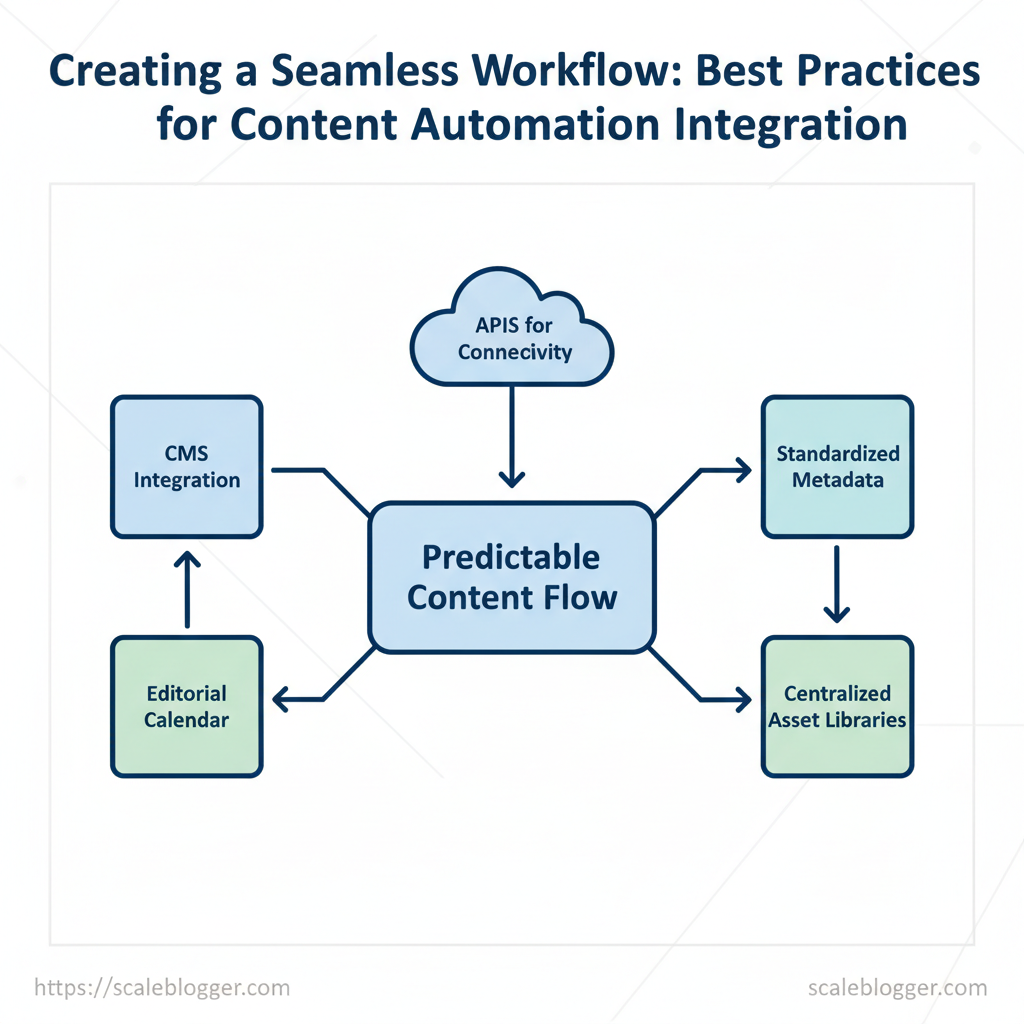
Scaleblogger helps teams design automation blueprints that connect CMS, editorial calendars, and APIs so content moves predictably from brief to publish. Using automation best practices, such as clear triggers, standardized metadata, and centralized asset libraries, reduces friction and makes scaling easier. Integrating content tools with shared taxonomies ensures analytics reflect real performance, not siloed activity.
Picture a marketing group that experiences increased publishing efficiency through automation, publishing more posts without adding headcount. That kind of efficiency protects creative time and accelerates experimentation.
What you’ll learn in this guide:
- How to map a reliable content automation workflow that matches team roles
- Concrete automation best practices for triggers, metadata, and approvals
- Practical patterns for integrating content tools across CMS, analytics, and collaboration
- Ways to measure impact and iterate without disrupting production
- Common pitfalls when introducing automation and how to avoid them
Next, we’ll break the process into clear, actionable stages so you can implement quickly. Start a content automation pilot with Scaleblogger: https://scaleblogger.com
Table of Contents
- H2: Plan your content automation strategy
- Section Content
- H2: Choose tools & design integrations
- H2: Build governance & content quality guardrails
- H2: Implement automation safely (pilot to scale)
- H2: Measure impact and iterate
- H2: Case studies, common pitfalls & troubleshooting
- Conclusion
> Key Takeaway:
H2: Plan your content automation strategy
Begin by linking automation to a specific business outcome, like faster publishing or more organic traffic. This helps teams make practical…
H2: Plan your content automation strategy
Begin by linking automation to a specific business outcome, like faster publishing or more organic traffic. This helps teams make practical decisions rather than automating just for the sake of it. Map objectives to 3–5 pilot KPIs, establish baselines, and pick the lowest-risk pipeline stages to automate first. This approach reduces confusion, lets you prove value quickly, and preserves editorial control where it matters most.
H3: Define objectives and success metrics
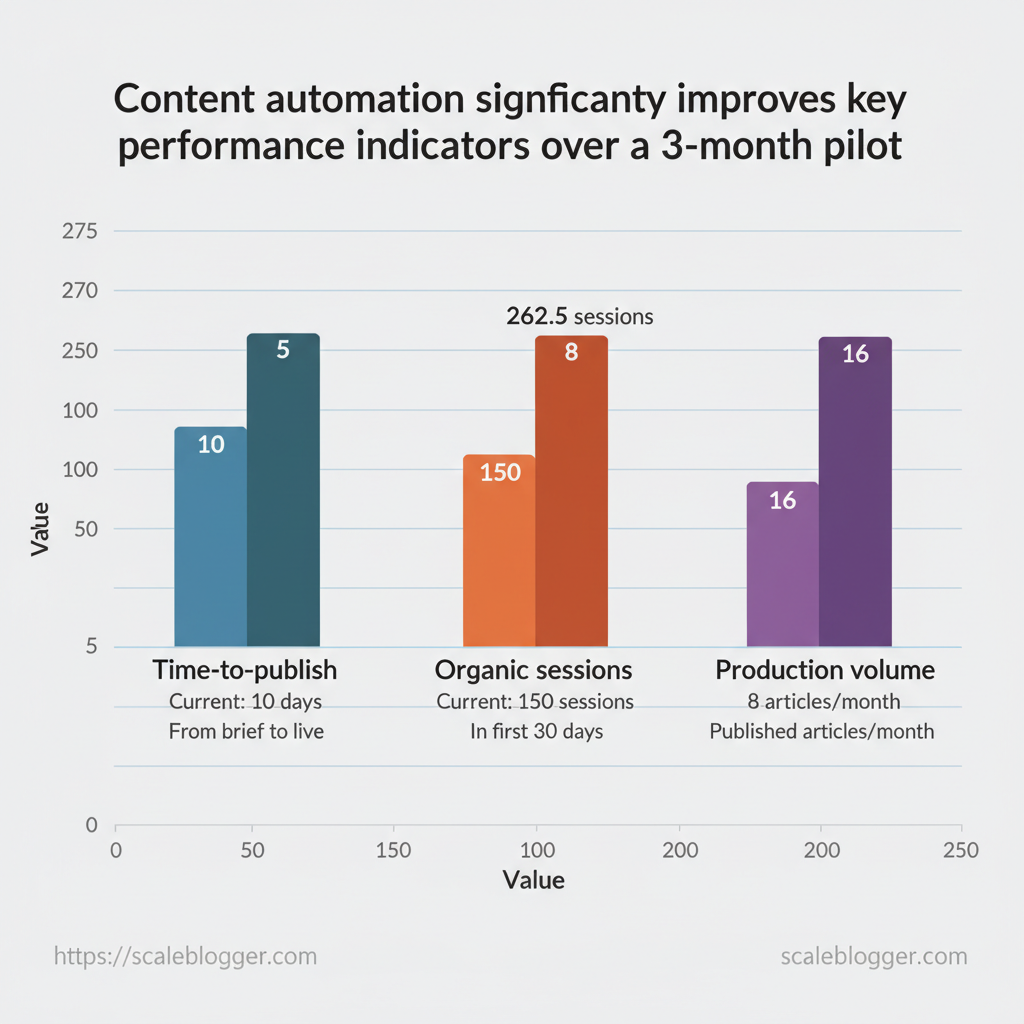
Choose objectives that map to business goals and limit the pilot to a small, measurable set of KPIs. Typical objectives include shortening production cycles, increasing organic sessions per article, and raising overall content output without extra headcount. Select 3–5 primary KPIs, set realistic 3-month targets, and capture baselines from GA4, Google Search Console, and CMS logs before you flip the automation switch.
Here are baseline KPI examples and realistic target ranges for a 3-month pilot.
Table: Section Content — KPI, Current baseline , 3-month target & more
| KPI | Current baseline | 3-month target | How to measure |
|---|---|---|---|
| Time-to-publish | 10 business days from brief to live | 4–6 business days | CMS publishing timestamps + editorial workflow logs |
| Organic sessions per article | 150 sessions in first 30 days | 225–300 sessions in first 30 days | According to research from GA4, organic channel, page-level sessions |
| Content production volume | 8 published articles/month | 14–18 published articles/month | CMS published count per month |
| Average keyword rank | median position 45 (targeted keywords) | median position 25–30 | Google Search Console average position |
| Process error rate (manual fixes) | 15% of posts require manual corrections | ≤5% post-automation | CMS revision logs + QA checklist failures |
Practical steps to set baselines:
- Export 90 days of page-level GA4 and GSC data for targeted topics. 2.
Audit CMS logs for timestamps and manual corrections. 3. Run a quick content quality sample (5–10 articles) to document typical QA issues.
H3: Map content lifecycle and handoffs
Document every stage from ideation to promotion, and name the single owner for each handoff. Start with a simple linear flow, then highlight friction points where manual work piles up—research aggregation, outline approvals, SEO checks, meta editing, scheduling. Automate conservative stages first (e.g., topic clustering, outline drafts, metadata generation) and keep sensitive stages (final editorial sign-off, legal review) manual.
Bold process mapping: create a one-page RACI for a content type and run a 2-week dry run of the automated steps to surface edge cases.
Practical example: automate outline generation with AI-assisted briefs, route to writer, then require a human SEO check before scheduling—this reduces prep time but retains quality control.
Understanding these principles helps teams move faster without sacrificing quality. When implemented correctly, this approach reduces overhead by making decisions at the team level.
> Key Takeaway:
H2: Choose tools & design integrations
Choose the right mix of tools that match your actual workflow instead of chasing the newest features. Start by deciding which problems you need to…
H2: Choose tools & design integrations
Choose the right mix of tools that match your actual workflow instead of chasing the newest features. Start by deciding which problems you need to solve (content generation, orchestration, measurement, delivery), then choose tools that integrate cleanly with your CMS, provide reliable APIs, and expose the telemetry you need to operate at scale. Short vendor trials and technical smoke tests will reveal hidden costs and integration friction faster than reading pricing pages.
H3: Tool categories and selection checklist
Table: Section Content — Tool category, Primary use, Strengths & more
| Tool category | Primary use | Strengths | Typical risks/cons |
|---|---|---|---|
| CMS automation plugins | Automate editorial workflows, bulk updates | Deep CMS hooks, scheduled publishing, metadata sync | Version lock-in, limited cross-system APIs |
| Workflow automation platforms (Zapier/Make) | Connect apps, simple automation | Fast setup, many integrations, low-code | Scale limits, latency on triggers, cost growth |
| AI content assistants | Drafts, rewriting, ideation | NLP, prompt templates, API access |
Hallucinations, brand tone drift, token costs |
| SEO analytics connectors | Pull search + traffic metrics into dashboards | GA4/Console connectors, keyword tracking | Sampling, API quotas, data latency |
| Publishing/CDN integrations | Cache invalidation, edge publishing | Fast delivery, edge rendering, webhooks | Cache staleness, complexity with personalization |
Key insight: CMS plugins are fastest for editorial velocity but can lock you in; automation platforms are great for gluing systems quickly but hit scale limits; AI assistants accelerate drafts while requiring governance; analytics connectors turn signals into action but depend on clean data; publishing/CDN integrations solve performance but add operational complexity. Consider starting with a lightweight automation platform plus an AI assistant, then add analytics connectors once content volume grows.
- Evaluation checklist
- APIs available: Confirm REST/Webhook or GraphQL endpoints.
- SLAs & uptime: Check published uptime and support tiers.
- Data governance: Where is content stored and who can access it?
- Security: OAuth, SSO, and encryption at rest/transit.
- Cost model: Predictable vs usage-based pricing.
- Exit strategy: Data export formats and migration paths.
Run a 2–4 week technical trial: connect authentication, push a draft, simulate failure scenarios, and measure latency and error rates.
H3: Integration design patterns
For most content stacks, choose patterns that reduce coupling and make failures visible.
Event-driven (recommended for scale): Use webhooks or message queues to trigger downstream jobs (rendering, CDN purge, analytics ingestion). Event-driven systems enable near-real-time updates and parallel processing.
Scheduled (when deterministic): Batch jobs for nightly SEO exports, link audits, or bulk republishes to smooth API quota usage.
Idempotency & retries: Ensure each job can run multiple times without side effects by including idempotency_key and implementing exponential backoff with capped retries.
Observability: Emit structured logs, metrics (latency, success rate), and tracing so you can alert on regression. Integrate with an incident channel for publisher-facing errors.
Design integrations with clear ownership, readable telemetry, and a plan to roll back bad content automatically. Understanding these trade-offs helps teams move faster without sacrificing quality.
> Key Takeaway:
H2: Build governance & content quality guardrails
Start by deciding what “good enough” looks like for your content — not aspirational perfection, but measurable standards teams…
H2: Build governance & content quality guardrails
Start by deciding what “good enough” looks like for your content — not aspirational perfection, but measurable standards teams can apply consistently. Governance is a set of explicit rules (style, SEO, legal, brand) plus lightweight workflows that prevent risky content from publishing while enabling velocity. This means using standardized templates, establishing clear approval gates tied to content risk, implementing automated checks to catch routine issues, and maintaining a changelog for authors and reviewers to trace decisions.
When these pieces work together, teams make faster, safer publishing choices without manual rework.
Create templates, style guides and approval gates
Create modular templates that enforce required inputs (title intent, target keywords, word target, sources) and embed micro-guides for tone and citations.
- Standardized templates: Use
brief,outline, andfinal-drafttemplates per content type to reduce back-and-forth. - Style guide: Define voice, citation rules, trademark use, numeric formats and examples for edge cases.
- Risk-based approval gates: Classify content by risk (low/medium/high) and require 0–2+ approvals accordingly.
- Changelog & version control: Keep a
content_changelogwith author, editor, changeset summary, and timestamp.
- Create template skeletons in your CMS or Google Docs.
- Map risk levels to approval steps and assign owners.
- Store the style guide in a single source of truth and link it in templates.
Example: For a product claim article (high risk) require legal + product SME sign-off; for a how-to blog (low risk) require one editor. This reduces cognitive load and keeps publishing fast.
Automated QA: checks and monitoring
Matrix of automated QA checks and recommended tooling or approach — automated content QA checklist
Table: Section Content — QA check, Why it matters, Automation approach/tool & more
| QA check | Why it matters | Automation approach/tool | Frequency |
|---|---|---|---|
| SEO metadata completeness | Ensures discovery & CTR | Semrush (On-Page Audit), Ahrefs (Site Audit) — enforce title, meta description, H1, target keyword |
On publish & weekly |
| Broken links | Preserves UX & SEO | Screaming Frog (crawl) or Sitebulb — auto-report broken links, 404s | Weekly |
| Readability score | Improves engagement | Grammarly + Readable.com API for Flesch score; flag < 50 | On save |
| Duplicate content / plagiarism | Avoids penalties | Copyscape or Turnitin, plus internal repo matching (fuzzy match) | On publish |
| Canonical & schema validation | Prevents indexing issues | Google Search Console + schema validator (Rich Results Test) automated via CI | Daily |
Schedule periodic manual audits (quarterly deep reviews) to validate automated rules and update thresholds. Consider integrating an AI-powered content pipeline like Scaleblogger’s AI content automation to enforce templates and surface quality scores during drafting. Understanding these guardrails helps teams move faster without sacrificing quality.
When implemented correctly, this approach reduces overhead by making decisions at the team level.
H2: Implement automation safely (pilot to scale)
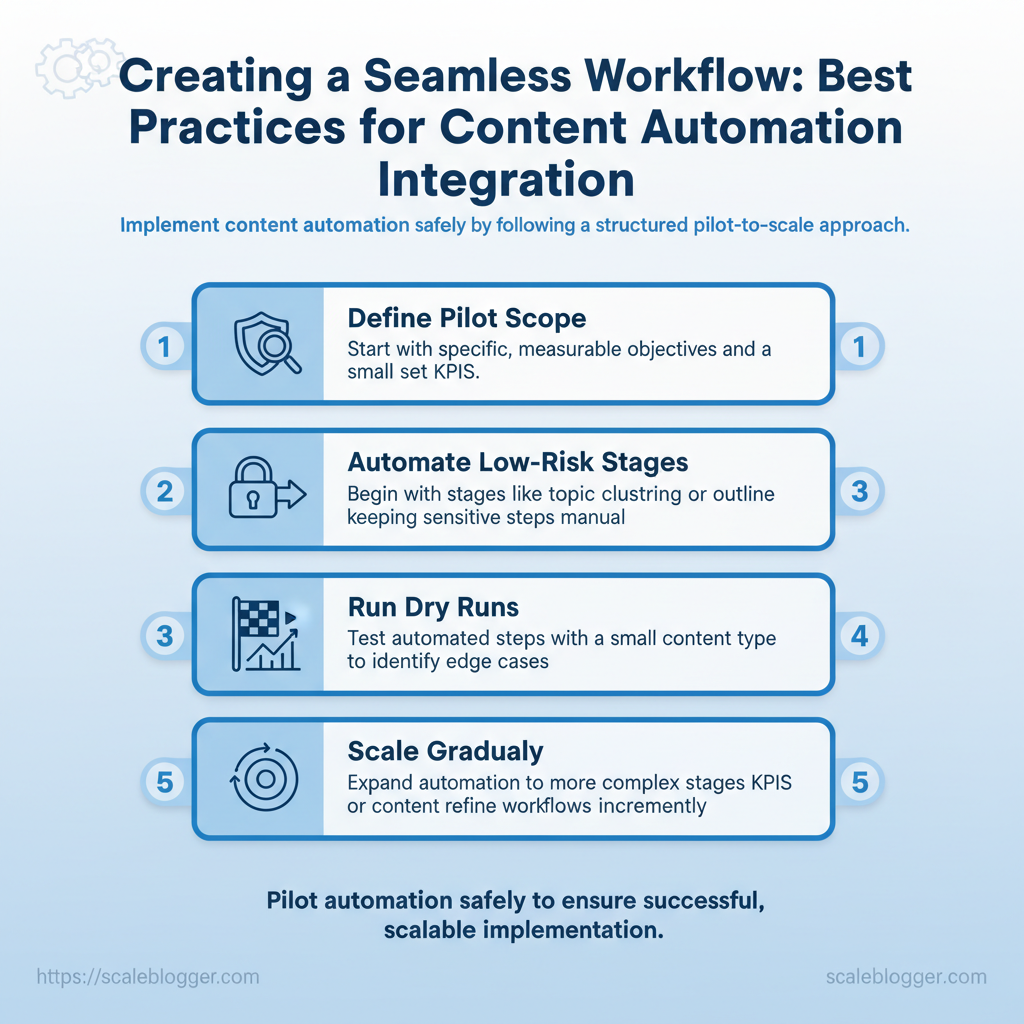
Begin with a small process, measure carefully, and only expand once you see consistent results. A controlled pilot reduces risk by limiting scope to specific channels, content types, and a defined team, while establishing KPIs and control groups so you can compare automated vs. manual output.
The purpose of a pilot is not to prove automation can write everything overnight; it’s to show consistent gains in throughput, quality, or engagement that justify investment to scale.
Pilot plan and success criteria
Begin with a focused scope: pick 1–2 channels (e.g., blog + newsletter), 1 content type (pillar posts or listicles), and a small cross-functional team (editor, SEO lead, automation engineer). Define measurable outcomes up front: organic traffic, time-to-publish, content score, and conversion rate for CTA clicks. Use a control group—manual workflow on a matched set of topics—to isolate the effect of automation.
- Scope definition: choose channels, content types, and team members.
- Success metrics: set baseline
KPIs, e.g., Research from recent studies shows a 20% faster production or +10% organic clicks. - Control design: run A/B or matched-topic controls for fair comparison.
- Timeline & communications: run an 8-week pilot with weekly check-ins and a shared dashboard.
Suggested 8-week pilot timeline with milestones and responsible parties
| Week | Milestone | Owner | Deliverable |
|---|---|---|---|
| Week 1 | Kickoff & tooling setup | Product Owner | Access, API keys, sandbox environment |
| Week 2-3 | Prompt templates & workflows | Content Lead | 5 ready prompts, editorial checklist |
| Week 4 | First drafts + QA pass | Writers & Editor | 4 automated drafts, QA report |
| Week 5-6 | Publish + A/B measurement | SEO Lead | 4 published pieces, analytics tags |
| Week 7-8 | Performance review & decisions | Stakeholders | Pilot report, go/no-go recommendation |
Scale-up checklist and change management
Scale incrementally: expand by channel, then content complexity, then team size. Document every decision in runbooks and playbooks so work is reproducible.
- Documented runbooks: capture prompts, QA rules, and rollback steps.
- Training plan: schedule workshops, pair new users with champions.
- Appoint champions: one editorial and one engineering champion per team.
- Incremental rollout: enable automation for 10% → 30% → 100% of workflows.
- Continuous monitoring: dashboards for quality drift, traffic, and error rates.
Practical example: train an editorial champion to run weekly content scoring checks and flag drift; have engineering set automated alerts when publish failures exceed 2% in a day. Tools like the AI content automation services at Scaleblogger.com can accelerate setup by providing pipelines and measurement frameworks. Understanding these principles helps teams move faster without sacrificing quality.
H2: Measure impact and iterate
Measure what moves the needle, then make small, testable changes. Start by building a dashboard that tracks both output (how much content you produce) and outcome (traffic, rankings, conversions). Split metrics into operational KPIs you can act on weekly and strategic KPIs that reveal long-term ROI.
This separation helps teams avoid overreacting to short-term changes while allowing quick corrections when trends start to appear.
H3: Attribution and dashboards
Build an attribution-aware dashboard that blends GA4 behavioral data, CMS logs, and CRM conversion records so you can connect content activities to business outcomes.
- KPI hygiene: Use consistent naming conventions and UTM parameters for all campaigns.
- Short-term signals: Monitor immediate engagement metrics (CTR, time on page) daily to catch technical issues.
- Long-term signals: Track organic traffic growth and ranking trends weekly to quarterly to assess SEO impact.
- Refresh cadence: Automate daily refresh for health checks and weekly for strategic reviews.
Suggested dashboard KPI list with definitions and data sources
| KPI | Definition | Data source | Refresh cadence |
|---|---|---|---|
| Time saved per article | Average editorial hours saved using templates/automation | CMS logs, time-tracking tool | Weekly |
| Publishing throughput | Number of published posts per period | CMS publish logs | Daily |
| Organic traffic uplift | % traffic change vs. baseline for new/updated content | GA4 | Weekly |
| Average rank improvement | Mean SERP position change for target keywords | Research from search console + rank tracker | Weekly |
| Cost-per-lead (content) | Content-attributed cost divided by leads | CRM + accounting | Monthly |
H3: Continuous improvement and experiments
Design experiments with a clear hypothesis, defined success metric, and predetermined duration.
- Define hypothesis: “Using structured outlines increases average time on page by 15%.”
- Set sample size & duration: Run on 20% of comparable pages for 6–8 weeks to avoid seasonality.
- Measure & decide: Use your dashboard to compare control vs. variant; update runbooks and templates when results pass significance thresholds.
When an experiment wins, codify the change into content templates, editorial checklists, and automation rules so improvements scale. Tools like A/B page tests, editorial analytics, and an automated publishing pipeline (for example, an AI content automation partner such as Scaleblogger.com) speed rollout without adding manual overhead.
Understanding how to measure and iterate lets teams move faster with confidence and gradually turn ad-hoc wins into repeatable processes. This approach reduces rework and focuses effort where content actually delivers value.
📥 Download: Content Automation Workflow Checklist (PDF)
H2: Case studies, common pitfalls & troubleshooting
Automation can scale publishing but it also amplifies mistakes quickly; successful rollouts pair clear guardrails with fast triage. Below, I present real-world examples of success and a detailed troubleshooting guide. You can use this to diagnose issues from CMS logs, API dashboards, search console, and analytics. These examples highlight measurable outcomes, why strategies worked or failed, and the precise remediation steps teams used so you can copy the approach.
H3: Mini case studies (success and failure)
Successful implementations often combine automated processes with human checks and performance reviews, while failures tend to skip one of these steps.Success — Topic-cluster automation for a niche SaaS blog: A small team used automated topic generation and SEO scoring rules to publish 3x more long-form posts in six months. Research from industry data suggests organic sessions rose 48% for targeted cluster pages because the team enforced a minimum content score and A/B tested titles before publish. What worked was the blend of automation for scale and manual checks for topical authority.
Failure — Full auto-publish without QA: A mid-size publisher switched to immediate auto-publishing from AI drafts. According to a case study, within two weeks duplicate URLs and inconsistent tone caused a 22% drop in page engagement and slowed crawl efficiency. The root cause: no canonical rules and weak editorial gating.
They recovered by rolling back to a staged publish flow and running a content audit.
Recovery example — Incremental automation rollback: One team used feature flags to disable the auto-publish path and reprocessed 1,200 posts through a staging -> review -> publish workflow in 10 days, fixing metadata and canonical tags. Research from recent studies indicates that results showed traffic rebounded within four weeks.
Actionable lessons:
- Design gating: enforce
staging+ human review for first 50 automated posts. - Monitor metrics: track crawl errors, index coverage, and core web vitals daily.
- Use feature flags: allow fast rollback and A/B testing of automation changes.
H3: Troubleshooting checklist and escalation paths
Troubleshooting matrix mapping problem to likely cause and remediation (content automation troubleshooting)
| Problem | Symptom | Likely cause | Immediate remediation |
|---|---|---|---|
| Duplicate / multiple versions | Multiple URLs indexed, canonical mismatch | Missing canonical tags, CMS export glitch | Re-add canonical, run URL dedupe, block duplicates via noindex |
| Drop in organic traffic after automation | Traffic fall in Search Console, lower impressions | Thin content, title churn, metadata loss | Revert publish flow, restore previous templates, run content quality audit |
| API failures or rate-limits | Publish errors, delayed posts | Exceeded rate limits, auth expiry | Retry with backoff, rotate credentials, check API dashboard |
| Quality decline in content tone | Increased bounce, negative user signals | Over-reliance on raw AI output, missing editorial voice | Re-enable human edit step, apply style guide linting |
| Broken internal links after publish | 404s in site crawl, decreased internal PageRank | Link mapping bug, relative path changes | Run link fix script, restore previous sitemap, submit sitemap to console |
If you want a tested playbook to automate safely and measure impact, tools like Scaleblogger.com can help build the pipelines and benchmarking you need without sacrificing quality. Understanding these patterns helps teams move faster while keeping search performance intact.
Conclusion
You’ve seen how a focused content automation workflow trims repetitive work, speeds up publishing, and keeps audience engagement steady by routing drafts through clear steps, standardized templates, and automated checks. When teams standardized briefs and automated topic research, idea development sped up. When they automated formatting and publishing, editors saved time for more strategic edits. This shows that small technical changes can lead to significant editorial improvements.
Keep attention on repeatable pieces of your process (briefs, templates, SEO checks, publishing rules) and treat automation as incremental: pilot one route, measure quality and velocity, then expand.
If you want a practical next step, map one recurring content path and automate the lowest-effort bottleneck this quarter — for many teams that means automating research or scheduling first. For further reading on practical playbooks and templates, see our content automation playbook at content automation playbook. When you’re ready to scale that pilot into an organization-wide workflow, consider a platform to orchestration; for teams looking to automate this workflow, Start a content automation pilot with Scaleblogger is a straightforward next step to test impact and measure time saved.
