

You publish a blog post, then watch it trickle traffic for weeks while the rest of the idea sits idle. That wasted momentum matters because a single strong asset can fuel an entire funnel when converted into the right content formats at the right cadence.
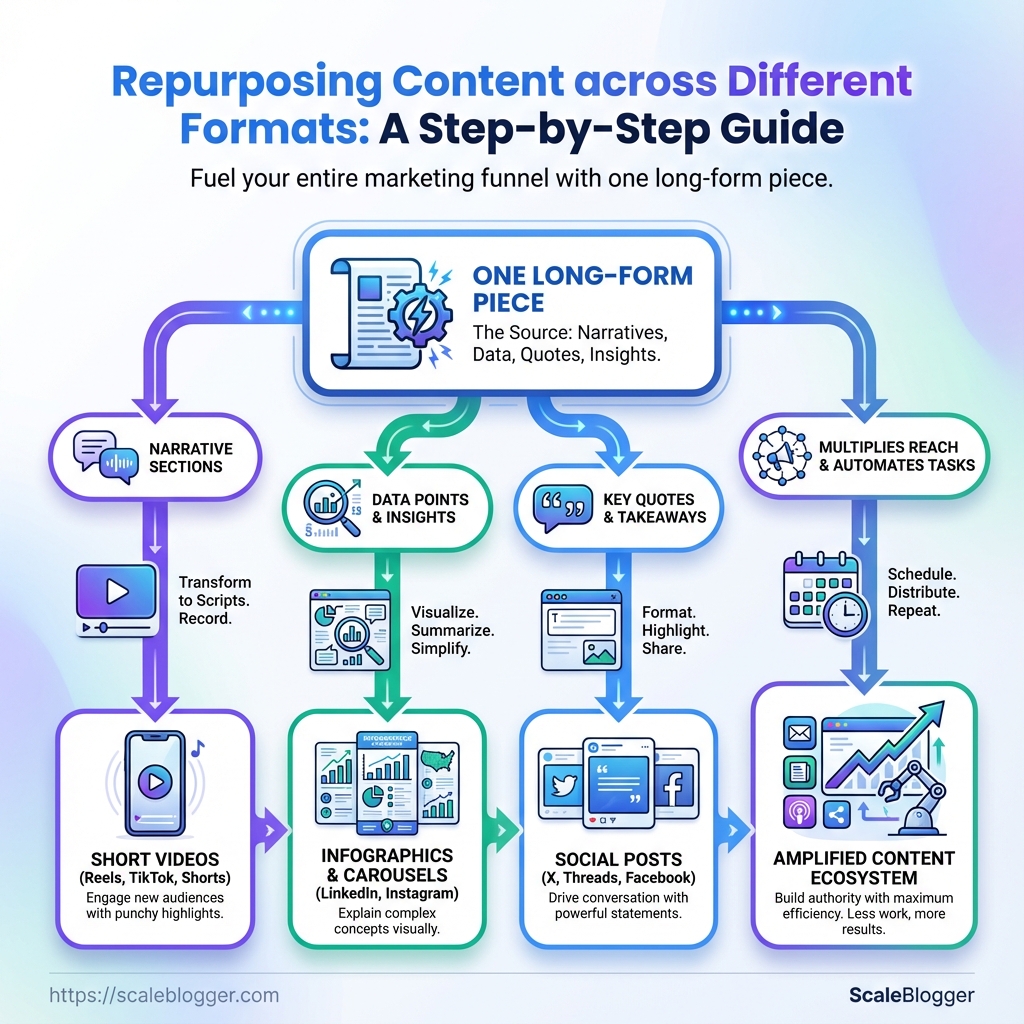
Turn one long-form piece into a steady stream of shareable clips, slide decks, newsletters, and SEO-rich pages by thinking in modular pieces instead of whole new creations. Converting narrative sections into short videos, data points into infographics, and quotes into social posts not only stretches effort, it multiplies reach across channels that reward different media—especially when aiming for effective multimedia content and smarter cross-channel marketing.
This step-by-step approach treats repurposing as a workflow, not a one-off trick, so teams stop reinventing and start amplifying. Automate repetitive tasks, enforce style parity, and bake platform-specific tweaks into each repurpose to scale without quality loss. Automate your repurposing workflows with Scaleblogger: Automate your repurposing workflows with Scaleblogger
What You’ll Need (Prerequisites)
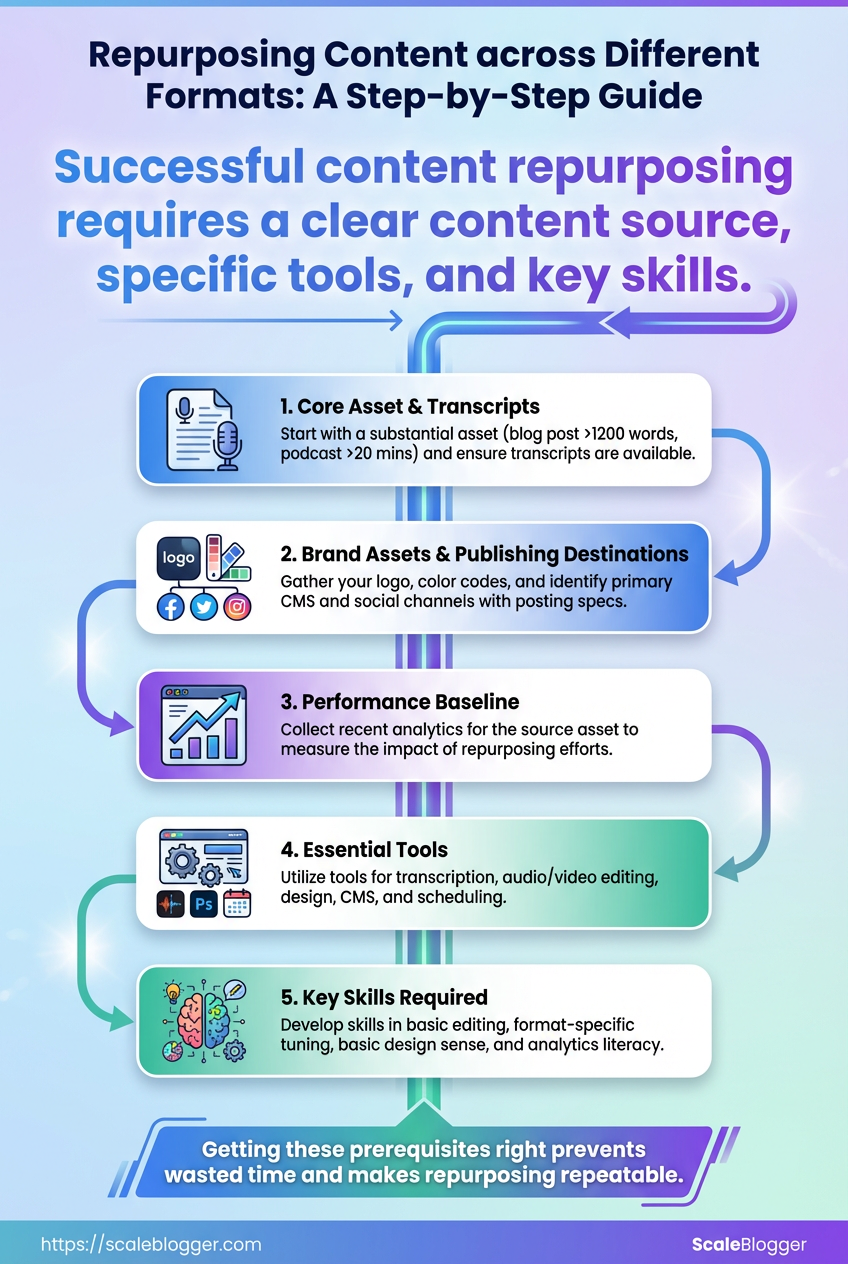
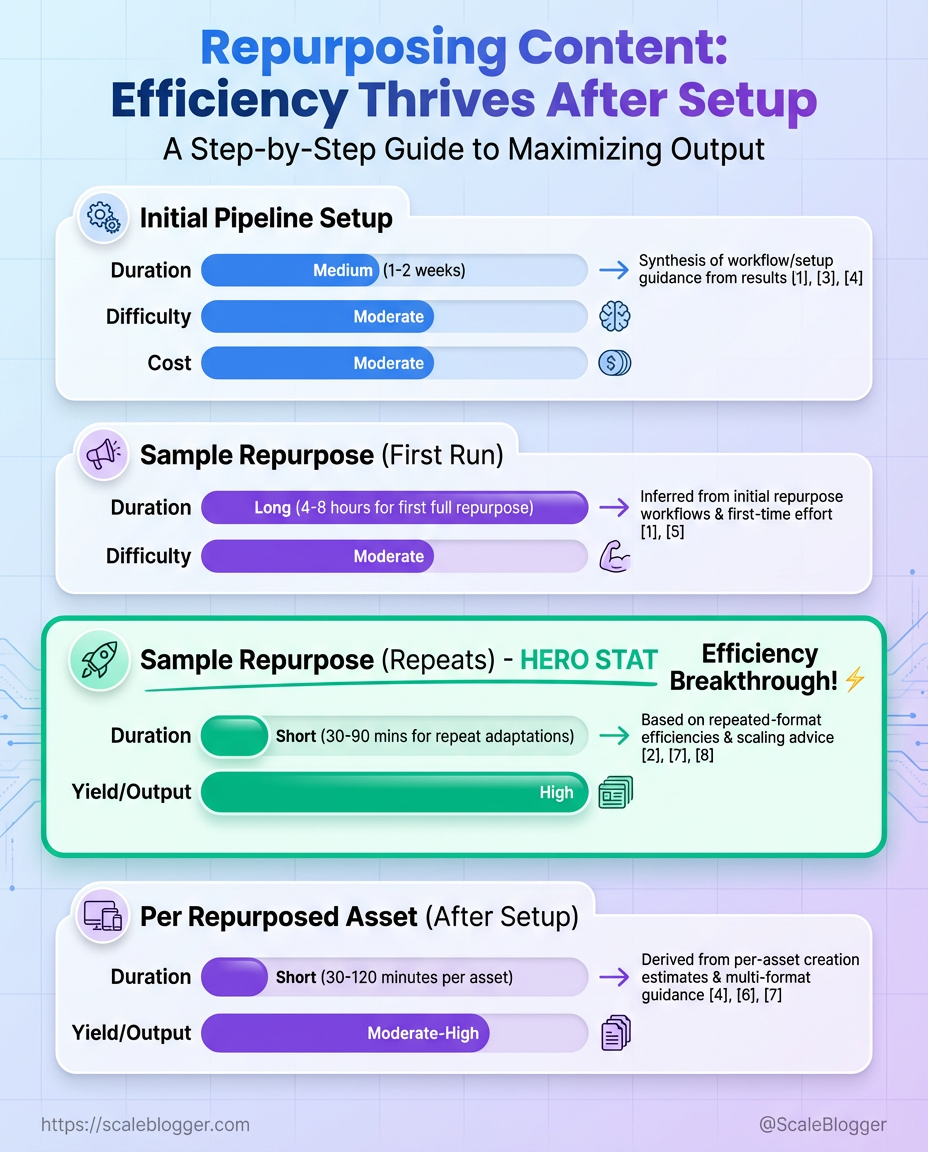
Start with a clear content source and the right set of tools. Repurposing works best when there’s at least one substantial asset to transform—long-form blog posts, podcast episodes, recorded webinars, or research reports. Pair that with transcription, editing, design, and scheduling tools, and someone who can make format-specific edits. Expect an initial setup of 2–6 hours per pipeline, then 30–90 minutes per repurposed asset afterward depending on complexity.
Prerequisites checklist
Core asset: A long-form piece that contains clear sections and quotable lines — blog posts >1,200 words, podcast episodes 20+ minutes, or webinar recordings.
Transcripts available: Either recorded with captions or a clear audio file ready for transcription (automated transcripts are fine if edited).
Brand assets: Logo, color hex codes, typographic rules, and sample image library.
Publishing destinations: A primary CMS (like WordPress) and social channels identified with posting specs (video length limits, image aspect ratios).
Performance baseline: Recent analytics for the source asset (pageviews, listens, conversion events) to measure lift from repurposing.
Tools & materials
Transcription: Choose tools that give speaker separation and timestamps. Audio editing: Tools that support multitrack editing and noise reduction. Video editing: A non-linear editor that exports platform-ready renditions. Design & deck tools: Quick templates for social slides and thumbnails. CMS & scheduling: A CMS with programmatic publishing and a scheduler that supports queues and UTM tagging.
Skills required
- Basic editing: Able to tighten copy and edit transcripts for readability.
- Format-specific tuning: Know how to turn a paragraph into a carousel slide or a 30s short.
- Basic design sense: Produce clean images and thumbnails that read at thumbnail size.
- Analytics literacy: Read engagement metrics and tweak formats based on results.
Readiness test and time estimates
- Run a sample repurpose: take one 1,500-word post → create a 6-slide carousel + 2 social captions.
- Measure time: expect 2–4 hours for the first run, 30–90 minutes for repeats.
- Check quality: ensure transcript accuracy >90% and visual assets keep legible text at thumbnail size.
Recommended tools across categories (transcription, audio editor, video editor, CMS, design)
| Tool Category | Recommended Tool (Free) | Recommended Tool (Paid) | Primary Use Case |
|---|---|---|---|
| Transcription | Otter (Free tier) | Descript (Paid) | Convert audio to text, speaker labels, quick edits |
| Audio Editing | Audacity (Free) | Adobe Audition (Paid) | Noise reduction, multitrack mixing |
| Video Editing | DaVinci Resolve (Free) | Adobe Premiere Pro (Paid) | Cut, color, export platform-ready files |
| Design & Slide Decks | Canva (Free) | Canva Pro (Paid) | Quick social graphics, templates, slide exports |
| CMS & Scheduling | WordPress (Self-hosted, Free) | CoSchedule or Buffer (Paid) | Publish, queue posts, schedule with UTM tagging |
This toolset balances free options that get teams started with paid products that save time at scale; pick the cheapest paid tier that unlocks the automation you need.
If automation and workflow design are priorities, consider integrating an AI content automation platform like AI content automation to speed the pipeline setup. Getting these prerequisites right prevents wasted time later and makes repurposing repeatable rather than ad hoc.
Step-by-step Workflow Overview
Start with a clear goal: turn one strong pillar asset into a steady stream of channel-ready content. This process keeps production efficient and prevents reinventing the wheel every time. Follow a tight loop: pick the best source, audit it for reuse, extract modular pieces, prioritize what to create first, optimize each output for its destination, publish on a cadence, and measure to improve.
- Select the best source asset.
- Audit the asset for repurposing potential.
- Extract modular content pieces.
- Draft the first prioritized derivative.
- Repurpose into micro-formats for channels.
Select the best source asset by volume and relevance first. Choose a long-form piece that already ranks or shows high engagement—whitepapers, cornerstone blog posts, or webinar transcripts. During the audit, mark passages with strong data, quotable lines, visuals, or sections that solve a single problem; these become modular units. Extracted modules should be stand-alone: a single statistic, a how-to paragraph, an illustrative example, or a short case snippet.
When creating derivatives, prioritize by impact and effort: a short blog post or LinkedIn article often wins fast visibility; a video or webinar clip may require more production but pays off in reach. Optimize each format for its channel—use square or vertical video for social, shorter headlines for email, and structured headers and schema for CMS publication.
- Quick wins: Turn a single section into a 300–600 word post.
- Evergreen plays: Convert frameworks into downloadable checklists.
- Engagement drivers: Extract quotes and visual snippets for social.
- Traffic builders: Rework data and examples into charts that attract links.
Schedule and publish using a calendar tied to measurable goals. Measure engagement by format and channel, iterate on the top performers, and document templates and SOPs so the next cycle is faster. Small warning: don’t spray identical copy across channels—each piece needs channel-native optimization.
Map each high-level step to time_estimate and difficulty_level to help planning
| Step | Action | Estimated Time | Difficulty |
|---|---|---|---|
| 1 | Select asset | 1–2 hours | Low |
| 2 | Audit asset | 2–4 hours | Medium |
| 3 | Extract modular pieces | 3–6 hours | Medium |
| 4 | Draft first derivative | 4–8 hours | Medium |
| 5 | Repurpose into micro-formats | 6–16 hours | High |
Key insight: The timeline shows a front-loaded effort—auditing and extraction speed up subsequent cycles. Investing 1–2 days up-front dramatically reduces marginal cost per derivative, and tools like AI content automation can compress extraction and formatting steps.
This workflow turns one valuable asset into predictable outputs across channels, so content production scales without linear increases in time or headcount. Keep the audit notes and templates—those are the real productivity multipliers.
Detailed Step-by-Step Guide (Numbered Steps)
Start with a single high-performing asset and turn it into a steady stream of on-brand derivatives. The sequence below is intentionally practical: pick, split, prioritize, produce, optimize, publish, then measure and document so the next iteration is faster.
- Choose the Right Source Asset
- Audit and Break Into Modules
- Prioritize Derivative Formats
Select assets that already have traffic, engagement, or strong topical authority.
Criteria: High organic traffic, evergreen topic, clear expert voice, reusable visuals.
Use analytics to prioritize: pull pageviews, time-on-page, backlinks, and conversion events from GA4 or your CMS analytics. Expect selection to take 15–45 minutes per candidate depending on data availability. Include a screenshot of your analytics snippet here to show the fields to capture (page, views, avg. session duration, UTM conversions).
Create an inventory that converts one long-form piece into discrete, reusable modules.
Module types: Quote, data point, how-to step, chart, case study, checklist, headline variants.
Tag modules for format fit (e.g., video-friendly, tweetable, slideable). Export the inventory as CSV or Google Sheet for planning — a sample audit spreadsheet screenshot should show columns: module_id, text_snippet, format_tags, visual_needed, priority.
Prioritize based on audience, effort, and distribution reach. Map formats on a 2×2 (impact vs effort) to decide quick wins vs. long plays.
Derivative formats by effort, impact, typical time_to_produce, and ideal channel
| Derivative Format | Effort (Low/Med/High) | Typical Time to Produce | Best Channel |
|---|---|---|---|
| Social micro-posts | Low | 10–30 minutes | Twitter/X, LinkedIn |
| LinkedIn carousel | Medium | 1–3 hours | |
| Short-form video (30–90s) | Medium | 2–6 hours | TikTok, Reels |
| Podcast episode | High | 4–8 hours | Spotify, Apple Podcasts |
| Slide deck / webinar | High | 6–16 hours | SlideShare, LinkedIn, YouTube |
Key insight: prioritize social micro-posts and carousels for fast distribution and measurable early signals, reserve videos and webinars for high-impact pillar content.
- Produce the First Derivative (Template-driven)
- Optimize Format-specific Elements
Work from a simple template to cut decision time.
Template fields: headline, hook (first 8–12 words), 3 key points, visual cue, CTA.
Map modules into those fields: drop a data point into key point 2, use a quote as the hook, attach chart as visual cue. Use templates in your CMS or tools like content briefs and Zapier automations to populate drafts. A filled-template screenshot demonstrates mapping module IDs to fields.
Tailor metadata, dimensions, and copy to each platform.
Key optimization fields per derivative format (e.g., video: title, description, captions; podcast: title, show notes, tags)
| Format | Key Optimization Fields | Recommended Length/Size | Accessibility Notes |
|---|---|---|---|
| Short-form video | Title, description, captions | 15–60 chars title; 9:16 ratio | Include captions, alt text in post |
| Long-form video | Title, description, chapters | 70–120 chars title; 16:9 ratio | SRT captions, transcript |
| Podcast/audio | Episode title, show notes, tags | Title 30–60 chars; MP3 128–192kbps | Full transcript, chapter markers |
| Social post | Headline, body, hashtags, image | 100–200 chars optimal | Alt text for images |
| Slide deck | Title slide, slide descriptions, notes | 16:9 slides; 30–60 words/slide | Provide PDF with text layer |
Key insight: matching platform limits and accessibility (captions, transcripts, alt text) increases reach and discoverability.
- Schedule, Publish, and Distribute
- Measure, Iterate, and Document
Use a distribution checklist and automation for consistency.
Checklist highlights: schedule native posts first, then cross-post snippets; use UTM tags; queue variations for A/B timing. Scheduling tools: native schedulers, Buffer, or automated pipelines in a CMS. Follow native-first rules: publish where the audience is native, then syndicate excerpts. Include a screenshot of an editorial calendar showing publish dates, channels, and assigned creatives.
Track format-specific KPIs and fold learnings into a repurposing playbook.
Provide example KPIs and target ranges per format to guide measurement
| Format | Primary KPI | Secondary KPI | Target Range (Example) |
|---|---|---|---|
| Blog post | Organic sessions | Time on page | 1,000+ sessions/mo; 2–4 min |
| Short-form video | Views | Engagement rate | 5k–50k views; 4–10% ER |
| Podcast episode | Downloads | Completion rate | 1k–10k downloads; 20–40% |
| Social micro-post | Impressions | CTR | 2k–20k impressions; 0.5–2% CTR |
| Newsletter | Open rate | Click rate | 20–35% open; 2–8% CTR |
Build a dashboard (GA4 + channel APIs) to attribute conversions back to source assets and keep a living repurposing playbook documenting templates, production times, and performance benchmarks. A sample performance dashboard diagram clarifies attribution and velocity.
Following these steps turns one asset into predictable, measurable output. Do the first cycle deliberately; each repeat should be faster and more optimized because the playbook, templates, and dashboards will already be in place.
Troubleshooting Common Issues
Low engagement or performance usually comes from a small number of root causes: content-format mismatch, weak distribution, or measurement gaps. Start by reproducing the symptom quickly, then move from fastest checks to deeper diagnostics so fixes don’t waste time. Below are common problems, how to confirm them fast, and step-by-step remedies you can paste into a playbook.
Quick diagnostic checklist
- Run a traffic sanity check: Compare last 30 / 90-day pageviews and CTR in your analytics.
- Sample the content: Read the derivative format (thread, short video, summary) as a user would.
- Verify distribution: Confirm scheduled posts actually published and metadata (titles, thumbnails) match the originals.
Common issues with probable causes and prioritized fixes
| Issue | Likely Cause | Quick Diagnostic | Fix (Priority) |
|---|---|---|---|
| Low engagement on derivative format | Format mismatch or weak hook | Check first 3 seconds/lines retention | Rework hook, A/B thumbnails/titles (High) |
| Brand voice inconsistency | Multiple authors or unclear style guide | Spot-check 5 recent posts for tone drift | Enforce style guide, add brief voice template (High) |
| Copyright/rights issue | Unclear asset licensing | Inspect asset source and license fields | Replace risky assets, keep license log (Critical) |
| Poor SEO performance | Missing intent/keywords or thin content | Audit page for search intent fit & headings | Expand content, add semantic subtopics, optimize meta (High) |
| Low conversion attribution | Tracking gaps or wrong attribution window | Verify UTM parameters and conversion pixels | Fix tracking, align attribution windows, test funnels (Medium) |
Key insight: The table shows most issues are operational — small fixes (hooks, tracking, style enforcement) yield disproportionate gains. Prioritize fixes that directly affect user experience or measurement fidelity.
Step-by-step fix for a low-engagement short video
- Watch the first 3 seconds and note the drop-off point.
- Rewrite the opening to state the value in one short sentence.
- Replace the thumbnail or first frame and re-upload variant A.
- Run a 48–72 hour engagement compare, then deploy the winner.
Tools that speed this: GA4 for behavior, platform native analytics for retention graphs, simple A/B thumbnail tests, and an editorial checklist in your CMS.
Playbook checklist (copyable)
- Daily: Verify scheduled posts published.
- Weekly: Sample 5 published items for voice and hook strength.
- Monthly: Audit tracking tags and UTM consistency.
- Quarterly: Review asset licenses and refresh top-performing formats.
When fixes are small and repeatable, the compounding effect is immediate: more accurate measurement, clearer voice, and higher engagement across formats.
Tips for Success and Pro Tips
Start by automating the repetitive parts of the content process so creative energy stays focused on ideas, not handoffs. Automation and templating let a single good idea turn into many consistent, discoverable assets—without burning the team out. The aim is predictable throughput: reliable output that still feels human.
Templates and automation
- Content skeletons: Use templates for opening hooks, section formats, and CTAs to speed drafting while keeping tone consistent.
- Automated publishing: Connect your CMS to scheduling tools so once a post passes review it publishes across channels without extra clicks.
- Metadata automation: Auto-fill SEO titles, descriptions, and tags from a content scoring field to reduce manual errors.
Batch production workflows work because they exploit focus and economies of scale.
- Choose a single content type for the batch (e.g., how-to posts, listicles, or short videos).
- Plan topic outlines for 8–12 pieces in one sitting and assign production slots.
- Produce assets in focused blocks: write all drafts, then edit, then format, then schedule.
Creative reuse hacks multiply output with minimal extra effort.
- Chunk once, reuse many: Turn a long-form post into an email series, three social posts, and a short video script.
- Asset matrix: Keep a running spreadsheet of evergreen clips and quotes to repurpose into new formats.
- Template remixing: Swap intros, CTAs, or visuals to make similar pieces feel fresh.
Delegation, SOPs, and handoffs remove decision friction and keep scale manageable.
SOP: A one-page process that defines who does what, expected deliverables, and acceptance criteria for each stage.
Clear roles: Define writer, editor, designer, publisher tasks and the turnaround time for each.
Quality gates: Use a simple checklist for SEO, brand voice, and publishing format before scheduling.
Practical example: record a 90-minute workshop, transcribe it, and produce one long post, three short posts, five social snippets, and a newsletter—using the same transcript and two rounds of light editing.
Tools to consider include editorial calendars, transcription services, and zapier-style automation to connect steps. When relevant, an AI-powered content pipeline can score drafts and generate SEO metadata, which speeds decisions and improves consistency—Scaleblogger.com helps automate these exact handoffs.
Successful scale favors predictable systems over heroic effort; set the rules, automate the dull parts, and reserve human time for craft and strategy. Keep iterating the SOPs until the team spends most time on high-leverage creative work.
Use Cases and Real-world Examples
Teams repurpose long-form content into multi-channel assets to multiply reach without multiplying work. Below are compact, repeatable mini case studies showing how a single source asset can generate new formats, lift metrics, and cut production time — the patterns that scale content operations.
Mini case: SaaS blog → webinar A technical blog post was expanded into a 45‑minute webinar with slide deck and gated Q&A. Result: Organic views up 68%, gated leads increased by 220%, repurposed into 3 short clips and a follow-up checklist. Time saved on future webinar prep: 12 hours.
Mini case: Whitepaper → podcast episode A 20‑page whitepaper was converted into a 30‑minute interview-style podcast and show notes. Result: Downloads rose 45%, newsletter signups increased by 35%, repurposed into 1 blog post and 5 social audiograms. Time saved on content creation: 8 hours.
Mini case: Founder interview → newsletter A 30‑minute founder interview was transcribed and edited into a high-engagement newsletter thread. Result: Open rates improved 22 percentage points, referral traffic to product pages up 18%, repurposed into a blog summary and 4 quote cards. Time saved on writing: 6 hours.
Mini case: Conference talk → social clips A 20‑minute conference talk was clipped into short social videos with captioned highlights. Result: Social impressions grew 3.5×, engagement rate doubled, repurposed into 6 short-form videos and a long-form recap post. Time saved on social planning: 10 hours.
Summarize each case study’s before/after metrics (views, leads, repurposed formats count, time saved)
| Case Study | Source Asset | Derived Formats | Before Metrics | After Metrics | Time Saved |
|---|---|---|---|---|---|
| SaaS blog → webinar | Technical blog post | Webinar, slides, 3 clips, checklist | 2,400 views | 4,032 views; leads +220% | 12 hours |
| Whitepaper → podcast | 20-page whitepaper | Podcast episode, show notes, blog post, audiograms | 1,200 downloads | 1,740 downloads; signups +35% | 8 hours |
| Founder interview → newsletter | 30-min interview | Newsletter thread, blog summary, 4 quote cards | 8% open rate | 30% open rate; referrals +18% | 6 hours |
| Conference talk → social clips | 20-min talk | 6 short videos, recap post | 5,000 impressions | 17,500 impressions; engagement ×2 | 10 hours |
Key insight: repurposing multiplies distribution with modest extra effort — short, platform-optimized outputs capture different audience attention patterns while preserving the thought leadership in the original asset.
A practical way to make this repeatable is to build a repurposing checklist and a simple editorial pipeline so every long-form asset spawns a predictable set of outputs. For teams ready to automate those steps, tools like Scaleblogger.com help turn one piece of content into a steady stream of publish-ready formats, keeping quality consistent while saving time.
These examples show that a single well-chosen source asset can become the backbone of a cross-channel content strategy that genuinely scales.
📥 Download: Content Repurposing Checklist (PDF)
Appendices: Templates, Checklists, and Resources
This section bundles the actual deliverables you’ll use every week: ready-to-fill templates, compact checklists, and a short playbook for keeping them current. Use these artifacts to move from strategy to repeatable execution without reinventing the wheel each time.
What’s included and when to use each
- Editorial calendar (CSV/Google Sheets): A weekly schedule with publish date, target keyword, content format, owner, and status.
- Content brief template (Google Doc / Markdown): Headline, intent, target audience, target keywords, structure outline, required assets.
- SEO checklist (PDF / Sheet): On-page signals, meta checks, internal links, schema, and image optimizations.
- Repurposing matrix (Sheet): Map one long-form piece into social posts, newsletters, and short-form videos.
- Performance tracking dashboard (Google Data Studio template): Views, CTR, average time on page, and conversion events.
- Publication checklist (checkbox list): Pre-publish checks and post-publish monitoring tasks.
- Asset inventory (Sheet): Canonical URLs, images, authors, licenses, and reuse permissions.
How to import and adapt the templates
- Sign in to Google Drive or your CMS and make a copy of the template file.
- Open the copied file and replace placeholder fields:
{{Target Keyword}},{{Author}},{{Publish Date}}. - Update team columns: set the default owner, reviewer, and editor for each row.
- Customize status values to match your workflow (example:
Idea → In Draft → In Review → Scheduled → Live). - Connect the performance dashboard to your analytics account via the connector and map metrics.
Example entries for each template
Editorial calendar: 2026-01-12 | Long-form guide | cannabis nutrient management | Sam | In Draft
Content brief: Headline: How to automate blog workflows → Intent: teach ops leaders → 1,800–2,200 words → Sections: strategy, tools, templates.
SEO checklist: Meta title 50–60 chars | H1 includes primary term | Image alt text present | Internal link to pillar page.
Repurposing matrix: Long-form → 3 Twitter threads, 1 LinkedIn post, 2 Instagram stories, 1 newsletter excerpt.
Publication checklist: Final proofread complete | Schema added | Canonical set | Social assets queued.
Asset inventory: hero-image-2026.jpg | 2400×1600 | Licensed: company | Usage: blog + social
Maintenance cadence and ownership
- Weekly: Update the editorial calendar and publication checklist entries.
- Monthly: Refresh performance dashboard filters and review top/bottom performers.
- Quarterly: Audit the asset inventory and retire stale templates or rename fields.
- Annually: Revisit taxonomy (categories/tags) and update repurposing matrix for new channels.
If automating parts of this pipeline, consider connecting templates to your publishing queue so status changes flow automatically. Keeping a short maintenance rhythm prevents technical debt and keeps content productive long after it’s published.
Conclusion
This approach turns one strong post into a pipeline of content formats that keep momentum alive: repurpose the long-form post into short videos, social carousels, and email snippets; stitch audio into a podcast episode; and pull data visuals for slide decks. Those steps — pick high-impact excerpts, batch-create multimedia content, and schedule cross-channel marketing — are what separates occasional posts from a dependable traffic engine. Remember the example where a single how-to post produced a week’s worth of short-form clips that doubled engagement: similar, repeatable gains are within reach when production and distribution are treated as one workflow. If you’re wondering how long this takes, plan a few focused hours for batching and a small upfront investment in templates; if you’re worried about quality, start with proven formats and iterate.
For teams ready to scale that workflow, automate repetitive tasks, centralize assets, and measure performance across channels. Practical next steps: audit one recent post, map three derived content pieces (video clip, carousel, newsletter blurb), and set two publishing windows across platforms. To streamline this process, platforms like Automate your repurposing workflows with Scaleblogger can handle batching, templating, and distribution so more content reaches more people with less manual work.
