

You can publish the best article in your industry, but if the page is slow, difficult to read, or confusing to navigate, many visitors may never appreciate it.
That is how web design impacts content marketing. Design determines how easily people can find, read, understand, trust, and act on your content.
Good web design doesn’t replace good content. Instead, it gives that content the environment it needs to perform. From readability and mobile usability to page speed and calls to action, small design choices can make a big difference in how people experience your content.
Key Takeaways
- Good web design makes content easier to consume. Clear layouts, readable text, and simple navigation reduce friction.
- Design and SEO overlap. Mobile usability, page speed, internal linking, and site structure can affect search performance.
- Design influences what happens after someone reads. Well-placed calls to action can turn readers into subscribers, leads, or customers.
Table of Contents
Why Web Design Matters for Content Marketing
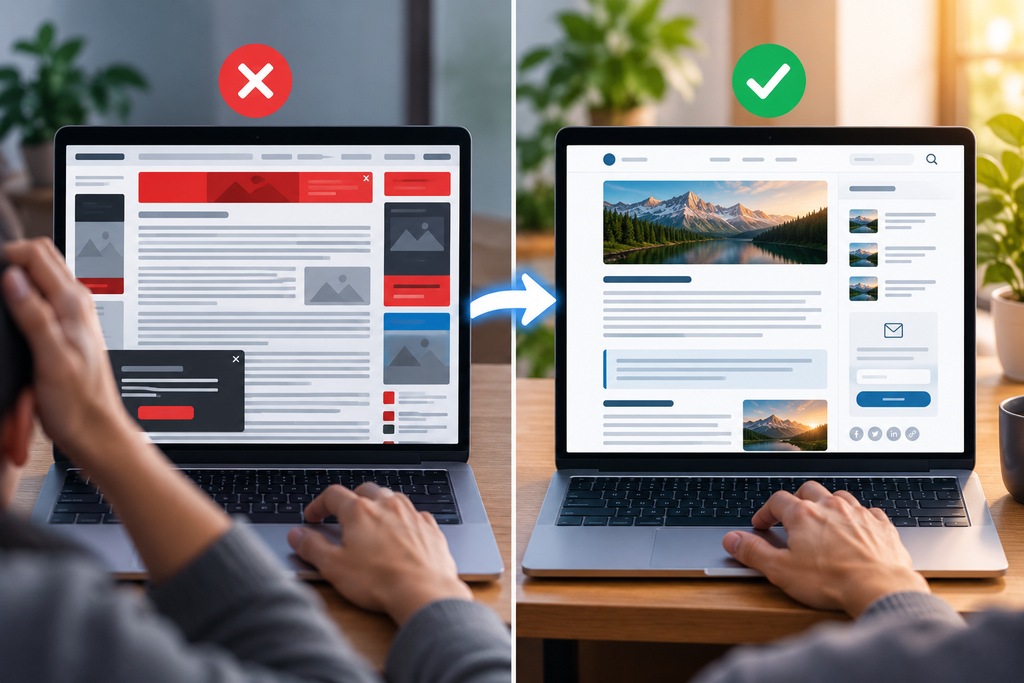
Think of your content as the message and your website as the place where that message is delivered.
If the environment is distracting or frustrating, the message becomes harder to receive.
Imagine landing on a useful 1,500-word guide only to find tiny text, huge paragraphs, multiple popups, and advertisements interrupting every few sentences.
The information might be excellent, but reading it feels like work.
Now imagine the same article with short paragraphs, descriptive headings, comfortable spacing, relevant images, and clear navigation.
Same information. Completely different experience.
That’s why web design and content marketing shouldn’t be treated as separate strategies. Your website needs to help people consume the content you’ve worked hard to create.
1. Web Design Makes Content Easier to Read
Readability is one of the clearest ways web design affects content marketing.
People often scan online content for headings, answers, examples, and key points before deciding which sections deserve closer attention. Your design should make that easy.
Simple elements can make a big difference:
- Comfortable font sizes
- Short paragraphs
- Clear H2 and H3 headings
- Enough white space
- Good color contrast
- Reasonable content width
- Bullet points where appropriate
Typography involves much more than choosing an attractive font. Google’s web.dev typography guidance recommends considering factors such as text size, line length, and spacing between lines when designing readable web content.
Compare a wall of 500 words with the same information divided into useful sections.
Most people will find the second version easier to follow.
This doesn’t mean every sentence needs its own paragraph or every idea needs a bullet point. The goal is simply to make the article comfortable to read.
Good design should help the reader focus on the content—not compete with it.
2. Design Influences Trust
Before someone signs up for your newsletter, buys something, or follows your advice, they need some reason to trust the website they’re using.
Design contributes to that impression.
A website doesn’t need expensive animations or elaborate graphics to look trustworthy. In many cases, simplicity works better.
Readers should be able to easily find and understand things such as:
- Consistent branding
- Clear navigation
- Professional images
- Contact information
- Author information where relevant
- Publication or update dates
- Working links and buttons
- A consistent layout
The opposite creates unnecessary friction.
Broken images, overlapping text, aggressive popups, and confusing menus can distract people from otherwise useful content.
This becomes particularly important when you’re using content to demonstrate expertise. Google’s guidance on creating helpful, reliable, people-first content similarly encourages publishers to make it clear who created content and provide background about authors when readers would reasonably expect it.
If you’re trying to build authority through helpful articles, the website surrounding those articles should support that credibility.
3. Navigation Helps Readers Discover More Content
Content marketing shouldn’t always end when someone finishes one article.
Imagine someone finds your guide about content marketing through Google.
After reading it, they may naturally want to learn how to measure whether their content is actually working.
Good website design makes that next step easy.
You could, for example, point them toward your guide to benchmarking content performance metrics, where they can continue learning about traffic, engagement, conversions, and other performance signals.
Content discovery can also happen through:
- Contextual internal links
- Related articles
- Clear categories
- Breadcrumbs
- Search functionality
- Simple menus
Google also recommends creating a logical site structure and linking important pages from other relevant pages, because links help both users and search engines discover content.
The key is relevance.
Don’t add internal links simply because you want more links on the page. Each one should genuinely help the reader take a useful next step.
4. Mobile Design Affects How People Experience Your Content
Your article might look beautiful on your laptop and terrible on a phone.
That’s a problem.
A mobile-friendly content page should let readers comfortably consume the article without zooming, rotating their phone, or fighting with elements covering the screen.
Check things like:
- Font size
- Image width
- Navigation
- Tables
- Buttons
- Forms
- Popups
- Spacing
Tables deserve particular attention. A comparison table that looks perfect on desktop can become almost unusable when squeezed onto a small screen.
Mobile design also matters for search. Google explains in its mobile-first indexing documentation that it primarily uses a site’s mobile content for indexing and ranking.
So don’t treat mobile optimization as something you check after finishing the desktop site.
For a content-focused website, mobile should be part of the content experience from the beginning.
5. Page Speed Can Affect Content Performance
Nobody publishes an article hoping readers leave before seeing it.
Yet a slow website creates exactly that risk.
A visitor may have clicked because your title perfectly matched their question. If the page takes too long to become usable, you’ve introduced friction before they’ve read the first sentence.
Common causes of slow content pages include:
- Oversized images
- Too many scripts
- Heavy animations
- Excessive third-party widgets
- Poorly configured plugins
- Unnecessary tracking tools
- Slow hosting
You don’t need to remove every image or turn your website into a blank page in the name of speed.
The goal is balance.
Optimize images, remove things that don’t add meaningful value, and regularly test important pages.
Google recommends good Core Web Vitals as part of providing a strong page experience. Its current metrics cover loading performance, responsiveness, and visual stability.
You can also use PageSpeed Insights to check an individual URL and identify potential performance problems.
For content marketers, however, the simplest lesson is:
Make it easy for readers to reach your content.
6. Visual Design Can Make Content Easier to Understand
Images shouldn’t exist just to make an article look longer or more attractive.
The best visuals actually help explain something.
For example, a tutorial might benefit from screenshots showing exactly where readers need to click.
A data-heavy article might benefit from a simple chart.
A complicated process might become much easier to understand with a diagram.
Useful content visuals include:
- Screenshots
- Charts
- Diagrams
- Tables
- Illustrations
- Before-and-after examples
- Short videos
Choose the format based on what you’re explaining.
If a screenshot communicates something better than three paragraphs, use the screenshot.
If an image doesn’t help the reader understand the topic, you probably don’t need it.
This principle applies to content distribution too. Different channels often require different ways of presenting the same information. Our guide to social media SEO explores how formats such as infographics, short videos, charts, and article previews can help extend the reach of long-form content.
Visuals should earn their place.
7. Web Design Influences Conversions
Content marketing usually has a purpose beyond getting pageviews.
You might want readers to:
- Join your email list
- Start a free trial
- Request a consultation
- Read another article
- Download a resource
- Create an account
- Buy a product
Web design helps readers understand what they can do next.
The important part is making that next step relevant to what they just read.
Suppose someone finishes an article about improving their SEO workflow. A CTA inviting them to try an SEO-related tool makes sense.
A huge popup advertising an unrelated product doesn’t.
You can take this further with personalization. Instead of presenting every visitor with exactly the same next step, a site can adapt recommendations or CTAs around audience behavior and intent. Our guide to automated content personalization explains how this can work at scale.
Placement matters too.
You don’t need five buttons competing for attention before the reader has even reached the article.
A useful CTA can appear naturally after you’ve provided enough value for the reader to understand why the next step might benefit them.
This makes conversion feel like part of the experience rather than an interruption.
How Does Web Design Affect SEO?
Web design and SEO overlap in several important areas.
A well-designed website can make it easier for search engines to access content while also improving the experience for people who find that content.
Important areas include:
Site structure: Clear navigation helps organize pages logically.
Internal linking: Relevant links help users and search engines discover related content.
Mobile usability: Pages should work properly across screen sizes.
Page performance: Fast, stable, responsive pages provide a better experience.
Heading structure: Descriptive headings make long content easier to navigate.
Image optimization: Properly sized images and descriptive alt text improve accessibility without unnecessarily slowing pages.
Google’s SEO Starter Guide provides a useful overview of many of these fundamentals.
But there’s an important distinction:
An attractive website doesn’t automatically rank higher.
Design supports SEO by making your website technically accessible, organized, usable, and easier for people to interact with.
You still need content that satisfies what people are searching for.
Common Web Design Mistakes That Hurt Content Marketing
Sometimes improving content performance isn’t about adding something new. It’s about removing unnecessary friction.
Watch for problems such as:
- Large blocks of uninterrupted text
- Tiny fonts
- Poor text/background contrast
- Slow-loading images
- Broken mobile layouts
- Confusing navigation
- Too many popups
- Autoplaying videos
- Distracting animations
- Too many competing CTAs
- Poor internal linking
There’s a simple test you can use.
Open one of your most important articles and pretend you’ve never visited the website before.
Can you quickly understand what the article is about?
Can you comfortably read it?
Can you find related information?
Do you know what to do next?
If any answer is no, you’ve probably found an opportunity to improve the design.
How to Improve Web Design for Content Marketing
You don’t necessarily need a complete website redesign.
Start with your most important content pages.
Check them on both desktop and mobile. Look at how quickly they load, whether the text is comfortable to read, and whether important elements work properly.
Then simplify.
Remove unnecessary distractions. Break large sections into readable chunks. Compress oversized images. Improve internal links. Make navigation clearer.
Most importantly, measure what happens after making changes.
Instead of assuming a redesigned page performs better because it looks nicer, use real performance data to see whether reader behavior improves.
ScaleBlogger’s guide to analytics-driven SEO iteration explains how search queries and on-page behavior can be turned into small, testable improvements rather than relying on guesswork.
You can combine that information with Google Search Console’s Performance report to understand how people discover your pages through Google Search.
That turns web design from a matter of personal preference into something you can continuously improve based on how real readers use your site.
Final Thoughts
Understanding how web design impacts content marketing comes down to one simple idea:
Great content needs a good environment to perform well.
Your website should make it easy for people to find your content, understand it, trust it, and decide what to do next.
That doesn’t require flashy design.
Often, the most effective improvements are surprisingly simple: readable text, faster pages, useful visuals, logical navigation, mobile-friendly layouts, and relevant calls to action.
Then measure the results using the right content performance metrics rather than judging a redesign only by how it looks. ScaleBlogger
Content gives people a reason to visit. Good web design gives them a reason to stay, explore, and take the next step.
