

Voice queries are reshaping how audiences find answers, yet most content strategies still treat voice as an afterthought. Optimizing for voice search quickly boosts your visibility. It helps align content with how people naturally speak and what actions they want. Reports show that conversational questions and local intent are common in voice searches.
This creates chances to gain valuable clicks and customer actions.
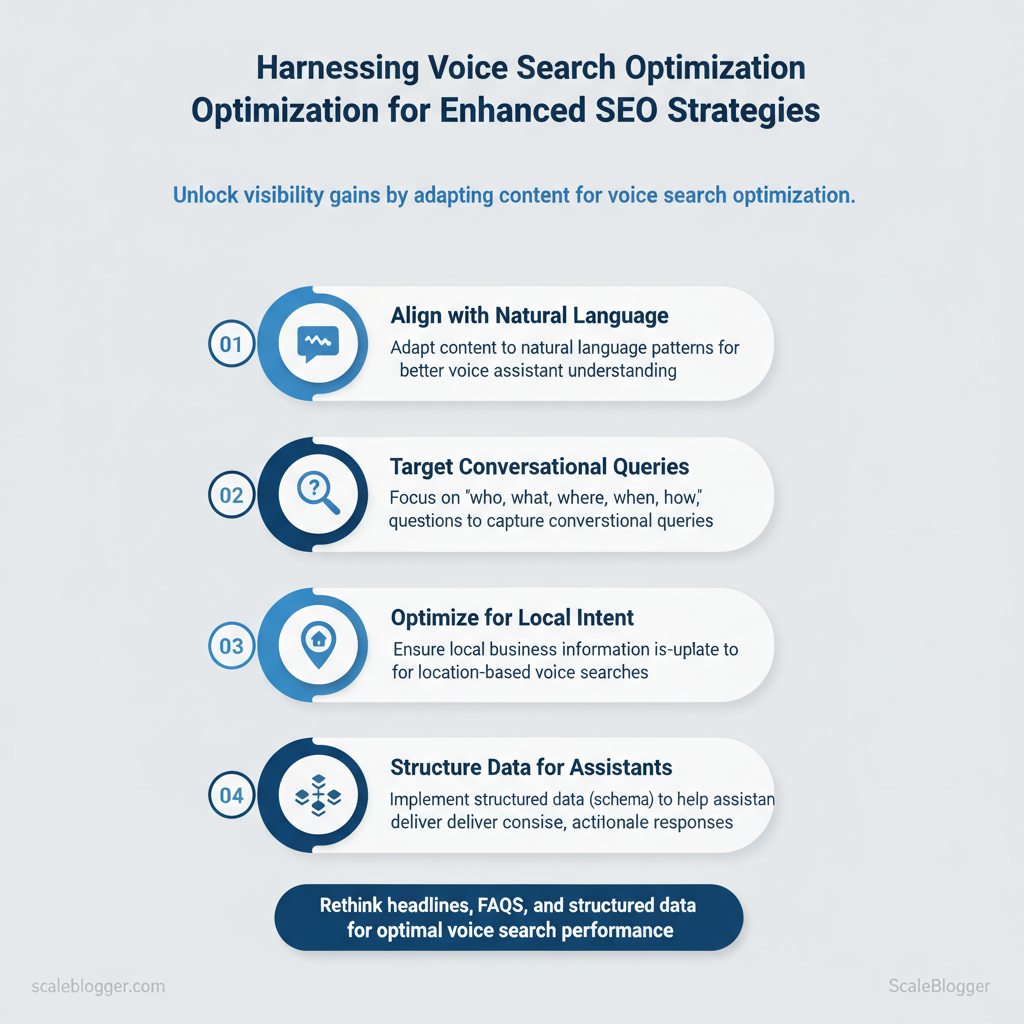
Optimizing for voice means rethinking headlines, FAQs, and structured data so assistants deliver concise, actionable responses. Picture a local retailer whose voice-optimized FAQ surfaces as the spoken answer for “where to buy gluten-free bread near me” — that click becomes a store visit.
- How conversational keywords increase featured snippet eligibility
- Why concise, direct answers outperform long paragraphs for voice devices
- Where to apply
structured dataand schema to boost assistant confidence - How local SEO adjustments capture nearby voice-driven traffic
Next, a practical sequence shows how to audit current content, map conversational intents, and implement schema and copy changes that drive measurable voice traffic. Scale voice-optimized content with AI automation: https://scaleblogger.com
> Key Takeaway: ## Understanding Voice Search and Its Impact on SEO
Voice search transforms keyword-led SEO into conversation-led discovery. Speech recognition turns spoken words into text.
Understanding Voice Search and Its Impact on SEO
Voice search transforms keyword-led SEO into conversation-led discovery. Speech recognition turns spoken words into text. Natural language understanding (NLU) interprets what people mean and what they are referring to. Signals from the device and context, like location and recent searches, influence the final outcome.
Market analysis shows voice assistants answer a very high percentage of queries accurately, which drives reliance on concise, actionable responses rather than long search-result lists (Voice-Activated Revolution: Harnessing Voice Search For Better SEO).
Here’s how it works in practice
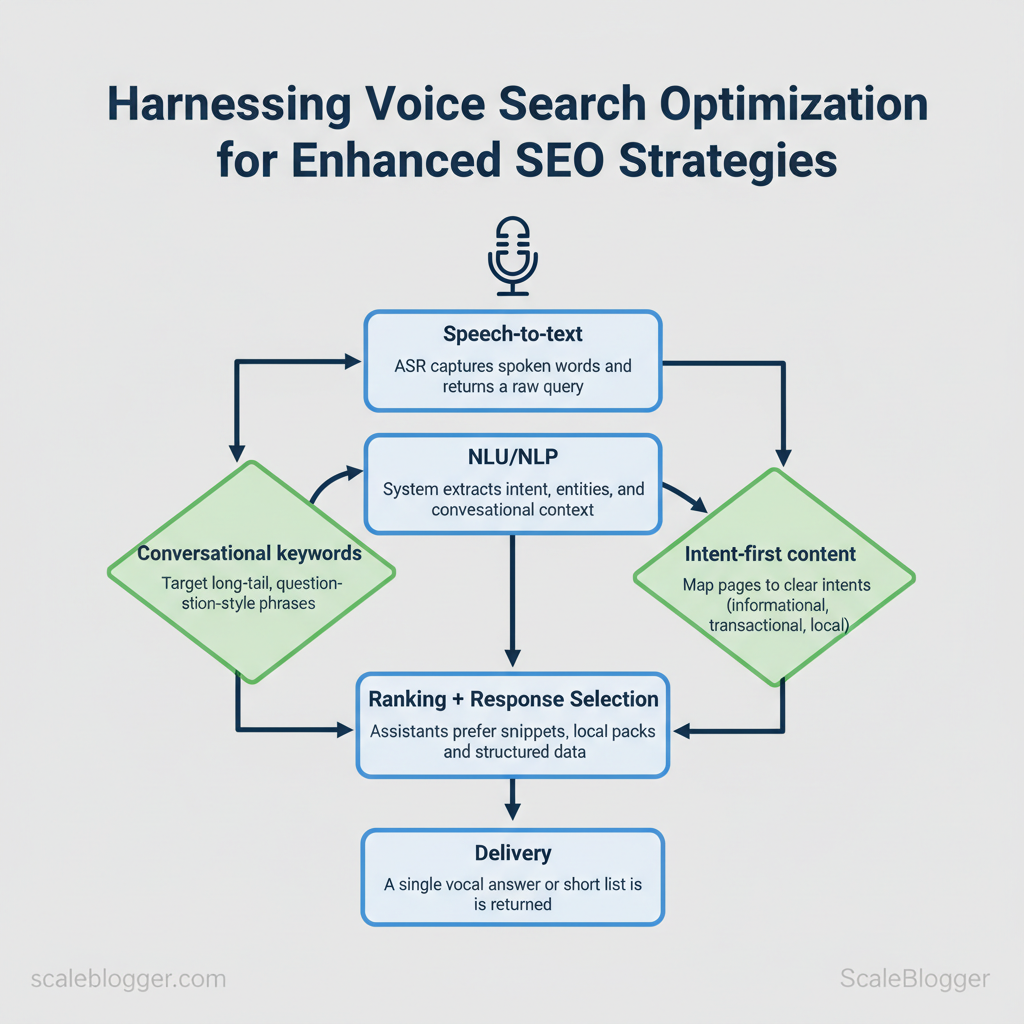
- Speech-to-text:
ASR(automatic speech recognition) captures spoken words and returns a raw query. 2.
NLU/NLP: The system extracts intent, entities, and conversational context (follow-ups and pronouns). 3. Ranking + response selection: The assistant prefers featured snippets, local packs, and structured data answers.
- Delivery: A single vocal answer or short list is returned, often without a clickthrough.
”). Intent-first content: Map pages to clear intents: informational, transactional, local. Concise answers: Provide short, authoritative snippets near the top of pages for voice extraction.
- Local optimization: Keep
Google Business Profileand schema up to date; many voice queries are location-focused. * Technical performance: Fast load times and structured markup matter more because assistants choose single best answers.
Voice search changes ranking signals because the output format differs. Featured snippets and rich answers become primary real estate; local signals and microdata carry outsized weight; and conversation design (anticipating follow-ups) influences content architecture. Medium and Siteimprove guides reinforce focusing on conversational keywords, featured snippet optimization, and local SEO as core tactics (Voice Search Optimization: Harnessing the Power of Voice Assistants for SEO, Voice search SEO: how to for voice search).
Voice vs typed search characteristics to clarify strategic differences for SEO
| Aspect | Typical Query Style | User Intent Signals | SEO Implication |
|---|---|---|---|
| Query length and phrasing | Long, conversational questions | Natural language intent, more modifiers | long-tail Q&A and FAQs |
| Device / Location context | Mobile, smart speaker; location-heavy | Real-time location & device signals | Prioritize local SEO & mobile speed |
| Expected content format | Short answer, step or local result | Need for concise, direct answers | Provide succinct answer blocks |
| Result format | Featured snippet, local pack, rich card | Single authoritative response preferred | Target featured snippets & schema |
| Interaction design | Follow-up friendly, multi-turn | Conversational context & pronouns | Structure content for follow-ups |
Understanding these principles helps teams move faster without sacrificing content quality.
> Key Takeaway: ## Keyword Research for Voice: From Short Queries to Conversational Phrases
Prerequisites
- Access to your site’s search logs or chat transcripts
- An SEO toolset (at least one keyword research tool + Google Trends)
- A simple spreadsheet to score…
Keyword Research for Voice: From Short Queries to Conversational Phrases
Prerequisites
- Access to your site’s search logs or chat transcripts
- An SEO toolset (at least one keyword research tool + Google Trends)
- A simple spreadsheet to score and prioritize keywords
Tools / Materials needed
- Google Search (Autocomplete)
- People Also Ask (PAA) in SERPs
- AnswerThePublic (free/paid)
- Customer support transcripts or chat logs (internal)
- SEMrush / Ahrefs (paid filters for question/long-tail)
- Keywords Everywhere (paid credits)
- Google Trends (free)
- Moz Keyword Explorer (limited free credits)
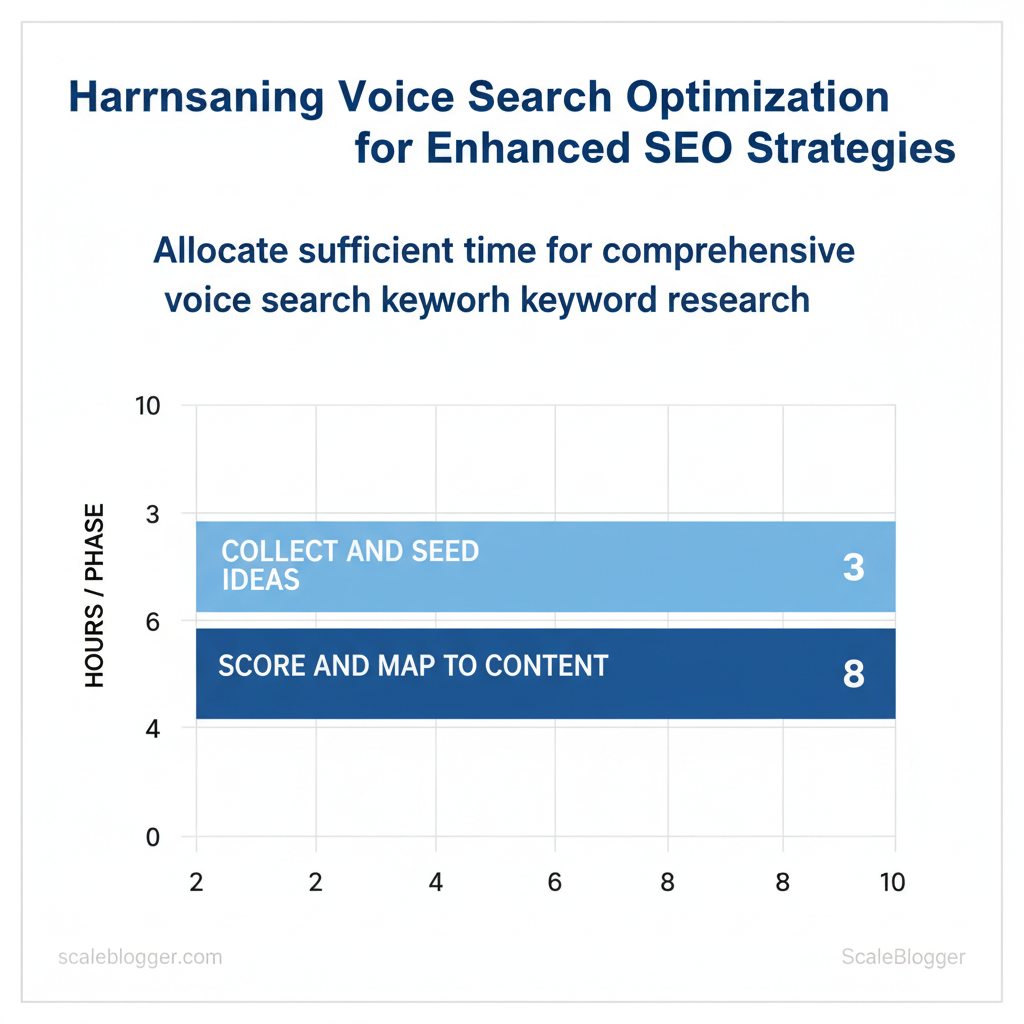
Time estimate 1–3 hours to collect and seed ideas; 4–8 hours to score and map to content.
- Start with conversational seed prompts
- Use
who,what,where,when,how,why,can,isas starting tokens and drop the product/service or intent term after them. - Capture full-phrase suggestions from Google Autocomplete and expand via PAA and AnswerThePublic.
- Expect queries to morph from short queries like “lawn mower” to conversational phrases like “how do I sharpen a lawn mower blade safely?”
- Mine internal organic signals
- Export customer support transcripts, chat logs, and FAQ searches.
- Normalize phrasing (remove names, session IDs) and extract question patterns.
- Prioritize recurring questions — those indicate high user intent and ready-made content.
- Score by intent and opportunity
- Create a scoring model with columns: Intent (informational/local/transactional), Snippet probability, Current page rank, Conversion value (1–10).
- Weight transactional/local voice queries higher for conversion value; prioritize pages ranked on page 1 with snippet gaps for quick wins.
- Target featured snippet formatting for answers under 40–60 words to increase voice assistant pickup.
- Map voice phrases to content formats
- Short answer snippets → FAQ blocks or
How-toschema - Conversational flows → Dialogue-style FAQ pages and conversational CTAs
- Local queries → Updated GMB/Maps listings and schema
Troubleshooting common issues
- If voice impressions are low despite traffic, confirm pages are structured for snippets and have concise answers.
- If transcription data is noisy, cluster similar intents and test sample voice queries manually in the target assistant.
> Market analysis shows voice assistants now answer an overwhelming share of quick queries with high accuracy, changing how users phrase searches. See the Forbes analysis on voice search adoption and accuracy: Voice-Activated Revolution: Harnessing Voice Search For Better SEO
Provide a concise tool + method matrix for sourcing voice query ideas
Table: Section Content — Tool/Source, How to use it for voice keywords, Best practice tip & more
| Tool/Source | How to use it for voice keywords | Best practice tip | Use case example |
|---|---|---|---|
| Google Autocomplete | Type conversational seeds and capture top suggestions | Use incognito + locale to mirror user geography | Seed: how to fix → how to fix a leaky faucet |
| People Also Ask (PAA) | Expand PAA boxes to harvest related questions | Click-expand recursively to reveal deeper questions | PAA shows can a plumber fix a leak today? |
| AnswerThePublic | Visualize question trees and export CSV | Filter by question nodes and long-tail phrases | “what is the best time to fertilize lawn” |
| Customer support transcripts | Extract exact user questions and phrasing | Normalize slang and typos; tag intent | “My heater won’t start, what do I do?” |
| SEMrush (questions filter) | Pull question keywords and SERP features | Export by country; sort by SERP features column | Questions with high snippet potential |
| Ahrefs (Questions report) | Find long-tail question volume and clicks | Combine with Parent Topic for content clustering | “how to choose running shoes for flat feet” |
| Keywords Everywhere | Collect related long-tail and question phrases | Use browser plugin for quick exports | Shows related how/why phrases alongside volume |
| Google Trends | Verify seasonality and rising voice topics | Compare conversational phrases vs. short terms | “best summer tent” spike in May–July |
| Moz Keyword Explorer | Discover keyword difficulty + SERP features | Use difficulty + opportunity to prioritize quick wins | Low-difficulty question ranking on page 2 |
| Voice-specific filters (toolsets) | Use voice-query flags where available ✓/✗ | Seek filters that surface question intent and snippet chance | Filters show question intent for local queries |
Understanding conversational phrasing and scoring by intent lets teams convert existing content into voice-ready answers quickly and effectively. When implemented correctly, this approach reduces wasted effort by focusing on high-opportunity questions and the pages closest to capturing them.
> Key Takeaway: ## Content Formats and Writing Techniques for Voice Queries
Prerequisites
- A published site with clear HTML structure and
FAQ/HowTocontent. Access to a CMS where you can edit headings, schema, and short lead paragraphs.
Content Formats and Writing Techniques for Voice Queries
Prerequisites
- A published site with clear HTML structure and
FAQ/HowTocontent. - Access to a CMS where you can edit headings, schema, and short lead paragraphs.
- Tools: an SEO auditor, SERP-snippet tester, and optionally an AI-powered content pipeline (for example, Scaleblogger’s AI content pipeline) to automate lead-answer generation.
Time estimate: 2–6 hours per page to draft, mark up, and test a voice-first version.
Voice assistants prefer short, clear answers. Use structured content that they can convey easily. Start every answer with a concise lead (1–2 sentences) that addresses the query, then expand with structured detail. This format increases eligibility for featured snippets and spoken responses.
> Voice assistants now answer a very high percentage of queries accurately; market reporting cites an accuracy rate for assistants above 90% in many scenarios (Forbes analysis of voice search impact and accuracy).
- Structuring content for featured snippets and spoken answers (step-by-step)
- Craft a 1–2 sentence lead that directly answers the question; keep it in active voice.
- Follow with a short list or numbered steps when applicable (
How-to), each step one sentence. - Use clear question-form headings (
What is X?,How do I X?) to match voice queries. - Add a 2–3 sentence expansion or example after the concise answer for context.
- Mark up answers with
FAQ,HowTo, orLocalBusinessschema and use semantic HTML ().
Writing voice-friendly copy: tone, syntax, readability
- Tone: Use conversational, helpful voice; speak like a subject-matter colleague. Syntax: Favor short sentences (10–15 words), active verbs, and natural phrasing. Readability: Aim for 6th–8th grade reading level; simple words read better aloud.
- Signals: Include explicit cues like
minutes,distance, orpricefor local/transactional queries. Automation: Use an AI pipeline to generate the lead answer and variations for A/B testing; Scaleblogger’s automation can speed this process while maintaining schema and snippet structure.
Common issues & troubleshooting
- If snippets aren’t picked up, shorten the lead and ensure schema is present.
- If answers sound robotic, rewrite with contractions and natural phrasing.
- Test on real devices and in SERP simulators; adjust for phrasing users actually speak.
Content template availability for different query types (definition, how-to, local, comparison)
Content template availability for different query types (definition, how-to, local, comparison)
| Query Type | Ideal Lead Format | Approx. Answer Length | Supporting Elements |
|---|---|---|---|
| Definition / What is | One-sentence definition + context | 15–30 words | Short example, simple analogy, FAQ schema |
| How-to / Step-by-step | 1-sentence goal + numbered steps | 30–80 words | Numbered list, HowTo schema, time estimate |
| Local / Near me | One-line direct answer with distance/time | 10–25 words | LocalBusiness schema, address, hours, map link |
| Comparison / vs | Direct comparison sentence + quick pros/cons | 25–60 words | Bulleted pros/cons, comparison table, FAQ schema |
| Transactional / Where to buy | Direct answer with availability and price | 10–30 words | Product schema, price, store link, shipping time |
Understanding and applying these principles helps teams create content that’s discoverable by voice and useful to people who prefer to listen rather than read. When implemented well, the content performs better across devices with minimal extra maintenance.
Technical SEO and Site Architecture for Voice
Prerequisites: access to site CMS, ability to add JSON-LD or modify HTML head, server/hosting dashboard (CDN, caching), and analytics (GA4 or equivalent) to measure changes. Tools/materials needed: schema validator (Rich Results Test), Lighthouse, server profiling tool, CDN config panel, and Scaleblogger’s AI content pipeline for generating concise answer copy when relevant. Estimated time: 1–3 days for audit and quick fixes, 2–6 weeks for architecture and performance improvements depending on scale.
Design for voice-first answers: short, direct responses that fit conversational queries. Implement structured data to increase eligibility for spoken answers and answer blocks; prioritize mobile speed and low latency to meet assistant heuristics.
- Schema Markup, Structured Data, and Answer Blocks
- Add
FAQandHowToJSON-LDwhere content naturally answers common queries; these map well to answer snippets. - Use LocalBusiness schema for local intent pages (store hours, service area, phone); voice assistants pull these fields for “near me” queries.
- Implement Speakable for short news or summary sections to signal content optimized for speech playback.
- Keep answer text concise (one to three sentences) and surface it near the top of the page for crawlability.
- Validate with Google’s Rich Results and monitor Search Console for enhancements and errors.
Example JSON-LD for FAQ (insert in page head or via CMS):
json { "@context":"https://schema.org", "@type":"FAQPage", "mainEntity":[ {"@type":"Question","name":"What is voice search?","acceptedAnswer":{"@type":"Answer","text":"Voice search uses spoken queries to return answers from search engines or assistants."}} ] }Performance, Mobile UX, and Server Considerations
- Improve
LCPby deferring noncritical CSS, preloading hero images, and serving optimized images (WebP/AVIF). ReduceFID/INPby minimizing main-thread work, usingrequestIdleCallbackfor nonessential JS, and splitting long tasks. StabilizeCLSby reserving image and ad dimensions and avoiding layout-shift-inducing injected content.
- mobile navigation for conversational discovery: surface a “quick answers” module and collapse deep menus into tappable categories. Server & CDN: enable edge caching, configure cache-control headers, and ensure persistent connections (HTTP/2 or HTTP/3). Move APIs to edge functions where feasible to cut latency under 100ms.
Schema types by use case and voice benefit to guide implementation choices
| Schema Type | Best Use Case | Voice Benefit | Implementation Notes |
|---|---|---|---|
| FAQ | Common Q&A pages | High eligibility for answer blocks | FAQPage JSON-LD; concise Q/A pairs; validate with Rich Results |
| HowTo | Process and tutorials | Step-by-step spoken instructions | Use HowTo markup; include estimated times and materials |
| LocalBusiness | Store pages, service areas | Improves local voice queries and actions | Include address, telephone, openingHours |
| Speakable | Short news summaries | Signals content for voice playback | Limited to news/short content; use speakable property with selectors |
| Product | Ecommerce pages, specs | Supports product queries and quick facts | Include price, availability, brand; useful for quick comparison answers |
Understanding these principles helps teams move faster without sacrificing quality. When implemented correctly, this approach reduces overhead by making decisions at the team level.
Local and Conversational UX: Capturing ‘Near Me’ and Multi-Turn Queries
Prerequisites
- Up-to-date Google Business Profile (GBP) access and ownership
- Site analytics with search query logging (GA4 recommended)
- CMS capable of structured content blocks and schema insertion
Tools / materials
- Google Business Profile dashboard,
schema.orgFAQ markup, local landing page templates - Content pipeline automation (ScaleBlogger’s AI-powered content pipeline is an effective option alongside general CMS automation)
- Review management tool and mobile performance tester
Opening concept To optimize for local voice searches and ongoing conversations, think like a person talking to an assistant. Use short, relevant questions and quick follow-up queries. Voice users ask location, availability, price, and next-step questions in quick succession — design content to answer the first query and anticipate the second.
Optimizing for Local Voice Queries and ‘Near Me’ Searches
- Consistent NAP: Ensure Name, Address, Phone are identical across GBP, site footer, and directories; mismatches reduce local ranking. GBP completeness: Include hours, services, menu/pricing, and
special_hoursfor holidays; keep hours updated in real time. Concise local landing pages: One page per neighborhood or service with clear address, service area, and 1–3 concise CTAs.
- FAQ with schema: Add
FAQandLocalBusinessschema to capture featured snippets and voice answers. Mobile-first performance: Prioritize sub-2s load on mobile to reduce abandonment for voice searchers.
Designing for Multi-Turn Conversations and Follow-Ups
- “). 2.
Chain answers with structured Q&A blocks: short answer first, then an optional sentence for context. 3. Surface related content via tags: attach related links (menus, booking widget) directly under answers to reduce friction.
- Use ephemeral context tokens: persist user context (service, location) across pages to power chained replies. 5.
Measure drop-off after each turn and iterate on phrasing and content placement.
> Voice assistants answer a high percentage of queries with concise responses; optimizing for concise conversational keywords improves capture rates. (See Forbes on voice accuracy and adoption: https://www.forbes.com/councils/forbestechcouncil/2024/12/17/voice-activated-revolution-harnessing-voice-search-for-better-seo/)
Local optimization checklist with priority and impact to make implementation scannable
| Task | Priority | Estimated Effort | Expected Impact |
|---|---|---|---|
| Verify Google Business Profile | High | 1–2 hours | High local visibility, GBP features enabled |
| Add FAQ with schema | High | 2–4 hours/page | Increased featured snippet and voice answers |
| Create local landing pages | High | 4–8 hours/page | Better relevance for “near me” and local queries |
| Collect and respond to reviews | Medium | Ongoing | Trust signal; improves local ranking and CTR |
| Ensure mobile load times | High | 1–3 days | Lower abandonment; better voice conversion rates |
Understanding and implementing these patterns accelerates capture of local voice intent and makes follow-up flows feel seamless to users. When content anticipates the next question, conversational UX becomes a competitive advantage.
📥 Download: Voice Search Optimization Checklist (PDF)
Measuring Success and Scaling Voice Search Optimization
Prerequisites
- Access to Google Search Console and
GA4property - Rank-tracking or SEO platform with question/long-tail filters
- Local listings dashboard (Google Business Profile) and access to schema deployment
- Basic automation tooling (CMS access, CI/CD or tag manager)
Tools / materials needed
- Google Search Console, Google Analytics (GA4)
- Rank tracker (SEMrush, Ahrefs, Rank Ranger)
- Local SEO tracker (BrightLocal, Yext)
- Automation: tag manager, CMS templates, deployment scripts
- Initial instrumentation: 4–8 hours
- Weekly reporting and triage: 1–3 hours
- SOP and template rollout: 1–2 weeks
- Key metrics and signals to track
- Featured snippet impressions & clicks — use Google Search Console
Performancereport to isolatepositionandsearchAppearance: FEATURED_SNIPPET. - Conversational query discovery — pull query reports and filter for long-tail question patterns (
who, what, where, how, when, why) to capture natural-language triggers. - Local pack visibility & conversions — monitor local searches, calls, direction requests via Google Business Profile and BrightLocal.
- Voice platform responses — where available, ingest analytics from Assistant/Action Console or Alexa Skill Metrics for
answer_rateand user engagement. - SERP intent shifts — track ranking changes for FAQ/snippet-optimized pages with rank-tracker question filters.
- Click-through vs. zero-click ratio — combine GSC impressions with GA4 sessions to understand voice-driven zero-click behavior.
- Conversions traceable to voice — tag phone clicks, directions, and micro-conversions in GA4 using events and attribution windows.
- Content-level ROI — measure traffic, engagement, and conversions per snippet-optimized piece to prioritize scaling.
- Scaling: SOPs, templates, automation
- Create an SOP: audit → prioritize → → deploy → monitor; set weekly cadence and ROI thresholds.
- Build templates:
Snippet Answerblocks (40–60 words),Question Blockschema-ready sections, and meta description patterns. - Automate schema: use CMS plugins or deployment scripts to inject
FAQandQAPageschema from structured templates. - Automate discovery: scheduled query exports from GSC + NLP filtering to feed content queues.
- Prioritize by ROI: score opportunities by traffic potential, conversion value, and implementation cost.
- Run quarterly audits: update templates, re-run question discovery, and reassign high-impact pages.
Measurement tools and what voice-specific signals each provides to inform tool selection
| Tool | Voice-specific signals | Best for | Notes |
|---|---|---|---|
| Google Search Console | Featured snippet impressions, query-level clicks, searchAppearance flags |
Organic performance, snippet tracking | Free; direct SERP signals |
| Google Analytics (GA4) | Events for voice-driven clicks, zero-click attribution, session behavior | Conversion tracing, engagement | Free; needs event tagging |
| SEMrush | Question-filter rank tracking, SERP feature detection | Keyword research, competitive gaps | Pricing from $129.95/mo |
| Ahrefs | Rank tracking with keyword intent, SERP feature alerts | Backlink + keyword intelligence | Pricing from $99/mo |
| Moz Pro | Keyword explorer with question suggestions, SERP feature reports | Mid-market SEO teams | Pricing from $99/mo |
| Rank Ranger | Custom voice/rich-feature tracking, historical SERP visualizations | Advanced rank reporting | Tiered pricing; agency features |
| BrightLocal | Local pack visibility, citation tracking, GBP metrics | Local SEO and voice-local visibility | Pricing from $29/mo |
| Yext | Listings syndication, voice-search-ready knowledge graph | Large-scale local listings | Custom pricing; enterprise focus |
| Alexa Skills Console | Skill impressions, utterance analytics | Amazon Alexa skill owners | Platform-specific metrics |
| Google Assistant Console | Action analytics, conversation paths | Google Assistant Actions | Platform-specific metrics |
Understanding these principles helps teams move faster without sacrificing quality. When implemented, this approach reduces manual churn and lets content teams focus on high-value creative work.
Conclusion
Voice-first queries are changing discovery: prioritize conversational keywords, structure answers for snippets, and automate scale so content stays timely and context-aware. Earlier examples showed that content answering multi-turn questions improved visibility. Teams that turned FAQ flows into short, clear answers experienced quicker ranking improvements. Expect to audit existing pages, create concise voice-ready answers, and set up automation to publish variants — audit 10 priority pages this week, write 50–70 word canonical answers for each, and automate distribution to long-tail variants to capture voice intent at scale.
If questions linger about measuring voice traffic or prioritizing intents, track conversational queries in Search Console. Segment by query length and click-through behavior, focusing first on informational, local, and how-to intents. For hands-on implementation and to accelerate production, consider practical automation tools. As a next step, explore how to Scale voice-optimized content with AI automation to turn these tactics into repeatable workflows.
