

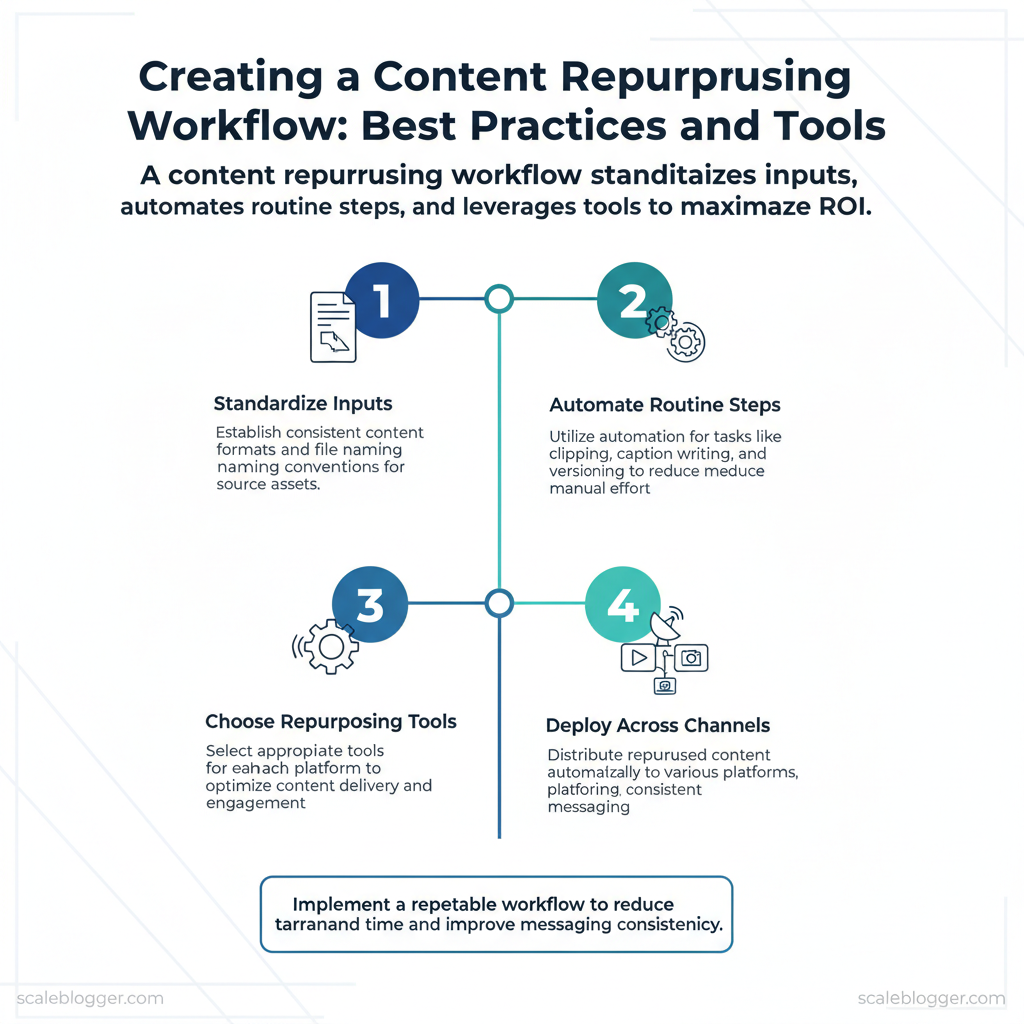
Marketing teams burn time turning one strong piece of content into dozens of usable assets. Manual clipping, caption writing, and versioning scatter effort across platforms and dilute ROI. Building a repeatable content workflow for repurposing fixes that leak by standardizing inputs, automating routine steps, and choosing the right repurposing tools for each channel.
A tighter workflow reduces turnaround time and keeps messaging consistent across formats and platforms. Picture a product launch where a single webinar becomes a blog, five short videos, and a sequence of social posts deployed automatically. That coordination lifts engagement while freeing creative time for higher-value work.
Practical changes matter more than perfect theory: standardize file naming, use templates for formats, and route assets through automation for distribution. Scaleblogger integrates into this stack as an automation-first option that centralizes repurposing logic and reduces manual handoffs. Industry research shows teams that adopt automated workflows see measurable efficiency gains, and the right mix of tools scales those gains predictably.
- How to map source assets to repurposed formats for maximum reach
- Steps to automate editing, captioning, and scheduling without losing quality
- Criteria for selecting repurposing tools and integrating them into a `content workflow`
- Templates and naming conventions that cut production time by days
- Where Scaleblogger fits into an automated repurposing pipeline
Step 1 — Audit Your Existing Content
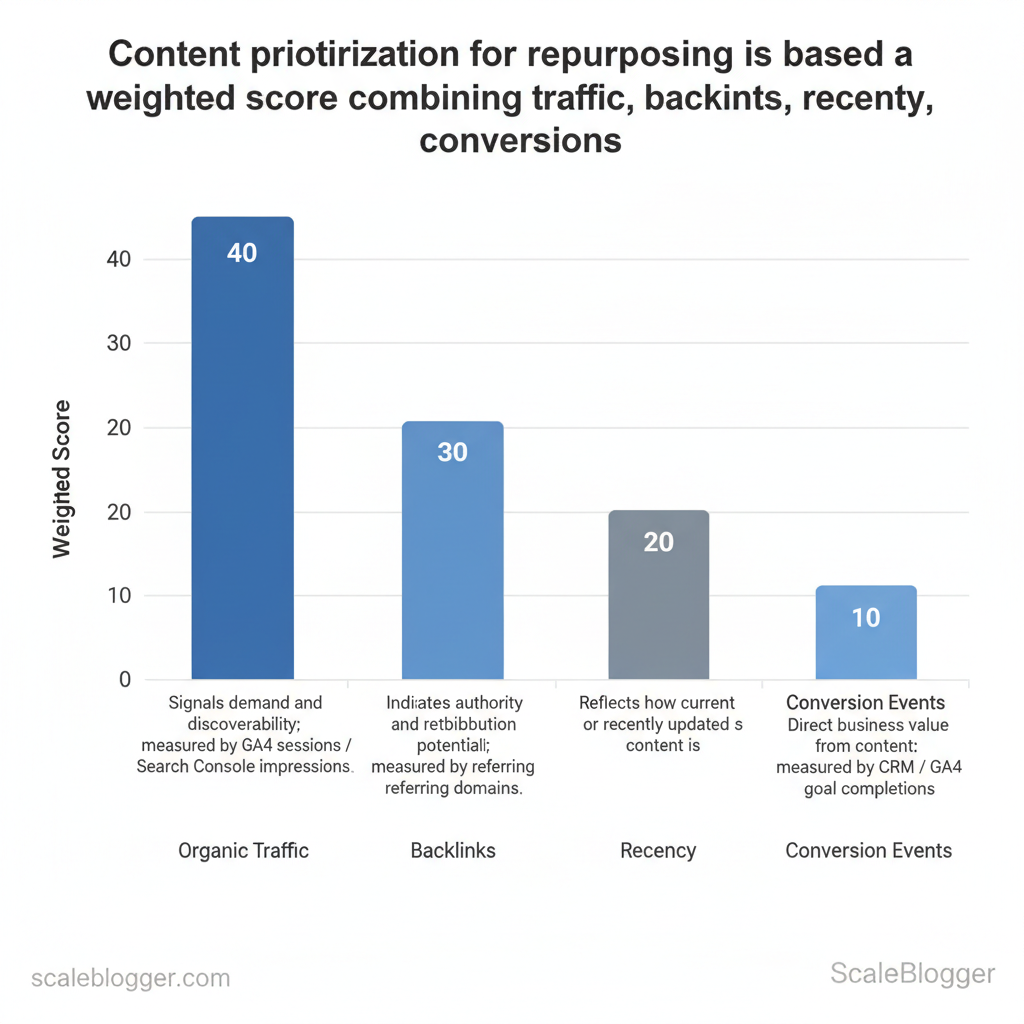
Start by treating the audit as a signal-gathering sprint: identify which pages already work, which can be repurposed, and which should be archived. Focus first on measurable outcomes — traffic, backlinks, conversions — then layer on strategic fit like topical relevance and evergreen potential. A rapid, repeatable audit removes guesswork and creates a prioritized backlog for repurposing.
Prerequisites (10 minutes)
- Access: Google Analytics / GA4, Google Search Console, CMS, backlink tool (Ahrefs/Moz), CRM conversion data.
- Tools: Spreadsheet (Google Sheets), Screaming Frog or site crawler, Zapier/Make, basic Python installed.
- Goal: Produce a ranked list of pages to repurpose within 60 minutes.
- Identify 10 high-opportunity pages for updates or format shifts.
- Mark 10 low-value pages for consolidation or removal.
- Create a one-line repurpose idea for every high-priority page.
- Screaming Frog: map content types and HTTP status in bulk.
- Google Sheets + Apps Script: normalize and compute scores automatically.
- Zapier/Make: schedule weekly exports from GA4 to your sheet.
- Light Python script: combine CSVs and output sorted scores.
merge_metrics.py
| Criteria | Why it matters | How to measure | Quick threshold for repurpose |
|---|---|---|---|
| Organic traffic | Signals demand and discoverability | GA4 sessions / Search Console impressions | >500 sessions/mo or rising trend |
| Engagement (time on page/comments) | Shows content depth and user interest | CMS time-on-page, comments count | Avg. time >90s or >5 comments |
| Backlinks and referral links | Indicates authority and redistribution potential | Ahrefs/Moz referring domains | >5 referring domains |
| Conversion events | Direct business value from content | CRM / GA4 goal completions | ≥1 conversion/mo or high intent action |
| Evergreen relevance | Longevity & repurpose ROI | Manual editorial review | Content still relevant in 12+ months |
When scaling this process, automate the exports and scoring and schedule regular audits. Consider using AI content automation like the services at Scaleblogger.com to convert prioritized posts into multi-format assets and shorten the time from audit to published repurpose. Understanding these principles reduces busywork and speeds decision-making across content teams. When executed consistently, audits turn scattered content into a predictable growth engine.
Step 2 — Define Repurposing Goals and KPIs
Start by matching each repurposed format to a single, measurable business objective. That forces trade-offs up front — short-form video and carousels win attention quickly but rarely convert directly; gated guides and email sequences convert but require a longer funnel. Choose one primary goal per pipeline, then assign 1–2 primary KPIs and a clear 90-day target so teams know when to scale or stop.
- Awareness: Prioritize reach and view metrics; measure with views, impressions, and share rate.
- Engagement: Prioritize depth metrics; measure with watch time, time on page, likes/comments and completion rate.
- Conversion: Prioritize lead and revenue metrics; measure with leads, conversion rate, and downstream MQL-to-SQL movement.
| Repurposed format | Primary goal | Primary KPI | Best distribution channel |
|---|---|---|---|
| Short-form video (30–60s) | Awareness | Views / Completion rate | TikTok, Instagram Reels, YouTube Shorts |
| Long-form video (5–10min) | Engagement | Average watch time / View-through rate | YouTube, LinkedIn (native), company site |
| Carousel/infographic | Awareness / Engagement | Saves / Shares / Time on card | LinkedIn, Instagram, Pinterest |
| Email drip / gated guide | Conversion | Lead conversion rate / MQLs | Email (drip), landing page with PPC |
| Podcast episode | Engagement / Thought leadership | Downloads / Listening duration | Apple Podcasts, Spotify, YouTube republish |
90-day target template (use and adapt)
Measuring ROI of repurposing (practical)
Example ROI calculation
Use `UTMs` and distinct landing pages to make the numbers defensible, and consider using a content scoring framework (or an AI-powered content pipeline like Scaleblogger.com) to prioritize repurposing that moves the needle. When teams set clear goals and traceable KPIs, repurposing stops being busywork and becomes an engine for predictable growth. Understanding these choices shortens the feedback loop and frees creators to focus on high-impact work.
Step 3 — Create a Repeatable Repurposing Workflow
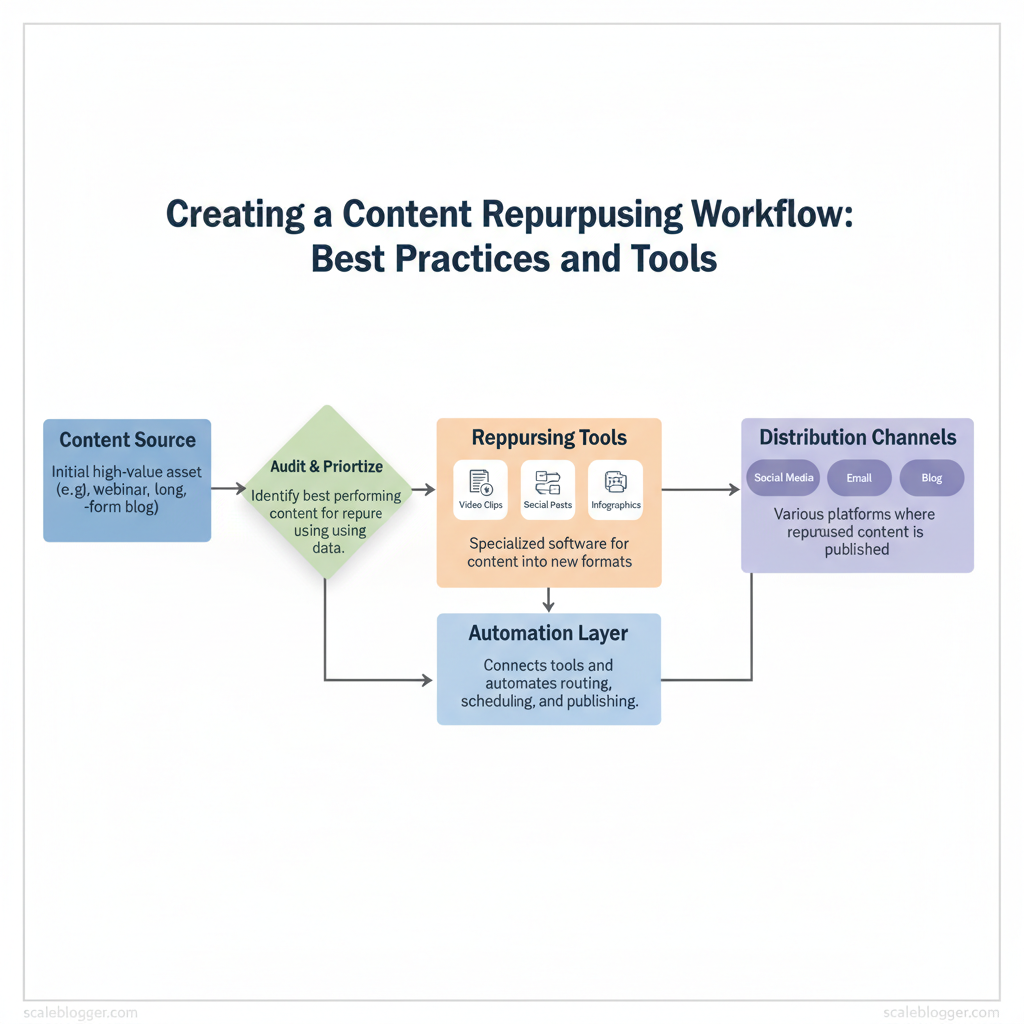
Start by treating repurposing as a production line: inputs (long-form assets) flow through defined, repeatable stages to produce format-specific outputs. The value comes from eliminating ad-hoc decisions — each stage has a clear owner, checklist, and time cadence so work moves predictably and quality remains consistent.
| Stage | Primary tasks | Responsible role | Estimated time |
|---|---|---|---|
| Select | Audit content inventory, pick high-ROI pieces (traffic, backlinks, intent) | Content Strategist | 1–2 hours per selection |
| Plan | Map target formats, distribution channels, KPIs; create asset briefs | Content Strategist / Project Manager | 2–4 hours per campaign |
| Extract (content atoms) | Pull quotes, visuals, data points, subheadings, timestamps | Repurposing Specialist / Editor | 1–3 hours per long-form asset |
| Adapt (format-specific) | Convert atoms to scripts, carousels, short videos, tweets, newsletters | Designer / Video Editor / Copywriter | 3–8 hours per output bundle |
| Optimize (SEO/design) | Add meta, headlines, thumbnails, alt text, SEO copy, accessibility checks | SEO Specialist / Designer | 1–3 hours per final asset |
| Distribute & Measure | Schedule across channels, trigger paid boosts, collect engagement and conversion metrics | Marketing Ops / Analytics | 1–2 hours initial; ongoing reporting weekly |
- Brief template: single-paragraph goal, target persona, main CTA, required assets
- Handoff checklist: source link ✓ transcript ✓ chosen quotes ✓ image credits ✓ SEO keywords
- Publish checklist: title optimized ✓ meta ✓ thumbnail ✓ distribution tags
Operational tips: assign single-threaded ownership for each stage, require asynchronous status updates, and keep a central Kanban column for each workflow stage. Industry teams that adopt a modular pipeline reduce idle time and scale output predictably. For teams wanting to automate scheduling and performance benchmarking, consider integrating an AI content automation system like the one at Scaleblogger.com to accelerate plan-to-publish cycles.
Understanding these principles helps teams move faster without sacrificing quality. When implemented consistently, the workflow turns repurposing from guesswork into a reliable growth lever.
Step 4 — Tools and Automations That Save Time
Start by mapping tools to the repurposing workflow so every asset moves through the pipeline with minimal friction. This section lists must-have tools by stage, offers practical automation recipes (Zapier/Make), and flags common failure modes with fixes so teams stop wasting time on handoffs and start shipping more content.
Prerequisites
- Team access: API keys or account logins for the tools below.
- Content inventory: A simple spreadsheet or CMS list of source posts/videos.
- Basic Zapier/Make familiarity: Able to create triggers and map fields.
- Accounts for tools below (free tiers usually available)
- A project board (Notion/Trello) to capture automation outputs
- Reusable automations that create drafts, transcriptions, social posts, and performance tracking with one-click publishing.
| Tool | Workflow stage | Primary feature | Best for (budget/scale) |
|---|---|---|---|
| Descript | Editing & clips | Text-based video/audio editing, overdub | Creators / small teams — Free + $12/mo |
| Canva | Visual repurposing | Drag-and-drop design, templates, video | Solo to mid teams — Free + $12.99/mo Pro |
| Otter.ai | Transcription | Automated transcripts, speaker ID | Cost-conscious transcription — Free + $8.33/mo |
| Zapier | Workflow automation | 3,000+ app triggers/actions, multi-step Zaps | Teams automating many apps — Free + $19.99/mo |
| Make (Integromat) | Complex automations | Visual scenario builder, conditional logic | Automation engineers — Free + from $9/mo |
| Buffer | Scheduling | Social queue scheduling, analytics | Small teams — from $6/mo per channel |
| Hootsuite | Enterprise scheduling | Multi-account publishing, monitoring | Larger teams — from $99/mo |
| Notion | Planning & CMS | Databases, templates, content calendar | Teams needing integrated docs — Free + $4/mo |
| Loom | Micro video | Quick screen-recordings, share links | Product & comms teams — Free + $8/mo |
| Rev | Human transcription | 99% accurate transcripts, captions ($1.50/min) | High-accuracy needs — pay-as-you-go |
| ChatGPT (OpenAI) | Draft generation | Draft outlines, refactoring, prompts | Ideation & drafting — ChatGPT Plus $20/mo |
| Grammarly | Editing & tone | Advanced grammar, tone detection | Polished copy — Free + $12/mo |
Automation recipes (3 ready-made flows)
Example Make/Zap pseudo-template “`json { “trigger”: “new_cms_post”, “steps”: [ {“action”:”transcribe”,”service”:”otter”,”inputs”:[“audio_url”]}, {“action”:”summarize”,”service”:”chatgpt”,”inputs”:[“transcript”]}, {“action”:”create_card”,”service”:”notion”,”inputs”:[“title”,”summary”,”tags”]} ] } “`
Implementation tips
- Use `tags` consistently to route content between automations.
- Start small: automate the highest-volume, lowest-risk task first.
- Monitor logs weekly; add notifications for failures to a Slack channel.
Step 5 — Distribution and Channel Optimization
Distribution must be treated as a targeted engineering task, not an afterthought. Repurposed assets perform best when formats, cadence, and CTAs are tuned to each channel; a single blog post can yield a week of high-impact touchpoints if sliced correctly and tracked with a minimal attribution schema. Below are channel-specific best practices, one practical optimization tip per channel, a 30-day distribution calendar you can implement immediately, and a compact tracking setup to prove what’s working.
Channel-specific best practices for repurposed assets
- Format tailoring improves reach: convert long-form blogs into short scripts, carousels, and newsletters.
- Cadence matters: stagger posts across channels to capture different audience windows and algorithmic boosts.
- CTA alignment: match CTA type to platform intent—education on YouTube, quick conversions on email.
| Channel | Recommended format | Ideal length | Best CTA type |
|---|---|---|---|
| YouTube | Long-form explainer (repurposed blog → scripted video) | 8–12 minutes | Subscribe / watch playlist |
| LinkedIn feed | Text + image carousel summarizing insights | 200–400 words / 6–10 slides | Download checklist / comment |
| TikTok/Shorts | 3–5 short clips highlighting key tips | 15–60 seconds each | Follow / visit profile |
| Instagram (reels/carousel) | Reels from video snippets; carousels for step lists | Reels 15–60s; carousels 5–10 cards | Save post / visit link in bio |
| Email newsletter | Summary paragraph + link + exclusive add-on | 150–250 words | Click to read full post |
30-day distribution calendar and where to boost
Minimal tracking schema for clear attribution
- UTM template: use `utm_source`, `utm_medium`, `utm_campaign`, `utm_content` for each slice.
- Conversion events: `page_view`, `signup`, `content_download`, `watch_complete`.
- Content ID: attach `content_id` to all UTMs for easy aggregation.
Troubleshooting tips
- If social engagement is low, shorten first 3 seconds of videos and test different thumbnails.
- If email CTOR underperforms, swap subject lines and test single-CTA vs dual-CTA.
📥 Download: Content Repurposing Workflow Checklist (PDF)
Step 6 — Iterate, Test, and Scale
Start with a hypothesis, run a focused test, then use results to expand what works. Iteration here is a disciplined loop: define a measurable hypothesis (for example, “shorter intro increases time-on-page by 10%”), execute a controlled variant, validate with basic statistics, and either scale the winner or run a follow-up experiment. This approach turns opinions into repeatable outcomes and prevents wasted production capacity.
- Hypothesis-driven tests: prioritize thumbnail/hook/CTA first, then structural changes (format, length).
- Cadence: run weekly creative tests (headlines, thumbnails), monthly performance reviews (traffic, conversions).
Scaling strategies: templates, teams, and outsourcing (time estimate: initial 2–4 weeks to set system; ongoing scale in 90 days)
- Templates and atom libraries: build a library of reusable `title`, `outline`, and `CTA` atoms to cut production time by 30–50%.
- When to hire vs outsource: hire for core, strategic roles (editorial lead, SEO strategist); outsource repetitive production (research briefs, first drafts) via vetted freelancers or agencies.
- 90-day milestones: use a sprinted playbook with weekly owners and measurable outputs to move from pilot to scale.
| Week | Action | Owner | Expected output |
|---|---|---|---|
| Week 1–2 | Build template library (titles, outlines, CTAs) | Content Lead | 20 reusable templates |
| Week 3–4 | Run weekly A/B creative tests | Growth PM | 8 test results, 2 winners |
| Week 5–8 | Onboard 2 freelance writers + automation for scheduling | Ops Manager | 16 published posts/month |
| Week 9–12 | Hire editorial lead or agency for scale | Head of Content | 40 posts/month, QA workflow |
| Review & optimize | Monthly performance review and playbook update | Analytics Lead | Updated templates, scaling checklist |
Understanding these iteration and scaling mechanics helps teams move from ad-hoc content pushes to a predictable, test-driven growth engine. When implemented correctly, this approach reduces overhead and lets creators focus on high-impact work.
After walking through why repurposing stalls and how automation, templates, and clear ownership fix the workflow, this is what matters: automating repetitive edits frees time for strategy, templates keep brand voice consistent across formats, and a single owner for version control prevents duplicated effort. The pattern shows that teams that apply these elements move from reactive slicing of content to a predictable pipeline that reliably produces social clips, blog derivatives, and email sequences. If you’re asking whether this can shrink turnaround or who should run it, the practical answer is that a small cross-functional lead (content + ops) plus automated export and captioning tools delivers the fastest wins.
– Automate repetitive steps to recover hours per piece. – Standardize templates to preserve messaging while scaling formats. – Assign clear ownership so versions and metrics don’t get lost.
For a concrete next step, map one high-value piece of content and build a simple template to produce three outputs in a single workflow; measure engagement after two releases and iterate. To streamline this process, platforms like Automate your repurposing workflow with Scaleblogger can accelerate template-driven exports and captioning for teams looking to scale without added headcount. Start with one content type, automate the repetitive work, and use the freed capacity to test higher-impact creative.
