

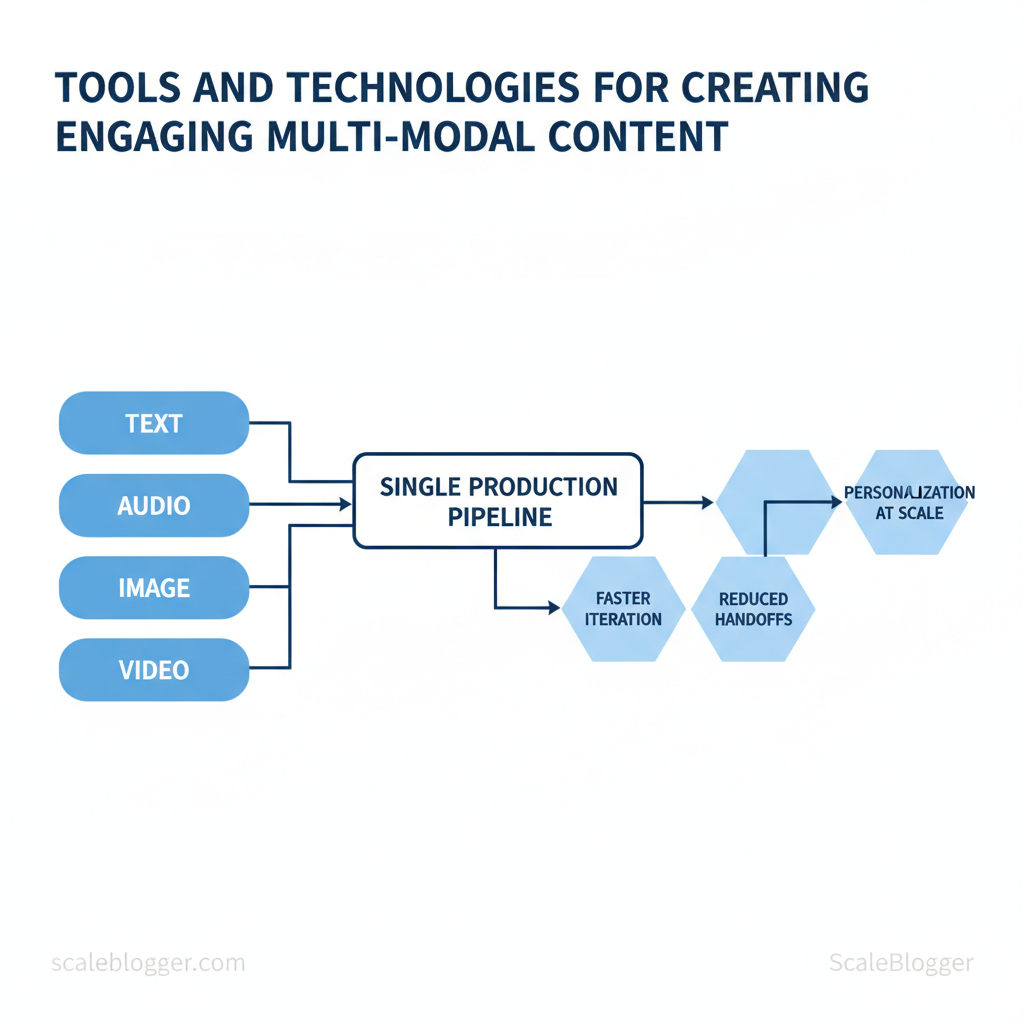
Marketing teams and creators still spend disproportionate time stitching together formats, platforms, and assets instead of shaping ideas that move audiences. The result: slower campaigns, duplicated effort, and content that performs well in one channel but falls flat in others. Emerging content creation tools and multi-modal content technology can collapse those gaps by treating text, audio, image, and video as parts of a single production pipeline.
These tools accelerate iteration, reduce manual handoffs, and make personalization at scale achievable without bloated teams. Picture a product launch where a single source asset produces a landing page, short-form video, and social carousels with consistent messaging and optimized formats. That’s the practical payoff — faster time-to-audience and higher engagement per campaign budget.
- How to evaluate digital content tools by output quality and integration ease
- Which AI-driven workflows reduce repetitive production tasks
- Best practices for asset versioning across formats and channels
- Quick setup steps for turning a single concept into multi-format deliverables
What You’ll Need (Prerequisites)
Begin by assembling a compact, reliable toolkit and confirming skills so the content pipeline runs smoothly from draft to publish. Expect 30 minutes to 2 hours to install accounts, configure basic settings, and verify media workflows. Difficulty ranges from Easy for a basic Google Docs → WordPress flow, to Medium when adding audio/video editors or automation connectors.
- Accounts: Sign-ups for a writing editor, image editor, CMS, and any AI assistants.
- Hardware: A reliable laptop (8GB+ RAM) and headset for recording.
- Credentials: FTP/CMS access and API keys for automation tools.
- Skill baseline: Intermediate CMS use, basic image/audio editing, familiarity with content SEO concepts.
- Time budget: Allocate 30–120 minutes for setup and one focused block per week for maintenance.
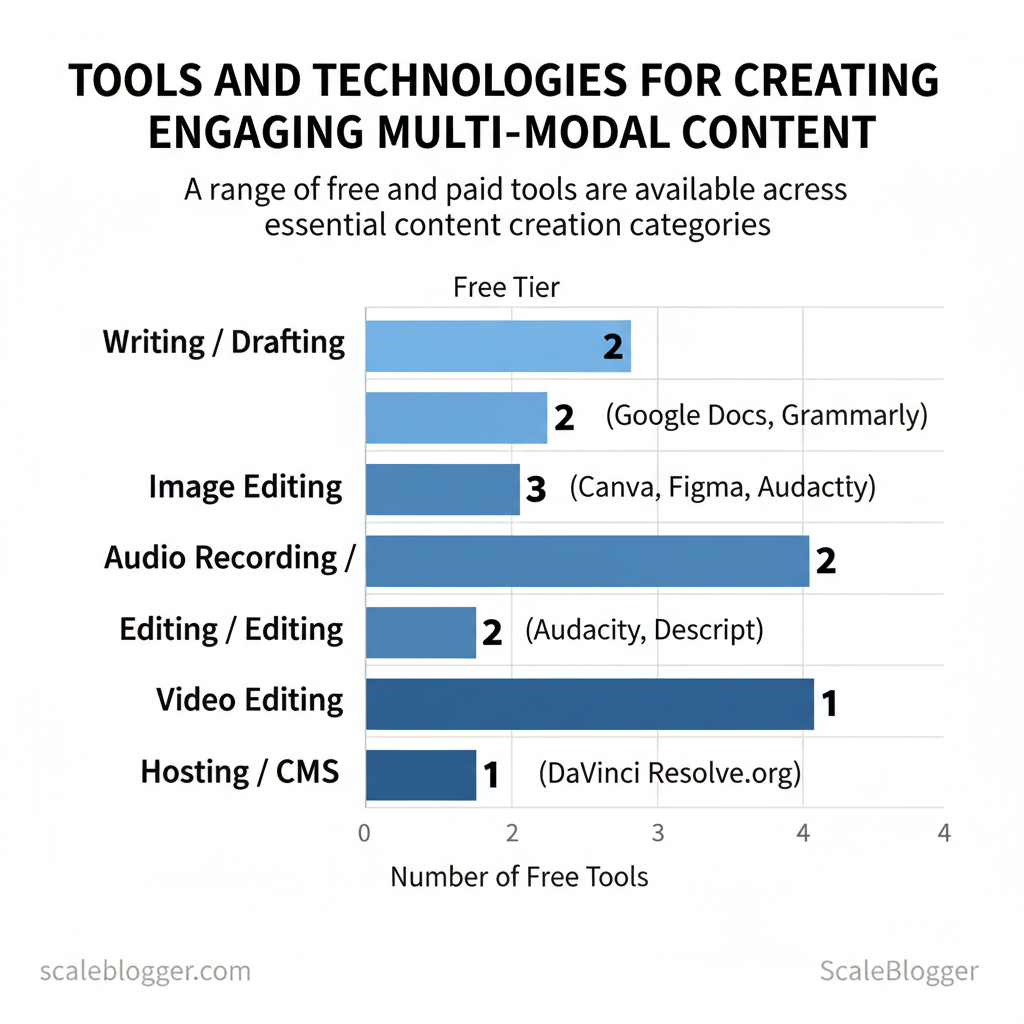
| Tool Category | Recommended Tool(s) | Why It’s Needed | Free/Paid | Skill Needed |
|---|---|---|---|---|
| Writing / Drafting | Google Docs; Microsoft Word (Microsoft 365 $6.99/mo); Notion (Free/$4/mo); Grammarly (Free/$12/mo); Jasper ($39/mo) | Collaborative drafting, grammar, AI prompts, SEO assist | Free tier / Paid tiers | Intermediate |
| Image Editing | Canva (Free/Pro $12.99/mo); Adobe Photoshop ($20.99/mo); Figma (Free/$12/mo) | Create thumbnails, resize, templates, SVG export | Free/Paid | Basic–Intermediate |
| Audio Recording / Editing | Audacity (Free); Descript (Free/$12/mo); Adobe Audition ($20.99/mo) | Record voiceovers, transcribe, multi-track edits | Free/Paid | Basic–Intermediate |
| Video Editing | DaVinci Resolve (Free/Studio $295); Adobe Premiere Pro ($20.99/mo); Final Cut Pro ($299 one-time) | Edit clips, color, export web-ready files | Free/Paid | Intermediate |
| Hosting / CMS | WordPress.org (hosting $5–15/mo); Squarespace ($16/mo); Webflow (CMS $12+/mo); Ghost (paid from $9/mo) | Publish, manage pages, plugins, SEO controls | Free software / Paid hosting | Intermediate |
Understanding these prerequisites reduces rollout friction and lets teams focus on content quality rather than tool troubleshooting. When implemented correctly, this setup accelerates production while keeping options open for future automation and scale.
Step-by-Step Workflow Overview
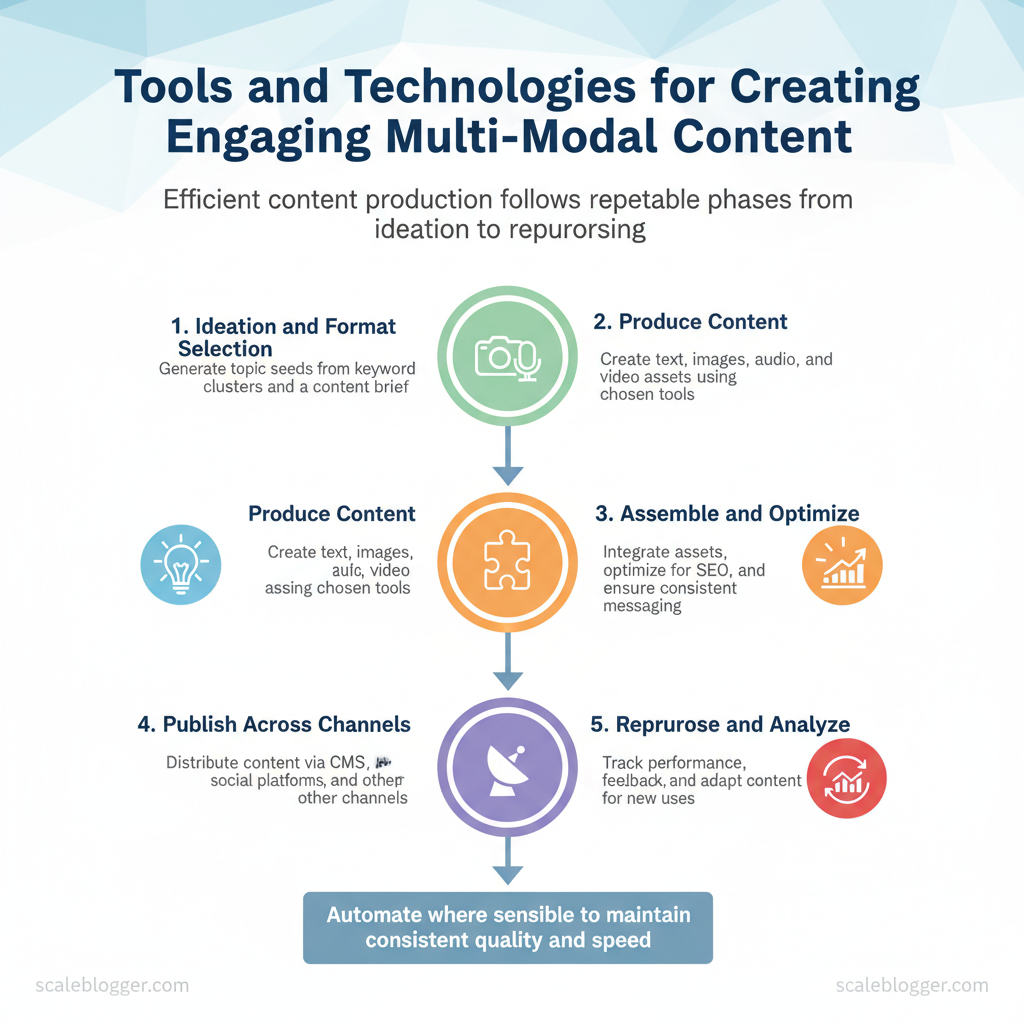
Start with a simple truth: efficient content production breaks down into repeatable phases—ideate, produce, assemble, publish, then repurpose. When those phases are defined and automated where sensible, teams move faster and maintain consistent quality across formats.
Prerequisites
- Defined audience and intent: Document primary personas and search intent for the campaign.
- Content inventory: A spreadsheet or CMS export of existing assets to avoid duplication.
- Clear KPIs: Ranking targets, traffic goals, and engagement metrics for measurement.
- Editorial calendar (CSV or Google Sheet)
- Content briefs template (use `title`, `keywords`, `audience`, `CTA`)
- Asset library for images/audio/video
- Publishing platform and access tokens (CMS, social APIs)
- Optional: AI content automation solution like Scaleblogger.com to scale repetitive tasks
Example publishing template (YAML) “`yaml title: “Target Title” format: “long-form” publish_date: “2025-01-15” primary_keyword: “semantic content optimization” distribution: [“website”, “twitter”, “newsletter”] “`
Practical tip: automate repetitive checks (links, schema, metadata) and reserve human review for judgment calls. Consider integrating an AI-powered workflow provider to reduce manual handoffs and maintain a steady cadence for repurposing. Understanding these principles helps teams move faster without sacrificing quality.
Numbered Steps: Create Multi-Modal Content
Start by treating multi-modal content as a single project with discrete micro-tasks: write, create visuals, record audio, edit video, and publish. Execute each task in sequence with clear acceptance criteria, then loop for iteration. Below are seven sequential steps with concrete micro-actions, tool recommendations (beginner → advanced), time estimates, and verification checks.
Total time estimate: 3–10 hours depending on complexity and media mix.
| Task | Recommended Tool (Beginner) | Recommended Tool (Advanced) | Cost | Why Choose |
|---|---|---|---|---|
| Writing / Drafting | Google Docs | Jasper | Free / $39+/mo | collab editing; AI long-form |
| Writing / Drafting (alt) | ChatGPT Free | ChatGPT Plus | Free / $20/mo (Plus) | rapid ideation; API for scale |
| Image Creation / Editing | Canva | Adobe Photoshop | Free tier / $12.99+/mo | templates + quick design; advanced retouch |
| Generative Image | DALL·E (free credits) | Midjourney | Free trial / $10+/mo | fast concept art; high-quality renders |
| Audio Recording / Editing | Audacity | Descript | Free / $12+/mo | basic editing; AI transcription + overdub |
| Audio (pro) | Zoom H1 (recorder) | Adobe Audition | Device ~$100 / $20.99/mo | portable capture; professional mastering |
| Video Editing / Assembly | CapCut / iMovie | Adobe Premiere Pro | Free / $20.99/mo | quick edits; timeline control |
| Video (alternatives) | Canva Video | Final Cut Pro | Free tier / $299 (one-time) | templates; macOS optimized |
| CMS / Publishing | WordPress (hosting varies) | Webflow / HubSpot | Free core / $12+/mo hosting | flexible publishing; automation + design |
Optimizing Media for Web (Formats, Sizes, Accessibility)
Start by exporting media with formats and settings that balance visual fidelity and download cost; this reduces page load and improves engagement while keeping content accessible. For images, prefer modern formats (`AVIF`, `WebP`) with fallbacks to `JPEG/PNG` for legacy support. For video, deliver `MP4` (H.264 or H.265 where supported) and provide adaptive bitrates. For audio, use `AAC` or `MP3` at conversational bitrates and always include transcripts and captions.
Practical export and compression steps
Responsive images and srcset guidance
- Generate variants: create 3–5 widths for each image.
- Use `srcset` and `sizes`: inform the browser which image to pick.
- Lazy-load non-critical images: use `loading=”lazy”` and `decoding=”async”` for images below the fold.
 “`
“`
Caption and transcript workflow (templates)
- Caption template: [Short summary] — 1 sentence describing what the media shows; include speaker name if applicable.
- Transcript template: Timestamped lines `00:00 Speaker: Sentence.` Export `.vtt` for captions and `.srt` for legacy systems.
Validation and testing tools
- Performance checks: Lighthouse and PageSpeed Insights for load and Core Web Vitals.
- Accessibility checks: axe DevTools, WAVE, or Lighthouse a11y audits.
- Compression checks: compare quality with `SSIM` or `PSNR` and visual spot-checks.
| Media Type | Recommended Format | Typical Target Size | Compression Tip | Accessibility Note |
|---|---|---|---|---|
| Hero Images | AVIF / WebP (fallback JPEG) | 150–350 KB | Save at quality 60–75; serve responsive widths | Include descriptive `alt`; short caption |
| Inline Images | WebP / JPEG | 20–80 KB | 2x export, resize to display size, quality 55–70 | `alt` text and `aria-describedby` when needed |
| Short Video Clips | MP4 (H.264/H.265) | 1–5 MB per 10s clip | CRF 22–28; two-pass for better compression | Include captions (`.vtt`); short descriptive text |
| Long-form Video | HLS/DASH segments (MP4 variants) | 50–200 MB per 10 min (varies by bitrate) | ABR ladder: 400k–3M; encode multiple renditions | Full captions + chaptered transcript |
| Audio Clips / Podcasts | AAC / MP3 | 0.75–1.5 MB per min (64–128 kbps) | 64–96 kbps for talk, 128kbps for music | Provide full searchable transcript (`.txt`, `.vtt`) |
Assembly, QA, and Publishing Checklist
Start the final pass with a short, machine- and human-readable QA sequence so nothing slips through at publish time. Start by validating that the content matches intent, then confirm technical readiness, and finish by scheduling distribution. This order prevents rework and reduces the risk of indexing or UX problems after launch.
Example meta template: “`html
Tools and automation: integrate `site-crawler`, schema validators, and scheduling tools; consider an AI content pipeline like Scaleblogger.com to automate repetitive checks and distribution. Understanding these principles helps teams move faster without sacrificing quality. When publishing becomes a predictable pipeline, editors focus on value rather than firefighting.
Troubleshooting Common Issues
When a content pipeline stalls, the most useful first move is to map observable symptoms to likely root causes and run a focused verification loop. Start by listing what’s failing (deliverables, timing, traffic, quality), then test the smallest unit that should work—publish one article, run one automation job, or refresh one keyword cluster. That narrow test isolates whether the problem is systemic or localized. Typical symptoms include missed publishes, sudden traffic drops, AI-generated low-quality drafts, or scheduling conflicts between CMS and social platforms. Common root causes are misconfigured automation rules, API rate limits, degraded model prompts, or gaps in editorial handoffs. Address each by reproducing the failure, applying a targeted fix, and confirming success with a short verification checklist.
Symptoms, probable roots, and immediate fixes
Step-by-step diagnostic process
Industry analysis shows many failures trace back to human–automation handoffs rather than the automation itself.
Verification checklist (copy into your runbook): “`text – Reproduced failure on single item ✅ – API tokens valid & not rate-limited ✅ – CMS publish logs show expected status ✅ – Page source passes SEO checks (canonical, robots) ✅ – Post visible and indexed within 24–72 hours ✅ “`
When automation causes repeated workflow friction, consider adding an approval gate or using an AI content scoring layer. For larger pipelines, Scale your content workflow with AI content automation at Scaleblogger.com where automated scheduling, benchmarking, and prompt libraries reduce these recurring issues. Understanding these diagnostic steps lets teams restore momentum faster and avoid repeat outages. This approach reduces firefighting and keeps creators focused on high-impact work.
Tips for Success and Pro Tips
Start by designing the workflow you actually follow, not the one you wish you followed. That means batching repeatable tasks, standardizing outputs, automating where the ROI is clear, and closing the loop with regular measurement so each cycle gets faster and higher-quality.
Prerequisites
- Clear content goals: Define audience, primary KPI, and target search intent.
- Standard asset library: Create templates for briefs, outlines, CTAs, and meta descriptions.
- Automation basics: Access to an automation tool or scheduler and a lightweight analytics dashboard.
- Short-form social: extract 8–12 soundbites or quotes.
- Newsletters: turn the intro + top three points into a digest.
- Snippet library: create 5 tweet-sized lines and 3 LinkedIn post prompts.
- Visuals: generate 1 hero image and 3 social cards from key sentences.
- Long-form spin: expand three high-performing short posts into a pillar article.
Practical pro tips
- Use a lightweight content scoring framework to decide where to double down.
- Schedule weekly 30-minute retrospectives to remove one friction point.
- When scaling, document exceptions instead of leaving them to tribal knowledge.
📥 Download: Multi-Modal Content Creation Checklist (PDF)
Measuring Success and Iteration
Start by defining a short list of measurable outcomes: traffic quality, engagement depth, conversion lift, and content velocity. For multi-modal content (text + audio + video + data visualizations), prioritize engagement per modality, assisted conversions, and time-to-value for content updates. Set realistic baselines in week 1 so every test has a clear delta to measure against.
Prerequisites
- Analytics access: GA4, server logs, and CMS analytics enabled.
- Event plan: a catalog of events and UTM conventions.
- Experiment runner: A/B testing platform or feature-flag system.
- Tracking tools: GA4, Hotjar/FullStory, server-side events
- Experiment tools: Google Optimize alternative or in-house flags
- Workflows: Git for content assets, editorial calendar, sprint board
Common measurement pitfalls: over-tracking vanity metrics, missing assisted-conversion attribution, and inconsistent UTM usage. Fix these by enforcing a single event taxonomy and by validating events weekly.
| Week | Milestone | Action | Metric to Monitor | Success Criteria |
|---|---|---|---|---|
| Week 1–2 | Baseline & Tracking | Deploy GA4, `dataLayer`, define events | Event coverage %, baseline sessions | 95% event coverage; baseline established |
| Week 3–4 | Quick wins | Run headline + thumbnail A/B | CTR, bounce rate | +10% CTR or -15% bounce |
| Week 5–6 | Multi-modal test | Launch video + transcript variant | Watch time, scroll depth | +20% watch time; +10% scroll |
| Week 7–8 | Conversion lift test | Test CTA copy + placement | Micro-conversions/day | +15% micro-conversions |
| Week 9–12 | Scale & Automation | Automate top-performing templates | Time-to-publish, engagement lift |
Conclusion
By streamlining content workflows, prioritizing repurposing, and applying simple automation to repetitive tasks, teams move from busywork to ideas that actually engage audiences. Earlier sections showed how standardizing templates reduced review cycles, how batching asset creation accelerated campaign launches, and how rule-based automation closed the loop between CMS and social channels. Those examples illustrate a pattern: clarity in process plus automation yields faster campaigns and fewer content bottlenecks. If you’re wondering how much to automate, start with the smallest, most repetitive task; if you’re unsure where to begin, map one content journey and eliminate manual handoffs first.
For immediate next steps, pick one workflow to standardize this week, set a measurable goal (time saved or publish cadence), and run a two-week experiment to validate impact. Document the template, assign a single owner, and measure results. For teams looking to scale beyond pilot projects, platforms and services that combine AI content production with automation can accelerate rollout without bloating headcount. To explore that option and see how a structured, automated content engine performs in practice, Explore Scaleblogger’s AI-driven content production services.
