

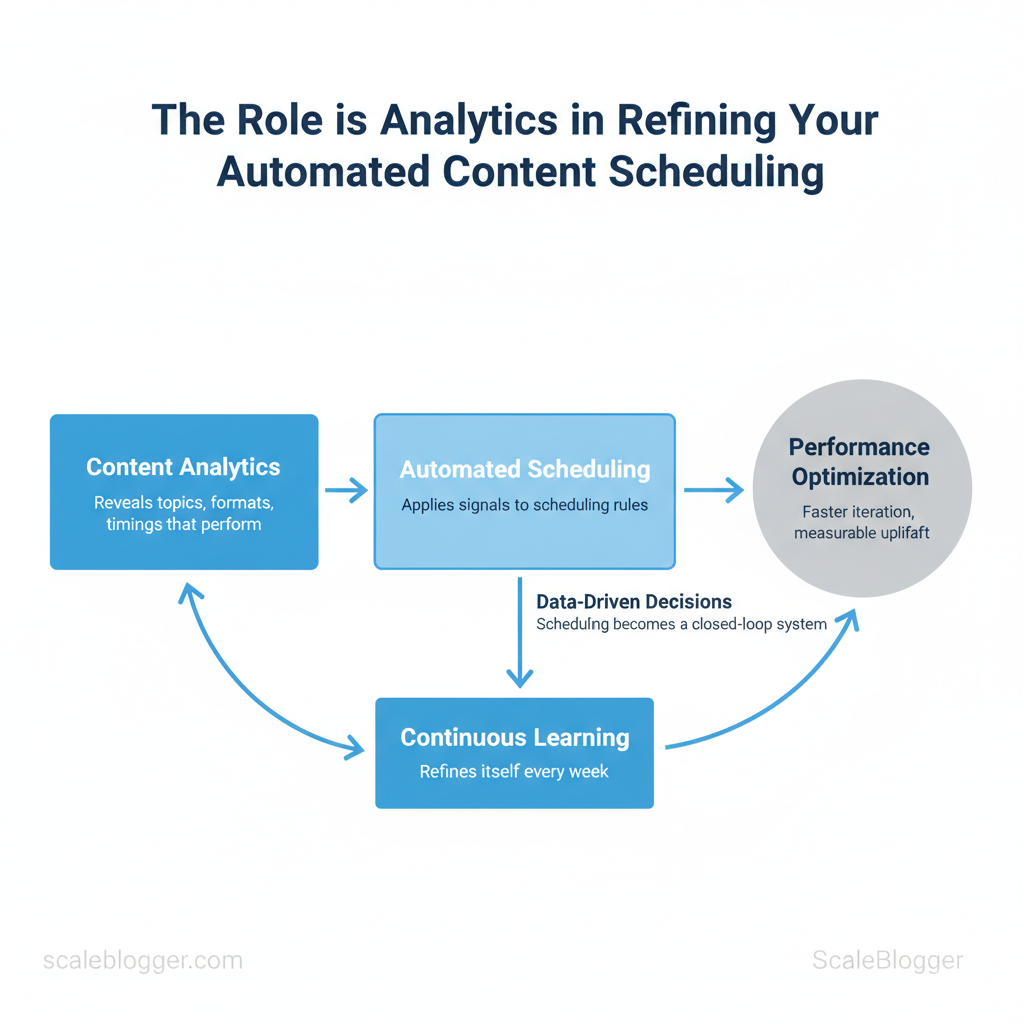
Marketing teams routinely overbook content calendars and under-measure impact, leaving high-performing slots empty and sunk effort unnoticed. Harnessing content analytics inside automated scheduling turns guesswork into repeatable advantage by revealing which topics, formats, and timings actually move the needle. When teams apply those signals to scheduling rules, the result is faster iteration, measurable uplift, and clearer ROI.
Automation without measurement is just delegation; measurement converts automation into learning.
Picture a calendar that promotes posts when `CTR` and `engagement_rate` spike, pauses formats that underperform, and reallocates budget to the authors driving the most traction. That’s where performance optimization and data-driven decisions meet workflow: scheduling becomes a closed-loop system that refines itself every week. For practical templates and integrations that jumpstart this process, Get started with an analytics-driven content schedule (free resources): https://scaleblogger.com
- How to map analytics signals to scheduling rules that scale
- Which KPIs to prioritize for steady audience growth
- Simple tests to validate timing and format hypotheses
- Automations that reduce manual scheduling while increasing reach
Why Analytics Is Essential for Automated Content Scheduling
Analytics determines whether automation actually improves performance or simply repeats mistakes. Teams that run scheduling rules without measurement treat publishing as a set-and-forget operation; analytics transforms that into a learning system that tests hypotheses, measures outcomes, and refines rules. Measurement reveals which times, formats, and frequencies move `CTR`, `engagement rate`, and downstream conversions—information that rules-only systems never surface. When analytics feeds scheduling, automation becomes adaptive: it boosts content that performs and prunes what’s underperforming.
How rules-only systems fail
- Rigid frequency: A fixed cadence may overwhelm loyal readers or leave new audiences underserved.
- Blind timing: Posting by a calendar ignores hourly and regional engagement patterns.
- Format mismatch: Rules assume a format will perform; they can’t detect declines in watch time or read depth.
- No attribution: Without measurement, teams cannot assign ROI to channels or content types.
- Slow learning: Manual retrospectives replace rapid iteration, making recovery from mistakes slow.
Example: shifting formats and times
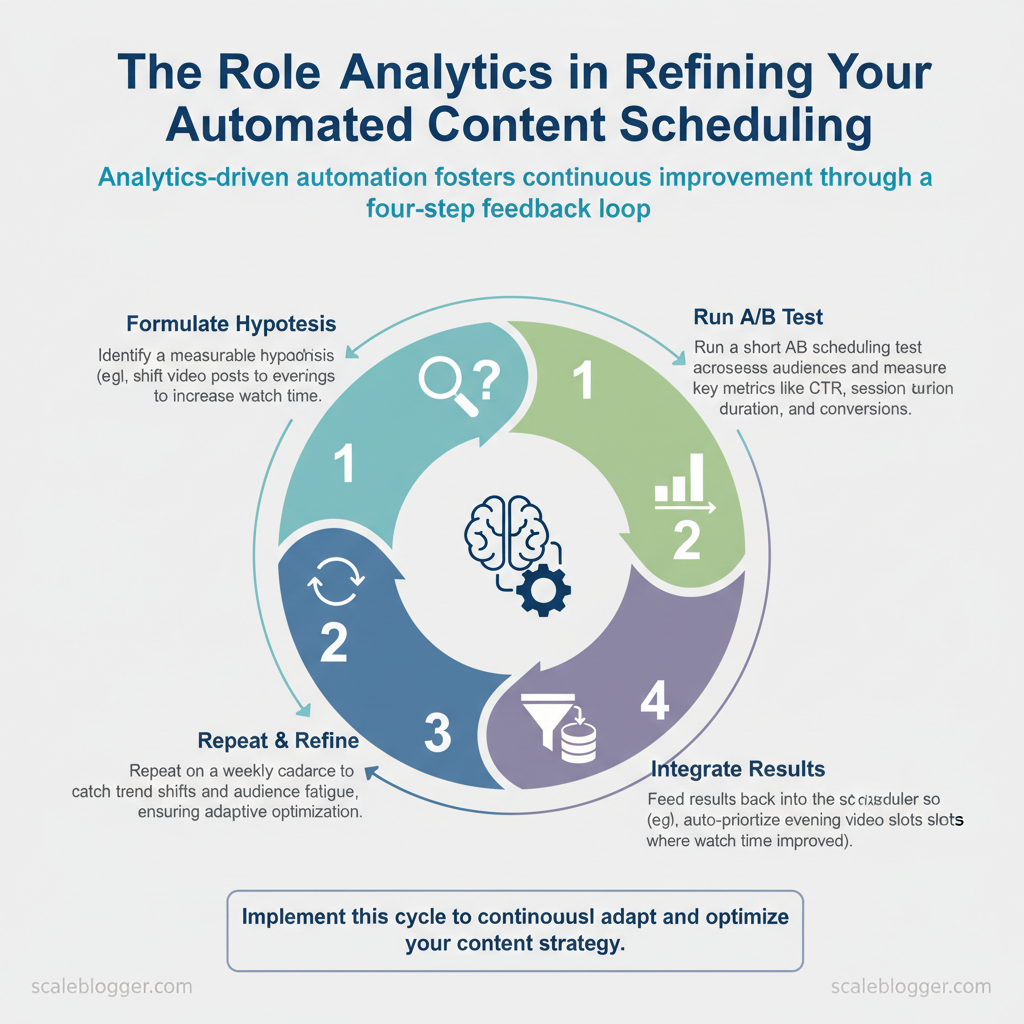
- Hypothesis: Short-form clips posted at 7pm local time increase `CTR` by 15%.
- Test: Schedule 20% of clips at 7pm vs baseline slots for two weeks.
- Measurement: Analytics shows `CTR` uplift and longer watch time for 7pm posts.
- Action: Adjust automation to allocate additional evening slots and reduce midday slots for clips.
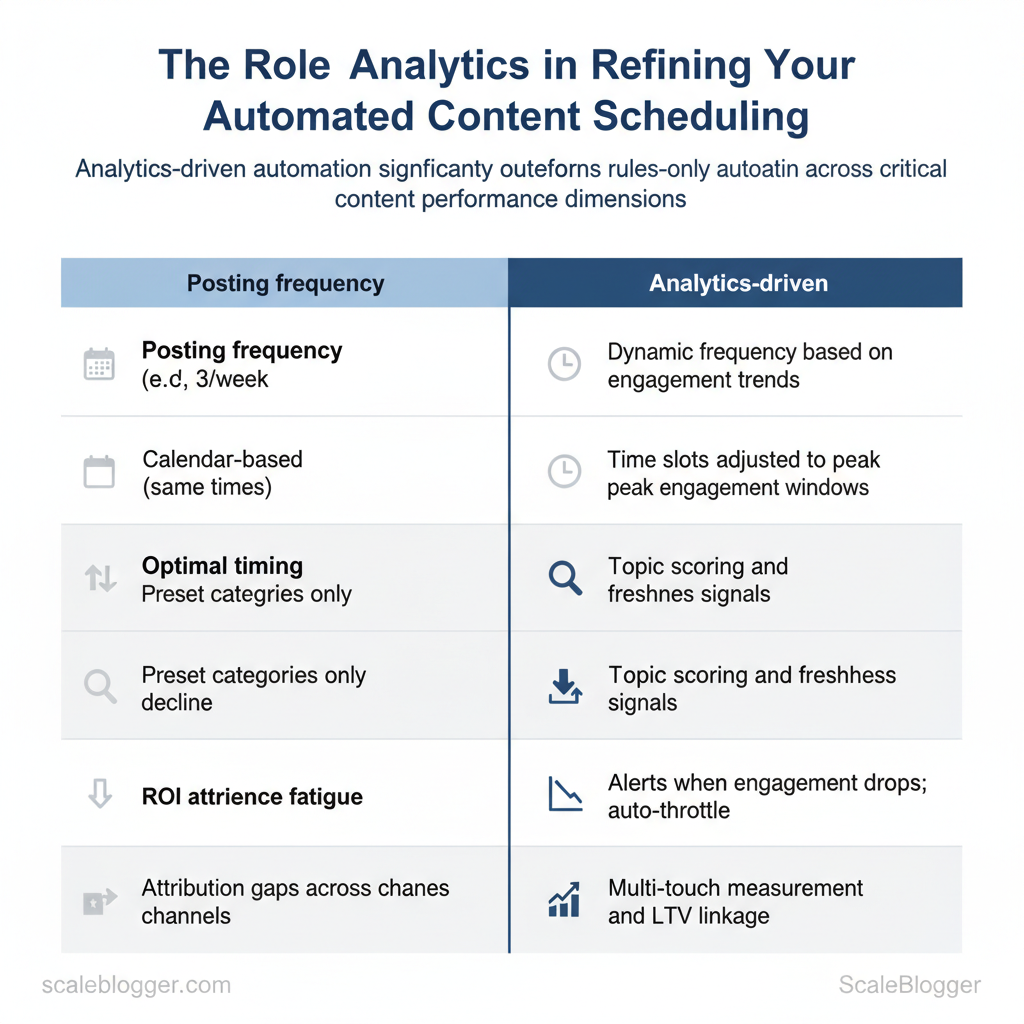
| Dimension | Rules-only Automation | Analytics-driven Automation | Business Impact |
|---|---|---|---|
| Posting frequency | Fixed cadence (e.g., 3/week) | Dynamic frequency based on engagement trends | Prevents fatigue, improves retention |
| Optimal timing | Calendar-based (same times) | Time slots adjusted to peak engagement windows | Higher `CTR` and reach |
| Content relevance | Preset categories only | Topic scoring and freshness signals | Better topical fit, increased conversions |
| Audience fatigue | No detection of decline | Alerts when engagement drops; auto-throttle | Reduces churn and unsubscribes |
| ROI attribution | Attribution gaps across channels | Multi-touch measurement and LTV linkage | Clearer budget decisions |
Key Metrics to Track for Scheduling Optimization
Start by tracking a compact set of engagement and conversion metrics that directly inform when, how often, and where content should be scheduled. These metrics show whether an audience is available (reach), receptive (engagement), and likely to act (conversion/retention). Monitor them together rather than in isolation: a spike in impressions with falling engagement suggests distribution timing is right but content needs adjustment; rising average watch time at off-hours indicates an opportunity to expand publishing windows.
Core engagement and reach metrics tell you if scheduling aligns with audience presence: Impressions — total times content was shown*; an early-warning signal for distribution effectiveness. Reach — unique users exposed*; shows audience breadth and saturation risk. CTR (Click-through rate) — clicks ÷ impressions*; indicates thumbnail/headline effectiveness at scheduled times. Engagement rate — interactions ÷ reach*; captures quality of interaction independent of raw views. Average watch/read time — time spent per view*; measures content resonance and ideal session lengths.
Conversion and retention signals guide cadence and recycling decisions:
Attribution caveats when linking scheduling to performance:
- Multi-touch paths distort single-publish attribution — avoid assuming a single send-time caused a conversion.
- Platform delays and view-through conversions can make scheduling impact appear delayed; use cohort windows of 7–30 days.
- Cross-channel amplification often shifts the optimal schedule—what works on social may not transfer to email.
- Rule-of-thumb thresholds: monitor CTR weekly (alert <1%), engagement rate weekly (alert <2%), average watch/read time monthly (alert <50% of content length).
| Metric | Definition / Formula | Primary Scheduling Impact | Monitoring Frequency |
|---|---|---|---|
| Impressions | Total times content displayed | Decide volume/frequency of publishes | Daily |
| Reach | Unique users exposed | Detect audience saturation; expand windows | Daily |
| CTR | `Clicks ÷ Impressions` | Test posting times and creative variants | Weekly |
| Engagement Rate | `Interactions ÷ Reach` | Choose formats and refine publish cadence | Weekly |
| Average Watch/Read Time | Average seconds or % completed | Set ideal content length and time slots | Weekly–Monthly |
Understanding these measures helps teams schedule with confidence and iterate faster without adding manual overhead. When applied consistently, this approach makes scheduling a data-driven lever that improves both visibility and downstream conversions.
Tools and Integrations for Analytics-Driven Scheduling
Modern scheduling must be driven by data signals rather than calendar habit. Start with analytics platforms that provide reliable, exportable event-level data and pair them with automation platforms that can act on those signals in real time. That combination lets teams automatically pause underperforming posts, boost high-CTR content, and reroute promotion budgets without manual bottlenecks.
Analytics Platforms and What to Look For – Real-time ingestion: choose sources that surface near-real-time metrics for impressions, clicks, and conversions. – API/export capability: API access and bulk exports enable automation; CSV downloads alone are insufficient for continuous workflows. – Segmentation & cohorts: cohort analysis reveals lifecycle performance that single-session metrics miss. – Custom events: track `content_view`, `cta_click`, `subscribe_attempt` with consistent naming across channels. – Attribution support: cross-channel attribution and UTM consistency let automation make channel-level decisions.
Practical reporting setup (example)
Scheduling & Automation Platforms — Integration Patterns Common mechanisms
- Webhooks — real-time event pushes to automation platforms.
- APIs (REST/GraphQL) — read/write control for publishing state and metadata.
- Message queues — `Pub/Sub` or `Kafka` for buffering spikes and retry logic.
- SFTP/CSV — batch export for legacy systems.
- Auto-pause low performers: when 24-hour CTR < 0.25% and cost-per-click > threshold, call CMS API to unpublish draft or remove paid promotion tags.
- Boost high-CTR posts: when a post’s 6-hour engagement velocity exceeds historical 90th percentile, add to paid distribution queue and increase budget by X%.
- Resurface evergreen: if engagement decay < Y after 180 days, schedule a republish with updated title and meta.
Example webhook payload “`json { “content_id”:”post-123″, “metric”:”ctr”, “value”:0.034, “window”:”6h”, “action”:”boost” } “`
| Feature | GA4 | Social Native Analytics | Third-party Content Analytics | Why it matters |
|---|---|---|---|---|
| Real-time data | ✓ near-real-time (streaming via Measurement Protocol) | Varies by platform; often delayed 5–15m | ✓ real-time dashboards common | Enables quick scheduling actions |
| API/data export | ✓ Measurement Protocol & Reporting API | ✓ Graph API (Facebook), Marketing API (LinkedIn), native exports | ✓ REST APIs, data warehouses connectors | Automation requires programmatic access |
| Cohort/segment analysis | ✓ built-in cohort reports | ✗ limited cohort features | ✓ advanced cohort tools, retention analysis | Detects post lifecycle and audience behavior |
| Custom event tracking | ✓ `gtag`/`event` support | ✗ limited to available engagement metrics | ✓ supports custom schemas and events | Necessary for content-specific triggers |
| Cross-channel attribution | ✓ basic attribution models, BigQuery export for advanced | ✗ per-channel attribution only | ✓ multi-touch attribution engines | Prevents double-counting and misdirected boosts |
Understanding these integration patterns reduces manual overhead and ensures scheduling decisions are timely and defensible. When implemented correctly, automation frees teams to focus on creative optimization rather than repetitive publishing tasks.
Designing Tests and Experiments for Scheduling Decisions
Start with a simple, repeatable experiment template and run disciplined tests that separate timing, frequency, and channel variables. Schedule one independent variable per experiment, set a measurable primary metric, estimate the sample size using platform baselines or a power calculator, and define a clear decision rule (for example: `p < 0.05` or a minimum 10% lift). Doing this prevents ambiguous results and keeps tests fast, actionable, and comparable over time.
- Clear hypothesis: one sentence, directional.
- Control defined: unchanged baseline variant available.
- Sufficient reach: estimate audience to hit sample size.
- No confounders: no simultaneous major campaigns or product launches.
- Monitoring plan: daily checks and automated alerts for anomalies.
- Contamination: mixing audiences or reusing the same creative across variants. Fix by isolating audience segments and swapping only the scheduling variable.
- Seasonality: calendar events shift behavior. Avoid by running matched-week comparisons or blocking tests around holidays.
- Insufficient runtime: stopping early creates false positives. Minimum monitoring for awareness-stage metrics is typically `2–4 weeks` depending on cadence and volume.
- Multiple simultaneous tests: interaction effects hide true impact. Stagger tests or use factorial designs when interaction measurement is intentional.
| Test Name | Hypothesis | Primary Metric | Sample Size / Duration | Decision Rule |
|---|---|---|---|---|
| Timing Test — Morning vs Afternoon | Morning posts (9am) increase CTR by ≥10% vs 3pm | CTR (%) | ~5,000 impressions per variant / 14–28 days | Win if ≥10% lift and `p < 0.05` |
| Frequency Test — 1x vs 3x per week | 3x/week increases weekly sessions by ≥15% | Weekly sessions | 4 weeks per arm / audience control | Win if sustained lift for 2 consecutive weeks |
| Format Boost Test — Short clip vs long read | Short clip drives higher engagement rate | Engagement rate | 2,500 views per variant / 14–21 days | Win if engagement rate +12% and practical lift |
| Channel Allocation Test — LinkedIn vs Twitter | LinkedIn produces 20% more qualified leads | Qualified leads | 100 lead-conversion opportunities / 30 days | Win if lead quality/OCR improves by ≥15% |
| Recycle Cadence Test — 30 days vs 90 days | 30-day recycle generates more recency traffic | Returning sessions | 8 weeks per arm / historical baseline | Win if returning sessions lift ≥10% without UX fatigue |
Understanding these principles helps teams move faster without sacrificing quality. When implemented correctly, this approach reduces overhead by making decisions at the team level.
Automating Responses to Analytics — Rules, Scripts, and Machine Learning
Automate immediate operational decisions with concise rules, reserve scripts for glue logic and integrations, and invest in machine learning when signal complexity justifies model maintenance. Start with simple rule-based recipes to cut manual triage time, add scripted workflows for edge-case handling and API orchestration, and only move to ML when historical signals predict outcomes reliably and at scale.
Rule-Based Automation Recipes (practical examples)
- Auto-pause low CTR posts: Pause underperforming posts to conserve budget and test variations.
- Auto-boost high engagement posts: Increase ad spend or push social amplification when engagement spikes.
- Reschedule posts with high impressions but low CTR: Change headline or thumbnail when impressions > threshold but CTR below benchmark.
- Promote evergreen content gaining traction: Add to evergreen promotion queue when organic impressions rise consistently.
- Throttle frequency to reduce audience fatigue: Reduce send frequency when engagement drops after X sends.
Code and script example (simplified auto-pause using a platform API) “`python
Python pseudo-code: pause article if CTR < 0.8% over last 72h
from analytics import fetch_metrics, publish_actionmetrics = fetch_metrics(post_id, window_hours=72) if metrics[‘impressions’] > 1000 and metrics[‘ctr’] < 0.008: publish_action(post_id, action='pause') ```
When to use scripts vs ML
- Signals for scripts: Data sparsity, deterministic rules, simple thresholds, or tasks requiring API orchestration (format conversion, scheduling).
- Signals for ML: Rich historical data (months+), multiple interacting features (time, audience cohort, creative variants), and a measurable positive ROI from predictions.
- Fallback strategy: Always include a conservative fallback—revert to rule-based defaults if model confidence is low or latency spikes.
- Human-in-the-loop: Require human review for actions with high cost or brand risk (promotions above spend thresholds, content takedown).
- Rate limits and API quotas: Implement exponential backoff and circuit-breakers in scripts.
- Spam/false-action detection: Add sanity checks (e.g., require minimum impressions before action).
- Sandbox validation: Use shadow mode (log-only) and A/B test automated actions against controlled cohorts.
| Recipe | Trigger (Metric) | Action | Tool/Implementation Example | Expected Result |
|---|---|---|---|---|
| Auto-pause low CTR posts | CTR < 0.8% over 72h & impressions >1000 | Pause post / remove from rotation | Zapier webhook → CMS API / custom Python script | Reduced wasted impressions; lower ad spend |
| Auto-boost high engagement posts | Engagement rate ↑ 30% day-over-day | Increase ad budget or promote on social | Facebook Ads API + Make automation | Faster reach growth; improved top-performing ROI |
| Reschedule posts with high impressions but low CTR | Impr > 5k & CTR < benchmark | Reschedule with new headline/thumbnail | Buffer API + CMS edit via Zapier | Improved CTR after creative refresh |
| Promote evergreen content gaining traction | Organic impressions + impressions growth >10% week | Add to evergreen queue / schedule promos | Custom scheduler + Google Sheets trigger | Sustained traffic lift; higher long-tail SEO value |
| Throttle frequency to reduce audience fatigue | Engagement drop >15% after N sends | Reduce send frequency for cohort | Email platform API + script | Lower unsubscribes; stabilized engagement |
📥 Download: Automated Content Scheduling Checklist (PDF)
Operationalizing Insights — Teams, Workflows, and Governance
Operationalizing analytics requires clear ownership, repeatable cadence, and documentation that makes decisions auditable. Begin by assigning crisp roles for scheduling and analytics, then bake dashboards, alerts, and templates into the workflow so insight-to-action is repeatable. Below are concrete rules, a sample RACI for scheduling governance, meeting cadences, and dashboard/alert standards that teams can adopt immediately.
| Task | Responsible | Accountable | Consulted | Informed |
|---|---|---|---|---|
| Define scheduling rules | Content Ops Manager | Head of Content | SEO Lead, Legal | Editorial Team, Stakeholders |
| Monitor analytics and alerts | Analytics Analyst | Head of Growth | Content Ops, DevOps | Marketing, Execs |
| Approve automation changes | Automation Engineer | Head of Content Ops | Security, Legal | Content Creators |
| Run experiments (A/B, cadence tests) | Growth PM | Head of Growth | Data Scientist, SEO Lead | Content Ops, Editors |
| Document outcomes | Content Ops Coordinator | Head of Content Ops | Analytics Analyst | Entire Marketing Team |
Typical agendas include: alert triage, experiment status, backlog prioritization, and documentation sign-off.
- Dashboards: Focus on outcomes — surface sessions, conversions, organic ranking changes, content scoring, and experiment lift; include trend lines and baseline comparisons.
- Alerts: Thresholds by impact — e.g., traffic drop >20% week-over-week, conversion fall >15%, publish failures >0.5%; route critical alerts to Slack + email, less critical to a daily digest.
- Documentation: Audit-first templates — capture hypothesis, dataset, query, experiment settings, results, decision, and owner.
Understanding these principles helps teams move faster without sacrificing quality. When implemented correctly, this approach reduces overhead by making decisions at the team level.
Conclusion
You’ve seen how pairing content analytics with automated scheduling uncovers wasted opportunity and makes performance measurable. When teams align cadence to data, they stop guessing which slots perform and start reallocating resources to formats and times that actually move the needle. One editorial team that adopted analytics-driven automation reclaimed previously underused publishing windows and freed editorial capacity for higher-value pieces; another used automated A/B scheduling to identify headline patterns that consistently lifted engagement. Prioritize quick wins: instrument events, map the highest-impact publishing slots, and automate repeatable workflows so the calendar starts working for you instead of against you.
If questions remain — like how long before results appear or which metrics to track first — expect initial signal within weeks once tagging and scheduling are consistent, and focus on engagement rate, click-through, and conversion attribution as starting metrics. For teams looking to scale this approach without rebuilding internal tooling, platforms can streamline tracking, scheduling, and reporting. To streamline this process, Explore Scaleblogger’s automation and analytics solutions as one practical next step. Begin by running a two-week pilot: tag your top 20 posts, automate their optimal slotting, review the outcome, and iterate. That sequence yields clarity fast and creates a repeatable loop for continuous improvement.
