

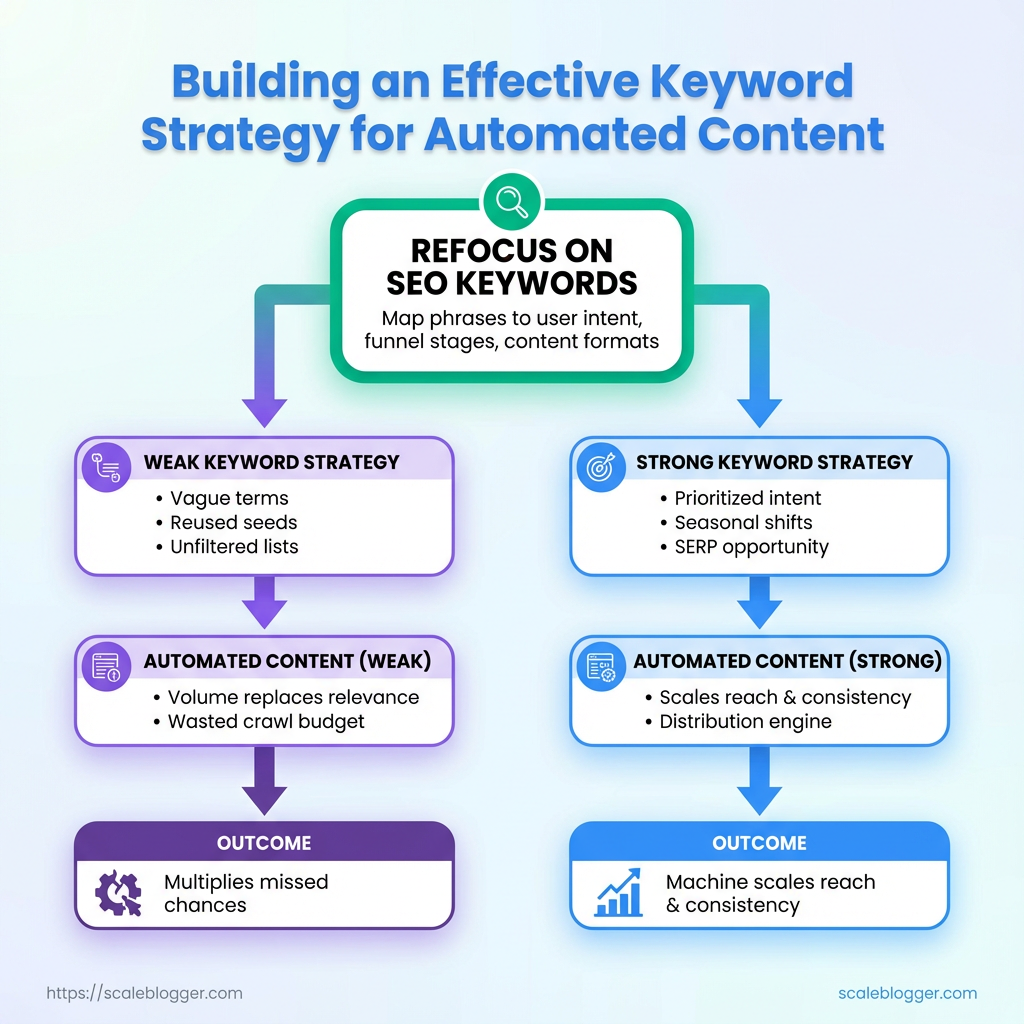
Your publishing calendar fills up faster than your traffic numbers grow because the content isn’t aligned with search demand. That mismatch starts with a weak keyword strategy: chasing vague terms, reusing the same seed keywords, and handing unfiltered lists to automation tools that dutifully churn out posts nobody actually finds.
When automation produces content without a signal from strategic keywords, volume replaces relevance and crawl budget goes to waste. A smarter approach treats automated content as a distribution engine fed by prioritized intent, seasonal shifts, and SERP-level opportunity, not as a shortcut past research.
Refocusing on the right SEO keywords means mapping phrases to user intent, funnel stages, and content formats before automation touches them. Do that and the machine scales reach and consistency; skip it and scaling simply multiplies missed chances.
What You’ll Need (Prerequisites)
Start with the essentials before building an automated keyword strategy: the right mix of tools, a baseline of data access, and practical SEO skills. Without those three pillars, automation becomes brittle — it either produces low-value content or needs constant manual correction. The list below covers concrete tools, the data access you’ll need, and the skills that speed up setup and maintenance.
Access to Search Data: A connected Google Search Console property and GA4 or equivalent analytics view to pull impressions, click-through rates, and landing page performance.
Seed keyword list: At least 200 validated keywords or topics that reflect buyer intent, gathered from historical traffic, customer interviews, and competitor landing pages.
Content automation endpoint: API access to your CMS or an automation platform (e.g., Zapier, Make, or direct CMS API) so processes can publish, update, or tag content programmatically.
Basic SEO knowledge: Comfort with keyword intent (informational vs transactional), on-page signals (title, meta, H1), and how to interpret SERP features.
Tools & quick wins to have on hand: Google Search Console & Analytics: for real performance signals and query data. An advanced keyword tool: to scale keyword discovery and grouping. An automation layer: to move data between systems and trigger content workflows. A content editor or CMS with templates: to enforce structure and speed publication.
- Ensure
APIkeys and account-level access are available for any automation platform and the CMS. - Compile and clean the seed keyword list: remove duplicates, normalize terms, and tag by intent.
- Grant read/write permissions for Search Console and Analytics to the user or service account that will run reports.
Practical examples: A marketing ops person sets up a Zap that pulls top-performing queries from Search Console weekly and pushes them into a content backlog in the CMS. An SEO specialist tags seed keywords by intent and maps them to content templates so automated drafts follow a consistent structure.
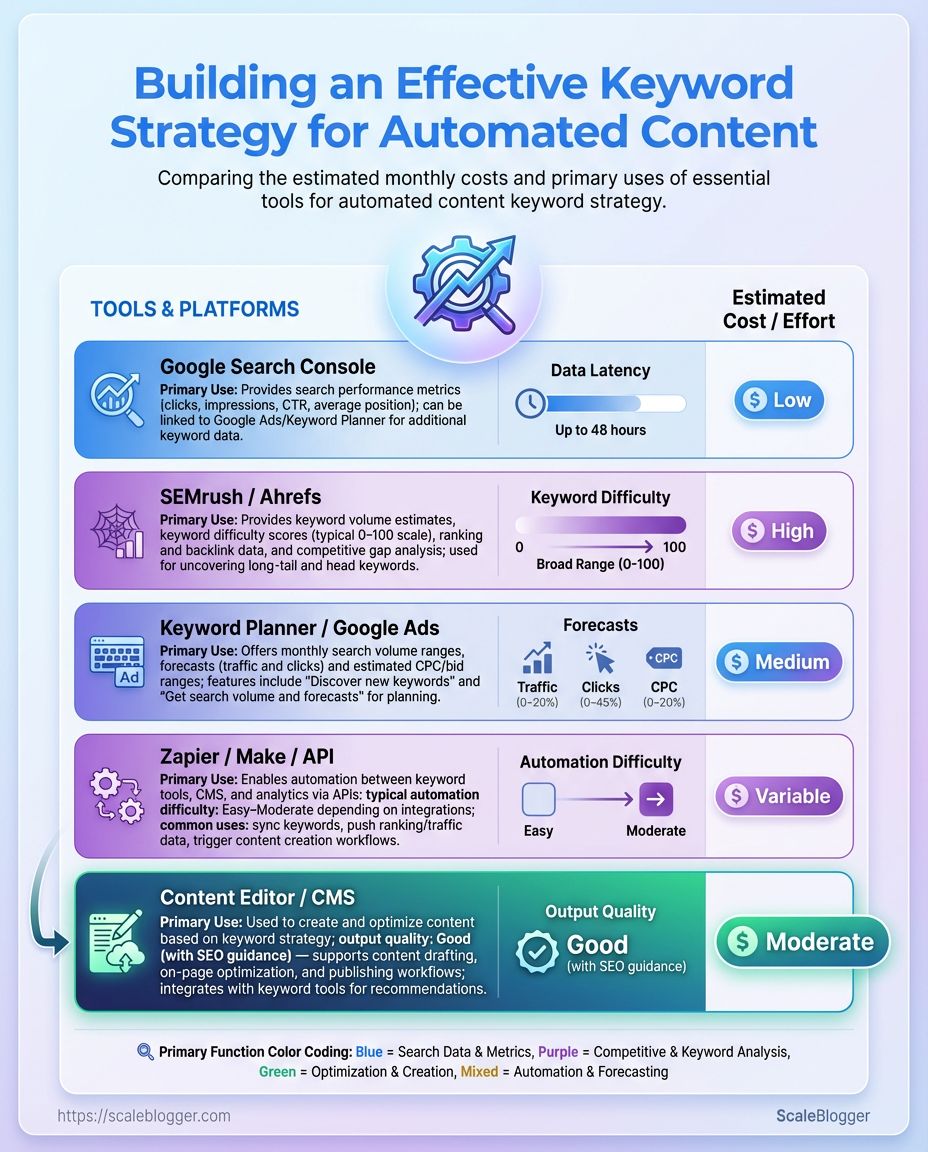
Recommended tools and the role each plays in building a keyword strategy for automated content
| Tool | Primary Use | Pros for Automation | Estimated Cost |
|---|---|---|---|
| Google Search Console | Search performance and query data | Official performance signals, free access to impressions/CTR | Free |
| SEMrush / Ahrefs | Competitive research, keyword metrics | Large keyword databases, API access for batch exports | SEMrush from $119.95/mo; Ahrefs from $99/mo |
| Keyword Planner / Google Ads | Search volume and bid estimates | Direct Google volume estimates, useful for commercial intent | Free with Google Ads account |
| Zapier / Make (Integromat) / API | Workflow automation between tools | No-code automation, connectors to CMS and analytics | Zapier from $19.99/mo; Make from $9/mo; APIs vary |
| Content Editor / CMS with templates | Authoring, templating, publishing | Structured templates, versioning, API for programmatic publishing |
WordPress hosting $5–30/mo; managed CMS varies $20+/mo |
Key insight: Pairing official data sources (Search Console, Keyword Planner) with a robust keyword tool (SEMrush/Ahrefs) gives both signal accuracy and scale. An automation layer plus a templated CMS closes the loop so keyword strategy becomes repeatable and measurable.
Get these elements in place and the rest — workflows, scoring, and scaling — becomes a matter of composition, not discovery. Consider linking automation to publishing early so experiments run fast and learnings compound.
Define Your Automated Content Goals and KPIs
Start by turning high-level business objectives into measurable content outcomes. If the business goal is “grow qualified organic traffic,” translate that into specific keyword-driven KPIs: target monthly search volume for prioritized keywords, target positions (e.g., top 3), and conversion events tied to content (newsletter signups, demo requests, etc.). These become the north star for automation: the content pipeline should generate pieces and internal links that move those keyword KPIs upward.
Prerequisites
Baseline metrics: Pull 90 days of organic traffic, keyword rankings, and conversion rates from your analytics and search console. Stakeholder alignment: Agree on business goals, target audience stages (awareness, consideration, decision), and acceptable time horizon (90–180 days). Access: Read-only access to search console, analytics, and your CMS for publishing cadence data.
Tools & materials
- Keyword research dataset: a ranked list of candidate keywords with intent and volume estimates.
- Content inventory: list of existing pages, their traffic, and current rankings.
- Tracking sheet or dashboard: where KPIs will be recorded weekly.
Step-by-step process
- Identify the single business outcome you’ll optimize first (e.g., increase trial signups via blog channels).
- Map that outcome to keyword intent buckets — awareness, consideration, decision — and prioritize awareness-stage keywords when the objective is top-of-funnel growth.
- For each priority keyword, set KPI targets: baseline rank, target rank, estimated traffic lift, and expected conversion rate uplift.
- Pull baseline metrics from analytics and search console and log them next to each keyword to make progress measurable.
- Define operational KPIs for the automation itself: number of automated drafts produced per week, publish frequency, and average time-to-rank for similar topics historically.
- Create an attribution rule so content-driven conversions map back to the primary KPI (e.g., last non-direct click to blog post → signup).
Practical examples
Example — Awareness play: Target five informational keywords with combined monthly volume of ~10k; KPI: achieve top-5 positions for at least three within 120 days and lift organic sessions by 25% from those pages. Example — Consideration play: Target two product-edge keywords; KPI: raise CTR to landing pages by 15% and increase MQLs from blog flows by 10%.
Use automation to scale the repetitive parts — ideation, brief generation, scheduling — while holding the KPI targets and baselines as guardrails. Tools like AI content automation can help set up pipelines and dashboards that map keyword outputs directly to those KPIs.
Being precise about what success looks like from day one keeps automation focused and measurable, so every piece of content has a clear purpose tied to a business outcome.
Build a Seed Keyword List and Intent Framework
Start by collecting a broad set of seed keywords from multiple places, then tag each one with intent and priority so automation can act on them predictably. Use diverse sources to avoid tool bias, normalize the data into a single sheet (keywords.csv), and make sure every row includes intent, volume, difficulty, and a priority flag. That sheet becomes the single source of truth for automated topic generation, briefs, and editorial queues.
Sources and collection strategy
- Gather export data from:
- Google Search Console: use
Performance→Queriesexport for real-world intent signals. - Ahrefs/SEMrush: pull keyword lists, difficulty, and estimated monthly volume.
- Internal CRM / sales logs: export top customer pain points and product-interest phrases.
- Normalize terminology: convert plural/singular and reorder words for natural language (e.g.,
keyword strategy→SEO keyword strategy). - Tag each keyword immediately after import.
Intent tagging: Informational: Queries that seek answers or how-to guidance.
Commercial: Researching tools, comparisons, or reviews.
Transactional: Buying signals or clear purchase intent.
Navigational: Brand or product-specific lookup.
Priority levels: High: Strong traffic + strategic alignment. Medium: Niche or supporting content. Low: Long-tail or experimental ideas.
Step-by-step process to create the seed sheet
- Export keyword lists from each source into CSV files.
- Consolidate into one sheet and dedupe using
LOWER()and trimming functions. - Add
intentandpriority_levelcolumns and populate them by rules (see examples below). - Add
monthly_volumeandkeyword_difficultyfields from tools; leave a source column for traceability. - Save as
keywords.csvand import into the automation pipeline.
Sample CSV schema and example rows to import into automation pipeline
| keyword | intent | monthly_volume | keyword_difficulty | priority_level |
|---|---|---|---|---|
| how to build keyword strategy | informational | 2400 | 25 | high |
| best AI content tools | commercial | 1100 | 45 | medium |
| buy content automation | transactional | 90 | 60 | low |
| seo keyword research template | informational | 200 | 30 | medium |
| automated blog publishing workflow | informational | 150 | 20 | medium |
This sample shows how to map common queries into actionable rows. Exporting from GSC, Ahrefs/SEMrush, and CRM fills the monthly_volume and difficulty columns, while intent and priority keep automation focused where it moves the needle.
Practical tips and automation-ready details
- Use consistent labels: keep
intentvalues limited to the four terms above. - Automate priority rules: e.g., set
priority_level=highwhenmonthly_volume > 1000ANDkeyword_difficulty < 40. - Add provenance: include a
sourcecolumn (e.g.,GSC,Ahrefs,CRM) for auditing. - Integrate with pipelines: name the file
keywords.csvand map columns exactly when loading into your CMS or automation tool.
Having a tidy seed list with clear intent and priorities makes it possible to scale topic generation reliably, route work to the right content format, and feed automated briefs into tools like editorial schedulers or Scaleblogger.com for execution. Keep the sheet current and it becomes the foundation for predictable organic growth.
Scale Keyword Discovery with Automation
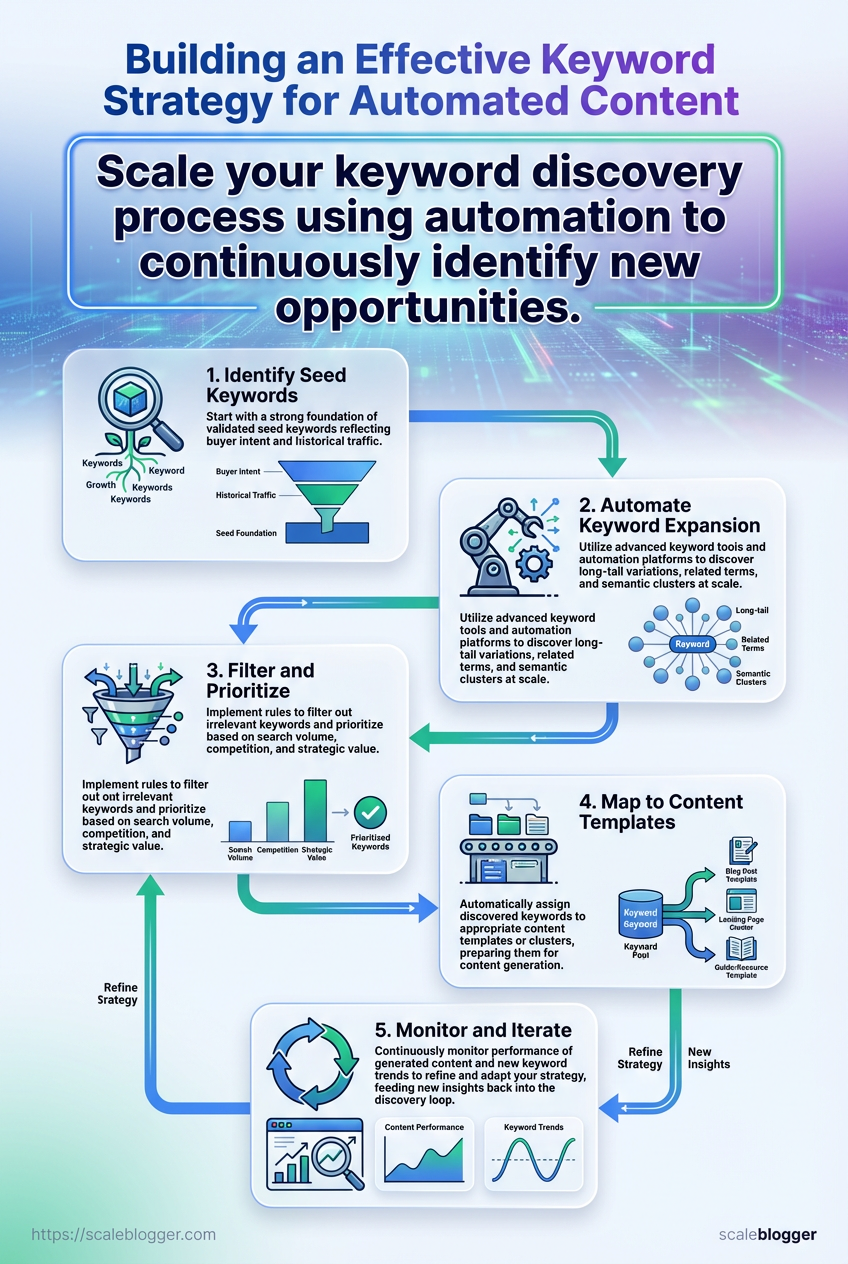
Start by automating the tedious part: expand a seed set into thousands of candidate phrases, enrich each with metrics, remove duplicates, score them, and queue the winners for content planning. That sequence — expand → enrich → dedupe → score → queue — is the backbone of a repeatable pipeline that turns keyword strategy into predictable content output.
Seed keywords: A short list (20–100) of high-level topics you already rank for or want to own. Access tokens/API keys: For your keyword provider(s), SERP API, and any data enrichment services. Storage: A database or spreadsheet (BigQuery, Postgres, or Google Sheets for small scale). Scheduler: A task runner (Airflow, Prefect, GitHub Actions, or cron). Basic scripting environment: Python or Node.js preferred.
Tools & materials
- Keyword API: Provides raw expansions (Phrase, Ahrefs, SEMrush-style tools).
- SERP scraper/API: Pulls current ranking difficulty and top results.
- Traffic estimator: Estimates monthly volume or impressions.
- Data store: Where intermediate enrichment and dedupe happen.
- Orchestration: For retries, backoff, and monitoring.
- Expand
- Seed the API with
seed_keywordsand collect phrase variants, question forms, and long-tail modifiers. - Enrich
- For each candidate, request
monthly_volume,CPC,KD(keyword difficulty), and current top-10 URLs’ titles and word counts. - Dedupe
- Normalize phrases (
lowercase, strip punctuation, collapse spaces), remove exact duplicates, and apply near-duplicate clustering using trigram similarity orfuzzywuzzydistance > 0.85. - Score
- Apply a weighted scoring formula. Example:
Score = 0.5 normalized_volume + 0.3 (1 - normalized_KD) + 0.2 * intent_score
Where:
normalized_volume: volume scaled 0–1 normalized_KD: difficulty scaled 0–1 intent_score: 0.0–1.0 where 1.0 = strong commercial/transactional intent
Suggested thresholds:
- Score ≥ 0.75: High-priority — push to editorial queue.
- 0.5 ≤ Score < 0.75: Consider for cluster pages or supporting posts.
- Score < 0.5: Archive or revisit after further signals.
Error handling & rate-limit guidance
- Exponential backoff: Retry failed API calls with
retry_countup to 5 and backoffs at 1s, 2s, 4s, 8s. - Circuit breaker: If >20% of calls fail within a minute, pause the pipeline and notify via Slack/email.
- Batch sizing: Keep batch sizes small (50–200 items) to stay under provider rate limits.
- Idempotency: Write intermediate states to the data store so restarting won’t duplicate work.
Practical example: schedule a nightly job that expands seeds, enriches in parallel batches of 100, dedupes with trigram clustering, scores, and inserts top 50 into the editorial queue. Connecting this to an AI content automation service like Scaleblogger.com can turn the queue into draft outlines automatically, saving weeks of manual research.
Automating discovery this way frees time for judgment calls — prioritize the human decisions and let the pipeline handle volume.
Map Keywords to Content Templates and Automation Rules
Start by treating keywords as workflow triggers, not just SEO targets. Match each search intent to a specific content template, attach publish rules and quality gates, then automate the routine tasks (drafting, review, metadata, scheduling). This prevents one-off pages that underperform and turns keyword strategy into reproducible content outputs.
Create templates and publish rules for each intent
How-to guide: Use a structured step-by-step layout with H1 + H2 sections and numbered process blocks. Informational (listicle): Lead with a concise overview, use numbered headers, and include internal CTAs. Comparison: Include feature tables and pros/cons, use schema for product comparisons. Product review: Surface specs, pricing, and verdict box; require screenshots or product data. Short answer/FAQ: One concise question + answer set, optimized for FAQ schema.
Common template features: Metadata: title patterns, slug rules, canonical logic Internal links: 2–4 contextual links to pillar content Media requirements: hero image, 1–2 supporting visuals, alt text rules Schema: recommended schema type per template (FAQ, HowTo, Product)
- Define the publish rule set for a template (who approves, min content score, required assets).
- Attach quality gates: editorial review, SEO score threshold, fact-check sign-off, accessibility pass.
- Wire automation: when a keyword reaches priority, create a draft from the matched template, populate metadata, assign to an author, and schedule a review task.
Example template populated with a seed keyword
Seed keyword: automated content pipeline
Title pattern: How to Build an Automated Content Pipeline for Your Blog — {seed}
H1: Build an Automated Content Pipeline for Your Blog H2s: Overview · Tools & setup · Workflow steps · Metrics to track · FAQs Required assets: 800–1,200-word draft, 2 screenshots, a downloadable checklist Quality gate: SEO score ≥ 70, editorial review by Senior Editor, fact-check on tools
Template types by intent, recommended word count, and typical SEO components
| Template Type | Best For (Intent) | Recommended Word Count | Key SEO Elements |
|---|---|---|---|
| How-to guide | Action/Transactional | 1,500-2,500 | H1+H2s, step-by-step, schema |
| Listicle | Awareness/Informational | 1,200-1,800 | numbered headers, CTAs |
| Comparison | Commercial | 1,800-2,500 | feature tables, pros/cons |
| Product Review | Transactional | 1,200-2,000 | specs, pricing table |
| Short answer/FAQ | Informational | 600-900 | concise answers, FAQ schema |
This table reflects common SERP patterns: how-to pages need depth and schema, listicles perform on scannability and internal linking, comparisons work when feature tables and metrics are explicit.
Automating these mappings reduces manual work and raises consistency: assign templates, enforce gates, and let automation handle draft creation and routing. For faster implementation, use an AI content automation platform — for example, AI content automation can prefill templates and trigger review workflows — then tweak rules based on performance signals. This is how keyword strategy becomes repeatable content production that actually ranks and converts.
Optimize Generated Content for On-Page SEO
Start by treating the draft like code that needs validation. Automate checks for every article so obvious SEO problems are eliminated before publishing. That reduces manual QA time and keeps optimization consistent across hundreds of posts.
Content parsed into structured fields: Title, meta_description, headings, body, images, canonical URL, publish date, author.
Access to site CMS/API: Programmatic updates require API keys or CMS automation plugins.
Tools & materials
- Screener tools: Screaming Frog or Sitebulb for crawl validation.
- Performance checks: Google Lighthouse or PageSpeed insights for load-related issues.
- Keyword/intent tools: SEMrush, Ahrefs, or internal keyword lists.
- Automation platform: CI/CD scripts, Zapier, or an AI pipeline such as Scaleblogger.com for batch processing.
Programmatic on-page optimizations and QA
- Define validation rules as code or JSON so they run per-article automatically.
- Run an automated crawl that validates required fields and flags failures.
- Apply corrective actions where safe (e.g., auto-generate
meta_descriptionfrom lead paragraph), and queue human review for anything ambiguous. - Push changes to a staging environment, run performance and accessibility checks, then publish.
Example validation rules (implement as JSON or rules engine)
Title: Must be 40–70 characters and contain primary SEO keyword.
Meta description: Must be 120–160 characters and not duplicate site-wide.
H1: Exactly one H1 and it should match or be a close variant of the title.
Canonical: Internal canonical set and not a redirect.
Images: All images must have alt text and optimized srcset.
Internal linking: At least two contextual internal links to relevant cluster pages.
Schema: Page must include schema.org/Article with headline, author, datePublished, and image.
Automation steps for internal linking and schema
- Internal linking: Use a topical-match script that looks up target pages by topic cluster and inserts natural anchor text; flag if no targets exist.
- Schema generation: Populate structured data from article fields and validate the JSON-LD using a linter.
- Canonicalization checks: Ensure canonical points to the preferred URL and validate with a crawl.
QA time estimate and suggested workflow
- Automated pass: 5–15 minutes per article (depends on site size).
- Human review: 20–60 minutes for high-value posts; 5–15 minutes for low-priority updates.
- Full publish cycle: 30–90 minutes per article when combining automation and human QA.
Suggested tools for the pipeline
- Crawl + validate: Screaming Frog, Sitebulb
- Structured data linting: JSON-LD validator or built-in Lighthouse checks
- Link automation: Custom scripts or an AI content automation platform like Scaleblogger.com for scale
Automating these checks catches routine issues, preserves ranking signals, and frees editors to focus on nuance rather than chores. When the pipeline is reliable, quality becomes a scalable advantage rather than a bottleneck.
Monitor Performance and Iterate the Keyword Strategy
You need a repeatable system that turns traffic signals into deliberate content moves. Start by wiring dashboards to the right data, pick a review cadence you can sustain, and use a simple decision matrix to decide whether to optimize, expand, or retire content. That makes keyword strategy an operational rhythm instead of a one-off project.
Set up dashboards and core KPIs
Primary dashboard KPIs: Impressions: total exposure in Search Console.
Clicks: raw traffic from search results.
CTR: Clicks / Impressions to show snippet effectiveness.
Average position: ranking health per keyword cluster.
Organic sessions: visits from organic channels in analytics.
Conversion rate: goal completions tied to content (newsletter signup, demo).
Engagement time: average session duration or scroll depth.
Define alert thresholds on the dashboard: Traffic drop: -30% week-over-week for a page → flag. CTR decline: drop >20% vs. 28-day baseline → investigate snippet/metadata. Ranking fall: position change >5 places for target keyword → schedule audit. Conversion dip: conversion rate down >15% → A/B test CTA or content UX.
Monthly triage checklist
- Review ranking and traffic trends for top 50 target pages.
- Compare
Impressionsvs.Clicksto identify low-CTR opportunities. - Audit pages flagged by alerts and assign an action: optimize, expand, or retire.
- Document tests (title changes, schema, content depth) and track outcomes.
- Re-run automated content tasks where gains are repeatable.
Decision matrix for the content lifecycle
Content score: combine traffic, CTR, conversions, and topical relevance into a single 0–100 score.
If score ≥70: amplify — add internal links, build promotion, and repurpose into formats. If 40–69: optimize — update headers, add evidence, test meta and schema. If <40 and declining: archive or merge — consolidate thin pages into a stronger hub.
A sample content lifecycle and review cadence mapped to KPIs
| Phase | Action | Cadence | Primary KPI |
|---|---|---|---|
| Initial publish | Publish, index request, submit sitemap | Day 0 | Impressions & CTR |
| Monitor first 14 days | Check index, clicks, entry pages | Daily | Impressions & CTR |
| Daily | Track anomalies and traffic spikes | Daily | Impressions & CTR |
| Early optimization | Adjust titles/meta and internal links | Day 14–30 | Rankings |
| Apply on-page edits | Add depth, visuals, LSI keywords | 30 days | Rankings |
| Content upgrade | Add downloadable/gated asset | 30–90 days | Organic traffic |
| Add depth/links | Build topical cluster links | 90 days | Organic traffic |
| Retire/repurpose | Merge thin pages or archive | 6 months | Conversion rate |
| Archive or merge | Redirect and consolidate content | 6 months | Conversion rate |
| Re-cycle into new template | Template improvements applied | Ongoing | Efficiency gains |
| Re-run automation | Re-generate summaries/metadata | Ongoing | Efficiency gains |
Key insight: map short-term QA (first 14–30 days) to visibility metrics and medium-term optimization (30–90 days) to ranking and traffic gains. Long-term decisions at 6 months should focus on conversions and efficiency.
Practical tools and cadence notes
- Dashboards: combine Google Search Console, GA4, and rank-tracker exports into one pane.
- Automation: schedule weekly exports and alerts; use your content pipeline to queue optimizations.
- Documentation: track every experiment and its effect on
CTR, position, and conversions.
Running this as a steady cadence turns keyword strategy into predictable growth: fix low-CTR snippets, deepen content where rankings plateau, and recycle underperformers into better experiences that actually convert. If automation is part of the stack, use it to scale the repetitive parts of this workflow and free time for higher-impact edits.
📥 Download: Automated Keyword Strategy Checklist (PDF)
Troubleshooting Common Issues
When automation or SEO pipelines fail, the fastest wins come from disciplined diagnostics: isolate the failing component, gather reproducible evidence, and apply a short-term patch while planning a permanent fix. Start by checking whether the problem is data, config, or downstream behavior. Common symptoms include missing pages in the index, content not publishing on schedule, duplicate titles/metas, or automated drafts that look low-quality. Reproduce the issue once, capture the UI or logs, then work through targeted checks—this prevents chasing phantom errors and keeps stakeholders calm.
Access: Admin-level access to CMS, CI/CD logs, and Google Search Console (or equivalent).
Tools & materials
Logs viewer: Access to build and scheduler logs.
SEO tools: Google Search Console, Lighthouse, or an SEO crawler.
Screenshot tool: Browser devtools and a screenshot utility for annotated captures.
Quick diagnostics to run now
- Check publishing status in the CMS dashboard.
- Inspect recent automation runs in the scheduler or CI logs (
gitlab-ci,github actions, or your scheduler UI). - Confirm crawlability: fetch as Google or run
curl -I https://example.com/pageto validate200/3xxresponses and headers. - Open Google Search Console for index coverage errors and URL Inspection for affected pages.
Specific issues and fixes
Automation job failing to publish
Short-term: Restart the job and re-run the last successful artifact. Permanent: Add retry logic and better error handling in the pipeline; surface failure alerts to Slack or email.
Pages not indexed
Short-term: Submit the URL in Search Console and ensure sitemap includes it. Permanent: Fix canonicalization and internal linking; schedule routine sitemap generation as part of the automated pipeline.
Duplicate titles/meta tags
Short-term: Manually update critical pages with unique titles. Permanent: Update the templating logic that auto-generates title/meta values; add unit tests that assert uniqueness for new posts.
Low-quality automated drafts
Short-term: Pause the automation that publishes drafts and switch to manual approval. Permanent: Improve prompt engineering and integrate a content scoring check that blocks posts below a quality threshold.
What to capture in screenshots/diagrams
- For CMS issues: capture the publishing pane showing status, timestamps, and the content preview.
- For pipeline errors: screenshot the failing log lines and the job step name.
- For SEO problems: capture Search Console coverage rows, the URL Inspection response, and a Lighthouse run.
Definitions
Automation pipeline: The sequence of scripts and services that fetch, generate, and publish content.
Content scoring: An automated evaluation of readability, intent match, and SEO signals.
When appropriate, route complex automation repair tasks to an AI-enabled workflow like Scale your content workflow to automate retry policies and content scoring. Keeping reproducible evidence and a two-track fix plan—patch now, repair later—saves time and protects rankings. This approach cuts firefighting cycles and gets the content engine back to predictable delivery.
Tips for Success and Pro Tips
Start by making the process intentionally human-centered: automation should speed production, not remove judgment. Prioritize a governance layer for high-impact content, run small experiments before broad changes, and build semantic clusters so pages complement rather than cannibalize each other. Practical habits—like assigning owners, scheduling regular audits, and templating A/B tests—turn good automation into predictable, scalable growth.
Use these hands-on strategies to optimize and scale without breaking quality.
Optimization habits to adopt Set human review for Tier 1 content: Always route flagship pages through a subject-matter reviewer before publish. Use semantic clustering: Group keywords by intent and topic to prevent cannibalization and surface better internal linking. Run small A/B tests first: Validate headline, meta, and template changes on a 3–5% traffic sample before full rollout. Localize strategically: Create a reuse strategy—translate once, adapt culturally, and centralize updates. * Monitor content scoring: Track engagement and rankings to trigger rewrites or consolidation.
Quick-reference governance checklist for scaling automated keyword strategies
| Governance Item | Why it matters | Recommended Implementation | Review Cadence |
|---|---|---|---|
| Content owner assigned | Ensures accountability | Assign a single owner per topic cluster with edit rights | Weekly |
| QA gate | Prevents low-quality publishes | Human review for T1 content; checklist validation for T2/T3 | Before publish |
| Semantic cluster map | Avoids cannibalization | Maintain a living map of keywords → pages with primary/secondary intents | Quarterly |
| A/B testing protocol | Validates template changes | Test on a 5% sample with defined success metrics and rollback plan | Ongoing |
Key insight: This checklist turns governance from a vague policy into a repeatable workflow. Regular ownership, an enforced QA gate, a maintained semantic map, and a lightweight A/B protocol together reduce risk while letting automation scale.
Operationalize this with a few simple steps:
- Draft a one-page governance playbook that defines T1/T2/T3 content and review paths.
- Build a semantic cluster spreadsheet that maps target keywords, intent, and canonical pages.
- Implement a lightweight A/B framework in your CMS or via an experiment tool and start with template changes.
- Schedule quarterly cluster audits and weekly owner check-ins to catch drift.
Final note: small disciplined processes beat ad-hoc heroics every time—set the guardrails, test incrementally, and let automation handle the heavy lifting while humans steer the strategy. For teams ready to automate responsibly, tools like Scaleblogger.com can help build topic clusters and automate workflows without sacrificing editorial control.
Conclusion
You now have a practical path from a scattered publishing calendar to a focused content engine: set measurable goals, build a seed keyword list around search intent, automate discovery at scale, map terms to repeatable templates, and treat optimization and iteration as ongoing work. Teams that mapped keywords to templates and enforced on-page SEO rules saw faster rankings and more predictable traffic growth, and those who piloted small automation workflows avoided quality drift by adding review gates. Start with a narrow vertical, automate the repetitive steps, and keep editorial control where it matters.
If quality and timing are top concerns, run a short pilot: pick 20 high-intent SEO keywords, apply the content template flow, and measure CTR and ranking over 6–12 weeks—this answers the “how long until results?” and “will automation hurt quality?” questions without guessing. To streamline that pilot, platforms like Scaleblogger can handle keyword-driven workflows and template automation while preserving review stages. When ready, take the next step: Start a pilot with Scaleblogger to automate keyword-driven content. That single action turns the strategy into a testable process and makes it clear whether scaling automated content will move the needle for your site.
