

Marketing teams still spend too much time converting one-off assets into scalable programs, and that friction kills both reach and relevance. Industry practice now favors tailored content delivered through automated distribution, yet many implementations produce generic feeds rather than meaningful engagement. This gap costs attention, lowers conversion rates, and wastes creative energy.
Successful programs move from one-to-many publishing to pipelines that focus on the audience. These pipelines connect content intent to distribution triggers. Picture a product team that routes feature explainers to high-intent segments, then uses automation to sprout short-form variants across channels; engagement rises while manual hours fall. Experts note that adding content personalization rules to automation—rather than just grouping posts—makes schedules drive growth.
- What an audience-aware pipeline looks like and why it outperforms simple scheduling
- How to translate content intent into distribution triggers and personalization rules
- Small technical patterns that unlock scalable variants without bloated workflows
- Metrics that reveal whether automation improves attention or just increases output
Scaleblogger’s automation-first approach demonstrates how to operationalize these patterns for faster, measurably better distribution. Get started with Scaleblogger to automate tailored content and turn distribution into a repeatable competitive advantage.
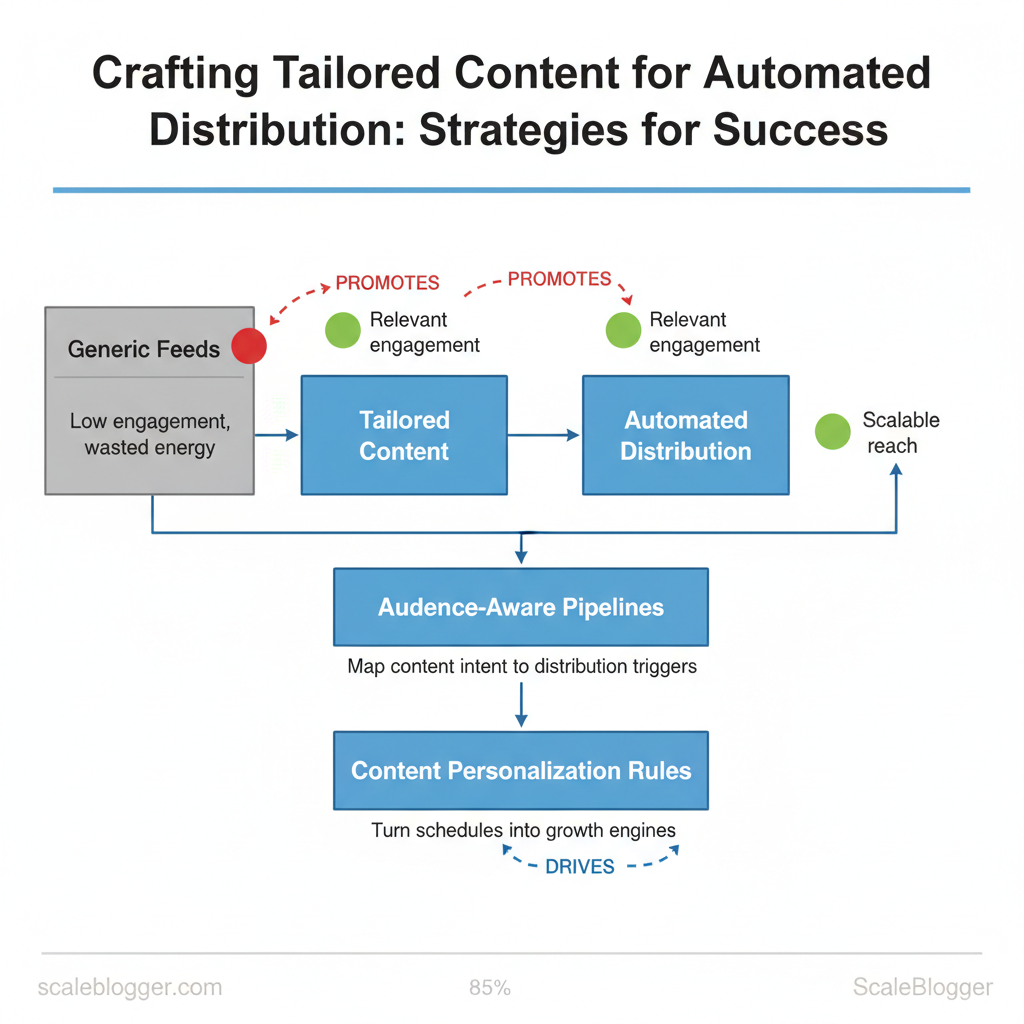
> Key Takeaway: ## Understand the Foundations of Tailored Content
Start by treating personalization as a spectrum, not a binary switch. One end features simple token substitutions, such as names and locations.
Understand the Foundations of Tailored Content
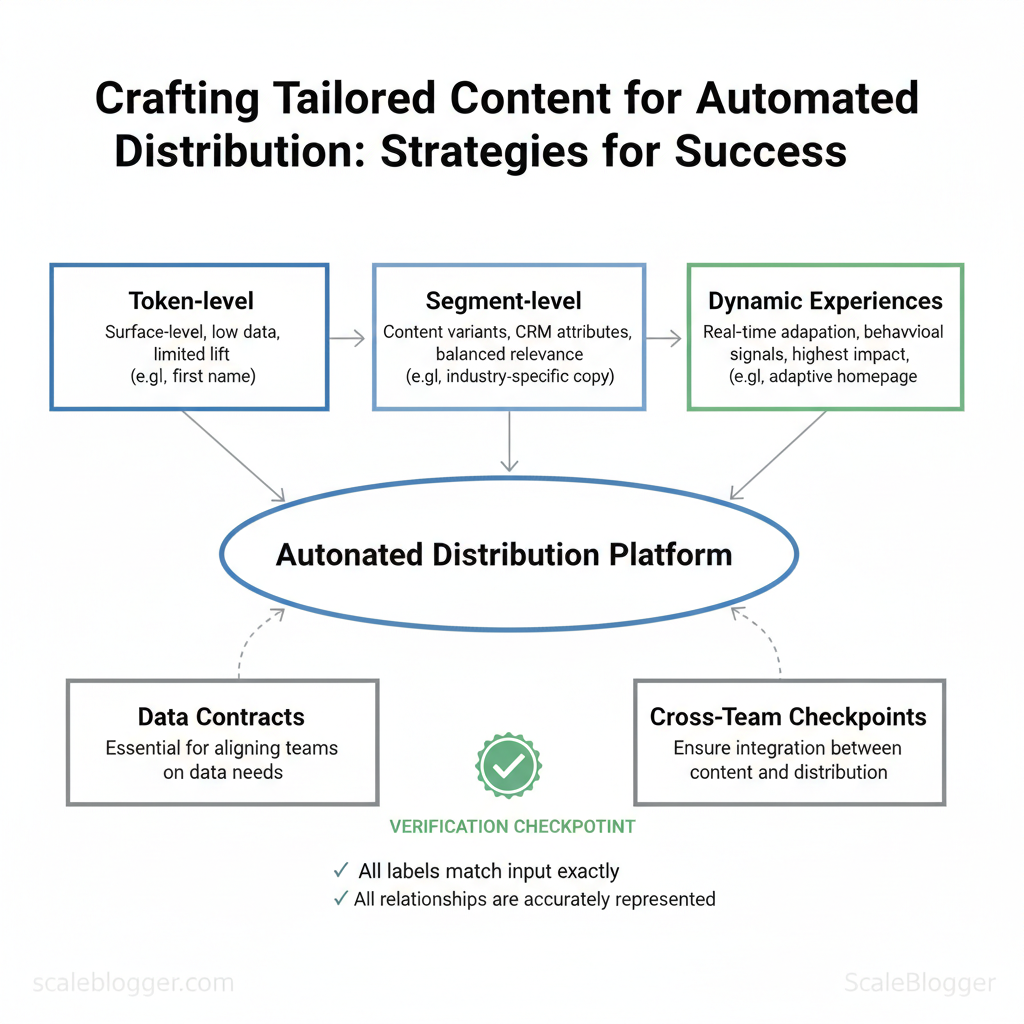
Start by treating personalization as a spectrum, not a binary switch. One end features simple token substitutions, such as names and locations. In the middle are segment-based variants that target industries or personas. At the far end are fully dynamic experiences that respond to real-time behavior.
Defining these levels early prevents scope creep, clarifies data needs, and sets realistic performance expectations for stakeholders.
Key concepts and a practical three-tier model
- Token-level personalization — What it is: surface-level replacements like
{{first_name}}; Example: “Hi Maria, here’s your local guide.” - Segment-level personalization — What it is: content variants based on audience buckets; Example: product page copy for “ecommerce managers” vs “site owners.”
- Dynamic experiences — What it is: content that adapts in real time to behavior or context; Example: homepage hero that changes after detecting return visits or cart abandonment.
Why precise terminology matters for planning Using consistent terms avoids cross-team misalignment: data engineers need to know whether a “personalized campaign” requires a single name field or streaming events. Product, content, and analytics teams should map features to these tiers during prioritization so data contracts, testing windows, and success metrics line up.
Why integration between content and distribution matters Integration prevents wasted impressions and inconsistent user experiences. When content personalization is designed independently from distribution, teams risk sending the wrong variant to the wrong channel, or timing messages at the wrong stage of the funnel. Common failures include:
- Wrong segment: tailored article sent to a generic newsletter list.
- Timing mismatch: behavior-triggered content pushed before tracking activates. * Channel mismatch: long-form, personalized pages repurposed into short SMS snippets without rework.
Three practical cross-team checkpoints
- Data-contract sign-off: engineering confirms available fields and update cadence before creative production. 2.
Pre-launch gating: distribution validates segment definitions and delivery windows against the content variants. 3. Post-publish review (48–72 hours): analytics and content jointly review engagement, misfires, and error rates.
Personalization planning that ties content to distribution reduces wasted scale and improves user trust. When teams agree on definitions, data, and checkpoints up front, campaigns scale more predictably and with fewer surprises.
Personalization tiers side-by-side to show complexity, data needs, and expected impact
| Personalization Tier | What it changes | Data required | Typical use cases |
|---|---|---|---|
| Token-level (name, location) | Minor copy swaps, greeting lines | First name, city | Welcome emails, confirmation pages |
| Segment-level (industry, persona) | Variant headlines, CTAs, content blocks | CRM attributes, firmographics | Nurture sequences, landing pages |
| Dynamic experiences (real-time behavior) | Layout, offers, microcopy adapt live | Session events, behavioral signals | Cart recovery, personalized homepages |
Suggested tools and templates: a content-variant checklist, a data-contract template for engineers, and an editorial branching map. Scaleblogger.com’s AI content automation can accelerate variant creation and scheduling when teams are ready to scale.
> Key Takeaway: ## Map Audiences and Signals for Automated Distribution
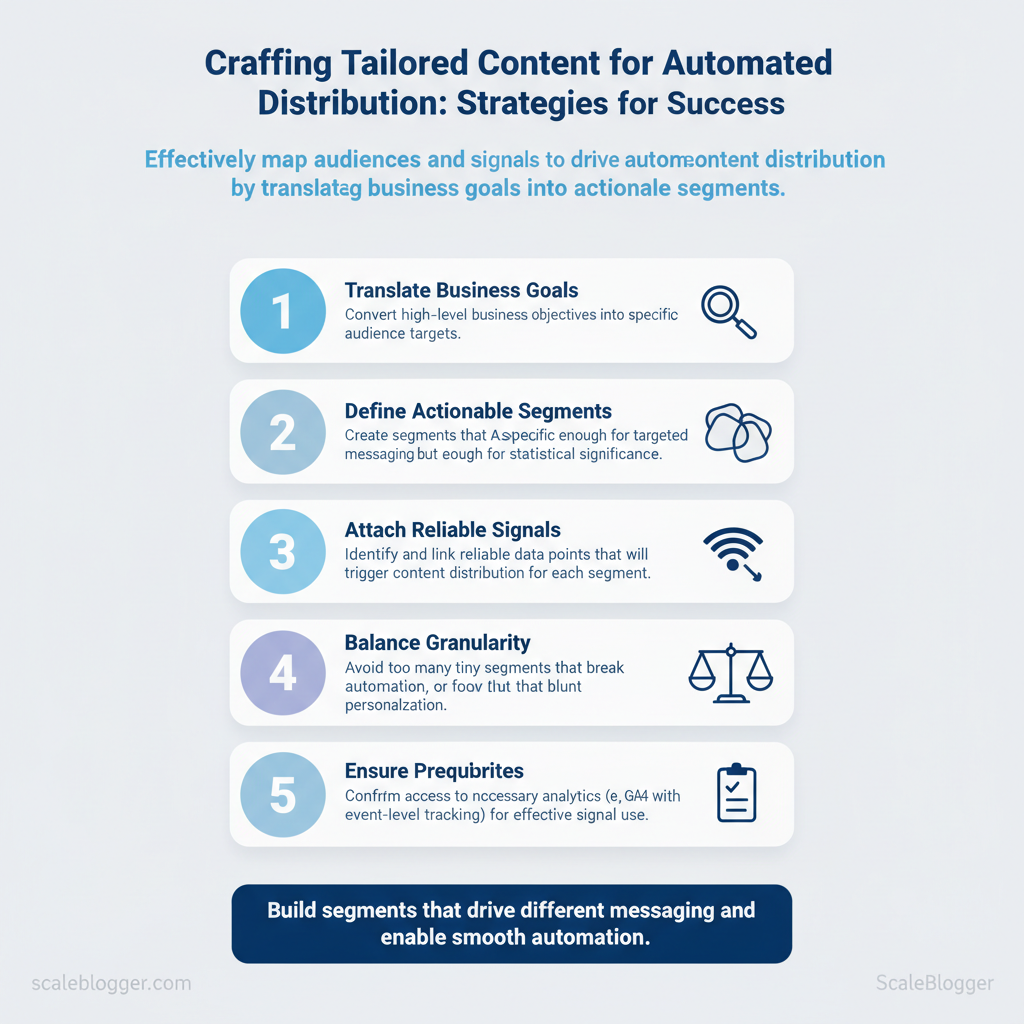
It is suggested to start by treating audience mapping as a translation problem: converting business goals into actionable segments, then attaching reliable signals that trigger distribution.…
Map Audiences and Signals for Automated Distribution
It is suggested to start by treating audience mapping as a translation problem: converting business goals into actionable segments, then attaching reliable signals that trigger distribution. Balance granularity with usable volume—too many tiny segments break automation; too few blunt personalization. Build segments that are specific enough to drive different messaging but large enough for statistically meaningful engagement and smooth automation.
Prerequisites
- Analytics access: GA4 or equivalent with event-level tracking. CRM/CDP connection: Contact-level fields and recent activity synced. Email/platform lists: Segmented and consent-verified.
- Team alignment: Clear conversion definitions (lead, MQL, purchaser).
Tools/materials needed
- Analytics platform: GA4, or server-side events. CRM/CDP: Salesforce, HubSpot, or a CDP like Segment. com` for dynamic blog-to-channel workflows.
- Export templates: CSV/JSON templates for syncing segments.
- Build practical audience segments
- Define 4–6 tactical segments to start. Each should include a clear trigger, minimum size target (e.g., 1,000 users/month), and downstream channel.
- Use behavioral + identity signals together: event history from analytics + purchase/LTV from CRM.
- Prioritize segments for automation by estimated ROI and technical ease (start where data is already clean).
High-value signals and why they matter
Conversion history: Purchases or trials — indicates value. Engagement depth: Pages per session, time on content — signals content fit.
Lifecycle stage: CRM stage or lead score — tailors messaging urgency.
2×2 prioritization (Impact vs Availability)
- , recent purchasers). 2.
, LTV segments). 3. Low impact / High availability: Use for testing and scaling.
- Low impact / Low availability: Defer until needed.
Verification checklist to avoid noise
- Signal freshness: Is the timestamp accurate and recent? Uniqueness: Deduplicate by user ID or email. Completeness: ≥90% of target users have the required fields.
- Stability: Signal rate variance <30% week-over-week. Privacy/consent: Confirm lawful use and opt-ins.
Quick reference matrix showing sample segments, defining criteria, data sources, and ideal channels for distribution
| Segment | Definition / Criteria | Primary Data Source | Ideal Channels |
|---|---|---|---|
| New Visitor | First session within 14 days | Google Analytics / GA4 events | Social ads, On-site banners |
| Returning Visitor | >1 session in 30 days, no purchase | GA4 user_id, cookies | Email nurture, Paid social |
| Recent Purchaser | Purchase within 90 days | CRM transactions, CDP | Post-purchase email, SMS |
| Churn-risk | LTV decline or no activity 60+ days | CRM engagement, CDP flags | Win-back email, Retargeting |
| High-value Prospect | Lead score >75 or predicted LTV | CRM lead score, CDP model | Sales outreach, Personalized content |
> Industry analysis shows that automation without clean signals creates noise rather than reach.
A simple SQL snippet for extracting recent purchasers:
sql SELECT user_id, email, max(purchase_date) as last_purchase FROM purchases WHERE purchase_date >= DATE_SUB(CURRENT_DATE, INTERVAL 90 DAY) GROUP BY user_id, email;Understanding these principles helps teams move faster without sacrificing quality. When implemented correctly, the approach reduces manual decision-making and lets creators focus on message and creative.
> Key Takeaway: ## Design Content Templates and Modular Assets
It is recommended to design modular templates so teams can assemble pages and posts like building blocks: predictable, reusable, and easy to personalize without breaking brand voice. Start with a small…
Design Content Templates and Modular Assets
It is recommended to design modular templates so teams can assemble pages and posts like building blocks: predictable, reusable, and easy to personalize without breaking brand voice. Start with a small library of core blocks—headline, intro hook, value proposition, social proof, CTA—each with explicit variables, naming rules, and fallback copy so automation can stitch content reliably.
Modular Content Patterns and Templates
| Module Name | Variables / Fields | Fallback Text | Best Use Case |
|---|---|---|---|
| Headline | {{topic}}, {{metric}}, {{audience}} |
“Quick wins for modern teams” | Blog H1, social card |
| Intro Hook | {{problem}}, {{timeframe}} |
“Many teams struggle with momentum.” | Post lead paragraph |
| Value Proposition Block | {{feature}}, {{benefit}}, {{evidence}} |
“Delivers measurable improvements.” | Product/solution section |
| Social Proof / Testimonial | {{name}}, {{role}}, {{quote}}, {{company}} |
“Trusted by peers.” | Case study excerpt, sidebar |
| Primary CTA | {{action}}, {{target}}, {{urgency}} |
“Learn more” | End of article, conversion module |
- Naming and fallback guidelines
- Use predictable prefixes:
headline_,intro_,cta_for grouping. - Keep variables short and semantic:
{{audience_segment}},{{metric_value}}. - Define fallbacks for tone: conversational vs. formal fallbacks per channel.
- Template example
html
<article class="mod-article">
<h1>{{headline}}</h1>
<p class="hook">{{intro_hook}}</p>
<section class="value">{{value_feature}} — {{value_benefit}}</section>
<blockquote>{{testimonial_quote}} — {{testimonial_name}}</blockquote>
<a class="cta" href="{{cta_url}}">{{cta_text}}</a>
</article>
Rules for personalization, tone, and consistency
- Personalization threshold: Only personalize when
audience_confidence_score >= 0.7and at least two corroborating signals exist (behavioral + demographic). - Tone rules: Use persona-based tone profiles—Friendly for SMB, authoritative for enterprise—never mix within one asset.
- Avoid awkward personal references: Do not include location or life-event personalization unless consent and recent engagement exist.
QA checklist for consistency
- Variable integrity: All
{{}}variables resolved or replaced with fallbacks. Tone match: Verify tone profile tag matches channel. Length checks: Headline ≤ 70 chars, intro ≤ 40 words.
- Accessibility: Alt text present for images, CTA keyboard-focusable.
Practical tip: Integrate these templates into your CMS component library and run automated tests that render fallbacks. Scale your content pipeline with AI-powered content automation like the services at Scaleblogger.com when you need orchestration across editorial and publishing systems. Understanding these principles helps teams move faster without sacrificing quality.
Build Automation Workflows and Orchestration
Think of automation as a reliable pipeline with predictable triggers, clear delivery, and measurable verification. Begin by defining each workflow as a timeline. Identify what starts it, which systems change the data, which template or channel publishes it, and how to verify success. That structure keeps orchestration maintainable and testable, and it makes rollback and A/B testing straightforward when something goes wrong.
Practical blueprint plus examples
- Define the canonical workflow schema
- Trigger — event or schedule (webhook, cron, user action).
- Data — canonical payload shape and enrichment points (
user_id,locale,last_activity). - Template — reusable templates with tokens (
{{first_name}},{{hero_article}}). - Orchestration — transform/enrich, routing, conditional branching.
- Delivery — ESP API, CMS publish, social API.
- Verification — API response, event receipts, sampling checks.
- Example workflows across channels (timeline format follows in the table below)
- Email: welcome series triggered on first signup, enriched with source attribution, sent via ESP with staged throttling.
- Web: on-site hero personalization triggered by segment membership, pulled from a CDP and rendered via server-side include.
- Social: segment-triggered posts queued to a social scheduler with UTM tracking and muted fallback for missing assets.
Integration and data hygiene best practices
- Required endpoints: CDP ingest endpoint, ESP transactional/send endpoint, CMS publish API, Social platform post API, Analytics event ingestion—each must accept a canonical
event_idanduser_id. - Data cadence: daily canonical sync for user profiles, real-time event streaming for triggers, hourly content freshness checks.
- Hygiene steps: validate payloads (schema + required fields), normalize keys (snake_case or camelCase consistently), deduplicate by
event_id, TTL stale profiles (e.g., mark profiles inactive after 90 days). - Fallback strategies: use template defaults when tokens missing, route to human queue for critical failures, skip non-blocking channels and log for retry when assets are unavailable.
Workflow orchestration template
yaml trigger: "user.signup" payload: { user_id, email, source } transform: - enrich: fetch_profile(user_id)
- segment: apply_rules(profile)
deliver: - channel: esp.send
template: welcome_v2 verify: - event: delivery.receipt
- check: open_rate_sample >= 20%
rollback: - action: disable_automation
- notify: ops-team
Step-by-step workflow timeline showing trigger, processing step, and delivery action for each example workflow
| Workflow | Trigger | Processing / Orchestration | Delivery Action | Verification Step |
|---|---|---|---|---|
| Welcome email series | New account created (webhook) | Enrich from CDP, dedupe, apply persona rules | Send via SendGrid transactional API (/mail/send) |
ESP delivery receipt + sample open rate check |
| On-site hero personalization | Page load for logged-in user | Query CDP segment, pick hero variant, cache variant | Server-side render via CMS API, edge cache | Visual QA + analytics event hero_view |
| Segment-triggered social post | User reaches milestone (event stream) | Assemble post copy, attach image, queue moderation | Post via Twitter/X API or Buffer API | API success response + link click tracking |
For teams scaling content, plug-in automations like those offered by Scaleblogger.com for AI content automation simplify template management and performance benchmarking—particularly when orchestrating many channel-specific variants. Understanding these principles helps teams move faster without sacrificing quality.
Test, Measure, and Iterate for Continuous Improvement
Start by treating experiments like a product. Define the outcome first. Choose the smallest change that could affect that metric, and design tests so results guide the next steps. Channel-specific KPIs drive what “moving the needle” looks like — email needs opens and conversions, paid social needs CTR and CPA, on-site personalization needs conversion rate and revenue per visitor.
Design experiments so they answer one question at a time; conflate too many variables and decisions become noisy.
Metrics, KPIs, and experiment design
- Define success metrics. Tie each test to one primary KPI and up to two secondary KPIs to detect downstream effects.
- Choose the experiment type. Use A/B tests for creative or copy changes, multivariate tests for layout + copy combinations, and holdout cohorts for personalization algorithms.
- Statistical basics. Aim for
p < 0.05and predefine minimum detectable effect (MDE). For small lifts, it is suggested to plan for large samples; for big changes, smaller samples may suffice. - Sample-size quick rule: If expected lift ≤5%, target at least 10k impressions/users per variation; for 5–15% lifts, 2–5k per variation often suffices. Use a sample-size calculator before launching.
> According to recent research, average email open rates cluster around ~21%, indicating that small percentage lifts in email may require larger samples to be confident.
Basic sample-size formula (approx): n ≈ (Zα/2 + Zβ)^2 (p1(1-p1)+p2(1-p2)) / (p1-p2)^2Scale safely: rollout strategies and governance
- Pilot: Run a controlled pilot on a representative segment (1–5% of traffic).
- Regional rollouts: Expand to 10–25% across regions to validate geo effects.
- Global release: Full rollout after meeting predefined criteria.
- Governance: Document owner, SLA for monitoring, rollback triggers (e.g., >10% negative lift on revenue or CPA exceeds threshold), and a postmortem cadence.
Decision checklist before scaling: KPI reference table mapping channel to primary metrics, acceptable lift benchmarks, and suggested sample-size considerations
Secondary KPIs stable (no >5% negative drift). No unintended downstream harms (tech, legal, or privacy flags).
Key insight:* Different channels require different expectations and sample sizes — email often needs the largest samples to detect small percentage lifts, while personalization and creative social tests can show larger relative gains with fewer observations. Plan pilots, document governance, and use clear rollback triggers so scaling decisions are data-driven and reversible. Understanding these principles helps teams iterate faster while keeping risk contained; this is why automation and disciplined measurement matter for sustainable content growth.
Channel
Primary KPIs
Benchmark Lift to Watch For
Sample Size Note
Email
Open rate, CTR, Conversion rate
5–15% relative lift (meaningful)
Use Mailchimp averages (open ≈21%); for <5% lift, target 10k+ recipients/variation
On-site Personalization
Conversion rate, Revenue per visitor
10–30% lift possible for targeted segments
Start with 1–3k sessions/variant; larger for broad audiences
Paid Social
CTR, CPA, ROAS
10–25% CTR lift; CPA reductions of 5–15%
WordStream benchmarks suggest CTRs low; plan 2–10k impressions/variant
Organic Social
Engagement rate, Referral traffic
15–40% engagement lift for creative changes
Smaller samples ok (1k+ engagements); track downstream site conversions
📥 Download: Tailored Content Automation Checklist (PDF)
Ethical, Privacy, and Operational Considerations
Design personalization and automation around a consent-first model so personalization improves engagement without exposing users or the brand to legal and reputational risk. Treat data uses as product features. List them, display them when collecting data, and make it easy to opt out. Operational rules must enforce fairness: audit training signals, log decisions, and set clear escalation paths when models behave unexpectedly.
Privacy and consent best practices
- Consent-first personalization: Collect explicit permission before using behavioral or profile data for individualized recommendations. Document and display data uses: Maintain a live
data-usespage and surface short explanations at collection points so users know why each signal matters. , 30 days for session data, 24 months for subscription info) and enforce role-based access to PII.
- Practical example: At signup, present a short toggle for
recommendations based on activitywith a link to thedata-usespage and a one-click revoke action in account settings. Policy enforcement: Automate deletion requests and maintain an audit log of consent changes.
Consent models (implicit, explicit, granular consent) with pros/cons and regulatory fit
Table: Section Content — Consent Model, Description, Pros & more
| Consent Model | Description | Pros | Cons |
|---|---|---|---|
| Implicit consent | User actions imply consent (e.g., continued site use after notice) | Low friction, easy UX | Weak legal fit under GDPR, ambiguous audit trail |
| Explicit consent | Clear affirmative action (checkbox/opt-in) | Strong regulatory fit, good auditability | Higher drop-off, more UX friction |
| Granular consent | Separate toggles per use (analytics, personalization) | User trust, flexible marketing | Complex UI, higher implementation cost |
Bias, fairness, and operational safeguards
- Identify potential bias vectors: training corpora, signal selection, label noise. 2.
Mitigate with balanced sampling, synthetic augmentation, and holdout cohorts to detect disparate impact. 3. Implement an audit checklist: data provenance logged, fairness metrics tracked per cohort, retraining triggers, human review gates.
- Operational policy: require
explainabilitynotes for any model used in content personalization and schedule quarterly bias reviews.
Example audit checklist (short):
- Data provenance: source + collection date
- Fairness metrics: outcome parity, false positive rates by cohort
- Access log: who queried model outputs
Combine these practices with automated tooling—either in-house or via AI content automation platforms like Scale your content workflow—to scale safely without losing control. Understanding these principles helps teams move faster without sacrificing quality. When implemented correctly, this approach reduces overhead by making decisions at the team level.
Conclusion
The process described throughout this article makes clear that scaling tailored content requires three coordinated moves: align audience signals with topic frameworks, automate repetitive production steps, and measure engagement to iterate quickly. Teams that combine clear topic models with automation can reduce publishing time and improve relevance for different segments. For example, a content operations team that standardized templates and automated distribution saw a steady increase in click-through rates in weeks. A product marketing group that used personalization rules with bulk production regained a lot of editorial capacity. Start by mapping your highest-value audience segments, then automate the content transforms that consume the most time.
- Map segments and priorities.
- Automate templated production workflows.
- Measure outcomes and refine weekly.
If you still have questions about preserving voice at scale or deciding which workflows to automate first, start by focusing on the smallest repeatable unit you can standardize and pilot it for one channel. To this work for teams, platforms like Scaleblogger can automate tailored content and integrate with existing workflows. com).
Doing this accelerates implementation while keeping your editorial control intact.
