

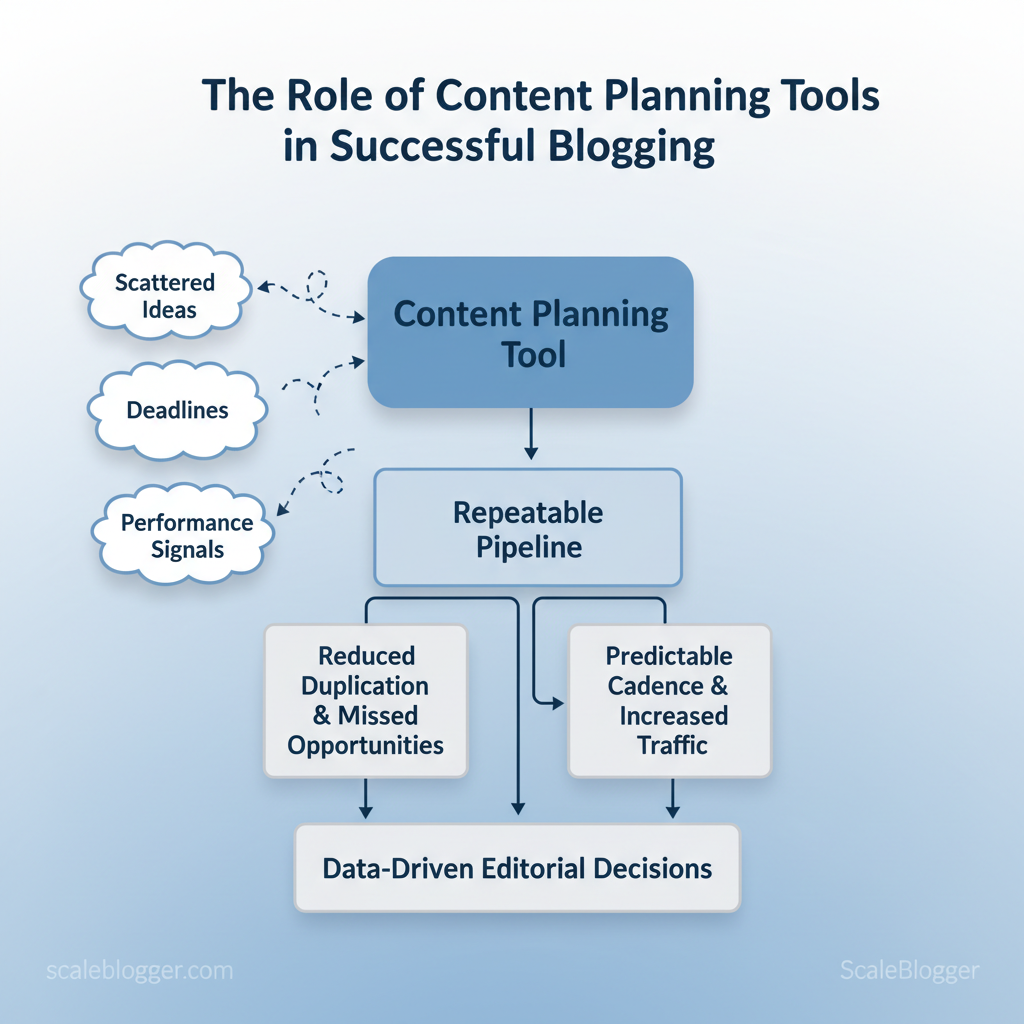
Marketing teams often lose speed because content ideas, deadlines, and performance signals are stored in different locations. A content planning tool reduces that gap by organizing scattered ideas into a repeatable process. This reduces duplication and maximizes opportunities. Experts suggest that better tools can save time on coordination and highlight topics that might engage audiences and improve SEO.
Picture a small editorial team that stops firefighting and starts publishing with predictable cadence; traffic and conversions follow. Tools also make collaboration measurable, so editorial decisions rely on data rather than guesswork — a shift many social teams describe as transformational according to reviews of planning platforms and workflows.
- How a centralized calendar enforces consistency and reduces rework
- Ways automation routes briefs, assets, and publish tasks to the right contributors
- How to use workflow metrics to prioritize high-impact topics
- Simple governance patterns that keep evergreen content fresh
The next section breaks down practical steps to evaluate and implement planning tools that scale editorial output while preserving quality. Explore Scaleblogger’s content strategy and automation services: https://scaleblogger.com
> Key Takeaway: ## Why Content Planning Tools Matter
Start with the practical difference: content planning tools convert fragmented ideas and manual guesswork into a repeatable pipeline that scales. Teams using purpose-built planning systems move from firefight…
Why Content Planning Tools Matter
Start with the practical difference: content planning tools convert fragmented ideas and manual guesswork into a repeatable pipeline that scales. Teams using purpose-built planning systems move from firefight publishing to a predictable cadence that supports SEO growth, cross-team coordination, and measurable content reuse.
Prerequisites
- A documented content strategy or editorial brief
- Shared access to your CMS and analytics (GA4 or equivalent)
- A centralized place to capture ideas (spreadsheet or lightweight tool)
What You’ll Need
- Content calendar or planning platform (consider both enterprise and emerging tools)
- Keyword list and topic clusters exported from your SEO tool
- Performance dashboard (weekly reporting)
Business and editorial benefits (what to expect)
- Consistency and cadence: Maintain predictable publishing frequency and reduce missed cycles. Better SEO targeting: Map content to keyword clusters and avoid coverage gaps. Reduced duplicated effort: Single source of truth prevents multiple teams working similar topics.
- Faster approvals: Built-in workflows speed review and cut handoffs. * Repurposing visibility: Track assets for reuse across channels.
Common pain points these tools solve
- Idea fragmentation and capture — centralize concepts so valuable briefs don’t sit in DMs. 2.
Priority setting for topics — assign business value, traffic potential, and timing to each idea. 3. Lack of performance feedback loops — link publish dates to outcomes and iterate quickly.
- Editorial drift — enforce style, templates, and SEO guardrails. 5.
Resource allocation — visualize capacity and assign owners proactively.
Concrete examples and evidence
- Industry reviews note that planning platforms help social teams stay consistent and collaborate more efficiently; see the hands-on comparison in the SocialBee evaluation of content planning tools I tested 10+ content planning tools: Here’s what I recommend.
- Practical guides show how structured content plans reduce stress and improve outcomes when paired with a workflow; see The Ultimate Blog Content Plan: Better Content, Less Stress.
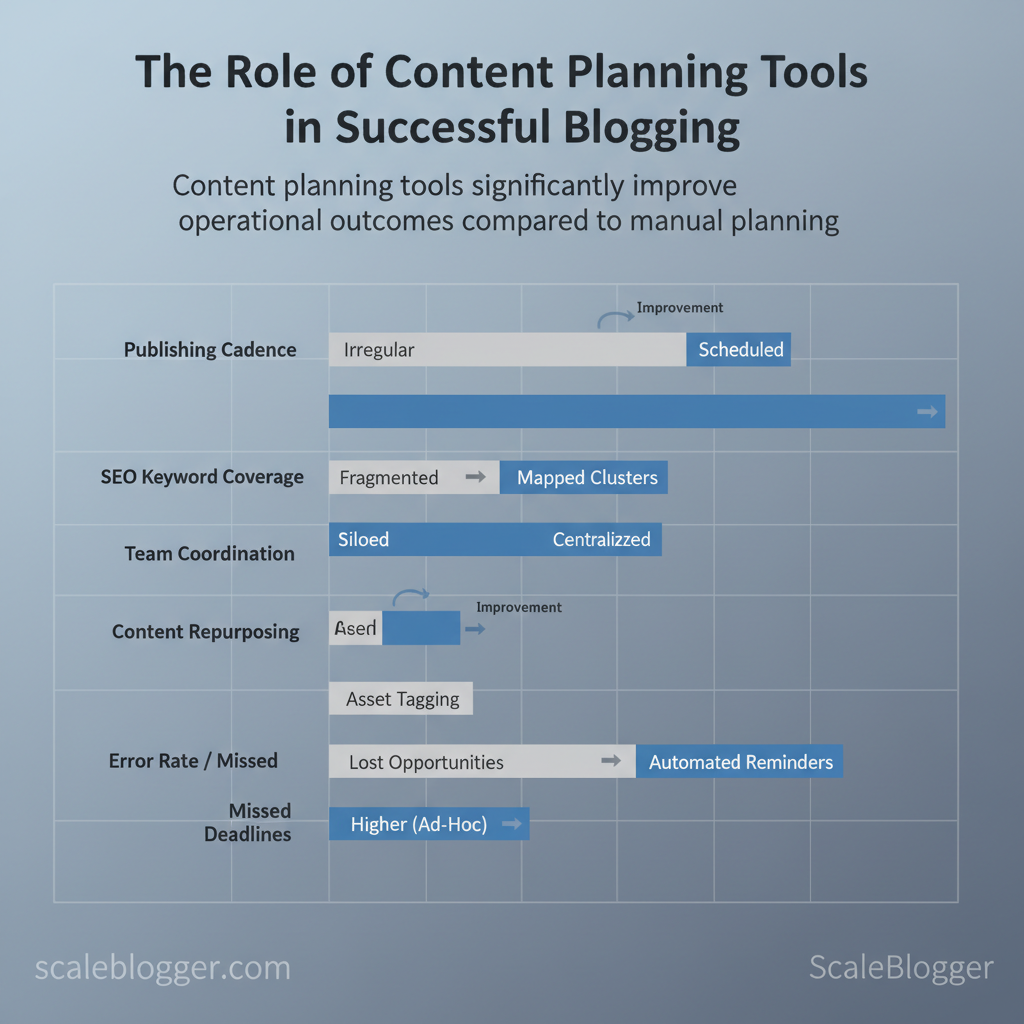
Side-by-side outcomes when using content planning tools versus manual planning
| Outcome | Manual/Ad-hoc Planning | Using Content Planning Tools | Impact (Time/Quality) |
|---|---|---|---|
| Publishing cadence | Irregular, reactive | Scheduled calendar with recurrence | Faster scheduling; fewer missed deadlines |
| SEO keyword coverage | Fragmented, opportunistic | Mapped to clusters and gaps | Improved topical coverage, fewer overlaps |
| Team coordination | Email/DMs; siloed drafts | Centralized assignments & approval flows | Reduced rework; clearer ownership |
| Content repurposing | Lost opportunities | Asset tagging and reuse workflows | More cross-channel assets; higher ROI |
| Error rate / missed deadlines | Higher due to ad-hoc processes | Automated reminders and checklists | Lower error rate; consistent delivery quality |
> Key Takeaway: ## Core Features to Look For in a Planning Tool
Effective planning tools eliminate friction, enabling teams to deliver high-quality work consistently. Start by prioritizing a handful of features that directly affect velocity and quality: an…
Core Features to Look For in a Planning Tool
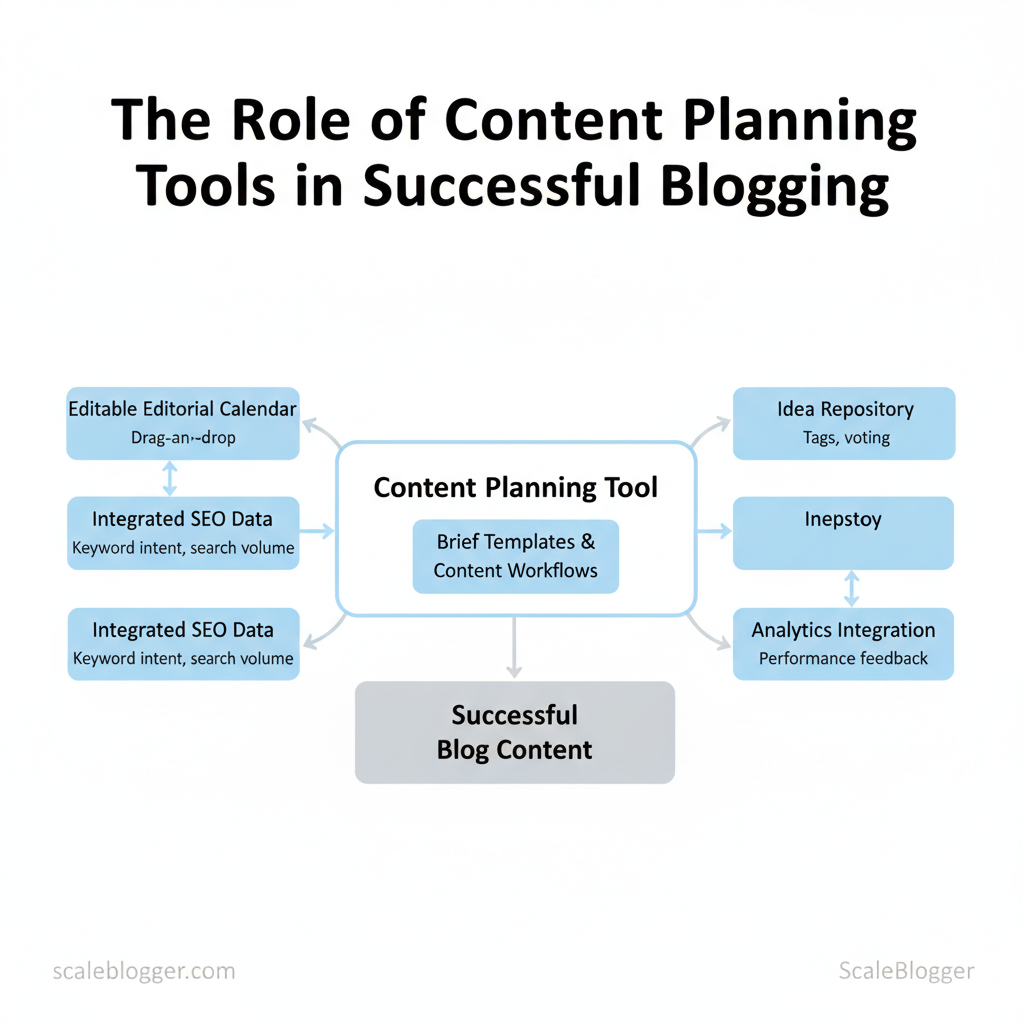
Effective planning tools eliminate friction, enabling teams to deliver high-quality work consistently. Start by prioritizing a handful of features that directly affect velocity and quality: an editable editorial calendar that supports drag-and-drop, integrated SEO signals, reusable brief templates, and built-in analytics that close the loop between publication and performance. These features turn planning from a spreadsheet exercise into a repeatable system.
- Editorial calendar with
drag-and-drop— Enables rapid rescheduling, visual cadence control, and conflict detection; critical when deadlines shift. - Built-in or integrated SEO data — Keyword intent, search volume ranges, and SERP snapshots reduce guesswork during topic selection.
- Brief templates and content workflows — Standardize inputs (audience, CTA, word count, keywords) so writers start with the correct constraints.
- Idea repository — Centralized backlog with tags and voting keeps ideas discoverable and prevents duplicate work.
- Analytics / reporting — Content-level metrics, trend views, and attribution to channels let teams what actually moves the needle.
- First, ensure the calendar supports
drag-and-dropand role-based assignments so ownership is visible. - Then, validate that SEO signals are surfaced inline (keyword difficulty, suggested headings) rather than as separate reports.
- Finally, confirm brief templates map to your workflow stages (Draft → Review → Approve → Publish).
> Market data shows effective content planning bridges vision and execution; tools that centralize ideas, briefs, and performance reduce time-to-publish and increase ROI when used consistently. (See Tools and Strategies for Effective Content Planning: https://www.walkwithpic.com/blog/effective-content-planning-tools-strategies)
Nice-to-have features accelerate repeatability and reduce manual work:
- Automation for repetitive tasks (auto-scheduling, canonical tagging).
- CMS and analytics integrations (direct publish, GA4, Search Console).
- AI-assisted features (brief drafting, headline suggestions, content scoring) that speed first drafts and iterate headlines based on predicted CTR.
Feature availability and suitability across different team sizes
| Feature | Solo Creators | Small Teams (2-10) | Marketing Teams (10+) | Why it matters |
|---|---|---|---|---|
| Editorial calendar | Essential ✓ drag-and-drop |
Essential ✓ assignments, views | Essential ✓ enterprise workflows | Keeps cadence visible and reduces deadline conflicts |
| Idea repository | Helpful ✓ simple backlog | Important ✓ tagging, voting | Critical ✓ permissions, workflows | Prevents idea loss and aligns backlog with strategy |
| Keyword integration | Helpful ✓ basic suggestions | Important ✓ volume + difficulty | Critical ✓ SERP snapshots, integrations | Guides topic selection toward measurable demand |
| Brief templates | Important ✓ reusable templates | Essential ✓ approval flows | Essential ✓ custom templates by campaign | Standardizes handoffs and speeds brief creation |
| Analytics / reporting | Basic ✓ page metrics | Important ✓ custom reports | Essential ✓ attribution, dashboards | Turns outputs into optimizations and budget evidence |
Understanding these principles helps teams move faster without sacrificing quality. When implemented correctly, this approach reduces overhead by making decisions at the team level.
> Key Takeaway: ## How to Evaluate and Select the Right Tool
Start by identifying the users and the workflows the tool must support. Focus on the people doing the daily work—writers, editors, SEO, social—and the handoffs between them.
How to Evaluate and Select the Right Tool
Start by identifying the users and the workflows the tool must support. Focus on the people doing the daily work—writers, editors, SEO, social—and the handoffs between them. The right tool reduces problems at those transitions and highlights the signals the team needs to work quickly without redoing tasks.
- Map users and workflows (10–30 minutes per workflow)
- List primary users and secondary stakeholders.
- Document key workflows: content ideation → brief → drafting → editing → SEO review → scheduling.
- Mark decision points where automation or templates matter.
- Pilot with representative content and team members (2–6 weeks)
- Select 3–5 typical content pieces (one long-form blog, one pillar page, one social bundle).
- Run a focused pilot with two authors, one editor, and one operations lead.
- Track completion time, revision count, and publish readiness.
- Set measurable pilot goals (quantify before you start)
- Throughput: produce X more publish-ready drafts per month.
- Time savings: reduce average drafting time by Y%.
- Quality: reduce revisions per article by Z.
- Use
time_spentandrevision_countas pilot metrics.
- Compare features using a simple scoring rubric (30–60 minutes)
- Score each shortlisted tool against the rubric below using vendor demos, internal trials, and pilot metrics.
- Prioritize integrations and onboarding speed—those cost more in real time than license fees.
Budgeting and ROI estimation steps (1–2 hours planning, ongoing tracking)
- List all cost components: license fees, onboarding services, integration engineering, training hours, and change management. Translate time savings into dollars: multiply hours saved by fully-burdened hourly rate. Set payback period: target
6-12 monthsfor mid-market buys; longer for enterprise deals with heavy customization.
- Include soft ROI: improved SEO traffic, faster time-to-publish, and reduced churn in creators.
Provide a simple scoring rubric to compare shortlisted tools across key criteria
| Criteria | Weight (1-5) | Tool A (Asana) Score | Tool B (Trello) Score | Weighted Score |
|---|---|---|---|---|
| Core features fit | 5 | 4 | 3 | Tool A: 20, Tool B: 15 |
| Ease of use | 4 | 4 | 5 | Tool A: 16, Tool B: 20 |
| Integrations | 5 | 4 | 3 | Tool A: 20, Tool B: 15 |
| Cost | 3 | 3 | 5 | Tool A: 9, Tool B: 15 |
| Support & onboarding | 3 | 4 | 3 | Tool A: 12, Tool B: 9 |
Common pricing models and expected total cost of ownership
| Pricing Model | Typical Cost Range | Pros | Cons | Best for |
|---|---|---|---|---|
| Per-seat monthly | $8–$99/user/mo | Predictable per-user features | Scales poorly with headcount | Growing teams |
| Flat/team monthly | $100–$1,000+/mo | Predictable team cost | Limited per-user controls | Small teams |
| Usage-based | $0.01–$0.50/action | Pay for what you use | Variable bills, hard to forecast | High-variance workflows |
| Enterprise / custom | $10k+/yr | Dedicated support, SLAs | Long contracts, higher TCO | Large orgs |
| Freemium / free tier | Free → limited | Low barrier to try | Lacks advanced features | Solo creators, trials |
6–12 month payback is realistic and helps justify the purchase to finance and leadership.
Understanding these evaluation steps lets teams compare tools objectively, reduce rollout risk, and make procurement decisions that speed content velocity while protecting quality. When implemented correctly, this approach reduces overhead and keeps creators focused on high-impact work.
Practical Workflows: From Idea to Published Post
Prerequisites
- Editorial calendar with prioritization rules
- Access to analytics (GA4 or platform equivalent)
- Single-source brief template stored in CMS or project tool
Tools / materials needed
- Content calendar (e.g., a shared Google Sheet or
Notionboard) - SEO research (keyword tool, SERP checks)
- Collaboration platform (Slack, Asana, ClickUp)
- Scheduling/publishing tool (native CMS, or automation)
Time estimate: It usually takes 3–10 days to go from idea to published post for most mid-length articles; complex research articles take longer.
- Workflow for Solo Bloggers — fast, repeatable steps
- Validate idea (10–30 minutes)
- Quick SERP check for target keyword intent; confirm gaps and existing angles.
- Create a
mini-brief(5–15 minutes)
- Template:
Title | Angle | Target keyword | 3 subheadings | Primary CTA - Example:
Title: How to Audit Your Content Pipeline Angle: Practical checklist for small teams Keyword: content audit checklist Subheads: Audit cadence; Metrics to track; Action plan CTA: Download the audit template- Expected outcome: a one-paragraph guide that the writer can execute.
- Draft with blocks (1–3 hours)
- Write in discrete sections: intro, problem, solution, examples, CTA.
- Quick self-edit + on-page SEO (30–60 minutes)
- Check headings, meta, internal links, image alt text.
- Publish + 24-hour promotion checklist
- Social post, newsletter blurb, syndication to one platform, schedule evergreen re-shares.
- If traffic is low after 72 hours, try adding an internal link and re-sharing the post within niche communities.
- Workflow for Teams and Agencies — SLA-driven handoffs
- Idea approval
- Brief creation
- Drafting
- Editing & SEO review
- Publishing & promotion
Typical timeline and handoff durations for team workflows
| Stage | Responsible Role | Typical Duration | Deliverable |
|---|---|---|---|
| Idea approval | Content Lead | 1–3 days | Approved topic list |
| Brief creation | Strategist / SEO | 1–2 days | Detailed brief & keywords |
| Drafting | Writer | 3–7 days | Draft (1–2k words) |
| Editing & SEO review | Editor / SEO Specialist | 2–4 days | Edited draft + SEO checklist |
| Publishing & promotion | Publisher / Growth | 1–3 days | Live post + promotion plan |
Operational notes for teams
- Roles: Writer owns first draft, Editor owns clarity and tone, SEO Specialist owns search intent and metadata, Publisher owns live checks and scheduling.
- SLAs: Set firm review windows (e.g., 48 hours for editing) and automated reminders.
- Recurring analytics: Weekly 30–60 minute review to adjust topics and repurpose top performers.
Understanding these principles helps teams move faster without sacrificing quality. When implemented correctly, this approach reduces overhead by making decisions at the team level.
Measuring Impact and Iterating
Begin by treating measurement like a product loop: track, measure, make hypotheses, test, and repeat. Good instrumentation means dashboards that surface the primary KPIs—organic sessions, ranking for target keywords, leads generated—and a set of secondary KPIs that explain behavior (time on page, scroll depth, organic CTR). Build alerts so regressions trigger investigation before they compound.
Prerequisites
- Access to
Google Analytics 4andGoogle Search Console - Tagging and UTM consistency across campaigns
- A lightweight experiment tracker (spreadsheet, Notion, or a simple database)
- Baseline dashboard (BI tool, GA4 Explorations, or native analytics)
Key Metrics and Dashboards
- Organic sessions — trend and cohort breakdown by content type
- Average position for target keywords — focus on intent-matched phrases
- Organic CTR — SERP snippet effectiveness
- Conversion rate from blog — lead capture and downstream revenue attribution
Table: Section Content — Metric, Good Threshold, Action if below threshold & more
| Metric | Good Threshold | Action if below threshold | Tool/Data source |
|---|---|---|---|
| Organic sessions | +10% MoM or steady growth curve | Audit recent content changes, distribution, and indexation; refresh top-performing posts | Google Analytics 4 |
| Average position for target keywords | ≤ 5 for priority keywords | Improve on-page SEO, add supporting content, build internal links | Google Search Console |
| Organic CTR | Research from Google Search Console shows that 3–8% (depends on SERP features) | Rewrite title/meta, test schema, run SERP intent review | Google Search Console, GA4 |
| Conversion rate from blog | A 2024 study from Aprimo found that 1–3% (lead form or CTA clicks) | A/B test CTAs, reduce friction, add contextual offers | GA4, tool native analytics |
Running content experiments and continuous improvement
- , “Rewrite H1 and meta to increase organic CTR by 20% in 30 days”). 2.
Document the measurement plan: segments, time window, statistical rules, and rollback criteria. 3. Prioritize tests by effort × impact: target low-effort, high-impact items first (title/meta rewrites, internal links, CTAs).
- Use controlled experiments where possible: compare performance against a matched control cohort or time-shifted baseline. 5.
Log every change: content version, publication date, distribution touches, and results.
Troubleshooting: if experiments show noise, extend the test window, segment by channel, or increase sample size. For dashboards, keep one canonical view for stakeholder alignment and one exploratory view for analysts.
Understanding these practices reduces churn and helps teams make faster, data-driven content decisions—freeing creators to focus on craft while automation handles the routine checks.
📥 Download: Content Planning Tool Implementation Checklist (PDF)
Adoption, Change Management, and Scaling
Start by treating adoption as a program, not a project. Successful rollout balances quick wins with governance that prevents drift as teams scale. Build a clear onboarding rhythm, standardized templates, and defined content ownership so teams can move fast while remaining accountable.
- 30/60/90 day onboarding milestones
- Day 0–30: Kickoff and foundation — Run a live kickoff, assign
content-ownerroles, deploy core templates, and schedule weekly office hours. Expected outcome: first two published pieces using new pipeline. - Day 31–60: Operationalize — Enforce naming conventions, lock template variants, implement review cadences, and start tracking adoption metrics. Expected outcome: consistent metadata and predictable publishing cadence.
- Day 61–90: and scale — Analyze performance, expand automation (scheduling, briefs), and train second cohort. Expected outcome: measurable reduction in review time and higher baseline engagement.
, blog_post_v1_author_topic_date). This prevents duplicate work and preserves SEO structure. Naming conventions: Use clear, consistent patterns for files, assets, and content IDs to enable automation and analytics.
, 48 hours). Review cadence: Weekly editorial triage, biweekly performance sync, quarterly governance review. Incremental automation: Automate publishing and basic QA checks first; add semantic checks later.
- Scale safeties: Limit write access to templates; log changes with
gitstyle or CMS revision notes. Governance playbook: Short, living doc with examples, roles, and escalation paths. Integration plan: Map integrations (analytics, CMS, scheduling) and test in a sandbox.
Training, feedback loops, and continuous governance require short, repeatable formats and measurable signals. Use brief recorded tutorials plus regular office hours and quarterly governance reviews to keep practices current. Collect adoption metrics (active users, content throughput, time-to-publish) and qualitative feedback (surveys, interviews) and feed that into the governance review.
Quick reference of training formats and recommended frequency — content planning tool adoption
| Training Type | Frequency | Duration | Best for |
|---|---|---|---|
| Live kickoff workshop | One-time + cohort repeats | 90–120 minutes | Rapid alignment, roles, hands-on setup |
| Recorded micro-tutorials | Evergreen; update quarterly | 3–7 minutes each | On-demand how-tos, new features |
| Office hours / Q&A | Weekly (first 90 days) then biweekly | 30–60 minutes | Troubleshooting, adoption barriers |
| Quarterly governance review | Quarterly | 60–90 minutes | Policy changes, metrics, roadmap |
Understanding these practices helps teams adopt tools faster without creating chaos. When governance and training are compact and repeatable, scaling becomes predictable and measurable. This is why modern content strategies prioritize automation and clear ownership—it frees creators to focus on value instead of process.
Combine the practical steps: match topic selection with audience interests, centralize deadlines and resources, automate repetitive tasks, and measure content against specific business objectives. Those steps reduce churn between ideation and execution, as teams that unify planning and publishing cut time-to-publish and improve topical consistency. If you wondered whether automation sacrifices quality, some evidence and practitioner reports suggest the opposite may be true when workflows preserve editorial review and audience-first briefs.
Start by piloting one content stream—pick a pillar topic, set a predictable cadence, and add a simple automation for publishing or reporting. Track engagement and iterate weekly. Remove redundant tools, document the workflow, and assign a single owner for each content lifecycle to keep momentum.
For professional implementation or to scale faster, consider platforms that specialize in content strategy and automation; as WalkWithPic illustrates, planning tools change output and stress levels for the better. com) to translate these steps into a repeatable program.
