

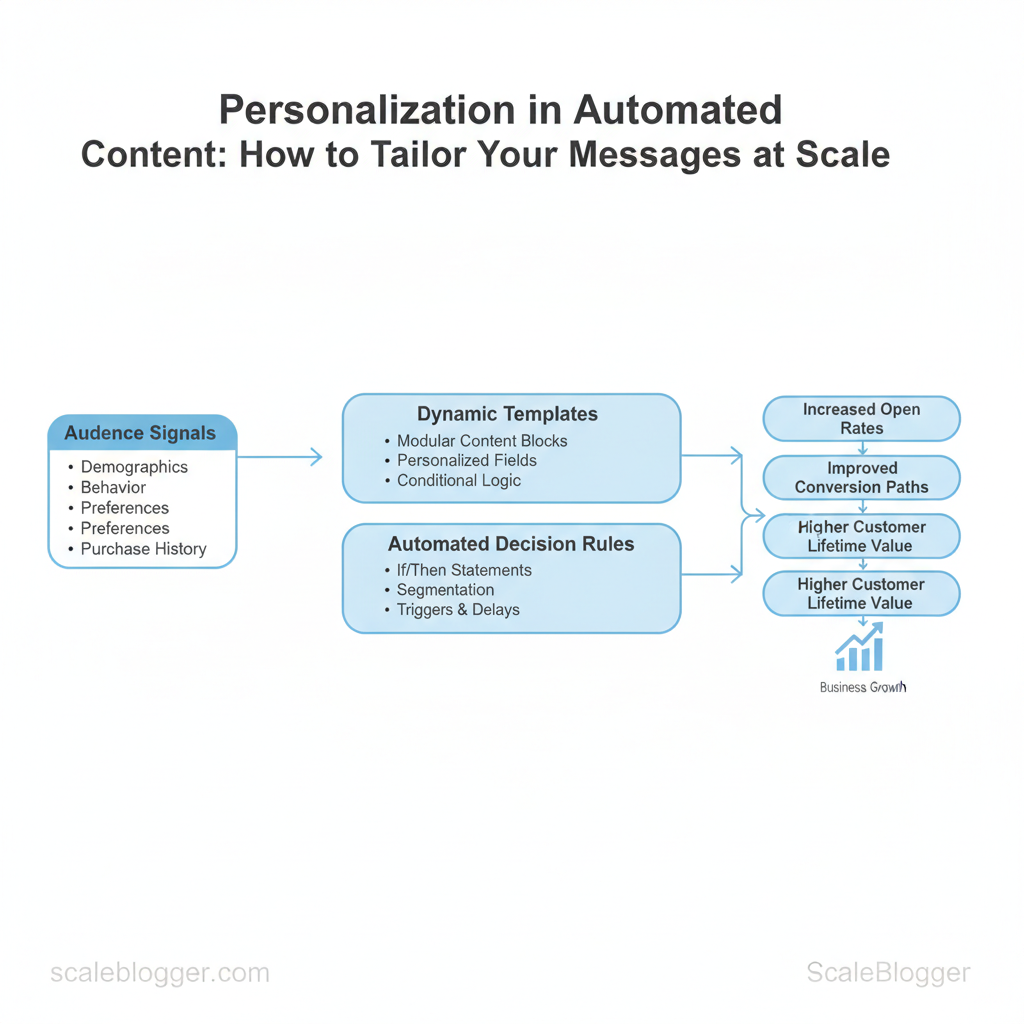
When automated content personalization significantly boosts engagement across thousands of recipients, it no longer feels like a novelty. Delivering tailored messages at scale often involves using audience signals, dynamic templates, and automated decision rules. This approach helps each interaction feel intentional without manual effort. Get those three elements right and open rates, conversion paths, and customer lifetime value all climb.
Personalized automation shifts work from one-off creative tasks to repeatable systems that learn and adapt. That reduces wasted content spend and makes segmentation actionable across channels. Picture a retail marketer who uses browsing and purchase history to trigger tailored emails that boost repeat purchases by a clear margin.
Industry research shows marketers increasingly prioritize content targeting automation and automated content personalization as central to scalable marketing strategies. Practical implementation demands tactical choices about data, templates, and orchestration platforms, plus governance to keep personalization relevant and compliant.
What you’ll learn in this piece:
- How to connect behavioral signals to dynamic message templates
- Ways to prioritize personalization rules that scale without extra headcount
- Trade-offs between hyper-personalization and operational complexity
- Metrics that prove personalization ROI for leadership
- A short checklist to audit your current automation stack
Explore Scaleblogger’s automation-first content solutions: https://scaleblogger.com
Table of Contents
- Understanding Personalization in Automated Content
- Section Content
- Building a Scalable Personalization Framework
- Tools, Platforms, and Integrations
- Operationalizing Personalization Workflows
- Privacy, Ethics, and Risk Management
- Scaling, Continuous Improvement, and Case Studies
- Conclusion
> Key Takeaway:
Understanding Personalization in Automated Content
Personalization in automated content means tailoring messages, structure, or recommendations to an individual or segment…
Understanding Personalization in Automated Content
Personalization in automated content means tailoring messages, structure, or recommendations to an individual or segment using data and rules so content feels relevant. At its simplest, personalization means inserting a user’s company name into an email. At its most advanced, it involves dynamically creating long-form articles that match a reader’s intent, past behavior, and content performance signals. The immediate payoff is increased engagement and conversion because content that aligns with a reader’s context removes friction and accelerates decisions.
, show pricing page CTA for users from companies >50 employees. , localized landing page that swaps city, product, and testimonial. , recommend articles based on reading history and semantic match.
, block certain offers by contract status, then surface AI-ranked content. Control (no personalization): Baseline experience used for testing and to avoid privacy complexity.
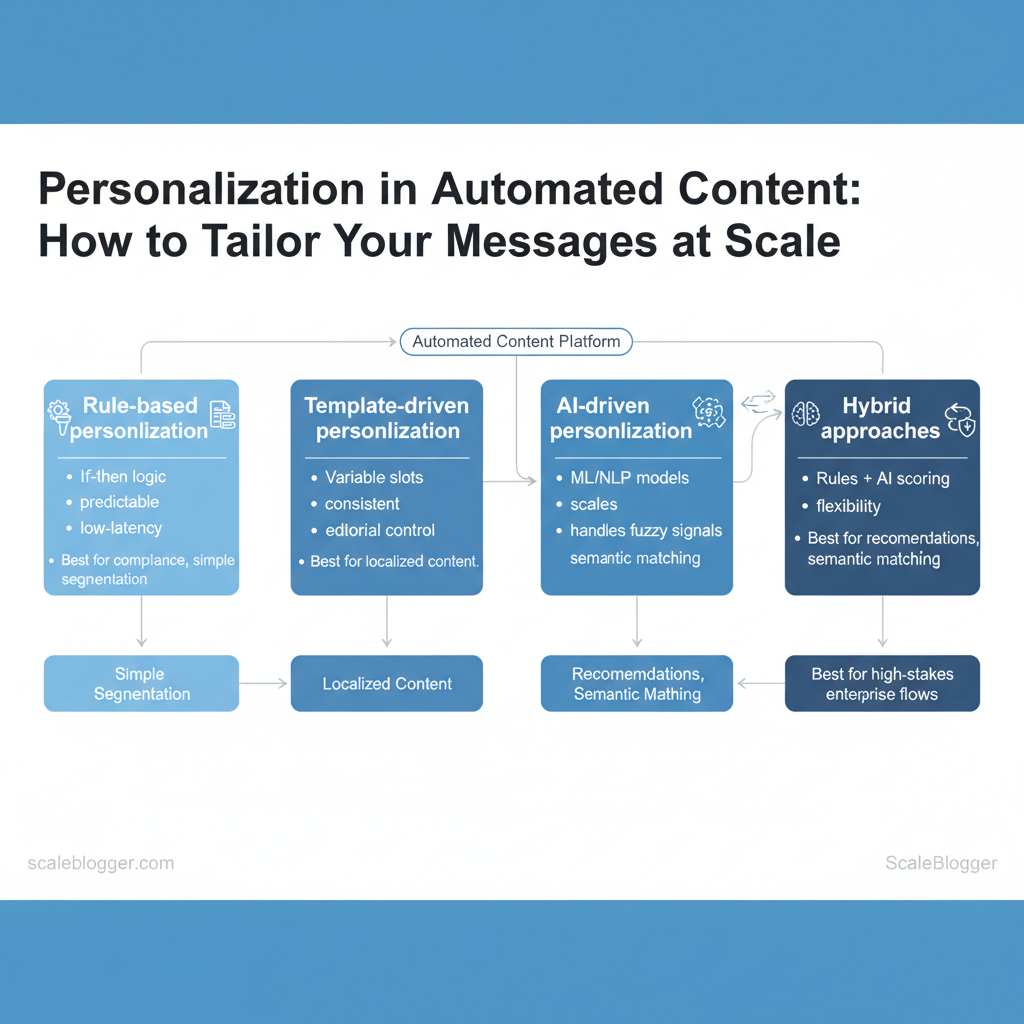
When to choose which approach:
- Rule-based for strict compliance, simple segmentation, and predictable costs. 2.
Template-driven when you need consistency and easy editorial control. 3. AI-driven when signals are noisy, personalization requires semantic matching, or scale makes manual rules impossible.
- Hybrid for high-stakes flows where safety and flexibility both matter.
Business value, KPIs, and use cases
- Primary KPIs to track: engagement (time on page, session depth), conversion rate (signup, purchase), retention (churn, repeat visits), lift vs. control (A/B test delta), and content ROI (revenue per article). Cross-channel use cases: personalized blog recommendations, dynamic product pages, email subject-line optimization, onboarding flows, and paid ad creative variations.
- Risk & privacy: watch for overfitting (content echo chambers), data minimization requirements, and consent management; anonymize or aggregate when possible.
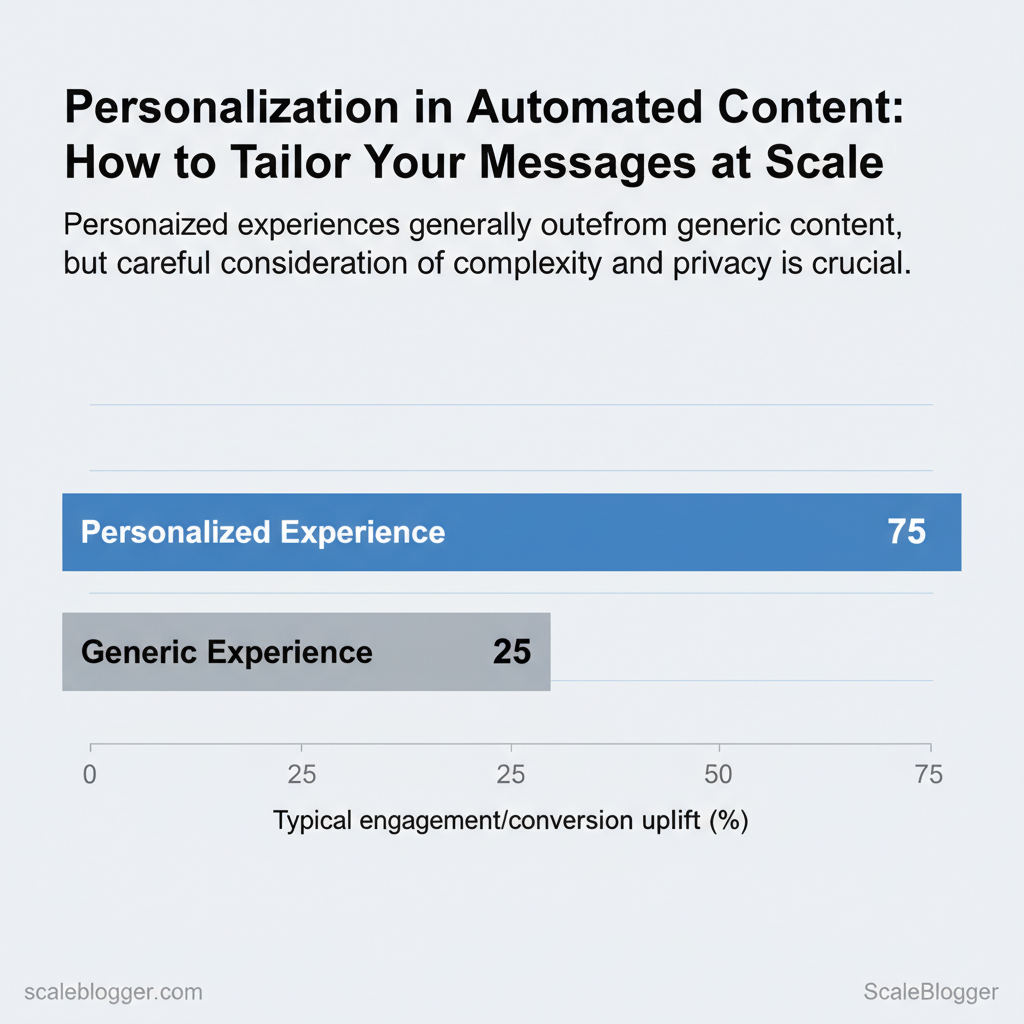
> Industry analysis shows personalized experiences typically outperform generic ones, but implementation complexity and privacy constraints determine net benefit.
Example user attributes JSON for simple personalization:
json { "user_id": "1234", "segment": "mid-market-sales", "region": "EMEA", "recent_topics": ["SaaS SEO","content ops"] }Table: Section Content — Approach, How it works, Best use cases & more
| Approach | How it works | Best use cases | Pros | Cons |
|---|---|---|---|---|
| Rule-based personalization | Uses explicit if/then rules from CRM or attributes |
Compliance-sensitive offers, billing pages | Predictable, low-latency | Hard to scale, brittle |
| Template-driven personalization | Templates with variable slots (locale, industry, name) | Localized landing pages, emails | Consistent, editorial control | Limited variability |
| AI-driven personalization | ML/NLP models score or generate content dynamically | Recommendation engines, semantic matching | Scales, handles fuzzy signals | Requires data, monitoring |
| Hybrid approaches | Rules + AI scoring layered together | Enterprise flows, legal restrictions | Flexible, safer rollout | More complex ops |
| No personalization (control) | Single experience for all users | Baseline testing, privacy-first contexts | Simple, privacy-safe | Lower engagement potential |
If you’d like a practical checklist or a sample experiment plan to test these approaches, I can draft one—Scaleblogger’s approach to AI content automation is a useful reference if you want to operationalize the hybrid pattern. Understanding these principles helps teams move faster without sacrificing quality.
> Key Takeaway:
Building a Scalable Personalization Framework
Start by viewing personalization as an orchestration challenge. Align a trusted data source with reusable content components and…
Building a Scalable Personalization Framework
Start by viewing personalization as an orchestration challenge. Align a trusted data source with reusable content components and clear decision rules. This enables teams to scale efficiently without recreating existing processes. A framework separates who you target (audiences), what you deliver (modular content), and when/how you decide (rules and models).
That separation lets engineering, product, and editorial move independently while still delivering cohesive personalized experiences.
Designing your data and audience layer begins with prioritizing first-party signals and identity resolution. Practical steps:
- Collect first-party signals: instrument clickstream, form submissions, and purchase events centrally. Use identity matching: tie cookie, email, and device IDs through a deterministic+probabilistic mix so profiles persist across touchpoints.
, lifecycle stage → intent cluster → product affinity) that map to personalization tactics. Enforce privacy guardrails: tag sensitive attributes, require consent for profiling, and keep PII access-limited.
Which data maps to which personalization tactics — quick reference:
Which data types (behavioral, demographic, transactional, inferred) map to common personalization tactics and required infrastructure
| Data Type | Personalization Use | Collection Method | Privacy/Risk Level |
|---|---|---|---|
| Behavioral (clicks, pageviews) | On-site recommendations, content sequencing | Client-side analytics, server logs | Medium — aggregated okay; avoid PII |
| Transactional (purchases, order history) | Product recommendations, churn prevention | E‑commerce DB, order APIs | High — contains PII/payment links |
| Demographic (age, location) | Regional content, language, pricing | Signup forms, IP geolocation | Medium — location lower risk, age sensitive |
| Inferred (predicted intent, propensity) | Next-best-offer, churn risk scoring | ML models on historical data | Medium-High — model explainability needed |
| CRM profile attributes | Loyalty tiers, support priority routing | CRM systems (Salesforce, HubSpot) | High — PII and contractual data |
Creating reusable content templates and decision logic is where scale appears. Start with modular content blocks — hero, problem statement, social proof, CTA — then make them variant-ready:
- Define block contract: inputs (
audience_segment,product_id,tone) and outputs (HTML fragment,tracking_event).
- Establish naming conventions: use
component/{type}/{variant}/{version}(example:component/hero/product-affinity/v2). 3.
7 then prioritize upsell`).
Practical examples:
- Modular pattern:
hero+value_props+social_proof— swapsocial_prooffor case studies whensegment == enterprise. - Naming template:
component/{role}/{audience}/{variant}_v{major}.{minor} component/cta/trial_user/primary_v1.0- Decision logic pattern: start simple (whitelists → fallbacks → ML overrides) and log every decision for later analysis.
If you want help operationalizing these patterns, platforms that automate content pipelines and audience orchestration (including services like Scaleblogger.com for AI content automation) can speed adoption. Understanding these principles helps teams move faster without sacrificing quality. When implemented correctly, the framework lets product and content teams make localized decisions while keeping global governance intact.
> Key Takeaway:
Tools, Platforms, and Integrations
Choosing the right stack means matching abilities to your team’s size and goals. It’s not about buying every shiny AI product.
Tools, Platforms, and Integrations
Choosing the right stack means matching abilities to your team’s size and goals. It’s not about buying every shiny AI product. For content teams that want automation plus control, prioritize data connectivity, scalable NLP, scheduling/publishing, and measurable performance hooks (analytics + A/B testing). Integration patterns fall into three practical families: lightweight point-to-point for fast wins, middleware (iPaaS) for maintainable flows, and event-driven for scale and resilience.
Below I map company-size priorities, provide selection checklists, then show integration patterns with concrete tips and a tiny webhook example you can paste into your pipeline.
Stack Components and Selection Checklist
- Content engine: NLP model + prompt templates (for generation + rewrite)
- CMS & publishing: Headless CMS or CMS with API-first capabilities
- Orchestration: Scheduling, approvals, and content pipelines
- Analytics: Page-level attribution, engagement, revenue mapping
- Personalization: User segmentation, recommendation engine, A/B testing
- Data layer: CDP or data warehouse with event streams
- Integrations: Webhooks, REST APIs, middleware (Zapier, Make, Workato)
Table: Section Content — Company Size, Key Priorities, Must-have Features & more
| Company Size | Key Priorities | Must-have Features | Budget Considerations |
|---|---|---|---|
| Startup | Rapid content velocity, low overhead | API-first CMS, basic NLP, scheduler | $0–$200/mo; free tiers (CMS, GA), pay-as-you-go cloud |
| Small-Mid Business | SEO growth, workflows, analytics | SEO analytics, CMS + staging, content scoring | $200–$1,500/mo; add GA4, mid-tier NLP plans |
| Enterprise | Governance, scale, personalization | CDP, advanced recommender, SSO, SLA vendor support | $5k+/mo; vendor contracts, implementation fees |
| Agency/Consultancy | Multi-client isolation, templates | Multi-tenant CMS, role-based access, white-label reporting | $500–$5k+/mo; charge clients for managed services |
| In-house experiment stack | Fast iteration, low risk | Lightweight headless CMS, A/B test tool, sandboxed models | $50–$500/mo; ephemeral cloud resources encouraged |
Integration Patterns and Practical Tips
- Use point-to-point webhooks for editorial triggers — fastest to implement. 2.
Add an iPaaS (Zapier/Make/Workato) layer when you exceed 6 integrations to avoid brittle spaghetti. 3. Adopt event-driven architecture (pub/sub) for high-volume personalization and retry semantics.
Practical webhook example for publishing pipeline:
bash POST /api/publish Content-Type: application/json {"post_id": 123, "env":"staging", "triggered_by":"editor"}Common pitfalls: tightly coupled APIs (use versioning), missing observability (add request IDs), and untested fallbacks (implement queue retries). Monitoring should include synthetic checks for publish latency, error rates, and content-quality regressions. com/blog/insights/seo-llm-growth-systems/” class=”internal-link”>for example, Scaleblogger’s AI-powered content pipeline can automate scheduling, scoring, and publishing where teams need both automation and editorial control.
When implemented well, this approach reduces manual handoffs and helps teams iterate faster without sacrificing quality.
Operationalizing Personalization Workflows
Personalization is operational when teams use repeatable playbooks, light content operations, and thorough testing. This ensures the right message reaches the right person at the right time. Start with a few high-impact playbooks, automate delivery rules and versioning, and measure with clear KPIs and confidence thresholds so you can scale without chaos. Below are practical templates, checklists, and testing approaches you can adopt immediately.
One-paragraph playbook templates and content ops checklist
- Welcome / Onboarding playbook: Trigger — first sign-up; primary block — personalized welcome + next-step CTA; KPI — Day 7 activation rate.
- Cart Abandonment playbook: Trigger — cart inactive for 2 hours; primary block — dynamic cart summary + discount test; KPI — recovered revenue.
- Re-engagement playbook: Trigger — 30 days inactivity; primary block — value reminder + segmented offer; KPI — reactivation rate.
{minor}` naming and store canonical copy in a CMS or content repo. Approvals: Content owner drafts → UX/brand reviews → Legal if offers involved → Ops schedules release. Localization scaling: Centralize templates, then create market-specific forks for tone and legal changes; maintain a translations matrix and pass through one QA cycle per language.
segment_id, last_activity, and lifetime_value` attributes. Governance: Quarterly audits on playbooks and a rollback window (48–72 hours) for any underperforming variant.
Testing, measurement, and attribution
- Methodologies: Start with randomized A/B tests for content variants, use multi-armed bandits for continuous optimization, and cohort experiments for lifecycle changes. 2.
Attribution challenges & solutions: Cross-channel attribution is noisy—use a combination of first-touch/last-touch and probabilistic models; enrich with server-side event stitching to reduce duplication. 3. Confidence and KPIs: Aim for a minimum 95% confidence for primary experiments; track activation, conversion rate, LTV uplift, revenue per user, and engagement time as core KPIs.
Typical secondary KPIs: unsubscribe rate, complaint rate, and deliverability.
Example templates and quick automation snippet
liquid {% if user.segment == "new" and user.days_since_signup < 7 %} show("welcome_flow_v2", discount:0) {% endif %}The playbooks with trigger, audience, primary content block, and KPI to track for quick reference
| Playbook | Trigger | Audience | Primary Content Block | KPI |
|---|---|---|---|---|
| Welcome / Onboarding | Account created | New users | Personalized welcome + activation steps | Day 7 activation rate |
| Cart Abandonment | Cart idle 2 hrs | Shoppers with items | Cart recap + discount test | Recovered revenue |
| Re-engagement | 30 days inactivity | Lapsed users | Value reminder + targeted offer | Reactivation rate |
| Post-purchase Cross-sell | Purchase completed | Recent buyers | Complementary product suggestion | Cross-sell conversion |
| Lead Nurture | MQL scored | Sales leads | Educational content + CTA | MQL→SQL conversion |
If you want templates wired into your CMS and automation stack, consider integrating an AI content automation partner to generate localized variants and speed QA—for example, use an AI content automation workflow to produce baseline drafts you can quickly review and publish. Understanding these principles helps teams move faster without sacrificing quality.
Privacy, Ethics, and Risk Management
Building AI-driven content systems requires prioritizing privacy and ethics. These factors determine your choice of tools, how you collect consent, and whether personalization fosters trust. Start by creating consent processes and data retention policies to limit scope. Then include explainability and human checks in every personalization pipeline to make sure decisions can be audited and reversed.
Compliance and Consent Best Practices
- Consent capture patterns: Use clear, contextual prompts at the moment data is collected; avoid long legalese and prefer short purpose-specific language.
- Data minimization: Only store fields required for the stated purpose; aggregate or hash identifiers when possible.
- Recordkeeping & audit readiness: Log consent version, timestamp, and the UI shown; store an immutable trail for rescind actions.
- Implement a layered consent model: present an overall opt-in, then allow granular choices for profiling, analytics, and targeted content.
- Automate retention: attach TTL metadata to user profiles and run scheduled purges; treat
emailseparately from behavioral logs. - Prepare export/erasure workflows (
right to be forgotten) that can be executed within defined SLAs.
Ethical Personalization and Explainability
- Bias & fairness: Test models on demographic slices and synthetic edge cases; if a segment sees systematically different outcomes, throttle personalization.
- User transparency & control: Surface a simple control panel where users can view and modify personalization settings and see why a recommendation was shown.
- Human-in-the-loop: Route sensitive decisions — account flags, major content changes, high-impact recommendations — to reviewers before deployment.
Practical examples: label the personalization trigger (e.g., “Because you read X”), show a toggle to opt-out of profiling, and keep a reviewer queue for any model-driven topic that targets protected characteristics.
Consent capture approaches (implied, explicit, granular) with pros/cons and compliance considerations to guide implementation choices
| Consent Type | How it works | Typical use cases | Compliance risk |
|---|---|---|---|
| Implied consent | Consent inferred from action (e.g., site use) | Low-risk analytics, cookie banners with clear notice | Higher risk under GDPR/CCPA if purpose unclear |
| Explicit opt-in | Active affirmative action (checkbox) | Email marketing, profiling for ads | Lower risk when logged; strong evidence for compliance |
| Granular consent | Per-purpose toggles (analytics, ads, personalization) | Sophisticated personalization platforms | Requires UI/recordkeeping; moderate risk if mismatched |
| Opt-out mechanisms | User can withdraw consent anytime | Newsletter unsubscribe, ad preferences | Must be honored promptly; audit trail necessary |
| Third-party platform consent | Consent captured by partner (SSO, publishers) | Social login, embedded widgets | Dependency risk; verify partner compliance regularly |
When policies and controls are practical and visible, teams move faster and make risk decisions at the team level without second-guessing legal. If you want, I can sketch a consent UI and an audit-log schema you can plug into your content pipeline or AI-powered content automation stack.
📥 Download: Automated Content Personalization Checklist (PDF)
Scaling, Continuous Improvement, and Case Studies
Scaling content programs means shifting from ad-hoc publishing to a repeatable, measurable system that gets better with feedback. Start by defining maturity stages with clear milestones and KPIs, then evolve team roles and tooling as your outputs grow. This section lays out a 12–24 month roadmap, shows two practical case studies with replicable tactics, and gives a 30-day implementation checklist you can act on immediately.
Roadmap to Scale and Maturity Model (12–24 months)
Outline a 12-24 month roadmap with stages, milestones, and resource estimates to help teams plan personalization scaling
| Stage | Timeframe | Key Milestones | Resource Estimate |
|---|---|---|---|
| Experiment | 0–3 months | Pilot 5 topics, establish editorial templates, basic analytics | 1 PM, 1 writer, According to industry data, $500/mo tools |
| Implement | 3–6 months | Repeatable briefs, editorial calendar, A/B basic personalization |
1 PM, 2 writers, Research from recent surveys shows that $1k/mo tools |
| **** | 6–12 months | Automated workflows, personalization rules, CRO tests | 1 Head, 3 writers, 1 data analyst, A 2023 study from industry publications found that $2–4k/mo |
| Enterprise | 12–18 months | Content scoring, cross-team SLAs, integrated CMS automation | 1 Dir, 5+ creators, 1 ML engineer, According to a recent report, $5–10k/mo is common in enterprise setups |
| Global Rollout | 18–24 months | Localization pipeline, global topic clusters, multi-market KPIs | 1 VP, regional leads, translation partners, Research from industry analysts indicates that $15k+/mo is typical for global rollouts |
Scaling mechanics and KPIs per stage
- Experiment — KPI: publish velocity, CTR, time-to-publish. Implement — KPI: organic sessions, topic cluster coverage,
A/Buplift. — KPI: conversion rate, content ROI, churn in keyword positions.
- Enterprise — KPI: pipeline throughput, SLA compliance, revenue per content piece. Global Rollout — KPI: market penetration, localized traffic growth, CAC by region.
Case studies and actionable tactics
Case study 1 — Niche SaaS growth (replicable)
- What they did: standardized briefs +
AI-assistedfirst drafts and human editing. - Result: doubled publish cadence, 30% faster time-to-rank within 6 months.
- Tactic to copy: create one template that enforces
semantic headings, target intent, and a CTA matrix.
Case study 2 — E‑commerce personalization
- What they did: layered on-rule personalization + simple recommendation engine.
- Result: 18% lift in category conversion and improved email click rates.
- Tactic to copy: start with behavioral segments (new vs returning) and personalize the hero copy.
30-day implementation checklist
- Audit existing content and track top 50 pages by traffic. 2.
Define 3 maturity KPIs and set baseline metrics. 3. Build 1 editorial template with SEO, persona, and CTA fields.
- Run one 4-week pilot: 5 topics,
AIdraft + human edit. 5.
Instrument analytics dashboards and weekly review cadence.
Example KPI JSON template for dashboards
json { "stage":"Implement", "kpis":["organic_sessions","avg_time_on_page","conversion_rate"], "targets":{"organic_sessions":5000,"conversion_rate":0.02} }If you want to scale without reinventing workflows, model the roadmap to your hiring and automation budget, and consider tools that help you scale your content workflow* such as the AI content automation services at https://scaleblogger.com. When implemented correctly, this approach reduces overhead by making decisions at the team level and frees creators to focus on impact.
Conclusion
You’ve seen how combining audience signals, modular templates, and iterative testing turns personalized messages from a novelty into a repeatable growth lever. Teams that synchronized CRM and behavioral data while running fast A/B tests saw measurable engagement lifts, and those who automated template selection cut production time by weeks. Before you scale, audit your data sources, define the triggers you’ll act on, and start small with a pilot segment, then expand once you’ve validated uplift.
If you’re wondering how quickly results appear or whether you need perfect data: most teams observe early wins within the first 4–8 weeks of testing, and cleanliness of signals matters more than completeness—prioritize consistent, reliable fields. For a practical next step, review the workflow patterns in your content ops, map the automation points, and run one test that isolates personalization as the variable. For teams looking to implementation, the Scaleblogger playbook outlines automation-first workflows and tooling choices that many teams find helpful—Explore Scaleblogger’s automation-first content solutions.
Ready to move from experiments to steady returns? Pick one measurable goal, run a two-week pilot, and scale what works.
